
PDF to Audiobook — Text to Speech for PDF, EPUB, DOCX & Web
Pricing
from $24.00 / 1,000 audio minutes
PDF to Audiobook — Text to Speech for PDF, EPUB, DOCX & Web
Turn PDF, EPUB, DOCX, TXT files and web articles into natural-sounding audiobooks (MP3 or M4B with chapters) with Kokoro AI voices. English, Spanish, French, Italian, Portuguese, Hindi. Bulk text to speech from datasets. No API key needed.
Pricing
from $24.00 / 1,000 audio minutes
Rating
0.0
(0)
Developer

tidydata
Maintained by CommunityActor stats
0
Bookmarked
2
Total users
1
Monthly active users
7 days ago
Last modified
Categories
Features
Share
🎧 PDF to Audiobook — Text to Speech for PDF, EPUB, DOCX & web articles
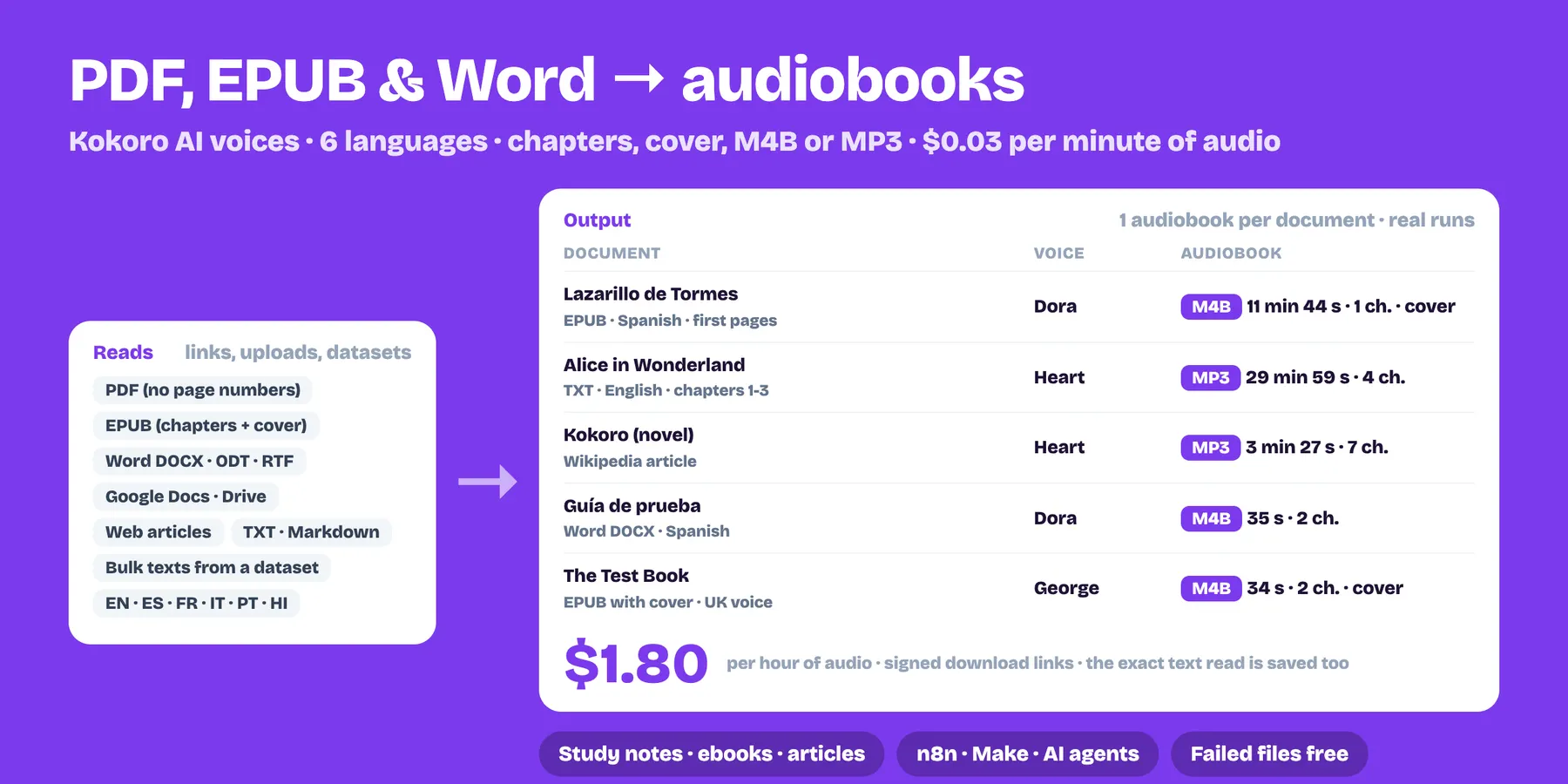
Turn any document into a natural-sounding audiobook. Give it a PDF, EPUB, Word file, text, Markdown or the link of a web article and get back an MP3 or M4B audiobook with chapter marks, read by Kokoro, one of the best open text-to-speech AI models (Apache-2.0). English (US & UK), Spanish, French, Italian, Brazilian Portuguese and Hindi, 38 voices.
$0.03 per minute of audio — $1.80 per hour, no start fee, no subscription. No subscription, no API key, no account at any TTS service. Failed and skipped documents are free.
- ✅ PDF, EPUB, DOCX, ODT, RTF, TXT, Markdown, HTML files and web articles (main text only: menus, ads and comments are left out)
- ✅ Chapters from the book's own table of contents (EPUB, PDF bookmarks, Word headings, Markdown headings, "Chapter 1" lines) → chapter marks in the MP3/M4B and, if you want, one file per chapter
- ✅ Clean reading: page numbers, running headers and footers, hyphenated line breaks, footnote marks, links and Project Gutenberg licence text are removed before reading
- ✅ M4B audiobook for Apple Books and audiobook apps, with the EPUB cover as artwork, title and author
- ✅ 38 Kokoro voices, female or male, adjustable speed (0.5×–2×), language detected automatically
- ✅ Bulk text to speech: a list of texts, or a text column of another Actor's dataset (articles, posts, product descriptions) → one audio file per row, billed by total length
- ✅ The exact text that was read is saved as a .txt (free), so you can check it
- ✅ Google Docs, Google Drive, Dropbox, OneDrive links, file uploads, a key-value store, or a dataset of links
- ✅ Ready for n8n, Make, Zapier, the API and AI agents: every file comes back as a download link that works without a token
What can I use it for?
| You want… | Settings |
|---|---|
| Listen to a PDF or ebook on the go (study notes, reports, papers, novels) | MP3 or M4B · Female or male · speed 1.0–1.2 |
| An audiobook of your own book (self-publishing draft, beta readers) | M4B · one file per chapter |
| Learn a language with graded readers in Spanish, French, Italian or Portuguese | Language set · speed 0.85–0.9 |
| Audio versions of blog posts or newsletters | Article links or a dataset of a scraper · MP3 |
| Voice-overs and narration for videos, e-learning, product descriptions | Texts list · one file per text |
| Accessibility: read documents aloud for people with dyslexia or low vision | Any document · speed to taste |
How to use it
- Paste one or more document links (or upload files, or write the text).
- Choose the voice (female/male or a named voice) and the format (MP3 or M4B).
- Run it and open the Results tab: one row per document with the audiobook link, its chapters and duration.
Input example (API, n8n, Make):
Bulk text to speech from another Actor's dataset:
Output example
Pricing
Pay only for the audio you get, per started minute: $0.03 / minute, everything included: chapter files, the text file, the cover and all formats are included. Examples: a 10-page article (~12 min) = $0.36; a 300-page novel (~9 h) = about $16.
- Bulk texts are billed by their total length in the run, not one minute each: 100 short product descriptions of 10 seconds = 17 minutes = $0.51.
- Failed or skipped documents are never charged, and every document is checked against your maximum cost per run before it is read.
- Faster speed = shorter audio = cheaper.
Voices and languages
| Language | Female (default) | Male (default) | More voices |
|---|---|---|---|
| English (US) | Heart | Michael | Bella, Nicole, Aoede, Kore, Sarah, Nova, Sky · Fenrir, Puck, Echo, Eric, Liam, Onyx, Adam |
| English (UK) | Emma | George | Isabella, Alice, Lily · Fable, Lewis, Daniel |
| Spanish | Dora | Alex | Santa (male) |
| French | Siwis | — | |
| Italian | Sara | Nicola | |
| Portuguese (Brazil) | Dora | Alex | Santa (male) |
| Hindi | Alpha | Omega | Beta · Psi |
The language is taken from the book's metadata or detected from the text; you can also set it. Any voice can read any of these languages (with its own accent).
Speed
The voice runs on CPU, faster than real time. With the default 4 GB of memory, one hour of audio takes about 40–65 minutes (it depends on how busy Apify's servers are); with 16 GB about twice as fast (two voices read in parallel). The price per minute is the same at any memory. The default timeout is 4 hours, enough for about 4 hours of audio at 4 GB: for a long novel use 16 GB and/or a longer timeout (the Actor tells you before starting if a document can't finish in time, free). Documents are read one after another.
Limits and good to know
- Scanned PDFs (images without a text layer) can't be read: run them through an OCR tool first, e.g. PDF Text Extractor, and pass the text.
- DRM-protected ebooks (Kindle, Adobe DRM) are refused. Old .doc files: save as .docx or PDF.
- Links to YouTube, TikTok, Instagram, Facebook, X and other social platforms are refused. Read only documents you have the right to turn into audio.
- Pages that need JavaScript or a login can't be read as articles: download the file and upload it.
- Safety limits (all adjustable): 1,500,000 characters (~28 h) per document, 2,000 PDF pages, 200 MB per file, 100 documents per run.
- Numbers, dates and abbreviations are read by the voice's own rules; tables and code blocks are skipped.
FAQ
How good are the voices? Kokoro-82M topped the open TTS Arena leaderboard among open models when it came out; it sounds natural for long listening. It is not a clone of any real person's voice.
Can I sell the audiobook? Kokoro is Apache-2.0, so the audio is yours to use commercially; the rights to the text are the author's. Some stores (e.g. ACX/Audible) have their own rules about AI narration — check them.
Will it read the footnotes, page numbers and headers? No: page numbers, repeated headers/footers and footnote marks are removed, and EPUB footnotes are skipped. The saved .txt shows exactly what was read.
Is my document kept? Files are stored in your own Apify storage only, under your account's data retention.
Related Actors
- PDF Text Extractor — PDF & Image to Text OCR — get the text out of scanned PDFs first
- Audio & Video Transcription — the other way round: speech to text
- Audio Noise Remover — clean your own voice recordings
Questions or a document that fails? Open an issue on the Issues tab: we answer quickly.


