

Audio Noise Remover — AI Noise Removal for Voice & Video
Pricing
from $4.00 / 1,000 minute cleaneds
Audio Noise Remover — AI Noise Removal for Voice & Video
Remove background noise from voice recordings, podcasts, interviews and videos with DeepFilterNet AI: fans, traffic, hum, wind, room noise. Optional loudness normalization (-16 LUFS podcast, YouTube, ACX) and silence trimming. Videos keep the picture. Links, uploads or datasets.
Pricing
from $4.00 / 1,000 minute cleaneds
Rating
0.0
(0)
Developer

tidydata
Maintained by CommunityActor stats
0
Bookmarked
2
Total users
1
Monthly active users
5 days ago
Last modified
Categories
Features
Share
🎙️ Audio Noise Remover — AI background noise removal for voice & video
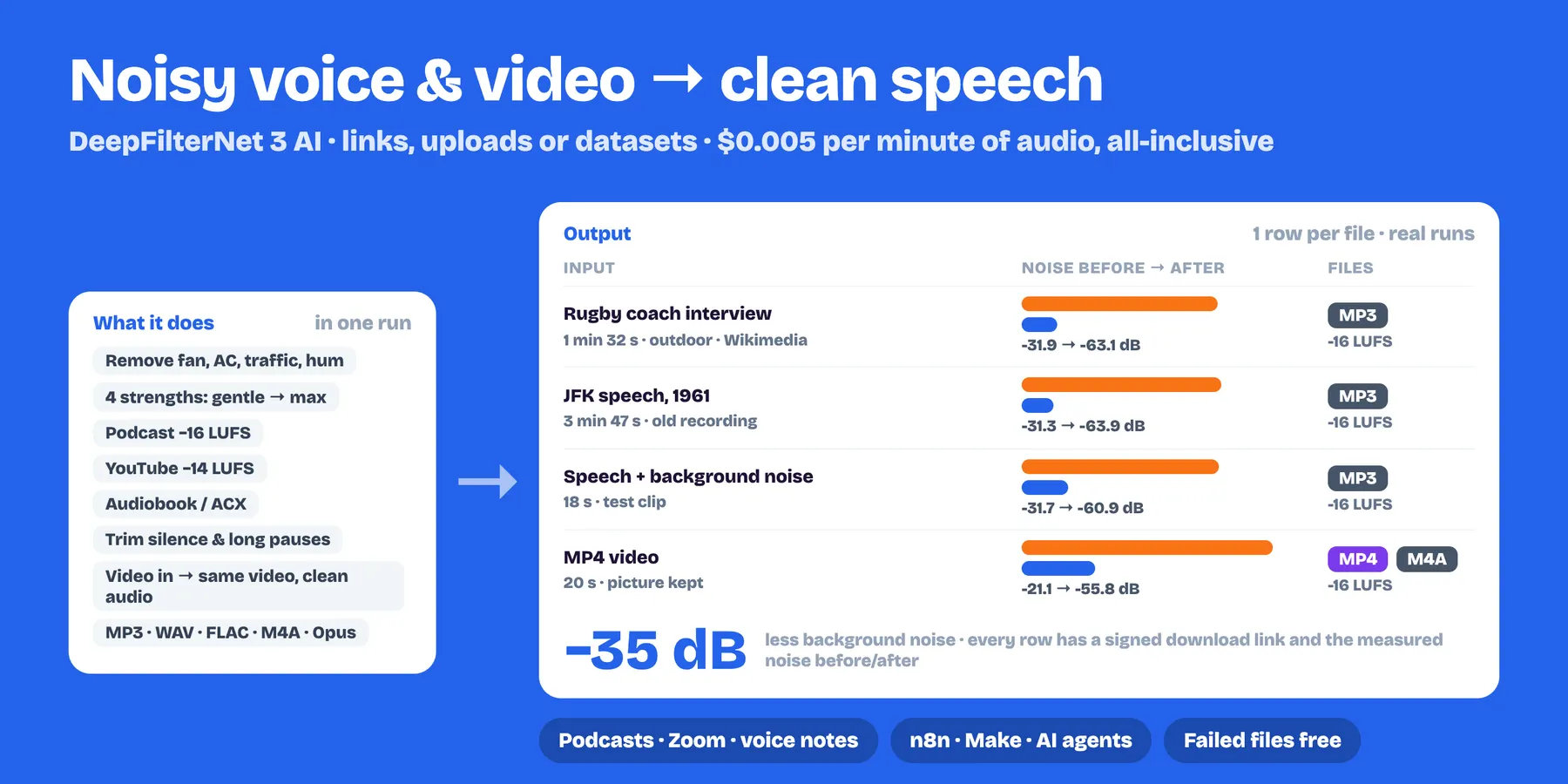
Remove background noise from speech — fans, air conditioning, traffic, wind, hum, hiss, keyboard and room noise — with DeepFilterNet 3, an open-source speech-enhancement AI that rivals paid tools. Built for podcasts, interviews, voice-overs, lectures, Zoom/Teams recordings, voice notes, vlogs and phone recordings. Videos come back as the same video with the clean soundtrack (the picture is copied, not re-encoded).
$0.005 per minute of audio, all-inclusive — about $0.30 per hour. No subscription, no credits that expire, no API key. Failed and silent files are free.
- ✅ AI noise removal with 4 strengths: gentle, balanced, strong (recommended) or max
- ✅ Loudness normalization in the same run: podcast −16 LUFS, YouTube −14 LUFS, audiobook / ACX (−20 LUFS, peaks under −3 dB), broadcast EBU R128 (−23 LUFS) — two-pass, with a true-peak limiter
- ✅ Trim silence: start/end only, or shorten every long pause (great for podcasts and voice-overs)
- ✅ Videos: MP4, MOV, MKV, WebM in → same video with clean audio + the clean audio file
- ✅ Low rumble filter, optional extra-clean post-filter, mono mixdown
- ✅ Output in the same format as the input, or MP3, WAV (16/24-bit), FLAC, M4A or Opus
- ✅ Measured result for every file: noise level before and after (dB), loudness, silence removed
- ✅ Direct links, Google Drive, Dropbox, OneDrive, file uploads, a key-value store or a dataset column of another Actor
- ✅ Long files (hours) with flat memory; clean only a part (start/end time) and pay only for that part
- ✅ Ready for n8n, Make, Zapier, the API and AI agents: every file comes back as a download link
What can I use it for?
| You want… | Settings |
|---|---|
| A podcast or interview recorded with a noisy fan, street or café | Strong · Podcast −16 LUFS · Shorten long pauses |
| Clean audio for a YouTube video, reel or course, keeping the picture | Strong · YouTube −14 LUFS (video in → video out) |
| An audiobook that passes ACX / Audible checks | Balanced or strong · Audiobook (ACX) · WAV or MP3 |
| Better speech-to-text: clean before transcribing (fewer errors on noisy calls) | Strong · Opus or MP3 → send to a transcription Actor |
| Phone, WhatsApp or Zoom recordings, old tapes and dictation with hiss | Max · Podcast |
| Keep some room tone so it sounds natural | Gentle or balanced |
How to use it
- Paste one or more links (or upload files).
- Choose the strength (strong is a good default) and the loudness target.
- Optional: trim silence, pick the output format.
- Run and open the Results tab: one row per file with the download link(s) and the noise measurements.
Input example (API, n8n, Make):
Output example
Download links open without an API token (signed links), so you can pass them straight to the next step of your workflow. Video inputs also return videoUrl (the video with the clean soundtrack; fileUrl points to it).
Pricing
Pay only for what is cleaned, per started minute of audio: $0.005 / minute for every strength, loudness and format. A 28-minute episode = $0.14; one hour = $0.30. The video with the clean soundtrack, loudness normalization and silence trimming are free. Failed, silent or skipped files are never charged, and the run stops cleanly before it goes over your maximum cost per run. Apify Store discounts apply on higher plans.
Strength: which one?
| Strength | Noise reduction | Best for |
|---|---|---|
| Gentle | up to −12 dB | Takes the edge off; very natural; mixed music + voice |
| Balanced | up to −20 dB | Clearly cleaner, keeps some room tone |
| Strong (default) | up to −35 dB | Almost all noise gone — the usual choice for podcasts and video |
| Max | no limit | Very noisy recordings, phone calls, old tapes |
The AI keeps human voices. Music, sound effects and laughter in the background are treated as noise and removed too (use gentle to keep more of them, or our Vocal Remover to separate music from voices).
Speed
The AI runs on CPU, faster than real time. With the default 2 GB of memory, a 90-second clip is ready in under a minute and one hour of audio takes about 25–30 minutes; give the run 8 GB (about 4× faster) or more for long files (blocks run in parallel; the price per minute does not change). Files are processed one after another.
Limits and good to know
- Links to YouTube, TikTok, Instagram, Spotify, SoundCloud, Facebook, X or Vimeo are refused: their terms forbid downloading. Use your own files or files you have the right to process.
- No streams (.m3u8, .mpd), no DRM files. Max file size 2 GB and 180 minutes per file by default (both can be raised).
- Silence trimming changes the timing, so it applies to the audio file only: videos keep their length and stay in sync.
- Audio is processed at 48 kHz (the model's rate); stereo stays stereo unless you choose mono.
FAQ
Is it as good as Adobe Podcast Enhance or Krisp? DeepFilterNet 3 is one of the best open speech-enhancement models (published at Interspeech 2023) and is excellent at steady and changing background noise. It does not re-synthesize the voice, so it never invents words or changes the speaker's timbre.
Can I clean many files at once? Yes: paste a list of links, point it to a public Google Drive folder, pick a key-value store, or pass a dataset column from another Actor.
Does it remove echo / reverb? It reduces room noise; strong reverb is only partly reduced.
Is my audio kept? Files are stored in your own Apify storage only, under your account's data retention.
Related Actors
- Audio & Video Transcription — turn the clean audio into text and subtitles
- Vocal Remover & AI Stem Splitter — remove background music and keep the voice, or split songs into stems
- FFmpeg Video Converter & Compressor — convert, compress, trim and extract audio
Questions or a file that fails? Open an issue on the Issues tab: we answer quickly.


