

Bilibili Scraper - Videos, Comments, Danmaku & Creator Uploads
Pricing
from $0.90 / 1,000 videos
Bilibili Scraper - Videos, Comments, Danmaku & Creator Uploads
Scrape Bilibili (哔哩哔哩 B站) videos by keyword, link, creator or ranking: views, likes, coins, favorites, shares, tags. Add comments with replies, danmaku and danmaku profiles, creator profiles with bio contacts, live rooms and hot search. Monitor mode, no login. From $0.90 per 1,000 videos.
Pricing
from $0.90 / 1,000 videos
Rating
0.0
(0)
Developer

Top Api
Maintained by CommunityActor stats
0
Bookmarked
3
Total users
2
Monthly active users
5 days ago
Last modified
Categories
Share
What does Bilibili Scraper do?
Bilibili Scraper extracts public data from Bilibili (哔哩哔哩, B站), China's largest video community, and turns keywords, video links, creator pages and the popular lists into structured rows: each video with views, likes, coins, favorites, shares, comments, danmaku count, tags, category, duration and publish date; comments and replies; danmaku (bullet comments) with the second they appear; creator (UP主) profiles; live rooms and the hot-search board. Built for China-market researchers, brand and KOL teams, agencies, AI-training and data pipelines that need Bilibili numbers without an account.
Bilibili Scraper - B站 Scraper - 哔哩哔哩 Scraper - Bilibili Comments Scraper - Bilibili Danmaku Scraper - Bilibili API
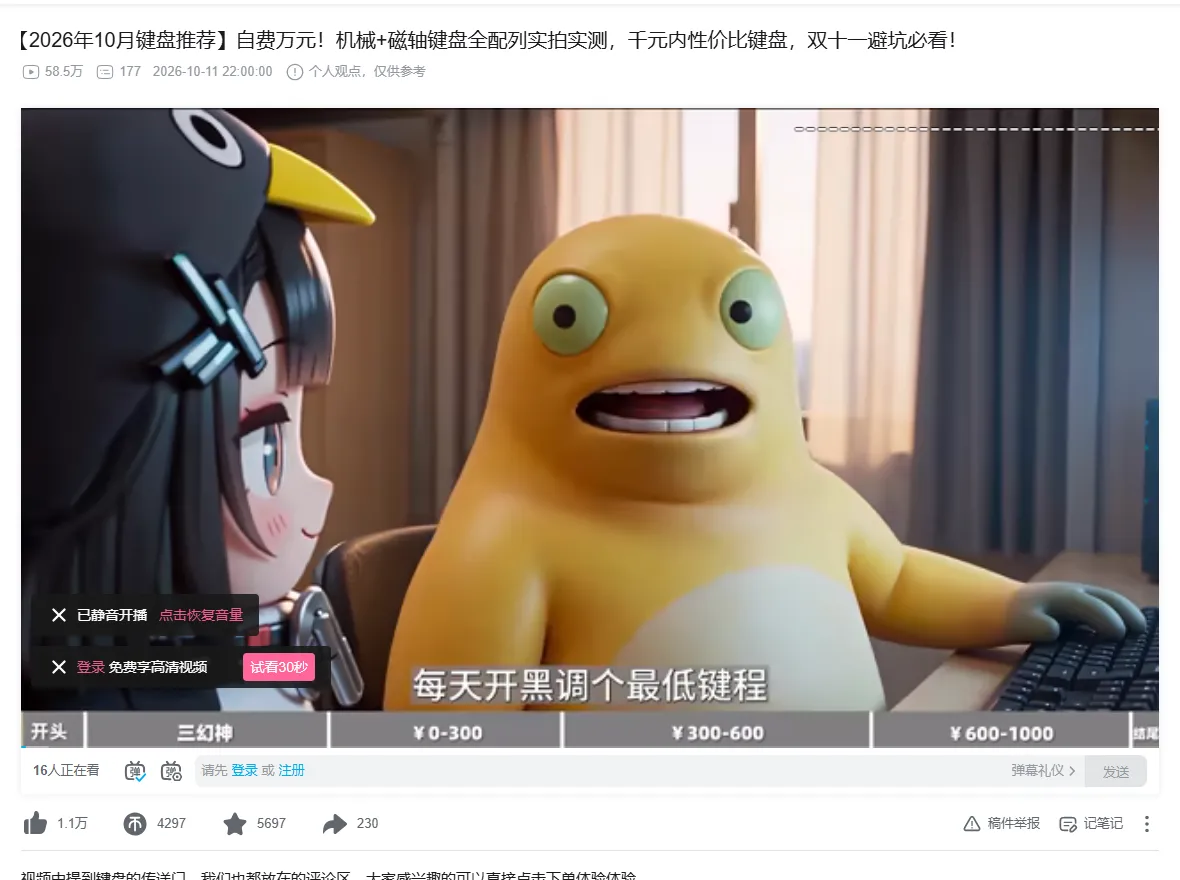
- Ten modes in one actor: keyword search, videos by link, comments of links, danmaku of links, a creator's uploads, creator profiles, creator search, popular / ranking / must-watch lists, hot search and live-room search.
typetells the rows apart; each kind has its own price and you pay only for the kinds you switch on. - Past Bilibili's 1,000-results-per-search cap: when a keyword has more, the run walks it by date window (measured: 1,200 unique videos for "原神" in 24 s).
- A creator's whole upload list: 935 videos back to 2015 for 影视飓风 (Bilibili's own counter shows 938), 99 per request, newest first.
- Comments as deep as you ask: 20 per page, hot or newest first, with replies, pinned comments and whether the uploader liked or replied.
- Danmaku from two sources merged: the video's danmaku pool plus its 6-minute timeline segments, deduplicated: 9,560 danmaku for one 45-minute video where the pool alone gives 7,200. Packed as one item per video by default, or one row per danmaku.
- Danmaku reaction profile: unique senders, danmaku per minute, the peak minute and an evenly spread sample, in one row per video.
- No login, cookies or API key. Paste keywords, links or creator ids and run.
- Monitor mode for schedules: each run returns only videos, comments, danmaku, creators, live rooms and topics no earlier run delivered.
- Export anywhere: JSON, CSV, Excel, XML; schedules, webhooks, Make, Zapier, n8n, Google Sheets; Apify API and MCP, with
compactoutput for AI agents.
What data can you get from Bilibili?
| 🎬 Video id, link, title (`bvid`, `url`) | 👁️ Views (`viewCount`) | 👍 Likes, 🪙 coins, ⭐ favorites, ↗️ shares |
| 💬 Comment count (`replyCount`) | 🔤 Danmaku count (`danmakuCount`) | ⏱️ Duration, publish date |
| 🏷️ Tags, category (`category`, `categoryId`) | 📺 Parts (P1, P2…), resolution, original / repost | 🏆 Honors and highest site rank (`honors`, `hisRank`) |
| 📈 Engagement rate, like rate | 👥 Watching now (`onlineCount`) | 🔗 Related videos, stream links |
| 🗨️ Comments + replies: text, likes, time, level | 💥 Danmaku: text, second, colour, mode, sent time | 📊 Danmaku profile: senders, per minute, peak |
| 🧑🎨 Creator: followers, videos, total likes, level | ✅ Verification, VIP, live room | 📧 Email / WeChat / QQ from the public bio |
| 🔴 Live rooms: title, watching, area, streamer | 🔥 Hot search: keyword, heat score | 🙂 Sentiment of comments and titles (optional) |
On a 100-video search run with full details, views, likes, coins, favorites, shares, tags, category, parts and resolution were filled on 100% of rows.
How to scrape Bilibili with Bilibili Scraper
- Create a free Apify account — $5 of monthly credit, no card needed.
- Open Bilibili Scraper and click Try for free.
- Pick a mode under What to scrape, then type a keyword, paste video links or paste creator ids.
- Switch on any extras (comments, danmaku, full details) and set Max results.
- Click Start, then open Storage and Export as JSON, CSV or Excel — or let a schedule run it for you.
⬇️ Input
| Parameter | Type | Description |
|---|---|---|
| 🔍 What to scrape | ||
mode | Select | search · video_detail · video_comments · video_danmaku · user_videos · user_profile · user_search · popular · hot_search · live_search. Default search |
searchQuery / searchQueries | Text / list | Keywords, Chinese or English, e.g. 原神, 机械键盘, AI tutorial |
searchAliases | List | Other spellings searched with each query and merged into it, e.g. 耐克 for Nike |
videoUrls | List | bilibili.com/video/BV…, BV1… ids, av… ids, b23.tv share links; ?p=2 picks a part |
userIds | List | Creator ids (the number in space.bilibili.com/<mid>) or those links |
popularSource, category | Select | Popular feed, ranking (by 15 categories or all) or the must-watch list |
| 🎯 Filters (applied by Bilibili's search) | ||
sortOrder | Select | Relevance, most views, newest, most danmaku, most favorites, most comments |
durationFilter | Select | Any, under 10 min, 10-30, 30-60, over 60 |
pubtimeBegin, pubtimeEnd | Text | Published window, e.g. 2026-09-01; also filters uploads and popular rows |
searchCategoryId | Integer | Bilibili category id, e.g. 4 = games, 188 = tech |
sortComments | Select | Hot, newest, or most liked |
| ✂️ Refine results (before anything is charged) | ||
minViews, minLikes | Integer | Skip videos under these counts |
minDurationSec, maxDurationSec | Integer | Length bounds in seconds |
publishedWithinDays | Integer | Only videos from the last N days |
includeKeywords, excludeKeywords | List | Words that must / must not appear in the title, description or tags |
minFollowers, onlyWithContacts | Integer / Boolean | Creator rows: follower floor; only creators whose bio lists an email, WeChat, QQ or phone |
| ➕ Extra data | ||
includeDetails | Boolean | Full page data for search, uploads and popular rows (coins, shares, tags, parts, honors). Free |
includeRelated, includeCreatorProfile, includeOnlineCount, includeStreamUrls | Boolean | Related videos, uploader stats, watching-now, DASH stream links. Free |
includeComments, maxComments, includeReplies, maxRepliesPerComment | Comments and replies as their own rows (charged per comment) | |
includeDanmaku, danmakuOutput, maxDanmakuPerVideo | Danmaku, packed per video (default) or one row each (charged per danmaku) | |
danmakuAllParts, danmakuStartSec, danmakuEndSec | Every part of a multi-part video; a time window inside the video | |
includeDanmakuProfile, danmakuSampleSize | One reaction-profile row per video (charged per profile) | |
sentimentAnalysis, anonymizeUsers | Boolean | Lexicon sentiment on comments and titles; hashed commenter names |
| 🔁 Monitoring | ||
monitorMode, monitorStoreName | Boolean / Text | Only rows no earlier run with the same store delivered. Pair with a schedule |
followUpComments | Boolean | With monitor + comments: also new comments under videos delivered before (up to 200) |
| 📦 Output | ||
maxResults | Integer | Default 100; 0 = no limit. Videos (or creators, live rooms, topics) per run |
maxResultsPerSearch | Integer | Cap per keyword or creator |
compact | Boolean | Core fields only, for AI agents and MCP |
| ⚙️ Advanced | ||
proxyConfiguration, maxConcurrency | Requests go direct first; the proxy is used only when Bilibili refuses the container's IP |
Input JSON
Pick the mode before anything else
Each mode reads its own box: search, user_search and live_search read the keywords; the three video_* modes read videoUrls; user_videos and user_profile read userIds. Do: {"mode": "user_videos", "userIds": ["946974"]} · Don't: {"mode": "search", "userIds": ["946974"]} (search has no keyword, so the sample search runs).
Use a creator id, not a name
userIds takes the number from the creator's space link (space.bilibili.com/546195 → 546195). To find creators by name, use user_search with the name as the keyword.
Want only coins and shares? Switch on full details
Search results do not carry coins or shares (Bilibili's search API leaves them out), so those fields are empty on plain search rows. includeDetails: true reads each video's page data and fills them, at the same price per video.
⬆️ Output
Every record becomes one dataset item. These tables are real rows from platform runs:
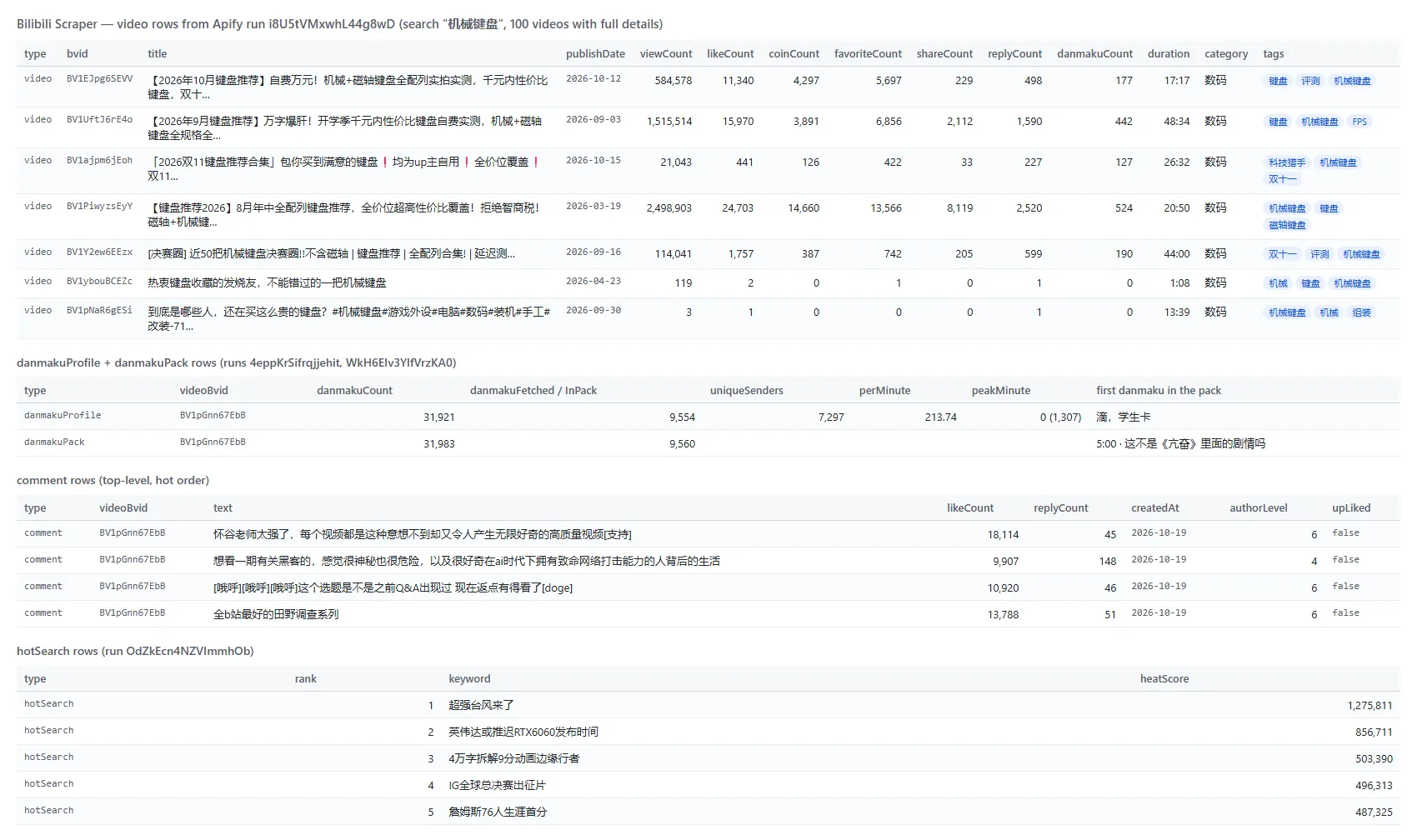
A video row (shortened):
A packed danmaku item holds a video's danmaku in danmaku, one object per danmaku: danmakuId, text, videoTime (second), videoTimeFormatted, mode, fontSize, color, sentAt, pool, senderHash, weight. With danmakuOutput: "rows" each of those is its own type: "danmaku" row.
Fields and how often they were filled
| Rows | Field fill on platform runs |
|---|---|
| Search, no details (20 rows) | bvid, title, views, likes, favorites, comments, danmaku, duration, publish date, author, category, tags 100%; coins, shares, cid empty (not in search results) |
| Search + full details (100 rows) | the above plus coins, shares, cid, parts, resolution, original/repost 100%; description 63%; honors 3% |
| Creator uploads (935 rows) | views, likes, coins, favorites, shares, comments, danmaku, duration, description, cid 99-100%; tags only with full details |
| Comments + replies (386 rows) | text, likes, time, level, VIP, uploader-liked 100%; gender 44%; bio 58%; emotes 28%; mentions 23%; pictures 7%; replies carry rootCommentId |
| Danmaku (9,560 in a pack) | id, text, second, mode, colour, font size, sent time, sender hash, weight 100% |
| Creator search (5 rows) | name, followers, videos, level, verification, recent videos 100%; bio 80%; live room 60% |
| Live rooms / hot search | room, title, watching, area, streamer 100% / keyword, heat score 100% |
How can I use Bilibili data?
- 🎯 Brand and KOL teams — find creators by keyword, read their followers, total likes and the business contact in their bio, then track their uploads.
- 📊 Market researchers — follow a category's ranking or a product keyword week over week (views, coins, favorites as purchase-intent signals).
- 💬 Consumer-insight teams — pull comments and danmaku to see what viewers say at each second of a launch video.
- 🎮 Game and anime studios — measure reaction to a trailer with the danmaku profile: peak minute, danmaku per minute, unique senders.
- 🤖 AI and NLP teams — build Chinese text corpora from comments and danmaku, with timestamps.
- 📈 Agencies — schedule
monitorModeruns and get only new uploads and comments each day.
How much does it cost to scrape Bilibili?
Bilibili Scraper is pay-per-event (the Pricing tab always shows the live rates). There is no start fee.
| Event | Price | When it is charged |
|---|---|---|
video | $0.0009 per video ($0.90 per 1,000) | Each video row delivered after your filters |
comment | $0.00044 per comment ($0.44 per 1,000) | Each comment or reply row |
danmaku | $0.000018 per danmaku ($0.018 per 1,000) | Each danmaku, packed or as a row |
creator | $0.0009 per creator | Each creator profile row |
danmaku-profile | $0.0045 per profile | Each video part profiled |
hot-search | $0.00045 per topic | Each hot-search row |
live-room | $0.0009 per live room | Each live-room row |
Worked examples:
- The sample input (search "原神", 20 videos) = 20 × $0.0009 = $0.018
- 1,000 videos from a keyword = $0.90
- 1 video + 100 comments = $0.0009 + 100 × $0.00044 = $0.045
- All danmaku of a 45-minute video (about 9,500) = $0.17; its reaction profile = $0.0045
- A creator's 935 uploads + their profile = 935 × $0.0009 + $0.0009 = $0.84
- The hot-search board (50 topics) = $0.0225
Apify platform usage is included in these prices. Measured on the platform at the default 256 MB: 20 videos in 3 s, 100 videos with full details in 17 s, 1,000 with full details in 123 s, 935 uploads in 15 s, 1,000 comments in 29 s.
Integrations, API, scheduling & MCP
- Schedules: run Bilibili Scraper hourly or daily from the Schedules tab; with
monitorModeeach run returns only what is new. - Webhooks: fire a URL when a run finishes — push rows to your CRM, Slack or a sheet.
- No-code: Make, Zapier, n8n, Google Sheets, Airtable, Slack via Apify integrations.
- API:
apify-clientfor Node.js or Python, and the Apify API reference. - MCP / AI agents: connect Claude, Cursor or any MCP client through the MCP tab; switch on
compactto keep answers small.
More TopApi scrapers
| 🎵 Douyin Scraper - 抖音 videos, creators, comments | 🎬 TikTok Scraper - TikTok posts by profile, hashtag or URL | 🔗 TikTok Video Scraper - TikTok videos by URL |
| ▶️ YouTube Shorts Scraper - Shorts by channel or URL | 📸 Instagram Scraper - posts and reels | 🧭 All TopApi actors |
Limits & empty runs
- What Bilibili shows a signed-out visitor is the ceiling. Subtitles, the commenter's IP location, follower and following lists and the AI summary are shown to logged-in viewers only, so they are not in the rows.
- Search: Bilibili returns at most about 1,000 videos per keyword; more comes from date windows, and the run summary says how many windows ran.
- Zero counts are Bilibili's: for some keywords many results show 0 views (23 of 50 for "机械键盘"); the row carries what Bilibili reports, and
engagementRatestays empty when views are 0. UseminViewsto skip them. - Danmaku: Bilibili keeps a capped pool per video (7,200 of 31,800 on the test video); the two sources merged gave 9,560. Above
maxDanmakuPerVideoan even spread across the timeline is returned. - Uploads: the list a visitor gets held 935 of the 938 videos Bilibili counts for the test creator.
- Refusals: when Bilibili refuses the container's IP the request moves to the Apify proxy; if Bilibili asks for a human verification the run stops that keyword and says so. Nothing is charged for rows not delivered.
- Empty dataset: your filters removed everything, the video is deleted or private (
not_foundin the run summary), or monitor mode found nothing new. Lines that are not Bilibili links get a freeerrorrow.
FAQ
How many videos can Bilibili Scraper get for one keyword?
About 1,000 per search on Bilibili, and past that by date window: a test run returned 1,200 unique videos for "原神" in 24 seconds. Set maxResults to the number you need.
Can Bilibili Scraper get every video of a Bilibili creator?
Yes, with user_videos: the creator's upload list, newest first, 99 per request (935 videos in 15 seconds in testing, against the 938 Bilibili shows).
Can Bilibili Scraper get Bilibili comments and replies?
Yes. includeComments (or the video_comments mode) returns 20 comments per page, hot or newest first, as deep as maxComments allows; includeReplies adds each thread's replies. A test run read 1,000 comments of one video in 29 seconds.
What is danmaku and can Bilibili Scraper export it?
Danmaku (弹幕) are the comments that fly across a Bilibili video at a given second. Bilibili Scraper returns them with the second, colour, display mode and send time, packed into one item per video (the default) or one row each, plus an optional reaction profile.
Can I run Bilibili Scraper on a schedule?
Yes. Save the input as a task, open Schedules, pick a cadence and switch on monitorMode; a run that finds nothing new delivers no rows and charges nothing.
Can I use Bilibili Scraper with the Apify API?
Yes — start runs and read datasets with apify-client for Node.js or Python.
Can I use Bilibili Scraper through an MCP server?
Yes. Open the MCP tab, connect your client and ask for Bilibili videos, comments or creators in plain language.
Do I need a Bilibili account, cookies or a proxy?
No. Bilibili Scraper reads what Bilibili shows a signed-out visitor; no account, cookie or QR login is involved.
Why did my Bilibili Scraper run return no rows?
The video is deleted or private, your filters removed every row (the run summary lists which filter), monitor mode found nothing new, or the input was not a Bilibili link (each such line gets a free error row). Nothing is charged for those.
Is it legal to scrape Bilibili?
Bilibili Scraper collects publicly available data only, nothing behind a login. You are responsible for complying with Bilibili's terms of service, creators' copyright and data-protection law (GDPR, CCPA, PIPL); creator profiles and comments are personal data.
Your feedback
Found a bug or missing a field? Open an issue on the Issues tab — we answer within two working days.


