

Amazon Product Search: prices, ratings, ASINs
Pricing
from $2.60 / 1,000 product extracteds
Amazon Product Search: prices, ratings, ASINs
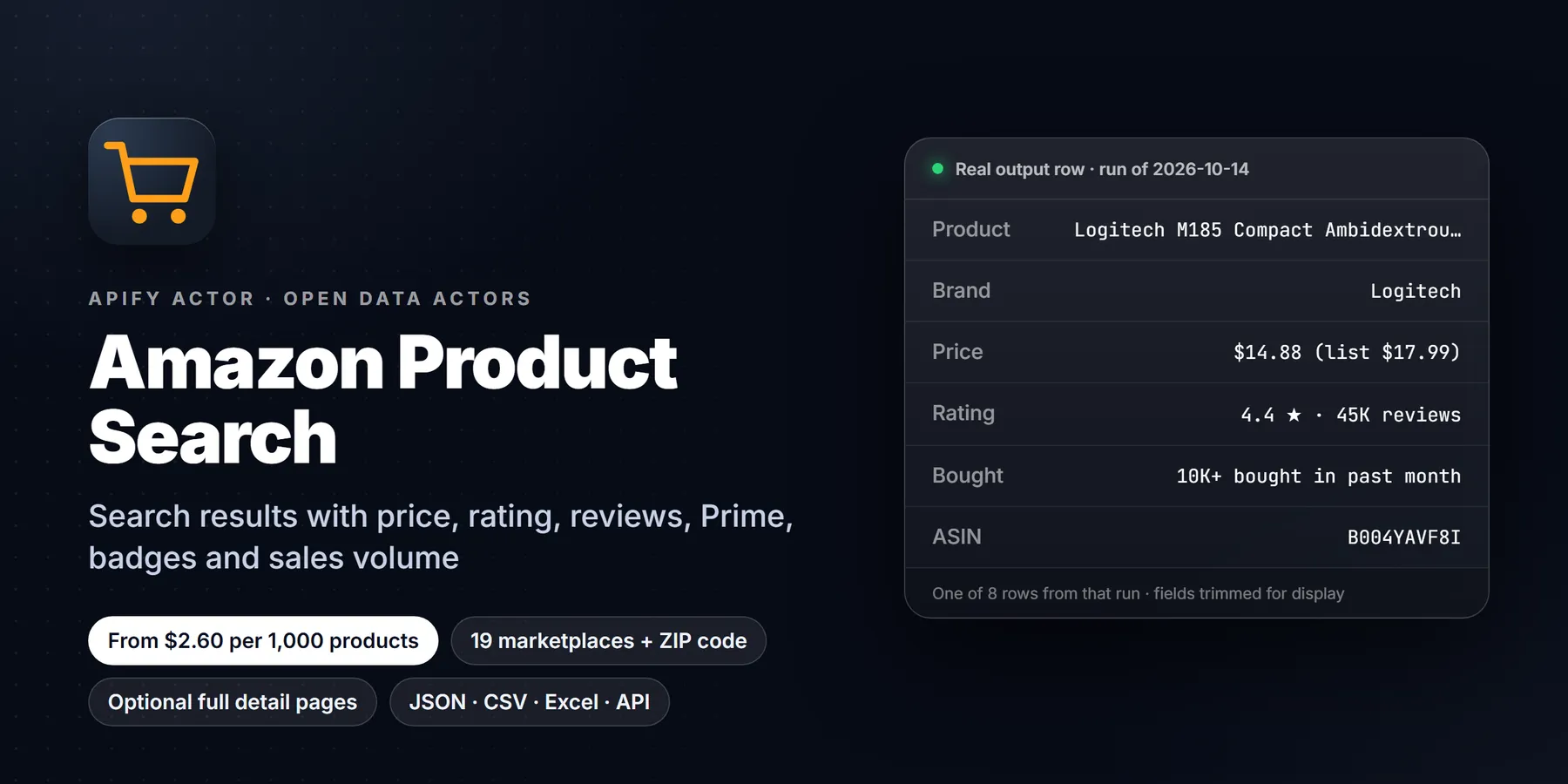
Amazon product data at $0.004 per product, 20% below the alternative we tested (free plan), with 41 filled fields per product in that test. Search by keyword, URL or ASIN: price, list price, rating, reviews, Prime, badges, bought-in-past-month, images and specs. No login.
Pricing
from $2.60 / 1,000 product extracteds
Rating
0.0
(0)
Developer

Detroit Web Agent - Open Data
Maintained by CommunityActor stats
0
Bookmarked
2
Total users
1
Monthly active users
12 hours ago
Last modified
Categories
Share
Amazon Product Search: prices, ratings and ASINs from public pages

| Price per 1,000 products | Free plan | Starter | Scale | Business |
|---|---|---|---|---|
| This Actor | $4.00 | $3.40 | $3.00 | $2.60 |
| Most-used alternative | $5.00 | $4.00 | $3.50 | $3.00 |
Turn Amazon keyword searches, category pages, search URLs, product URLs or ASINs on 19 Amazon sites into a clean product table, optionally priced for a delivery zip code: price, list price, rating, review count, Prime, sponsored flag, badges, bought-in-past-month, best-seller rank, seller, breadcrumbs, images, bullet features, variants, dimensions and weight. Public pages only. No login.
- In short: Amazon Product Search (Apify actor
transparent_meteorite/amazon-product-search) reads public Amazon search-result and product pages and returns one structured row per unique product. - Who it is for: sellers and brands tracking competitors, price monitors, affiliate and comparison sites, market researchers.
- Input: keywords, Amazon search, category or product URLs, ASINs, country (19 Amazon sites), delivery zip code, sort, price range, minimum rating, Prime only, department, max products (total and per query), product-page details (on by default), seller offers, proxy.
- Output: one row per unique product (deduped by marketplace and ASIN) with up to 63 fields (including
stars,reviewsCount,inStock,delivery,breadCrumbs,highResolutionImages,isAmazonChoice,isBestSeller,offers), as JSON, CSV or Excel. - Pricing: pay per event. Per product delivered: $0.004 on the Apify free plan, $0.0034 Bronze, $0.003 Silver, $0.0026 Gold, Platinum and Diamond. Plus a start event of $0.00005 per GB of run memory.
- Limits: public pages only, no login, no reviews or reviewer data. Amazon blocks some IPs; a blocked page is retried on a fresh session and a search that stays blocked delivers nothing and costs nothing.
Give it a keyword or a list of ASINs; get a clean Amazon product table without a login.
Run in 30 seconds
- Open the prefilled run (free Apify account; it creates a saved task with a working input).
- Press Start. The input is small on purpose, so the first run is quick and costs a few cents at most.
- Open the Output tab, switch to Table view, download as CSV, Excel or JSON.
Prefilled input:
Ready-made presets by use case (each opens as a saved task you can edit):
Why choose this over alternatives
- Price per product is lower on the free, Bronze, Silver and Gold plans than the alternative we tested. On Platinum and Diamond the alternative is cheaper.
- Unique products only: duplicates are never charged, and a search that stays blocked is not charged.
- Search by keyword, search URL, product URL or ASIN. No login.
- The alternative returns more columns (63 flattened fields against our 42 in the same test). If you need a column we do not have, check the field table first.
| This actor | Typical alternatives | |
|---|---|---|
| Products returned, page 1 of one search | 16 of 16 | 16 of 16 |
| Time for 16 products with full details | 15 to 20 s | 23 s |
| Fields per product | 42 | 63 (flattened) |
| Price per product, free plan | $0.004 | $0.005 |
| Price per product, Platinum / Diamond | $0.0026 / $0.0026 | $0.0017 / $0.0008 |
Measured 2026-10-11 (source: head-to-head test runs on the same query, "wireless mouse", amazon.com, page 1, one run per side, both runs succeeded). One run each is a small sample.
What it does and who it is for
You give the actor searches (keywords or search URLs) and/or specific products (ASINs or product URLs). It reads the public search pages in Amazon's own ranking order, opens each product page for the full detail set, removes duplicates and writes one row per product to an Apify dataset. You can download the dataset as JSON, CSV, Excel, XML or HTML, or read it through the API.
It is built for people who need Amazon listings as data:
- Sellers and brands watching competitor prices, ratings, badges and search position for their keywords.
- Price monitors that re-check a fixed list of ASINs on a schedule.
- Affiliate and comparison sites that need titles, images, prices and features for a category.
- Market researchers sizing a niche from review counts, best-seller ranks and Amazon's "bought in past month" figure.
It reads product data only. It does not collect customer reviews, reviewer names or profiles, and it never logs in.
Quick start
Press Start with the prefilled form (keyword "wireless mouse"), or paste:
ASINs and URLs work too: "asins": ["B07CMS5Q6P"], "urls": ["https://www.amazon.co.uk/s?k=kettle"].
What you get: output fields
Open each product page too (includeDetails) is on by default so every row has the full field set. In our test run each row had 42 fields. Switch it off for a faster, lighter run with the 17 search-card fields only (price, rating, reviews, badges, image, position and the like).
Fields marked "details" come from the product page and need includeDetails on. A field is null or empty when Amazon does not show it for that product, and a few optional keys (brandStory, dateFirstAvailable) appear only when the page has them.
| Field | Type | Meaning |
|---|---|---|
asin | string | Amazon's product id. With marketplace it is the unique key |
title, url | string | Product title and canonical /dp/ASIN link |
brand | string | Brand (details) |
price, listPrice, currency | number, number, string | Current price, the struck-through price when Amazon shows one, and the currency code |
rating, reviewCount | number | Star rating and number of ratings |
starsBreakdown | object | Percentage of ratings at each star level, 5star to 1star (details) |
isPrime, isSponsored | boolean | Prime badge; whether the search placement was an ad |
badges | array | For example "Amazon's Choice", "Best Seller" |
boughtInPastMonth | string | Amazon's text, for example "10K+ bought in past month", when shown |
monthlyPurchaseVolume | number | The same figure as a number: the lower bound Amazon shows ("1K+" = 1000, "10K+" = 10000, "200+" = 200). Null when Amazon shows none |
bestsellerRanks | array | Best Sellers Rank entries, each {rank, category} (details) |
availability | string | Stock text, for example "In Stock" (details) |
seller | string | The seller named on the product page (details) |
categories | array | Breadcrumb path, top level first (details) |
images | array | Product image URLs (details; without details, the one search-card image) |
features | array | The bullet points (details) |
attributes | array | The product attribute list as {key, value} pairs (details) |
productDescription | string | The long description when the seller provides one (details) |
aPlusContent, brandStory | string | Text of the enhanced brand content blocks when present (details) |
aiReviewsSummary | string | Amazon's AI-generated review summary text when shown (details) |
variants | array | Variant ASINs with their selectable attributes and thumbnail (details) |
variantDetails | array | One entry per variant: asin, label (for example "Blue / 1"), dimensions (colour, size, pack) and thumbnail. Empty when the product has no variants (details) |
dimensions, weight | string | As listed in the specs table, when present (details) |
manufacturer, modelNumber, upc, dateFirstAvailable | string | From the product details table, when listed (details) |
fastestDelivery, deliveryMessage | string | Delivery texts as shown to an anonymous visitor at the default location (details) |
videosCount | number | Number of videos on the product page (details) |
sustainabilityFeatures | array | Raw text of the sustainability badges block, when present (details) |
position, page, query | number, number, string | Rank within the search (running across pages), result page, and the keyword. Null for ASIN and product-URL lookups |
marketplace, countryCode | string | Site key (US, UK, DE, JP, ...) and the same site as an ISO country code (UK becomes GB) |
stars, reviewsCount | number | Same values as rating and reviewCount, under the names other Amazon tools use |
inStock, inStockText | boolean, string | In stock true / false (from the stock text and the buy button; null when the page shows neither) and the stock text as shown |
delivery, deliveryDate | string | Delivery promise text and the first delivery date shown, for the delivery location in effect |
locationText, zipCode | string | The "Deliver to" location the page was priced for and the zip you set (only when a zip was set and Amazon accepted it) |
breadCrumbs | string | Category path joined with " › " (details) |
thumbnailImage, highResolutionImages | string, array | First image and all full-size image URLs |
isAmazonChoice, isBestSeller | boolean | Badge flags, any site language (Amazon's Choice, Amazons Tipp, ...) |
description | string | Product description, or the feature bullets joined when there is none |
sellerId | string | Merchant ID of the buy-box seller (details) |
offers, offersCount | array, number | Other sellers when maxOffers > 0: each {price, currency, condition, seller, sellerId, shipsFrom, deliveryDate, isPinned} |
categoryUrl | string | The category search the row came from (category URL input) |
source | string | search (search card only), search+detail (search card merged with the product page) or detail (ASIN or product-URL lookup) |
scrapedAt | string | ISO timestamp of extraction |
Sample output
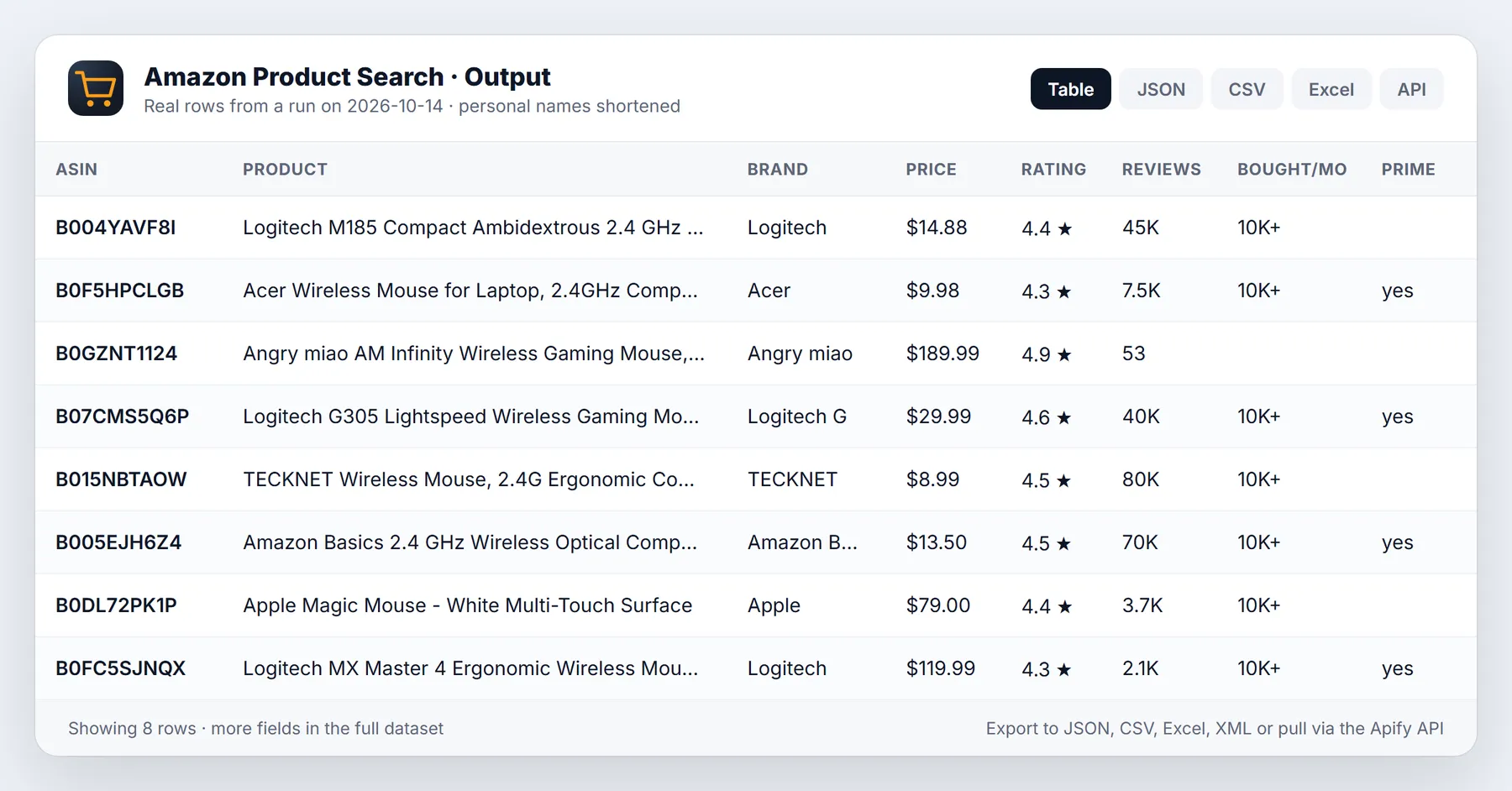
A real row from a test run on 2026-10-11 (build 0.1.10), abridged: long text is cut with ..., long lists show their first entries, and seven bulky fields (attributes, variants, aPlusContent, productDescription, aiReviewsSummary, sustainabilityFeatures, upc) are left out. Values shown are as delivered.
The 2026-10-13 version adds countryCode, stars, reviewsCount, inStock, delivery, breadCrumbs, highResolutionImages and the other fields listed above to every row.
Input options
No field is required. With no keywords, URLs or ASINs the run searches "wireless mouse" as an example (and says so in the log), so an empty input still returns data. You can mix keywords, URLs and ASINs in one run.
| Input | Default | What it does |
|---|---|---|
keywords | none | One search per line, for example wireless mouse. Results come in Amazon's own ranking order |
startUrls | none | Search pages (/s?k=...), category pages (/b?node=..., /s?rh=n:...) or product pages (/dp/ASIN) on any supported site. The site is read from each URL; filters in a search URL are kept |
urls | none | The same as startUrls as plain text lines (older field, still works) |
asins | none | 10-character product ids, for example B07CMS5Q6P, fetched from the country chosen below |
countryCode | US | Amazon site for keywords and ASINs: US, CA, UK (or GB), DE, IT, ES, NL, SE, PL, BE, IN, JP, AU, MX, BR, AE, SA, SG, TR. URLs carry their own |
marketplace | none | Older name for countryCode, still works. countryCode wins when both are set |
zipCode | none | Delivery zip / postcode, set before scraping so prices, stock and delivery dates match that area. See the section below |
maxItems | 20 | Stop after this many products in total, 1 to 5,000. Set it explicitly when you call the actor from the API |
maxItemsPerQuery | 0 (no cap) | Cap per keyword or URL, so one broad search does not use the whole maxItems budget. maxItemsPerStartUrl is accepted too |
maxPages | 1 | Result pages to read per keyword or URL, 1 to 20 (about 16 to 60 products each). maxSearchPagesPerStartUrl is accepted too |
sort | Amazon default | relevance, price-asc, price-desc, avg-rating, newest or best-sellers, for keyword and category searches |
minPrice, maxPrice | none | Price range in the site currency, sent to Amazon and checked again on each row |
minRating | none | Drop products rated below 1, 2, 3, 4 or 4.5 stars (unrated products are dropped too) |
primeOnly | false | Keep only rows with a Prime badge. Reliable on amazon.com; other sites rarely show Prime to a logged-out visitor, so it can return nothing there |
department | none | Amazon search alias such as electronics, kitchen, beauty (the i= value of an Amazon search URL) |
scrapeProductDetails | true | Open each product page for the full field set. One extra request per product, fetched 8 at a time. includeDetails is the older name; if either is off, product pages are skipped |
maxOffers | 0 (off) | Add up to this many seller offers per product from Amazon's "Other sellers" panel. One extra request per product |
autoProxyFallback | true | If you left the proxy off and Amazon blocks two attempts in a row, switch to Apify residential proxy for the rest of the run. Turn it off to never use a proxy you did not pick |
proxyConfiguration | no proxy | Your own choice of Apify Proxy group or custom proxies. Each retry uses a fresh session |
Input examples
Track a fixed list of products (price, stock, rating) in the UK:
Three pages of search results, search cards only, for a fast rank check:
A search you built on Amazon with its own filters and sort order, pasted as it is, plus one product page:
ASIN and product-URL lookups are fetched first, then the searches. If the same product turns up twice (two keywords, or an ASIN that is also in a search), it is delivered once.
Countries, zip & URL input
19 Amazon sites. Set countryCode for keywords and ASINs, or paste URLs from any of these sites (the site is read from each URL). Prices come in the site's own currency (currency is the ISO code, for example JPY, BRL, PLN).
| Code | Site | Code | Site | Code | Site |
|---|---|---|---|---|---|
| US | amazon.com | SE | amazon.se | MX | amazon.com.mx |
| CA | amazon.ca | PL | amazon.pl | BR | amazon.com.br |
| UK (GB) | amazon.co.uk | BE | amazon.com.be | AE | amazon.ae (English pages) |
| DE | amazon.de | IN | amazon.in | SA | amazon.sa (English pages) |
| IT | amazon.it | JP | amazon.co.jp | SG | amazon.sg |
| ES | amazon.es | AU | amazon.com.au | TR | amazon.com.tr |
| NL | amazon.nl |
Each site was checked on 2026-10-13 with a live search page through the same fetch code (price, currency, rating and review count filled on 90% or more of the cards). amazon.fr is not offered: it answered every automated request with a challenge page through datacenter IPs, residential IPs and browser-like requests, so a run there would deliver nothing.
Delivery zip code. zipCode sets the "Deliver to" location once per site before the first page, the way the location box on Amazon does, and every later request carries it. Rows then show locationText (for example "New York 10001", "London SW1A1AA", "10115 Berlin") and zipCode, and prices, stock and delivery dates are the ones Amazon shows for that area. Tested live on 2026-10-13 for the US (10001, 99501), UK (SW1A 1AA) and DE (10115). If Amazon refuses the code, the run carries on at Amazon's default location and the log and OUTPUT.warnings say so; rows then have no zipCode.
URL input. startUrls takes any mix of:
- search pages:
https://www.amazon.de/s?k=kaffeemaschine(your own filters and sort in the URL are kept), - category pages:
https://www.amazon.com/b?node=172282orhttps://www.amazon.com/s?rh=n:172282(read as a node search, so rows have the full search-card fields), - product pages:
https://www.amazon.co.jp/dp/B0XXXXXXXX.
Best-seller list pages (/gp/bestsellers/...) are skipped with a warning; use the category URL for that node instead.
Pricing
Pay per event. There is no subscription and no rental fee for this actor.
| Event | Free | Bronze | Silver | Gold | Platinum | Diamond |
|---|---|---|---|---|---|---|
| Product extracted (one per product row delivered) | $0.004 | $0.0034 | $0.003 | $0.0026 | $0.0026 | $0.0026 |
| Actor start (one per GB of run memory, minimum one) | $0.00005 | $0.00005 | $0.00005 | $0.00005 | $0.00005 | $0.00005 |
The default run memory is 2 GB, so the start costs $0.0001 per run unless you change the memory in the run options. The price per product is the same with details on or off.
Worked examples at the default memory:
| Products delivered | Free | Bronze | Silver | Gold and above |
|---|---|---|---|---|
| 20 (the form default) | 20 x $0.004 + $0.0001 = $0.0801 | $0.0681 | $0.0601 | $0.0521 |
| 100 | $0.4001 | $0.3401 | $0.3001 | $0.2601 |
| 1,000 | $4.0001 | $3.4001 | $3.0001 | $2.6001 |
| 5,000 (the maximum for one run) | $20.0001 | $17.0001 | $15.0001 | $13.0001 |
A daily price check on 50 ASINs delivers 1,500 rows in 30 days: on the Bronze plan that is 1,500 x $0.0034 + 30 x $0.0001 = $5.103.
Apify's free plan includes $5 of monthly platform credit, which covers about 1,200 products with this actor at the free-plan price.
What is and is not charged:
- One event per product row written to the dataset.
- Duplicates are not delivered and not charged.
- A search page or ASIN lookup that stays blocked after all retries delivers no row and is not charged.
- If a search found a product but its product page could not be read, the row is still delivered with the search-card fields (
sourceissearch) and is charged.
To cap spend, set Maximum cost per run in the run options; the actor stops when the limit is reached.
How to run it
In Apify Console
Open the actor, fill in the form and press Start. Rows appear in the Output tab while the run is going. When the run ends, use Export for JSON, CSV, Excel, XML or HTML.
From the API or a client library
Set APIFY_TOKEN to your token from Apify Console > Settings > API & Integrations.
Python (pip install apify-client)
JavaScript / Node.js (npm install apify-client)
On a schedule
Create a schedule in Apify Console (Schedules > Create new), add this actor with your saved input, and pick a cron expression such as 0 8 * * * for 08:00 every day. Each run writes a new dataset; join runs on marketplace + asin and compare price, availability, rating and position over time using scrapedAt.
With n8n, Make, Zapier or AI agents
Start the actor with the Apify API (POST /v2/acts/<actor>/runs) or the Apify node in n8n, Make or Zapier, wait for the run, then read GET /v2/datasets/<id>/items. Any MCP-capable agent can call it as a tool through the Apify MCP server. Webhooks work as for any Apify actor: add one for the "run succeeded" event and your endpoint receives the run id and dataset id when the data is ready.
Reliability and blocking
Amazon blocks a share of automated traffic, and how much depends on the IP and the day. This is what the actor does about it and what we have measured.
- Requests use browser-like TLS and headers.
- When Amazon answers with a robot or captcha page, the actor retries on a new session (a new IP when a proxy is set), up to 6 attempts per page with exponential backoff, and warms up anonymous cookies from the home page after the first block. It never solves captchas.
- If you left the proxy off and two attempts in a row are blocked, the run switches itself to Apify residential proxy for the rest of the run (
autoProxyFallback, on by default). - A search that stays blocked is listed in the run's
OUTPUTrecord and in the log.
Measured on the Apify platform with no proxy set, 2026-10-11, across amazon.com, .co.uk and .de: in 2 batches totalling 162 requests, 1 was blocked and every search and ASIN lookup delivered rows. Before the retry, referer and cookie changes, UK and DE search pages were blocked on almost every request from datacenter IPs (2 clean out of 62). Both sets of batches ran on one day, so the cause of the improvement is not isolated, and we have no measurement over weeks or at thousands of lookups. The automatic residential fallback is covered by tests against a local server but was not triggered in a live run. For heavy volumes, expect to need a residential proxy.
Run summary record
Each run writes a record named OUTPUT to its key-value store:
| Key | Meaning |
|---|---|
jobs | How many searches and product lookups the input produced |
requests, ok, blocked, errors, retries | Page requests made and how they ended |
successRatePct | ok as a percentage of requests |
delivered, charged | Rows written and events charged (these match) |
duplicates | Products found more than once and delivered once |
failedJobs | Searches or lookups that produced nothing |
escalatedToResidential | Present when the automatic proxy fallback was used |
chargeLimitReached | True when your maximum cost stopped the run |
warnings | Plain-language notes, for example ASIN B0...: not found |
Limits and honest caveats
- Product data only. No customer reviews, questions or reviewer profiles.
- Public pages as an anonymous visitor sees them. Prices, Prime and delivery texts can vary by location and session. Treat each row as a snapshot at
scrapedAt. - Search cards are thin. Brand, seller, breadcrumbs and most other fields come from the product page, so keep details on (the default) when you need them.
- Delivery location: without
zipCode, prices and delivery dates are for Amazon's default location for an anonymous visitor (for amazon.com, often outside the US). sustainabilityFeaturesis raw text from the badge block and can include filler entries such as "icon".- Sites: 19 Amazon sites with the same parser (list above). US, UK and DE are tested most; amazon.fr is not supported.
- Prime on non-US sites: logged-out pages outside amazon.com rarely show the Prime badge, so
isPrimeis mostly false there andprimeOnlycan return nothing. - Seller contact details (phone, address) are not collected.
- One run delivers at most 5,000 products and reads at most 20 result pages per search. Split bigger jobs across keywords or runs.
- Amazon can change its pages at any time, which can empty a field until the actor is updated.
New to Apify? Create a free account and run this Actor in under a minute. Some links are affiliate links.
Related actors
More tools from the same publisher that fit this workflow:
- Amazon Best Sellers Scraper: best seller ranks across 21 Amazon countries
- Shopify Leads & Store Scraper: Shopify store leads with apps, products and contacts
- Company Enrichment by Domain: enrich a domain with socials, emails and tech stack
- Website Email Extractor: pull emails, phones and socials from each business website
- Website Tech Stack Detector: detect the CMS, frameworks and hosting behind any site
- Local Business Leads: find local businesses with no website from OpenStreetMap, a cheap complement to Maps data
Use from AI agents: every actor here is callable through the Apify MCP server (mcp.apify.com) and our open-data-actors MCP endpoint.
FAQ
Do I need an Amazon account, cookies or an API key? No. The actor does not log in and you supply no cookies.
Why did I get fewer products than maxItems? The search had fewer results on the pages you asked for (raise maxPages), duplicates were removed, a search was blocked (see OUTPUT.warnings), or your maximum cost was reached.
Why is brand or seller empty? Those come from the product page. Either includeDetails is off or that product page could not be read; in both cases source is search.
Are sponsored results included? Yes, with isSponsored: true, in the position Amazon showed them. Filter on that flag if you want organic results only.
What is monthlyPurchaseVolume? Amazon shows a rounded lower bound such as "10K+ bought in past month" on some products. The actor copies the text to boughtInPastMonth and the number (10000) to monthlyPurchaseVolume. It is Amazon's figure, not an estimate of ours. In our 16-product test run 14 products showed one.
Can I track a price over time? Yes. Schedule a run on a list of ASINs and compare price across datasets by asin.
How fast is it? A 16-product search with full details took 15 to 23 seconds in our test runs. Detail pages are fetched 8 at a time.
Does it work for other Amazon marketplaces? Yes, 19 sites: see Countries, zip & URL input. amazon.fr is the exception. Open an issue if you need another.
Can I get prices for a specific delivery area? Yes, set zipCode. Rows show the location Amazon priced them for in locationText.
Troubleshooting
| Symptom | Likely cause and fix |
|---|---|
Run fails with Nothing to fetch | Every keyword, URL and ASIN was invalid or unsupported (see OUTPUT.warnings). Fix them |
Rows have no zipCode | Amazon did not accept the zip for that site; the warning names the reason. Check the format (US 5 digits, UK full postcode) |
Run fails with No products matched your filters | minRating, the price range or primeOnly removed every row. Loosen them |
Run fails with No products delivered | Every page was blocked. Run again, or choose a residential proxy in the Proxy setting |
| Rows have only about 17 fields | includeDetails is off, or product pages were blocked (source is search) |
Warning ASIN ...: not found | That ASIN does not exist on the chosen site. Check countryCode |
Warning no results parsed | Amazon returned a page with no product cards for that search. Check the keyword or URL in a browser |
| Fewer rows than expected from the API | maxItems was not sent. Set it explicitly |
Terms & responsible use
This actor reads public Amazon pages that anyone can open without logging in. Amazon's Conditions of Use restrict automated access, so you are responsible for how you use the data: respect Amazon's terms, applicable law and rate limits, do not resell Amazon content as your own, and keep volumes reasonable. The actor collects no login data, no cookies of yours and no reviewer names or profiles. It is an independent tool and is not affiliated with or endorsed by Amazon. Prices and availability change quickly and vary by location; treat each row as a snapshot at scrapedAt.
More resources
- Guide & examples: mamoo85.github.io/open-data-actors/amazon-product-search.html
Works well with
Other actors from Detroit Web Agent - Open Data that pair with this one:
- Shopify Store Leads: compare marketplace prices with the independent Shopify stores selling the same products.
- Website Contact Extractor: find contact details on the brand websites behind the sellers.
Changelog
- 2026-10-09: First version (private).
- 2026-10-11: Product-page details on by default and fetched 8 at a time (build 0.1.8).
- 2026-10-11: Retries with exponential backoff, cookie warm-up and automatic residential fallback; added
monthlyPurchaseVolumeandvariantDetails(builds 0.1.9 to 0.1.11). - 2026-10-12: README expanded: full field table, sample output, pricing examples, API and scheduling guides, limits, FAQ and troubleshooting.
- 2026-10-13: Added a Run in 30 seconds section with a one-click prefilled run link, saved use-case presets and cross-links to pairing actors.
- 2026-10-13: 19 Amazon sites (
countryCode), deliveryzipCode, category andstartUrlsinput, sort / price / rating / Prime / department filters,maxItemsPerQuery, selleroffers, and new fieldsstars,reviewsCount,inStock,delivery,breadCrumbs,highResolutionImages,isAmazonChoice,isBestSeller,description,sellerId,countryCode. Empty input now runs an example search.
Support
A product that should have been returned, a field that parsed wrongly, or a field you need added? Open an issue on this actor's Issues tab with the run URL and what you expected. The run URL lets us see the exact input and the OUTPUT record.
Need more than the data?
This actor is built by Detroit Web Agent, a small Detroit studio that builds websites, lead pages and simple data tools for small businesses. If you want these results turned into a working website, a landing page or a CRM import, or you need a field this actor does not cover yet, open an issue on the Issues tab or visit detroitwebagent.com.
Built and maintained by Detroit Web Agent - Open Data (Detroit, Michigan). Questions, bugs or a field you need: open an issue on this Actor's Issues tab and we will reply there.
Use it from AI assistants (MCP)
Amazon Product Search works as a tool for AI assistants through the official Apify MCP server. Add this server URL to any MCP client (Claude Desktop, Claude Code, Cursor, ChatGPT connectors, VS Code):


