

Meta Ad Library Scraper: Facebook Ad Library & Instagram Ads
Pricing
from $0.65 / 1,000 ad extracteds
Meta Ad Library Scraper: Facebook Ad Library & Instagram Ads
Search the public Meta Ad Library (Facebook and Instagram ads) by keyword, advertiser Page id or library URL. No login. Flat rows: ad text, headline, link, CTA, media URLs, ISO dates, platforms, variations. $0.00065 per ad.
Pricing
from $0.65 / 1,000 ad extracteds
Rating
0.0
(0)
Developer

Detroit Web Agent - Open Data
Maintained by CommunityActor stats
0
Bookmarked
2
Total users
1
Monthly active users
12 hours ago
Last modified
Categories
Share
Meta Ad Library Scraper: Facebook and Instagram Ads, No Login

| Price per 1,000 ads | Free plan | Starter | Scale | Business |
|---|---|---|---|---|
| This Actor | $0.65 | $0.65 | $0.65 | $0.65 |
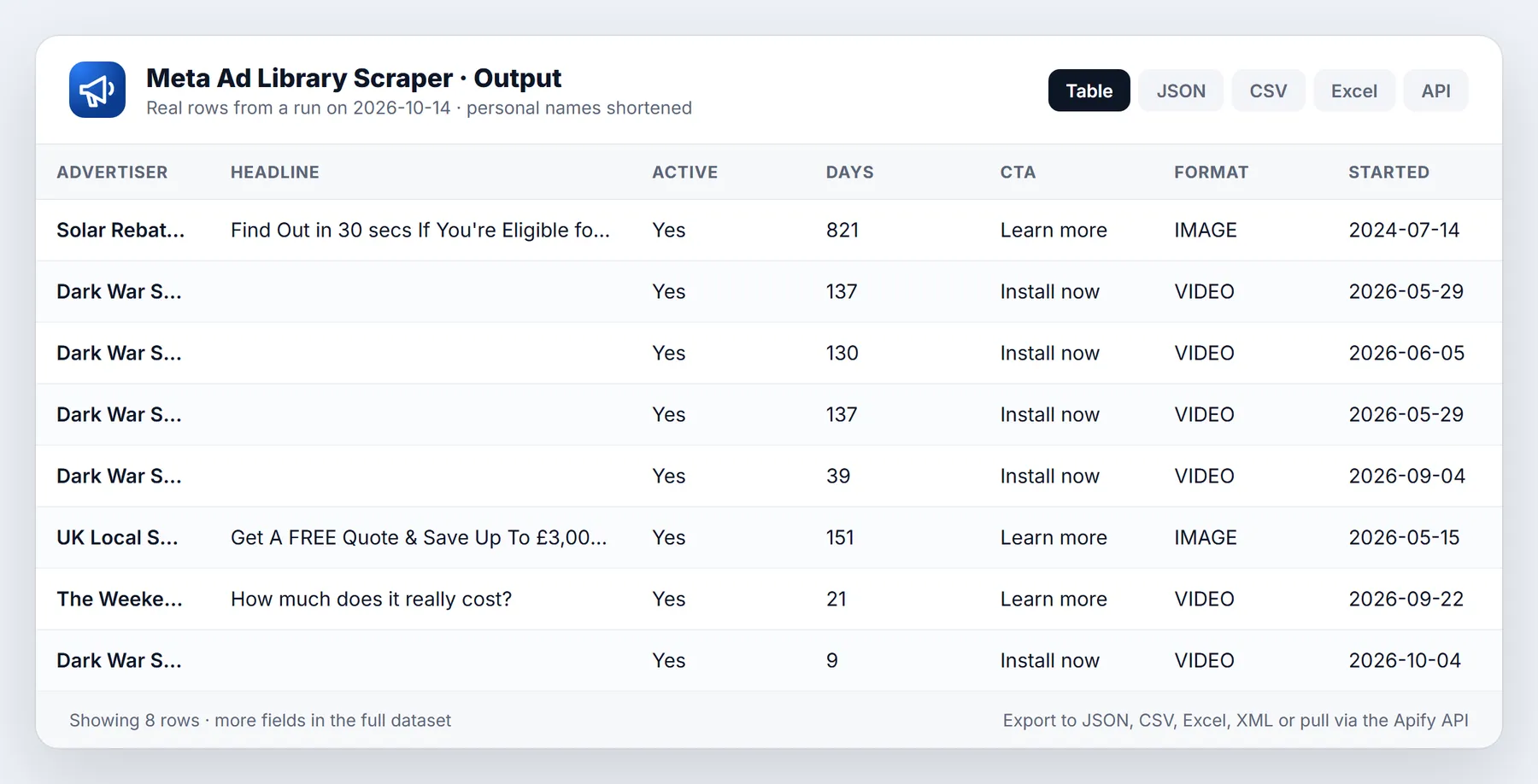
Search the public Meta Ad Library (facebook.com/ads/library) by keyword, advertiser Page id or a pasted library URL, and get one clean row per ad: advertiser, ad text, headline, link, call to action, image and video URLs, dates, platforms and variation count. No Facebook login, no cookies of yours, no browser.
- In short: Meta Ad Library Scraper (Apify actor
transparent_meteorite/meta-ad-library) returns ads from the public Meta Ad Library as flat, typed rows. It reads the same public pages and paging calls the Ad Library website uses, with no account. - Who it is for: marketers and agencies researching competitor creative, ecommerce and app teams, ad-intelligence tools, journalists checking who advertises what.
- Input: search terms, advertiser Page ids and/or Ad Library URLs, plus country, active status, ad type, media type, start-date range, platforms, languages, max ads (1 to 50,000), only-new mode.
- Output: 34 fields per ad: ad id, advertiser Page id, name, categories, like count, profile link and picture, active flag, start and last-seen dates, days running, platforms, body text, headline, link, caption, CTA, display format, media type, image and video URLs, carousel card count, variations count, Library URL, scrape time. Political and issue ads also carry Meta's published spend, impressions and reach ranges.
- Pricing: pay per event. $0.00065 per ad delivered on every Apify plan, plus a start event of $0.00005 per GB of run memory. Duplicates and ads skipped by only-new mode are never charged.
- Limits: only what the Ad Library publishes: no targeting, no exact spend for commercial ads, no ad performance. Meta rate-limits datacenter IPs, so residential proxy is the default.
Key facts
- Actor name: Meta Ad Library Scraper
- Data source: the public Meta Ad Library
- Output formats: JSON, CSV, Excel, XML, HTML table, RSS (Apify dataset)
- Access: Apify Console, REST API, JavaScript/Python clients, schedules, webhooks, Apify MCP server
- Login or third-party API key needed: no, only an Apify account
- Also known as: Facebook ads scraper, Instagram ads scraper, Meta Ad Library API alternative, competitor ad research tool
Run in 30 seconds
- Open the prefilled run (free Apify account; it creates a saved task with a working input).
- Press Start. The input is small on purpose, so the first run is quick and costs a few cents at most.
- Open the Output tab, switch to Table view, download as CSV, Excel or JSON.
Prefilled input:
Ready-made presets by use case (each opens as a saved task you can edit):
Why choose this over alternatives
- Flat, typed columns: media URLs, link, CTA and ISO dates in their own fields, where the alternative we tested returns a raw nested JSON snapshot.
- A variation count on every ad in our test (the alternative: 63% of ads).
- The same number of ads for the same query, at a lower price per ad.
- Search by keyword, advertiser Page id or pasted Ad Library URL. No login.
| This actor | Typical alternatives | |
|---|---|---|
| Price per ad | $0.00065 | $0.00075 |
| Ads returned for a 30-ad request | 30 of 30 | 30 of 30 |
| Time for 30 ads | 8 to 10 s | 9 s |
| Ads with a variation count | 100% | 63% |
| Ads with an image or video URL | 100% | not measured |
| Output shape | flat typed columns | raw nested JSON |
Measured 2026-10-11 (source: head-to-head test runs on the same query, "running shoes", United States, active ads, 30 ads each, one run per side, both runs succeeded). Speed and coverage were level; the differences are output shape, variation count and price. One run each is a small sample.
What it does and who it is for
Meta publishes every ad that runs on Facebook, Instagram, Messenger, Audience Network and Threads in a public, searchable library. The website is built for browsing one ad at a time. This actor turns a search of that library into a table: one row per ad, the same 34 columns every time, ready for a spreadsheet, a database or a script.
It is built for people who study advertising:
- Marketers and agencies collecting competitor creative, headlines and calls to action before a campaign.
- Ecommerce and app teams watching what rivals launch and how long they keep an ad running.
- Ad-intelligence and reporting tools that need a feed of new ads per advertiser.
- Journalists and researchers checking who advertises on a topic, including the spend and impression ranges Meta publishes for political and issue ads.
There is no browser inside the actor. It makes plain HTTP requests with a Chrome-like TLS fingerprint, which is why a 30-ad run finishes in seconds.
Quick start
- Open the actor and keep the prefilled search term, or type your own.
- Set
maxItems(default 100). - Run. Rows appear in the dataset as they are found; export as JSON, CSV or Excel.
What you get: output fields
Every row has the same 54 keys: the 32 camelCase fields below plus 22 flat snake_case copies of the same data (listed after the table). A field is null (or an empty list) when the Library does not publish it for that ad.
| Field | Type | Meaning |
|---|---|---|
adArchiveId | string | The ad's Library id. Stable, use it as your upsert key |
libraryUrl | string | Direct link to the ad in the Ad Library |
pageId, pageName | string | The advertiser Page, as the Library shows it publicly |
pageCategories | array | The Page's categories, for example ["Shoes"] |
pageLikeCount | number | The Page's like count as shown in the Library |
pageProfileUrl, pageProfilePictureUrl | string | The advertiser's public profile link and picture |
isActive | boolean | Whether the ad was running when it was read |
startDate, endDate | string | ISO dates (YYYY-MM-DD). endDate is the last day the Library saw the ad running |
daysRunning | number | Whole days from startDate to endDate (or to the day of the run when the Library gives no end date) |
platforms | array | Any of FACEBOOK, INSTAGRAM, MESSENGER, AUDIENCE_NETWORK, THREADS |
bodyText, title, linkDescription, caption | string | The ad copy: main text, headline, description line and display link |
linkUrl | string | Where the ad sends people |
ctaText, ctaType | string | Button label and type, for example "Shop now" and SHOP_NOW |
displayFormat | string | The creative format exactly as the Library reports it, for example DCO |
mediaType | string | video when the ad has a video, image when it has only images, otherwise the display format in lower case |
imageUrls, videoUrls | array | Meta CDN links to the creative files |
cardCount | number | Number of cards in a carousel or multi-creative ad |
variationsCount | number | How many near-identical versions the Library groups with this ad. 1 when the Library reports no grouping |
spend, impressionsText, reachEstimate | mixed | Only when Meta publishes them (political and issue ads, some regions); otherwise null |
targetedCountries, adCategories | array | Only when Meta publishes them; otherwise empty |
languages | array | The language filter you set, echoed back. Null when you set none. The Library does not label each ad's language |
searchedFor | string | Which search term, page:<id> or URL found this ad |
scrapedAt | string | ISO timestamp of extraction |
Flat copies, same values, named the way other ad scrapers name them: ad_archive_id, page_id, page_name, page_profile_picture_url, page_like_count, body_text, caption, cta_text, cta_type, link_url, link_description, title, image_urls, video_hd_url, video_sd_url, video_preview_image_url, start_date, end_date, is_active, publisher_platforms, collation_count, ad_library_url. The video fields are null on ads without a video.
With fetchDetails on, each row also has a details object: collationId, byline (paid for by), disclaimerLabel, pageIsDeleted, containsDigitalCreatedMedia, containsSensitiveContent, totalActiveTimeSeconds, isReshared, brandedContent, extraLinks, extraTexts, extraImageUrls, extraVideoUrls, pageCategories. It uses the same response, so it costs nothing extra.
Image and video URLs are Meta CDN links and expire after some days; download them promptly if you need the files.
Sample output
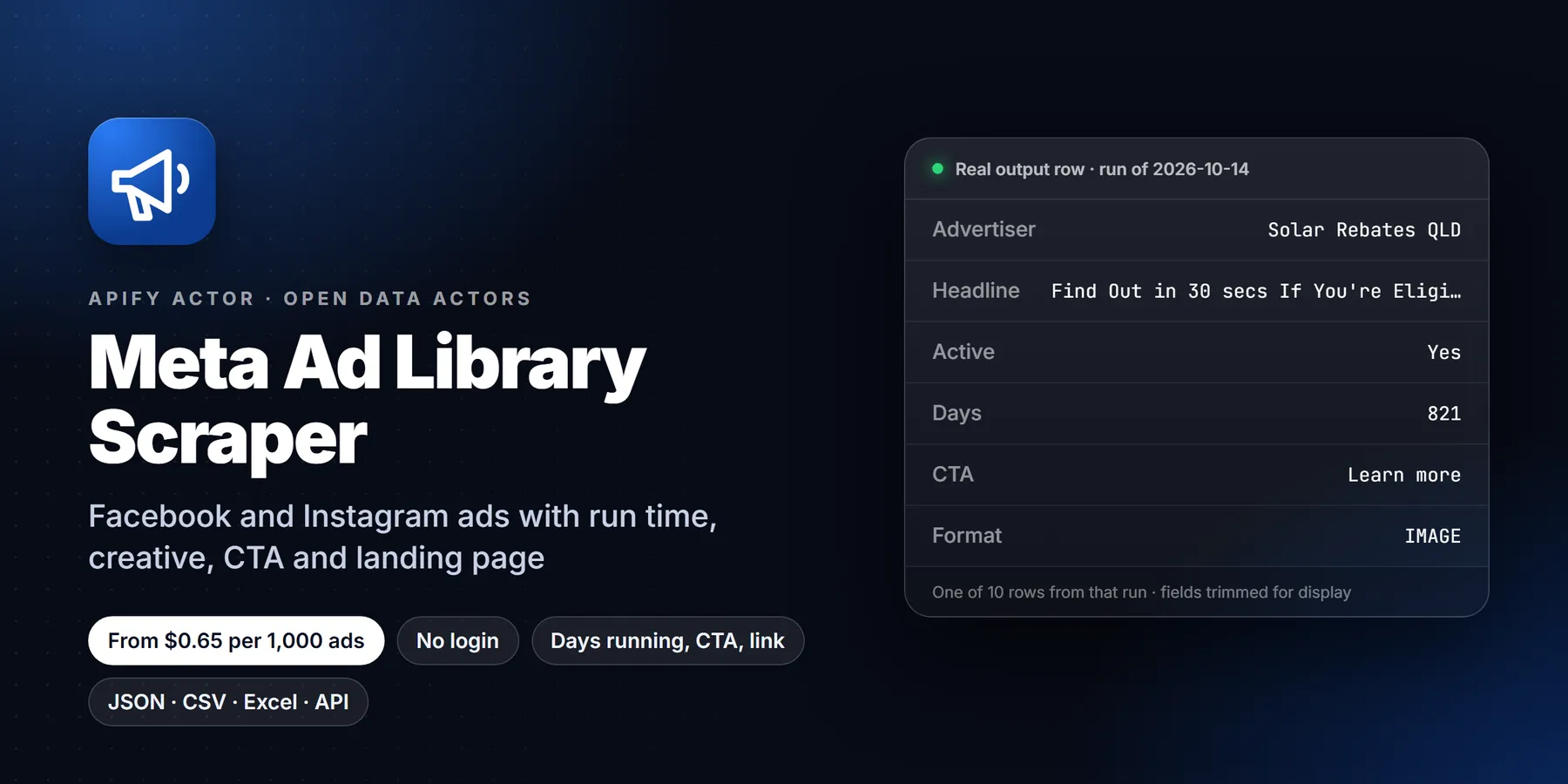
A real row from a test run on 2026-10-11 (build 0.1.6). The CDN URLs are shortened with ... and only the first image URL is shown; nothing else is changed.
This row was chosen on purpose because it shows a common surprise: the text fields hold {{product.name}} style placeholders. That is what the Library publishes for catalog (dynamic product) ads, where Meta fills in the product at delivery time. In this 30-ad test run, 16 ads were of that kind. See the FAQ.
Input options
No field is required by the form, but a run needs at least one target: a search term, a Page id or a Library URL (startUrls). A completely empty input runs the prefilled demo search (running shoes); input that has only unusable targets stops with the message Nothing to search. You can mix all three kinds in one run; each is searched in turn and maxItems is the total across all of them.
| Input | Default | What it does |
|---|---|---|
searchTerms | none | Keywords or advertiser names, one per line, for example running shoes |
pageIds | none | Numeric Facebook Page ids (the view_all_page_id value in an Ad Library URL). Returns the ads that Page runs |
startUrls | none | Paste any facebook.com/ads/library/?... URL. Its own filters are used as they are (see "Filters & URL input") |
libraryUrls | none | Same as startUrls, kept for older runs |
country | US | Two-letter country code, or ALL |
activeStatus | active | active (running now), inactive (ended) or all |
adCategory | all | Same as adType, named as other scrapers do: all, political_and_issue_ads, housing, employment, credit. Overrides adType when not all |
adType | all | all, political, housing, employment or credit. Political and issue ads add Meta's published spend and impression ranges |
mediaType | all | all, image, video, meme or none |
dateFrom, dateTo (or minDate, maxDate) | none | YYYY-MM-DD. Only ads whose start date is on or after / on or before the date, checked on every row |
platforms | all | Any of facebook, instagram, audience_network, messenger, threads |
languages | none | Language codes such as en, es. The Library filters by them |
sortBy | default | default, relevance (the Library's relevancy ranking) or impressions (ranks by total impressions; the Library only publishes impressions for political and issue ads) |
fetchDetails | false | Adds the details object to each row. No extra requests, no extra charge |
maxItems | 100 | Total ads to deliver, 1 to 50,000 |
onlyNewSinceLastRun | false | Skip ads delivered by an earlier run that used the same state store |
stateStoreName | meta-ad-library-seen | Named key-value store that remembers delivered ad ids |
proxyConfiguration | Apify residential proxy, US | See "Proxy" below |
The country, status, type, media, date, platform and language filters apply to searchTerms and pageIds. A pasted Library URL carries its own filters.
Filters & URL input
- Paste a URL. Put any Ad Library search URL in
startUrlsand run it. Read from the URL:active_status,ad_type,country,q,search_type,view_all_page_id,media_type,start_date[min],start_date[max],sort_data,publisher_platformsandcontent_languages. Links that are not Ad Library search URLs are skipped and listed in the run summary. - Advertiser Pages.
pageIdstakes the numeric Page id or an Ad Library URL withview_all_page_id. Facebook links that only contain a vanity name (facebook.com/nike) are skipped, because the id cannot be read from them without a login. - Dates. The Library's own date filter matches ads delivered inside the range, so it also returns ads that started earlier. This actor drops those and keeps only ads whose
start_dateis insideminDatetomaxDate. - Sorting.
relevancereorders results.impressionsis accepted by the Library but only changes the order for political and issue ads, the only ads with published impressions. A sort by newest is not offered because the Library has no such sort. - Platforms and languages. Both are applied by the Library itself, and the counts it reports change accordingly.
Input examples
Every ad one advertiser runs, active and ended:
Video ads on Instagram for two keywords, started this year, in the United Kingdom:
A search you built in the Ad Library website, pasted as it is:
A daily watch list that returns only new ads:
Proxy
Meta rate-limits datacenter IPs on the paging call, so a datacenter run usually gets only the first page (about 30 ads). The default is therefore Apify residential proxy with a US exit, and the form is prefilled the same way. In a test with the proxy turned off, a run returned 26 ads in 132 seconds; with the residential default the same query returned 30 ads in 8 to 10 seconds. Keep the default unless you have a reason to change it.
Pricing
Pay per event. There is no subscription and no rental fee for this actor.
| Event | Price (all Apify plans) |
|---|---|
| Ad extracted (one per ad row delivered) | $0.00065 |
| Actor start (one per GB of run memory, minimum one) | $0.00005 |
The default run memory is 4 GB, so the start costs $0.0002 per run unless you lower the memory in the run options.
Worked examples at the default memory:
| Ads delivered | Cost |
|---|---|
| 100 (the form default) | 100 x $0.00065 + $0.0002 = $0.0652 |
| 1,000 | $0.6502 |
| 10,000 | $6.5002 |
| 50,000 (the maximum for one run) | $32.5002 |
A daily watch run that finds 40 new ads a day delivers 1,200 ads in 30 days: 1,200 x $0.00065 + 30 x $0.0002 = $0.786.
Apify's free plan includes $5 of monthly platform credit, which covers about 7,600 ads with this actor.
What is not charged: duplicates inside a run (the same ad found by two search terms is delivered once) and ads skipped by only-new mode. To cap spend, set Maximum cost per run in the run options; the actor checks the remaining budget before each ad and stops cleanly when the limit is reached.
How to run it
In Apify Console
Open the actor, fill in the form and press Start. Rows appear in the Output tab while the run is going. The status line shows the current target and how many ads it has delivered, with the Library's approximate total when Meta reports one. When the run ends, use Export for JSON, CSV, Excel, XML or HTML.
From the API or a client library
Set APIFY_TOKEN to your token from Apify Console > Settings > API & Integrations.
Python (pip install apify-client)
JavaScript / Node.js (npm install apify-client)
On a schedule
Create a schedule in Apify Console (Schedules > Create new), add this actor with your saved input, and pick a cron expression such as 0 6 * * * for 06:00 every day. Turn on onlyNewSinceLastRun so each run returns, and charges for, only ads you have not received yet.
With n8n, Make, Zapier or AI agents
Start the actor with the Apify API (POST /v2/acts/<actor>/runs) or the Apify node in n8n, Make or Zapier, wait for the run, then read GET /v2/datasets/<id>/items. Any MCP-capable agent can call it as a tool through the Apify MCP server. Every row has a stable adArchiveId for upserts. Webhooks work as for any Apify actor: add one for the "run succeeded" event and your endpoint receives the run id and dataset id when the data is ready.
Watch mode (new ads only)
Turn on onlyNewSinceLastRun and keep the same stateStoreName between runs. The actor stores the id of every ad it delivers in that named key-value store. On later runs, ads already in the store are skipped and not charged, so each run returns only new ads.
- Use one store name per watch list, for example
shoe-brands-watch. Two lists sharing a store would hide each other's overlaps. - An ad is recorded only after its row is pushed and charged. The store is saved every 50 ads and again at the end, and also when a run is aborted.
- Watch mode reports new ads. It does not report ads that ended; for that, run with
activeStatus: "all"and compareisActiveandendDatebetween exports.
Run summary record
Each run writes a record named OUTPUT to its key-value store:
| Key | Meaning |
|---|---|
targets | How many search terms, Pages and URLs were processed |
adsDelivered, chargeCalls | Rows written and events charged (these match) |
adsDuplicate, adsSkippedAlreadySeen | Ads not delivered, and why |
chargeLimitReached | True when your maximum cost stopped the run |
perTarget | For each target: the Library's reported total, ads delivered and pages read |
warnings | Plain-language notes, for example a target that failed |
Limits and honest caveats
- Only what the Library publishes. No audience targeting, no exact spend for commercial ads, no clicks, conversions or other performance data. Meta does not make those public.
- Spend, impressions and reach are ranges, and only for some ads. Meta publishes them for political and issue ads and in some regions. For ordinary commercial ads those fields are null.
- Catalog ads show placeholders. Dynamic product ads are published with
{{product.name}}style text. The actor passes that through and does not guess the product. - Media links expire. Image and video URLs are Meta CDN links with a limited life.
- Rate limits and captchas. The actor pauses 0.6 to 1.2 seconds between pages, retries the first page up to 3 times and later pages up to 5 times with exponential backoff, and waits longer when Meta signals a rate limit. If Meta asks for a captcha on the run's IP, the actor does not attempt to solve it: it stops that target, records a warning and moves on to the next one.
- Very large result sets. One target is read for at most 2,000 pages, and one run delivers at most 50,000 ads. Split bigger jobs by date range, country or Page.
- Meta can change the Library at any time, which can break or limit results until the actor is updated.
New to Apify? Create a free account and run this Actor in under a minute. Some links are affiliate links.
Related actors
More tools from the same publisher that fit this workflow:
- Website Tech Stack Detector: detect the CMS, frameworks and hosting behind any site
- Technical SEO Audit: crawl a site for a 0-100 technical SEO score
- Sitemap Extractor & Broken Link Checker: list every sitemap URL and check for broken links
- WHOIS & Domain Lookup: WHOIS/RDAP, DNS, subdomains and SSL for a domain
- Company Enrichment by Domain: enrich a domain with socials, emails and tech stack
- Website Email Extractor: pull emails, phones and socials from each business website
Use from AI agents: every actor here is callable through the Apify MCP server (mcp.apify.com) and our open-data-actors MCP endpoint.
FAQ
Do I need a Facebook account or cookies? No. The actor does not log in and you supply no cookies.
Why is residential proxy the default? Meta rate-limits datacenter IPs after the first page of results. With residential IPs the actor pages through large result sets.
Why did I get fewer ads than the Library's result count? The count in the Library header includes variations and can shrink as ads end. Also check maxItems, active status and country filters, and look at OUTPUT.perTarget to see how many pages were read for each target.
Why do some ads have {{product.name}} as the title? They are catalog ads. Meta publishes the template, not the product each viewer saw. linkUrl, caption, the media URLs and the advertiser fields are still real.
Does it give exact spend? Only where Meta publishes it, as the ranges Meta shows (political and issue ads). Commercial ads have no public spend, so those fields are null.
Can it get ads from a Page URL? Use the Page's numeric id in pageIds, or paste a Library URL that already filters to that Page. To find the id, open the advertiser in the Ad Library and copy the view_all_page_id value from the address bar.
What does variationsCount mean? The Library groups near-identical versions of an ad under one entry. The count tells you how many versions are in that group. Advertisers testing many versions of one creative show a high number.
One of my targets failed. Did I lose the run? No. A failed target is recorded in OUTPUT.warnings and the run continues with the next target. The run is marked failed only when no ads at all could be fetched.
How fast is it? A 30-ad test run on 2026-10-11 finished in about 8 seconds. Larger runs add roughly a second of deliberate pause per page.
Troubleshooting
| Symptom | Likely cause and fix |
|---|---|
Run fails with Nothing to search | The input had no search terms, Page ids or Library URLs. Add one |
Run fails with No ads could be fetched | Every target failed, usually because the IP was rate-limited. Keep the residential proxy default and try again |
| Only about 30 ads per target | The proxy was switched to datacenter or turned off. Restore the residential default |
| Warning mentions a captcha | Meta challenged that IP. Run again; a new run gets a different residential IP |
| Zero ads for a real advertiser | Check country (try ALL) and activeStatus (try all) |
| Watch-mode run returns everything again | The stateStoreName changed or the store was deleted. Keep the name identical between runs |
A pageIds entry is ignored | Page ids must be numeric. A Page name or username is not an id |
Terms and responsible use
- Source: the public Meta Ad Library, which Meta publishes for transparency. The actor uses no login and no cookies, and never touches private profiles.
- Personal data: the only person-or-business identifier in the output is the advertiser Page name and id that the Library itself shows. Use of the data must comply with the GDPR/CCPA, Meta's Terms and the law in your country.
- This actor is independent and not affiliated with or endorsed by Meta. Meta can change the Library at any time, which can break or limit results. Do not use the data to harass, to profile private individuals, or to run anything deceptive.
- Be reasonable with volume: the actor already paces its requests and backs off when Meta rate-limits.
More resources
- Guide & examples: mamoo85.github.io/open-data-actors/meta-ad-library.html
Works well with
Other actors from Detroit Web Agent - Open Data that pair with this one:
- Shopify Store Leads: find the Shopify stores behind the advertisers you found.
- Company News Monitor: follow news coverage of advertisers whose campaigns you track.
Changelog
- 2026-10-09: First version (private).
- 2026-10-11: Form prefill now matches the residential proxy default; added
pageProfileUrl,pageProfilePictureUrlanddaysRunning(build 0.1.6). - 2026-10-12: README expanded: full field table, sample output, pricing examples, API and scheduling guides, limits, FAQ and troubleshooting.
- 2026-10-13: Added a Run in 30 seconds section with a one-click prefilled run link, saved use-case presets, cross-links to pairing actors and Store title and search description reworded around how buyers search.
- 2026-10-13: Added
startUrls(paste any Ad Library URL),minDate/maxDate,adCategory,sortByandfetchDetails; every row now also has flat snake_case fields (body_text,cta_text,link_url,video_hd_url,ad_library_urland more); dates are checked on each ad's start date.
Support
Missing an ad that the Library shows, a field that parsed wrongly, or need a field added? Open an issue on this actor's Issues tab with the run URL and what you expected. The run URL lets us see the exact input and the OUTPUT record.
Need more than the data?
This actor is built by Detroit Web Agent, a small Detroit studio that builds websites, lead pages and simple data tools for small businesses. If you want this data wired into a dashboard or an alert, get in touch.
Built and maintained by Detroit Web Agent - Open Data (Detroit, Michigan). Questions, bugs or a field you need: open an issue on this Actor's Issues tab and we will reply there.
Use it from AI assistants (MCP)
Meta Ad Library Scraper works as a tool for AI assistants through the official Apify MCP server. Add this server URL to any MCP client (Claude Desktop, Claude Code, Cursor, ChatGPT connectors, VS Code):


