
Price & Stock Monitor for Shopify Stores: Competitor Tracking
Pricing
from $0.50 / 1,000 product rows
Price & Stock Monitor for Shopify Stores: Competitor Tracking
Monitor competitors' Shopify stores: new and removed products, price drops and rises, sales started or ended, back in stock, sold out since your last run, with an HTML report. Prices, stock, variants and SKUs per product. Obeys robots.txt. $0.50 per 1,000 products + $0.002 per store read. Free demo.
Pricing
from $0.50 / 1,000 product rows
Rating
0.0
(0)
Developer

Wisekit
Maintained by CommunityActor stats
0
Bookmarked
2
Total users
1
Monthly active users
16 hours ago
Last modified
Categories
Features
Share
Know the morning a competitor cuts prices, restocks or launches a product.
Track competitors' online stores built on Shopify and see what changed since your last run: new and removed products, price drops and rises, sales started or ended, back in stock and sold out, with an HTML change report. Use it for competitor price tracking, as a products scraper for a full catalogue export, or for back-in-stock alerts through Apify's schedules and integrations (email, Slack, webhook).
Enter a store domain and get every product with its prices, compare-at (was) prices, stock, variants, SKUs and image URLs. About $0.50 per 1,000 products plus $0.002 per store read; stores that can't be read are free. Try the Free demo first: no store is contacted and nothing is charged.
Measured on Apify (512 MB, 17 Nov 2026, whole run): 100 products in 4 seconds, 168 products in 5 seconds, 1,000 products from two stores in 6 seconds.
Not affiliated with or endorsed by Shopify Inc. You are responsible for making sure you have the right to collect and reuse the data you get with this Actor.
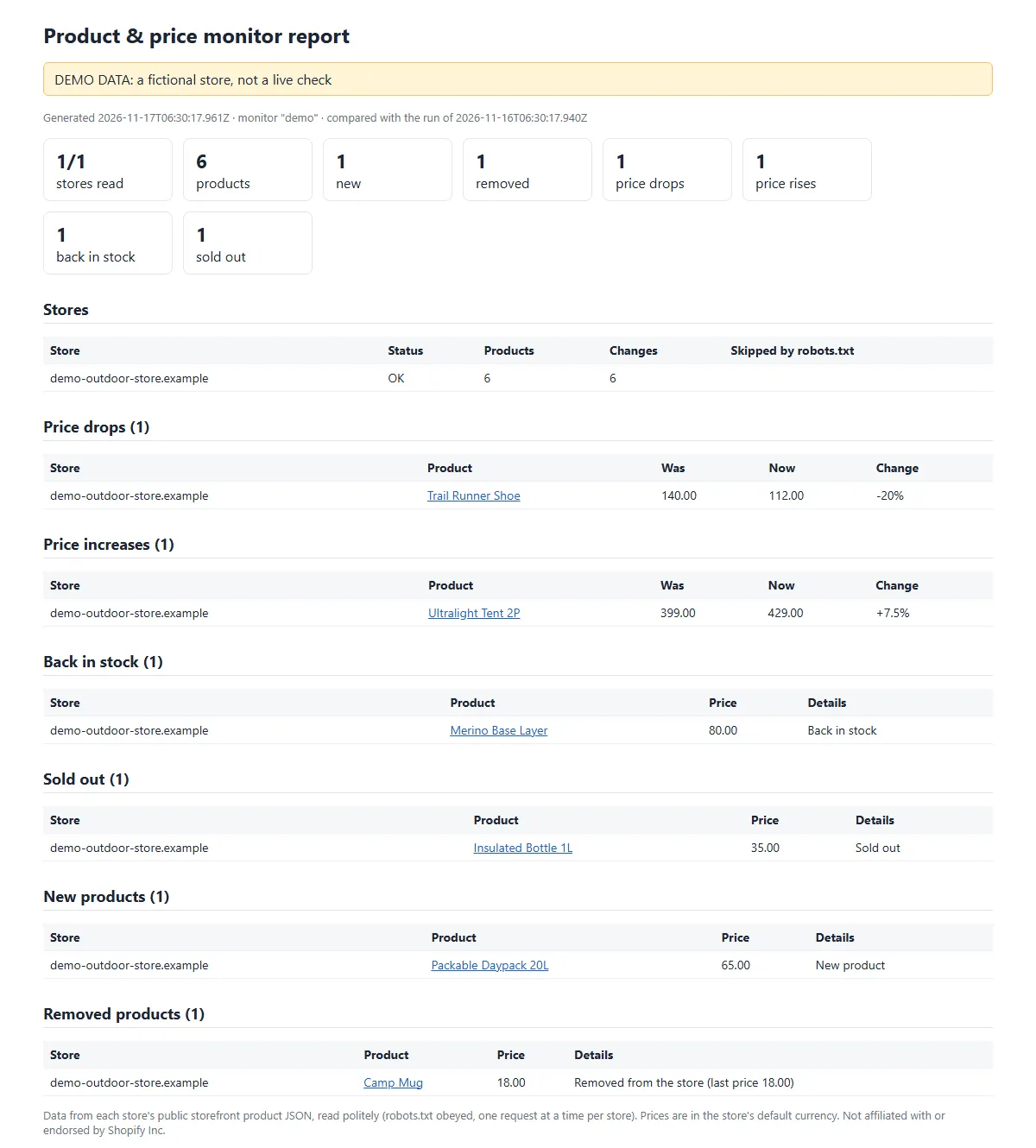
Sample change report from demo mode (fictional store, labelled DEMO DATA).
What you get
- Changes since the last run (set a monitor name): each product marked
new,changed,unchangedorremoved, with a one-line summary such as "Price down 140.00 → 112.00 (-20%); Sale started", old and new minimum price and % change, back in stock, sold out, sale started or ended, and which variants changed. - HTML change report (REPORT): price drops, price rises, back in stock, sold out, new and removed products, and the status of every store, ready to share.
- Only the changes, if you want: tick Only output changed products and unchanged products are neither output nor charged on repeat runs.
- One row per product with every variant inside: title, URL, vendor, product type, tags, dates, min and max price, on sale and biggest discount, in stock, SKUs, compare-at prices, option values, first image URL.
- Prices in the store's own currency: stores that sell abroad show each visitor prices in their local currency. The Actor asks for the store's home country (from its public /meta.json), so an Australian store gives Australian-dollar prices, as on its website. Each row has a
currencyfield saying which currency its prices are in. - Polite, honest reading: reads only each store's public product JSON and its public store info (/meta.json), obeys robots.txt (including Crawl-delay), at most one request per second per store, no proxies, no login, no browser.
- Works for AI agents and the API: only
storeUrlsis required, e.g.{"storeUrls":["allbirds.com"]}. The free demo is{"storeUrls":["demo"],"demoMode":true}. - SUMMARY as JSON per store (status, products read, change counts) and a one-line result in the run's status message.
Why one row per product and not per variant: a clothing product often has 20 to 60 size and colour variants, so per-variant rows would multiply your cost and bury the changes. Every variant is still in the row (variants), and variant-level price and stock changes are listed in the change fields.
Who uses it
- Ecommerce brands: schedule a daily run on your three to five closest competitors and get only what changed: price drops, new launches, items back in stock or sold out.
- Agencies: run one monitor per client and share the HTML change report in your weekly update.
- Dropshippers and resellers: spot a supplier's or rival's sale starting, products being removed, and sizes selling out.
- Pricing and merchandising teams: export a full catalogue with prices, compare-at prices and SKUs for a one-off price comparison.
- AI agents and automations: call it with just
storeUrlsfrom an agent or through Apify's Make, Zapier or n8n integrations, and usechangeSummaryfor a ready-to-read sentence per product.
How to use it
- Enter one or more stores in Store URLs or domains. Bare domains (
allbirds.com), full URLs, collection URLs (https://kith.com/collections/footwear) and product URLs all work. - Optional: set Monitor name (e.g.
competitors; it needs at least one letter a-z or digit) and schedule the Actor (Apify Console > Schedules). The first run saves the baseline; each later run reports what changed. - Optional: tick Only output changed products to get just the changes on repeat runs (unchanged products aren't output or charged).
Try it for free first with Free demo: a fictional store read twice from bundled data, with every kind of change, at no charge.
Input example (also for AI agents and the API)
Only storeUrls is required. Other fields: collectionHandles (read only these collections of each plain-domain store), includeDescription (add the product description HTML, off by default), demoMode.
Output example (one row, shortened)
Prices are numbers in the store's default currency, as the store's public product JSON shows them.
How much does it cost to monitor a Shopify store?
Pay per event, two events:
| Event | Price | When |
|---|---|---|
| Product row | $0.0005 | Each product row in the dataset ($0.50 per 1,000). Removed-product rows on monitor runs count as rows. |
| Store read | $0.002 | Each store read successfully: one per started 1,000 products read, or one per started 30 seconds of reading time if that is more (only on slow stores). Reading time is the time spent on requests that worked plus the pause between requests: 1 second, or the Crawl-delay the store's robots.txt asks for. Waits after a store asks us to slow down (HTTP 429) or after an error, failed requests, and writing rows to the dataset are not counted. |
Examples: one store, 1,000 products = $0.502. A daily monitor of a 5,000-product store with Only output changed products and 20 changes = $0.01 + $0.01 = $0.02 per run.
- Stores that can't be read (blocked, password protected, not a Shopify store, disallowed by robots.txt, robots.txt unreadable, or an error on the first page) are free: you get a status row explaining why, at no charge. A store with an empty catalogue that was read successfully counts as read (one store read).
- If a store stops responding part-way through (for example it starts refusing or rate-limiting us after some pages), the products read before that are delivered and charged (their rows and the store read), and a free status row says why the read stopped.
- Two entries that lead to the same store (for example an old domain that redirects to the new one) are read once and charged once; the other entry gets a free
duplicate_storestatus row. - With Only output changed products, unchanged products on repeat runs are not output or charged; you pay the store read and the changed rows.
- The demo is free.
- The run stops when it reaches the maximum charge you set for the run.
Apify free-plan accounts can read 1 store and up to 100 products per run; any paid Apify plan unlocks up to 50 stores and 25,000 products per store per run. On a paid plan, $5 buys about 9,000 product rows with their store reads.
Get a daily price-drop alert in 4 steps
- Enter your competitors' stores, set Monitor name (for example
competitors) and tick Only output changed products. Click Save as a new task. - On the task, add a Schedule: daily at 07:00 in your time zone. The first run saves the baseline; each later run lists only what changed.
- Under the task's Integrations, add Slack, email or a webhook on "Run succeeded" so the changed rows (or a link to the REPORT) come to you.
- Open REPORT in the run's Output tab for the HTML change report: price drops, rises, back in stock, sold out, new and removed products.
A daily monitor of a 5,000-product store with 20 changes a day costs about $0.02 a run, or about $0.60 a month.
How it reads stores (and what it never does)
- Reads only each store's public storefront product JSON (
/products.jsonand/collections/{handle}/products.json) by plain HTTP. No browser, no login, no API tokens, no proxies. - Reads robots.txt first and obeys it (Disallow and Allow rules with wildcards, and Crawl-delay). Paths a store disallows are skipped and listed in the summary and report. If robots.txt can't be read (a server error, or a web page where the rules should be), the store is skipped (
robots_unavailable) and not charged; a store with no robots.txt at all (HTTP 404 or a similar "not found" answer) has no rules. - Polite: one request at a time per store, at least 1 second apart (longer if the store asks for it). If a store asks us to slow down (HTTP 429), the Actor waits as asked and retries at most twice per request, and at most 6 times and 60 seconds of waiting per store in a run (a store asking for 60 seconds or more at once is not waited for); after that it stops reading that store for the run and marks it
rate_limited. If a store refuses access (HTTP 403 or 430) or shows a bot check, the Actor stops reading that store at once and marks itblocked. Password-protected stores are markedpassword_protected; sites without public product JSON are markednot_shopify. - Identifies itself honestly with the user agent
WisekitProductMonitor/1.0. - Outputs image URLs only (images are never downloaded). No reviews, customer or account data.
- Monitor state is saved only in a key-value store in your own Apify account, named
product-monitor-<monitor name>.
Is it legal to monitor competitor prices?
The Actor reads only the product data each store publishes for every visitor (its public product JSON and store information), obeys robots.txt, identifies itself honestly, waits between requests and stops at once when a store refuses. It collects product and price facts, not data about people. Price monitoring is a common business practice, but the rules differ by country and by site, and some stores' terms of service restrict automated reading. You are responsible for checking that your use is lawful. This is not legal advice.
Limits
- Up to 50 stores per run, up to 25,000 products per store (default 1,000).
- About 1.5 to 2 seconds per 250 products per store; stores are read in parallel (up to 5 at a time). Measured on Apify at 512 MB on 17 Nov 2026, whole run including start-up: 100 products from allbirds.com in 4 seconds; 168 products from deathwishcoffee.com in 5 seconds; 1,000 products from two stores (kith.com and gymshark.com, 500 each) plus one non-Shopify domain in 6 seconds; the free demo in 3 seconds. Measured from our own computer the same day: 5,000 products from one store in about 32 seconds.
- Product URLs are looked up in the store's product feed (so you get stock too), reading until all are found or the "Max products per store" limit is reached. In a very large store, raise that limit if a product isn't found.
- Removed products are only reported when the whole store (or collection) was read on this run and the last one, so a product cap or an interrupted read never shows false removals.
- Some stores block automated reading or disallow it in robots.txt. Those stores are reported, not charged, and not retried from other IP addresses.
- Redirects are only followed to public store domains, and only the redirect of robots.txt may lead to another domain (the store's main domain).
FAQ
Can I monitor only some products? Yes: enter product or collection URLs instead of the store domain, or use collectionHandles.
How do I get alerts? See Get a daily price-drop alert in 4 steps above.
Does it work on any store? It works on stores built on Shopify that publish the standard storefront product JSON and allow it in robots.txt. Other sites are reported as not_shopify at no charge.
Use it from the API or an AI agent
Only storeUrls is required. Python (pip install "apify-client>=3"), printing only what changed since the last run:
curl, in one request (add ?maxTotalChargeUsd=1.00 to cap the cost):
AI agents (MCP): add Apify's MCP server to Claude Desktop, Claude Code, Cursor or another MCP client with this Actor as a tool:
Prompts to try: "Run the product price monitor in demo mode and list the price drops." (free) or "Read allbirds.com with the product price monitor, max 100 products, and list the five cheapest products in stock with their currency." The run's status message gives a one-line result.
Other Wisekit Actors
- Store Qualifier for Shopify Stores: which of these stores are worth monitoring? Shopify or not, country, catalogue size and price band for a list of domains, $0.004 per store.
- AI Brand Visibility Tracker: see whether ChatGPT, Perplexity, Gemini and Claude recommend your brand or your competitors.
Feedback and support
Found a bug, or want a field added? Open an issue on the Issues tab; we aim to reply within 24 hours. Ratings and reviews, good or bad, help other people find the Actor and help us improve it.
Changelog
- 17 Nov 2026: form instructions, daily alert recipe, API and agent snippets, demo screenshot.
- 0.1.6 (17 Nov 2026): prices always in the store's home currency, with a
currencyfield on every row (stores that sell abroad used to come back in USD). - 0.1 (16 Nov 2026): first release: products, prices, stock and variants, change tracking with a monitor name, HTML change report, free demo.


