
Store Qualifier for Shopify Stores: Country, Catalogue & Prices
Pricing
from $4.00 / 1,000 qualified stores
Store Qualifier for Shopify Stores: Country, Catalogue & Prices
Give it store domains. For each one: is it on Shopify, home country and currency, product count, min, max and median price in its own currency, sample products, and own label vs reseller. Reads only the store's public catalogue data, nothing else. Unreadable stores are free.
Pricing
from $4.00 / 1,000 qualified stores
Rating
0.0
(0)
Developer

Wisekit
Maintained by CommunityActor stats
0
Bookmarked
2
Total users
1
Monthly active users
39 minutes ago
Last modified
Categories
Features
Share
Turn a list of store domains into a ranked shortlist: which are on Shopify, where they sell, how big the catalogue is and what they charge.
Give it a list of online store domains. For each store you get one row: is it built on Shopify, its home country and currency, how many products it sells, its price range and median price in its own currency, and whether it mostly sells its own label or other brands. Optional, off by default: the generic business address a store publishes on its own site (info@, support@ ...), up to 3 per store, for a partnership, wholesale or support enquiry. One charge per store whose product catalogue was read ($0.004); stores that aren't on Shopify, or whose catalogue can't be read, are free. If a store redirects to its main domain, that domain is read instead.
Try the Free demo first: five fictional stores, no store is read and nothing is charged.
Use the results lawfully. This Actor reads only each store's public storefront data and returns facts about the store and its catalogue, plus, only if you turn it on, the generic business email addresses the store publishes on its own site. Some vendor and store names are names of people (a maker or owner trading under their own name), so treat them with the same care as any personal information. Check that your use of the results meets the laws and terms that apply to you. This Actor is not legal advice. Not affiliated with or endorsed by Shopify Inc.
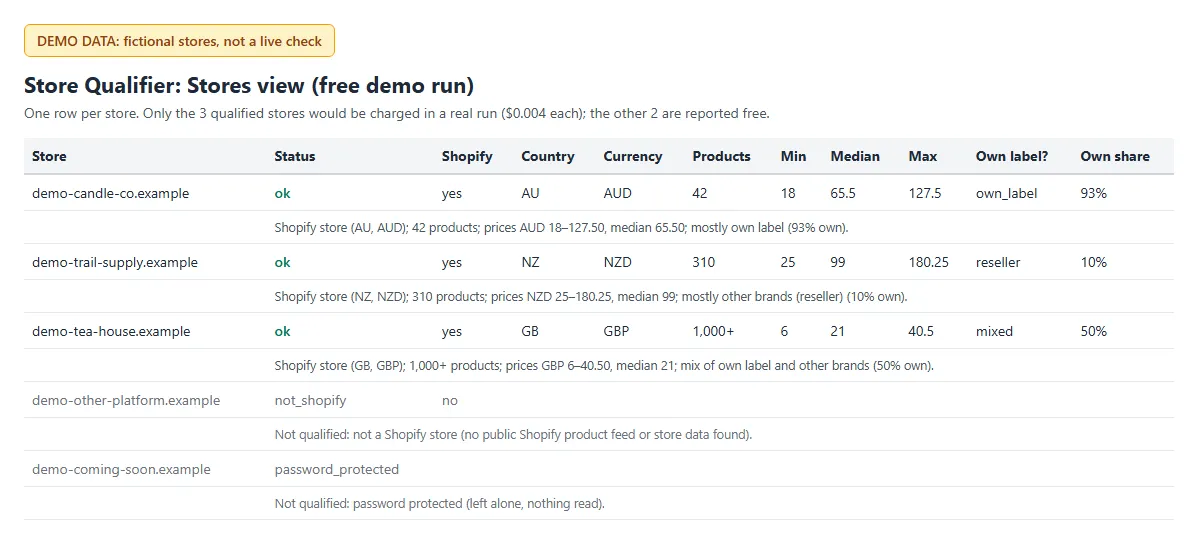
Sample output from demo mode (fictional stores, labelled DEMO DATA).
Who uses it
- Agencies and freelancers sizing a list of prospective client stores before a pitch: platform, market, catalogue size and price band in one table.
- App and SaaS sellers filtering a domain list down to Shopify stores in the countries they serve.
- Suppliers and wholesalers looking for stores that resell other brands (
ownLabelSignal: reseller) rather than make their own. - Investors and analysts checking catalogue size, price band and recent activity (
newestProductPublishedAt) across a set of stores. - AI agents and automations that need a yes/no "is this a Shopify store, and how big?" answer from one line of JSON.
What data do you get per store?
| Field | What it is |
|---|---|
status, summary | ok (qualified: catalogue read) or why the store was not qualified, and a one-line summary |
isShopify | true when the store runs on Shopify |
storeName | The name the store gives itself in its storefront data |
homeCountry, homeCurrency | The store's home country and currency, as the store states them |
productCount, productCountIsMinimum | Products in the public catalogue (counted up to 1,000; true means "at least") |
minPrice, maxPrice, medianPrice, currency | Price range and median product price, in the store's home currency |
sampleProductTitles, topProductTypes | Up to 5 product titles and the 3 most common product types |
ownLabelShare, ownLabelSignal, topVendors, vendorCount | Share of products whose vendor is the store itself: own_label (70% or more), mixed, reseller (30% or less), or single_other_vendor (one vendor name that differs from the store name, often the company's legal name or the owner's name). topVendors and vendorCount: vendor names the store lists in its public product feed (usually brands; on some stores a maker's or owner's own name) |
newestProductPublishedAt | When the newest product in the catalogue was published: a sign of an active store |
publicEmails, emailSource | Only with includePublicEmails on: up to 3 role-based business addresses (info@, hello@, support@ ...) on the store's own domain, and the page each was found on (same order). Empty otherwise |
demo | true only on free demo rows (absent on real runs) |
Export the dataset as JSON, CSV or Excel, or send it to Google Sheets through Apify's integrations.
How to qualify a list of stores
- Paste your store domains in Store domains or URLs, one per line. Bare domains (
example-store.com) and full URLs both work; only the domain is used. - Click Start. Five stores are read at a time; each takes about 4 seconds (usually 2 to 5 seconds more with public business emails on).
- Open the Stores table in the Output tab, sort by
productCountormedianPrice, and filter onstatus=ok.
Input
| Field | Default | Notes |
|---|---|---|
storeUrls | (required) | Domains or URLs, one per line. Up to 500 per run (3 on the Apify free plan). |
maxProductsPerStore | 1000 | 1 to 1,000. |
includePublicEmails | false | Also return public business emails (role-based, store's own domain, up to 3), +$0.002 per store with at least one. See "Public business emails". |
demoMode | false | Free demo: five fictional stores from bundled data, no store is read, nothing is charged, other fields are ignored. |
Example input: {"storeUrls": ["example-store.com", "https://www.another-store.com"]}
Free demo input: {"storeUrls": ["demo"], "demoMode": true}
Example row (fictional store)
How much does it cost to qualify a store?
$0.004 per store qualified (pay per event store-qualified, $4 per 1,000 qualified stores), charged only when the store's product catalogue was read (an empty catalogue that was read counts). With includePublicEmails on, $0.002 per qualified store where at least one public business email is returned (event contact-found); stores with none are not charged extra. Nothing else is charged. Shopify stores whose product feed can't be read (feed_unavailable: you still get the name, country and currency), stores that are not on Shopify, blocked, password protected, disallowed by robots.txt, rate limited, unreachable or excluded at their owner's request are free. Your maximum charge per run is respected, counting stores still being read. The free demo is free.
- Example: 100 domains, 60 on Shopify and readable: 60 × $0.004 = $0.24. The other 40 cost nothing.
- With public emails: the same 60 stores, 35 of them with a public business email: $0.24 + 35 × $0.002 = $0.31.
- Apify's free plan: up to 3 stores per run, so you can try it on real stores before you pay for anything.
- Speed: about 4 requests and 4 seconds per store (3 test stores, 17 Nov 2026), 5 stores at a time; usually 2 to 5 seconds more per store with public business emails on, up to about 20 seconds on a slow store (5 stores, measured locally 18 Nov 2026).
Public business emails
Off by default. Turn on includePublicEmails and, for each qualified store, the Actor reads at most 4 pages on the store's own website: the homepage, its contact page (/pages/contact or the contact page linked from the homepage) and the Shopify policy pages /policies/contact-information, /policies/refund-policy and /policies/privacy-policy. Each page is read only if the store's robots.txt allows it, at least 1 second apart, with the same honest User-Agent. It stops as soon as the contact page gives an address, or after 3 addresses.
- Only generic addresses the store publishes itself: the part before the @ must be a role such as info, hello, contact, support, help, care, customerservice, sales, shop, team, enquiries, wholesale, press or partnerships (an optional region suffix such as support-au is allowed). Transactional mailboxes (orders, returns, shipping, accounts, billing, admin) are not returned.
- Dropped: anything that could be a person's address (first names, initials, firstname.lastname), addresses on any other domain, and free mail addresses (gmail.com, outlook.com and the like), even when the store shows them. Only addresses in plain page text or
mailto:links are read; addresses a store has disguised or hidden from automated readers ("[at]" spellings, character codes, email-protection services) are skipped. - Stores that say no: if the homepage or a contact page asks not to receive unsolicited messages (for example "no solicitations"), none of that store's addresses are returned and
contact-foundis not charged. - No names, phone numbers or street addresses are returned.
- Your responsibility: use the addresses lawfully, and only for relevant, individual business enquiries. Publishing an address is not consent to every message. Laws differ by country. Australia's Spam Act 2003 requires consent for commercial email (consent can be inferred from a published address only in limited cases, for messages relevant to the recipient's business role), and it also restricts acquiring or using automatically collected address lists to send unsolicited commercial email. In the EU and UK, GDPR and ePrivacy/PECR rules apply, and a generic address of a sole trader or of a business named after its owner can still be personal data. In the US, CAN-SPAM sets rules for commercial email, including a working opt-out. Don't send unsolicited commercial email where the law forbids it. This is not legal advice.
- Store owners can ask for their addresses not to be collected: open an issue on the Issues tab with your domain. It is added to an exclusion list; the store can still be qualified, but its pages are never read for emails.
What it never does
- No names of people, no phone numbers or street addresses. Email addresses only with
includePublicEmailson, and only role-based addresses on the store's own domain (see above). - No pages beyond a fixed small set on the store's own site: robots.txt, the store's public
meta.jsonand its public product feed, plus the 4 email pages above when you turn that option on. A redirect is only followed to one of those. If a store redirects to its main domain, that domain is read instead; no other links are followed. - No login, cookies, proxies or browser. robots.txt is read first and obeyed; at least 1 second between requests, or the store's Crawl-delay; a store that refuses us, shows a bot check or is password protected is left alone at once.
- Your results stay in your own Apify dataset. We keep no copy, and the run log shows counts and statuses only.
Is it legal to check stores this way?
The Actor reads only data each store publishes for every visitor: its robots.txt, its public store information (meta.json) and its public product feed, and, only if you turn on public business emails, up to 4 of its own public pages (homepage, contact and policy pages). It obeys robots.txt, identifies itself honestly, waits between requests and stops at once when a store refuses.
It returns facts about stores and their catalogues, and, only if you turn it on, generic business email addresses that a store publishes on its own site. It never returns names or phone numbers. Some vendor names can be a person's name (see above).
Don't use the results to build mailing lists, or to send unsolicited commercial email or messages where the law forbids it; anti-spam laws such as CAN-SPAM, GDPR and ePrivacy rules, and Australia's Spam Act 2003 may apply.
Whether your own use of the results is lawful depends on what you do with them and where you are, so check the laws and terms that apply to you. This is not legal advice.
Use it from the API or an AI agent
Only storeUrls is required. Python (pip install "apify-client>=3"):
curl, in one request (waits for the run and returns the rows; add ?maxTotalChargeUsd=1.00 to cap the cost):
AI agents (MCP): add Apify's MCP server to Claude Desktop, Claude Code, Cursor or another MCP client with this Actor as a tool:
Prompts to try: "Run the store qualifier in demo mode and summarise the table." (free) or "Qualify these store domains and tell me which are on Shopify, their home country and median price: example-store.com, another-store.com." The run's status message gives the result in one line, for example "Qualified 3/5 stores (3 on Shopify)."
Qualify new stores every week (schedule recipe)
- In Apify Console, click Save as a new task with your input (for example the domains your team added this week).
- Add a Schedule to the task, for example every Monday at 07:00.
- Under the task's Integrations, add Slack, Google Sheets or a webhook on "Run succeeded" to send the Stores table where your team works.
Status values
ok, not_shopify, feed_unavailable, blocked, password_protected, robots_disallowed, robots_unavailable, skipped_crawl_delay, rate_limited, time_limit, duplicate_store, error, excluded_by_request, invalid_input, skipped_max_charge, skipped_plan_limit, skipped_run_limit. Only ok is charged.
Store owners
If you run a store and don't want it read by this Actor, open an issue on this Actor's Issues tab with your domain. It is added to an exclusion list and gets no further requests. If you only want your email addresses left out, say so: the store goes on a separate list and its pages are never read for emails.
Other Wisekit Actors
- Price & Stock Monitor for Shopify Stores: monitor the stores that qualify. Every product with prices and stock, and what changed since your last run.
- AI Brand Visibility Tracker: see whether ChatGPT, Perplexity, Gemini and Claude recommend a brand or its competitors.
Feedback and support
Found a bug, or want a field added? Open an issue on the Issues tab; we aim to reply within 24 hours. Ratings and reviews, good or bad, help other people find the Actor and help us improve it.
Changelog
- 18 Nov 2026: optional public business emails (
includePublicEmails, off by default): up to 3 role-based addresses on the store's own domain, plain text and mailto: links only, none when the store asks not to receive unsolicited messages, +$0.002 per store with at least one (contact-found); "Public business emails" view. - 17 Nov 2026: free demo mode (five fictional stores, no charge); form instructions; README with examples, API and agent snippets.
- 17 Nov 2026: first public release: qualifier only, $0.004 per store qualified.


