
AI Brand Visibility Tracker: ChatGPT, Perplexity & Gemini
Pricing
from $20.00 / 1,000 perplexity checks
AI Brand Visibility Tracker: ChatGPT, Perplexity & Gemini
Does ChatGPT, Perplexity, Gemini or Claude recommend your brand or your competitors? LLM brand monitoring for GEO/AEO: mention rate, rank in the answer, citations and share of voice, change since last run, and a client-ready HTML report. Official APIs. From $0.02 per check; failed checks free.

Find out whether AI assistants recommend your brand or your competitors when buyers ask them questions. This is LLM brand monitoring for GEO (generative engine optimisation) and AEO: you see your brand's visibility in ChatGPT, Perplexity, Gemini and Claude the way an SEO rank tracker shows your Google rankings.
Give it your brand, a few competitors and the questions your customers ask. It asks each AI with live web search turned on, then reports your mention rate, your rank in the answer, how often your website is cited, and your share of voice against each competitor. Schedule it weekly to see the change since the last run. Every run includes a ready-to-share HTML report.
Cost: from $0.02 per check (Perplexity) to $0.10 (Claude). Failed checks are free. On the Apify free plan, each run gives a free preview of up to 3 checks. Demo mode is free.
What you get:
- Mention rate: how often each AI names your brand
- Citation rate: how often your website is linked as a source
- Position: whether you're named first, second or later in the answer
- Share of voice: your share of all brand mentions compared with competitors
- Top cited domains: the sites the AIs trust for your topic, so you know where to get featured
- Change since last run: percentage-point changes, so you can track progress week by week
No browser automation and no scraping of chat apps. Every check uses the AI companies' official APIs, so results are stable and runs don't break when a chat interface changes.
Not affiliated with or endorsed by OpenAI, Perplexity, Google or Anthropic. Product names are used only to say which AI engines are checked.
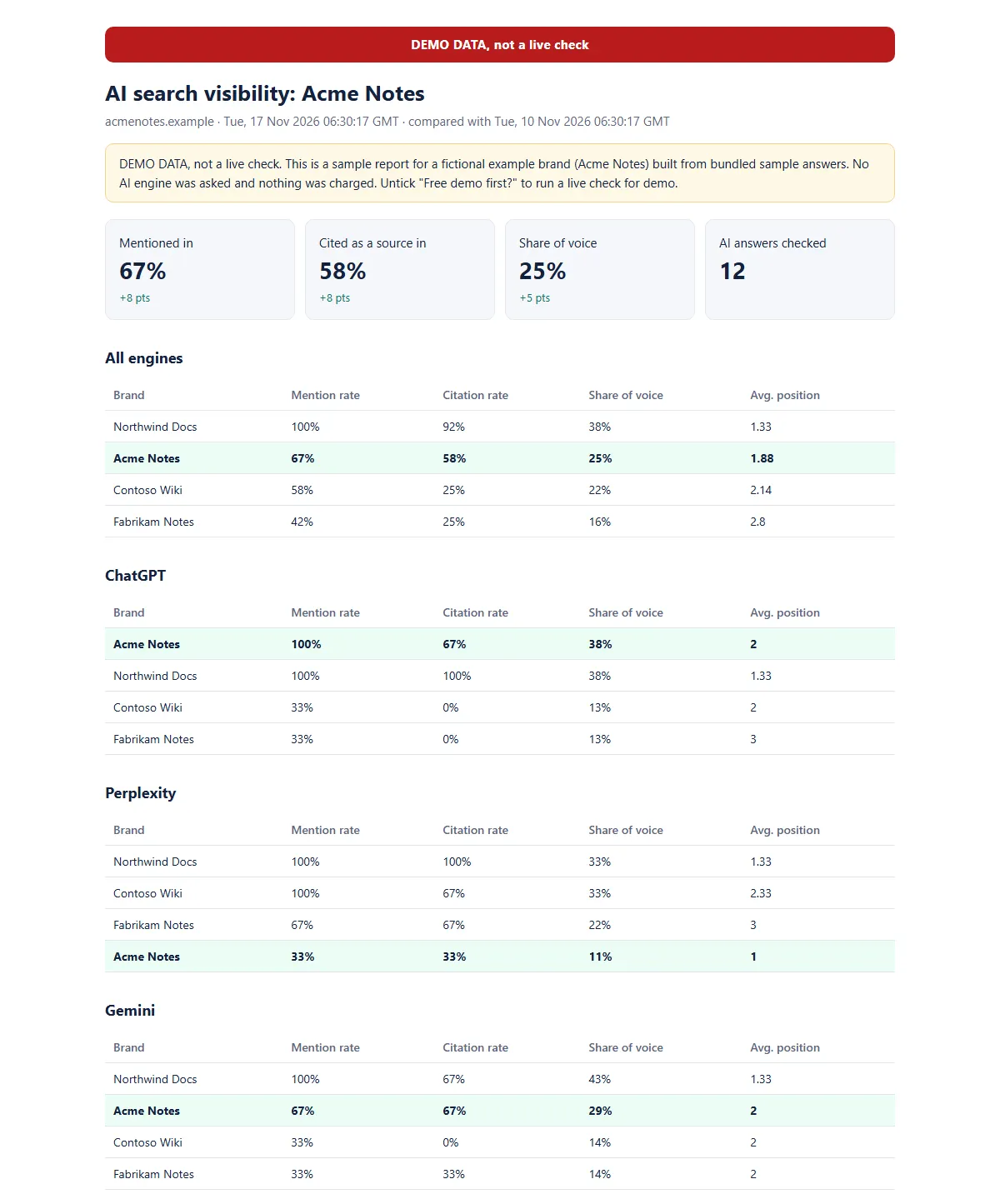
Sample report from demo mode (fictional brand Acme Notes, labelled DEMO DATA).
Quick start (2 minutes)
- Type your brand name and, in What you sell, a few words such as
CRM for small agencies. - Pick the AI engines to ask. Each engine shows its price per check.
- Click Start. The run log shows how many checks it will make and the most it can cost before anything is charged. When it finishes, open the Visibility report in the Output tab.
Everything else is optional. Add your website domain to measure citations, and competitors to see share of voice.
Try it free with demo mode
Not sure yet? Tick Free demo first? at the top of the input and click Start. In a few seconds you get the full output, the same dataset, HTML report and JSON summary as a real run, for a fictional example brand (Acme Notes) built from bundled sample answers. No AI engine is asked and nothing is charged. Everything in a demo run is labelled DEMO DATA, not a live check (each dataset row has demo: true). Untick it to check your own brand.
Use it from an AI agent (MCP) or the API
Agents can find and call this Actor through Apify's MCP server. Only brandName is required. Add category and the Actor writes 5 buyer-style prompts for you (for example "What is the best project management tool?"). Four of the five don't name your brand, so the mention rate shows whether the AI recommends you unprompted. Without category, it asks 5 questions about the brand itself, which shows what the AI says about you rather than whether it recommends you, so add a category whenever you can.
Minimal input:
Free demo call (no AI calls, no charge): {"brandName": "demo", "demoMode": true}.
- Engine names:
chatgpt,perplexity,gemini,claude(lowercase). Any other name is rejected before the run starts, so nothing is charged. - The answer in one line: the run's status message gives the result, for example "Checked 10 AI answers. Acme was mentioned in 40% and its site cited in 20% (ChatGPT 60%, Perplexity 20%). Most-mentioned competitor: …". The log states the maximum cost before the first check.
- What it returns: one dataset row per AI answer (
brandMentioned,brandRank,brandCited,competitorsMentioned,citedDomains,promptSource,error), plus theSUMMARYkey-value record with mention rate, citation rate and share of voice overall, per engine and per prompt.SUMMARY.promptSourceis"auto"when the Actor wrote the prompts and"user"when you passedprompts;SUMMARY.promptsCheckedlists them. - What it costs: 5 auto prompts × (ChatGPT $0.05 + Perplexity $0.02) = $0.35. If you leave
enginesout, it checks ChatGPT and Perplexity only. Add"gemini"and"claude"to check all four: 5 × $0.28 = $1.40. Failed checks are free. - Permissions: it runs with limited permissions (it only uses its own storage), so it works with Apify's prepaid agent tokens.
- Pass your own
promptsto check specific questions; they always replace the auto prompts. Prompts that name your brand (like the brand-only fallback) almost always get a mention, so judge visibility on prompts that don't name it, such as "What is the best {category}?".
MCP client config (Claude Desktop, Claude Code, Cursor and other MCP clients; Apify's MCP server with only this Actor as a tool):
Prompts to try:
- "Use the brand visibility tracker in demo mode and summarise the report." (free)
- "Check whether ChatGPT and Perplexity recommend Acme as a project management tool. Keep the cost under $0.50." (5 prompts × $0.07 = $0.35)
Python (pip install "apify-client>=3"):
curl, free demo in one request:
Who it's for
- SEO and GEO agencies: monthly AI-visibility reports for clients
- Marketing teams: track whether content and PR work moves AI recommendations
- Founders: see what ChatGPT says when someone asks for "the best tool for X"
How to use it
- Enter your brand name and website domain (a full URL works too).
- Add competitors, one per line, as
Name | domain.com. Aliases can be added after a second|, for exampleHubspot | hubspot.com | HubSpot CRM. - Add the prompts your buyers ask, such as "What is the best CRM for a small agency?". Use 5–20 for a solid picture. Or leave prompts empty and enter a product category (for example
CRM for small agencies): the Actor then writes 5 buyer-style prompts for you, at no extra cost. - Pick the AI engines to check.
- Optional: set a monitor name (for example
acme-weekly) and schedule the Actor. Each run is then compared with the previous one.
Example input
What data do you get?
Dataset: one row per AI answer
| Field | Meaning |
|---|---|
engine, model | Which AI answered |
prompt, repeat | The question asked |
promptSource | user if you wrote the prompt, auto if the Actor generated it from your brand and category |
brandMentioned, brandMentionCount | Whether and how often your brand was named |
brandRank | Your position among all brands named (1 = first) |
brandCited, brandCitationRank | Whether your domain was linked, and at what position |
competitorsMentioned, competitorsCited | Which competitors showed up |
mentionOrder | Every tracked brand in the order it appeared |
citedDomains, sources | Every source the AI used |
answerText | The full answer (turn off with includeAnswerText) |
error | Set if this check failed. Failed checks are not charged |
demo | true only on demo-mode sample rows (absent on real checks) |
Export it as JSON, CSV or Excel, or connect it to Google Sheets, Looker Studio or Zapier.
Key-value store
REPORT: a ready-to-share HTML report with summary cards, a table per engine and per prompt, and the top cited domainsSUMMARY: the same numbers as JSON, includingchangeSinceLastRun,promptSourceandpromptsChecked
How much does it cost to track AI visibility?
You pay per AI answer checked. Failed checks and demo-mode runs are free.
| Event | When it applies | Price |
|---|---|---|
| ChatGPT check | ChatGPT answer, using our API keys | $0.05 |
| Gemini check | Gemini answer, using our API keys | $0.11 |
| Perplexity check | Perplexity answer, using our API keys | $0.02 |
| Claude check | Claude answer, using our API keys | $0.10 |
| Bring-your-own-key check | Any engine, using an API key you supply | $0.01 |
Free Apify plan: free preview
On an Apify free plan, each run gives you a free preview of up to 3 checks on ChatGPT, Perplexity and Gemini, using our API keys, and preview checks are not charged. Claude is not included. The report shows a notice when the preview limit applies.
For the full report, with every prompt, every engine and Claude included, either:
- upgrade to any paid Apify plan, or
- add your own API keys in the input. Checks on your own keys are never limited, even on the free plan.
Example: 10 prompts × 4 engines = 10 ChatGPT checks ($0.50) + 10 Gemini checks ($1.10) + 10 Perplexity checks ($0.20) + 10 Claude checks ($1.00) = $2.80 per run. Weekly tracking costs about $12 a month.
Set Maximum cost per run in the run options. The Actor stops cleanly when it reaches your limit.
Bring your own keys
If you already pay for OpenAI, Perplexity, Google AI or Anthropic API access, paste your keys into the optional secret fields. You then pay only the $0.01 bring-your-own-key fee, and the AI cost goes to your own account. Keys are stored encrypted and never logged.
Privacy
Your prompts, brand names and results stay in your own Apify storage. To keep pricing fair, the Actor records anonymous usage figures for each run (token counts, number of checks and cost). These never include your prompts, brands or answers.
Is it the same answer my customers see in ChatGPT?
Close, but not identical. The Actor uses the official APIs with web search turned on (OpenAI Responses API with web search, Perplexity Agent API with web search, Gemini with Google Search grounding, Claude with web search), with the models most people get in the free and standard apps. The consumer apps add personalisation, memory and location, so one person's answer can differ from ours. That is why the Actor measures rates over several prompts (and repeats) rather than one answer: the trend is what to watch.
Track it weekly in 3 steps
- Fill in your brand, competitors and prompts, set Monitor name (for example
acme-weekly) and click Save as a new task. - On the task, add a Schedule: weekly, Monday 07:00. Each run is compared with the previous one (
changeSinceLastRun). - Under the task's Integrations, add email, Slack or a webhook on "Run succeeded" so the REPORT link reaches you or your client each week. Set Maximum cost per run on the task so a week never costs more than you planned.
Tips for useful results
- Write prompts like a buyer, not like a brand. "Best accounting software for freelancers in the UK" tells you far more than "Is Xero good?".
- Use
repeats(2–3) for important prompts. AI answers vary between runs, and repeats give you a steadier rate. - Set
countryto get location-aware answers where the engine supports it. - Watch
topCitedDomains. These are the review sites, directories and publications the AIs trust. Getting listed there is usually the fastest way to be recommended more.
FAQ
Which models are used?
By default: gpt-5-mini, perplexity/sonar, gemini-3.6-flash and claude-sonnet-5-5, which are close to what most people get in the free and standard versions of each app. On our API keys you can also pick claude-haiku-5-5 for Claude, at the same price. Any other model, for example gpt-5, works when you add your own API key for that engine, and is then charged at the $0.01 bring-your-own-key price. Claude Opus models aren't available.
How is a "mention" detected? By whole-word, case-insensitive matching on the brand name and any aliases, so "Notion" does not match "notional". Add aliases for abbreviations or product names.
Why did one engine get skipped? If an API key is rejected (401 or 403), the remaining checks for that engine are skipped and not charged. The run log says which engine and why.
Can I track several brands?
Run the Actor once per brand with a different monitorName, or treat your competitors as the brands you're comparing against.
How much does a typical run cost? 10 prompts on ChatGPT and Perplexity only: 10 × $0.05 + 10 × $0.02 = $0.70. The same 10 prompts on all four engines: $2.80. Set Maximum cost per run and the Actor stops cleanly at your limit.
Can I use it from an AI agent or with MCP?
Yes. See Use it from an AI agent (MCP) above: only brandName is required, and with a category the Actor writes the prompts itself.
Other Wisekit Actors
- Price & Stock Monitor for Shopify Stores: competitors' prices, stock, new and removed products, and what changed since your last run.
- Store Qualifier for Shopify Stores: turn a list of store domains into a shortlist: Shopify or not, country, catalogue size and price band.
Feedback and support
Found a bug or want a feature? Open an issue on the Issues tab; we aim to reply within 24 hours. Ratings and reviews, good or bad, help other people find the Actor and help us improve it.
Changelog
- 17 Nov 2026: Gemini check $0.09 → $0.11 (Google bills each web search, and a check can use up to 5); Gemini now runs with minimal thinking, which keeps typical checks cheaper. Also: form instructions, weekly tracking recipe, MCP config, Python and curl snippets, demo screenshot.
- 16 Nov 2026 (0.1.9): usability pass: free demo first, grouped input sections, maximum cost logged before the first check, one-line result in the status message, auto-written buyer prompts from a product category.
- 16 Nov 2026: first public release, with per-engine prices (Perplexity $0.02, ChatGPT $0.05, Gemini $0.09, Claude $0.10, own key $0.01).


