

Review Insights AI – Complaints, Bugs & Feature Requests
Pricing
from $0.50 / 1,000 review analyseds
Review Insights AI – Complaints, Bugs & Feature Requests
Turns customer reviews into ranked complaints, bugs, feature requests and praise, with share of reviews, trends, app versions and real quotes. Reads App Store reviews directly, and Amazon, Google Play, Google Maps or Trustpilot reviews from any scraper's dataset or a CSV.
Pricing
from $0.50 / 1,000 review analyseds
Rating
0.0
(0)
Developer

yck
Maintained by CommunityActor stats
0
Bookmarked
2
Total users
1
Monthly active users
12 hours ago
Last modified
Categories
Share

Turn hundreds or thousands of customer reviews into a ranked list of what people complain about, what breaks, what they ask for and what they love. Each topic shows how many reviews mention it, its average rating, whether it is rising, which app version it started in, and real quotes.
- App Store: reads reviews directly. Give an app link, ID or name and up to 1,000 reviews per country are fetched.
- Amazon, Google Play, Google Maps, Trustpilot, Booking, Yelp…: point it at the dataset of any review scraper, or connect it as an integration so every scraper run gets analysed automatically.
- Your own data: CSV, JSON or JSON Lines exports from a helpdesk, survey tool or shop back office, or pasted reviews.
- Competitor benchmark: analyse several apps or products together and compare every topic side by side ("Subscription hard to cancel: Babbel 4.7%, Duolingo 0%").
- Shareable report: a clean HTML page with the overview, every topic and its quotes.
- Optional AI summaries: short titles, a one-line summary and a suggested action per topic, plus an executive summary.
Works in English, French, German, Spanish, Italian, Portuguese and Dutch, and still groups reviews in other languages.
What data can you get?
| 🏷️ Topic type: complaint, bug, request, praise | 📝 Topic title and keywords | 🔢 Reviews mentioning it |
| 📊 Share of all reviews | ⭐ Average rating | 😊 Sentence sentiment |
| 📈 Trend: rising, falling, stable | 📱 First app version affected | 💬 Representative quotes |
| 🆚 Same topic at competitors | 🤖 Optional AI summary and action | 🧾 Shareable HTML report |
How to use it
- Click Try for free at the top of this page.
- Add App Store apps (link, ID or name), or the dataset ID of any review scraper (Amazon, Google Play, Google Maps, Trustpilot…).
- Optionally add competitors, a date range and AI summaries.
- Click Start.
- Open the REPORT in the key-value store, or download the topics as JSON, CSV or Excel.
Who it is for
- App makers and product managers: what to fix first, what users ask for, what an update broke.
- Amazon sellers and brands: recurring defects, sizing or quality issues, what buyers praise, so listings and products can improve.
- Agencies and consultants: a client-ready review audit in minutes, including competitors.
- Local businesses and chains: what Google Maps reviewers say about service, waiting times, prices or cleanliness.
Input examples
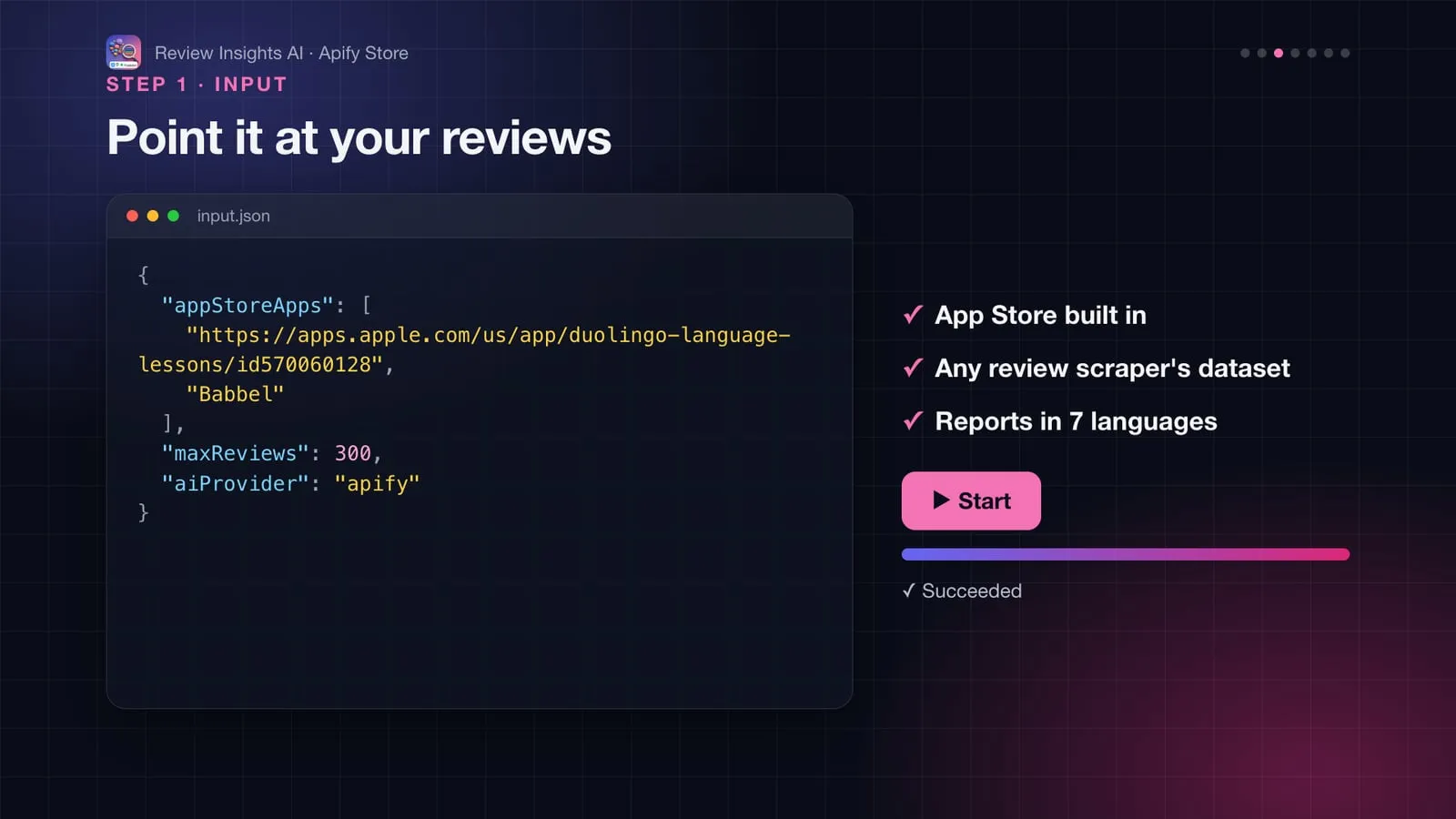
One App Store app
Benchmark against competitors, in the US and UK stores
Only reviews of the last 60 days, with AI summaries in French
Amazon product reviews – run any Amazon reviews scraper from Apify Store, then pass its dataset ID. Reviews are grouped per product (ASIN):
Google Play, Google Maps or Trustpilot reviews – same thing with that scraper's dataset. Field names are detected automatically. If detection picks the wrong fields, map them:
Every scraper run, automatically – in the scraper's Integrations tab, add "Run Actor" → Review Insights AI. Each finished scrape is analysed, no input needed.
Your own export (CSV, JSON or JSON Lines)
Quick test with pasted reviews (start a line with a rating to include it)
AI with your own Anthropic key
Output
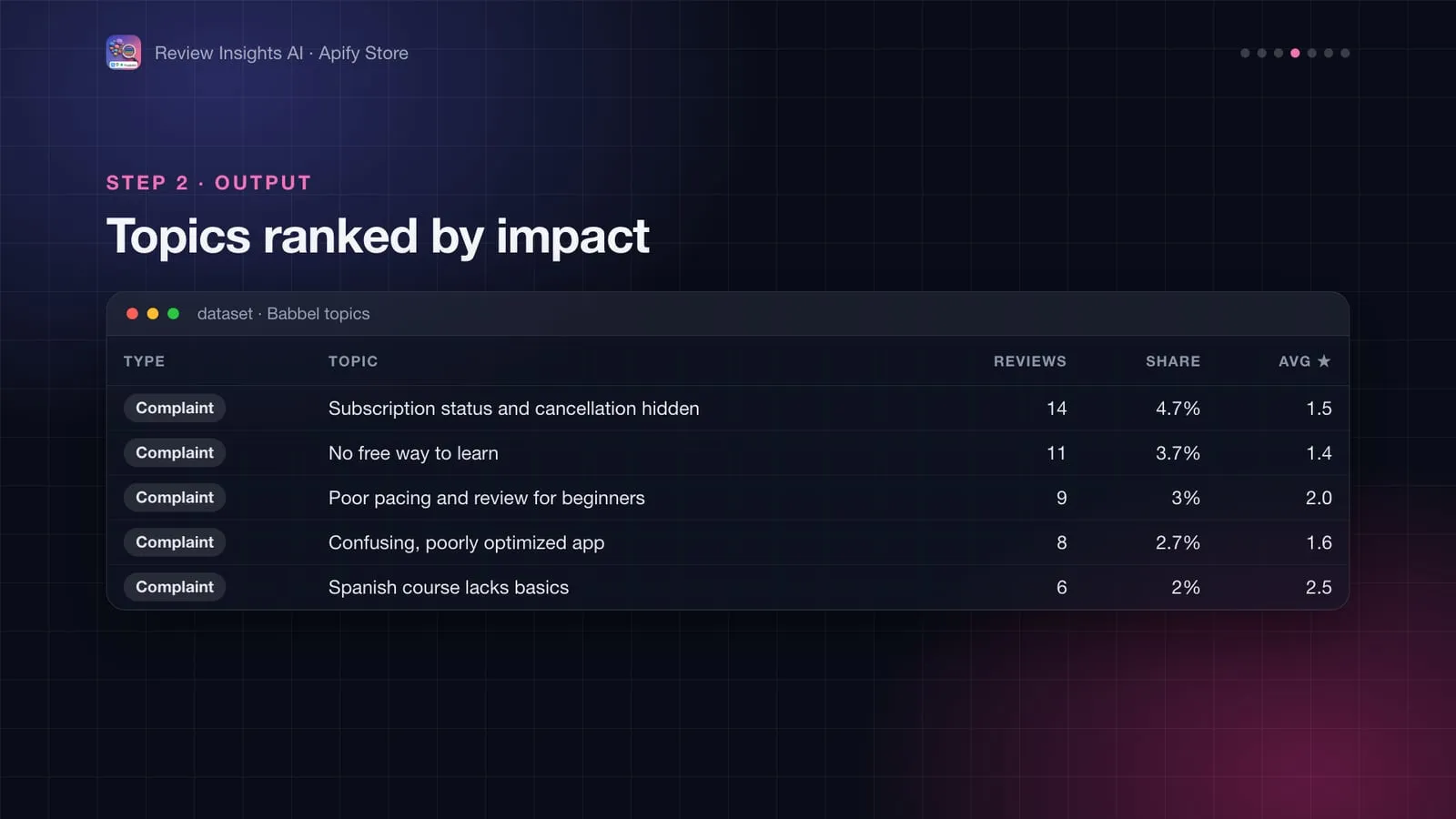
Every run also saves a shareable REPORT page:
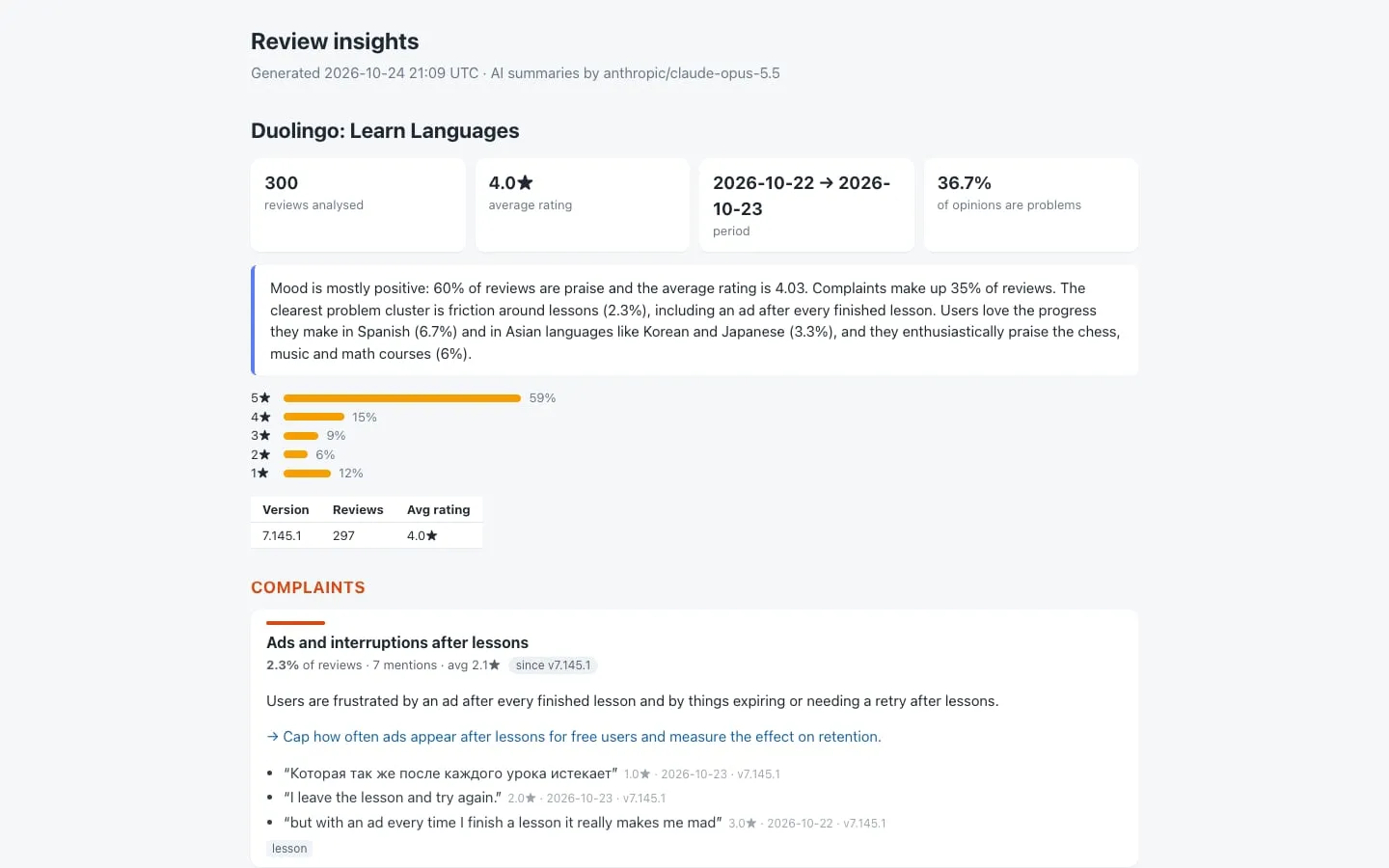
One row per topic and product, ranked by the share of reviews that mention it. A real example (Babbel, compared with Duolingo, 300 reviews each, October 2026):
| Field | Meaning |
|---|---|
type | complaint, bug (malfunction or defect), request (feature request or suggestion) or praise |
title, keywords | What the topic is about |
mentions, sharePercent | Reviews mentioning the topic, and their share of all reviews of the product |
avgRating, sentiment | Average star rating of those reviews, and the model's sentiment of the sentences themselves (1–5) |
trend | Share in the last 30 days of data vs before: rising, falling or stable (needs 45+ days of reviews) |
versions | App reviews: first version the topic appears in, and its share in each of the latest versions |
examples | Up to 3 representative quotes, with the full review, rating, date and version |
comparison | When several products are analysed: the same topic's share in the others |
aiTitle, aiSummary, aiAction | With AI turned on |
The key-value store also holds:
- REPORT: the HTML report, ready to share.
- SUMMARY: per product, the rating distribution, average rating by month and by app version, the mix of opinions, and the AI executive summary.
How it works
- Each review is split into separate opinions: "Great app, but too many ads" gives one praise and one complaint.
- A multilingual model trained on product reviews scores each opinion from 1 to 5 stars, with the review's own rating as context. Requests ("please add…", "j'aimerais…") and malfunctions ("keeps crashing", "stürzt ab") are recognised in 7 languages.
- Opinions are turned into meaning vectors and grouped with similar ones, so "too many ads", "an ad after every lesson" and "ads everywhere" end up in one topic.
- Each topic is labelled with its most distinctive words and its clearest short quote, then counted: share of reviews, average rating, trend and versions.
- With AI on, a language model rewrites each topic as a short title, a summary and a suggested action, writes an executive summary and drops vague groups. Counts and quotes always come from step 4, so the AI cannot invent numbers.
The language models run inside the Actor: your reviews are not sent anywhere unless you turn on AI.
Pricing
| Event | Price |
|---|---|
| Review analysed | $0.0005 ($0.50 per 1,000 reviews) |
| Insights report, per product | $0.02 |
Example: 1,000 App Store reviews of one app cost $0.52. Platform usage is included.
AI summaries (optional) are billed separately. With Apify AI they go on your Apify account at the model's list price on paid Apify plans: in our tests a report cost roughly $0.05 to $0.15 with the default Claude Opus 5.5, and under a cent with anthropic/claude-haiku-5.5. The free Apify plan pays about 10 times more. With Anthropic your own API key is billed by Anthropic.
Good to know
- App Store: Apple's public review feed gives up to 500 most recent and 500 most helpful reviews per country. Add countries to go further, or use another source for the full history.
- Amazon and Google Play reviews are not fetched by this Actor: use any scraper from Apify Store and pass its dataset, or connect this Actor as its integration.
- Speed: about 3 minutes for 1,000 reviews (long reviews take longer). Up to 10,000 reviews per product.
- Small samples: topics need repeated mentions. Below about 50 reviews, expect only a few topics, or lower Minimum mentions.
- Spending limit: if you set a maximum cost per run, the most recent reviews that fit are analysed.
More Actors from this developer
| 🔔 Review Alerts & AI Reply Drafts Instant alerts and reply drafts for new reviews | 🤖 AI Brand Visibility Tracker See how ChatGPT, Gemini and Perplexity rank your brand | 👗 SHEIN Catalog & New Arrivals Tracker Search SHEIN's catalogue and track new arrivals |
| 🌐 Website Meta Extractor Title, description, Open Graph and more for any URL | 🚗 European Car Deal Score Fair price and deal rating for used cars in 8 countries | 🏢 French Company Data Every French company: SIREN, address, NAF, directors |
FAQ
Can I use it through the API, Make, Zapier or Google Sheets?
Yes. Every run can be started and read through the Apify API (JavaScript and Python clients, CLI, MCP), and Apify integrations connect it to Make, Zapier, n8n, Google Sheets, Slack, webhooks and more.
Is it legal to use this data?
The Actor only reads public or official open data and doesn't log in anywhere. Check the source's licence and your local rules (for example GDPR when data concerns people) for your use case; if in doubt, ask a lawyer.
Something isn't working, or you need another field?
Open an issue on the Issues tab: feedback is read and answered.


