

Apify Portfolio Expansion Planner
Pricing
from $127.50 / 1,000 delivered portfolio expansion plans
Apify Portfolio Expansion Planner
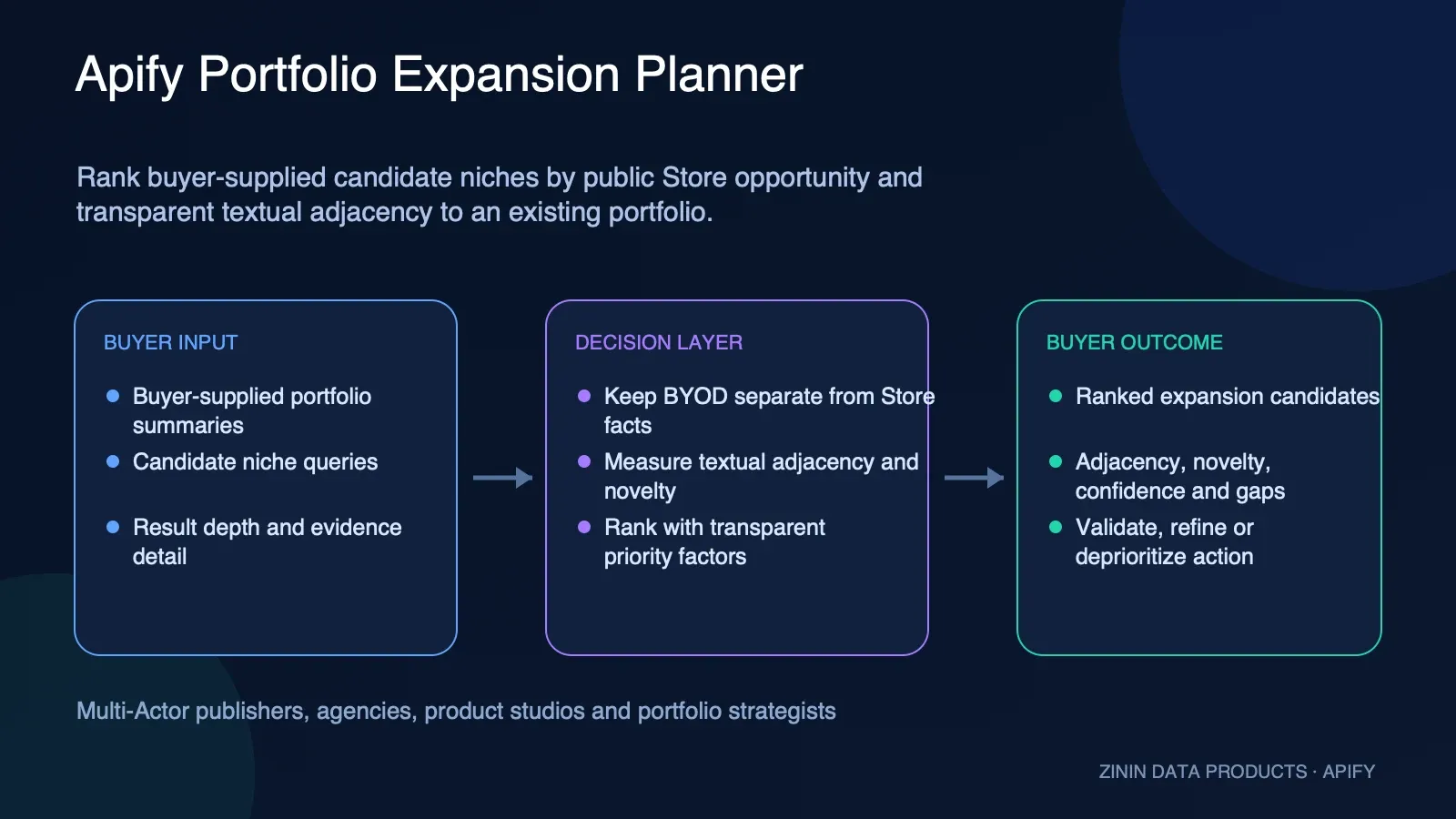
Rank declared Actor expansion ideas by public Store opportunity, textual adjacency to a buyer-supplied portfolio, and novelty. Get evidence, confidence, gaps, and a manual validation action—not a revenue forecast.
Pricing
from $127.50 / 1,000 delivered portfolio expansion plans
Rating
0.0
(0)
Developer

Tim Zinin
Maintained by CommunityActor stats
0
Bookmarked
1
Total users
0
Monthly active users
13 days ago
Last modified
Categories
Share
Rank buyer-supplied candidate niches by visible Store opportunity, textual adjacency to an existing Actor portfolio, and explicit novelty.
Built for: Multi-Actor publishers, automation agencies, product studios, and portfolio strategists deciding whether the next product should reuse an existing audience or explore a new category.
Commercial unit: one useful portfolio-expansion plan. Price: $0.15 per delivered result-found plan plus the configured start event (starting at $0.005). Invalid input, source failure, insufficient evidence, cache hits, and true replays are not presented as newly delivered paid reports.
Decide what to research next — without pretending public metadata is a business forecast
Choosing an Actor niche, portfolio move, or price is usually slowed down by fragmented evidence. Store search results are easy to browse but difficult to compare consistently: queries change, visible usage windows are confused with revenue, pricing events represent different units, and attractive numbers are copied into spreadsheets without their coverage limits. Apify Portfolio Expansion Planner turns that messy first research step into one bounded Dataset row with source context, deterministic calculations, confidence, explicit gaps, a human-review action, and an auditable billing receipt.
The Actor is designed to answer a narrow decision question, not to manufacture certainty. One to twenty buyer-supplied portfolioActors and two to twenty candidateQueries; portfolio objects are BYOD and are never fetched from a private Apify account. The result helps a product owner decide where to spend the next hour of qualitative validation. It does not claim to know private revenue, conversion, retention, buyer intent, market size, profitability, or future demand.
The result in plain language
- A normalized, timestamped report tied to the exact input and public Store cohort.
- Deterministic ranking or benchmarking fields that can be reproduced and reviewed.
- Visible source coverage and
dataGaps, so missing evidence does not disappear behind a score. - A separate confidence axis; confidence describes evidence sufficiency, not commercial attractiveness.
- A conservative next action:
VALIDATE_TOP_EXPANSIONwhen a sufficiently covered candidate exists; otherwiseREFINE_PORTFOLIO_OR_CANDIDATES. - A Dataset row for analysis plus a KVS
OUTPUTenvelope for terminal workflow truth. - Replay-safe PPE accounting: one genuinely delivered report can create one
result-foundcharge; the same request cannot create a second result charge.
When this Actor is a good fit
- A publisher wants to choose between deepening a lead-generation family and entering an unrelated data niche.
- An agency has reusable domain knowledge and wants to see which candidate descriptions are textually closest before interviewing existing customers.
- A product studio wants one transparent portfolio review artifact instead of combining opportunity and strategic-fit scores by hand.
- A marketplace operator needs an auditable shortlist while keeping private account access out of the workflow.
Use it near the beginning of a product-discovery workflow: after a human has written a specific decision question, but before a team builds, reprices, or reallocates a portfolio slot. The strongest workflow combines this report with buyer interviews, support-ticket themes, search demand, sales objections, delivery-cost estimates, and a paid landing-page or concierge test.
When not to use it
Do not use this Actor as a substitute for customer discovery, financial due diligence, a private Apify account export, an autonomous investment decision, or permission to contact anyone. Do not use a score to make irreversible product changes without reading the underlying cohort and gaps. If the decision requires exact current Store facts, run a fresh observation rather than relying on an old cached report.
Evidence-to-action workflow
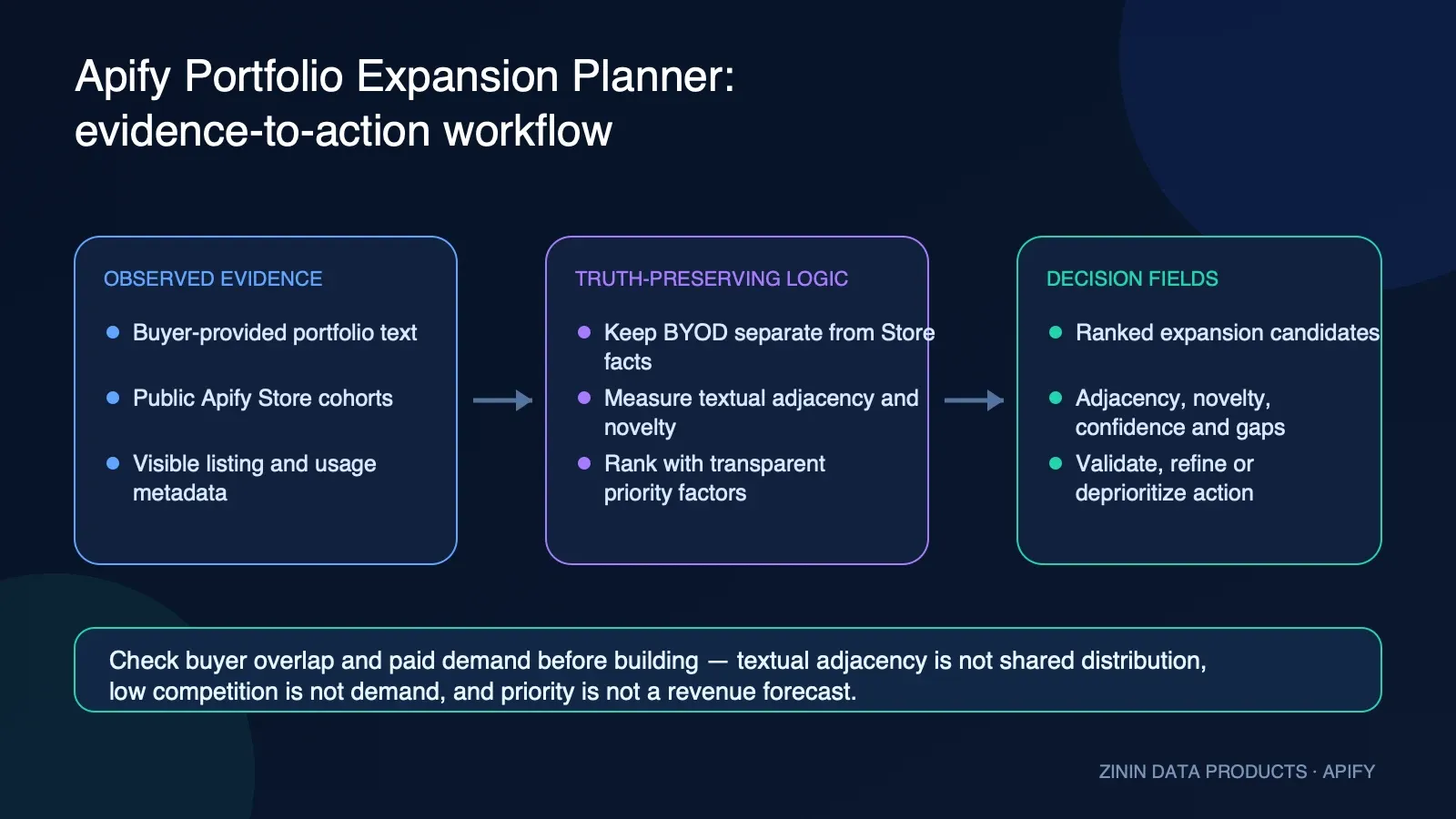
- Define the decision in buyer language. Narrow queries make interpretation easier than broad category labels.
- Submit a unique
requestIdwith the bounded input. The Actor validates types, lengths, unknown fields, and URI-like/control-character payloads before source access. - Fetch the declared cohort from the public Apify Store API. No private account token or hidden marketplace dataset is used for research.
- Normalize visible fields and calculate Actor-specific metrics deterministically.
- Keep the commercial signal separate from evidence confidence and sample coverage.
- Write one useful report to the default Dataset, then charge its
result-foundevent and record the delivery receipt. - Write the authoritative terminal envelope to default KVS key
OUTPUT, including replay, cache, source, failure, and billing truth. - Route
recommendedActionto a human product review.safeToAutomateremains false.
How the calculation works
For each candidate query, the Actor creates a public Store opportunity report and compares candidate tokens with the submitted portfolio name, title, description, and categories. The closest textual overlap becomes adjacency; novelty is its complement. The final priority uses raw values before display rounding: 70% public Store opportunity, 20% textual adjacency, and 10% novelty. Candidates are then ordered deterministically. A candidate is useful only with a real opportunity score, at least three observed Store Actors, and coverage of at least 0.50.
The method intentionally favors auditability over false sophistication. No LLM invents comparators or rewrites the decision after seeing a result. Stable canonical input creates a digest used for replay and conflict handling. Sorting rules make ties deterministic. Display rounding happens only after calculations that require raw precision. If the public source or state layer cannot support a trustworthy result, the Actor fails closed or returns an unbilled insufficient-evidence terminal state rather than manufacturing a positive row.
Read score and confidence separately
| Axis | What it answers | What it does not answer |
|---|---|---|
| Signal | What the deterministic method observed for this declared cohort | Whether to ship the product |
| Confidence | Whether enough expected public fields were available | Whether a high-scoring niche is strategically correct |
| Coverage | How complete the expected source metrics were | Whether the public Store represents the whole market |
| Data gaps | What a human should verify next | A reason to silently discard inconvenient evidence |
| Recommended action | Which review step follows from the evidence state | Permission for autonomous build, pricing, outreach, or deletion |
Input
Start with Try for free in Apify Console, or use the same contract through an API client. public-task.json, examples/input.json, and the Input schema prefill are intentionally identical. The published Task input is therefore a real contract example rather than decorative documentation.
Common input controls
| Field | Purpose |
|---|---|
schemaVersion | Must be 1.0; prevents silent interpretation of an unknown contract. |
requestId | Stable idempotency key, 1–128 safe characters. Use a new value for a genuinely new observation. |
maxResults | Bounds detailed Store comparator retention from 1 to 100. It does not increase what the source publishes. |
freshnessMinutes | Allows compatible cached report reuse; set 0 when the workflow requires a new source observation. |
detailLevel | compact for routing or evidence for review-heavy workflows. |
Input validation is strict. Unknown properties, coercible strings such as "10" for an integer, control characters, and embedded URI-like strings in query fields are rejected. This prevents ambiguous automation inputs and keeps research queries separate from network destinations.
Output: Dataset report and KVS terminal envelope
The Actor exposes two result stores because they serve different jobs:
REPORTSpoints to default Dataset items. A row exists only for a useful delivered business report and is convenient for tables, exports, integrations, and downstream analysis.OUTPUTpoints to the default Key-Value Store record namedOUTPUT. It is the authoritative terminal envelope for success, replay, cache behavior, source failure, validation failure, delivery failure, and billing reconciliation.
Never infer terminal success from process exit alone. For automation, read OUTPUT, verify its status and billing fields, and then read the Dataset row it references. This prevents a workflow from treating an empty Dataset, failed charge, or replay as a fresh paid result.
Dataset field dictionary
| Field | Meaning |
|---|---|
schemaVersion | Contract version; currently 1.0. |
requestId | Buyer-controlled idempotency key used to distinguish a replay from a new commercial request. |
reportType | Stable Actor-specific report discriminator. |
generatedAt / observedAt | UTC timestamps for report construction and source observation. |
dedupeKey / entityId | Stable normalized identity for storage joins, deduplication, and review queues. |
detailLevel | compact or evidence, as requested. |
sampleConfidence | Compatibility label derived from sample size and source coverage. |
confidenceScore / confidenceBand | Separate confidence axis; never substitute this for opportunity or priority. |
dataGaps | Explicit reasons the report should be interpreted cautiously or researched further. |
recommendedAction | Human-facing next step. For this Actor: VALIDATE_TOP_EXPANSION when a sufficiently covered candidate exists; otherwise REFINE_PORTFOLIO_OR_CANDIDATES. |
safeToAutomate | Always false for the business decision; downstream systems should route to review. |
failureType / retryable | Successful Dataset rows use null and false; terminal failures are recorded in OUTPUT instead of billed as results. |
billing | Event name, delivery status, and PPE receipt facts for the row. |
portfolioActorCount | Number of validated buyer-supplied portfolio objects used as context. |
expansions | Ranked candidate list with priority, public Store opportunity, adjacency, novelty, rationale, and coverage. |
expansions[].priority | 70/20/10 composite for ranking this submitted candidate set. |
expansions[].adjacency | Textual similarity to the closest submitted portfolio description. |
expansions[].novelty | Complement of adjacency; not a technical or commercial moat measurement. |
expansions[].matchedPortfolioActorIds | Submitted Actor IDs that provide the closest textual context. |
Decision-envelope guarantees
Every successful Dataset row includes recordType, entityId, observedAt, confidenceScore, confidenceBand, dataGaps, recommendedAction, safeToAutomate, failureType, retryable, and billing. These fields make the report usable as an enrichment object instead of a loose analytics blob. They also make uncertainty queryable: a reviewer can filter low-confidence rows, inspect gaps, group stable entities, and separate business evidence from delivery mechanics.
safeToAutomate is deliberately false. The report may automate research collection and queue construction, but it should not autonomously build an Actor, change a public price, delete a product, or represent a market claim to a customer.
Pricing and billing truth
This Actor uses pay per event (PPE): $0.15 per delivered result-found plan plus the configured start event (starting at $0.005). Pricing tiers may reduce configured event prices at higher platform usage, and the live Apify pricing panel remains the source of truth for the current account charge.
The runtime treats billing as part of delivery integrity:
- It validates the request and reserves the idempotency state.
- It constructs the report and verifies the minimum usefulness boundary.
- It pushes the Dataset row with the
result-foundevent. - It checks the returned aggregate charge receipt. A positive
chargedCountproves the current row was delivered even when that event also reaches the configured event limit. - It records receipt truth in the report state and
OUTPUT. - A compatible replay writes one free copy of the prior report to the new run's Dataset, with
billing.billable:false; it cannot create anotherresult-foundcharge.
Validation errors, public-source failures, insufficient evidence, and internal delivery contradictions are not relabeled as paid insights. If delivery truth cannot be established, the terminal envelope exposes the failure and retryability instead of claiming success.
Run with the Apify API
Replace APIFY_TOKEN with a secret stored in your environment. Do not place a token in source control, screenshots, or README examples.
cURL
JavaScript
Python
The Python example mirrors the exact JSON shape; if your codebase uses a generated model, preserve string enums and integer types exactly. For scheduled Tasks, generate a new business requestId per intended observation, or keep a stable request only when replay suppression is the desired behavior.
Automation patterns
Product-research review queue
Run the Actor on a fixed cadence, append useful Dataset rows to a warehouse, and create a review ticket only when recommendedAction changes or confidence crosses your team’s threshold. Include the source timestamp, confidence, gaps, and exact query in the ticket. A changing score without a changing cohort or coverage should not trigger an irreversible roadmap action.
Spreadsheet or BI export
Export Dataset items as JSON, CSV, or Excel through Apify Dataset endpoints. Keep nested evidence fields in the raw table even if the dashboard displays only rank, score, confidence, and action. That preserves the ability to explain a decision months later.
n8n, Make, Zapier, and webhooks
Trigger the Actor from the automation platform, wait for terminal completion, read KVS OUTPUT, and branch on explicit status. Send successful report rows to a human review queue. Send retryable source failures to bounded retry handling. Send non-retryable validation failures to input repair. Never branch only on “run finished.”
Agent and MCP workflows
An agent can call the Actor as a research tool, but the prompt should require it to cite dataGaps, confidenceBand, and the observed source timestamp whenever it summarizes the result. The agent must not convert an opportunity score into a revenue forecast or omit the “not safe to automate” boundary.
Reliability, idempotency, and replay behavior
The Actor canonicalizes the validated business input and excludes trusted run-specific transport additions from the buyer digest. requestId identifies the commercial request; the digest detects incompatible reuse. A compatible completed request can return existing state without creating a second paid result. Reusing one requestId with materially different business input is treated as a conflict, not as permission to overwrite history.
On Apify, the published daily-prefill request ID is extended with the trusted run ID so repeated clicks on the public Task remain distinct intentional test runs. In your own automation, choose the semantics explicitly:
- Use a new
requestIdfor each new observation you want to purchase and store. - Reuse the same
requestIdwhen retry/replay suppression is required. - Do not reuse an ID with changed queries, categories, windows, portfolio context, or selectors.
- Read
OUTPUTto distinguish cache reuse, replay, terminal failure, and delivered success.
Data provenance, security, and privacy
Research data comes from the public Apify Store API endpoint used by the runtime. The Actor does not log into a private Store account, scrape customer dashboards, infer private revenue, or fetch submitted portfolio objects from an account. Buyer input remains the caller’s declared research context.
The runtime uses limited Actor permissions, bounds input and result sizes, rejects network-looking query payloads, and avoids LLM processing. Public source metadata can still change or be incomplete. Store the observation timestamp and source diagnostics with any derived decision.
Do not include personal data, credentials, private URLs, tokens, or confidential strategy text in query fields. Although these Actors are aimed at marketplace-product research rather than personal-data enrichment, your organization remains responsible for input governance, retention, and access controls.
Honest limitations
- Adjacency is token overlap, not proof of shared code, distribution, audience, sales motion, or operating capacity.
- Novelty is the complement of textual similarity; it is not innovation, defensibility, or total addressable market.
- Portfolio objects are trusted buyer-supplied context, not Store-verified facts.
- A high composite priority does not predict demand, cost, conversion, retention, or revenue.
Additional boundaries apply to every Actor in this family:
- Public search results may be ranked, capped, delayed, renamed, or removed by the source.
- Missing visible fields lower evidence quality; they are not safely interpreted as zero.
- A comparator may target a different buyer, output unit, geography, freshness requirement, or service level.
- The Actor observes marketplace metadata at a point in time and does not establish causality.
- Recommendations are research-routing labels, not legal, financial, investment, or autonomous operating advice.
A practical validation playbook
After receiving a report, keep the next step small and falsifiable:
- Read the top result and every
dataGap; reject any interpretation that requires a missing field to be zero. - Open the relevant public comparator listings and compare the actual buyer promise, output unit, freshness, price, and limitations.
- Interview at least a small set of target users about the workflow, current workaround, frequency, budget owner, and cost of delay.
- Define one paid outcome unit and estimate source, compute, support, refund, and failure costs.
- Test positioning with a landing page, concierge delivery, waitlist, or paid pilot.
- Record conversion and retention evidence separately from Store metadata.
- Re-run the Actor only when a fresh marketplace observation would change the decision.
This sequence prevents the report from becoming ceremonial analytics. Its job is to make the first research decision faster and more explainable, then hand off to stronger evidence.
Troubleshooting
The Dataset is empty
Read KVS OUTPUT. A compatible useful replay now has one free Dataset row and requestReplay:true; an empty Dataset instead points to invalid input, insufficient evidence, source failure, or delivery failure and is not automatically a successful zero-result report.
Confidence is low
Inspect dataGaps, source coverage, and observed cohort size. Narrow or rephrase the query, select more comparable categories, or wait for a later observation. Do not simply override confidence because the score supports the preferred roadmap answer.
A repeated run did not create a new row
Check whether the same canonical input and requestId were already completed. That is expected replay protection. Supply a new requestId only if you intend to purchase a new observation.
A run reached an event limit
Read the billing receipt in OUTPUT. A positive chargedCount means the current result event was delivered even if the same event reaches the configured limit. Zero charged events with a limit flag is not a delivered paid result.
Store results look unrelated
Tighten buyer-declared queries and categories. The Actor preserves search limitations rather than using an LLM to invent relevance. Always review visible comparator samples before acting.
FAQ
Is this an AI forecast? No. The workflow is deterministic and evidence-first. It structures public Store metadata and buyer-supplied context; it does not ask an LLM to predict success.
Does it access private Apify analytics? No. It uses public Store observations only.
Does a high score prove demand? No. It prioritizes validation under the documented method.
Can I use the output in a dashboard? Yes. Use Dataset REPORTS for rows and keep KVS OUTPUT for terminal and billing truth.
Can I automate a roadmap or price change from recommendedAction? No. safeToAutomate is false because the public evidence cannot support that irreversible decision by itself.
What should I cite internally? Cite the exact query, source timestamp, observed cohort, coverage, confidence, and data gaps—not only the headline score or label.
Does the Actor read my private Apify portfolio? No. It uses only the bounded objects you place in portfolioActors plus public Store search results. This makes the provenance of every portfolio claim explicit.
Why include both adjacency and novelty? They expose the strategic tension instead of hiding it: close candidates may reuse messaging, while novel candidates may diversify. The final decision still belongs to the buyer.
Related Apify marketplace research tools
| Actor | Best used for |
|---|---|
| Apify Market Gap Finder | Compare two to twenty buyer-declared Actor niches against separate public Apify Store cohorts, then receive a ranked, evidence-linked validation queue. |
| Apify Niche Demand Radar | Measure the current direction of visible Apify Store user activity for one declared niche across comparable 7/30 or 30/90-day windows. |
| Apify Pricing Benchmark Advisor | Build an observed price distribution from visible pay-per-event prices in a declared public Apify Store cohort. |
Support
When reporting a reproducible issue, include the run ID, Actor version, sanitized input, terminal OUTPUT status, and whether the Dataset contains a row. Never post an API token or signed storage URL. Feature requests are most useful when they name the buyer, decision, required public evidence, and acceptable false-positive or missing-data behavior.
Apify Portfolio Expansion Planner is intentionally a decision-support product: it collects bounded evidence, explains the calculation, preserves uncertainty, and tells a human what to validate next. That is more useful than a confident number whose source, coverage, and commercial meaning cannot be defended.


