

Shopify Catalog & Merchandising Intelligence
Pricing
from $5.10 / 1,000 store analyzeds
Shopify Catalog & Merchandising Intelligence
Qualify Shopify merchant leads with evidence-backed public catalog coverage, observed price positioning, vendors, product categories, and merchandising recency. Includes confidence, data gaps, and a review-ready next action. No login or Shopify API key.
Pricing
from $5.10 / 1,000 store analyzeds
Rating
0.0
(0)
Developer

Tim Zinin
Maintained by CommunityActor stats
0
Bookmarked
2
Total users
1
Monthly active users
14 days ago
Last modified
Categories
Share
Turn a list of public merchant websites into evidence-backed Shopify qualification data for marketing, sales research, ecommerce consulting, and competitive monitoring. For every submitted website, the Actor checks whether supported Shopify evidence is visible and, when the public feeds are available, observes catalog coverage, variant list prices, vendors, product categories, collections, and the newest product timestamp.
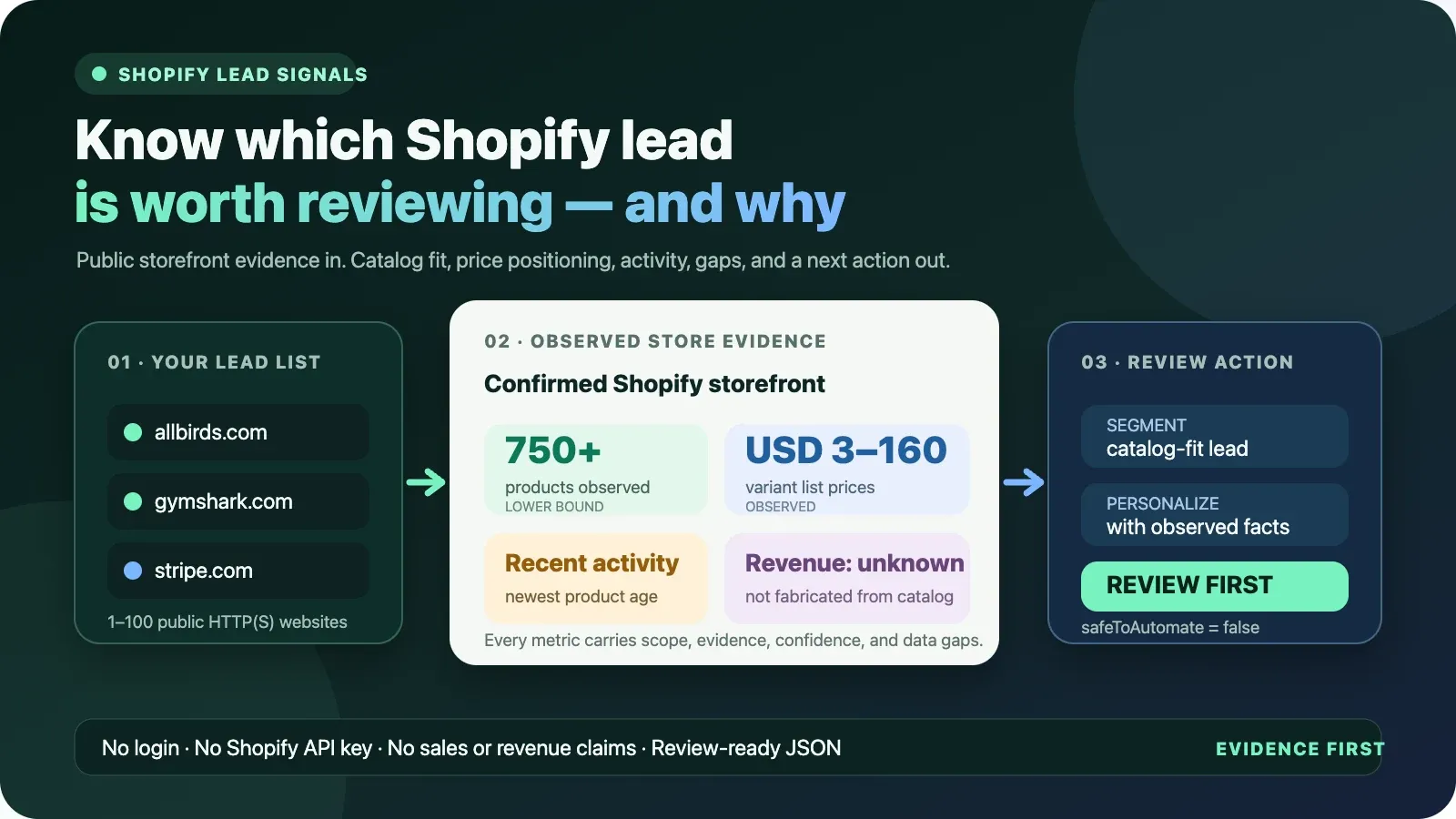
The result is designed for a decision, not just a scrape. Every successful observation includes source evidence, count semantics, freshness, confidence reasons, explicit data gaps, and a recommended review action. The Actor does not turn catalog size into a fictional revenue number: public product counts and list prices do not prove sales volume, conversion, or revenue.
The product in one sentence
Submit 1–100 public HTTP(S) websites and receive one review-ready Shopify qualification result per site: platform evidence, exact-or-lower-bound catalog semantics, observed price positioning, merchandising recency, provenance, confidence, gaps, and the next sensible human action.
Why marketers need more than “this site uses Shopify”
A technology flag is useful, but it is rarely enough to decide whether an account belongs in a campaign. Two merchants may both use Shopify while having very different public storefronts:
- one exposes twelve products in a narrow category and has not published a product recently;
- another exposes hundreds of products across several product types and vendors;
- one has observed variant list prices around USD 15;
- another has an observed median variant price above USD 100;
- one exposes a complete public feed;
- another reaches the 750-product scan cap, so the observed count is only a lower bound.
Those differences can help a marketer choose an appropriate segment, message, service package, or manual research priority. They cannot prove revenue, budget, purchase intent, internal staffing, or whether a merchant wants to buy anything. This Actor keeps that boundary visible in the data.
What you receive
For each reachable website, the Actor can return:
- Shopify evidence: whether supported Shopify signatures were observed on the submitted public storefront response.
- Catalog coverage: products observed from the public
/products.jsonfeed, withexactorlower_boundsemantics instead of an ambiguous total. - Observed price positioning: minimum, maximum, average, and median public variant list prices, the number of variant prices observed, and storefront currency when it is visible.
- Vendor and category mix: the most common public
vendorandproduct_typevalues, plus how many observed products supported each leading value. - Merchandising recency: the newest public product creation/publication timestamp observed and its age at run time.
- Collection coverage: the number of collections observed and whether that number is exact, lower-bound, or unavailable.
- Evidence and provenance: source type, source URL, observation timestamp, supported fields, records observed, and coverage semantics.
- Decision support: coverage score, confidence score, confidence reasons, data gaps,
recommendedAction, action priority, and an explanation. - Stable identifiers: deterministic website entity ID plus observation and event IDs for joins, deduplication, warehousing, and repeated checks.
- Operational truth:
OUTPUTin the default key-value store records requested, processed, confirmed-delivered, withheld, duplicate, and advisory counts, plus partial/budget/replay state.
Existing integrations remain supported. The original productCount, collectionsCount,
priceRange, topProductTypes, topVendors, newestProductAt, catalogComplete,
catalogTruncatedReason, salesSignals, and revenueEstimate fields remain present. Their meaning
is now more explicit:
productCountremains the number of products scanned and is mirrored byproductsScanned;collectionsCountremains the number observed and is mirrored bycollectionsObserved;revenueEstimateis retained only for backward compatibility and returnsband: "unknown",confidence: "insufficient_evidence"on a confirmed Shopify result;- no public Dataset view presents revenue as a qualification metric.
Who this is for
Small marketing agencies
Qualify a prospect list before spending time on manual storefront research. Segment confirmed Shopify stores by observed catalog band, price positioning, leading product type, or recent public merchandising activity. Use the evidence fields to prepare a specific account note rather than a generic “we help ecommerce brands” opener.
Example defensible note: “The public storefront check observed a large catalog lower bound, a leading footwear category, and a recently published product. Review the current site before using those facts in outreach.”
Example unsupported claim: “The company is growing quickly, earns more than $10M, needs an agency, and has budget now.” None of those conclusions follows from a public catalog.
Freelancers and boutique ecommerce consultants
Use observed catalog complexity and merchandising cadence to prioritize accounts that resemble the stores you serve. A catalog with many categories or vendors may be relevant to feed management, merchandising operations, creative production, taxonomy, localization, or storefront QA services. It is still a research signal, not proof that a problem exists.
Lead generation and RevOps teams
Enrich an existing, lawfully obtained website list before routing records to a campaign. Stable
entityId values make website-level joins easier. productCountMode, evidence, and data gaps make
it possible to avoid treating lower bounds as exact totals. safeToAutomate: false keeps the result
out of an unreviewed auto-send path.
This Actor does not find personal emails, infer identities, or determine a lawful basis for contact. Use your own compliance process and outreach policy.
Ecommerce software and service providers
Research the public shape of a merchant account before a discovery call. A catalog-tool vendor may care about observed product volume and category diversity; a pricing consultant may care about observed variant price distribution; a creative studio may care about recent product publishing. Choose only fields relevant to your product and verify the live storefront before making a claim.
Portfolio and competitive researchers
Store results on a schedule to build your own history of public observations. The Actor reports the
current observation; it does not claim that a change occurred unless you compare observations. Use
observationId, observedAt, and freshness to keep lineage, then calculate diffs in your own
warehouse or use the related Shopify Price Change Monitor.
Developers and data teams
Use the Apify API, schedules, webhooks, datasets, and exports to add bounded Shopify storefront
evidence to a larger workflow. The result is JSON-first and intentionally includes operational
state in OUTPUT so a consumer can distinguish complete runs from budget stops or ambiguous
delivery failures.
Practical use cases
1. Segment a Shopify prospect list
Input a list of domains from your CRM or market research. Filter results where isShopify is true,
then group by catalogSizeBand.label, pricePositioning.median, topProductTypes, or
merchandisingActivity.status. Keep productCountMode beside every size filter so a lower bound is
never presented as an exact catalog total.
2. Build a manual personalization queue
Route records with a relevant observed category, vendor mix, or recent product timestamp into a
research queue. Show the reviewer evidence, confidenceReasons, dataGaps, and the public URL.
The reviewer confirms that the signal remains visible and decides whether it belongs in the final
message.
3. Prioritize ecommerce audits
Consultants can identify stores whose public catalog shape matches a service speciality. For example, many observed product types can justify a taxonomy review; many observed vendors can justify a feed-governance conversation; recent product publication can justify checking launch workflows. These are hypotheses for an audit, not diagnosed problems.
4. Enrich an account table
Join entityId, isShopify, productsScanned, productCountMode, pricePositioning, leading
vendors/types, and checkedAt to a company record. Preserve the full result separately so the
decision can be traced back to the observation and its limitations.
5. Monitor a known merchant set
Schedule the same domain list weekly or monthly. Store snapshots and compare exact fields yourself.
Do not compare productCount without checking productCountMode: a complete count and a lower
bound are not interchangeable.
6. Separate Shopify-specific and non-Shopify campaigns
A reachable website without a supported Shopify signature returns isShopify: false and an
explicit gap: absence of the supported signature is not proof of the site's complete ecommerce
architecture. Use that result to exclude it from a Shopify-specific batch or send it to manual
technology verification.
How the pipeline works
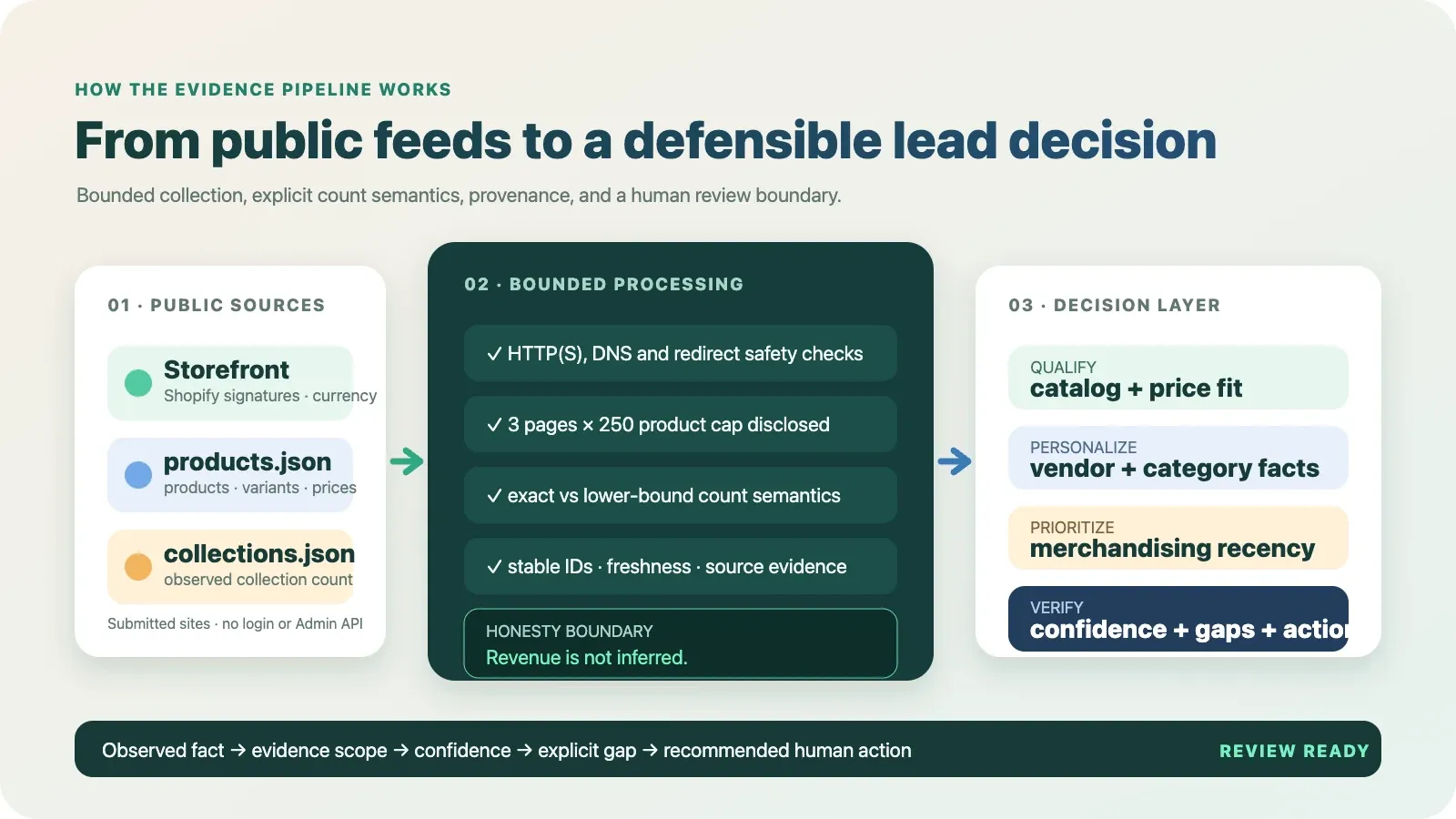
- Validate input. The runtime requires an object with 1–100 website strings. It rejects blank values, non-string items, unsupported schemes, embedded credentials, overlong URLs, and invalid concurrency instead of silently dropping or coercing them.
- Normalize and deduplicate. Missing schemes become HTTPS, fragments are removed, and case-equivalent normalized URLs are deduplicated before processing and billing.
- Fetch the submitted storefront safely. The Actor accepts HTTP(S), resolves DNS, blocks private/loopback/link-local/metadata targets, pins verified addresses against DNS rebinding, and repeats the check on every redirect hop.
- Check supported Shopify signatures. The initial public HTML, final URL, and selected public response header names are checked for a narrow Shopify signature set.
- Read public Shopify feeds. Confirmed stores are queried through their public
/products.jsonand/collections.jsonendpoints. The product scan uses Shopify's 250-item page size and stops after three pages or the real end of the feed. - Calculate observable statistics. The Actor calculates price distribution from observed public variants, leading vendors/types from observed products, and merchandising recency from the newest observed product timestamp.
- Attach semantics and evidence. Counts are labelled
exact,lower_bound,not_available, ornot_applicable; evidence records identify the source and supported fields; coverage and confidence explain how much can be used. - Recommend review. The result suggests a conservative next action and always sets
safeToAutomate: false. - Deliver with billing safeguards. Paid results are linked to Dataset delivery. Remaining
budget is checked inside a concurrency-safe lock. An ambiguous delivery/charge receipt fails the
run with
replaySafe: falserather than pretending success. - Persist completion truth.
OUTPUTrecords counts and whether the run is complete, partial, budget-stopped, or unsafe to replay.
Public data sources
| Source | What is observed | What it does not prove |
|---|---|---|
| Submitted storefront HTML/final URL/public header names | Supported Shopify signatures and storefront currency when exposed | Store ownership, merchant identity, plan, GMV, revenue, conversion, or internal configuration |
/products.json | Public product records, public variant list prices, vendor/type values, product timestamps | Orders, units sold, inventory truth, margins, discounts actually paid, customer demand, or complete Admin API data |
/collections.json?limit=250 | Up to 250 public collection records | A guaranteed total when the cap is reached or the feed is unavailable |
The Actor does not use a Shopify Admin API token, merchant login, browser session, proxy by default, or private customer data. A storefront may disable a feed, return a custom response, rate-limit the request, or expose only part of its internal catalog. Those conditions are returned as gaps rather than filled with guesses.
Input
Input schema
| Field | Type | Required | Limits | Meaning |
|---|---|---|---|---|
websites | array of strings | yes | 1–100; each ≤2,048 characters | Public HTTP(S) websites such as allbirds.com or https://example.com/ |
maxConcurrency | integer | no | 1–20; default 5 | Number of websites processed concurrently |
Example input
Input is strict by design. ftp://example.com, https://user:password@example.com, non-string
array entries, empty arrays, and a maxConcurrency such as "5" fail validation. This protects
downstream billing and avoids the common failure mode where invalid entries disappear silently.
Output
Successful and failed per-site rows are written to the default Dataset. A machine-readable run
summary is written to the default key-value store as OUTPUT.
Representative successful Shopify result shape
The values below demonstrate the current schema and count semantics. Live values change with the public storefront and should always be read from your run.
This example deliberately shows a truncated catalog. productCount: 750 is preserved for older
integrations, while productCountMode: "lower_bound" and catalogComplete: false prevent it from
being presented as the merchant's exact product total. Numeric values in a live run may differ.
Non-Shopify result
A reachable page without a supported Shopify signature is still a completed, billable check:
Failure result
If the site cannot be observed, the Actor emits a free failure row where pricing permits it. The row does not pretend that the site is non-Shopify:
OUTPUT run summary
When a linked Dataset delivery returns an ambiguous billing receipt, the Actor marks the run failed
and sets replaySafe: false. Inspect the Dataset and charged events before retrying, because a blind
rerun could duplicate a delivered result or charge.
Field guide
| Field | Meaning |
|---|---|
url | Final observed storefront URL after guarded redirects |
requestedUrl | Normalized submitted URL before redirects |
found | Whether a public storefront response was successfully observed |
isShopify | Whether the supported Shopify signature set matched |
productCount | Backward-compatible number of products scanned; not automatically an exact total |
productsScanned | Number of public product records observed during this run |
productCountLowerBound | Minimum catalog size supported by this observation |
productCountMode | exact, lower_bound, not_available, or not_applicable |
collectionsObserved | Public collections observed, up to the endpoint cap |
collectionsCountMode | Coverage semantics for the collection count |
priceRange | Backward-compatible observed min/max and currency |
pricePositioning | Observed min/max/average/median, currency, variant-price count, and basis |
topProductTypes | Leading public product-type names in the scanned records |
topProductTypeSignals | Leading names with supporting observed-product counts |
topVendors | Leading public vendor names in the scanned records |
topVendorSignals | Leading names with supporting observed-product counts |
newestProductAt | Newest observed created_at or published_at timestamp |
merchandisingActivity | Recency interpretation and its explicit timestamp basis |
catalogComplete | Whether pagination reached a real short/empty terminal page |
catalogTruncatedReason | Why the catalog is incomplete; null when complete |
catalogSizeBand | Descriptive observed-size band with exact/lower-bound basis |
revenueEstimate | Compatibility field that explicitly declines to estimate revenue |
evidence | Source-level provenance records without raw private headers or bodies |
entityId | Stable website entity key |
observationId | Identifier for this timestamped observation |
eventId | Identifier for this store-check event |
freshness | Live-observation timestamp semantics and cache status |
coverageScore | 0–100 measure of how much relevant public catalog scope was observed |
confidenceScore | 0–100 confidence in the bounded claims actually made |
confidenceReasons | Plain-English reasons behind confidence |
dataGaps | Material information the run did not observe |
recommendedAction | Conservative next review step |
actionPriority | Low, medium, or high review priority based on observable signals |
safeToAutomate | Always false; human review is required before consequential action |
failureType / retryable | Failure classification and retry guidance |
summary | Human-readable result with the same bounded semantics |
Count semantics that prevent bad segmentation
Exact
productCountMode: "exact" means the public product feed reached an empty or short terminal page
within the scan boundary. It is exact for the public feed observed at that time, not a guarantee
about unpublished, market-restricted, authenticated, draft, or Admin-only records.
Lower bound
productCountMode: "lower_bound" means at least that many public records were observed, but the end
of the catalog was not proven. This happens when the 750-product cap is reached or a later page
fails. Use 750+, not 750, in a human-facing segment label.
Not available
The site was Shopify-confirmed or failed, but the public feed did not yield usable product data. Do not substitute zero; unknown and empty are different states.
Not applicable
The submitted page was reachable but did not match the supported Shopify evidence. A Shopify catalog count does not apply to this observation.
Confidence is claim-specific
A row can have high confidence that a site is Shopify and low catalog coverage at the same time.
For example, a storefront signature may be clear while /products.json is disabled. The Actor
therefore keeps confidenceScore separate from coverageScore and records the reasons and gaps.
Scores are deterministic descriptions of this Actor's observation scope. They are not audited accuracy rates, probabilities that a merchant will buy, or guarantees about the storefront.
Pricing and cost control
The current pay-per-event configuration is $0.005 per Actor start plus $0.006 per completed site check. The live Apify pricing panel is authoritative if pricing changes after this README is published.
At the current rate:
- 1 completed site check: approximately
$0.011including one run start; - 10 completed site checks in one run: approximately
$0.065; - 100 completed site checks in one run: approximately
$0.605.
Unreachable failure rows are written without the useful-result event where platform pricing allows a free explanation. A reachable non-Shopify result is still a completed check and is billable. Shopify-confirmed rows with an unavailable public products feed are also completed checks because the platform evidence and diagnostic result were delivered.
The Actor checks the buyer's remaining maximum charge before each paid delivery inside a shared
lock, preventing concurrent workers from independently passing the same budget check. If the budget
ends before all requested sites are delivered, OUTPUT reports a partial budget stop and a free
advisory row explains the remainder. No advisory is added when the last requested result itself
reaches the event limit, because the run is already complete.
Integrations
Apify API with cURL
Keep tokens in your secret manager or Apify integration settings. Do not commit them to source control or paste them into public logs.
JavaScript client
Python client
CSV or Excel
Run the Actor, open the default Dataset, and export CSV or Excel. For a compact review table, keep
requestedUrl, isShopify, productsScanned, productCountMode, pricePositioning,
topProductTypes, topVendors, merchandisingActivity, confidenceScore, dataGaps, and
recommendedAction.
Webhooks and schedules
Use an Apify schedule for recurring observations and a run-succeeded webhook to trigger your data
pipeline. Read OUTPUT before accepting the batch. A run status alone is not enough for a robust
consumer: confirm status: "COMPLETE", partial: false, and replaySafe: true.
CRM workflow
Map entityId to your account record, store checkedAt, and add only the fields your campaign
needs. Preserve evidence and gaps in a linked research record. Place results in a review queue; do
not auto-send based only on actionPriority or recommendedAction.
Responsible use and privacy
The Actor reads public website responses submitted by the user. It does not log in, bypass access controls, collect checkout/customer records, or return personal contact data. You are responsible for the website list, retention, outreach policy, contractual restrictions, and applicable law.
Recommended practices:
- submit domains you are permitted to research;
- use reasonable schedules rather than aggressive repeated polling;
- preserve the source timestamp and data gaps;
- verify facts on the current storefront before external communication;
- do not infer sensitive traits, revenue, financial health, or purchase intent;
- do not use a public vendor name as proof of a corporate relationship beyond the observed feed;
- do not present
lower_boundcounts as exact; - keep
safeToAutomate: falsein consequential workflows.
Limitations
- Shopify themes and storefront behavior vary. The supported signature set is intentionally narrow and can miss Shopify sites that hide or transform the relevant evidence.
- Only the submitted page response is checked for the storefront signature. Subpages and rendered client-side state are not exhaustively crawled.
- Product collection is capped at 750 public records per store. Larger catalogs return a lower bound.
- Collection observation is capped at 250 records.
- Public feeds may be disabled, rate-limited, customized, geographically varied, or different from Shopify Admin data.
- Variant prices are public list-price observations. They do not prove final checkout price, discount usage, currency conversion, taxes, shipping, margin, units sold, or realized revenue.
newestProductAtis based on timestamps in observed public records. It is not a complete history of merchandising work and does not prove business growth.- Top vendors and product types reflect the scanned sample. On a truncated catalog, unseen records may change the ranking.
- A non-Shopify result means supported evidence was not observed on this response; it is not a universal technology audit.
- Stable IDs identify the normalized website and observation, not a legal entity or beneficial owner.
- Scores describe evidence quality and coverage, not buying propensity or model accuracy.
- The Actor is not a full catalog exporter, contact finder, financial estimator, legal opinion, or autonomous outreach system.
Related Actors
| Actor | When to use it |
|---|---|
| Shopify Price Change Monitor | Compare repeated Shopify catalog observations and monitor candidate changes over time |
| Website Contact Extractor | Separately observe public business contact channels after you have a legitimate enrichment use case |
| Tech Stack Detector | Observe a broader set of public website technology signatures |
| Website Tech Stack Change Detector | Compare a buyer-supplied technology baseline with a fresh bounded page observation |
| Zid Store Products Scraper | Collect public product data from Zid storefronts rather than Shopify |
FAQ
Does this require a Shopify API key or merchant login?
No. It observes the submitted public storefront and public Shopify JSON feeds where available. It does not access Shopify Admin data.
Does it estimate revenue?
No. The legacy revenueEstimate field remains only for compatibility and explicitly reports
unknown / insufficient_evidence. Catalog size and list prices do not prove units sold or revenue.
Is productCount the exact catalog size?
Only when productCountMode is exact and catalogComplete is true—and even then it is exact for
the public feed observed at that moment, not private Admin records. When the mode is lower_bound,
display the number with a plus sign.
Why is a non-Shopify result billable?
The Actor completed the requested public check and delivered a supported answer with evidence scope, confidence, gaps, and a next action. Billing is for the check, not for a positive Shopify match.
Why can a Shopify-confirmed row have low coverage?
The storefront can expose a strong Shopify signature while disabling or limiting the public product feed. Confidence in platform detection and coverage of catalog details are different questions.
Does it collect email addresses or owner names?
No. It focuses on store, catalog, price, vendor, category, and merchandising observations. Use a separate, compliant contact-enrichment workflow if needed.
Can it scan more than 750 products?
Not in the current bounded product. The cap keeps requests predictable and affordable. A result that reaches the cap clearly reports a lower bound and truncation reason.
Can I use the result to send automated outreach?
The output intentionally says safeToAutomate: false. Use it to prioritize and support human
research, then apply your own legal, quality, and relevance checks.
What should I do with duplicates?
Normalized case-equivalent URLs are deduplicated before work and billing. OUTPUT.duplicatesRemoved
reports how many submitted values were removed as duplicates.
What happens if my run budget is too low?
The Actor stops before an unaffordable paid delivery. OUTPUT reports partial status and counts;
when the free Dataset explanation channel is available, an advisory row explains how many results
were confirmed and recommends resubmitting only undelivered websites.
What does replaySafe: false mean?
The Actor could not prove the delivery/charge outcome. Inspect the Dataset and run charging events before retrying. A blind rerun may duplicate data or charges.
Can an AI agent call it?
Yes. Use the Apify API or Apify MCP integration, but instruct the agent to inspect confidence,
coverage, data gaps, and safeToAutomate rather than treating the summary as an autonomous decision.
How do I report an incorrect result?
Use the issue/contact option on the Actor page with the submitted public URL, run ID, timestamp, and the field you believe is incorrect. Do not include credentials or private customer data.


