

Careers ATS Jobs by Company Domain
Pricing
from $3.40 / 1,000 job posting founds
Careers ATS Jobs by Company Domain
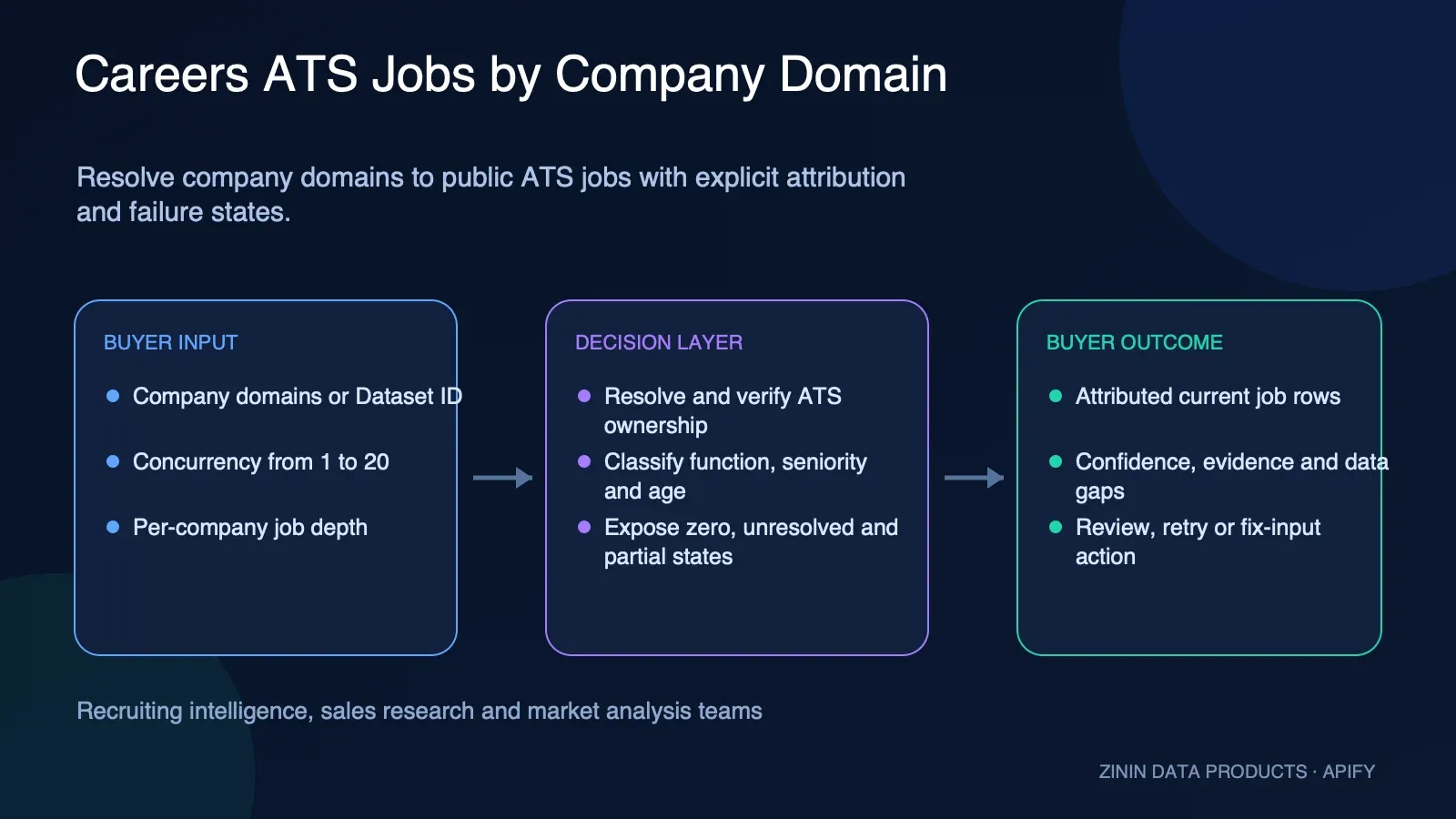
Resolve company domains to public Greenhouse, Lever, Ashby, Workable, Rippling, or Workday boards. Get attributed jobs, function and seniority, source evidence, confirmed zero, partial, and unresolved states.
Pricing
from $3.40 / 1,000 job posting founds
Rating
0.0
(0)
Developer

Tim Zinin
Maintained by CommunityActor stats
0
Bookmarked
2
Total users
1
Monthly active users
a month ago
Last modified
Categories
Share
Careers Page Scraper
Turn a company domain into its open jobs. This is a company-domain-to-jobs lookup:
give it a bare domain and it finds the company's ATS itself — Greenhouse, Lever, Ashby,
Workable, Rippling or Workday — instead of making you already know which one to ask
(greenhouse:figma, lever:spotify). It reads the company's own careers page for an
ATS link first; when that page doesn't name one, it verifies a guessed slug against
real, non-zero postings before trusting it — plain HTTP 200 on a guess is never enough
on its own (see the empty-board trap in FAQ). Point it at figma.com, datadoghq.com,
or a domain on Workday like bankofamerica.com, and get that company's open roles back
— honestly capped and honestly labeled on the rare board that's deeper than the default
read.
What you get
- Domain in, jobs out — no ATS token guessing. Every other jobs actor in this niche
(ours included —
job-postings-aggregator,company-hiring-radar,intent-signal-aggregator) takesprovider:slugon input, so you have to already know which system a company uses. This one only needs the domain — that's job postings by company domain, nothing else required. - Six ATS platforms auto-detected, not three. Greenhouse, Lever and Ashby, plus
Workable, Rippling and Workday — added because all three are real, live, keyless
applicant-tracking-system APIs the same way the original three are, each proven with
a real non-empty board (not from documentation): a Greenhouse jobs scraper, a Lever
postings API reader, an Ashby jobs scraper, a Workable reader, a Rippling reader and a
Workday jobs scraper, all in the same run. Three more platforms — SmartRecruiters,
Recruitee, Personio — are deliberately left out: their own
robots.txtdisallows automated access outright (Disallow: /, checked live). That's a line this Actor doesn't cross, not a gap we missed — see FAQ for the exact evidence. - Two-step resolution, first-party evidence preferred. First checks the company's
own careers page (
/careers,/jobs,/about/careers) for an explicit ATS link — this is how it finds a company's ATS without you telling it which one. Only falls back to guessing a slug from the domain when that fails, and only for the five platforms where a guess is even meaningful — Workday's tenant can't be guessed from a domain (see FAQ for why bankofamerica.com's real tenant isn't "bankofamerica" at all), so a Workday board is only ever found through its own careers-page link. - Four honest outcomes, not one "not found" bucket. Resolved with open jobs (paid rows), resolved with a confirmed zero right now (free), could-not-identify-the-ATS (free — explicitly NOT "no jobs"), and source unreachable (free — explicitly NOT "no ATS"). Most tools in this space collapse all of this into a single false negative; the full breakdown is in Output below.
- Honest about depth, not just about zero. Greenhouse, Lever, Ashby and Workable
hand back their whole board in one call — no limit applies. Workday and Rippling are
paginated, so a
maxJobsPerCompanyinput (default 500, up to 5,000) caps how deep this Actor reads per company — and when a board runs deeper than that cap, a free notice row says so explicitly instead of quietly stopping. Nothing here is sold to you as "every posting" when it isn't. - You don't pay for a board this Actor can't vouch for. A domain-slug match (Method B)
is only ever billed once this Actor checks that board's own declared owner against your
domain. Real example:
atlas.comresolves to a real, live Ashby board with real, open roles, but that board's own page declares its company website asatlascard.com, notatlas.com— a different company most likely owns it. Every job from it still lands in your dataset in full; none of it is billed. See Pricing and theatlas.comrow in Output below for exactly how this works, and its one honest limitation. - Protects you from a garbage list, not the other way around. If fourteen domains in
a row come back unresolved and this run hasn't resolved a single company yet, it stops
early instead of grinding through the rest of a list that was never going to work — one
free
run-noticerow tells you how many domains were never even attempted. A single real resolve at any point permanently lifts this guard for the rest of the run, so a mixed list is never at risk — see FAQ for exactly when this fires and why 14. - Runs standalone, or as an Integration bolted straight onto any company-list scraper you already run — see "Add it as an Integration" below.
- Runs on Apify: schedule it, monitor it, call it from the API or the MCP server, export to JSON/CSV/Excel, or push results straight into your own pipeline.
How to run it
- Click Try for free — no card needed on the free plan.
- Paste company domains into Company domains, one per entry — bare domains or full
URLs both work (
figma.comorhttps://www.figma.com/careersnormalize the same way). - Optional: raise Max jobs per company above the default
500if you expect a Workday or Rippling board deeper than that and want the rest — see Input below. - Press Start. Job rows and free status rows land in the same dataset — read them in the UI, pull them from the API, or have a webhook push them onward.
Add it as an Integration
Open the scraper Actor you already run (anything that outputs a dataset of company
domains — a directory scraper, a lead-gen tool, your own company list), go to its
Integrations tab, click Add integration, and pick Careers Page Scraper.
Leave Dataset ID empty in the integration's prefilled input — this Actor reads it
automatically from the triggering run (payload.resource.defaultDatasetId). From then
on, every successful run of that scraper feeds straight into this one — hiring signals
by domain, generated automatically every time your upstream list updates. You can also
point it manually at any dataset through the Dataset ID field — picking it there
(not just pasting the raw ID) is what grants this run's token read access to it. Domains
are pulled from whichever field in each row looks like one (companyDomain, domain,
website, url, and a handful of other common names), so it doesn't need the upstream
scraper to match any fixed schema.
Pricing
Pay-per-event: $0.01 per run start + $0.004 per job posting found — that's $4.00 per 1,000 postings. No monthly seat, no minimum. Both prices step down with your Apify account tier, to $0.008 / $0.0032 on DIAMOND (up to 20% off, the standard ladder every Actor in this fleet runs on).
Every free row stays free — a company whose ATS could not be identified, a confirmed empty board, an unreachable source, an invalid domain, the notice that a board ran deeper than your depth limit, and the notice that a hopeless list was cut short.
One more free case, added 04.08.2026: a delivered job can be free too. When a
company's ATS is found via the domain-slug fallback (Method B — see FAQ) rather than a
link on the company's own careers page, this Actor checks that board's own declared owner
against the domain you asked for before billing it. Confirmed match — billed, same as
always. Confirmed mismatch, or the check itself could not be run — the job still ships to
you in full, just never billed. Real example: atlas.com resolves to a genuine, non-empty
Ashby board, but that board's own page declares its company website as atlascard.com —
a different company most likely owns it, so every job from it is free. This never applies
to a company found via Method A (its own careers page already named this board — nothing
left to check), and never applies to a resolved-zero/unresolved/source-error/
invalid-domain row, which were already free before this. See Output below for the
real atlas.com row, and its field table for what attributionConfirmed and
attributionNote mean.
About that run-start fee: most Actors in this niche charge nothing to start. This one charges a cent, and here is the honest reason — because it refuses to bill you for domains it could not resolve, a list where nothing resolves is work this Actor does for free. The cent covers that case, and the early-abort guard above keeps it from ever being a large one. You are never charged for an answer this Actor could not find, and — as of the case above — never for a job it delivered but could not confirm actually belongs to the domain you asked for.
Input
| Field | Required | What it does |
|---|---|---|
domains | no | Company domains to resolve — bare domain or full URL, either works. Takes priority over datasetId when both are set. Up to 100 per run. |
datasetId | no | Another Actor's dataset of companies to resolve instead, chosen through the dataset picker (not a plain text ID) — picking it there is what grants this run read access to it. Filled in automatically when this Actor runs as an Integration — leave it empty in that setup. |
maxConcurrency | no | How many domains to resolve in parallel, 1-20. Default 5. |
maxJobsPerCompany | no | Depth limit for paginated sources only (Workday, Rippling) — how many open roles to read per company before stopping. Doesn't apply to Greenhouse, Lever, Ashby or Workable, which already return their whole board in one call. Default 500, up to 5000. Raising it costs real run time — Workday averages roughly 1.1 seconds per page of 20 roles, so a full read of a large tenant can take several minutes. When the cap is hit, a free resolved-truncated row says so and tells you to raise it. |
Output
One dataset row per open job for a resolved company, plus one free status row for every domain that didn't produce any job rows, plus — new for the six-platform build — one extra free notice row on a domain whose board was deeper than this run read.
A job row (Figma resolves on Greenhouse via its own careers page — real row from a real run of the exact input above):
A job row resolved by the domain-slug fallback, not a careers-page link (datadoghq.com
has no ATS link on its own site, but datadoghq → datadog is a real, live Greenhouse
board once the corporate suffix is stripped):
The honest-unresolved case — this is the same run, one free row for a domain where every attempt reached a real server but never matched (this actor's whole differentiator: it says so instead of pretending there are no jobs):
A confirmed-empty board looks the same shape, illustrative (not a live capture — the
distinction that matters is resolutionStatus: "resolved-zero" plus jobCount: 0,
instead of "unresolved" with jobCount: null):
The honest-truncation case — a real row from a real run on bankofamerica.com, with
maxJobsPerCompany deliberately set low (20, well below the default 500) to trigger
it on demand: the dataset held exactly 21 rows for this domain — 20 paid job rows,
billed and confirmed (20 billed job row(s) in the run log), plus this one free notice
row after them. Its own careers page names the real ATS tenant — ghr, nothing
derivable from the domain "bankofamerica" itself, which is exactly why Workday is never
guessed, only found this way. At a much higher limit the same domain keeps going — a
live check at maxJobsPerCompany=3000 read the entire board, roughly two thousand
postings (a live board, so the exact count moves — one closed between two checks run an
hour apart), in 123.6 seconds, with no truncation row at all:
Confirming a board actually belongs to the domain you asked for (Method B only)
A domain-slug match (Method B) is real and non-empty the moment it's found, but that alone
doesn't prove the board belongs to the domain you asked for — three live boards do exist
under a guessed slug for a different company (see FAQ). So before billing a Method-B
job, this Actor checks the board's own declared owner against your domain. Confirmed —
real row, airtable.com, billed:
Not confirmed — real row, atlas.com, same run, delivered but free (found: false on a
row with a real title, real jobId, real url — never withheld, only unbilled):
A third case, just as free but a different fact: attributionConfirmed: null means this
Actor could not tell either way — either the check itself could not be run at all (the
provider's owner-signal request timed out, or — for Workday — this check never applies in
the first place, see FAQ), or the board's declared name is inconclusive rather than
confidently wrong. That second flavor is real and live: chime.com resolves to its own,
genuine Greenhouse board — the company never changed its name — but that board's own
declared name is legally "Chime Financial, Inc", not "Chime":
This is deliberately null, not false — "Chime Financial, Inc" reads as a genuine match
to a human who knows the company, but this Actor cannot tell that apart from a genuinely
different company that merely shares a leading word: pulse.com's own real Greenhouse
board is named "Pulse Healthcare" — the identical shape ("Pulse" + a business descriptor)
— and is a real, unrelated company (the actual Pulse this Actor's own SPEC.md example
refers to is runpulse.com). By name alone, these two cases cannot be told apart, so
neither is confidently confirmed and neither is confidently rejected. All three cases —
confirmed, confidently rejected, and inconclusive — are covered live and in tests; see
FAQ below for what this check can and cannot prove.
| Field | Meaning |
|---|---|
companyDomain | The normalized domain (null on a free run-level notice row). |
provider | greenhouse, lever, ashby, workable, rippling or workday once resolved; null otherwise. |
providerSlug | The ATS's own slug for this company. Case matters for Lever, Workable and Rippling; doesn't for Greenhouse or Ashby. For Workday the slug is composite (tenant + site) and the tenant is always lowercased. |
resolvedVia | careers-page (first-party link found on the company's own site) or slug-guess (fallback, only ever set together with a confirmed non-zero job match, and never for Workday — see FAQ). null when never resolved. |
attributionConfirmed | Only meaningful on a job row. true on every Method A row (the company's own careers page already named this board — nothing left to check, always billed) and on a Method B row whose declared owner matches your domain (billed). false on a Method B row whose declared owner names someone else (free — the atlas.com row above). null on a Method B row where the check could not be run at all (free — a different fact from false, never conflated with it). null on every non-job row too, where it simply doesn't apply. |
attributionNote | Human-readable explanation of the value above — what was compared to what. null wherever attributionConfirmed is null on a non-job row. |
found | true marks a billed row, false a free one — that was always true, but it no longer implies "job row vs. status row." Before 04.08.2026, found: true meant "job row" and only that; as of the case above, a genuine job row (real title/url/jobId) can carry found: false when it was delivered free-by-policy — see atlas.com above. resolved-truncated, resolved-zero, unresolved, source-error, invalid-domain, error and run-notice all still carry found: false as before. In short: found: true and "this row cost me money" are still the same statement — just no longer a statement about row shape. |
scrapedAt | When this Actor produced the row. |
jobId / title / location / department / isRemote / url / publishedAt | Present only on job rows — one open posting, normalized the same way regardless of which ATS it came from. |
resolutionStatus | Present only on status/notice rows: resolved-zero (confirmed empty board), unresolved (tried every path, never matched — NOT "no jobs"), source-error (never even reached a server — NOT "no ATS"), invalid-domain (input wasn't a usable domain, no network call spent on it), resolved-truncated (the board was read only in part — either the run hit your maxJobsPerCompany depth limit, in which case the row tells you to raise it, or a later page of the source's own API failed mid-read, in which case raising the limit won't help and a retry will), error (an unexpected exception while processing this one domain), or run-notice (a free, run-level explanation, companyDomain: null — e.g. the run's spend cap was hit, or the run stopped early on an unresolved streak, see FAQ). Every run notice still has a non-null run-scoped entityId, counter sourceEvidence, an explicit completeness entry in dataGaps, and a normalized retryable failure type; it is not an empty separator row. |
jobCount | 0 on a confirmed resolved-zero row. On resolved-truncated, how many job rows this run actually delivered for that domain (not the true total). null everywhere else, including job rows, which don't carry this field. |
declaredTotal | Only on resolved-truncated rows: the source's own claimed total, when it can be trusted — null for Workday always (its total is proven unreliable, see FAQ), a real number for Rippling. |
error | Human-readable reason on a status/notice row; null on resolved-zero; absent on job rows. |
summary | Present only on a run-notice row — what happened at the run level and what to do about it. |
FAQ / Limitations
Does it need an API key, a login, or a browser? No — Greenhouse, Lever, Ashby and Workable all publish their job boards as public, keyless JSON APIs; Rippling and Workday are the same, just paginated. The only other requests this Actor makes are plain GETs to the company's own careers page to look for a link. No proxies, no browser, no scraping of JS-rendered content.
Why did deel.com come back unresolved instead of a job list? Deel isn't on any of
the six platforms this Actor checks, under any slug it could find or guess — checked
live. unresolved is this Actor's honest way of saying "we don't know", not "they have
no openings". If you know the real ATS, job-postings-aggregator's provider:slug
input still works for a company like this.
Why would a domain that's definitely on Workday still come back unresolved? Because
finding a Workday tenant by guessing the domain doesn't work reliably enough to trust —
proven live on bankofamerica.com, whose real tenant is ghr (its internal HR system
name), nothing you'd ever derive from "bankofamerica". So Workday is only ever resolved
through its own careers-page link (Method A), never through a domain-slug guess (Method
B) — that's a deliberate exclusion, not a bug. A large public company can still come back
unresolved if its careers page happens not to link its ATS board directly, even though
the Workday board itself is live and working — this Actor would rather say "we couldn't
find the link" than fabricate a tenant guess for a system where guesses aren't safe.
What's the empty-board trap mentioned above? Ashby, Workable and Rippling all return
a plain HTTP 200 for a registered but currently empty or unrelated board (Ashby:
api.ashbyhq.com/posting-api/job-board/deel → {"jobs":[]}; the same shape shows up on
several other real, unrelated companies on Workable and Rippling) — that 200 alone does
not prove the board actually belongs to the company whose domain you guessed the slug
from; it could just as easily be a different organization that happens to share the same
short slug. This Actor only accepts a domain-slug-guess match when the response contains
real, non-zero postings. A genuine zero-job company is still findable — just via its own
careers-page link (first-party evidence), not a coincidental guess.
How does the ownership check work, and what can't it prove? Once Method B already has
a real, non-empty match, this Actor takes one more step before billing for it: it reads
the board's own declared owner and compares it to the domain you asked for. On Ashby
that's a real second domain (publicWebsite) — atlas declares atlascard.com, which is
how this Actor knows atlas.com most likely isn't the real owner. On Greenhouse, Lever,
Workable and Rippling, the board only publishes a company name, not a second domain — so
on four of these five providers, a coincidental name match (an unrelated real company that
happens to share a name with the one you asked about) could in principle still pass; there
is no stronger evidence those four APIs publish, and this Actor doesn't pretend otherwise.
A genuine rebrand can also read as a false rejection in the honest direction — a company
whose careers-page title changed but whose domain didn't will fail this name comparison
and ship free rather than risk confirming the wrong owner. This check never runs on Method
A (the company's own site already named this board — nothing left to check) and never
runs on Workday (never guessed by domain to begin with, see above).
Why does chime.com come back attributionConfirmed: null instead of true, when it's
genuinely Chime's own board? Because the board's declared name is legally "Chime
Financial, Inc" — this Actor's name comparison strips real legal suffixes (Inc, Ltd,
GmbH...) but deliberately does NOT strip ordinary business words like "Financial" or
"Technology" (adding more words to that list risks eventually swallowing a real brand
word too). "Chime Financial, Inc" starts with the requested domain's own label plus a real
word this Actor won't guess past, so it lands as inconclusive (null), never a confident
match (true) and never a confident rejection (false) either. The reason it can't just
become true: pulse.com's own real Greenhouse board is named "Pulse Healthcare" — the
identical shape — and is a genuinely different, unrelated company. By name alone, a
"Brand + business word" board cannot be told apart from a same-shaped board that belongs
to someone else, so this Actor reports neither with more confidence than it has. You still
get every job from a null board in full — see Pricing above.
Why is a Workday board slower to read than the other five? Measured live, not
estimated: figma.com (Greenhouse, 177 jobs) took 3.0 seconds; flosum.com (Workable,
resolved by slug-guess, 151 jobs) took 3.5 seconds; bankofamerica.com (Workday) took
9.5 seconds at a 100-job depth and 123.6 seconds to read its entire board (roughly two
thousand postings) at a raised maxJobsPerCompany=3000; target.com (Workday, 496
jobs) took 47.1 seconds. Workday paginates — roughly 1.1 seconds per page of 20 roles —
while Greenhouse, Lever, Ashby and Workable return their whole board in a single call.
Expect a large Workday company to run noticeably slower than the other five platforms,
especially at a raised maxJobsPerCompany.
Why does declaredTotal come back null on a truncated Workday board instead of the
real count? Because Workday's own total field is proven unreliable — checked live: it
can stay pinned at a suspiciously round number (observed stuck at exactly 2,000 on one
real tenant) no matter how far past that point real, distinct postings keep coming back.
Printing that number to you as fact would be worse than admitting we don't know it, so
this Actor never does — Rippling's own total, by contrast, checked out consistent across
pages and is reported as-is.
What happens when a company has more open jobs than maxJobsPerCompany allows? You
still get every job row this run read, fully paid and fully usable — plus one free
resolved-truncated notice row for that domain saying plainly that more exist and how
many were actually delivered. Nothing is silently dropped without being disclosed; raise
maxJobsPerCompany on your next run to read deeper.
Why did my run stop before reaching the end of my domain list? This Actor protects
you from spending run time and your run-start budget grinding through a list that was
never going to resolve — one where none of the domains you gave it actually run on any
of the six platforms it checks. If fourteen domains in a row come back unresolved
and this run hasn't resolved a single company yet (no resolved-zero, no job found
— either counts as a resolve), it stops and delivers one free run-notice row stating
how many domains were never even attempted, instead of quietly working through the rest
at your expense. A single real resolve at any point — even domain #2 — permanently lifts
this guard for the rest of the run, so a mixed list is never at risk: this only fires on
a list where nothing has worked yet. Network failures, invalid domains and other errors
never move the streak counter in either direction — only a clean unresolved verdict
does, so a run of source outages is never mistaken for "this list has no ATS." The
threshold isn't arbitrary: assuming a pessimistic 20% of domains in a list actually have
a detectable ATS, the chance of missing fourteen in a row by pure luck should stay under
5% (ln(0.05)/ln(0.80) ≈ 13.4, rounded up to 14). Live-tested: 20 real .gov domains
with no ATS at all stopped exactly at the 14th, with 6 domains never touched; the same
list with one real company mixed in at position 5 ran all 20 through, no early stop at
all. One practical note: the counter tracks completed lookups, so at the default
concurrency of 5 a few domains are already in flight when the guard trips and they
finish normally — expect it to stop after roughly 14-18 domains rather than exactly 14.
Run with maxConcurrency: 1 if you want it to stop on the nose.
Which ATS platforms does it cover, and which does it skip on purpose? Six: Greenhouse,
Lever, Ashby, Workable, Rippling and Workday — each proven live with a real, non-empty
board, not from documentation. Three more are deliberately excluded: SmartRecruiters,
Recruitee and Personio all publish a robots.txt that disallows automated access outright
(Disallow: /, SmartRecruiters carving out only LinkedIn's own crawler) — checked live,
not assumed. This Actor doesn't build around a source's explicit refusal, even when the
API itself would technically respond. iCIMS, BambooHR and fully custom in-house career
sites are outside this Actor's scope for a different reason — no public API to read at
all — and come back unresolved, never a false zero.
How fresh is the data? Live at request time — the same feeds that power each company's own careers-page widget.
Can I call it from an AI agent? Yes — standard Apify Actor, callable from the Apify API, the SDK, or the Apify MCP server.
What this is NOT. Not a full-text job-description scraper — only the fields listed
above (that's what all six ATS APIs publish as metadata). Not a guarantee that
unresolved means "no jobs" — it means this Actor couldn't determine the ATS, nothing
more. Not a guarantee that every job row on this Actor's page is complete for every
board — Greenhouse, Lever, Ashby and Workable always come back whole, but a very deep
Workday or Rippling board is read only up to maxJobsPerCompany, always disclosed when
it applies. Not a coverage guarantee beyond these six systems — a company on any other
platform, or with no public ATS at all, always comes back unresolved, honestly. Not a
guarantee that a billed Method-B job's board is provably yours on every provider — Ashby's
check compares a real domain, but Greenhouse, Lever, Workable and Rippling only ever
expose a company name to check against, the strongest evidence those four systems
publish (see FAQ); when even that name doesn't match, the job ships anyway, just free.
Found a wrong result, or need a check we don't run? Open an issue on this Actor's page.
Built by zinin. Questions? Telegram @timzinin.
Commercial guide: Careers Page Scraper — Attributed Public ATS Job Intelligence
Resolve public company careers pages to supported ATS boards, return current job rows, and keep company attribution, zero, unresolved, truncation, and source failure distinct.
This guide is written for buyers, operators, analysts, and automation builders. It explains what the Actor observes, how to turn the Dataset into a controlled workflow, and where human verification remains mandatory.
The decision this product supports
Which current public job postings can be attributed to the submitted company domain, and what does the resolution evidence actually support?
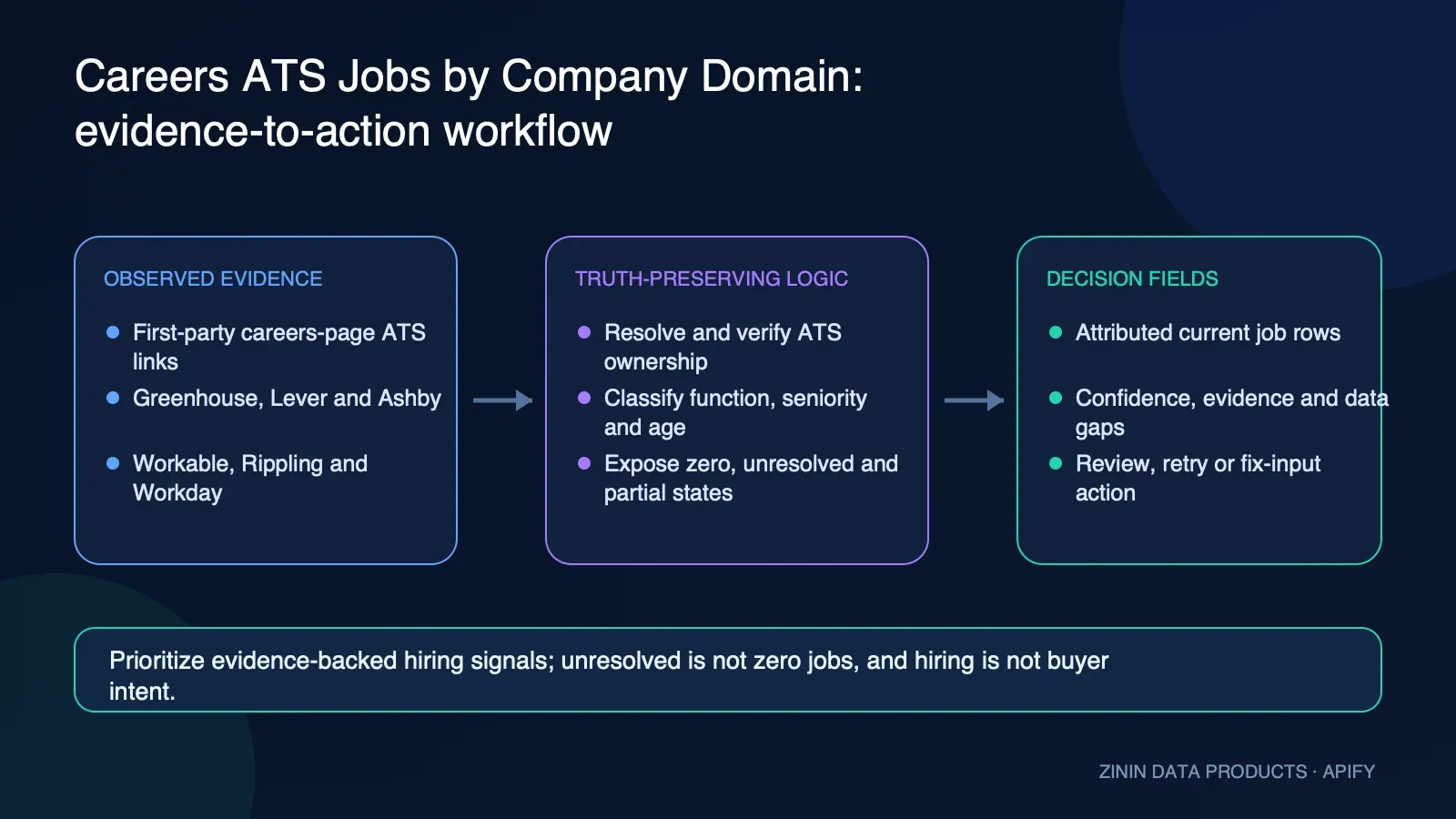
The Actor reduces collection and first-pass triage work. It does not remove responsibility for source verification or authorize an external business action. The commercial value comes from a structured, repeatable evidence layer: stable identity, observation time, source evidence, confidence, gaps, recommended action, and failure semantics travel with the raw facts.
Who uses it
| User | Value |
|---|---|
| B2B marketers | Observe function-specific hiring context before manual account research. |
| Recruiting researchers | Collect public roles from supported ATS providers without manually discovering every board token. |
| Sales operations | Separate confirmed company attribution from real but unrelated or unverifiable job-board rows. |
| Market analysts | Build a bounded current-role snapshot with explicit source and completeness status. |
| Lead-generation agencies | Enrich approved company domains with evidence-linked hiring observations and honest resolution failures. |
| Automation builders | Integrate domain or Dataset input and branch on job rows versus resolution/advisory rows. |
Input contract
| Input field | How to use it |
|---|---|
| domains | Up to 100 bare domains or URLs. Presence takes priority over datasetId, and each value is normalized to a company domain. |
| datasetId | An Apify Dataset selected with READ permission when direct domains are absent. Candidate domain fields are detected per row. |
| maxConcurrency | Parallel company resolution from 1 to 20. Keep the first batch modest. |
| maxJobsPerCompany | Depth cap for paginated Workday and Rippling boards. Hitting the cap produces an explicit truncated outcome. |
Recommended first Input
Start with this bounded example, inspect every Dataset field, and only then expand the scope. Input limits are product controls, not inconveniences: they make cost, completeness, and error handling visible.
Field dictionary
| Field or group | Meaning |
|---|---|
| entityId, companyDomain, inputRef, observedAt | Stable job/company identity, submitted domain, and observation context. |
| title, location, department, employmentType, publishedAt, url | Current public job facts retained from the attributed ATS response. |
| provider, providerSlug, resolvedVia | ATS source and resolution path used for the company domain. |
| attributionConfirmed, attributionNote, billingEligibility | Company-to-board ownership support and whether a job row qualifies as confirmed output. |
| jobFunction, seniority, jobAgeDays, freshnessBand | Deterministic title/time classification for triage. |
| resolutionStatus, found, partial | Job, confirmed zero, unresolved, invalid, truncated, and source-error states remain distinct. |
| confidenceScore, confidenceBand, confidenceConflict | Evidence confidence and explicit attribution conflict. |
| sourceEvidence, negativeSignals | Direct job URL and attribution evidence plus machine-readable gaps. |
| recommendedAction, actionPriority, safeToAutomate | Review routing that never auto-converts hiring into buyer intent. |
| failureType, retryable, recommendation | Operational handling for source, input, unresolved ATS, truncation, and run advisories. |
Common decision fields
| Field | Operational meaning |
|---|---|
| recordType | The semantic row family. Use it to distinguish a business result from an advisory or terminal record. |
| schemaVersion | Version of the additive decision-intelligence contract. Pin or validate it in strict consumers. |
| entityId | Stable entity identity for deduplication and joins. It is not necessarily a legal identifier. |
| inputRef | The relevant submitted input reference after normalization. |
| observedAt | When the Actor observed or finalized the evidence. It is not necessarily the source publication time. |
| firstSeenAt and lastSeenAt | Always-emitted observation boundaries. Stateful monitors use the compatible baseline/current boundary. Stateless rows set both equal to observedAt for the current run; that equality does not establish historical tenure. |
| freshness | A structured statement about evidence age or availability, not a prediction. Its basis and age unit follow the source-specific field definition. |
| eventId | For monitors, the stable identity of one observed transition or monitor outcome. It is distinct from entityId. |
| before and after | For monitors, the bounded comparable snapshots used for the decision. Null means that side of a comparison was not honestly available. |
| changedFields and changeFlags | Machine-readable monitor deltas and normalized change labels. Empty arrays mean no supported changed field was established, not that every possible real-world fact stayed constant. |
| materialityScore and materialityBand | Magnitude of an observed monitor change when the Actor can calculate it. Materiality is separate from evidence confidence and may be unknown when the source lacks the required facts. |
| confidenceScore | Evidence support on a 0–100 scale. It is separate from materiality, lead score, or business value. |
| confidenceBand | Readable high/medium/low/unknown grouping of evidence support. |
| confidenceReasons | Observed facts that raise confidence. |
| confidenceRisks | Missing, partial, ambiguous, inferred, or conflicting aspects that reduce confidence. |
| confidenceConflict | Explicit consistency warning when structured evidence does not reconcile. |
| sourceEvidence | Source-linked observations supporting the row. Preserve this during export. |
| dataGaps | Important evidence the Actor did not observe or cannot establish. Keep these gaps visible in CRM, spreadsheet, and automation exports. |
| negativeSignals | Machine-readable risks or gaps. A negative signal is not automatically a negative business outcome. |
| recommendedAction | Bounded review label produced from the available evidence. |
| actionPriority | Suggested queue priority, not urgency guaranteed by the source. |
| actionReason | Plain-language explanation for the recommended action. |
| safeToAutomate | Whether the narrow recommended action is deterministic enough for automation. Organizational policy still applies. |
| failureType | Normalized terminal or partial failure classification. Null means no classified failure. |
| retryable | Whether a later retry may legitimately change an operationally incomplete result. |
| recommendation | Human-readable handling guidance, especially for terminal rows. |
Evidence, confidence, and honest boundaries
What the evidence supports
- A confirmed job row is a current public ATS record whose board attribution supports the submitted domain.
- A real job with rejected or unknown ownership is retained for diagnosis but is not attached as confirmed company hiring.
- resolved-zero means an attributable supported ATS returned zero current openings at observation time.
- unresolved means no supported resolution path found an attributable ATS; it does not mean zero hiring.
- Paginated source caps and later-page failures remain explicit partial/truncated outcomes.
What this Actor never claims
- The Actor does not access private applicant, employee, compensation, or recruiting-pipeline data.
- It does not submit applications or contact candidates or employers.
- It does not infer a company's budget, purchase intent, urgency, growth rate, or financial health from one job.
- It does not claim support for every ATS or careers-site architecture.
- It does not call an unresolved or failed source a confirmed zero.
Reading data gaps correctly
A data gap is part of the result. Nulls, partial flags, confidence risks, source failures, and unavailable fields must survive export. Removing these fields makes the remaining facts look more complete than they are. When two sources conflict or a required identity cannot be proven, lower confidence and keep safeToAutomate=false.
Source evidence is not permission
A public source proves only that a value or statement was observable at the recorded time and URL. It does not establish consent, contractual rights, legal status, accuracy after observation, or authorization for a downstream action. Your organization remains responsible for source terms, privacy rules, outreach policy, retention, and human review.
Decision policy and action routing
| Action | How to use it |
|---|---|
| PRIORITIZE_RELEVANT_HIRING_SIGNAL | Review confirmed sales or marketing openings as account context, then validate relevance manually. |
| REVIEW_OPEN_JOB_SIGNAL | Open the attributed job URL and evaluate its business relevance. |
| VERIFY_COMPANY_ATTRIBUTION | Resolve ownership before attaching the real job to the submitted company. |
| NO_CURRENT_OPENINGS_AT_RESOLVED_ATS | Record the time-bounded zero without extending it to unsupported sources or future hiring. |
| REVIEW_OR_FIND_ATS_MANUALLY | Investigate an unsupported or undiscovered board without calling it no hiring. |
| RERUN_WITH_DEEPER_JOB_LIMIT | Increase the cap only when the missing paginated roles matter to the question. |
| RETRY_SOURCE_CHECK | Retry technical source failure; do not create negative hiring evidence. |
Confidence is not attractiveness
confidenceScore answers “how strongly does the available evidence support this factual classification?” It does not answer “how valuable is this lead, property, account, or address?” A high-confidence negative fact may be commercially uninteresting; a low-confidence positive signal may deserve research but not action. Keep the concepts separate in dashboards, exports, and CRM fields.
Why safeToAutomate is conservative
safeToAutomate is intentionally false whenever the next step could amplify an uncertain inference. It may be true only for narrow deterministic actions explicitly supported by the row, such as suppressing an email with invalid syntax. A true value does not waive legal, privacy, consent, contractual, or organizational rules.
Retry policy
- Retry when
retryable=trueand the failure is operational, such as a temporary source or DNS problem. - Do not endlessly retry deterministic invalid input, policy refusal, or confirmed absence.
- A retry must preserve the original input reference and must not create duplicate downstream actions.
- Budget exhaustion is not negative evidence about the entity. Resume only the unprocessed scope with an authorized budget.
- A failed Actor run is an operational event. Never transform it into “no listing,” “no contact,” “bad lead,” or “invalid email.”
Commercial use-case playbooks
1. Account hiring context
Goal. Submit a handpicked domain list, filter confirmed jobFunction values, and give researchers source URLs instead of an inferred intent label.
Recommended runbook.
- Define the submitted cohort and write down why it is in scope.
- Start with the smallest useful Input and preserve the exact run ID.
- Inspect the Dataset overview before exporting anything.
- Check
failureType,retryable, completeness indicators, andconfidenceBand. - Open the relevant
sourceEvidenceor source URL for material rows. - Apply the recommended action as a review label, not as an instruction to contact, buy, delete, accuse, or publish.
- Record the analyst's final disposition in the destination system.
Do not skip. A confirmed job row proves a public opening on an attributed supported ATS at observation time. It does not prove buyer intent, headcount growth, financial condition, or future hiring.
2. Agency hiring enrichment
Goal. Deliver attributed job rows and a separate unresolved/error report so the client sees coverage honestly.
Recommended runbook.
- Define the submitted cohort and write down why it is in scope.
- Start with the smallest useful Input and preserve the exact run ID.
- Inspect the Dataset overview before exporting anything.
- Check
failureType,retryable, completeness indicators, andconfidenceBand. - Open the relevant
sourceEvidenceor source URL for material rows. - Apply the recommended action as a review label, not as an instruction to contact, buy, delete, accuse, or publish.
- Record the analyst's final disposition in the destination system.
Do not skip. A confirmed job row proves a public opening on an attributed supported ATS at observation time. It does not prove buyer intent, headcount growth, financial condition, or future hiring.
3. Recruiting market map
Goal. Group current confirmed jobs by function, seniority, and location while preserving observation time and board source.
Recommended runbook.
- Define the submitted cohort and write down why it is in scope.
- Start with the smallest useful Input and preserve the exact run ID.
- Inspect the Dataset overview before exporting anything.
- Check
failureType,retryable, completeness indicators, andconfidenceBand. - Open the relevant
sourceEvidenceor source URL for material rows. - Apply the recommended action as a review label, not as an instruction to contact, buy, delete, accuse, or publish.
- Record the analyst's final disposition in the destination system.
Do not skip. A confirmed job row proves a public opening on an attributed supported ATS at observation time. It does not prove buyer intent, headcount growth, financial condition, or future hiring.
4. CRM company enrichment
Goal. Store job counts or selected role facts in staging, update by entityId, and expire observations under your own freshness policy.
Recommended runbook.
- Define the submitted cohort and write down why it is in scope.
- Start with the smallest useful Input and preserve the exact run ID.
- Inspect the Dataset overview before exporting anything.
- Check
failureType,retryable, completeness indicators, andconfidenceBand. - Open the relevant
sourceEvidenceor source URL for material rows. - Apply the recommended action as a review label, not as an instruction to contact, buy, delete, accuse, or publish.
- Record the analyst's final disposition in the destination system.
Do not skip. A confirmed job row proves a public opening on an attributed supported ATS at observation time. It does not prove buyer intent, headcount growth, financial condition, or future hiring.
5. Dataset Integration
Goal. Pick the source Dataset through the UI, inspect candidate-domain extraction, and quarantine invalid source rows.
Recommended runbook.
- Define the submitted cohort and write down why it is in scope.
- Start with the smallest useful Input and preserve the exact run ID.
- Inspect the Dataset overview before exporting anything.
- Check
failureType,retryable, completeness indicators, andconfidenceBand. - Open the relevant
sourceEvidenceor source URL for material rows. - Apply the recommended action as a review label, not as an instruction to contact, buy, delete, accuse, or publish.
- Record the analyst's final disposition in the destination system.
Do not skip. A confirmed job row proves a public opening on an attributed supported ATS at observation time. It does not prove buyer intent, headcount growth, financial condition, or future hiring.
6. Large Workday board
Goal. Raise maxJobsPerCompany deliberately, monitor runtime, and treat any truncated advisory as incomplete coverage.
Recommended runbook.
- Define the submitted cohort and write down why it is in scope.
- Start with the smallest useful Input and preserve the exact run ID.
- Inspect the Dataset overview before exporting anything.
- Check
failureType,retryable, completeness indicators, andconfidenceBand. - Open the relevant
sourceEvidenceor source URL for material rows. - Apply the recommended action as a review label, not as an instruction to contact, buy, delete, accuse, or publish.
- Record the analyst's final disposition in the destination system.
Do not skip. A confirmed job row proves a public opening on an attributed supported ATS at observation time. It does not prove buyer intent, headcount growth, financial condition, or future hiring.
7. Zero-opening review
Goal. Use resolved-zero only for the exact attributable board and observation time; do not label the company inactive.
Recommended runbook.
- Define the submitted cohort and write down why it is in scope.
- Start with the smallest useful Input and preserve the exact run ID.
- Inspect the Dataset overview before exporting anything.
- Check
failureType,retryable, completeness indicators, andconfidenceBand. - Open the relevant
sourceEvidenceor source URL for material rows. - Apply the recommended action as a review label, not as an instruction to contact, buy, delete, accuse, or publish.
- Record the analyst's final disposition in the destination system.
Do not skip. A confirmed job row proves a public opening on an attributed supported ATS at observation time. It does not prove buyer intent, headcount growth, financial condition, or future hiring.
8. Attribution exception audit
Goal. Review false/null attribution rows to improve input data or source support without billing or exporting them as confirmed jobs.
Recommended runbook.
- Define the submitted cohort and write down why it is in scope.
- Start with the smallest useful Input and preserve the exact run ID.
- Inspect the Dataset overview before exporting anything.
- Check
failureType,retryable, completeness indicators, andconfidenceBand. - Open the relevant
sourceEvidenceor source URL for material rows. - Apply the recommended action as a review label, not as an instruction to contact, buy, delete, accuse, or publish.
- Record the analyst's final disposition in the destination system.
Do not skip. A confirmed job row proves a public opening on an attributed supported ATS at observation time. It does not prove buyer intent, headcount growth, financial condition, or future hiring.
Integration recipes
All examples use placeholders. Keep the Apify token in a secret manager and never write it into a Dataset, README, screenshot, or client-side application.
cURL: start a run and wait briefly
The run response includes defaultDatasetId. Read clean JSON rows with:
JavaScript with apify-client
Python with apify-client
Apify MCP call
Generic webhook consumer policy
- Trigger on a terminal Actor run event.
- Confirm the run status is
SUCCEEDEDbefore reading business rows. - Retrieve rows from
defaultDatasetId. - Reject or quarantine rows whose
failureTypeis non-null unless your policy explicitly handles that failure. - Send
safeToAutomate=falserows to a human-review queue. - Store
entityId,observedAt,sourceEvidence, confidence, action, and the Apify run ID together. - Make retries idempotent by keying the destination on the stable entity ID plus the intended observation or event identity.
Where this fits in a practical stack
| Destination | Recommended pattern |
|---|---|
| Apify Console | Use the visual Input form, start the run, then open the default Dataset overview. This is the fastest path for a one-off review and the best place to inspect evidence before automating anything. |
| Apify API | POST JSON input to the Actor run endpoint, wait or poll for completion, then read the default Dataset through the URL returned by the run object. |
| JavaScript client | Use apify-client from a Node.js service, pass the same JSON object as the Console Input, and preserve the returned run and Dataset IDs in your own audit log. |
| Python client | Use apify-client in a Python enrichment job, iterate Dataset items, and route rows by recommendedAction, confidenceBand, failureType, and retryable. |
| Make | Start the Actor from a scenario, wait for the run, retrieve Dataset items, filter unsafe or low-confidence rows, then insert review-ready rows into the destination application. |
| Zapier | Use an Apify run action or webhook trigger, fetch Dataset items, apply a Filter step, and send only review-approved fields into the next sales or operations step. |
| n8n | Use HTTP Request or Apify nodes, branch on failureType and retryable, keep a manual-review lane for safeToAutomate=false, and write sourceEvidence together with the business fields. |
| Google Sheets | Export the Dataset directly or append rows from an automation. Keep stable entityId as a hidden key so reruns update the correct record instead of creating ambiguous duplicates. |
| Airtable | Map entityId to a primary or deduplication field, store confidence and evidence in separate columns, and expose recommendedAction as the triage view. |
| Webhook | Configure an Apify webhook for terminal run states, retrieve the Dataset after SUCCEEDED, and treat FAILED or TIMED-OUT runs as operational events rather than negative business evidence. |
A safe automation shape
The Actor is a collection and decision-support component. A production workflow should keep raw evidence, decision metadata, and business action in distinct layers:
- Collect: run the Actor with explicit bounded input.
- Validate: require a successful run and schema-valid Dataset rows.
- Triage: branch on
failureType,retryable,confidenceBand, andsafeToAutomate. - Review: open source evidence for rows that may affect a person, campaign, investment, compliance decision, or customer record.
- Act: execute only the action approved by your own policy and authorized operator.
- Audit: retain run ID, Dataset ID, observation time, input reference, source evidence, and the final human decision.
This separation prevents a common automation error: turning “data was observed” into “a business action is justified.”
Operating guide
Before the first production run
- Write the business question in one sentence: Which current public job postings can be attributed to the submitted company domain, and what does the resolution evidence actually support?
- Confirm every submitted input is within your authorized scope.
- Use the prefilled small example and review all returned row types.
- Map stable identifiers, confidence, evidence, actions, gaps, failure, and retry fields into the destination.
- Establish a human owner for review exceptions.
- Set a run budget and output bound appropriate to the test.
- Verify that secrets are stored only in the platform or workflow secret manager.
After every scheduled run
- Check terminal run status and logs.
- Compare the number of submitted entities, produced business rows, and advisory rows.
- Review partial, unknown, conflict, and low-confidence buckets.
- Inspect a sample of source evidence, including at least one positive and one negative result.
- Confirm the destination deduplicated on the intended stable key.
- Verify that no downstream action was triggered from an error row.
- Track cost per useful reviewed row rather than cost per raw request alone.
Production monitoring signals
Monitor source-unavailable rate, partial-row rate, low-confidence share, missing evidence, retry volume, run duration, Dataset row count, and spend. A sudden shift may indicate source drift, input drift, or an upstream outage. Stop automation and investigate before accepting a new pattern as business truth.
Cost control
Test one domain with a known supported public board and one control domain. Review attribution, resolved-zero/unresolved semantics, and source URLs before expanding the list. Current prices live in the Apify pricing panel.
Use maxTotalChargeUsd when calling a monetized Actor if your workflow supports it. Treat a buyer-set cap as a hard safety boundary. If the cap stops work, the unfinished items remain unprocessed; they do not become negative results.
Review templates and quality reporting
Row-review worksheet
For every material row, an analyst should be able to answer the following without relying on memory or an unstated assumption:
- What submitted entity or query does this row refer to?
- Is it a business result, a baseline/advisory row, a partial observation, or a failure?
- Which exact source evidence supports the headline fact?
- When was the evidence observed, and is there a different source publication time?
- Which fields are direct observations, which are normalized, and which are deterministic derivations?
- What important evidence is null, missing, partial, ambiguous, or conflicting?
- Does confidence describe evidence support only, or has someone incorrectly treated it as business value?
- What recommended action is present, and what additional verification does its reason require?
- Is the narrow action marked safe to automate? If yes, does organizational policy also permit it?
- What final human disposition was made, by whom, and from which run and Dataset item?
Field-group review prompts
1. entityId, companyDomain, inputRef, observedAt
Contract meaning: Stable job/company identity, submitted domain, and observation context.
Reviewer prompts: Is the value present? Does its type match the schema? Is it supported by sourceEvidence or a documented deterministic transformation? Is any null being silently converted into a default? Would the value still mean the same thing after CSV export? Does the destination preserve the related confidence and gap fields?
2. title, location, department, employmentType, publishedAt, url
Contract meaning: Current public job facts retained from the attributed ATS response.
Reviewer prompts: Is the value present? Does its type match the schema? Is it supported by sourceEvidence or a documented deterministic transformation? Is any null being silently converted into a default? Would the value still mean the same thing after CSV export? Does the destination preserve the related confidence and gap fields?
3. provider, providerSlug, resolvedVia
Contract meaning: ATS source and resolution path used for the company domain.
Reviewer prompts: Is the value present? Does its type match the schema? Is it supported by sourceEvidence or a documented deterministic transformation? Is any null being silently converted into a default? Would the value still mean the same thing after CSV export? Does the destination preserve the related confidence and gap fields?
4. attributionConfirmed, attributionNote, billingEligibility
Contract meaning: Company-to-board ownership support and whether a job row qualifies as confirmed output.
Reviewer prompts: Is the value present? Does its type match the schema? Is it supported by sourceEvidence or a documented deterministic transformation? Is any null being silently converted into a default? Would the value still mean the same thing after CSV export? Does the destination preserve the related confidence and gap fields?
5. jobFunction, seniority, jobAgeDays, freshnessBand
Contract meaning: Deterministic title/time classification for triage.
Reviewer prompts: Is the value present? Does its type match the schema? Is it supported by sourceEvidence or a documented deterministic transformation? Is any null being silently converted into a default? Would the value still mean the same thing after CSV export? Does the destination preserve the related confidence and gap fields?
6. resolutionStatus, found, partial
Contract meaning: Job, confirmed zero, unresolved, invalid, truncated, and source-error states remain distinct.
Reviewer prompts: Is the value present? Does its type match the schema? Is it supported by sourceEvidence or a documented deterministic transformation? Is any null being silently converted into a default? Would the value still mean the same thing after CSV export? Does the destination preserve the related confidence and gap fields?
7. confidenceScore, confidenceBand, confidenceConflict
Contract meaning: Evidence confidence and explicit attribution conflict.
Reviewer prompts: Is the value present? Does its type match the schema? Is it supported by sourceEvidence or a documented deterministic transformation? Is any null being silently converted into a default? Would the value still mean the same thing after CSV export? Does the destination preserve the related confidence and gap fields?
8. sourceEvidence, negativeSignals
Contract meaning: Direct job URL and attribution evidence plus machine-readable gaps.
Reviewer prompts: Is the value present? Does its type match the schema? Is it supported by sourceEvidence or a documented deterministic transformation? Is any null being silently converted into a default? Would the value still mean the same thing after CSV export? Does the destination preserve the related confidence and gap fields?
9. recommendedAction, actionPriority, safeToAutomate
Contract meaning: Review routing that never auto-converts hiring into buyer intent.
Reviewer prompts: Is the value present? Does its type match the schema? Is it supported by sourceEvidence or a documented deterministic transformation? Is any null being silently converted into a default? Would the value still mean the same thing after CSV export? Does the destination preserve the related confidence and gap fields?
10. failureType, retryable, recommendation
Contract meaning: Operational handling for source, input, unresolved ATS, truncation, and run advisories.
Reviewer prompts: Is the value present? Does its type match the schema? Is it supported by sourceEvidence or a documented deterministic transformation? Is any null being silently converted into a default? Would the value still mean the same thing after CSV export? Does the destination preserve the related confidence and gap fields?
Weekly quality report
Create a recurring internal report with these measures. The report is about pipeline health, not market demand unless the source contract explicitly measures demand.
| Metric | Why it matters | Investigate when |
|---|---|---|
| Submitted inputs | Defines the actual denominator and scope of the run. | The count differs from the approved batch or schedule. |
| Business result rows | Shows how many usable observations were produced. | The rate changes sharply without an input explanation. |
| Advisory/failure rows | Prevents operational failures from disappearing in a results-only dashboard. | Any terminal class grows or is unmapped. |
| Partial-result rate | Measures incomplete source coverage or configured truncation. | It rises, or analysts stop seeing the partial warning. |
| Low-confidence rate | Shows the share of rows requiring more evidence. | It rises by source, cohort, or input pattern. |
| Retryable failure rate | Distinguishes temporary operational issues from deterministic outcomes. | Retries repeat without improving evidence. |
| Evidence-link coverage | Confirms material facts remain traceable after export. | Links or evidence objects are missing from delivered records. |
| Safe-automation share | Shows how little or much of the workflow can be deterministic. | A mapping change makes unsafe actions appear safe. |
| Manual-review backlog | Measures whether human verification capacity matches collection volume. | Rows age beyond the campaign or decision window. |
| Duplicate destination writes | Tests idempotency and stable identity mapping. | The same entity/run creates multiple external actions. |
| Cost per reviewed useful row | Relates platform spend to approved, decision-useful output. | Raw volume rises but reviewed utility falls. |
| Source-drift exceptions | Detects changed markup, response shape, policy, or source availability. | A new unknown pattern survives more than one bounded check. |
Client-facing delivery note template
Use a note like this when delivering exports to a client or another team:
This Dataset contains bounded public-source observations produced by the Apify Actor for the submitted Input. Each row includes observation time, evidence confidence, recommended review action, and explicit gaps where available. A positive row is not proof of buyer intent, permission, legal status, future outcome, or any fact listed in the Actor's “never claims” section. Partial and failure rows are included so coverage is not overstated. Validate material rows at their source before acting.
Add the Actor URL, run URL, Dataset URL, build/version, exact Input scope, observation window, pricing model observed for the run, reviewer name, and date of approval.
CRM disposition vocabulary
Keep collection results and sales dispositions separate. A practical downstream vocabulary is:
needs_evidence_review: useful signal exists but a reviewer has not approved it.needs_identity_review: entity or ownership association is not sufficiently proven.needs_policy_review: contact, privacy, suppression, legal, or contractual policy must be checked.approved_for_research: an analyst may perform more research; this is not approval for outreach.approved_for_authorized_action: a named operator approved one specific action under the organization's policy.retry_operational_failure: the source or infrastructure failed and a bounded retry is appropriate.closed_no_supported_signal: the completed bounded check found no supported signal; this is not a universal negative fact.closed_out_of_scope: the input should not have entered this workflow.
Never overwrite recommendedAction with the CRM disposition. The first is Actor-produced decision support; the second is your organization's accountable decision.
Sampling plan
For a new workflow, review every row in the first small run. When the contract is understood, sample all failure and partial rows plus a representative set of high-, medium-, and low-confidence results. Re-expand to full review whenever the source changes, the schema version changes, a new input cohort is introduced, the error distribution shifts, or a downstream user reports an unexplained result.
Change-management record
When you change field mappings or automation policy, record:
- Previous mapping or rule.
- New mapping or rule.
- Actor build/version and schemaVersion used for validation.
- Test run and Dataset URLs.
- Positive, negative, partial, retry, and budget fixtures inspected.
- Security and privacy review outcome.
- Approver and activation time.
- Rollback condition and responsible operator.
This makes a commercial data workflow supportable. Without the record, a later operator cannot distinguish a real source change from an undocumented mapping change.
Delivery patterns for marketing and small-business teams
One-off research
Run the Actor in Console, inspect the overview table, open evidence for each material row, and export only the approved subset. Record the run URL in the client or campaign notes.
Recurring watch or hygiene job
Use an Apify schedule. Write rows into a staging table keyed by entityId. Compare current and previous observations only when the Actor supplies valid state or your own pipeline implements an explicit comparable baseline. Never infer a change from a failed run.
Agency client delivery
Deliver three views: business results, evidence/quality exceptions, and operational failures. Include the run URL, observation time, configured scope, and a plain-language statement of what the Actor does not prove. This makes the deliverable auditable and reduces disputes caused by overclaiming.
CRM enrichment
Write into staging fields first. A human or approved policy promotes values into canonical CRM fields. Keep raw source values separate from normalized and decision fields, and do not replace a verified value with a lower-confidence observation.
AI-assisted review
An LLM can summarize rows, but it must receive the evidence, confidence risks, negative signals, and limitations. Require citations to sourceEvidence and prohibit invented identity, intent, legal, funding, mailbox, valuation, or availability facts.
Buyer and operator acceptance checklist
Use this checklist before calling the workflow production-ready.
Product fit
- The business question matches: Which current public job postings can be attributed to the submitted company domain, and what does the resolution evidence actually support?
- The submitted entities were selected through an authorized process.
- A human owner understands the positive, negative, partial, and failure row types.
- The team accepts the boundaries listed in “What this Actor never claims.”
- The destination keeps evidence confidence separate from business scoring.
Input and run controls
-
domainsis explicitly reviewed and bounded. -
datasetIdis explicitly reviewed and bounded. -
maxConcurrencyis explicitly reviewed and bounded. -
maxJobsPerCompanyis explicitly reviewed and bounded. - The first production-like run uses a small representative sample.
- A maximum charge or internal spend alert is configured where appropriate.
- The workflow records Actor ID, build/version, run ID, Dataset ID, and input hash.
Data handling
-
entityIdis mapped to an idempotent destination key. -
observedAtand source-specific time fields remain distinct. -
sourceEvidence, gaps, and nulls are preserved. - Advisory and failure rows cannot enter the positive-results lane.
- Low-confidence and partial rows have a visible manual-review view.
- Retention and deletion rules match the type of data collected.
Action safety
-
recommendedActionis treated as a review label. -
safeToAutomate=falseblocks automatic external action. - Consent, suppression, legal, contractual, and platform rules are evaluated downstream.
- A reviewer can trace a material action back to source evidence and run metadata.
- Retry logic cannot duplicate a downstream action.
Ongoing quality
- The team monitors failure, retry, partial, low-confidence, and empty-result rates.
- A source-drift threshold pauses the workflow for inspection.
- Sample evidence is manually reviewed on a recurring basis.
- Cost per useful reviewed row is measured.
- Documentation and field mappings are updated when schemaVersion changes.
Frequently asked questions
Is this a database?
No. It is an on-demand observation tool. Each run collects or evaluates the submitted scope and records evidence at that time.
Does a found row prove commercial interest?
No. A found row proves only the factual observation described by its fields. Buyer intent is never inferred.
Can I automatically contact every result?
No. Use recommendedAction as triage, verify the evidence and identity, and apply your own consent, privacy, suppression, and outreach rules.
Why is safeToAutomate often false?
Because a useful observation can still require identity, context, legal, or source verification before action. Conservative routing prevents false certainty from scaling.
What should I do with low confidence?
Open confidenceRisks and sourceEvidence, close the important gap, or keep the row in a manual queue. Do not hide the confidence field.
What does partial mean?
The Actor obtained some usable evidence but could not support a complete observation of the configured scope. Partial is not the same as empty.
What is a confirmed zero?
Only an explicit source or deterministic rule can support a confirmed absence. An outage, truncation, or unreadable response is not a zero.
Should I retry every failure?
No. Retry only when retryable is true. Invalid input, policy refusal, or deterministic classification should be corrected or handled, not looped.
Can I delete failure rows?
You can exclude them from a business-results view, but retain them in operational logs so Dataset completeness and retry decisions stay explainable.
How should I deduplicate?
Use entityId for the entity and, for stateful monitors, eventId for the observed transition. Also retain the Apify run ID.
Can I treat confidence as conversion probability?
No. Confidence measures evidence support, not purchase probability, revenue, suitability, or expected return.
Can I change the recommended action?
Yes. It is an explainable default. Your downstream policy can be stricter, and should encode organization-specific authorization and risk tolerance.
How do I estimate cost?
Run the smallest representative input, inspect live event prices and run usage in Apify, then model the number of billable result events. The live pricing panel is authoritative.
Why use a small prefill?
It produces a cheap, fast, inspectable first run and reduces the chance of scaling a wrong input or workflow assumption.
Can I schedule it?
Yes. Use an Apify schedule, but make the destination idempotent and review changes in failure, partial, and confidence rates.
Can I export CSV or Excel?
Yes. Apify Datasets support common export formats. JSON is recommended when you need nested evidence and decision fields.
Can I send results to Sheets or Airtable?
Yes. Preserve entityId, confidence, evidence, gaps, actions, and failure fields instead of mapping only the headline value.
Can I use it from Make, Zapier, or n8n?
Yes. Start the Actor, wait for a successful terminal state, read Dataset items, then branch on decision and failure fields.
Can an LLM consume the output?
Yes, but pass the structured evidence and limitations together. Instruct the model not to invent missing facts and to cite sourceEvidence.
What happens when a source changes?
The run may become partial, unavailable, or fail validation. Monitor these rates and inspect logs before treating changed output as a real-world shift.
Does public mean unrestricted?
No. Public visibility does not remove source terms, privacy obligations, retention rules, or the need for a legitimate downstream purpose.
Is a source URL permanent?
Not necessarily. Store observation time and material facts because web content can change or disappear.
Can I rely on one row for a high-stakes decision?
No. High-stakes legal, financial, employment, compliance, safety, or personal decisions require appropriate primary evidence and qualified review.
How do I report a suspected parsing issue?
Provide the Actor run ID, a redacted input, affected field, expected source evidence, and whether the issue reproduces. Never include tokens or private data.
What does success mean?
A confirmed job row proves a public opening on an attributed supported ATS at observation time. It does not prove buyer intent, headcount growth, financial condition, or future hiring.
Support information to include with an issue
Provide the public Actor name, Apify run ID, Dataset item index or stable entity ID, a redacted Input, the relevant source URL, expected behavior, observed behavior, and whether retrying produced the same result. Do not include an Apify token, API key, private customer record, or unnecessary personal data.
Final interpretation rule
A confirmed job row proves a public opening on an attributed supported ATS at observation time. It does not prove buyer intent, headcount growth, financial condition, or future hiring.


