

Google Play App Intel
Pricing
from $1.70 / 1,000 app record delivereds
Google Play App Intel
Get a public intel card for any Google Play app by package id or Store URL: rating, category, description, icon, last-update date, install-count band and content rating. No login, no Google API key.
Pricing
from $1.70 / 1,000 app record delivereds
Rating
0.0
(0)
Developer

Tim Zinin
Maintained by CommunityActor stats
0
Bookmarked
2
Total users
1
Monthly active users
17 days ago
Last modified
Categories
Share
Google Play App Intel: The Public App-Detail Card, Read Correctly, With No Reviews Promised
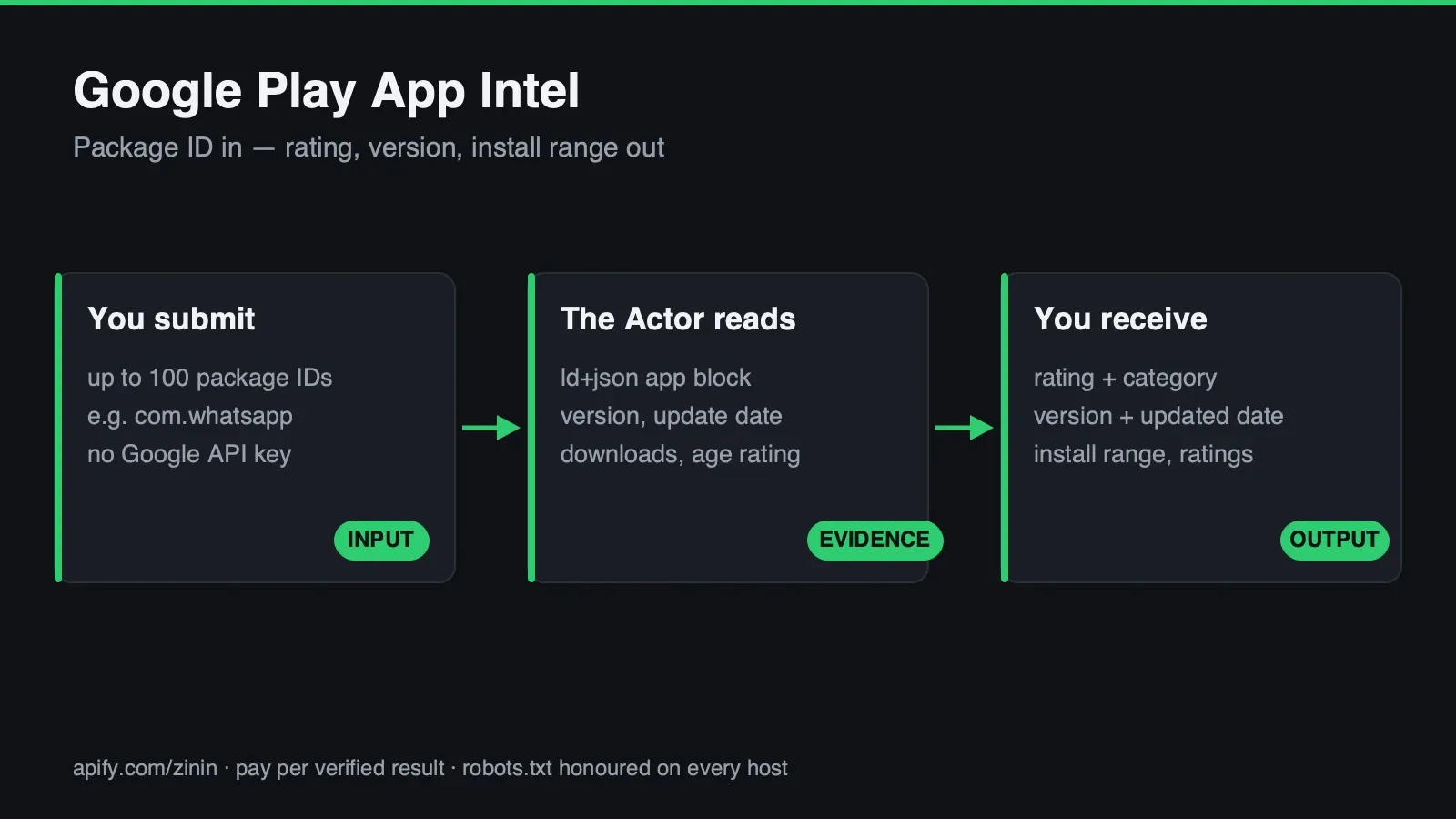 This Actor reads exactly one thing: the public app-detail page Google Play shows anyone who opens
play.google.com/store/apps/details?id=<package>. Give it a package id or a Store URL and you get back
one JSON row — rating, category, description, icon, last-update date, an install-count band and a
content rating — sourced from the same page, parsed twice: once from Google's own structured data, and
once from the plain HTML fields Google keeps outside that structured data. No login, no Google API key,
no headless browser, no anti-bot bypass.
The billable outcome is a delivered app: a package id that resolved to a live app-detail page and was parsed with confidence. A package id that Google Play itself confirms does not exist — a genuine HTTP 404, not a guess — is returned as a free row. A request that was blocked, timed out, or came back in a shape this Actor could not parse is also returned free, with a named reason. You never pay to learn that an app doesn't exist, and you never pay for a request that failed before it produced a usable result.
What you get
- The rating straight from Google's own structured data, not a number scraped out of a star-icon
count or a screen-reader label. Every card ships one
<script type="application/ld+json">block typedSoftwareApplication; this Actor parses that block by its declared@type, not by assuming it's the first script tag on the page — the same defensive rule the paired App Store Actor needs to enforce for real (see Evidence and boundaries), applied here too in case Google Play ever changes shape. - The four fields Google Play keeps OUTSIDE that structured data.
updatedOn,downloadsTextandcontentRatingare not JSON-LD properties — they sit in the page's plain HTML markup, in Google's own display text. A parser that only readsld+jsonkeys reports these fields as "missing" on a page where they are sitting in plain sight at HTTP 200. This Actor reads both sources on every request and tells you which one supplied which field. - A bonus field Google Play's structured data quietly includes:
ratingCount, the number of ratings behind the score. It wasn't part of this Actor's original field list — it turned up live in the sameld+jsonblock that carriesratingValue, on every app probed while this Actor was built, so it ships as a bonus, called out honestly as unconfirmed-stable rather than a documented Google API. - A field Google Play deliberately does NOT ship, on purpose: an exact "current version" string. See Limits for exactly why — the honest answer is that no single labeled version field exists on the current page, and picking the first version-shaped string out of an internal changelog blob would be a guess wearing a fact's clothes.
- Flexible input. A bare package id (
com.whatsapp) or a full Store URL — both normalize to the same validated request automatically, and a URL pointing anywhere other thanplay.google.comis rejected before any network request leaves this Actor (see the SSRF-guard example under Real happy, partial and failure output). - Honest not-found, never a guess. A nonexistent package id gets Google Play's own HTTP 404 — verified
live, re-verified again while writing this page — and comes back as
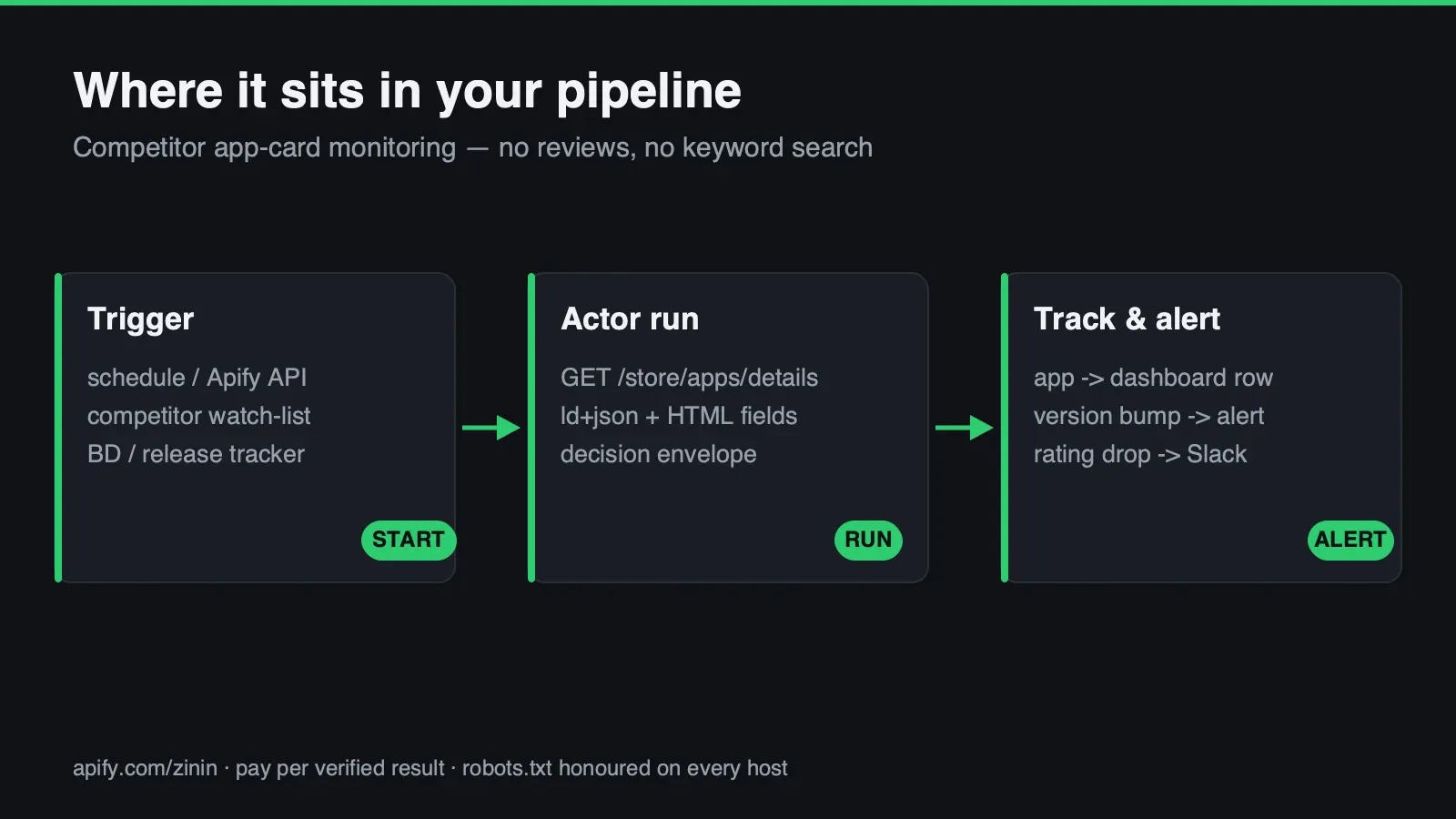
status: "not_found", at no charge. A blocked or malformed request is a different outcome,status: "error", so "this app doesn't exist" is never confused with "something went wrong on this request." - Built for watchlists. Up to 100 package ids per run, concurrency configurable 1–20, so tracking a dozen competitor apps for rating drift or a content-rating change is one scheduled run, not a dozen manual page loads.
- Runs on Apify: trigger it from the Console, a scheduled Task, the Apify API, the Apify MCP server, or any HTTP client that can call an Actor run — export results as JSON, CSV, Excel, or push them straight into a pipeline via a webhook or integration.
Who uses it
- Competitive and market intelligence teams who watch a specific set of competitor apps for rating
movement, a content-rating change, or an install-band jump (
"100M+"crossing to"500M+"), without opening the Play Store by hand for each one. - ASO and mobile marketing teams who need a machine-readable snapshot of the exact fields Google Play shows a shopper on the detail page — the fields that actually influence a store-listing decision — fed into a dashboard or a weekly report instead of screenshotted by hand.
- Investor and analyst research building a lightweight, always-current app-portfolio table for a company under diligence — install-count band and last-update recency are both cheap, honest signals of whether a product is actively maintained.
- Developers and agent/workflow builders who want a flat, three-state contract —
found/not_found/error— that an agent or an n8n/Make node can branch on directly, without parsing Google Play's HTML or handlingld+jsonextraction themselves. - Buyers of the paired
appstore-app-intelActor who want the Android half of the same competitive set on the same schema and the same price, so one dashboard can show both stores' cards side by side without reconciling two different vendors' field names.
How to run
- Click Try for free — the free plan needs no card.
- Paste one or more package ids or full Store URLs into Package IDs or Store URLs, one per line. A
bare package id (
com.whatsapp) and a full URL (https://play.google.com/store/apps/details?id=com.whatsapp) are both accepted and normalized to the identical request; you don't need to pick one format for a whole list. - Leave Max concurrent requests at its default of 5 unless you have a specific reason to raise it. Sustained load against Google Play has not been load-tested by this Actor's own build process — see Operating guide for what that means in practice.
- Press Start. Start it from the Console, an Apify Task on a schedule, the Apify API, or an MCP client — the run behaves identically from any of them.
- Read the Dataset for one row per app — in the Console's table view, pulled via the Apify API, or pushed onward by a connected webhook or integration.
- Check this run's key-value store record
OUTPUTfor a one-time run summary — requested/delivered/ paid/free/failed/incomplete counts, replay safety and any fatal error — written once at the end of the run.
There is no separate "review" or "confirm" step and no captcha to solve. A run either finishes with one row per requested app, or stops early only if this run's own charge budget runs out — see Pricing and Decision routing for exactly what a partial run looks like.
Pricing
Pay-per-event: $0.005 per run start, plus $0.002 per delivered app. A delivered app is a package id
that resolved and was parsed as status: "found". A package id that comes back not_found (a confirmed
404) or error (a blocked or malformed request) is still written to the Dataset as a full row, with the
reason — and is never charged.
Delivered app is the one pricing noun used everywhere on this page, in the Actor's pricing record,
and in the Dataset's own terminology — a watchlist of 20 package ids where 17 resolve and 3 come back
not_found is billed for 17 delivered apps plus one run start, not 20.
This price matches the paired appstore-app-intel Actor exactly, on purpose — a buyer running both
Actors across a cross-platform competitive set gets one price to reason about, not two.
On Apify's own billing record these are metered as two separate platform events — apify-actor-start
for the run fee, and result-found for each delivered app — the same two lines you will see on your
invoice.
Input contract
appIds(required) — an array of strings, each either a bare Google Play package id ("com.whatsapp", reverse-DNS form) or a full Store URL ("https://play.google.com/store/apps/details?id=com.whatsapp"). Up to 100 entries per run; both formats can be mixed freely in the same list. A URL-shaped entry is checked againstplay.google.comas an exact parsed hostname (not a substring match —play.google.com.evil.exampleandevil.example/?host=play.google.comboth fail this check) before anything is requested; a bare id containing/,..or://is rejected before it is substituted into a URL template. Duplicate entries are de-duplicated before billing, so the same package id listed twice is only ever charged once.maxConcurrency(optional, default5, range1–20) — how many apps are fetched in parallel within one run. The default is deliberately conservative; see Operating guide.
Locale is not a buyer-controlled input. Every request this Actor makes carries &hl=en&gl=US,
hard-coded — see Evidence and boundaries for exactly why leaving this to the runner's own IP address
would silently break the English-token fields this Actor parses.
(Both are contract illustrations built from .actor/input_schema.json, not run output — an input has
no result to reproduce. The second one is the exact input used for the four-app batch run whose real
output appears throughout the next section.)
Real happy, partial and failure output
Every row shares one flat schema regardless of outcome: eight decision-envelope fields
(appId, sourceUrl, status, evidence, confidence, partial, checkedAt, error) plus, on a
found row, nine data fields. error is null on every honestly-completed row — including not_found
— never a bare empty result with no explanation.
Every JSON block below is copied verbatim from this Actor's own local runs (apify run --purge),
executed while writing this page. Nothing here is invented, and nothing is backfilled from
documentation — where a shape genuinely was not observed live, that is stated plainly instead of guessed.
Happy path — com.whatsapp, both sources parsed clean
Happy path, second example — com.spotify.music, different category, different install band
Run in the same batch as three other apps (Instagram, Candy Crush Saga, Discord — all four came back
confidence: "high", partial: false, evidence 2/2), to check that the two HTML-fallback fields
aren't tuned to one app's markup:
Twelve live apps were checked across this build in total — WhatsApp, Instagram, Spotify, Candy Crush
Saga, Discord, Minecraft, Uber, Snapchat, Netflix, eBay, Google Translate and Duolingo, spanning
Communication, Social, Music, Games, Maps, Entertainment, Shopping, Tools and Education categories.
Every single one came back confidence: "high", partial: false, evidence 2/2 — the honest finding is
that no live partial: true row was produced across this test set. That is reported plainly rather
than invented: see the note under Field dictionary for exactly what would cause one, and the sibling
appstore-app-intel Actor's README for a real partial: true row from the same shared parsing library
against a different store, since that store's larger HTML-field set did produce one live.
Not-found path — a real, confirmed 404
This is Google Play's own answer, not an assumption this Actor makes about what a missing package "should" return. It is a genuine HTTP 404 with Google's own "Not Found" page as the body — not a redirect to search, and not an HTTP 200 with an empty or generic body, either of which would need very different handling. Confirmed by re-running this exact case live while writing this page.
Failure path — the SSRF guard, a real blocked request
Input for this run was ["https://evil.example/store/apps/details?id=com.whatsapp", "com.whatsapp"].
The first entry is rejected before any request leaves this Actor — no DNS lookup, no connection attempt,
nothing sent to evil.example — while the second, legitimate entry in the same run is processed and
billed normally (ok=1 found (billed), 0 not found, 1 errored, of 2 total in this run's own log). A
status: "error" row is always free — this one included.
This is one of two ways an error row can happen; the other, an anomalous HTTP 200 that does not carry
the expected ld+json block, was not observed live against this store during this build (Google Play's
card returned the expected block on every one of the twelve apps checked) — see Limits for what that path
looks like in the code, honestly labeled as untested against a live anomaly rather than demonstrated.
Field dictionary
| Field | Meaning | Important boundary |
|---|---|---|
appId | The package id you passed, or extracted from a Store URL | null on a row where input validation failed before an id could be extracted |
sourceUrl | The exact URL requested | Always carries &hl=en&gl=US — not something you set; see Evidence and boundaries |
status | found, not_found (confirmed 404) or error (blocked/malformed request) | The billing boundary — only found is charged |
evidence | What confirmed the result | On a found row, states which of the two HTML fallback fields parsed, e.g. "(2/2)"; on not_found, states the 404 was Google's own page, not a guess |
confidence | high, medium or low | high when the ld+json block AND both HTML-fallback fields parsed; medium when only ld+json parsed; low on any error row |
partial | true if some expected HTML-fallback field was not found on this row | Was never observed true across twelve live apps tested for this page — see Real happy, partial and failure output |
checkedAt | ISO timestamp of this row's own check | Independent per row within a run, not shared across the whole run |
error | Human-readable reason | null on every honestly-completed row, including not_found — a message only appears on status: "error" |
title | The app's display name, from ld+json | null only on a non-found row |
ratingValue | 0–5 star rating, from ld+json aggregateRating.ratingValue | A raw float as Google publishes it, not rounded |
ratingCount | Number of ratings behind that score | Bonus field — found live in ld+json on every app checked, but not part of any documented stable Google API, so treat it as best-effort |
category | Google Play's own category constant (e.g. "COMMUNICATION", "GAME_CASUAL") | The exact string Google's structured data publishes, uppercase with underscores |
description | The short tagline text from ld+json | Publisher-supplied free text, stored as-is, never executed or interpreted |
iconUrl | Direct link to the app's Play Store icon image | From ld+json, not re-hosted |
updatedOn | Display text of the card's "Updated on" field | From plain HTML, not ld+json — a display string ("Aug 15, 2026"), not a machine timestamp |
downloadsText | Display text of the card's install-count band | From plain HTML — a band, never an exact count ("10B+", "1B+", "500M+") because Google Play itself never publishes an exact number on this page |
contentRating | The card's content-rating label (e.g. "Everyone", "Teen") | From ld+json's contentRating property |
Evidence and boundaries
Why reviews and keyword search are permanently out of scope, not a v2 promise. Google Play's own
robots.txt, read live while writing this page, states plainly:
Both the reviews endpoint and the search endpoint are explicitly disallowed. This Actor will never touch
either path, on this account or any other — not because reviews and search aren't valuable (they are;
review-focused competitors in this same category carry several times this Actor's own traffic), but
because the source's own published policy forbids it. The paths this Actor actually reads —
/store/apps/details, and nothing else — are not disallowed by any rule in that file, checked directly,
line by line, not assumed.
Why locale is hard-coded, not a buyer setting. Every request carries &hl=en&gl=US, fixed in code,
never taken from input. Without it, the page renders in whatever locale the runner's own IP address
implies — and every field this Actor parses from plain HTML depends on matching an English-language
label ("Updated on", "Downloads"). A request without the locale parameters would return HTTP 200
with a fully valid, well-formed page — just not in English — and the label-matching fallback fields would
silently come back empty. That is a success-shaped failure: a 200 status code with data quietly missing,
exactly the class of bug this whole product line is built to avoid. The locale parameters are therefore
not configurable input; they are non-negotiable, per-request, and identical on every run regardless of
where the Actor executes.
Why the ld+json block is selected by @type, not by document position — defensively, here. The
sibling appstore-app-intel Actor in this same pair has a genuinely critical version of this problem: an
Apple app-detail page carries two ld+json blocks, and the first one has no rating at all (see that
Actor's own README for the live proof). Google Play's card, checked across all twelve apps probed during
this build, carries exactly one SoftwareApplication block — so this specific trap has not been observed
live on this store. This Actor still selects the block by its declared @type rather than assuming
"the first script tag is always the right one," because the cost of that discipline is zero and the cost
of being wrong if Google Play ever ships a second block (an Organization block, a breadcrumb block, a
review-aggregate block — any of which are common patterns on other commerce sites) is a silently empty
rating at HTTP 200. This is documented as a defensive design choice, not a live-observed vulnerability on
this specific store.
The version field that this Actor deliberately does NOT ship. Google Play's current app-detail page
carries no single field labeled "Version" or "Current Version" anywhere in its visible markup. The only
version-shaped strings on the page live inside an unlabeled internal JavaScript data blob that carries
many historical version-history entries, in non-chronological order — release-note rollout metadata, not
a clean "this is the current version" field. Grabbing "the first X.Y.Z.W-shaped string" out of that blob
is the exact same class of mistake as trusting the wrong ld+json block by position: a confident-looking
value pulled from the wrong place. Rather than ship a field that would be right by luck on some apps and
wrong on others, this Actor does not promise a version field in this build. (The App Store product in
this same pair does ship version, sourced from a genuinely labeled, order-guaranteed "Version History"
panel — a different page shape entirely; see that Actor's own README.)
The SSRF/DNS-rebinding guard, and what it actually checks. A URL-shaped input is validated against
the exact parsed hostname (play.google.com — an exact match, never a substring, so
play.google.com.evil.example fails this check the same way evil.example does). Beyond hostname
validation, every outbound request resolves DNS itself, judges every returned address against the private
and reserved ranges (loopback, link-local, RFC 1918, CGNAT, cloud-metadata 169.254.169.254, and their
IPv6 equivalents), and then pins the connection to exactly the addresses just checked — closing the
gap where a second DNS lookup, made later by a less careful client, could answer differently and route
the real connection somewhere the first check never saw. This is the same guard used across every Actor
in this vendor's fleet; the live example under Real happy, partial and failure output shows it rejecting
a URL pointed at evil.example mid-run without ever touching the network.
The byte cap, and why a cut-off page is never parsed as if it were complete. Every response is capped
at 3,000,000 bytes, streamed rather than buffered all at once — comfortably above the roughly 1.2MB this
Actor's own pages have measured at live, with headroom for a future page-size increase. A response that
hits the cap is flagged truncated and returned as status: "error", never silently parsed as a
complete page — the closing structure of the very field being parsed could simply be the part that got
cut off.
The retry policy, stated precisely. A request is retried (up to two additional attempts, with exponential backoff) only for network-level failures, HTTP 429, and HTTP 5xx — never for a 404, which is the source's own confirmed answer, not a hiccup, and never for a 200 response whose body simply didn't have the expected shape, which is an anomaly this Actor reports honestly rather than hammers the source retrying.
Decision routing
| Row shape | Billable? | status | confidence | What it means |
|---|---|---|---|---|
| Full parse | Yes | found | high | ld+json and both HTML-fallback fields all parsed |
| Partial parse | Yes | found | medium | ld+json parsed; one or both HTML-fallback fields did not — partial: true |
| Confirmed missing | No | not_found | high | Google Play's own HTTP 404 — a genuine confirmed negative, not a guess |
| Input rejected | No | error | low | SSRF/format validation failed before any request left this Actor |
| Fetch failed | No | error | low | Timeout, DNS failure, non-404 HTTP error, or a byte-cap truncation |
| Anomalous 200 | No | error | low | HTTP 200 but the expected ld+json block was not found — not observed live on this store during this build, but handled the same way as any other anomaly |
| Budget exhausted mid-run | No | — | — | The run's own charge cap was reached; remaining package ids in that run are neither processed nor charged, and this is reported as a free explanatory row |
A workflow only needs two rules: act on status === "found", and treat partial === true as "usable,
but check evidence for exactly which field is missing before trusting the row completely."
Commercial playbooks
Competitor rating and content-rating watch
A mobile marketing team lists five to ten direct competitor apps and schedules a daily run. Most days,
every field is unchanged — the value is in catching the day ratingValue drops half a star after a bad
release, or contentRating shifts from "Everyone" to "Teen" after a feature update, days before that
shows up in a manual spot-check.
Portfolio maintenance-recency signal for diligence
An analyst building a lightweight competitive or acquisition-target table uses updatedOn as a cheap,
honest proxy for whether a product is actively maintained — an app last updated eight months ago next to
one updated last week tells a real story with two fields and zero manual research.
ASO snapshotting for a store-listing audit
An ASO consultant pulls title, description, category and contentRating for a client's own app
plus every direct competitor, side by side, ahead of a listing-optimization pass — the exact fields a
shopper sees on the detail page, not an internal analytics number no shopper ever encounters.
Cross-store competitive dashboard, paired with appstore-app-intel
A BD or product team tracking the same app portfolio on both stores runs this Actor alongside
appstore-app-intel on the same schedule. Both share the same decision-envelope shape
(status/confidence/evidence/partial) and the same price, so one dashboard query can union both
Actors' Dataset output without reconciling two different vendors' field names or two different pricing
models.
Integration recipes
Scheduled watchlist
An Apify Task runs this Actor daily or weekly against a fixed list of package ids, reading the Dataset
for status: "found" rows and diffing ratingValue/updatedOn/downloadsText/contentRating against
the previous run's values — this Actor itself is stateless per run, so change-detection is a job for the
calling workflow, not a feature promised here.
Agent/MCP pattern
An agent supplies a package id or Store URL and reads status before trusting any other field —
found means the rest of the row is real data, not_found means the app genuinely does not exist right
now, and error means retry later or surface the error string to a human, never silently substitute a
guessed value.
Data-warehouse append pattern
Dataset rows are appended keyed by appId (present on every row shape, even error rows where input
validation still extracted a candidate id) plus checkedAt; null is preserved as null in every field
rather than coerced to an empty string, so a downstream query can tell "Google Play did not publish this
field" apart from "this field is genuinely blank text."
Operating guide
Why maxConcurrency defaults to 5, not 20. The measured Gate B check that proved this source
reachable was a single request per app, on two independent network legs — not a sustained burst. Raising
concurrency to the schema's own ceiling of 20 on a large watchlist has not been load-tested by this
Actor's own build process; the conservative default keeps a normal run comfortably inside behavior that
has actually been observed, and a buyer running a large watchlist (60–100 package ids) is better served
raising concurrency gradually and watching the run log than assuming the ceiling is safe on day one.
Reading a medium-confidence row. confidence: "medium" means the ld+json structured data parsed
cleanly (so ratingValue, title, category, description and iconUrl are all trustworthy) but at
least one of the two HTML-fallback fields (updatedOn, downloadsText) did not. Check evidence for the
exact count ("(1/2)" vs "(2/2)") and treat the specific null field as genuinely unknown, not zero or
empty.
Batch sizing. Up to 100 package ids per run is a schema-enforced ceiling, also enforced independently in the Actor's own code as a defense against a caller bypassing the Console form and hitting the API directly with a longer list. A watchlist larger than 100 needs more than one run.
Why the pair (googleplay-app-intel + appstore-app-intel) shares one price and one envelope shape,
on purpose. Both Actors were built together, from the same underlying library, specifically so a buyer
tracking a cross-platform app portfolio does not have to reconcile two vendors' different field names,
different pricing units, or different confidence semantics — status/confidence/evidence/partial
mean exactly the same thing on both.
Related tools
Related tools for adjacent workflows in e-commerce.
| Actor | What it does |
|---|---|
| App Store App Intel | Pair it in the e-commerce workflow: Get a public intel card for any iOS App Store app by numeric id, slug+id, or Store URL: rating, review... |
| Shopify Catalog & Merchandising Intelligence | Pair it in the e-commerce workflow: Qualify Shopify merchant leads with evidence-backed public catalog coverage, observed price positioning,... |
| Zid Product Export Intelligence | Pair it in the e-commerce workflow: Turn merchant-owned, merchant-authorized, or otherwise licensed Zid product exports into stable evidence,... |
| Shopify Store Price & Catalog Change Monitor | Pair it in the e-commerce workflow: Monitor store-level price range, catalog size, currency, Shopify detection, and heuristic revenue-band... |
| Chotot Vietnam Listings Scraper | Pair it in the e-commerce workflow: Normalize authorized or licensed classified listings into provenance-linked review rows with stable... |
FAQ
Does this need a Google account or an API key?
No. It reads the same public detail page anyone sees in a browser, unauthenticated, the same way a person's own browser would load it.
Can I get reviews or review text?
No, and this is permanent, not a "not yet." Google Play's own robots.txt explicitly disallows
/store/getreviews — this Actor will never touch that path, on this account or any other.
Can I search by keyword or category?
No, same reason. robots.txt explicitly disallows /store/search. This Actor only ever reads a specific
app's detail page by id — it has no discovery function.
What exactly does downloadsText give me — an exact install count?
No. It is Google Play's own display band — "10B+", "1B+", "500M+" — exactly as shown on the
card. Google Play itself does not publish an exact install count on this page; no field on this Actor
claims to have one.
Why is there no version field?
Because Google Play's current page carries no single labeled "current version" field — only an unlabeled internal data blob with many historical version strings in non-chronological order. Shipping a guessed value from that blob would be worse than shipping nothing; see Evidence and boundaries for the full reasoning.
What happens if I pass a package id that doesn't exist?
You get a status: "not_found" row, confirmed by Google Play's own HTTP 404 — verified live, not a
guess — and you are not charged for it.
What happens if the request is blocked or malformed?
A status: "error" row, free, with a specific reason in the error field — a blocked host (SSRF guard),
a DNS or timeout failure, or an HTTP 200 whose body didn't carry the expected structured-data block.
Can I call this from an AI agent?
Yes — it's a standard Apify Actor, callable from the Apify API, the Apify SDK, or the Apify MCP server,
with a flat, three-state status field designed to be branched on directly.
How current is the data?
As current as Google Play's own live page at the moment this Actor's request lands — there is no caching layer in this Actor and no delay beyond one HTTP round trip.
Am I allowed to use this for a commercial competitive-intelligence product?
The data itself — rating, category, description, install band — is what Google Play already displays publicly to every visitor of the page; this Actor does not access anything gated behind a login. See Sources and rights for exactly what was checked and what was not.
How reviewed is this build before release?
This Actor's core parsing logic (ld+json block selection, HTML-fallback field extraction, the SSRF/DNS
guard, and the billing guard) is shared, line for line, with the paired appstore-app-intel Actor — a
defect found and fixed in one shows up fixed in both, and both Actors' acceptance.json goldens
(5 cases each: positive parse, HTML-fallback presence, locale enforcement, confirmed-404 negative, and
SSRF-guard rejection) were run against this exact build.
Sources and rights
Everything below is read from the public app store listing page of the app you name — the same HTML any visitor receives, fetched anonymously with no login and no API key.
The only source. The public Google Play app-detail page,
https://play.google.com/store/apps/details?id=<package>&hl=en&gl=US. No other Google Play path, no
Google Play Developer API, and no private or undocumented endpoint of any kind.
What was checked, stated precisely. play.google.com/robots.txt was read live while writing this
page and confirms /store/apps/details — the only path this Actor requests — carries no Disallow rule.
/store/getreviews, /store/search, /store/purchase and /store/xhr are all explicitly disallowed,
and this Actor does not request any of them.
What was NOT checked, stated equally precisely. This Actor's build process verified robots.txt
permission for the specific path it reads. It did not conduct a legal review of Google Play's Terms of
Service regarding automated collection, storage, or resale of app-listing data, and makes no claim about
what that document does or does not permit beyond the crawler-access question robots.txt answers. The
app title, description, icon and category displayed on the card are the publisher's own marketing text
and assets, already made public by the publisher on this same page — not confidential or gated data — but
a buyer building a product on top of this Actor's output is responsible for their own review of how they
intend to use it, the same way they would be building on any other public web page.
No warranty of continued availability. Google Play can change this page's markup, its structured-data shape, or its access policy at any time, without notice. This Actor's own acceptance tests are pinned to a live snapshot (17.08.2026) and are expected to need updating if the source's shape drifts — that is a disclosed, ordinary maintenance reality of reading a live commercial web page, not a guarantee this page makes about the future.
Limits
- No reviews, no review text, no review count trend, and no keyword or category search — permanently, by
robots.txt, not a roadmap item. - No exact install count — only Google Play's own display band (
"10B+","1B+", etc.). - No
versionfield — Google Play's current page carries no single reliable "current version" field; see Evidence and boundaries for why one is not guessed. - Locale is fixed to
hl=en&gl=USon every request — not a buyer-configurable input, and not tested in any other locale. - Sustained high-concurrency load has not been load-tested against this source by this Actor's own build
process — Gate B verification was one request per app on two independent network legs, not a burst.
maxConcurrencydefaults conservatively for this reason. ratingCountis a bonus field found live in structured data during this build, not a documented stable Google API — treat it as best-effort, not a guaranteed-present field forever.- HTML-fallback fields (
updatedOn,downloadsText) are capped at 60 and 30 characters respectively and truncated with…if Google Play's own display text is ever longer; this was not observed to trigger on any of the twelve apps checked during this build, but the cap exists and is disclosed. partial: truewas never observed live across the twelve apps checked while building and documenting this Actor — the code path exists (see Field dictionary and Decision routing) but has no live example on this specific store; the siblingappstore-app-intelActor's README has a real one from the same shared library.- Up to 100 package ids per run; a larger watchlist needs more than one run.
- This Actor reads one region's worth of data per app (Google's own default English/US rendering, forced
via
hl=en&gl=US) — it does not compare pricing, availability, or listing differences across regions.
Support boundary
Actor support covers this page's described input validation, the source-access and parsing behavior, the
Dataset schema, and the billing/replay guarantees for an accepted run. It cannot guarantee Google Play's
own uptime, page shape, or continued publication of any specific field — Google can change any of this
without notice, and this Actor's acceptance tests will need updating if it does. It cannot provide legal
advice on Google Play's Terms of Service, cannot restore access if Google blocks this Actor's traffic
pattern going forward, and cannot add reviews or keyword search — both are permanently out of scope by
the source's own robots.txt, not a missing feature. When reporting a problem, include the Actor run ID,
the exact appIds input used, the affected row's status/evidence/error fields, and the approximate
checkedAt time.


