

Mercado Libre Scraper — LatAm Product Prices & Sellers
Pricing
from $3.00 / 1,000 product founds
Mercado Libre Scraper — LatAm Product Prices & Sellers
Search Mercado Libre (Mercado Livre in Brazil) by keyword in Argentina, Mexico, Brazil, Colombia, Chile and more. Get price, discount, seller, shipping, rating, image and item URL per listing — anti-detect browser rendering, no login or API key.
Pricing
from $3.00 / 1,000 product founds
Rating
0.0
(0)
Developer

Tim Zinin
Maintained by CommunityActor stats
0
Bookmarked
4
Total users
0
Monthly active users
3 days ago
Last modified
Categories
Share
Mercado Libre Scraper — Argentina, Mexico, Brazil & LatAm Product Prices
Get live Mercado Libre (Mercado Livre in Brazil) search results as clean rows: price, original price and discount percent, installment plan, condition, seller and official-store flag, free-shipping flag, rating, image and the direct item URL — for any keyword or search URL, across nine Latin American marketplaces, no Mercado Libre account and no API key.
Small first run
At the default 2 GB, the start fee is $0.04. If this input delivers three results, the listed total is $0.049. Set the run spending limit to bound the whole run. The result limit applies separately to each search; adding searches can increase the total. Runtime depends on source responses and retries.
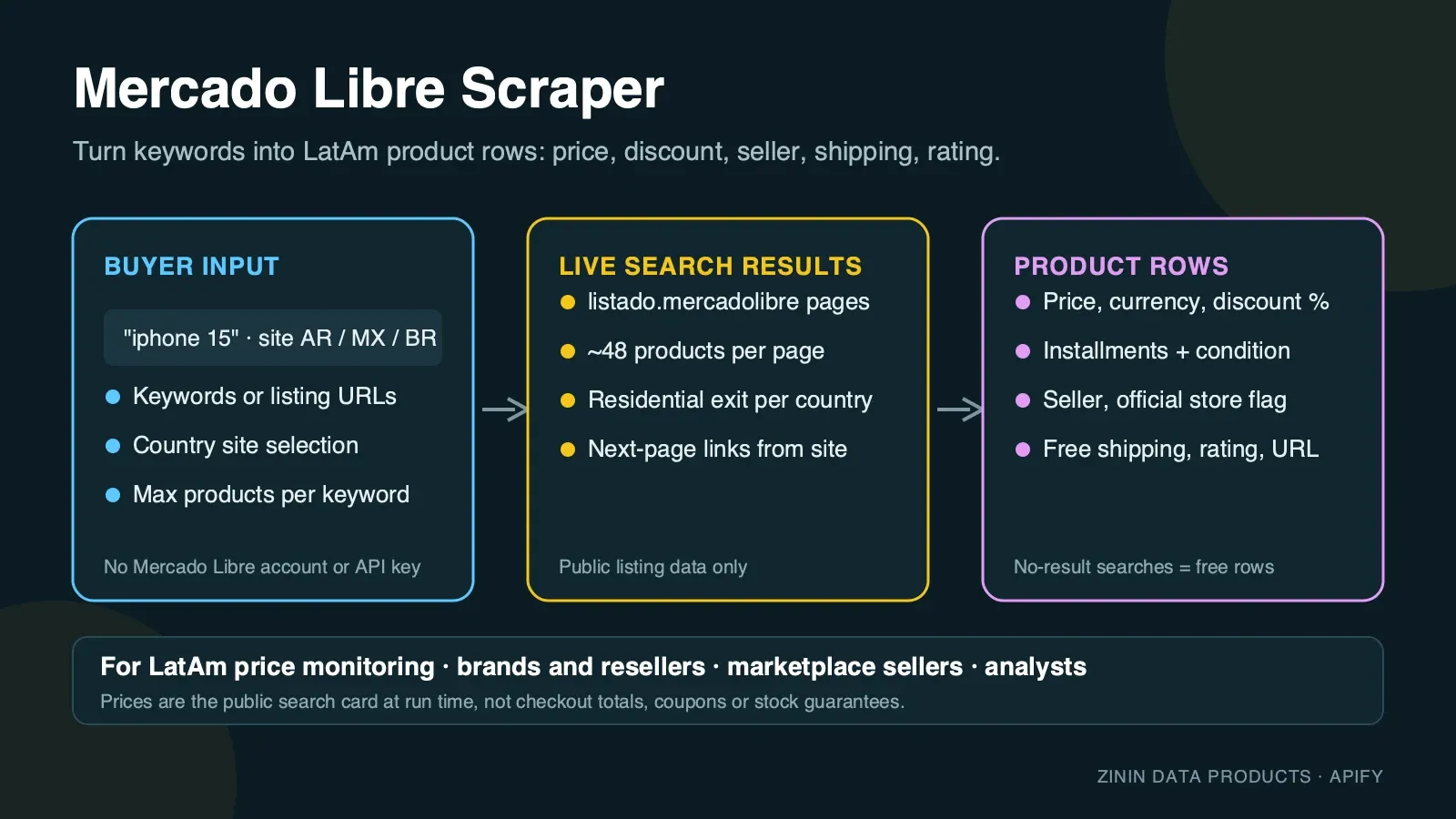
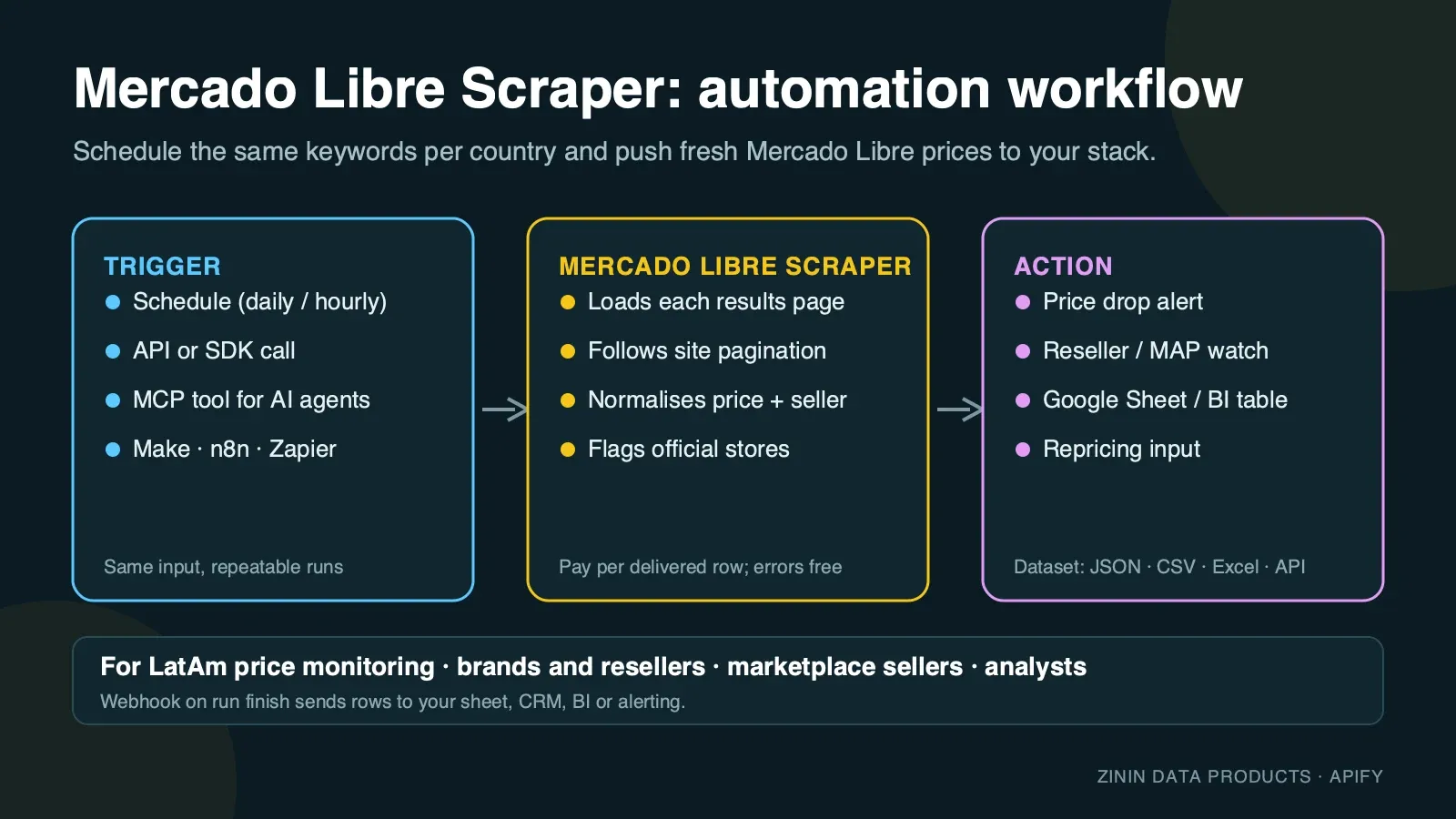
Mercado Libre is the largest online marketplace in Latin America — more than 100 million buyers across Argentina, Mexico, Brazil, Colombia, Chile and a dozen other countries, with the same product routinely listed by a dozen different sellers at a dozen different prices, plus a "buy new, refurbished or open-box" mix that changes the effective price a lot. This Actor reads the public search results pages exactly as a shopper in each country sees them and turns every product card into one structured row. You choose the marketplace (site), the keywords, and how many products you need, and get a dataset you can download as JSON, CSV or Excel, pull through the Apify API, or send to Google Sheets, Make, n8n, Zapier or an AI agent over MCP.
It is built for recurring price and assortment work: run it daily on the same keywords in the countries you sell or buy in, compare the rows, and you know who changed a price, who is running a discount, and which sellers are gaining official-store status.
What you get
One row per product card on the Mercado Libre search results page:
- Product identity —
id(the site-scoped item id, e.g.MLA3868215358, stable across runs), full producttitle, directurlto the item's page. - Price —
pricein the local currency (currency, e.g.ARS,MXN,BRL),originalPriceanddiscountPercentwhen the card shows a struck-through price and a "% OFF" badge. - Financing —
installments, the interest or no-interest instalment plan text exactly as shown, e.g. "Mismo precio 6 cuotas de 266666 ARS" or "15 meses sin intereses de 959.42 MXN". Instalment financing is a real part of how LatAm buyers compare prices, not a footnote. - Condition —
condition(e.g.Nuevo,Reacondicionado,Caja abierta) when the card shows one; new items in original packaging usually show no badge at all, which the Actor reports asnullrather than guessing "new". - Seller —
seller(business name when Mercado Libre shows one on the card) andisOfficialStore, true when the card carries the "Tienda oficial" / "Loja oficial" badge. - Social proof —
rating, the card's average score (0–5); most listings without enough sales show no score at all (null), which is normal, not missing data. - Delivery —
freeShipping(true when the card promises free shipping, checked against both the badge's colour-coded label and its underlying..._free_shippingkey so it works the same in Spanish and Portuguese) andshippingNote, Mercado Libre's own delivery promise text, e.g. "Llega gratis hoy" or "Llega gratis mañana". - Ad transparency —
isAdmarks paid placements the site itself flags as ads (is_pad). They are real products and are kept, but clearly labelled: on some searches they fill the top of the first page (a review run for "zapatillas running" on Mexico returned 4 ads among the first 8 cards; theiphone 15searches used for the examples below had none). Filter onisAdif you only want organic results. For ad cards the site's own link is a click-tracking beacon, so the Actor gives you the item's real page instead (https://articulo.mercadolibre.<tld>/MLM-…), built from the item id. - Position —
pageandpositionon the results page, so you can track ranking over time. - Context — the
queryorsearchUrlthat produced the row, thesite(country) it came from, and ascrapedAttimestamp. - Runs on Apify: schedule it, monitor it, call it from the API or the MCP server, export to JSON, CSV or Excel, or push results straight into your own pipeline.
Every row is a real product that Mercado Libre showed for your search. Keywords with genuinely no matches, blocked pages and budget stops are reported as free rows with an error field, so you always know what happened to each keyword and never pay for an explanation.
Who uses it
- Cross-border sellers and importers checking what a product sells for on Mercado Libre Argentina, Mexico or Brazil before they list it there, and which sellers dominate a keyword.
- Brands and distributors watching authorised and unauthorised resellers of their products: price floors, discount campaigns, official-store status, refurbished-market pricing.
- E-commerce and pricing teams feeding a repricing tool or a BI dashboard with daily Mercado Libre prices next to Amazon, Shopify or their own storefront.
- Market researchers and analysts sizing a category in a new LatAm market: how many sellers, what price band, how much of the market is refurbished vs new, how prices differ between Argentina and Mexico for the same product.
- Affiliate and content publishers building "best phones under $500" style pages from fresh prices, ratings and item links, country by country.
- AI agents that need a grounded answer about current Latin American retail prices and can call the Actor as an MCP tool.
How to run
- Click Try for free (or Start) on this page. You need a free Apify account; no Mercado Libre account, no API key.
- In Search keywords, enter one or more keywords, one per line. Spanish or Portuguese works best for local products (
zapatillas running,tênis masculino); English brand names work too (iphone 15). - Pick a Site — which country's marketplace to search. All keywords and URLs in one run use the same site.
- Optional: paste one or more Mercado Libre search URLs into Mercado Libre search URLs to reuse filters you already set on the site (category, price range, condition). The URL must match the marketplace you picked in Site.
- Set Max products per keyword or URL. One results page holds about 48 products.
- Click Start. Use the three-result JSON above for the first run; completion time varies with source responses and retries.
- Open the Output tab: the Products view shows image, title, price, discount, seller and link; the Errors and empty searches view shows the free explanation rows. Download as JSON, CSV, Excel or HTML, or call the dataset through the API.
To run it on a schedule, open Schedules, pick the Actor (or a saved task with your keywords) and choose daily or hourly. To connect it to other tools, see Integration recipes.
Pricing
This Actor uses pay per event pricing. You pay only for products actually delivered to your dataset, plus a small start fee:
| Event | Price | When it is charged |
|---|---|---|
| Actor start | $0.02 per GB of memory | Once per run. The default 2 GB memory means two start events. |
| Product found | $0.003 per product | For every product row delivered to the dataset. |
Example: with the default 2 GB memory, a run that delivers 100 products costs 2 × $0.02 + 100 × $0.003 = $0.34; 1,000 products cost $3.04. The same price applies on every Apify plan.
What you do not pay for:
- Rows with an
errorfield — keywords with genuinely no matches, pages Mercado Libre did not return, and the note written when your spending limit is reached — are free. - Proxy traffic, browser time and retries are included in the product price. You never see a separate proxy bill.
Spending limit. Apify lets you set Max total charge for any run. The Actor checks the remaining budget before every product and stops cleanly when the next product would exceed it, then writes a free row saying so.
Free plan. Apify's free plan includes monthly platform credit that covers small test runs of this Actor. The prefilled example is sized so that it completes well inside that credit.
Input contract
| Field | Type | Default | What it does |
|---|---|---|---|
searchQueries | array of strings | — (prefill ["iphone 15"]) | Keywords to search. One run can hold up to 50 keywords; duplicates are removed. |
site | string | AR | Which country's marketplace: AR (mercadolibre.com.ar), MX (mercadolibre.com.mx), BR (mercadolivre.com.br), CO (mercadolibre.com.co), CL (mercadolibre.cl), PE (mercadolibre.com.pe), UY (mercadolibre.com.uy), VE (mercadolibre.com.ve) or EC (mercadolibre.com.ec). Every keyword and URL in the run uses this one site. |
startUrls | array of URLs | [] | Mercado Libre search URLs (must match the domain of the selected site). Filters in the URL — category, price range, condition — are kept. Other hosts, or a domain that does not match site, are rejected before any work starts. |
maxItems | integer 1–2000 | 48 (prefill 20) | Products to return per keyword or URL. The Actor stops paginating as soon as the limit is reached. |
You must provide at least one keyword or one URL. An empty input fails immediately with a clear message and costs nothing beyond the start event.
Minimal input (the prefill):
Price research input — Mexico, several keywords:
Reuse filters you set on the site:
Output examples
All examples below are copied from real runs of this Actor on the Apify platform (September 2026). Nothing is invented or edited except whitespace.
Happy output (Argentina)
Input {"searchQueries": ["iphone 15"], "site": "AR", "maxItems": 20} — run finished in 39 seconds, 20 products delivered, 0 errors. First row:
A larger real run — the same input with maxItems: 120 — walked three results pages and delivered all 120 products in 52 seconds, for about $0.0041 of platform cost per page.
Happy output (Mexico)
Same input with "site": "MX" — run finished in 80 seconds, 5 products delivered, 0 errors:
Partial output (some fields genuinely absent on the card)
Same Argentina run, position 5 — a refurbished listing with no seller name and no rating shown on the card. null here means "Mercado Libre did not show this on the card", not a scraping failure:
Failure output (no results)
Mercado Libre's normal keyword search almost always returns some products — even a nonsense keyword gets a page of "related" suggestions, which this Actor treats as real results because the site itself presents them as the answer to your search. A genuine "no matches" page — Mercado Libre's own "No encontramos resultados para tu búsqueda" template — does happen with a narrow filter combination (here, a search URL with an impossible price filter, real run):
No product was charged in that run; only the start event applied. When the site blocks every request in a run even through fresh residential proxy sessions, the run still ends as Succeeded with the status message "The site blocked all N search(es)… No result was billed, only the run start." — check that message or the error field to retry automatically, and the error row instead reads The site did not return a result page after 3 attempts (...).
Field dictionary
| Field | Type | Meaning | Notes |
|---|---|---|---|
id | string | Mercado Libre's item id, e.g. MLA3868215358 | Site-scoped (the two-letter prefix matches site). Use it as the primary key when you compare runs. null only on error rows. |
title | string | Product title exactly as the seller wrote it | Spanish or Portuguese, not translated. |
price | number | Current price shown on the result card | Local currency units (not cents). Excludes coupons and shipping unless the card included them. |
currency | string | ISO currency code for the site, e.g. ARS, MXN, BRL, COP, CLP | Present on every product row. |
originalPrice | number | Pre-discount price shown struck through on the card | null when the card shows no discount. |
discountPercent | integer | The "% OFF" badge, parsed to a number | null when the card shows no discount. |
installments | string | Instalment plan text exactly as shown | e.g. "Mismo precio 6 cuotas de 266666 ARS", "15 meses sin intereses de 959.42 MXN". null when the card offers no instalments. |
condition | string | e.g. Nuevo, Reacondicionado, Caja abierta | Many "new, boxed" listings show no badge at all; that is null, not "new" assumed. |
seller | string | Seller / brand name shown on the card | null when the card does not name a seller (common for ordinary marketplace listings — open the item page for the seller). |
isOfficialStore | boolean | Card carries the "Tienda oficial" / "Loja oficial" badge | |
rating | number | Average score, 0–5 | null when the item has too few ratings for Mercado Libre to show one on the card. |
freeShipping | boolean | Card promises free shipping | Detected from both the shipping badge's own "free shipping" key and its Spanish/Portuguese text, so it is consistent across sites. |
shippingNote | string | Mercado Libre's own delivery promise text | e.g. "Llega gratis hoy". Dates and "today/tomorrow" wording are relative to the run time. |
isAd | boolean | Site's own paid-placement flag | true only when Mercado Libre itself marks the card as a paid ad. Ad rows are real products and are billed like any other row; filter on this field for organic-only lists. |
imageUrl | string | Product's main image (mlstatic.com CDN) | Images are not downloaded by the Actor; the URL is Mercado Libre's. |
url | string | Item's page on the local site | Absolute URL of the item page. For ad cards (isAd: true) the site links through a click-tracking beacon; the Actor replaces it with the item page built from id (https://articulo.mercadolibre.<tld>/MLM-3463237097, Brazil produto.mercadolivre.com.br), which opens the same product. |
page | integer | Results page the product appeared on | 1-based. |
position | integer | Position on that page | 1-based, order as returned by the site. |
query | string | Keyword that produced the row | null for URL inputs. |
site | string | Country site code, e.g. AR, MX | Matches the input site. |
searchUrl | string | First results page URL for this keyword or URL | |
scrapedAt | string | ISO timestamp when the row was written | UTC. |
error | string | Present only on free explanation rows | Never present on paid product rows. |
Evidence and boundaries
What this Actor observes and what it does not:
- Source. Only the public Mercado Libre / Mercado Livre search results pages (
listado.mercadolibre.<tld>,lista.mercadolivre.com.br), the same pages any visitor in that country sees without logging in. It does not open item pages, carts, checkout or account areas. - Price is the card price at run time. Mercado Libre runs frequent discount campaigns (Hot Sale, Cyber Monday, "Ofertas del día"), and instalment terms change by payment method and card issuer. The row is what the search card said when the Actor loaded it. It is not a checkout total and does not include coupons, bank-specific instalment promotions not shown on the card, or shipping surcharges for remote areas.
- Rating is the card's own average. Mercado Libre only shows a score once an item has enough sales/ratings; a
nullrating is normal for newer or low-volume listings, not a data gap. - Condition is what the card shows, not always what the listing implies. Ordinary new-in-box listings frequently carry no condition badge at all; the Actor reports that as
nullrather than assuming "new". - Ranking depends on context. Result order on Mercado Libre can vary with location, time and personalisation. The Actor uses a residential connection in the site's own country and no login, which is the closest thing to a neutral shopper view, but two runs minutes apart can order page one differently.
- Titles are not translated or cleaned. Sellers put model, colour and condition into titles their own way; you get them as written so nothing is lost.
- "No results" is rare by design. Mercado Libre's search almost never shows a literal empty page for a text keyword — it falls back to "related" suggestions instead, and the Actor reports those as real results because the site presents them as the answer. A genuine no-match page (Mercado Libre's own "No encontramos resultados" template) does occur with narrow filter combinations, and is reported as a free
errorrow. - No guarantees about completeness. Broad keywords can have thousands of matching listings but the site only lets visitors page through a bounded subset. For broad keywords, narrow the search (category, price range, condition in a pasted URL) rather than asking for thousands of rows.
How the Actor reaches the page: Mercado Libre, like most large marketplaces, protects its pages against automated traffic with a proof-of-work challenge that a plain HTTP request cannot pass even through a residential IP. The Actor opens each results page in a real, privacy-hardened browser through residential proxies in the marketplace's own country, waits until Mercado Libre's own page data is present, and reads it. Images, fonts and video are never downloaded, which keeps the run fast and the traffic small. If a page is not usable, it retries with a fresh session up to three times and then reports the keyword as a free error row instead of guessing.
Decision routing
| What you see in the data | What it usually means | What to do next |
|---|---|---|
| Your product appears from several sellers within a 5–10% price band | Commodity competition; price is the main lever | Track daily and alert on the lowest price per id group (join by title/model, since id is per-listing) |
| One seller sells well below everyone else | Clearance, refurbished/grey-market unit, or pricing error | Check condition and url before matching the price |
High discountPercent with a refurbished condition | Normal — refurbished units discount hard against new units of the same model | Compare like-for-like condition before concluding a price war |
isOfficialStore: true at a similar price to third-party sellers | The brand itself is competing directly on Mercado Libre | Useful signal for MAP (minimum advertised price) monitoring |
installments shows "sin intereses" (no interest) for many sellers on a keyword | Category-wide financing promotion, not a real price cut | Compare price, not the instalment amount, across sellers |
Free error row No results found | Keyword or filter too narrow | Broaden the keyword, or drop a filter from the pasted URL |
| Free error row about attempts | Mercado Libre did not serve the page to three sessions | Re-run later; it is not charged |
Commercial playbooks
1. Daily price watch for a product line. Save a task with your 10–30 product keywords and one site. Schedule it daily. In your sheet, group by id (or by title/model when tracking across sellers), keep the minimum price per day, and alert when a competitor drops below your floor.
2. Reseller and MAP monitoring for brands. Search your brand name and model numbers on each site you care about. Group rows by seller. Sellers that are not on your authorised list, or that sell under your minimum advertised price, are your follow-up list. Store url and scrapedAt as evidence.
3. Cross-country price comparison. Run the same keyword against AR, MX, BR, CO and CL in separate runs (or a saved task per site) and compare price after converting to one currency. This is the fastest way to see where a product is under- or over-priced relative to the rest of the region.
4. New vs refurbished market sizing. Run a broad category keyword with a large maxItems, then split rows by condition. The share of Reacondicionado / Caja abierta listings and their discount versus new units tells you how mature the refurbished market is for that category in that country.
5. Content and affiliate pages. Pull the top products for a keyword, filter to rating ≥ 4.5, and use the fresh price, discount and item link in your comparison page. Refresh weekly.
Integration recipes
Apify API (any language). Start a run and get items in one call:
Python client.
JavaScript client.
Google Sheets. Use Apify's Google Sheets integration on a saved task: every finished run appends rows to your sheet. Filter out rows where error is not empty.
Make, n8n and Zapier. Use the Apify app: trigger "Watch Actor runs" (or "Watch task runs"), then "Get dataset items", then your action — Slack message when the minimum price drops, a row in Airtable, a record in your CRM.
Webhooks. Add a webhook for ACTOR.RUN.SUCCEEDED pointing at your endpoint; it receives the run object with defaultDatasetId, and you fetch items from there.
AI agents (MCP). The Actor is available as a tool through the Apify MCP server (https://mcp.apify.com). An agent can call it with a keyword and a site and use the returned rows to answer "what does X cost on Mercado Libre Mexico right now". Keep maxItems small for interactive use.
Comparing runs over time
Most buyers use this Actor to see change, not a single snapshot. A reliable change-detection setup looks like this:
- Fix the input. Save a task with the exact keywords, site and
maxItems. Changing any of them changes which products are in scope and makes day-to-day comparison noisy. - Key on
id. It is Mercado Libre's own listing id and stable for the life of that specific listing. Titles rarely change; positions move every run. - Store
scrapedAtwith every row. It is the observation time. Two rows with the sameidand differentpriceare a price change between those two timestamps. - Separate "missing" from "gone". If an
iddisappears from the results, it may have dropped out of the page window you requested rather than been delisted. For important items, request more pages so the item stays in scope, or paste its ownurlin a search you know returns it. - Compare like with like. Use the same
siteand keyword wording across runs; result order can shift with personalisation and time. - Watch instalments, not only price. During financing promotions many sellers keep the price and change
installmentsfrom interest-bearing to "sin intereses". That is a real change in what the buyer pays over time.
A simple daily sheet: one tab per day of rows, a pivot of minimum price per id, and a conditional format that highlights a drop of more than 5%. That is enough to catch most competitor moves on Mercado Libre within a day.
Typical signals worth an alert: a new seller appearing in the top 10 for your brand keyword; the cheapest price for an id falling below your floor; isOfficialStore appearing where it did not before; discountPercent jumping during a sale event.
Operating guide
- Memory. The default 2 GB is enough — a 20-product prefill run finished in 22 seconds at 2 GB, versus 39 seconds at 4 GB, and the higher memory only raises the start fee.
- Run size. One results page ≈ 48 products and roughly 15–20 seconds including the browser session. A run with 10 keywords × 48 products typically finishes in a few minutes.
- One site per run. All keywords and URLs in one run use the same
site. To compare countries, run one task per site (or run them back to back) rather than mixing sites in one input. - Scheduling. Daily is enough for most price work; hourly makes sense only around big sale events (Hot Sale, Cyber Monday, Buen Fin).
- Stable keys. Compare runs on
id, not ontitle(sellers edit titles) and not onposition(ranking moves). - Many keywords. Put up to 50 keywords into one run rather than starting 50 runs — you pay one start fee instead of fifty.
- Timeouts. The default run timeout is 30 minutes. For very large jobs (thousands of products), raise the timeout or split keywords across runs.
- Retries. A keyword that failed with an attempts error is safe to run again; nothing was charged for it.
Troubleshooting
The run finished but I got fewer products than maxItems. Mercado Libre had fewer matching products for that exact keyword and site, or only lets visitors page through part of a very broad result set. Narrow the search with a pasted URL (category, price range) to reach deeper items.
I see No results found for a keyword that clearly has products on the site. Check that site matches where you actually searched, and check the spelling in the local language (zapatillas rather than sneakers for Argentina). Genuine empty pages are rare for plain keywords; they are far more common with a narrow pasted-URL filter.
I see an error about attempts. Mercado Libre did not serve a usable page to three separate proxy sessions. This is rare and temporary; start the run again. The failed keyword was not charged.
The run stopped early with a spending-limit row. Your Max total charge was reached. Raise it in the run options or lower maxItems.
My pasted URL was rejected. The URL must be on the exact listado.mercadolibre.<tld> (or lista.mercadolivre.com.br) domain that matches your selected site. An item page, a shop page, or a URL from a different country's site is not accepted.
Prices look different from what I see in my browser. Your browser may be logged in (member prices, saved cards, loyalty pricing) or outside the country you are checking. The Actor sees Mercado Libre as a logged-out shopper in the site's own country at the moment of the run.
FAQ
Do I need a Mercado Libre account or API application? No. The Actor reads public search pages; there is nothing to register.
Is this the official Mercado Libre API? No. Mercado Libre's official API (api.mercadolibre.com) requires OAuth application credentials, has its own rate limits, and — as of this Actor's build — rejects unauthenticated search calls outright. This Actor reads the public website the same way a shopper's browser does, so it needs neither credentials nor an approved app, and it returns exactly what the search page shows, including discount badges and instalment text the item-level API does not expose the same way.
Which countries are supported? Argentina, Mexico, Brazil, Colombia, Chile, Peru, Uruguay, Venezuela and Ecuador, picked with the site field. Argentina and Mexico were verified against live runs on the Apify platform while this Actor was built; the other sites use the same page structure and domain pattern and are supported the same way.
Can I get product descriptions, all images, seller ratings in detail or reviews? Not in this Actor. It reads search results, which is what price and assortment work needs at scale. The url field takes you to the item page for anything deeper.
How fresh is the data? It is read at run time. Schedule the Actor as often as you need fresh prices.
Why do some rows have null for seller, rating or condition? Mercado Libre only puts those on the card when it has something to show — a seller name, enough ratings, or a non-default condition. The Actor reports exactly what the card showed rather than inventing a value.
What happens if Mercado Libre changes its page? Rows would stop appearing and keywords would return free error rows rather than wrong data. The Actor is monitored and updated.
Búsqueda en español / Busca em português
Esta herramienta funciona con términos en español y portugués tal como los escribiría un comprador real: "iphone 15", "zapatillas running hombre", "aire acondicionado split 3000 frigorías", "heladera no frost". Elegí el país en Site (Argentina, México, Colombia, Chile, Perú, Uruguay, Venezuela o Ecuador) y el Actor busca en el dominio local de Mercado Libre — mismos resultados que verías vos, sin iniciar sesión.
- Qué obtenés por producto: precio, precio anterior y porcentaje de descuento, plan de cuotas, condición (nuevo/reacondicionado/caja abierta), vendedor y si es tienda oficial, envío gratis, calificación, imagen y enlace directo.
- Cómo usarlo: cargá tus palabras clave en "Search keywords" (una por línea), elegí el país en "Site" y presioná "Start". El resultado queda disponible en JSON, CSV o Excel.
- Para Brasil: seleccioná
BR— el Actor busca enlista.mercadolivre.com.brcon los mismos campos, en portugués ("tênis masculino", "ar condicionado split", "geladeira frost free").
Termos de busca úteis (Mercado Livre Brasil): "iphone 15 128gb", "tênis nike masculino", "notebook i5 8gb", "ar condicionado 12000 btus", "geladeira frost free 400 litros".
Sources and rights
- Data comes from publicly accessible Mercado Libre / Mercado Livre search result pages. The Actor does not log in, does not bypass paywalls and does not collect personal data about shoppers; seller names are business names published by Mercado Libre.
- Product titles, prices and images belong to MercadoLibre, Inc. and the respective sellers. Use the data in line with Mercado Libre's terms and the laws that apply to you, especially for republication.
- This Actor is not affiliated with, endorsed by or sponsored by MercadoLibre, Inc. "Mercado Libre" and "Mercado Livre" are trademarks of their owner and are used here only to describe the data source.
- Report a bug or ask for a feature in the Issues tab of this Actor. Custom fields or other Mercado Libre sites can be built on request.
More marketplace scrapers from the same author
| Actor | What it gives you |
|---|---|
| Rakuten Ichiba Scraper | Japanese product prices, shops, reviews and points |
| bol.com Scraper | Dutch and Belgian product prices and sellers |
| Wildberries Scraper | Russian marketplace prices, brands and sellers |
| Shopify Store Price & Catalog Change Monitor | Price and catalogue changes on Shopify stores |


