

bol.com Scraper — NL/BE Product Prices, Sellers & Ratings
Pricing
from $2.50 / 1,000 product founds
bol.com Scraper — NL/BE Product Prices, Sellers & Ratings
Search bol.com (Netherlands and Belgium) by keyword or search/category URL and get product listings: price and old price in EUR, brand, seller (bol or marketplace partner), rating, review count, delivery text and item URL. No login or API key.
Pricing
from $2.50 / 1,000 product founds
Rating
0.0
(0)
Developer

Tim Zinin
Maintained by CommunityActor stats
0
Bookmarked
1
Total users
0
Monthly active users
3 days ago
Last modified
Categories
Share
bol.com Scraper — Netherlands & Belgium Product Prices, Sellers and Ratings
Get live bol.com search and category results as clean rows: price and old price in EUR, brand, seller (bol itself or a marketplace partner), rating, review count, delivery promise and the direct product URL — for any keyword or bol.com URL, no bol.com account and no API key.
Small first run
At the default 2 GB, the start fee is $0.04. If this input delivers three results, the listed total is $0.0475. Set the run spending limit to bound the whole run. The result limit applies separately to each search; adding searches can increase the total. Runtime depends on source responses and retries.
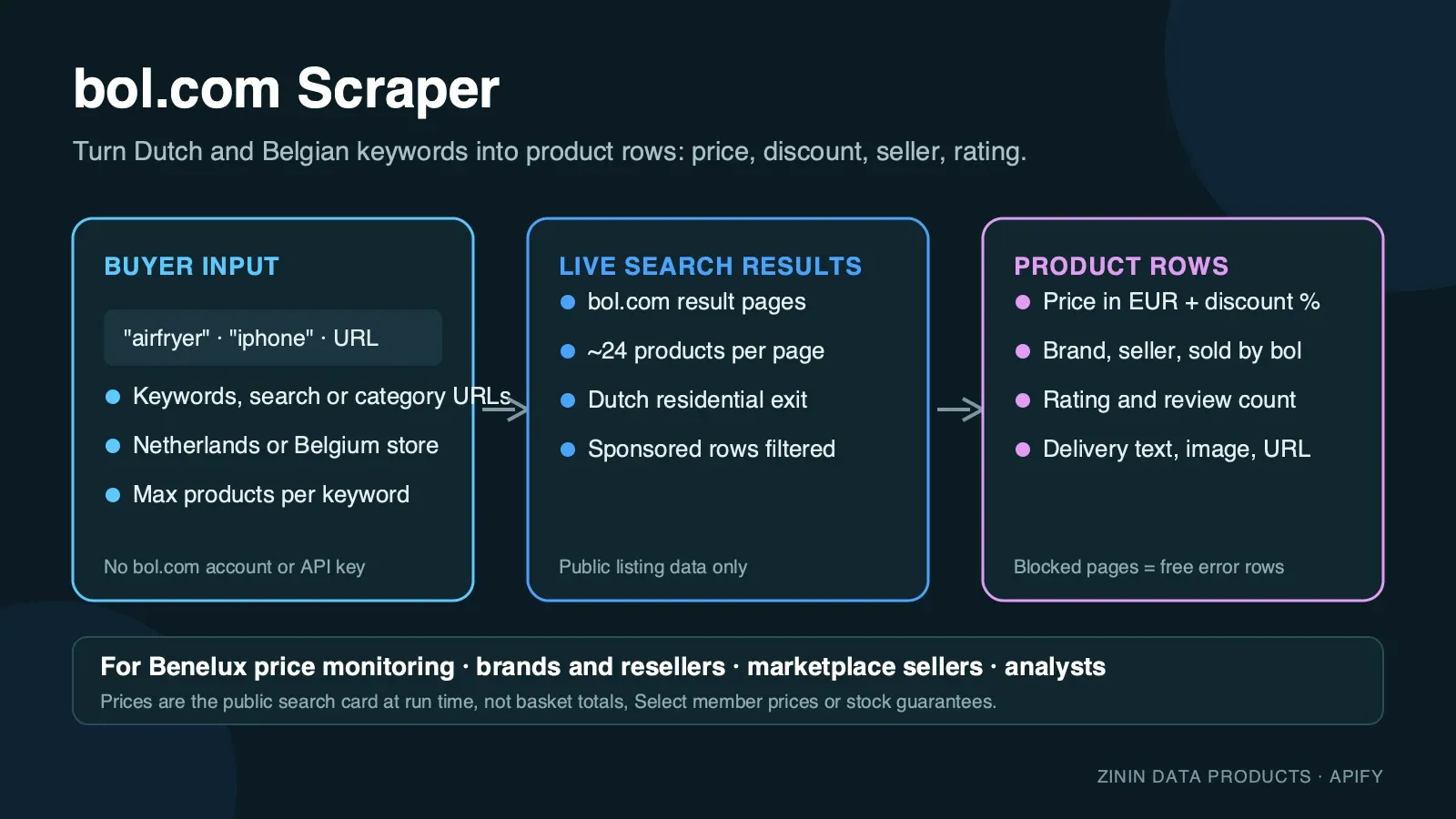
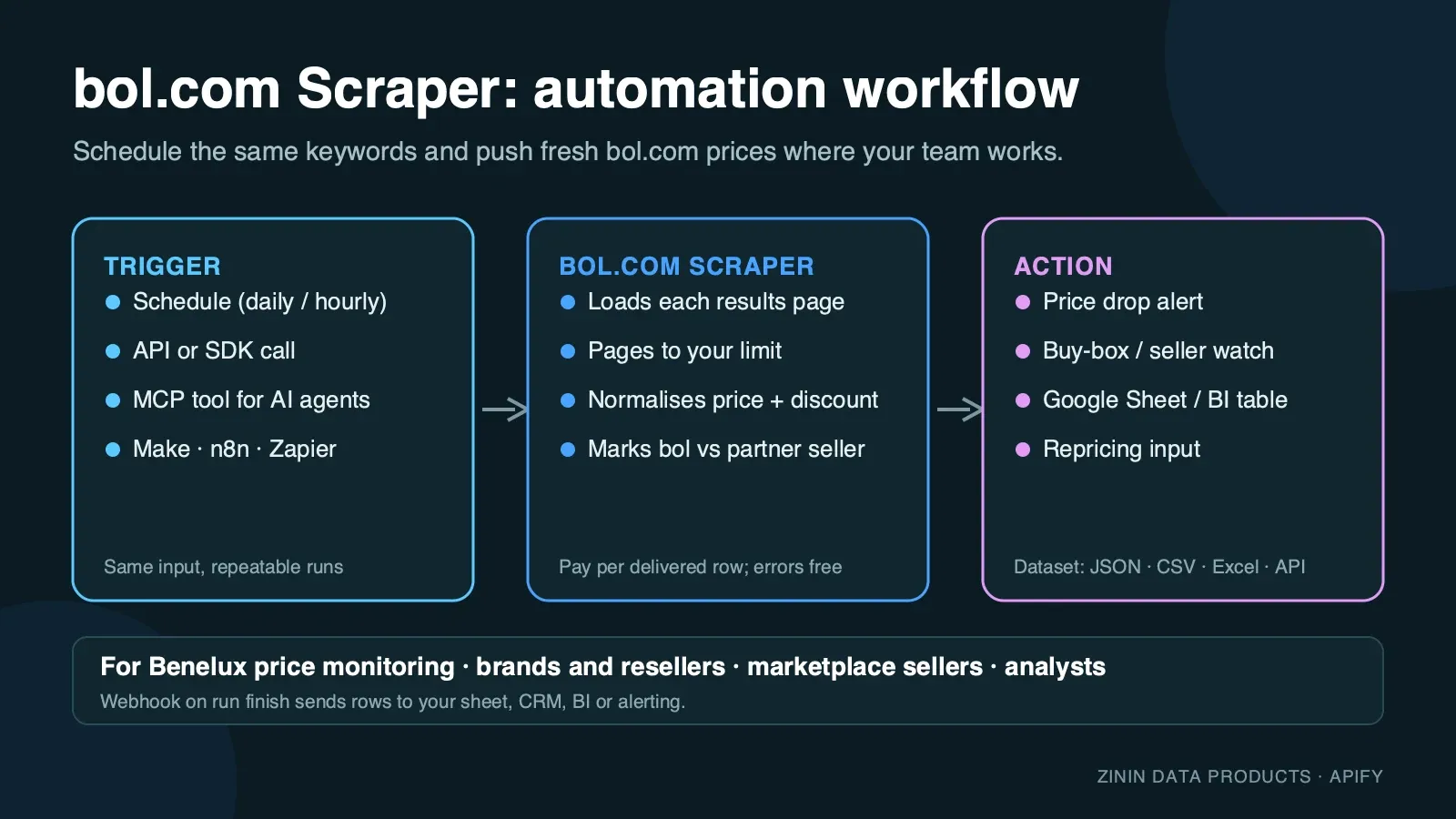
bol.com is the largest online retailer in the Netherlands and the second-largest in Belgium: millions of products, most of them sold either by bol itself or by one of tens of thousands of independent marketplace partners at their own price. This Actor reads the public search and category pages exactly as a shopper in the Netherlands or Belgium sees them and turns every product card into one structured row. You choose keywords or paste a search/category URL with your own filters, set how many products you need, and get a dataset you can download as JSON, CSV or Excel, pull through the Apify API, or send to Google Sheets, Make, n8n, Zapier or an AI agent over MCP.
It is built for recurring price and assortment work: run it daily on the same keywords, compare the rows, and you know who changed a price, which seller undercut bol itself and who is gaining reviews.
What you get
One row per product card on a bol.com search or category results page:
- Product identity —
productId(bol's numeric article id, stable across runs and the last path segment of the product URL), fulltitle,brandwhen the card shows one, and a shortfeatureslist of the spec bullets bol prints under the title (capacity, size, ISBN for books, and similar). - Price —
priceas a number in euros (currencyis alwaysEUR), read from the accessible price text on the card, not screen-scraped digits.originalPrice(bol's own "Adviesprijs" reference price) and a deriveddiscountPercentare included whenever the card shows a struck-through reference price above the current one. - Seller —
seller("bol"when bol.com itself is the seller, otherwise the marketplace partner's registered business name) and a conveniencesoldByBolboolean. - Social proof —
rating(0–5, bol's own average) andreviewCount, parsed from the card's accessible star-rating label. - Delivery —
deliveryText, bol's own delivery promise exactly as shown, e.g. "Op voorraad. Voor 23:59 uur besteld, morgen in huis" (in stock, order before 23:59, delivered tomorrow) or "Nog niet verschenen - reserveer een exemplaar" for pre-orders. - Ad transparency —
isSponsoredmarks paid placements ("Gesponsord"). They are excluded by default; switch them on to see which sellers are buying visibility for your keyword. - Image and link —
imageUrl(bol's product photo CDN) andurl, the direct product page. - Basket identity —
offerUid, the specific offer bol's own "add to basket" link points to. It isnullfor listing types that don't expose a direct basket link on the card (for example some refurbished or reservation offers) — the product itself is still fully returned, only this one extra id is missing. - Position —
pageandpositionon the results page, so you can track ranking over time. - Context — the
query/searchUrlthat produced the row, themarket(NLorBE) and ascrapedAttimestamp.
Every row is a real product bol.com showed for your search. Keywords bol could not serve a usable page for (after three fresh residential sessions) are reported as a free row with an error field, so you always know what happened and never pay for an explanation.
Who uses it
- Cross-border sellers and importers checking what bol.com charges for a product in the Netherlands or Belgium before they list it, and which marketplace partners dominate a keyword.
- Brands and distributors watching authorised and unauthorised resellers of their products on bol.com: price floors, who is undercutting the RRP, sold-through gaps.
- E-commerce and pricing teams feeding a repricing tool or a BI dashboard with daily bol.com prices next to Amazon.nl/.be and Coolblue data.
- Market researchers and analysts sizing a category: how many sellers, what price band, how reviews are distributed, how much of page one is sponsored, how bol's own price compares to partners'.
- Affiliate and content publishers building "beste airfryer onder €100" style pages from fresh prices, review counts and item links.
- AI agents that need a grounded answer about current Dutch/Belgian retail prices and can call the Actor as an MCP tool.
How to run
- Click Try for free (or Start) on this page. You need a free Apify account; no bol.com account, no API key.
- In Search keywords, enter one or more keywords, one per line — Dutch or English both work (
airfryer,iphone 17,lego). - Pick a Market: Netherlands (
bol.com/nl/nl) or Belgium, Dutch (bol.com/be/nl). Both are the same catalogue split by storefront; prices and delivery text can differ between the two. - Optional: paste one or more bol.com search or category URLs into bol.com search or category URLs to reuse filters you already set on the site (category, brand, price range). The Actor keeps every parameter of the URL and only walks its pages.
- Set Max products per keyword or URL and click Start. Use the three-result JSON above for the first run; completion time varies with source responses and retries.
- Open the Output tab: the Products view shows image, title, brand, price, seller, rating and link; the Errors and empty searches view shows the free explanation rows. Download as JSON, CSV, Excel or HTML, or call the dataset through the API.
To run it on a schedule, open Schedules, pick the Actor (or a saved task with your keywords) and choose daily or hourly. To connect it to other tools, see Integration recipes.
Pricing
This Actor uses pay per event pricing. You pay only for products actually delivered to your dataset, plus a small start fee:
| Event | Price | When it is charged |
|---|---|---|
| Actor start | $0.02 per GB of memory | Once per run. The default memory means one start event per GB. |
| Product found | $0.0025 per product | For every product row delivered to the dataset. |
Example: with the default 2 GB memory, a run that delivers 100 products costs 2 × $0.02 + 100 × $0.0025 = $0.29; 1,000 products cost $2.54. The same price applies on every Apify plan.
What you do not pay for:
- Rows with an
errorfield — keywords bol.com could not serve a usable page for, and the note written when your spending limit is reached — are free. - Proxy traffic, browser time and retries are included in the product price. You never see a separate proxy bill.
- Sponsored listings are only delivered (and charged) when you switch Include sponsored listings on.
Spending limit. Apify lets you set Max total charge for any run. The Actor checks the remaining budget before every product and stops cleanly when the next product would exceed it, then writes a free row saying so.
Free plan. Apify's free plan includes monthly platform credit that covers small test runs of this Actor. The prefilled example is sized so that it completes well inside that credit.
Input contract
| Field | Type | Default | What it does |
|---|---|---|---|
searchQueries | array of strings | — (prefill ["airfryer"]) | Keywords to search. One run can hold up to 50 keywords; duplicates are removed. |
market | string | NL | NL for bol.com/nl/nl (Netherlands) or BE for bol.com/be/nl (Belgium, Dutch). Ignored for pasted startUrls, whose own /nl/nl/ or /be/nl/ path decides the market. |
startUrls | array of URLs | [] | bol.com search URLs (bol.com/nl/nl/s/?searchtext=... or .../be/nl/s/...) or category URLs (bol.com/nl/nl/l/<slug>/<id>/). Filters in the URL are kept. Other hosts and paths are rejected before any work starts. |
maxItemsPerQuery | integer 1–3000 | 30 (prefill 20) | Products to return per keyword or URL. The Actor stops paginating as soon as the limit is reached. |
includeSponsored | boolean | false | Deliver sponsored ("Gesponsord") placements too, flagged with isSponsored: true. |
You must provide at least one keyword or one URL. An empty input fails immediately with a clear message and costs nothing beyond the start event. There is no sort input: bol.com's own sort dropdown (Relevantie/Prijs/Beoordeling/...) is a pure client-side control with no URL parameter — see Limitations.
Minimal input (the prefill):
Belgium, several keywords, sponsored included:
Reuse filters you set on the site (category page):
Output examples
All examples below are copied from real runs of this Actor on the Apify platform (September 2026). Nothing is invented or edited except whitespace and truncation of the features array where noted.
Happy output
Input {"searchQueries": ["airfryer"], "market": "NL", "maxItemsPerQuery": 10} at 2 GB memory — run finished in 18 seconds, 10 products delivered, 0 errors, $0.0005 platform usage. First two rows:
A marketplace-seller row from the same run (not bol itself):
A larger real run — the same keyword, maxItemsPerQuery: 120 — walked 6 results pages and delivered all 120 products in 76 seconds for $0.0176 in platform usage (2 residential proxy sessions, one retry).
A Belgium-market, third-party-seller example (market: "BE", keyword "iphone"), showing a refurbished offer where the card carries no direct basket link:
offerUid is null here — the refurbished-offer card links straight to the product page with an ?offerType=refurbished query rather than a direct "add to basket" URL. Every other field is unaffected.
Category-URL output
Input {"startUrls": ["https://www.bol.com/nl/nl/l/fantasy-sciencefiction/2510/"]} — bol.com's category (/l/) pages use the same product-card layout as search, so they work through startUrls without any special handling. A book row from a real run, showing the ISBN inside features (books have no brand field on bol.com; the author's name is the first feature instead):
Partial output (mid-run block)
bol.com occasionally blocks one residential session outright rather than serving a challenge (roughly 1 in 3–4 fresh sessions in cloud testing, 25.09.2026). When that happens mid-keyword, after some pages already succeeded, the Actor keeps every row it already delivered (charged) and reports the rest as a free error row — a real run:
The 9 rows delivered before the block are complete products like the ones above (a Samsung Neo QLED TV at €4,975 sold by a marketplace partner, then a Samsung QLED at €949 sold by bol itself at 37% off, and 7 more) — nothing about this row's error affects the rows already in your dataset or their charge.
Failure output
When bol.com does not return a usable page after three fresh residential sessions for the very first page of a keyword (no rows delivered yet), the keyword gets a free error row and — if every keyword in the run failed this way — the run still ends as Succeeded with the status message "The site blocked all N search(es)… No result was billed, only the run start." — check that message or the error field to retry automatically:
No product is charged when this happens; only the start event applies.
Field dictionary
| Field | Type | Meaning | Notes |
|---|---|---|---|
productId | string | bol's numeric article id | Stable across runs; also the last path segment of url. Use it as the primary key when you compare runs. null only on error rows. |
title | string | Product title exactly as bol/the seller wrote it | Not translated or cleaned. |
brand | string | Brand link on the card | null for products with no brand link (common for books, where the author is in features instead). |
price | number | Current selling price shown on the card, in euros | Parsed from the card's accessible price text, not the visually-styled digits, so it survives markup changes. |
originalPrice | number | bol's own "Adviesprijs" reference price | null when the card shows no reference price, or when it is not higher than price. |
discountPercent | integer | round(1 - price/originalPrice) × 100 | null whenever originalPrice is null. |
currency | string | Always EUR | Present on every row, including error rows, for schema stability. |
rating | number | Average review score, 0–5 | null when the card shows no rating (new or low-volume listings). |
reviewCount | integer | Number of reviews behind rating | null together with rating. |
seller | string | Registered seller name | "bol" for bol.com's own retail stock, otherwise the marketplace partner's business name exactly as shown. |
soldByBol | boolean | seller === "bol" | Convenience field so you can filter without a string comparison. |
deliveryText | string | bol's own delivery promise, verbatim | Dutch; dates/times are relative to the run time. |
features | array of strings | Short spec bullets under the title | Order and content follow bol's own card; for books this includes the ISBN-13. null when the card shows none. |
url | string | Product page URL | Includes any query string bol added (e.g. ?offerType=refurbished). |
imageUrl | string | Product photo (bol's media CDN) | Images are not downloaded by the Actor; the URL is bol's. |
isSponsored | boolean | Paid placement ("Gesponsord") | Only true when Include sponsored listings is on; otherwise sponsored cards are filtered out before this field would ever be true. |
offerUid | string | The specific offer bol's own basket link targets | null when the card has no direct "add to basket" link (seen on some refurbished/reservation offers) — every other field is still populated. |
market | string | NL or BE | The storefront the row came from. |
page | integer | Results page the product appeared on | 1-based. |
position | integer | Position on that page | 1-based, organic order after filtering sponsored rows (unless sponsored are included). |
query | string | Keyword that produced the row | null for URL inputs. |
searchUrl | string | First results page URL for this keyword or URL | |
scrapedAt | string | ISO timestamp when the row was written | UTC. |
error | string | Present only on free explanation rows | Never present on paid product rows. |
Evidence and boundaries
What this Actor observes and what it does not:
- Source. Only the public bol.com search (
/s/) and category (/l/) pages, the same pages any visitor in the Netherlands or Belgium sees without logging in. It does not open the product page, cart or account area, so per-variant or per-condition (new/refurbished tier) prices beyond what the card itself shows are out of scope. - Price is the card price at run time. bol.com runs frequent deals and partner price changes; the row is what the results card said when the Actor loaded it, not a checkout total, and does not include any personal member pricing.
productIdis bol's article id, not an EAN. bol.com's search cards do not publish EAN/GTIN codes; only the product page does, which this Actor does not open. Where a card prints an ISBN (books), it is captured insidefeaturesas free text, not normalised into its own field.- Ranking depends on context. Relevance order on bol.com can vary with time, stock and personalisation. The Actor uses a Dutch residential connection and no login for both markets, which is the closest thing to a neutral shopper view, but two runs minutes apart can order page one differently.
- No sort control. bol.com's sort dropdown is a pure client-side React component;
?sort=PRICE_ASCand every other query-string variant tested were silently ignored by the live site (cloud probe 25.09.2026: the<select>still reported "Relevantie" selected and product order was byte-identical to the unsorted page). This Actor therefore does not offer asortinput rather than shipping one that would quietly do nothing — if you need a specific order, sort the dataset yourself after the run (price,ratingandreviewCountare all plain numbers). - bol.com rarely returns a true zero-result page. Its own search falls back to loosely related products for almost any input, including random strings — a genuinely empty results page was not observed during testing. The free
errorrow path exists mainly for pages the Actor could not load at all (blocks, timeouts), demonstrated above, not for "no matching products". - Titles are not translated or cleaned. You get them exactly as the seller wrote them, in Dutch, so nothing is lost.
How the Actor reaches the page: bol.com, like most large retailers, protects its pages against automated traffic. The Actor opens each page in a real, privacy-hardened browser (Camoufox) through Dutch residential proxies, waits until bol's own product cards are present in the page, and reads them directly from the rendered DOM. Images, fonts and video are never downloaded, which keeps the run fast and the traffic small. If a page is not usable, it retries with a fresh proxy session up to three times and then reports the keyword or URL as a free error row instead of guessing.
Decision routing
| What you see in the data | What it usually means | What to do next |
|---|---|---|
| Your product appears from many sellers within a 5–10% price band | Commodity competition; price is the main lever | Track daily and alert on the lowest price per productId group |
soldByBol: false seller sells well below bol's own price | Marketplace clearance, grey import, or a pricing error | Check the product page and seller history before matching the price |
originalPrice present and discountPercent high | bol or a partner is running a deal | Compare against your own promo calendar before reacting |
Many isSponsored rows for a keyword (with sponsored on) | Competitive, ad-driven keyword | Budget for bol Advertising or target long-tail keywords instead |
reviewCount growing fast for a new productId | A rising product, or a seller running a review campaign | Add the item to a watch list; compare against your own listing |
deliveryText says "reserveer" / pre-order | Product not yet released or out of stock everywhere | Track separately from in-stock competitors; don't price-match a pre-order |
| Free error row about attempts | bol.com did not serve a usable page to three sessions | Re-run later; nothing already delivered is affected or re-charged |
Commercial playbooks
1. Daily price watch for a product line. Save a task with your 10–30 product keywords and maxItemsPerQuery: 30. Schedule it daily. In your sheet, group by productId, keep the minimum price per day per seller, and alert when a marketplace partner drops below your floor.
2. Reseller and MAP monitoring for brands. Search your brand name and model numbers in both market: "NL" and market: "BE". Group rows by seller. Sellers not on your authorised list, or selling under your minimum advertised price, are your follow-up list. Store url and scrapedAt as evidence.
3. Category sizing before entering bol.com. Run one category startUrls entry per sub-category with maxItemsPerQuery: 300. Count distinct sellers, look at the price distribution and the share of listings sold by bol itself versus partners. This tells you in an afternoon whether the category is bol-dominated or partner-fragmented.
4. NL vs BE price comparison. Run the same keywords with market: "NL" and market: "BE" and join the results on productId where it matches, or on title similarity where it doesn't (bol.com's Belgian catalogue is a subset of its Dutch one). A consistent EUR gap between the two storefronts for the same article is a real cross-border arbitrage signal.
5. Content and affiliate pages. Pull products for a keyword, filter to reviewCount >= 50 and rating >= 4.5, and use the fresh price, rating and item link in your comparison page. Refresh weekly.
Integration recipes
Apify API (any language). Start a run and get items in one call:
Python client.
JavaScript client.
Google Sheets. Use Apify's Google Sheets integration on a saved task: every finished run appends rows to your sheet. Filter out rows where error is not empty.
Make, n8n and Zapier. Use the Apify app: trigger "Watch Actor runs" (or "Watch task runs"), then "Get dataset items", then your action — Slack message when the minimum price for a productId drops, a row in Airtable, a record in your CRM.
Webhooks. Add a webhook for ACTOR.RUN.SUCCEEDED pointing at your endpoint; it receives the run object with defaultDatasetId, and you fetch items from there.
AI agents (MCP). The Actor is available as a tool through the Apify MCP server (https://mcp.apify.com). An agent can call it with a keyword and use the returned rows to answer "what does X cost on bol.com right now". Keep maxItemsPerQuery small for interactive use.
Comparing runs over time
Most buyers use this Actor to see change, not a single snapshot. A reliable change-detection setup looks like this:
- Fix the input. Save a task with the exact keywords, market and
maxItemsPerQuery. Changing any of them changes which products are in scope and makes day-to-day comparison noisy. - Key on
productId. bol.com keeps it stable for the life of a listing. Titles rarely change; positions move every day. - Store
scrapedAtwith every row. It is the observation time. Two rows with the sameproductIdand differentpriceare a price change between those two timestamps. - Separate "missing" from "out of stock". bol.com does not publish an explicit stock flag on search cards beyond
deliveryText; aproductIdthat disappears from the results may have dropped out of the page window you requested rather than been delisted. For important items, request more pages so the item stays in scope. - Compare like with like across markets.
NLandBEare separate storefronts with their own pricing; don't merge them into one price series without keeping themarketcolumn. - Track seller changes, not only price. A
productIdwhosesellerchanges from"bol"to a marketplace partner (or the reverse) between runs is often a stock or fulfilment change worth a closer look on its own.
A simple daily sheet: one tab per day of rows, a pivot of minimum price per productId, and a conditional format that highlights a drop of more than 5%. That is enough to catch most competitor moves on bol.com within a day.
Typical signals worth an alert: a new seller appearing in the top 10 for your brand keyword; the cheapest price for a productId falling below your floor; reviewCount jumping by more than 20 in a week for a competitor item; originalPrice appearing (a deal just started) on a product you track.
Operating guide
- Memory. 2 GB is enough and was verified in cloud testing (10 products in 18 seconds, $0.0005 platform usage); more memory does not make pages load faster and increases the start fee.
- Run size. One results page holds roughly 24–30 products and loads in a handful of seconds; a run with 10 keywords × 30 products typically finishes in a few minutes.
- Scheduling. Daily is enough for most price work.
- Stable keys. Compare runs on
productId, not ontitle(rarely edited, but not guaranteed stable) and not onposition(ranking moves). - Many keywords. Put up to 50 keywords into one run rather than starting 50 runs — you pay one start fee instead of fifty.
- Timeouts. The default run timeout is 30 minutes. For very large jobs (thousands of products), raise the timeout or split keywords across runs.
- Retries. A keyword that failed with an attempts error is safe to run again; nothing already delivered in that run was re-charged or affected.
Troubleshooting
The run finished but I got fewer products than maxItemsPerQuery. bol.com had fewer matching products for that keyword, or you set a very narrow category URL. Try a broader keyword or a parent category.
I see an error about attempts. bol.com did not serve a usable page to three separate residential sessions — occasionally seen mid-keyword after some pages already succeeded (see Partial output). This is rare and temporary; start the run again for that keyword. Rows already delivered were not affected.
The run stopped early with a spending-limit row. Your Max total charge was reached. Raise it in the run options or lower maxItemsPerQuery.
I expected a "no results" row but got unrelated products instead. That is bol.com's own search behaving as designed — see Evidence and boundaries. It almost never returns a truly empty page.
My pasted URL was rejected. Only https://www.bol.com/nl/nl/s/..., https://www.bol.com/be/nl/s/..., https://www.bol.com/nl/nl/l/... and https://www.bol.com/be/nl/l/... URLs are accepted. Product pages, brand pages and seller pages are not search or category listing pages.
The order I get doesn't match the sort order I picked on the website. There is no sort input — see Evidence and boundaries for why. Sort the returned rows yourself by price, rating or reviewCount.
FAQ / Limitations
Do I need a bol.com account or API key? No. The Actor reads public search and category pages; there is nothing to register.
Is this the official bol.com API? No. It is an independent tool that reads the public website. bol.com's own Open API / Retailer API is a separate, authenticated product aimed at sellers managing their own listings; this Actor needs no credentials and returns what any shopper's browser shows.
What this is NOT. It is not a checkout price calculator (no coupons, no member pricing, no shipping-cost line beyond the card's own delivery text), not an EAN/GTIN lookup (search cards don't publish one), not a stock-quantity feed (only the delivery-promise text), and it does not sort results — see above.
Can I get full product descriptions, all images or every offer on a listing? Not from this Actor. It reads search/category cards, which is what price and assortment work needs at scale. The url field takes you to the full product page.
How fresh is the data? It is read at run time. Schedule the Actor as often as you need fresh prices.
Can I run it from outside the Netherlands or Belgium? Yes. The Actor always uses a Dutch residential connection for both markets, so your own location does not matter.
What happens if bol.com changes its page? Rows would stop appearing and keywords would return free error rows rather than wrong data. The Actor is monitored and updated.
Found a bug or need a doorbraak for your specific use case — issues on this Actor's page.
Nederlandse samenvatting (bol.com Scraper)
Deze tool haalt bol.com zoekresultaten en categoriepagina's automatisch op, op basis van een zoekwoord of een geplakte URL. Geen bol.com account of API-sleutel nodig.
- Wat je krijgt: producttitel, merk, prijs en adviesprijs in euro's, verkoper (bol of een marketplace-partner), beoordeling en aantal reviews, levertijdtekst, afbeelding en productlink.
- Markten:
bol.com/nl/nl(Nederland) enbol.com/be/nl(België, Nederlandstalig) — beide via het veld Market. - Gebruik: vul bij Search keywords een of meer zoektermen in, één per regel (bijvoorbeeld "airfryer", "iphone 17", "lego"), stel het aantal producten in en klik op Start. Je kunt ook een zoek- of categorie-URL van bol.com plakken om je eigen filters te hergebruiken.
- Sortering: bol.com's eigen sorteermenu werkt niet via de URL — deze tool biedt daarom geen sorteeroptie aan. Sorteer de resultaten zelf achteraf op prijs, beoordeling of aantal reviews.
- Gesponsorde resultaten: standaard uitgeschakeld; zet Include sponsored listings aan om ze mee te nemen (gemarkeerd met
isSponsored). - Prijs: betaal per gevonden product. Zoektermen zonder bruikbare pagina (na drie pogingen) leveren een gratis foutregel op, geen kosten.
- Toepassingen: prijsonderzoek, concurrentiemonitoring van marketplace-verkopers, assortimentsanalyse per categorie, prijsvergelijking Nederland versus België, affiliate-content met actuele prijzen.
- Uitvoerformaat: JSON, CSV, Excel. Ook te koppelen aan Google Spreadsheets, Make, n8n, Zapier en de API.
Zoekwoordvoorbeelden: bol.com prijzen scrapen, bol.com concurrentie monitoren, bol.com productdata CSV, bol.com verkopers vergelijken, bol.com zoekresultaten ophalen.
Sources and rights
- Data comes from publicly accessible bol.com search and category result pages. The Actor does not log in, does not bypass paywalls and does not collect personal data about shoppers; seller names are business names published by bol.com on the marketplace.
- Product titles, prices and images belong to bol.com B.V. and the respective sellers. Use the data in line with bol.com's terms and the laws that apply to you, especially for republication. For large-scale commercial or seller-side integration, consider bol.com's official Retailer/Open API.
- This Actor is not affiliated with, endorsed by or sponsored by bol.com B.V. "bol" and "bol.com" are trademarks of their owner and are used here only to describe the data source.
- Report a bug or ask for a feature in the Issues tab of this Actor. Custom fields or coverage for other bol.com storefronts can be built on request.
More marketplace scrapers from the same author
| Actor | What it gives you |
|---|---|
| Mercado Libre Scraper | Latin American product prices and sellers |
| Rakuten Ichiba Scraper | Japanese product prices, shops, reviews and points |
| Wildberries Scraper | Russian marketplace prices, brands and sellers |
| Shopify Store Price & Catalog Change Monitor | Price and catalogue changes on Shopify stores |


