

Wildberries Product Scraper — Prices, Ratings & Reviews
Pricing
from $3.00 / 1,000 product founds
Wildberries Product Scraper — Prices, Ratings & Reviews
Search Wildberries by keyword and get products with price in RUB, discount percent, brand, rating, review count, supplier and image — via the public catalog API behind a real browser session, no login required.
Pricing
from $3.00 / 1,000 product founds
Rating
0.0
(0)
Developer

Tim Zinin
Maintained by CommunityActor stats
0
Bookmarked
6
Total users
3
Monthly active users
3 days ago
Last modified
Categories
Share
Wildberries Product Scraper — Prices, Discounts, Ratings & Reviews (Russia)
Search Wildberries.ru by keyword and get live product rows: price and pre-discount price in RUB, discount percent, brand, rating, review count, supplier and supplier rating, image and the direct product URL — no Wildberries account, no login.
Small first run
At the default 2 GB, the start fee is $0.04. If this input delivers three results, the listed total is $0.049. Set the run spending limit to bound the whole run. The result limit applies separately to each search; adding searches can increase the total. Runtime depends on source responses and retries.
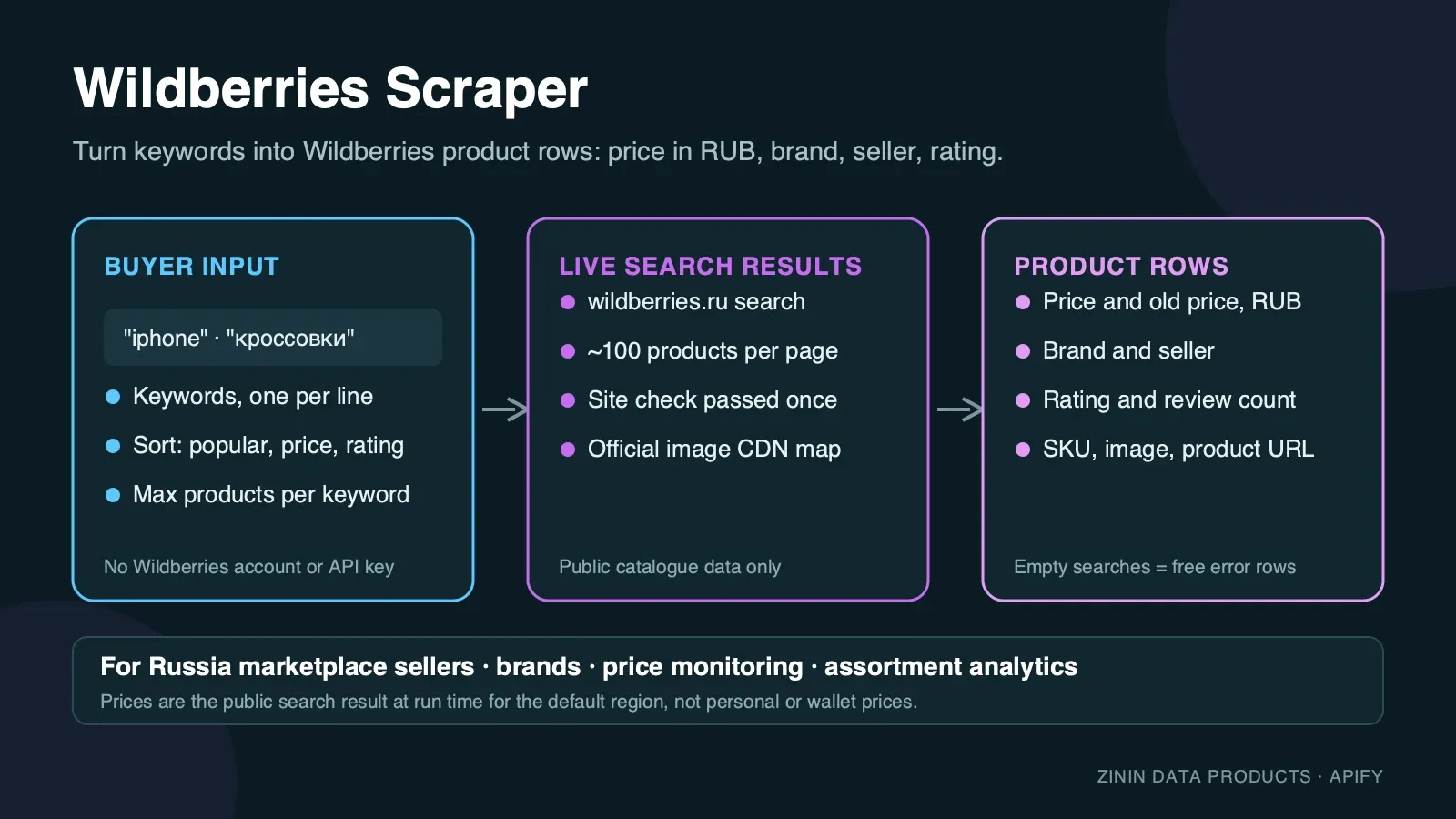
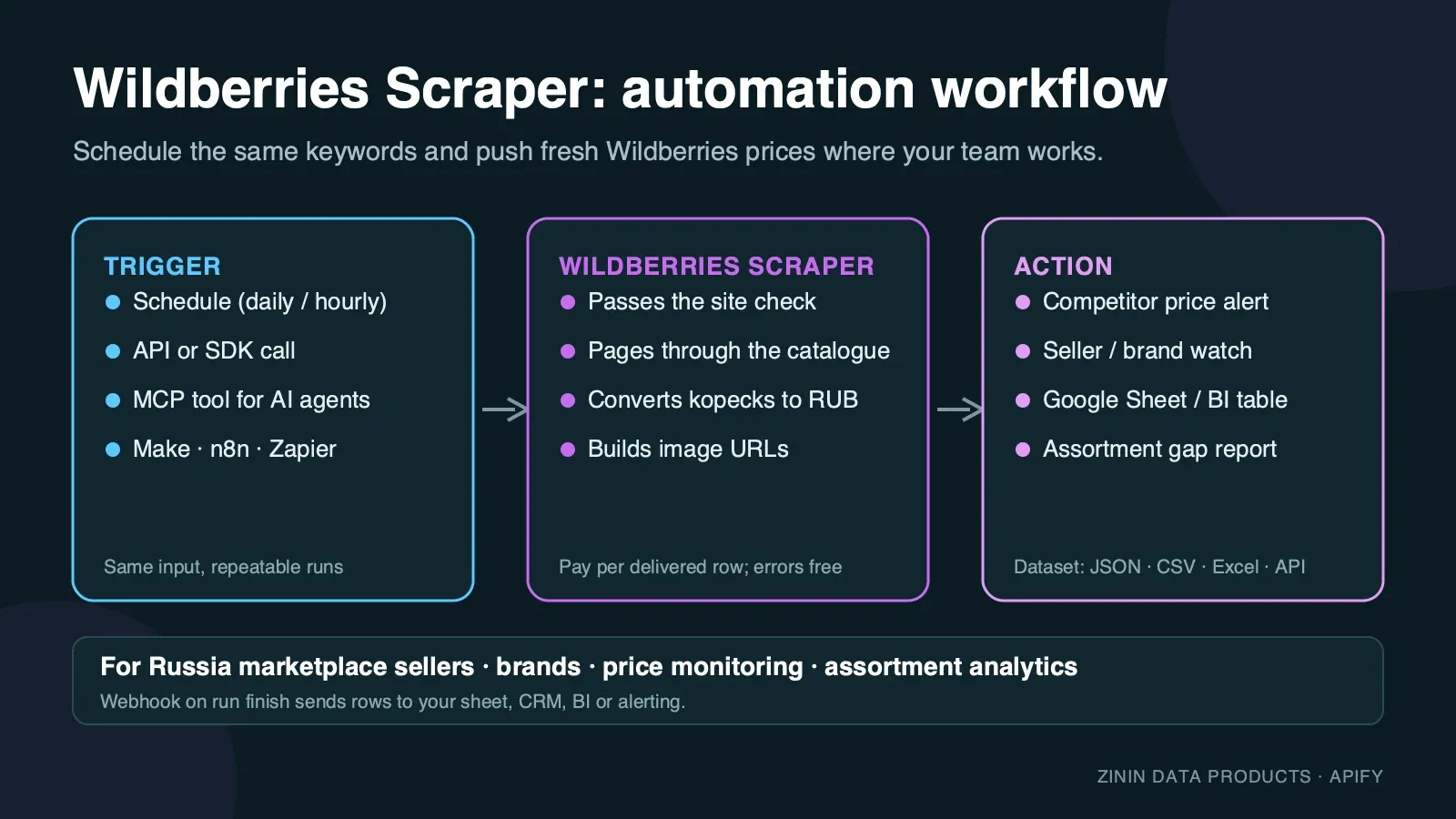
Wildberries is Russia's largest online marketplace: millions of SKUs from tens of thousands of independent sellers, all competing for the same search terms. This Actor reads the same public catalog search that a shopper on wildberries.ru sees and turns every product card into one structured row. You choose the keywords, set how many products you need per keyword, and get a dataset you can download as JSON, CSV or Excel, pull through the Apify API, or send to Google Sheets, Make, n8n, Zapier or an AI agent over MCP.
It is built for recurring price and assortment work: run it daily on the same keywords, compare the rows, and you know who changed a price, which seller is undercutting the market and how ratings are moving.
What you get
One row per product card in the Wildberries catalog search:
- Product identity —
id(Wildberries'nmId, stable across runs),nameexactly as the seller wrote it,brandand the directurlon wildberries.ru. - Price —
price.value(current price the buyer pays, in RUB),price.originalValue(the pre-discount price, when Wildberries shows one) anddiscount(percent off, computed from the two). - Social proof —
rating.value(0–5) andrating.count(number of reviews behind it). - Seller —
supplier(seller name) andsupplierRating(0–5), so you can tell a flagship brand store from a small reseller at a glance. - Image —
imageUrl, a direct link to the product's main photo on Wildberries' CDN. - Position —
pageandpositionon the results, so you can track ranking over time. - Context — the
queryandsearchUrlthat produced the row, and ascrapedAttimestamp.
Every row is a real product Wildberries showed for your search. Keywords with no results and pages Wildberries did not return are reported as free rows with an error field, so you always know what happened to each keyword and never pay for an explanation.
Who uses it
- Cross-border sellers and importers checking what a product sells for on the Russian market before they list it, and who the competing sellers are.
- Brands and distributors watching authorised and unauthorised resellers of their products on Wildberries: price floors, discount depth, out-of-band listings.
- E-commerce and pricing teams feeding a repricing tool or a BI dashboard with daily Wildberries prices next to other Russian marketplaces (Ozon, Yandex Market).
- Market researchers and analysts sizing a category: how many sellers, what price band, how ratings and review counts are distributed.
- Affiliate and content publishers building "cheapest iPhone 15 right now" style pages from fresh prices, ratings and product links.
- AI agents that need a grounded answer about current Russian retail prices and can call the Actor as an MCP tool.
How to run
- Click Try for free (or Start) on this page. You need a free Apify account; no Wildberries account, no login.
- In Search keywords, enter one or more keywords, one per line. Russian works best for Russian-market products (
наушники,кроссовки), English brand and model names work too (iphone 15,nintendo switch). - Set Max products per keyword — one results page holds 100 products, and the Actor pages further automatically up to your limit.
- Click Start. Use the three-result JSON above for the first run; completion time varies with source responses and retries.
- Open the Output tab: the Products overview view shows image, name, price, discount, rating and link; the Errors view shows the free explanation rows. Download as JSON, CSV, Excel or HTML, or call the dataset through the API.
To run it on a schedule, open Schedules, pick the Actor (or a saved task with your keywords) and choose daily or hourly. To connect it to other tools, see Integration recipes.
Pricing
This Actor uses pay per event pricing. You pay only for products actually delivered to your dataset, plus a small start fee:
| Event | Price | When it is charged |
|---|---|---|
| Actor start | $0.02 per GB of memory | Once per run. |
| Product found | $0.003 per product | For every product row delivered to the dataset. |
Example: with the default 2 GB memory, a run that delivers 100 products costs 2 × $0.02 + 100 × $0.003 = $0.34; 1,000 products cost $3.04. The same price applies on every Apify plan.
What you do not pay for:
- Rows with an
errorfield — keywords with no results and pages Wildberries did not return — are free. - Proxy traffic, browser time and retries are included in the product price. You never see a separate proxy bill.
Spending limit. Apify lets you set Max total charge for any run. The Actor checks the remaining budget before every product and stops cleanly when the next product would exceed it, then writes a free row saying so.
Free plan. Apify's free plan includes monthly platform credit that covers small test runs of this Actor. The prefilled example is sized so that it completes well inside that credit.
Input contract
| Field | Type | Default | What it does |
|---|---|---|---|
searchQueries | array of strings | — (prefill ["iphone 15"]) | Keywords to search on wildberries.ru. One run can hold up to 50 keywords; duplicates are removed. |
maxItemsPerQuery | integer 1–2000 | 50 (prefill 20) | Products to return per keyword. One results page holds 100 products; the Actor stops paginating as soon as the limit is reached. |
You must provide at least one keyword. An empty input fails immediately with a clear message and costs nothing beyond the start event.
Minimal input (the prefill):
Price research input — several keywords, more products:
Output examples
All examples below are copied from real runs of this Actor on the Apify platform (September 2026). Nothing is invented or edited except whitespace.
Happy output
Input {"searchQueries": ["iphone 15"], "maxItemsPerQuery": 20} — run finished in 42 seconds, 20 products delivered, 0 errors. First two rows:
A larger real run — {"searchQueries": ["iphone 15"], "maxItemsPerQuery": 250} — walked three results pages and delivered all 250 products in 59 seconds, every row carrying a resolved imageUrl.
Partial output (spending limit reached)
Archived output shape, not a current-price example. The quoted $0.02 cap below does not match the current tariff. At the default 2 GB, the start fee alone is $0.04. Use the current Pricing section when choosing a runnable spending limit.
Input {"searchQueries": ["iphone 15"], "maxItemsPerQuery": 50} started with Max total charge set to $0.02. The Actor delivered 5 products (first one shown above), saw that the next one would exceed the limit, stopped before charging and wrote this free row:
Failure / no-results output
A keyword with no matching products on Wildberries gets a free error row instead of an empty success. Input {"searchQueries": ["4780199999999"], "maxItemsPerQuery": 20} — a made-up barcode-style query — finished in 20 seconds, 0 products, 1 free row:
When Wildberries does not return a usable results page after five fresh residential sessions, the keyword gets a free error row with a similar shape and an error describing the last HTTP status and page title seen; if every keyword in the run failed this way, the run still ends as Succeeded with the status message "The site blocked all N search(es)… No result was billed, only the run start." — check that message or the error field to retry automatically. No product is charged when this happens — only the start event applies.
Field dictionary
| Field | Type | Meaning | Notes |
|---|---|---|---|
id | integer | Wildberries' nmId, stable identity of the listing | Use it as the primary key when you compare runs. null only on error rows. |
name | string | Product name exactly as the seller wrote it | Russian, occasionally mixed with Latin brand/model names. |
brand | string | Brand as classified by Wildberries | null for unbranded/generic listings. |
price.value | number | Current price in RUB, exactly as shown on the result card | Includes Wildberries Wallet-independent discount already applied by the card. |
price.currency | string | Always RUB | Present on every product row, for schema stability. |
price.originalValue | number | Pre-discount price in RUB | null when the card shows no separate original price (no discount). |
discount | integer | Percent off, computed from price.originalValue and price.value | null when there is no original price to compare against. |
rating.value | number | Average review rating, 0–5 | 0 (or null) means the item has no reviews yet. |
rating.count | integer | Number of reviews behind the rating | |
supplier | string | Seller's display name | |
supplierRating | number | Seller's own rating, 0–5 | Independent of the product's own rating. |
imageUrl | string | Direct link to the product's main photo | Built from the product id and Wildberries' own CDN routing table; see Evidence and boundaries. |
url | string | Product page on wildberries.ru | |
page | integer | Results page the product appeared on | 1-based; one page holds 100 products. |
position | integer | Position across all pages fetched for this keyword | 1-based. |
query | string | Keyword that produced the row | |
searchUrl | string | Results page URL for this keyword | |
scrapedAt | string | ISO timestamp when the row was written | UTC. |
error | string | Present only on free explanation rows | Never present on paid product rows. |
Evidence and boundaries
What this Actor observes and what it does not:
- Source. Only the public Wildberries catalog search at
wildberries.ru, the same results any visitor sees without logging in. It does not open the checkout, cart or account areas. - Price is the card price at run time. Wildberries runs constant seller-level and site-wide promotions. The row is what the search result said when the Actor loaded it, not a checkout total, and does not include Wildberries Wallet cashback or loyalty-tier pricing that requires a logged-in account.
- Ranking depends on context. Wildberries personalises and A/B-tests search ranking. The Actor uses a residential connection and no login, which is the closest thing to a neutral shopper view, but two runs minutes apart can order the same page differently.
- Image URL is derived, not returned by the search API. Wildberries' catalog search API never includes a photo URL — only a photo count. The Actor builds the CDN link itself from the product's own id, using Wildberries' own public CDN routing table (the same small config file the wildberries.ru front-end fetches to build its own image tags), fetched once per run. Every product on every page gets a resolved
imageUrlthis way, with no dependency on which cards happened to render. - Names and titles are not translated or cleaned. You get them as the seller wrote them, in Russian, so nothing is lost.
- No guarantees about completeness. Wildberries reports tens of thousands of hits for broad keywords but only lets visitors page through a bounded subset. For broad keywords, narrow the search (add a model, size or color word) rather than asking for very large row counts on a single generic keyword.
- Rating and review count come from the same search-card fields Wildberries shows shoppers. They are not recomputed or verified against the product page, and a brand-new listing with genuinely zero reviews shows
rating.value: 0— that is a real "no reviews yet" state, not a missing-data placeholder. - Search matching is Wildberries' own, and it is fuzzy. The Actor sends your keyword to Wildberries exactly as typed; Wildberries decides what counts as a match, including partial-word and related-term matches. A query with no literal matches can still return related products rather than an empty result — that is the source's behaviour, carried through unchanged.
How the Actor reaches the page: Wildberries, like most large marketplaces, protects its pages against automated traffic with a JavaScript challenge. The Actor opens the results page in a real, privacy-hardened browser through residential proxies, waits for the challenge to resolve and for Wildberries' own page to fetch its results, and reads that response directly. Further pages are fetched the same way the page itself would, reusing the session the challenge already unlocked. Images, fonts and video are never downloaded, which keeps the run fast and the traffic small. If a page is not usable, the Actor retries with a fresh session up to five times and then reports the keyword as a free error row instead of guessing.
Decision routing
| What you see in the data | What it usually means | What to do next |
|---|---|---|
| Your product appears from many sellers within a 5–10% price band | Commodity competition; price is the main lever | Track daily and alert on the lowest price.value per id |
| One seller sells well below everyone else | Clearance, grey import, or a pricing error | Check supplier and supplierRating before matching the price |
discount above 60–70% on a well-known product | Inflated price.originalValue used to make the discount look larger — a known marketplace pattern | Compare price.value across sellers rather than trusting the discount percent alone |
High rating.count but low rating.value | Popular but disappointing product | Useful early signal before a listing decision |
Low supplierRating on your target product's top seller | Fulfilment or authenticity risk for that listing | Flag for manual review before treating the price as a benchmark |
Free error row No results found | Keyword too narrow, misspelled, or genuinely absent from Wildberries | Try a broader or differently-worded keyword |
| Free error row about attempts | Wildberries did not serve the page to five sessions | Re-run later; it is not charged. More likely for a keyword that is not a real word or code — see Troubleshooting |
rating.value: 0 with rating.count: 0 on many results for a keyword | The keyword surfaces mostly new listings | Weight by rating.count, not just rating.value, when ranking results for a decision |
Commercial playbooks
1. Daily price watch for a product line. Save a task with your 10–30 product keywords and maxItemsPerQuery: 50. Schedule it daily. In your sheet, group by id, keep the minimum price.value per day, and alert when a competitor drops below your floor.
2. Reseller and price-floor monitoring for brands. Search your brand name and model numbers. Group rows by supplier. Sellers not on your authorised list, or selling under your minimum advertised price, are your follow-up list. Store url and scrapedAt as evidence.
3. Category sizing before entering the Russian market. Run one broad keyword per sub-category with maxItemsPerQuery: 300. Count distinct suppliers, look at the price distribution and the share of items with more than 50 reviews. This tells you in an afternoon whether the category is fragmented or dominated.
4. Discount-depth tracking. Run the same keywords during a Wildberries sale event and compare discount and price.value to the pre-sale baseline to see who is genuinely discounting versus inflating price.originalValue.
5. Content and affiliate pages. Pull products for a keyword, filter to rating.count ≥ 50 and a healthy rating.value, and use the fresh price and product link in a comparison page. Refresh weekly.
6. Supplier due diligence before matching or partnering. Before you match a competitor's low price or approach a seller for a partnership, run their brand or product keyword and look at supplier and supplierRating across everything they list. A single very low-rated listing next to otherwise strong ratings is a different risk profile than a supplier whose whole catalog runs low — the Actor gives you that whole-catalog view in one run instead of checking listings one by one on the site.
Integration recipes
Apify API (any language). Start a run and get items in one call:
Python client.
JavaScript client.
Google Sheets. Use Apify's Google Sheets integration on a saved task: every finished run appends rows to your sheet. Filter out rows where error is not empty.
Make, n8n and Zapier. Use the Apify app: trigger "Watch Actor runs" (or "Watch task runs"), then "Get dataset items", then your action — Slack message when the minimum price drops, a row in Airtable, a record in your CRM.
Webhooks. Add a webhook for ACTOR.RUN.SUCCEEDED pointing at your endpoint; it receives the run object with defaultDatasetId, and you fetch items from there.
AI agents (MCP). The Actor is available as a tool through the Apify MCP server (https://mcp.apify.com). An agent can call it with a keyword and use the returned rows to answer "what does X cost on Wildberries right now". Keep maxItemsPerQuery small for interactive use.
Comparing runs over time
Most buyers use this Actor to see change, not a single snapshot. A reliable change-detection setup looks like this:
- Fix the input. Save a task with the exact keywords and
maxItemsPerQuery. Changing either changes which products are in scope and makes day-to-day comparison noisy. - Key on
id. It is Wildberries' ownnmId, stable for the life of a listing. Names change with every seller edit; positions move constantly. - Store
scrapedAtwith every row. It is the observation time. Two rows with the sameidand a differentprice.valueare a price change between those two timestamps. - Separate "missing" from "out of stock". If an
iddisappears from the results, it may have dropped out of the page window you requested rather than sold out — Wildberries does not publish a stock flag on search cards. For important items, request more pages so the item stays in scope. - Watch
discount, not onlyprice.value. Sellers frequently moveprice.originalValueto change the displayed discount while leaving the actual price unchanged, or vice versa.
A simple daily sheet: one tab per day of rows, a pivot of minimum price.value per id, and a conditional format that highlights a drop of more than 5%. That is enough to catch most competitor moves on Wildberries within a day.
Typical signals worth an alert: a new supplier appearing as the cheapest for your brand keyword; the cheapest price for an id falling below your floor; rating.count jumping sharply in a week for a competitor item.
Scheduling and budget planning
A scheduled task is the usual way to run this Actor. Three things decide what a schedule costs and how useful it is:
- One run, many keywords. Put all keywords into one run instead of starting one run per keyword. The start event is charged once per run (per GB of memory), so ten keywords in one run pay one start, ten separate runs pay ten.
- Size to what you track. Most category work needs the first 100 products per keyword: that is where sales concentrate on Wildberries. Asking for 1,000 per keyword mostly adds long-tail listings with no reviews.
- Daily is enough for most price work. Seller prices and discounts on Wildberries move daily, not minute by minute. A daily run at a fixed time gives a clean series; around big promotions, add a second run.
Worked budget. Three category keywords, 100 products each, once a day: 2 × $0.02 + 300 × $0.003 = $0.94 per day, about $28 per month. The same schedule once a week costs about $4 per month. Set Max total charge on the task to a little above the expected run cost; the Actor stops cleanly at that limit and writes a free row saying so, so a mistaken keyword list can never run away with your budget.
Operating guide
- Memory. 2 GB (the default) is enough and is cheaper: a real 2 GB run finished in 37 seconds for the same 20 products a 4 GB run also delivered. More memory does not make pages load faster.
- Run size. One results page = 100 products and a few seconds once the initial challenge is solved. A run with 10 keywords × 50 products typically finishes in a few minutes.
- Scheduling. Daily is enough for most price work; hourly makes sense only during sale events.
- Stable keys. Compare runs on
id, not onname(sellers edit these constantly) and not onposition(ranking moves). - Many keywords. Put up to 50 keywords into one run rather than starting 50 runs — you pay one start fee instead of fifty.
- Timeouts. The default run timeout is 30 minutes. For very large jobs (thousands of products across many keywords), raise the timeout or split keywords across runs.
- Retries. A keyword that failed with an attempts error is safe to run again; nothing was charged for it.
Troubleshooting
The run finished but I got fewer products than maxItemsPerQuery. Wildberries had fewer matching products for that keyword. Try a broader keyword.
I see No results found. Check the spelling, try a Russian term, or broaden the keyword (drop a size, color or model qualifier).
I see an error about attempts. Wildberries did not serve a usable page to five separate sessions. This is rare and temporary; start the run again. The failed keyword was not charged. It is more likely for a keyword that is not a real word or phrase at all (a random string of letters, for instance) — real search terms, including specific model numbers and numeric codes, are not affected. This was observed and confirmed during testing (25.09.2026): three different random-letter test strings were blocked on every attempt, while every real-word and numeric-code test query (including ones with zero matching products) passed on the first attempt.
The run stopped early with a spending-limit row. Your Max total charge was reached. Raise it in the run options or lower maxItemsPerQuery.
imageUrl is missing for every row in a run. The Actor builds it from Wildberries' own CDN routing config, fetched once per run; if that one fetch fails (a transient network issue), every row in that run falls back to imageUrl: null rather than a guess. Re-running fixes it. See Evidence and boundaries.
Prices look different from what I see in my browser. Your browser may be logged in (Wildberries Wallet cashback, loyalty pricing) or have a saved delivery address that changes local pricing/availability. The Actor sees Wildberries as a logged-out shopper.
FAQ
Do I need a Wildberries account? No. The Actor reads public search pages; there is nothing to register.
Is this an official Wildberries API? No. It is an independent tool that reads the public website's own search results the way a browser does. Wildberries has no public product-search API for third parties.
Can I get full product descriptions, all images or size/variant-level stock? Not in this Actor. It reads search results, which is what price and assortment work needs at scale. The url field takes you to the product page for anything deeper.
How fresh is the data? It is read at run time. Schedule the Actor as often as you need fresh prices.
Can I search other Wildberries country domains? No, this Actor covers wildberries.ru only.
Can I run it from outside Russia? Yes. The Actor always uses its own proxy connection regardless of where you start the run from.
What happens if Wildberries changes its page? Rows would stop appearing and keywords would return free error rows rather than wrong data. The Actor is monitored and updated.
Why does imageUrl point at a domain I have not heard of (wbcontent.net)? It is one of Wildberries' own content-delivery hostnames, the same one the wildberries.ru site itself uses for product photos. It is not a third-party mirror or a guess.
Can I filter by price range, category or seller inside the Actor? Not directly — the Actor mirrors a plain keyword search. Add the filter terms to your keyword (a specific model, size or color) or filter the resulting dataset yourself; every row carries enough fields (price.value, supplier, brand) for that in a spreadsheet or a downstream script.
Поиск на русском
Этот робот ищет товары на Wildberries.ru по ключевым словам и отдаёт таблицу: цена в рублях, цена до скидки, процент скидки, бренд, рейтинг, число отзывов, продавец и его рейтинг, ссылка на фото и на карточку товара. Аккаунт Wildberries не требуется.
- Что получаете: артикул (nmId), название товара, бренд, текущую и старую цену в рублях, процент скидки, рейтинг и число отзывов, имя и рейтинг продавца, ссылку на фото, прямую ссылку на карточку.
- Как запустить: в поле «Search keywords» ввести запросы (по одному в строке) — русские слова («наушники», «кроссовки») или английские названия моделей («iphone 15») подходят одинаково, указать «Max products per keyword» и нажать «Start».
- Цена: оплата за каждый полученный товар. Строки без результата или с ошибкой сайта — бесплатны.
- Применение: мониторинг цен конкурентов, контроль минимальной цены (MAP) для брендов, анализ категории перед выходом на маркетплейс, обновление цен для партнёрских статей.
- Формат вывода: JSON, CSV, Excel; интеграция с Google Sheets, Make, n8n, Zapier и через API.
Примеры поисковых запросов: парсер Wildberries, мониторинг цен Wildberries, выгрузка товаров Wildberries в CSV, отслеживание конкурентов маркетплейс, парсинг карточек товара Wildberries.
Sources and rights
- Data comes from publicly accessible Wildberries catalog search results. The Actor does not log in, does not bypass a paywall and does not collect personal data about shoppers; seller names are business names published by Wildberries.
- Product names, prices and images belong to Wildberries and the respective sellers. Use the data in line with Wildberries' terms and the laws that apply to you, especially for republication.
- This Actor is not affiliated with, endorsed by or sponsored by Wildberries. "Wildberries" is a trademark of its owner and is used here only to describe the data source.
- Report a bug or ask for a feature in the Issues tab of this Actor.
More marketplace scrapers from the same author
| Actor | What it gives you |
|---|---|
| Mercado Libre Scraper | Latin American product prices and sellers |
| Rakuten Ichiba Scraper | Japanese product prices, shops, reviews and points |
| bol.com Scraper | Dutch and Belgian product prices and sellers |
| Shopify Store Price & Catalog Change Monitor | Price and catalogue changes on Shopify stores |


