

Website Tech Stack Detector
Pricing
from $4.25 / 1,000 site analyzeds
Website Tech Stack Detector
Turn public homepage HTML and response-header fingerprints into review-ready technology evidence for account segmentation, audits, migration research, and outreach preparation. Returns provenance, confidence, gaps, stable IDs, and conservative next actions for up to 100 submitted websites.
Pricing
from $4.25 / 1,000 site analyzeds
Rating
5.0
(1)
Developer

Tim Zinin
Maintained by CommunityActor stats
0
Bookmarked
1
Total users
1
Monthly active users
3 months ago
Last modified
Categories
Share
Website Tech Stack Detector — evidence for segmentation, audits, and outreach research
Turn a list of public website URLs into structured, review-ready technology observations. For each submitted page, the Actor checks the initial HTML and public HTTP response headers for a curated catalog of CMS, ecommerce, analytics, marketing, chat, framework, payments, and hosting signatures. It then returns not only the technology names, but also what kind of public evidence was observed, how complete the check was, what remains unknown, and what a human should review next.
Use it when a spreadsheet of domains is not enough and a black-box “uses technology X” label is too weak. The result is designed to fit account research, agency qualification, migration discovery, market mapping, and data-enrichment pipelines without pretending that a public script proves a contract, budget, buying intent, or complete internal stack.
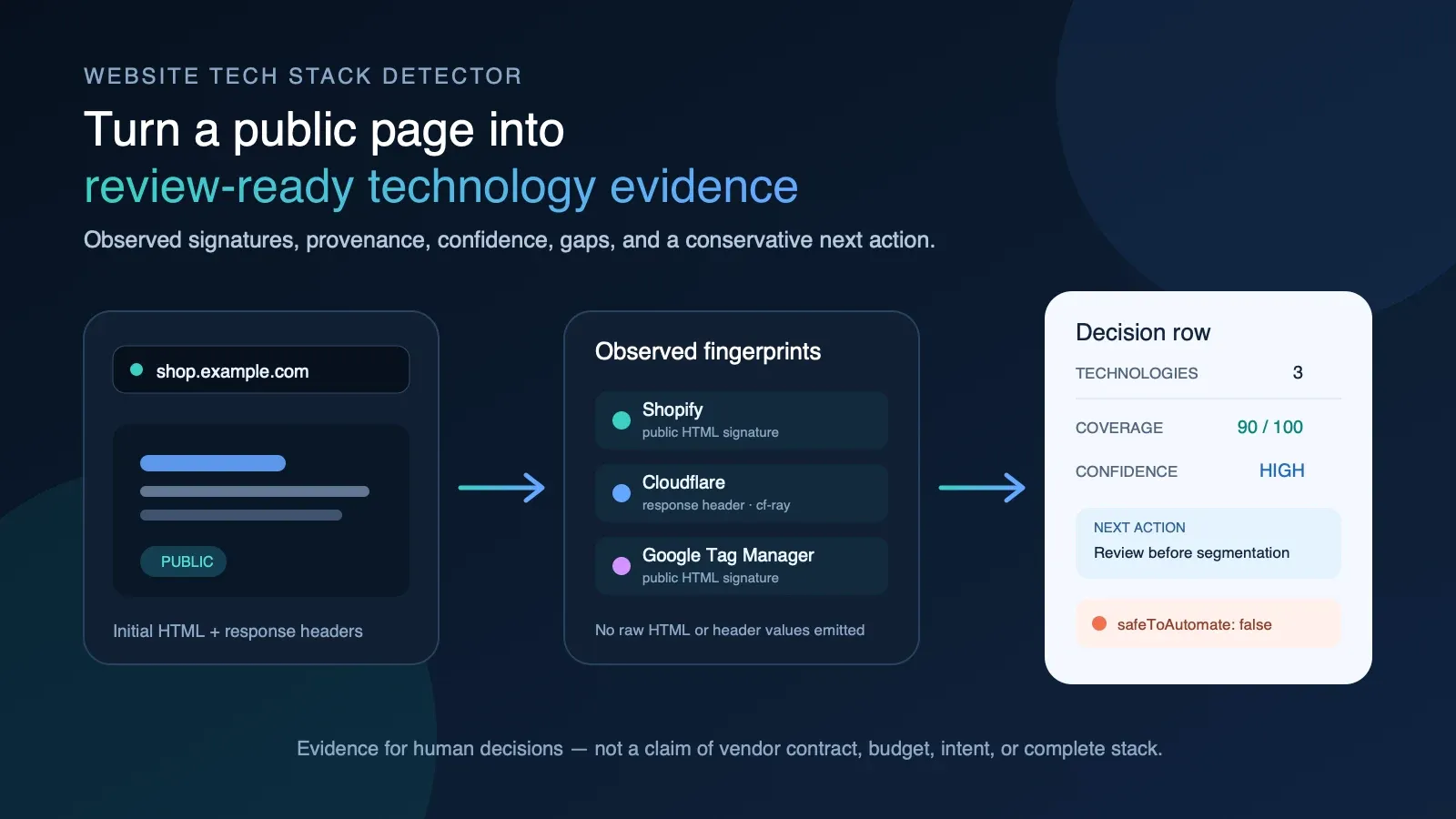
The result in one sentence
Give the Actor 1–100 URLs; get one structured observation per successful page and an explicit, unbilled failure row for pages it could not inspect.
The useful distinction is:
- What it says: “A Shopify-like storefront signature and a Cloudflare response-header signature were observed in this submitted page response.”
- What it does not say: “This company has an active Shopify contract, has budget, wants an agency, owns this domain, or gave permission to contact it.”
That boundary makes the data safer to use. Your CRM or workflow can segment on an observation while retaining the provenance and gaps a researcher needs to verify it.
What you can detect
The current catalog covers more than 50 recognizable public fingerprints across these groups:
| Category | Examples in the catalog |
|---|---|
| CMS | WordPress, Drupal, Joomla, Wix, Squarespace, Webflow, Ghost, Tilda, Framer |
| Ecommerce | Shopify, WooCommerce, Magento, BigCommerce, Salesforce Commerce, PrestaShop |
| Analytics and tags | Google Analytics 4, Universal Analytics, Google Tag Manager, Meta Pixel, Hotjar, Segment, Mixpanel, Amplitude, Plausible, Microsoft Clarity |
| Marketing and CRM | HubSpot, Marketo, Salesforce Pardot, Mailchimp, Klaviyo |
| Chat and support | Intercom, Drift, Zendesk, Crisp, Tawk.to, Calendly |
| Web frameworks | Next.js, Nuxt, Gatsby, Angular, jQuery |
| Payments | Stripe, PayPal |
| Hosting and CDN | Cloudflare, Vercel, Netlify, AWS CloudFront, Fastly, GitHub Pages, Nginx, Apache |
| Fonts and supporting assets | Google Fonts, Font Awesome |
This is a curated signature catalog, not an exhaustive inventory of every technology in existence.
The output explicitly includes SIGNATURE_CATALOG_NOT_EXHAUSTIVE and other gaps so an empty match
cannot be mistaken for proof that a site uses no technology.
Who this is for
Small marketing and web agencies
Start with a permitted list of businesses in a niche or territory, inspect their public sites, and group the accounts by observed storefront, CMS, analytics, chat, or CRM fingerprint. A Shopify agency can review Shopify-signature accounts. A migration consultant can inspect WordPress or legacy CMS observations. An analytics specialist can prioritize sites where a public tag-manager or analytics fingerprint deserves a manual audit.
The Actor does not generate a cold-email justification. It gives the researcher a bounded technical observation and the evidence type behind it. The agency still validates relevance, legal basis, contact permissions, and the actual need before outreach.
SDR and RevOps teams
Add technographic observations to an account list before building a campaign. Keep
technologyEvidence, confidenceReasons, and dataGaps next to the account, rather than importing a
technology label without provenance. Use recommendedAction as a review queue, not as an automated
message trigger.
Examples:
- route accounts with an observed ecommerce signature to an ecommerce-trained researcher;
- compare public technology fingerprints with the segment your product supports;
- flag a redirect, truncated response, or empty signature result for deeper verification;
- retain
entityIdandeventIdfor dedupe and event lineage in a warehouse.
Ecommerce specialists
Build a first-pass map of public storefront, payments, analytics, CRM, and support fingerprints. Use it to prepare discovery questions: “We observed a Shopify storefront signature on the submitted page — is Shopify still the system you want us to evaluate?” This is more defensible than stating the technology as an established commercial fact.
Developers and migration consultants
Use the result as an initial reconnaissance layer before a real architecture review. The Actor is fast because it does not launch a browser or crawl an entire site. That also means it will miss client-rendered and subpage-only technologies. The result tells you this explicitly and recommends a browser-capable or multi-page verification when the bounded response is not enough.
Researchers and portfolio analysts
Compare observed public fingerprints across a controlled URL set. Export the Dataset to JSON, CSV,
Excel, or a warehouse, group by byCategory, and retain observation timestamps and stable IDs. If
you need change history, schedule snapshots and compare them downstream, or pair this Actor with the
related Tech Stack Change Detector.
Five-stage workflow
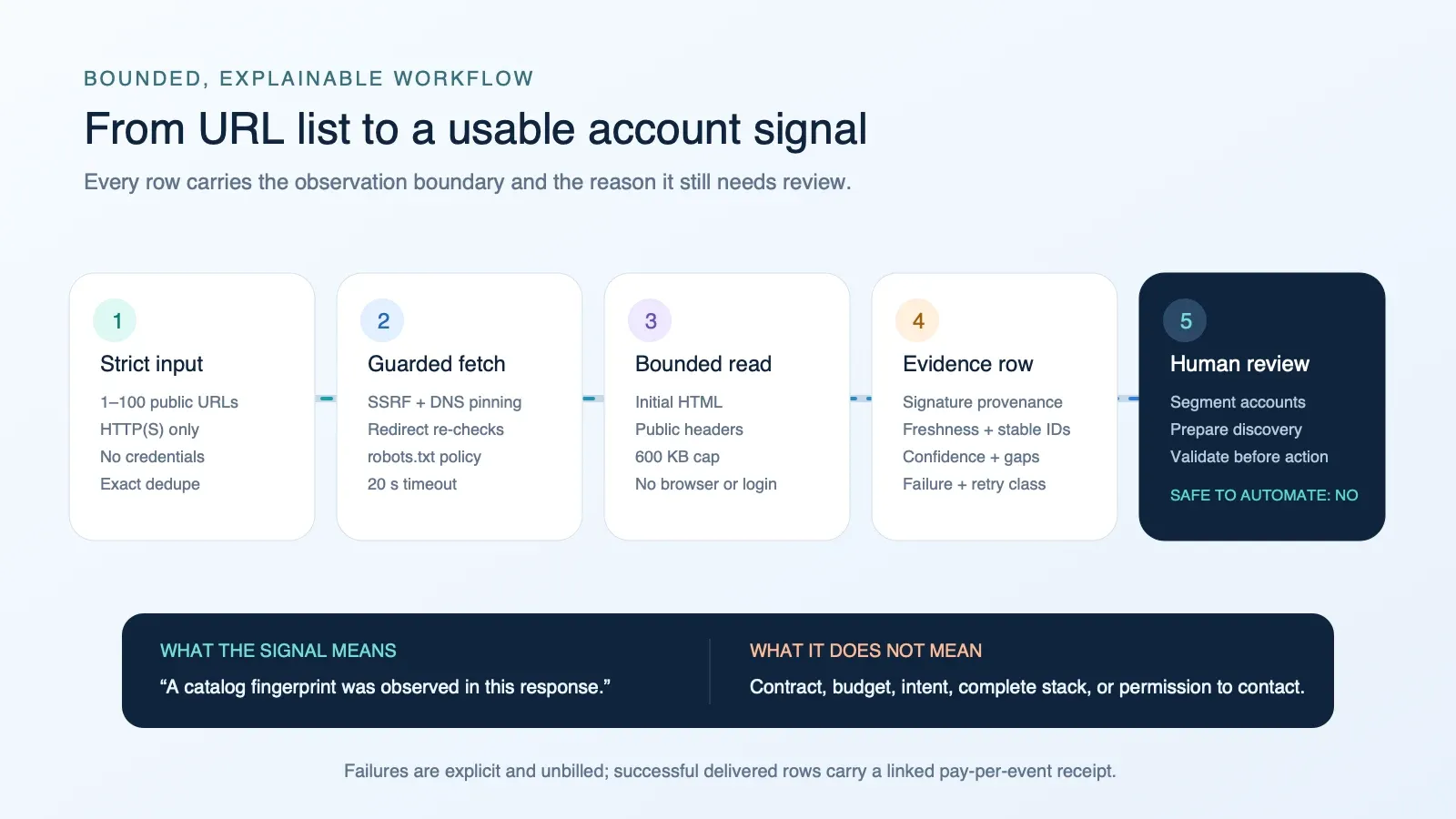
- Strict input — the Actor accepts 1–100 normalized public HTTP(S) URLs. It rejects blank entries, non-string values, credentials embedded in URLs, unsupported schemes, oversized URLs, and unsafe concurrency settings. URL fragments are removed and exact normalized duplicates are processed once.
- Guarded fetch — every hostname is resolved and checked against private, loopback, link-local,
metadata, mapped-IPv4, unique-local, multicast, and reserved address space. The verified public
address set is pinned into the actual connection. Every redirect is checked again. The submitted
path is checked against the site’s
User-agent: *robots.txt rules before it is fetched. - Bounded observation — the Actor reads the submitted page’s initial HTML and public response headers. It follows at most five redirects, waits at most 20 seconds per request, accepts HTML or XHTML responses, caps the page read at 600 KB, and does not launch a browser, inject cookies, authenticate, or use a proxy.
- Evidence row — each catalog match records the technology, category, evidence type, and any response-header name that contributed. Header values and raw HTML are not emitted. The row also includes stable IDs, observation time, coverage, confidence, gaps, failure class, and a conservative action.
- Human review — every row sets
safeToAutomate:false. Use the signal to prioritize research, then verify the business fact and permission boundary before taking action.
Why evidence provenance matters
A single technology name hides important differences. This Actor can distinguish:
public_html_signature— a catalog pattern appeared in the served HTML;final_url_signature— a catalog pattern appeared in the final URL after guarded redirects;public_response_header— a catalog response-header pattern matched; only the header name is retained in output;site_scoped_html_signature— a custom site-scoped rule matched, such as a CMS path that belongs to the checked host rather than a third-party embed.
These are observations, not vendor attestations. A script can be stale, a tag can be unused, a CDN can mask an origin, and a technology can be loaded only after JavaScript executes. Provenance lets a human decide whether the observation is strong enough for the intended task.
Input
| Field | Required | Contract |
|---|---|---|
websites | yes | Array of 1–100 public hostnames or HTTP(S) URLs. Each value must be a nonblank string no longer than 2,048 characters. Credentials and non-HTTP schemes are rejected. Fragments are removed; exact normalized duplicates run once. |
maxConcurrency | no | Integer from 1 to 20. Default: 10. Lower it for sites with strict rate limits. |
Minimal input:
Multiple submitted pages:
The fragment in the last URL is removed because fragments are never sent in an HTTP request. The path is retained. The Actor checks that submitted page, not an automatic crawl of the entire domain.
Output: the legacy fields remain, the decision fields are additive
Existing integrations can continue reading:
url,checkedAt,found,httpStatus, andpartial;technologiesCount,technologies, andbyCategory;- the convenient first-match fields
cms,ecommerce, andhosting; salesSignals, now worded strictly as observed public signatures rather than inferred spend, budget, or intent;summaryanderror.
The richer contract adds:
requestedUrlandfinalUrl;technologyEvidenceandevidenceScope;entityId,eventId,observedAt,firstSeenAt, andlastSeenAt;freshness,coverageScore,coverageBand,confidenceScore,confidenceBand, andconfidenceReasons;dataGaps,recommendedAction,actionPriority, andactionReason;safeToAutomate,failureType, andretryable.
Illustrative successful row
The following shows the candidate output shape. Actual technologies depend on the public response observed at run time.
Illustrative failure row
Source failures are explicit and are not billed as successful result-found events.
Field dictionary
| Field | Meaning and safe use |
|---|---|
requestedUrl | Normalized URL accepted from the buyer after fragment removal. |
finalUrl / url | Final public URL after guarded redirects. url is retained for compatibility. |
checkedAt / observedAt | Time this response was observed. These are not a claim that the technology was first installed at that time. |
found | true means the submitted page was successfully observed, even if no catalog signature matched. false means no successful page observation was delivered. |
partial | true when the response exceeded the 600 KB cap and detection used only the retained prefix. |
technologies | Flat list of catalog signatures observed in the bounded response. |
byCategory | The same observed names grouped by catalog category. |
cms, ecommerce, hosting | Convenience fields containing the first match in those categories, or null. They are not a full vendor inventory. |
salesSignals | Compatibility field containing factual phrases such as “Shopify storefront signature observed.” It does not assert investment, budget, intent, or current vendor contract. |
technologyEvidence | One object per observed catalog technology, with evidence types and safe header-name provenance. |
evidenceScope | The exact scope used for this result: initial HTML and headers of the submitted page, or no successful observation. |
entityId | Stable SHA-256-derived identity for the normalized requested website observation entity. |
eventId | SHA-256-derived identity for this observation event and observed technology state. |
freshness | States that the row came from this live website response and was not a reused cache record. |
coverageScore | Coverage of the bounded collection contract, not a percentage of the site’s true internal stack. A complete bounded response scores higher than a truncated or failed read. |
confidenceScore | Confidence in the reported catalog observations, based on evidence types and count. It is not confidence that no unreported technology exists. |
confidenceReasons | Human-readable reasons behind the score. |
dataGaps | Known facts that this method cannot establish, including client-rendered tools, subpage-only tools, exact versions, exhaustive coverage, vendor relationship, and intent. |
recommendedAction | Conservative next review step. It is not an automated outreach instruction. |
actionPriority | Relative review priority within this Actor’s bounded decision contract. |
safeToAutomate | Always false; public technographic evidence alone should not autonomously trigger contact or account decisions. |
failureType | Normalized source/policy failure class, or null for successful observations. |
retryable | Whether a source failure such as timeout or transient HTTP status may be worth retrying. It does not override OUTPUT.replaySafe for an ambiguous paid delivery. |
Coverage and confidence are deliberately separate
coverageScore answers: “Did the Actor complete the bounded page-response method?” A successful,
non-truncated response receives high coverage even when zero catalog signatures match. It does not
mean 90% of the real stack was discovered.
confidenceScore answers: “How much support do the retained public evidence types provide for the
catalog observations that were reported?” Response-header and site-scoped evidence can strengthen a
positive observation. An empty match receives conservative confidence and a verification action,
because absence from the initial HTML is not proof of absence from the business.
Pricing
This Actor uses pay per event. A one-time Actor-start event is charged when a run starts. A
result-found event is charged only when a successful result row is linked to Dataset delivery.
Source failures and the early budget-stop explanation use the zero-price default Dataset-item event.
| Apify plan tier | Actor start | Successful delivered website row |
|---|---|---|
| FREE | $0.00500 | $0.00500 |
| BRONZE | $0.00475 | $0.00475 |
| SILVER | $0.00450 | $0.00450 |
| GOLD | $0.00425 | $0.00425 |
| PLATINUM | $0.00410 | $0.00410 |
| DIAMOND | $0.00400 | $0.00400 |
At FREE-tier event prices:
- one run delivering 1 successful row costs about $0.010;
- one run delivering 100 successful rows costs about $0.505;
- 1,000 successful rows require at least 10 runs because input is capped at 100 URLs, so the event total is about $5.05 across those runs.
Apify compute usage and platform plan rules may appear separately in run accounting. Check the live Store pricing panel and run receipt for the exact prices that apply to your account.
Billing safety and replay behavior
Successful result delivery and charging happen in one linked Dataset call. Concurrent workers
serialize the budget check plus linked delivery so they cannot race past the buyer’s maximum charge.
With the pinned Apify SDK, a monetized successful delivery is accepted only when the receipt reports
the exact linked pair: the paid result-found event plus the zero-price default Dataset-item event.
If that call throws or returns an unexpected receipt, the Actor treats the outcome as ambiguous. It
persists OUTPUT, sets replaySafe:false, and fails. Do not automatically retry such a run until
an operator compares the Dataset with charged-event receipts; an automatic retry could duplicate a
delivered row or charge.
Ordinary buyer-budget exhaustion is different. The Actor stops before the next paid call, leaves unprocessed URLs untouched and uncharged, and writes one free advisory row only if work actually remains. A final successful row that happens to reach the event limit does not create a false “stopped early” notice.
Run summary in OUTPUT
The default Key-value store contains an OUTPUT record such as:
Interpret the counters this way:
requested— number of unique normalized URLs accepted after exact dedupe;processed— successful paid rows plus written unbilled failure rows;delivered— successful linked result rows;errors— source/policy failure rows written through the free Dataset event;advisoryRows— free early-stop explanation rows, separate from website results;partial— some requested URLs were not processed;stoppedForBudget— work remains and the buyer’s configured maximum charge was reached normally;replaySafe— whether an automatic retry is safe from the delivery-receipt perspective.
Run from the Apify Console
- Open the Actor and select Try for free or Start.
- Paste one URL per line into Websites. Hostnames without a scheme default to HTTPS.
- Leave concurrency at 10 unless the target sites require gentler access.
- Set a maximum run charge if you want a hard spending boundary.
- Start the run.
- Review the Dataset table. Expand
technologyEvidence,confidenceReasons, anddataGapsbefore using a row in segmentation. - Check
OUTPUTwhen integrating retries or monitoring partial runs.
Run through the Apify API
Replace YOUR_APIFY_TOKEN with your token in your own secret manager. Do not commit it.
To run and receive Dataset items in one request:
For production automation, prefer asynchronous runs and inspect the terminal run status, Dataset,
charged-event receipt, and OUTPUT replay state rather than assuming an HTTP response alone means
every requested row was delivered.
JavaScript client example
Python client example
Practical workflows
Workflow 1: platform-specialist agency research
- Begin with a business list you are permitted to research.
- Run the submitted homepages through this Actor.
- Filter for an observed platform signature, such as Shopify, WooCommerce, WordPress, Webflow, or Magento.
- Require
found:true, inspectpartial, and expand the matchingtechnologyEvidenceobject. - Send uncertain, empty, or HTML-only observations to a human verification queue.
- Only after validation, decide whether the account fits your service and whether contact is permitted.
Do not turn Shopify storefront signature observed into “the company is shopping for a Shopify
agency.” The output does not establish that.
Workflow 2: migration discovery preparation
- Submit the exact public pages a consultant plans to discuss.
- Group observations by CMS, ecommerce, framework, and hosting/CDN.
- Use
dataGapsto draft discovery questions about versions, client-rendered tools, subpages, back-office systems, contracts, and architecture. - Treat the result as a starting inventory, then confirm it with the client and deeper technical access.
Workflow 3: CRM enrichment with provenance
- Store
entityIdon the website account andeventIdon the observation record. - Store the flat technology list for filtering, but retain
technologyEvidenceand observation time in the same warehouse row. - Use
failureTypeandretryableto separate source recovery from terminal policy/input review. - Keep
safeToAutomate:falsein the downstream model so the enrichment cannot silently become an autonomous contact trigger. - On reruns, compare observations by event time rather than overwriting the prior evidence.
Workflow 4: portfolio or market snapshot
- Divide a larger permitted list into batches of up to 100 URLs.
- Use conservative concurrency and a bounded maximum charge.
- Aggregate
byCategorycounts only acrossfound:truerows. - Report failed, truncated, and empty-signature rows separately; do not silently fold them into “technology absent.”
- Store the Dataset and
OUTPUTreceipt with the analysis date so the scope is reproducible.
Accuracy boundaries and common causes of false negatives
The Actor is intentionally fast and bounded. It may not observe a real technology when:
- the technology is injected only after client-side JavaScript runs;
- the fingerprint appears only on checkout, blog, careers, support, or another subpage;
- a consent manager prevents a tag from appearing in the initial response;
- an edge cache, bot policy, locale, or experiment serves a different response;
- the site hides or rewrites vendor-specific paths and headers;
- the response exceeds 600 KB and the relevant fingerprint appears after the retained prefix;
- the technology is not yet represented in the curated signature catalog;
- the site blocks the request or disallows the submitted path in robots.txt.
An empty technologies array on a successful response therefore means “no current catalog signature
was observed in this bounded response.” It does not mean “this site has no detectable technology” or
“this company does not use the vendor.”
False-positive controls
CMS path rules are scoped to the checked site where appropriate. A third-party WordPress asset
embedded on a non-WordPress page should not label the whole site as WordPress merely because the
foreign URL contains wp-content. Generator detection is scoped to an actual
<meta name="generator" ...> tag, rather than any meta description that happens to mention a CMS.
These controls reduce common false positives, but a public signature can still be stale or ambiguous. Always review provenance for decisions that affect a person, account, or campaign.
Robots.txt behavior
Before fetching the submitted path, the Actor requests /robots.txt on the same origin and applies
the User-agent: * group using a simplified longest-prefix rule. Allow wins when it is the best
equal-or-longer match. Wildcards are not expanded. A missing or unreadable robots file is treated as
no restriction. A matching disallow returns an unbilled failure row.
This behavior is a product crawl boundary, not legal advice and not a full implementation of every robots extension used by every crawler.
Security and privacy
- The Actor accepts only public HTTP(S) URLs and rejects embedded credentials.
- Hostnames are resolved before connection; all returned addresses must be public.
- The verified addresses are pinned into the actual network connection to close the DNS-rebinding gap between validation and fetch.
- Every redirect is handled manually and receives the same scheme, DNS, and address checks.
- Loopback, private, link-local, metadata, unique-local, mapped-IPv4, multicast, reserved, malformed, and unparseable address forms fail closed.
- Raw HTML and response-header values are not emitted in Dataset rows.
- The Actor does not log in, inject buyer cookies, use a buyer browser profile, bypass access controls, or enrich from private account data.
- Page reads, robots reads, redirects, request time, batch size, and concurrency are bounded.
You are responsible for the URLs you submit, the lawful basis for your use, site terms, applicable privacy and marketing rules, and how downstream systems act on the result.
Export and integration patterns
The default Dataset can be exported through the Apify Console or API in JSON, JSONL, CSV, Excel, XML, RSS, or other supported Dataset formats. Nested evidence is richest in JSON/JSONL. When using CSV, consider retaining a JSON copy because arrays and objects may be serialized into cells.
Recommended warehouse keys:
- website entity:
entityId; - observation event:
eventId; - source time:
observedAt; - normalized request:
requestedUrl; - resolved page:
finalUrl; - positive facts:
technologyEvidence; - method boundary:
evidenceScope,coverageScore, anddataGaps; - review state:
recommendedAction,actionPriority, andsafeToAutomate; - run-level operations: the KVS
OUTPUTrecord plus the Apify run ID.
Scheduling and change tracking
You can schedule this Actor on Apify, but a scheduled snapshot is still a new bounded observation. Do not infer installation or removal solely from one missing signature. Compare multiple observations, account for response variants and failures, and preserve timestamps and gaps. If change tracking is your primary job, use the related Tech Stack Change Detector and keep this Actor for current-state evidence rows.
Troubleshooting
found:false with SOURCE_TIMEOUT
The site did not respond inside the 20-second boundary. The row is unbilled and retryable:true.
Retry later with lower concurrency. Repeated timeouts may mean the site blocks automated requests or
is unavailable.
found:false with INPUT_OR_POLICY_BLOCK
Inspect error. The URL may be malformed, non-public, use an unsupported content type, resolve to
blocked address space, or be disallowed by robots.txt. These are terminal for the submitted input
until the input or source policy changes.
found:true but technologies is empty
The page responded successfully, but the current catalog did not match the bounded initial HTML,
final URL, or headers. Follow recommendedAction: VERIFY_WITH_BROWSER_OR_ADDITIONAL_PAGES rather
than treating the empty array as a negative business fact.
partial:true
The response exceeded 600 KB. Signatures found in the retained prefix are reported, but later HTML
was not observed. The row includes HTML_TRUNCATED_AT_BYTE_CAP and reduced coverage.
The final URL differs from the submitted URL
The site redirected. requestedUrl preserves the normalized input; finalUrl and compatibility
field url show the terminal public page after guarded redirects.
The run is FAILED and replaySafe:false
Do not automatically retry. Compare the default Dataset with charged events first. The linked delivery outcome was ambiguous, so a blind retry can duplicate a result or a charge.
stoppedForBudget:true
The buyer’s configured maximum run charge could not cover the next successful row. Already delivered rows remain valid. Remaining URLs were not processed or charged. Raise the limit and submit only the remaining URLs if you want to continue.
FAQ
Does it crawl the whole website?
No. It checks exactly the submitted page after guarded redirects, plus that origin’s robots.txt. It does not discover or crawl subpages.
Does it render JavaScript?
No. It analyzes the initial server response. Client-rendered technologies may be missed. This is why every row carries the client-side and subpage data gaps.
Does a technology observation prove the company pays that vendor?
No. Public code or a response header does not prove an active commercial relationship, current budget, account ownership, or purchase intent.
Can I use it to find agency leads?
You can use it to enrich and prioritize a permitted account list for human research. Validate the
observation, business relevance, and applicable contact permissions before outreach. The Actor sets
safeToAutomate:false for this reason.
Why are some observations more confident than others?
Confidence reflects retained evidence types and match count. A response-header or site-scoped rule can support a stronger positive observation than one generic HTML match. It does not measure the percentage of the true stack discovered.
Why are header values not returned?
The output retains only the header name that supported a catalog match. This is enough to explain the evidence path without copying unrelated response values into the Dataset.
Are failed pages charged as successful results?
No. A source or policy failure row uses the zero-price default Dataset event. The Actor-start event may already have been charged because the run started.
Can I filter directly in the Dataset?
Yes. Use cms, ecommerce, hosting, technologies, byCategory, confidenceScore,
failureType, and recommendedAction. For nested evidence inspection, JSON export is usually the
most convenient.
Can an AI agent call it?
Yes. It is a standard Apify Actor accessible through the API and supported clients. The calling
agent should inspect OUTPUT.replaySafe, retain evidence and gaps, and avoid turning
safeToAutomate:false observations into autonomous outreach.
Is the result legal advice or compliance certification?
No. The Actor reads bounded public web responses and applies technical safeguards. The buyer remains responsible for site terms, applicable law, privacy, marketing rules, and downstream use.
Can I request another technology signature?
Use the Actor issue/support channel with a public example URL and explain the evidence pattern. A new rule should be specific enough to avoid foreign-embed and generic-keyword false positives.
Related Actors
| Actor | When to use it |
|---|---|
| Tech Stack Change Detector | Compare stack observations over time when a change event, rather than a current snapshot, is the product. |
| B2B Lead Enricher | Combine several public account-enrichment dimensions when technology alone is not enough. |
| Company Profile Lookup | Build a broader public company card from a domain or company name. |
| Company Hiring Radar | Add public job-board activity as a separate, explicitly sourced account observation. |
| Intent Signal Aggregator | Review multiple bounded public signals together; do not treat one technology fingerprint as intent. |
Product boundary
This Actor is a public-page technology evidence extractor. It is not a browser crawler, complete technographic database, vulnerability scanner, vendor-contract registry, buyer-intent oracle, ownership verifier, contact database, legal opinion, or autonomous sales agent.
That narrow boundary is the product advantage: a fast, affordable, inspectable observation that can be exported, scheduled, joined, and reviewed without hiding how the signal was produced.
Built by zinin. Questions or a reproducible signature issue? Use the Actor’s support channel or contact @timzinin.


