

Website Tech Stack Change Detector
Pricing
from $8.50 / 1,000 domains
Website Tech Stack Change Detector
Compare public submitted-page HTML and response-header signatures with a technology baseline you supply. Returns candidate additions, technologies not observed now, evidence provenance, confidence, gaps, stable IDs, and a conservative verification action for up to 100 websites.
Pricing
from $8.50 / 1,000 domains
Rating
5.0
(1)
Developer

Tim Zinin
Maintained by CommunityActor stats
0
Bookmarked
1
Total users
1
Monthly active users
2 months ago
Last modified
Categories
Share
Website Tech Stack Change Detector — evidence-backed candidate changes
Compare a technology baseline you already hold with a fresh observation of a public website page. For each submitted URL, the Actor checks the initial HTML and public HTTP response headers for a curated catalog of CMS, ecommerce, analytics, marketing, support, framework, payments, hosting, and font signatures. It then returns what was observed now, what differs from your supplied baseline, which evidence type supports each current match, how confident the comparison is, what remains unknown, and what should be verified next.
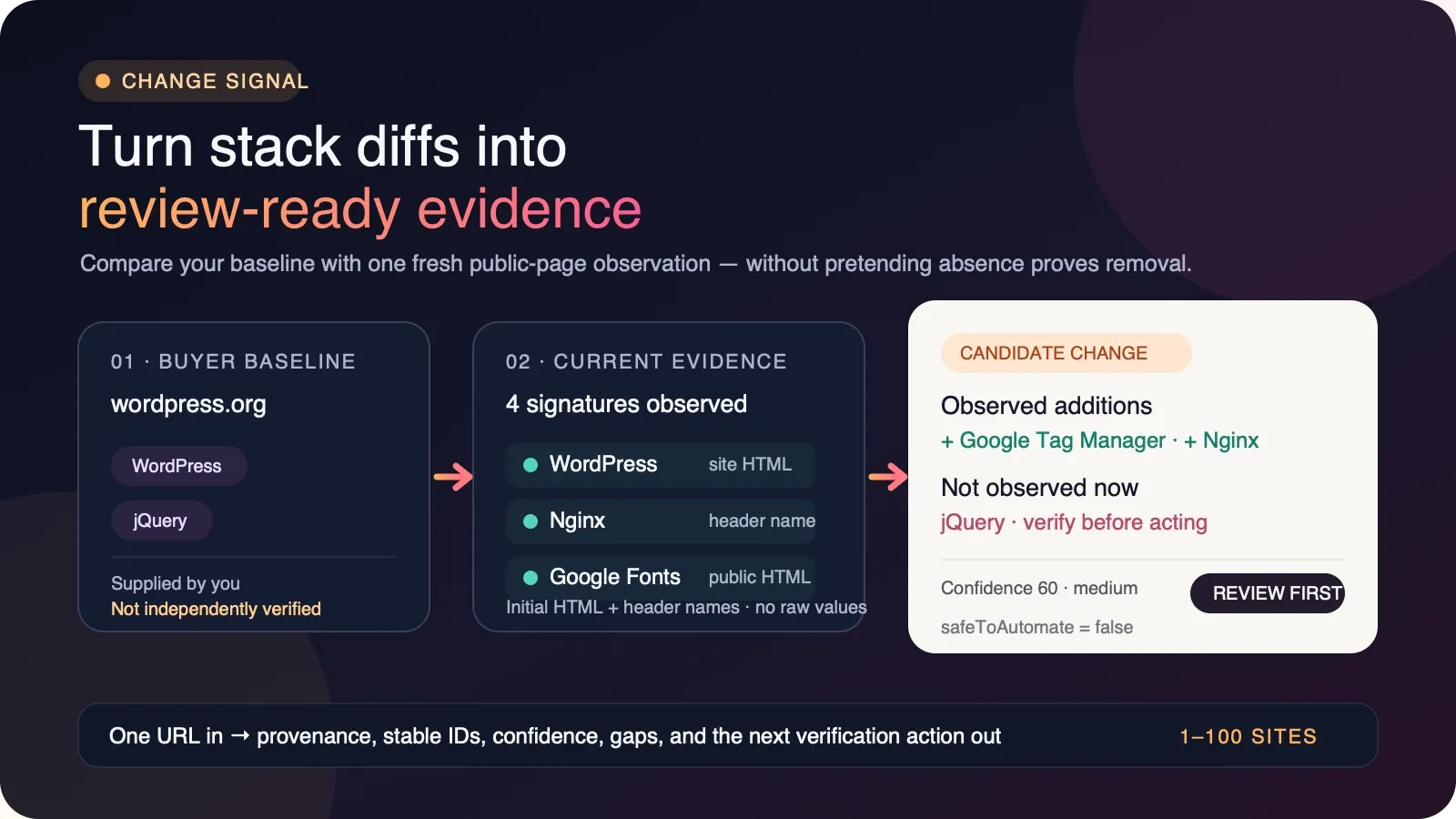
This is not a black-box claim that a company installed or removed a vendor. It is a bounded change lead for account research, migration discovery, audits, portfolio monitoring, and data enrichment. A missing signature on one served page is reported as “not observed now,” never as proof that the technology was uninstalled.
The product in one sentence
Give the Actor 1–100 URLs, optionally followed by | and a comma-separated previous stack; receive
one review-ready current observation or candidate comparison per successful URL, plus explicit
unbilled failure rows and a machine-readable run summary.
The central distinction is:
- Supported by the result: “WordPress, Nginx, Google Tag Manager, and Google Fonts signatures were observed in this submitted page response. jQuery was in the buyer-supplied baseline but was not observed on this response.”
- Not supported by the result: “The company removed jQuery, migrated its whole site, cancelled a contract, has a replacement budget, wants an agency, or approved automated outreach.”
That boundary is why every result includes provenance, confidence reasons, explicit gaps, a
recommended verification action, and safeToAutomate:false.
Who this is for
Small web and migration agencies
Monitor a permitted list of client, prospect, or portfolio sites for candidate platform movement. An observed Shopify signature that was absent from your previous baseline can move an account into a manual research queue. A previously supplied WordPress name that is not observed now can trigger a browser check or a conversation with an existing client. Neither should trigger a migration claim by itself.
Use the output to prepare a precise question: “Our latest public-page check did not observe the WordPress signature stored in our baseline. Has the site changed, or is WordPress now hidden behind rendering/CDN behavior?” That is more defensible than telling the buyer you know a migration occurred.
Marketing operations and RevOps
Attach change evidence to account records without throwing away lineage. entityId provides a
stable website join key; baselineId identifies the normalized buyer-supplied comparison set;
observationId identifies the current response observation; and eventId identifies this exact
comparison. Use those IDs to deduplicate events in a warehouse or workflow.
Candidate additions can prioritize research into newly visible analytics, ecommerce, CRM, chat, or support tooling. Candidate non-observations can identify records that may be stale. The Actor does not validate domain ownership, contract status, budget, purchase intent, contact details, or legal basis for outreach.
Ecommerce consultants
Compare public storefront, payments, analytics, email, chat, and hosting signatures with a baseline from a prior audit. A current Shopify or WooCommerce signature is a technical observation from the submitted page. It is not proof of merchant-of-record structure, payment processing, subscription status, order volume, or commercial relationship with the vendor.
Developers and technology auditors
Use the Actor as a lightweight first-pass diff before a browser-capable or authenticated audit. It is intentionally fast: no browser, no proxy, no login, no subpage crawl, and no JavaScript execution. This makes it useful for scheduled reconnaissance and also defines what it can miss.
Portfolio, market, and competitive researchers
Run a controlled domain set on a schedule, store the current technologies array as the next
baseline, and review candidate changes with the evidence and gaps retained. The Actor itself is
stateless; you own the history and decide retention, comparison cadence, and escalation policy.
What the current catalog can observe
The catalog contains more than 50 public fingerprints across these groups:
| Category | Examples |
|---|---|
| CMS | WordPress, Drupal, Joomla, Wix, Squarespace, Webflow, Ghost, Tilda, Framer |
| Ecommerce | Shopify, WooCommerce, Magento, BigCommerce, Salesforce Commerce, PrestaShop |
| Analytics and tags | Google Analytics 4, Universal Analytics, Google Tag Manager, Meta Pixel, Hotjar, Segment, Mixpanel, Amplitude, Plausible, Microsoft Clarity |
| Marketing and CRM | HubSpot, Marketo, Salesforce Pardot, Mailchimp, Klaviyo |
| Chat and support | Intercom, Drift, Zendesk, Crisp, Tawk.to, Calendly |
| Frameworks | Next.js, Nuxt, Gatsby, Angular, jQuery |
| Payments | Stripe, PayPal |
| Hosting and CDN | Cloudflare, Vercel, Netlify, AWS CloudFront, Fastly, GitHub Pages, Nginx, Apache |
| Fonts and supporting assets | Google Fonts, Font Awesome |
The catalog is curated, not exhaustive. An empty match means “no catalog signature was observed in
this response,” not “the site uses no technology.” Every successful row carries
SIGNATURE_CATALOG_NOT_EXHAUSTIVE, SUBPAGES_NOT_SCANNED, and other relevant gaps.
Five-stage workflow
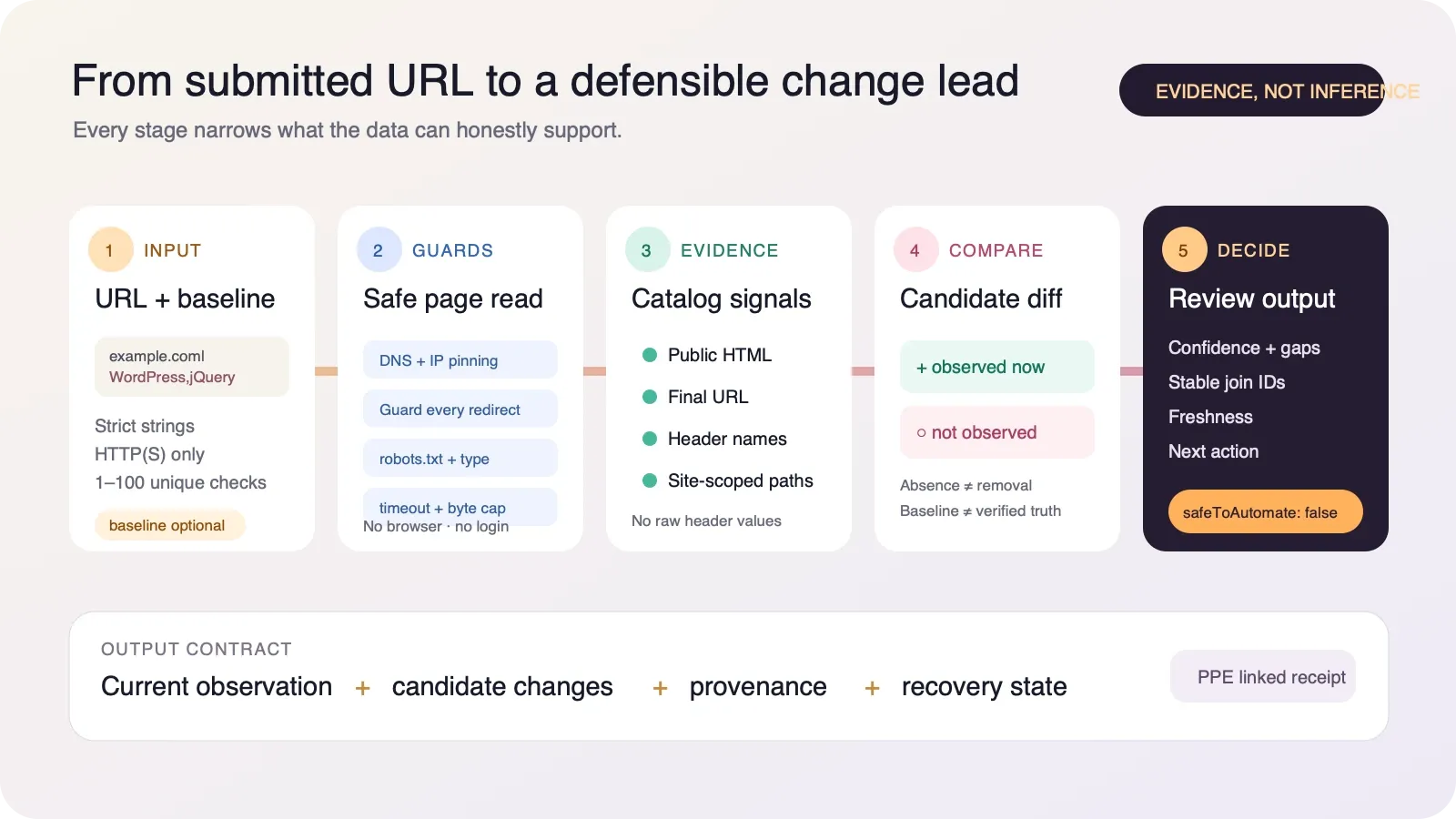
- Strict input — each item is either a public hostname/HTTP(S) URL or that URL followed by a pipe and previous technology names. Blank values, non-strings, embedded credentials, unsupported schemes, oversized values, empty baselines, unsafe concurrency, and lists above 100 are rejected. Fragments are removed. Equivalent normalized URLs with the same case-insensitive baseline set are processed once, even if the baseline order differs.
- Guarded fetch — the Actor resolves the hostname, rejects private/loopback/link-local/metadata
and reserved addresses, pins the verified public address set into the actual connection, and
repeats the guard for every redirect. It reads the site’s public
User-agent: *robots rules, accepts HTML/XHTML, follows at most five redirects, waits at most 20 seconds, and caps content at 600 KB. - Evidence collection — catalog matches retain technology, category, evidence type, and any contributing response-header name. Raw header values and raw page HTML are not emitted.
- Conservative comparison — current technology names are compared case-insensitively with the supplied baseline. Current-only names become candidate additions. Baseline-only names become candidate non-observations. Neither is upgraded into an installation/removal fact.
- Decision-ready output — the row adds stable IDs, timestamp, freshness, coverage, confidence, reasons, gaps, failure/retry state, priority, and a recommended next action. Automation remains review-first.
Input formats
| Field | Required | Contract |
|---|---|---|
items | yes | Array of 1–100 strings. Use example.com for a current observation or example.com|WordPress,jQuery for comparison. URL portion max 2,048 characters; whole item max 4,096; at most 100 previous technology names of at most 100 characters each. |
maxConcurrency | no | Integer 1–20. Default 10. Lower it for sites with strict rate limits. |
Current observation only:
Compare two sites with baselines:
Mix observations and comparisons:
The path is retained and only that submitted page is checked. A fragment such as #pricing is
removed because fragments are not sent in HTTP requests. example.com|WordPress,jQuery and
EXAMPLE.com|jquery,wordpress normalize to the same paid request and are processed once.
What a successful comparison row contains
The following is a shortened representative shape for
wordpress.org|WordPress,jQuery. IDs and timestamps are illustrative; always use your run output.
Compatibility fields
Existing integrations can continue reading these fields:
input,domain,found,httpStatus,checkedAt;technologies,stackHash, andpreviousStack;addedandremoved.
Their semantics are now explicit:
addedis an alias ofcandidateAddedTechnologies: catalog signatures observed now whose names were absent from the supplied baseline;removedis a compatibility alias ofcandidateNotObservedTechnologies: supplied names without a current submitted-page signature. It is not proof of uninstallation;- bare URL input has no baseline, so both arrays stay empty. The Actor never pretends that every current technology is “added” when you did not provide a previous state.
New integrations should use comparisonStatus, the two candidate... arrays,
changeSemantics, technologyEvidence, and the decision fields.
Comparison statuses
| Status | Meaning | Suggested handling |
|---|---|---|
NO_BASELINE_PROVIDED | Current observation only. | Store technologies as a future baseline if appropriate. |
NO_CATALOG_CHANGE_OBSERVED | Current catalog names match the supplied names case-insensitively. | Keep monitoring; do not infer that the entire site is unchanged. |
CANDIDATE_CHANGE_OBSERVED | At least one current-only or baseline-only name exists. | Verify with a browser, more pages, or the site owner before acting. |
PARTIAL_OBSERVATION_REVIEW_REQUIRED | The page hit the byte cap; the comparison uses partial content. | Treat all non-observations as weak and re-check with a deeper method. |
NO_SUCCESSFUL_CURRENT_OBSERVATION | Fetch, policy, content-type, DNS, timeout, or HTTP failure prevented comparison. | Use failureType and retryable; no change claim was made. |
Evidence types
technologyEvidence distinguishes how each current signature was observed:
public_html_signature— a catalog pattern appeared in served HTML;final_url_signature— a catalog pattern appeared in the final URL after guarded redirects;public_response_header— a public response-header pattern matched; output retains only the header name, not the raw value;site_scoped_html_signature— a custom rule matched a path belonging to the checked site, rather than a third-party embed.
Evidence provenance explains the current observation. It does not verify the historical baseline. If a baseline came from a different crawler, page, timestamp, region, cookie state, or catalog, differences can reflect methodology rather than a real site change.
Coverage, confidence, and gaps
coverageScore describes the completeness of this bounded page read, not coverage of the entire
company stack. A complete HTML response scores higher than a response truncated at the byte cap.
confidenceScore describes how defensible the comparison is under those limits. Candidate
non-observations reduce confidence because absence is weaker than observed evidence. Strong
response-header or site-scoped evidence can support a candidate addition, but still does not prove a
contract or installation across the whole site.
confidenceReasons explains the score in plain language. dataGaps always states the relevant
unknowns. Keep both when exporting data; dropping them converts a bounded observation into an
unsupported assertion.
Recommended actions
STORE_OBSERVATION_AS_FUTURE_BASELINE— no baseline was supplied; retain this observation if your policy permits and use it for a later comparison.RETAIN_BASELINE_AND_SCHEDULE_NEXT_OBSERVATION— no catalog-name difference was observed; keep the monitoring cadence without declaring the site unchanged.VERIFY_CANDIDATE_CHANGE_WITH_BROWSER_OR_ADDITIONAL_PAGES— candidate additions or non-observations exist; validate them before CRM mutation, outreach, migration claims, or vendor decisions.RETRY_AFTER_SOURCE_RECOVERY— the failure appears transient, such as timeout, DNS outage, HTTP 429, or server error.REVIEW_INPUT_OR_POLICY_BOUNDARY— correct an invalid/blocked URL or respect the recorded policy boundary before retrying.
Pricing
This Actor uses pay-per-event pricing: one start event per run and one result-found event for each
successfully observed page delivered to the Dataset. Failed fetch/policy rows use the zero-price
default Dataset event. A run-start event may still be charged even when every submitted site fails.
Current tier prices recorded for the Actor are:
| Account tier | Start event | Successful page result | 100 successful pages | 1,000 successful pages |
|---|---|---|---|---|
| FREE | $0.00500 | $0.01000 | $1.00500 | $10.00500 |
| BRONZE | $0.00475 | $0.00950 | $0.95475 | $9.50475 |
| SILVER | $0.00450 | $0.00900 | $0.90450 | $9.00450 |
| GOLD | $0.00425 | $0.00850 | $0.85425 | $8.50425 |
| PLATINUM | $0.00410 | $0.00820 | $0.82410 | $8.20410 |
| DIAMOND | $0.00400 | $0.00800 | $0.80400 | $8.00400 |
Examples assume every submitted page succeeds and exclude any future platform pricing change. Your Apify Store pricing panel and run receipt are authoritative for the tier and prices applied to your account.
Billing and budget safety
The runtime treats Dataset delivery and result-found as one linked SDK operation. For a monetized
run it requires the exact linked receipt: the named result event plus the zero-price default Dataset
item event. A missing or unexpected receipt count is ambiguous; OUTPUT sets replaySafe:false, the
run fails, and automatic retry is discouraged until an operator checks the Dataset and charged
events.
The budget check and linked delivery are serialized across concurrent workers. This prevents two workers from both seeing the same remaining budget before either charge settles. If the buyer’s cap is reached before all unique items are delivered, the Actor stops paid work and writes one free advisory row when pricing permits. If the last requested result exactly reaches the cap, the run is complete and no false “remaining work” advisory is emitted.
Run summary in OUTPUT
The default Key-value store contains OUTPUT with:
requested is the number of unique normalized URL/baseline-set requests after deduplication.
processed counts written result and failure rows, not skipped work. delivered counts successful
paid observations. errors counts explicit unbilled failure rows. partial means not every unique
request was processed, usually because of a budget or ambiguous delivery stop.
Failure and recovery behavior
| Failure class | Typical cause | Retryable |
|---|---|---|
INPUT_OR_POLICY_BLOCK | Invalid/unsafe URL, private destination, unsupported content type, robots restriction | no |
SOURCE_TIMEOUT | Request exceeded 20 seconds | yes |
SOURCE_UNAVAILABLE | DNS resolution failed | yes |
SOURCE_HTTP_TRANSIENT | HTTP 429 or 5xx | yes |
SOURCE_HTTP_TERMINAL | Other HTTP 4xx | no |
SOURCE_OR_PROCESSING_FAILURE | Other bounded fetch/processing failure | review |
A failed current observation has comparisonStatus:NO_SUCCESSFUL_CURRENT_OBSERVATION, empty
candidate arrays, zero confidence, explicit gaps, and no removal claim. It is not billed with
result-found.
Pricing misconfiguration fails closed. If the paid event is missing, or ordinary Dataset writes would themselves be billable, the Actor refuses to deliver results under a pricing contract that would contradict the Store description.
Call through the Apify API
Keep your token in a secret manager and pass it in the Authorization header.
Start a run and wait up to 120 seconds:
Run synchronously and return Dataset items:
Retrieve OUTPUT after a run using the run’s defaultKeyValueStoreId:
JavaScript client
Python client
Schedule a monitoring loop
The Actor does not keep baseline history. A practical recurring workflow is:
- run current observations for the permitted URL set;
- store
technologies,checkedAt,entityId, and your source/catalog version in your own table; - on the next schedule, render each item as
URL|Technology A,Technology B; - run the Actor and keep rows with
candidateChangeObserved:truein a review queue; - verify candidate changes with a browser, additional pages, or the account owner;
- update the baseline only after your verification policy passes.
Do not automatically overwrite the baseline with a partial or failed observation. Keep the evidence, comparison status, and prior baseline so a reviewer can reconstruct why a candidate event appeared.
Webhook and automation pattern
Use Apify run webhooks to notify your workflow when a run finishes. Fetch Dataset rows and OUTPUT, then branch conservatively:
OUTPUT.replaySafe:false→ stop; inspect charges and Dataset before retrying;comparisonStatus:NO_SUCCESSFUL_CURRENT_OBSERVATION→ follow failure/retry policy;comparisonStatus:PARTIAL_OBSERVATION_REVIEW_REQUIRED→ manual/deeper check;candidateChangeObserved:true→ create a research task with evidence and gaps attached;NO_CATALOG_CHANGE_OBSERVED→ retain baseline and continue schedule;NO_BASELINE_PROVIDED→ optionally store the current observation as a future baseline.
Never use removed alone as a destructive automation trigger. The safer condition is still a human
or a deeper verification result, because this Actor intentionally cannot prove whole-site removal.
CSV and spreadsheet use
The default Dataset can be exported to JSON, JSONL, CSV, Excel, XML, or RSS through Apify. Arrays and nested evidence serialize differently by export format. For spreadsheet review, retain at least:
requestedUrl,finalUrl,observedAt;comparisonStatus,candidateChangeObserved;candidateAddedTechnologies,candidateNotObservedTechnologies;technologyEvidence,confidenceScore,confidenceReasons,dataGaps;recommendedAction,actionPriority,safeToAutomate;entityId,baselineId,observationId,eventId;failureType,retryable,partial,error.
Flattening to only URL, added, and removed discards the information that prevents a candidate signal from becoming a false fact.
Stable IDs and joining
entityId— stable for the normalized requested URL;baselineId— stable for the case-insensitive sorted supplied baseline set, ornullwhen no baseline was supplied;observationId— combines entity, observation time, and current catalog names;eventId— combines the current observation with the supplied baseline identity.
Use entityId to join website records, baselineId to distinguish comparison inputs, and eventId
to deduplicate a delivered comparison event. Because observationId includes time, a later response
creates a new observation even if the technology-name set is unchanged.
Security boundaries
Buyer-supplied URLs are untrusted. Before a network connection, the Actor:
- rejects credentials and non-HTTP(S) schemes;
- blocks numeric private, loopback, link-local, metadata, CGNAT, multicast, unique-local, reserved, IPv4-compatible, and IPv4-mapped IPv6 destinations;
- resolves hostnames and rejects the request if any returned address is blocked;
- pins the verified addresses into the connection to resist DNS rebinding;
- follows redirects manually and repeats the guard on every hop;
- enforces timeout, redirect count, accepted content type, and byte cap;
- treats fetched HTML as data only; it is never evaluated or executed.
These controls reduce SSRF and resource risk. They do not turn the Actor into a vulnerability scanner or authorize testing a site you do not have permission to monitor.
Privacy and retention
| Data | Where | Typical retention/control |
|---|---|---|
| Submitted URLs and baseline names | Run Input/default Key-value store | Controlled by your Apify storage retention and deletion settings |
| Result/failure rows | Default Dataset | Controlled by your Apify storage retention and deletion settings |
| Run summary | OUTPUT in default Key-value store | Controlled by your Apify storage retention and deletion settings |
| Operational messages | Run log | Controlled by Apify log retention/settings |
The Actor does not create a named cross-run history store. It does not emit raw HTML or raw response-header values. It may output the submitted URL, baseline names, current technology names, evidence types, header names, timestamps, bounded errors, and stable hashes derived from those values. Do not place secrets, session URLs, personal data, or credentials in input.
Deleting the run’s Dataset removes result rows. Deleting its default Key-value store removes Input and OUTPUT for that run. Deleting only OUTPUT does not delete Dataset rows; deleting only Dataset rows does not delete Input or OUTPUT.
Responsible use
Use URLs you are allowed to inspect and follow applicable terms, robots rules, privacy requirements, anti-spam law, and internal policy. Technology observations can support research; they do not create permission to contact a person, infer sensitive attributes, or make a high-impact decision.
The Actor is not a legal opinion. Public availability does not by itself settle every jurisdiction, contract, or intended-use question. Your use case, volume, retention, downstream enrichment, and outreach process determine the compliance work you still need to do.
What this Actor does not do
- It does not render JavaScript or interact with consent banners.
- It does not crawl subpages or inspect authenticated areas.
- It does not compare against an internal stored history; you supply the baseline.
- It does not verify when, where, or how your baseline was collected.
- It does not prove installation, removal, license, contract, spend, usage, budget, or buying intent.
- It does not identify company owners, employees, contacts, emails, or phone numbers.
- It does not determine technology versions or vulnerability status.
- It does not guarantee detection of client-rendered, obfuscated, proxied, or private technology.
- It does not make any row safe for fully automated outreach or destructive CRM updates.
Choosing this Actor or the snapshot detector
Use Website Tech Stack Detector when you only need a current evidence-backed observation from a URL. Use Website Tech Stack Change Detector when you already have a baseline and need explicit candidate additions/non-observations plus baseline lineage. Both use bounded public-page signatures; neither proves the entire internal stack.
If you need a browser, multi-page crawl, authenticated scan, vendor verification, or persistent history, use a different tool or add those stages to your workflow.
Review checklist for a candidate change
Before changing an account field or contacting someone:
- Confirm
found:trueandpartial:false. - Check
technologyEvidencefor each candidate addition. - Treat
candidateNotObservedTechnologiesas weak until verified elsewhere. - Confirm the baseline source, timestamp, page, region, cookies, and catalog methodology.
- Review redirects and
finalUrl; the response may belong to a different hostname. - Inspect
confidenceReasonsand everydataGapsvalue. - Follow
recommendedAction; keepsafeToAutomate:falseintact. - Confirm your legal basis, permission, and message relevance separately from the technical signal.
- Store the evidence and IDs with the decision so the event remains auditable.
FAQ
Does the Actor keep history between runs?
No. It is stateless by design. Supply a previous stack after | when you want a comparison, and
store accepted baselines in your own Apify storage, database, spreadsheet, or warehouse.
Is removed proof that a technology was removed?
No. removed remains for compatibility and means the same as
candidateNotObservedTechnologies: the name was in your baseline but no catalog signature was
observed on the submitted page response. JavaScript rendering, subpages, CDN behavior, consent,
regional variation, catalog limits, or an inaccurate baseline can all produce that difference.
Why are added and removed empty for a bare URL?
Because there is no baseline. Calling every current technology “added” would fabricate history. A
bare URL returns NO_BASELINE_PROVIDED and a current observation you can choose to retain.
Does matching a Stripe signature prove the site takes payments through Stripe?
No. It proves a matching public client signature was observed in the submitted response. It does not prove production payment flow, merchant-of-record status, active contract, or transaction volume.
Can a site have zero detected technologies and still use many tools?
Yes. Client-rendered scripts, authenticated areas, subpage-only assets, proxying, obfuscation, consent behavior, and technologies outside the catalog can all hide from this bounded observation.
Does it render JavaScript?
No. It reads initial served HTML and response headers. This is faster and cheaper, but not equivalent to a browser session.
Does it respect robots.txt?
It reads the public User-agent: * block and applies longest-prefix path rules before fetching the
submitted page. Missing or unreadable robots.txt is treated as no restriction. Wildcard expansion is
not a promise of this simplified parser.
Are failed pages billed as results?
No result-found event is charged for a page without a successful current observation. The automatic
run-start event may already have been charged.
What happens when the spending cap is reached?
The serialized billing gate stops additional paid delivery. OUTPUT shows whether work is incomplete and whether the run stopped for budget. When possible, one free advisory row explains skipped work.
Can I safely retry any failed run?
Check OUTPUT. replaySafe:true means the Actor did not observe an ambiguous linked delivery receipt.
When replaySafe:false, inspect the Dataset and charged events before retrying to avoid duplicate
delivery or billing.
Can I call it from an AI agent or MCP workflow?
Yes. It is a standard Apify Actor accessible through API and supported clients. Keep the review boundary: an agent can route candidate rows into research, but should not convert them into confirmed removal or outreach permission.
Is this legal?
The Actor reads public page responses and respects its documented technical boundaries, but legality depends on jurisdiction, website terms, volume, purpose, retention, and downstream use. This README is not legal advice.
Related Actors
| Actor | When to use it |
|---|---|
| Website Tech Stack Detector | Current technology evidence without a supplied baseline |
| Company Profile Lookup | Broader company-card enrichment around a domain or company name |
| Company Hiring Radar | Public hiring signals and open-role research |
| B2B Lead Enricher | Multi-source account enrichment with its own evidence boundaries |
| Company Registry Enricher | Official registry identity and status fields |
Quick start
- Click Try for free.
- Add one or more entries to Websites and optional previous stacks.
- Use a bare URL for a current observation, or
URL|Technology A,Technology Bfor comparison. - Start the run.
- Review Dataset rows and the
OUTPUTrecord. - Verify candidate changes before updating systems or contacting an account.
Built by zinin. Questions or a reproducible false positive? Use the Actor issue tab and include the submitted public URL, observation time, and relevant evidence type — never include tokens, credentials, or private page content.


