

Viator Scraper — Tours, Activities & Excursions Prices
Pricing
from $5.00 / 1,000 tour founds
Viator Scraper — Tours, Activities & Excursions Prices
Search Viator (viator.com) by city, landmark or keyword and get tours & activities: price, discount, rating, review count, duration, free cancellation, badges, destination and booking URL. No login or API key.
Pricing
from $5.00 / 1,000 tour founds
Rating
0.0
(0)
Developer

Tim Zinin
Maintained by CommunityActor stats
0
Bookmarked
1
Total users
0
Monthly active users
4 days ago
Last modified
Categories
Share
Get live Viator (viator.com) tour and activity listings as clean rows: price from and currency, discounted-from price, rating, review count, duration, free-cancellation flag, sell-out and traveller badges, destination and the direct booking URL — for any city, landmark or keyword, no Viator account and no API key.
Small first run
At the default 2 GB, the start fee is $0.04. If this input delivers three results, the listed total is $0.055. Set the run spending limit to bound the whole run. The result limit applies separately to each search; adding searches can increase the total. Runtime depends on source responses and retries.
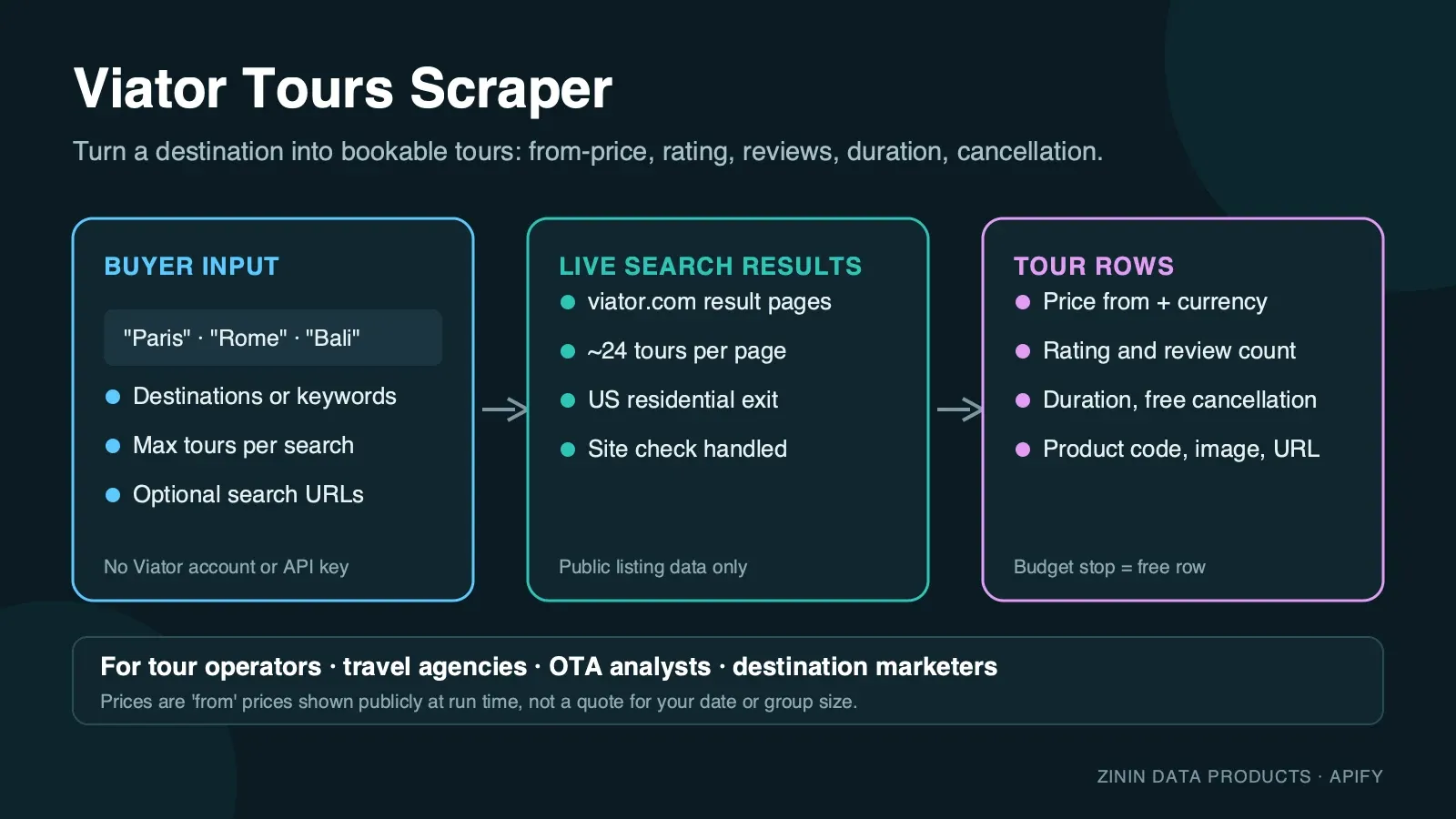
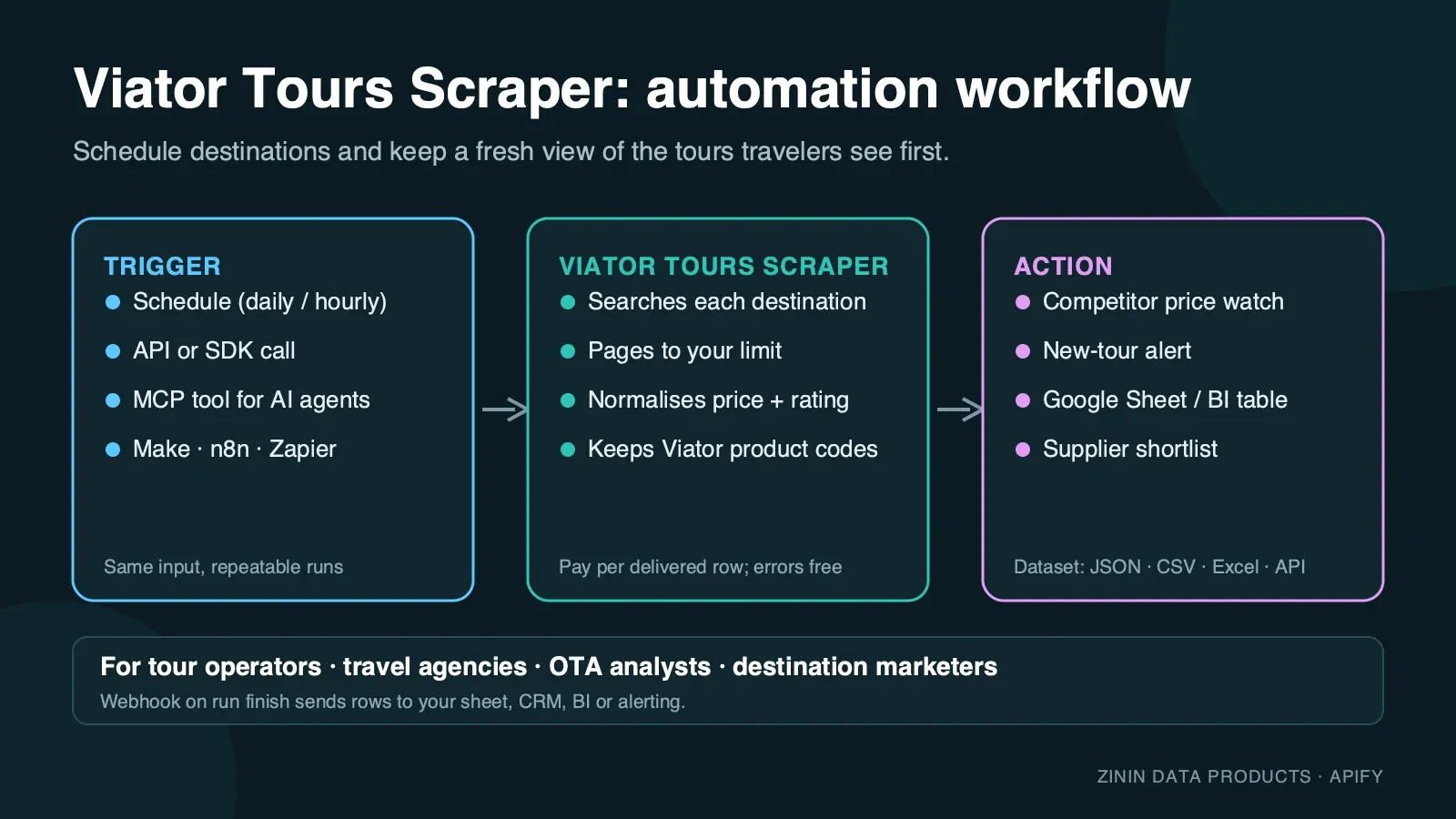
Viator (a TripAdvisor company) is one of the largest marketplaces for bookable tours, day trips, skip-the-line tickets and local experiences, with tens of thousands of products across thousands of destinations. This Actor reads the public tour listing pages exactly as a traveller sees them and turns every tour card into one structured row. You give it a city, landmark or free-text keyword — or paste a Viator search or destination URL with your own filters already applied — set how many tours you need, and get a dataset you can download as JSON, CSV or Excel, pull through the Apify API, or send to Google Sheets, Make, n8n, Zapier or an AI agent over MCP.
It is built for recurring price and assortment work on travel content: run it on a schedule for the destinations you cover, compare the rows, and you know which tours changed price, which sold out, and which new experiences appeared.
What you get
One row per tour or activity card on a Viator listing page:
- Product identity —
productCode(Viator's stable product identifier, unique across runs), fulltitle, and the directurlto the tour's booking page on viator.com. - Price —
priceas a number in the listedcurrency(usuallyUSD), exactly as shown on the card at run time, plusoriginalPricewhen Viator shows a crossed-out "was" price for a discounted tour. - Social proof —
rating(Viator's 1–5 average) andreviewCountfor the product. - Duration —
durationas a human-readable string ("2h 30m","1h 30m–3h"for tours with a flexible window) anddurationMinutes, the same value in minutes for sorting and filtering. - Booking terms —
freeCancellation(true when the card shows free cancellation) andprivateTour(true for private/small-group products). - Merchandising signals —
likelyToSellOutand the fullbadgesstring (Viator's own labels:LIKELY_TO_SELL_OUT,RECOMMENDED_BY_TRAVELLERS,SPECIAL_OFFERand others), so you can see which tours Viator itself is pushing. - Destination —
destination(name) anddestinationId(Viator's numeric destination ID, stable across runs and useful for joining rows from different keywords that land on the same place). - Media —
imageUrl, the largest available card image. - Position —
pageandpositionon the results page, so you can track ranking over time. - Context — the
queryorsearchUrlthat produced the row and ascrapedAttimestamp.
Every row is a real tour that Viator showed for your search. Pages Viator did not return and spending-limit stops are reported as free rows with an error field, so you always know what happened and never pay for an explanation. See Evidence and boundaries for the one honest limit of Viator's own search worth knowing before you rely on a "no results" row.
Who uses it
- OTAs, travel agencies and DMCs benchmarking Viator's public price and availability for a destination against their own inventory or a supplier feed.
- Tour operators and activity providers watching where their own listing ranks, what badges Viator has attached to it, and what competitors in the same destination charge and offer.
- Travel content and affiliate publishers building "best things to do in Paris" style pages from fresh prices, ratings and booking links instead of stale copy.
- Revenue and pricing teams feeding a BI dashboard or a repricing tool with Viator's current price band for a destination or activity category.
- Market researchers sizing a destination's tour supply: how many products, what price range, how ratings and review counts are distributed.
- AI agents that need a grounded answer about current tour prices and availability in a city and can call the Actor as an MCP tool.
Numbers, for planning
A single destination or search results page returns 24 tours; a bigger pull simply reads more pages, in order, until it has enough. Archived cloud runs returned 10 rows in about 25 seconds and 120 rows across five pages in about 40 seconds of scraping time (67 seconds wall clock). These are historical observations, not runtime guarantees. Current duration depends on source responses, page counts and retries; measure a small run before estimating a larger export.
How to run
- Click Try for free (or Start) on this page. You need a free Apify account; no Viator account, no API key.
- In Search keywords or destinations, enter one or more cities, landmarks or free-text keywords, one per line — e.g.
Paris,Rome,Colosseum,snorkeling Cancun. - Optional: paste one or more Viator URLs into Viator search or destination URLs to reuse a search you already ran on the site, or a specific destination's full "things to do" catalogue.
- Set Max tours per keyword or URL. One results page holds 24 tours.
- Click Start. Use the three-result JSON above for the first run; current completion time varies with source responses and retries.
- Open the Output tab: the Tours & activities view shows image, title, price, rating, duration and booking link; the Errors and empty searches view shows the free explanation rows. Download as JSON, CSV, Excel or HTML, or call the dataset through the API.
To run it on a schedule, open Schedules, pick the Actor (or a saved task with your destinations) and choose daily or weekly. To connect it to other tools, see Integration recipes.
Pricing
This Actor uses pay per event pricing. You pay only for tours actually delivered to your dataset, plus a small start fee:
| Event | Price | When it is charged |
|---|---|---|
| Actor start | $0.02 per GB of memory | Once per run. The default 2 GB memory means two start events. |
| Tour or activity found | $0.005 per tour | For every tour row delivered to the dataset. |
Example: with the default 2 GB memory, a run that delivers 100 tours costs 2 × $0.02 + 100 × $0.005 = $0.54; 1,000 tours cost $5.04. The same price applies on every Apify plan.
What you do not pay for:
- Rows with an
errorfield — pages Viator did not return, and the note written when your spending limit is reached — are free. - Proxy traffic, browser time and retries are included in the tour price. You never see a separate proxy bill.
Spending limit. Apify lets you set Max total charge for any run. The Actor checks the remaining budget before every tour and stops cleanly when the next tour would exceed it, then writes a free row saying so. A real run with the limit set just above the start fee delivered 1 tour and stopped with the note shown in Partial output — set your limit with real headroom for the number of tours you actually want, not exactly at the start-fee boundary; the platform itself can abort a run outright if it is set too tight for even the first delivered tour.
Free plan. Apify's free plan includes monthly platform credit that covers small test runs of this Actor. The prefilled example is sized so that it completes well inside that credit.
Input contract
| Field | Type | Default | What it does |
|---|---|---|---|
searchQueries | array of strings | — (prefill ["Paris"]) | Cities, landmarks or keywords to search. Up to 50 per run; duplicates are removed. |
startUrls | array of URLs | [] | Viator search URLs (https://www.viator.com/searchResults/all?text=...) or destination "things to do" URLs (https://www.viator.com/Paris/d479-ttd). Other hosts and URL shapes are rejected before any work starts. |
maxItems | integer 1–2000 | 24 (prefill 20) | Tours to return per keyword or URL. The Actor stops paginating as soon as the limit is reached. |
You must provide at least one keyword or one URL. An empty input fails immediately with a clear message and costs nothing beyond the start event.
Minimal input (the prefill):
Multiple destinations, a bigger pull:
Reuse a search you already ran on the site:
Output examples
All examples below are copied from real runs of this Actor on the Apify platform (September 2026). Nothing is invented or edited except whitespace.
Happy output
Input {"searchQueries": ["Paris"], "maxItems": 10} — run finished in 25 seconds, 10 tours delivered, 0 errors. First row:
A discounted product from the same destination, further down the same real run, shows originalPrice:
A larger real run — {"searchQueries": ["Paris"], "maxItems": 120} — walked five results pages and delivered all 120 tours in 40 seconds of scraping time (67 seconds wall clock including run start).
Partial output (spending limit reached)
Input {"searchQueries": ["Paris"], "maxItems": 10} started with Max total charge set just above the run's start fee. The Actor delivered 1 tour, saw that the next one would exceed the limit, stopped before charging and wrote this free row:
The delivered row was the same Versailles tour shown above. This is the same guard that stops a run cleanly whenever your budget runs out mid-way through a longer pull, not only at the very first tour.
Failure output
When Viator does not return a usable results page after three fresh residential sessions, the keyword gets a free error row and — if every keyword in the run failed — the run still ends as Succeeded with the status message "The site blocked all N search(es)… No result was billed, only the run start." — check that message or the error field to retry automatically. This exact row surfaced during development, from a pagination edge case that has since been fixed (see Evidence and boundaries); it is kept here because the row shape is genuine and is what you would see if Viator ever blocked every attempt for a keyword:
No tour was charged in that run; only the start event applied.
Field dictionary
| Field | Type | Meaning | Notes |
|---|---|---|---|
productCode | string | Viator's stable product identifier | Use it as the primary key when you compare runs. null only on error rows. |
title | string | Tour title exactly as Viator wrote it | Not translated. |
url | string | Direct booking page on viator.com | Built from the destination and title exactly as Viator's own links are; not shortened or tagged. |
imageUrl | string | Largest available card image | Images are not downloaded by the Actor; the URL is Viator's CDN (dynamic-media.tacdn.com). |
price | number | "From" price shown on the card | The lowest price for the product's cheapest option at run time; not a specific date, time slot or group size. |
currency | string | Currency of price and originalPrice | Usually USD; follows what Viator itself displayed for the session's locale. |
originalPrice | number | Crossed-out "was" price | null when the tour is not currently discounted. |
rating | number | Average review score, 1–5 | null if the product has no reviews yet. |
reviewCount | integer | Number of reviews | |
duration | string | Human-readable duration | A single value ("2h 30m") for a fixed-length tour, or a range ("1h 30m–3h") for one with a flexible window. |
durationMinutes | integer | Duration in minutes | For a range, the lower bound. Use duration for the full range in a report. |
freeCancellation | boolean | Card shows free cancellation | null if Viator did not return cancellation data. |
likelyToSellOut | boolean | Viator's own "likely to sell out" badge is present | |
badges | string | Comma-separated list of all badges on the card | E.g. LIKELY_TO_SELL_OUT, RECOMMENDED_BY_TRAVELLERS. null when the card has none. |
privateTour | boolean | Product is flagged private/small-group | null when Viator did not return the flag (common on free-text search results, see below). |
destination | string | Primary destination name | E.g. Paris, Vatican City. |
destinationId | string | Viator's numeric destination ID | Stable; use it to group rows across different keywords that resolve to the same place. |
page | integer | Results page the tour appeared on | 1-based. |
position | integer | Position on that page | 1-based order as Viator ranked it. |
query | string | Keyword that produced the row | null for URL inputs. |
searchUrl | string | First results page URL for this keyword or URL | Always the page-1 URL, even for rows found on a later page — use page for the actual page. |
scrapedAt | string | ISO timestamp when the row was written | UTC. |
error | string | Present only on free explanation rows | Never present on paid tour rows. |
Evidence and boundaries
What this Actor observes and what it does not:
- Source. Only the public Viator listing pages at
viator.com— either a destination's full "things to do" catalogue or a free-text search results page — the same pages any visitor sees without logging in. It does not open the tour's own booking/checkout page. - Price is the card's "from" price at run time. It is the lowest advertised price for the product, not a quote for a specific date, time or party size, and not a checkout total with taxes and fees. Viator prices and discounts change frequently; the row is what the listing card said when the Actor loaded it.
- Two search modes, both handled the same way. A recognized city or landmark (
Paris,Rome) resolves to that destination's full catalogue, which can run to thousands of products across many pages. A free-text phrase that Viator does not match to one destination (snorkeling Cancun) returns Viator's own ranked search results instead, capped at 200 total. Both shapes are read by the same code and produce the same row fields; onlypage/pagination mechanics differ internally. - Viator's own search has no literal "no results" state. This is worth knowing before you build automation around it: unlike a typical e-commerce search box, Viator's ranker always returns semantically-similar fallback candidates for a free-text query, even for gibberish or a real but essentially tour-less place (verified with six independent nonsense and edge-case queries during development — nothing returned zero). In practice this means a genuinely obscure or misspelled destination will still get some rows back rather than a clean "no results" row; check
destination/destinationIdagainst what you expected if a query's rows look unrelated to your keyword. - Ranking depends on context. Result order can vary with session, personalisation and time. The Actor uses a US residential connection and no login, which is the closest thing to a neutral visitor view, but two runs minutes apart can order a page differently.
- Ratings and availability are the card's summary only. The Actor does not check live time-slot availability, group-size pricing or seasonal closures — that detail lives on the tour's own booking page.
- No guarantees about completeness. A popular destination can have thousands of products; the Actor pages through as many as
maxItemsand the site's own pagination allow.
How the Actor reaches the page: Viator, like most large travel platforms, protects its pages against automated traffic (DataDome). The Actor opens each listing page in a real, privacy-hardened browser through US residential proxies, waits until Viator's own page data is present, and reads it. Images, fonts and video are never downloaded, which keeps the run fast and the traffic small. If a page is not usable, it retries with a fresh session up to three times and then reports the keyword as a free error row instead of guessing. Pagination itself is also retried once with a fresh session if a page ever comes back identical to an earlier one, a rare quirk observed once during development.
Data quality notes
- Duration is parsed, not guessed. Viator's own data carries two shapes: a fixed duration
(
"150 minutes"→"2h 30m") or a flexible range ("180 to 210 minutes"→"3h–3h 30m"). Both are converted the same way intoduration(human-readable) anddurationMinutes(a plain number — the lower bound for a range), so you can sort or filter numerically without re-parsing strings yourself. - The image URL is the largest one available, chosen by comparing every size Viator lists for the card's photo, not just whichever happens to be listed first — an earlier build of this Actor picked the last array entry and occasionally returned a 200×200 thumbnail instead of the full-size photo; that has been fixed and verified against real cloud rows.
- Every row is deduplicated within its own keyword or URL pull by
productCode(falling back tourl), so a tour that happens to appear on more than one page — which can occur if Viator's own ranking shifts slightly between page loads — is only delivered, and billed, once. - Destination-catalogue and free-text-search rows carry identical fields. Viator's own data structure differs slightly behind the two shapes (see Evidence and boundaries), but this Actor normalizes both into the same row shape before it reaches your dataset, so you never need to branch your downstream logic on which kind of search produced a row.
- Price is read as the numeric field Viator's own page data carries, not parsed from
on-screen text, so
$1,234.50never becomes a broken string —priceis always a plain number ornull.
Decision routing
| What you see in the data | What it usually means | What to do next |
|---|---|---|
| Many tours for a destination within a tight price band | Commodity category (e.g. hop-on-hop-off, day passes); price is the main lever | Track weekly and alert when a competitor drops below your floor |
originalPrice set and well above price | Viator or the operator is running a discount | Compare your own price against the discounted, not list, price |
likelyToSellOut: true on a top competitor | Real demand signal for that experience type | Consider matching availability or capacity, not just price |
High reviewCount but modest rating | Popular but polarising experience (common for large-group tours) | Read a few reviews before treating volume alone as quality |
badges includes RECOMMENDED_BY_TRAVELLERS or SPECIAL_OFFER | Viator itself is merchandising the product | Track whether your own listings ever earn these badges |
privateTour: true cluster forming for a destination | Market shifting toward small-group/private format | Evaluate a private variant of your own popular tours |
| Free error row about attempts | Viator did not serve the page to three sessions | Re-run later; it is not charged |
| Rows for a query look unrelated to what you typed | Free-text query did not match a destination; Viator's semantic fallback kicked in (see Evidence and boundaries) | Check destination; try the exact city/landmark name instead of a loose phrase |
Commercial playbooks
1. Destination price watch. Save a task with the 10–30 destinations you operate in and maxItems: 100. Schedule it weekly. In your sheet, group by destinationId, track the median price for comparable tour types, and alert when the market moves.
2. Competitor and OTA benchmarking for a specific tour type. Search your product category ("Colosseum tour", "Eiffel Tower skip the line") across the cities you cover. Compare price, rating, reviewCount and badges against your own listing to see exactly where you rank on the criteria travellers actually compare.
3. New-product discovery. Run the same destination monthly and diff productCode sets. New codes are new products Viator has onboarded in that market — useful for spotting new competitors or new categories worth entering.
4. Content and affiliate pages. Pull the top-rated tours (rating ≥ 4.5, reviewCount ≥ 500) for a destination and use the fresh price, rating and booking link in a "best things to do" page. Refresh monthly so prices and availability stay current.
5. Seasonal and event pricing. Run the same destination through a peak season (Christmas markets, Carnival, a major sporting event) and compare price and badges week over week to see how the market prices demand spikes.
Integration recipes
Apify API (any language). Start a run and get items in one call:
Python client.
JavaScript client.
Google Sheets. Use Apify's Google Sheets integration on a saved task: every finished run appends rows to your sheet. Filter out rows where error is not empty.
Make, n8n and Zapier. Use the Apify app: trigger "Watch Actor runs" (or "Watch task runs"), then "Get dataset items", then your action — a Slack alert when a competitor's price drops, a row in Airtable, a record in your CRM or PMS.
Webhooks. Add a webhook for ACTOR.RUN.SUCCEEDED pointing at your endpoint; it receives the run object with defaultDatasetId, and you fetch items from there.
AI agents (MCP). The Actor is available as a tool through the Apify MCP server (https://mcp.apify.com). An agent can call it with a destination and use the returned rows to answer "what tours are available in Rome right now and what do they cost". Keep maxItems small for interactive use.
Tracking price and availability over time
Most buyers use this Actor to see change, not a single snapshot. A reliable setup looks like this:
- Fix the input. Save a task with the exact destinations/keywords and
maxItems. Changing either changes which products are in scope and makes day-to-day comparison noisy. - Key on
productCode. It is Viator's stable identifier for the life of a listing. Titles and badges change with campaigns; positions move as ranking shifts. - Store
scrapedAtwith every row. It is the observation time. Two rows with the sameproductCodeand a differentpriceare a price change between those two timestamps. - Separate "missing" from "sold out"-adjacent signals. If a
productCodedisappears from the results, it may simply have dropped out of the page window you requested rather than been delisted —likelyToSellOutis a merchandising signal, not a live inventory count. For important products, request more pages so the item stays in scope. - Watch
originalPrice, not onlyprice. A tour keeping the samepricebut losing itsoriginalPrice(or gaining one) tells you a promotion started or ended.
A simple weekly sheet: one tab per week of rows, a pivot of price per productCode, and a conditional format that highlights a drop of more than 10%. That is enough to catch most competitor moves on Viator within a week.
Operating guide
- Memory. The default 2 GB is enough; more memory does not make pages load faster and increases the start fee.
- Run size. One results page ≈ 24 tours and a few seconds. A run with 10 destinations × 50 tours typically finishes in a few minutes.
- Scheduling. Weekly is enough for most price work; daily makes sense only around a specific event or season.
- Stable keys. Compare runs on
productCode, not ontitle(Viator edits titles) and not onposition(ranking moves). - Many destinations. Put up to 50 keywords into one run rather than starting 50 runs — you pay one start fee instead of fifty.
- Timeouts. The default run timeout is 30 minutes. For very large pulls (thousands of tours), raise the timeout or split destinations across runs.
- Spending limit. Give it real headroom (start fee plus the number of tours you expect, plus margin) — a limit set right at the start-fee boundary can make Apify abort the run outright instead of letting it stop cleanly with a free row. See Pricing.
- Retries. A keyword that failed with an attempts error is safe to run again; nothing was charged for it.
Troubleshooting
The run finished but I got fewer tours than maxItems. The destination or search had fewer matching products, or you reached Viator's own result cap for a free-text search (200 total). Try the exact destination name instead of a loose phrase to reach the full catalogue.
Rows for my query don't look like what I searched for. Your keyword did not resolve to a specific destination and Viator's semantic search returned its best-effort fallback instead of a true "no results" state — see Evidence and boundaries. Use the exact city or landmark name.
I see an error about attempts. Viator did not serve a usable page to three separate sessions. This is rare and temporary; start the run again. The failed keyword was not charged.
The run stopped early with a spending-limit row, or the run itself was aborted. Your Max total charge was reached (a graceful stop) or set too tight even for the start fee (a platform-level abort). Raise it in the run options with real headroom for the number of tours you want.
My pasted URL was rejected. Only https://www.viator.com/searchResults/all... search URLs and https://www.viator.com/<Destination>/d<id>-ttd... destination URLs are accepted. Tour booking pages and other Viator sections are not listing pages.
FAQ
Do I need a Viator account or API key? No. The Actor reads public listing pages; there is nothing to register.
Is this the official Viator/TripAdvisor Partner API? No. It is an independent tool that reads the public website. Viator's own partner API requires a commercial agreement and has its own terms; this Actor needs neither and returns what the public website shows.
Can I get the full tour description, itinerary or all photos? Not in this Actor. It reads listing pages, which is what price and assortment work needs at scale. The url field takes you to the tour's own page for the rest.
How fresh is the data? It is read at run time. Schedule the Actor as often as you need fresh prices.
Can I search other Viator locales (non-English)? The Actor reads viator.com in English through a US residential connection. Prices are shown in the currency Viator serves for that session, typically USD.
Why did my nonsense or misspelled query still return tours? Viator's own search never returns a literal zero — see Evidence and boundaries for the verified detail and what to check instead.
What happens if Viator changes its page? Rows would stop appearing and keywords would return free error rows rather than wrong data. The Actor is monitored and updated.
Sources and rights
- Data comes from publicly accessible Viator listing pages. The Actor does not log in, does not bypass paywalls and does not collect personal data about travellers.
- Tour titles, prices, images and review data belong to Viator, LLC (a TripAdvisor company) and the respective tour operators. Use the data in line with Viator's terms and the laws that apply to you, especially for republication. For large-scale commercial partnerships, consider Viator's official partner programme.
- This Actor is not affiliated with, endorsed by or sponsored by Viator, LLC or TripAdvisor, Inc. "Viator" is a trademark of its owner and is used here only to describe the data source.
- Report a bug or ask for a feature in the Issues tab of this Actor. Custom fields or additional destinations can be built on request.
More travel scrapers from the same author
| Actor | What it gives you |
|---|---|
| Tripadvisor Scraper | Attractions, restaurants and hotels with ratings and ranks |
| Expedia Hotel Scraper | Hotel prices per night and guest ratings |
| GetYourGuide Scraper | Activities with prices, ratings and durations |
| Airbnb Listings & Prices Scraper | Airbnb listings with nightly prices |


