

GetYourGuide Scraper — Tours, Activities, Prices & Ratings
Pricing
from $3.00 / 1,000 activity founds
GetYourGuide Scraper — Tours, Activities, Prices & Ratings
Search GetYourGuide by destination or keyword and get tours and activities: title, starting price with currency, rating, review count, duration, badges and the direct listing URL. Public pages, no login required.
Pricing
from $3.00 / 1,000 activity founds
Rating
0.0
(0)
Developer

Tim Zinin
Maintained by CommunityActor stats
0
Bookmarked
2
Total users
1
Monthly active users
4 days ago
Last modified
Categories
Share
GetYourGuide Scraper — Tours, Activities, Prices, Ratings & Badges
Get live GetYourGuide search results as clean rows: title, price from with currency, rating, review count, duration, badges (Top pick, Likely to sell out, Booked N times yesterday...), category, resolved location and the direct listing URL — for any destination or keyword, no GetYourGuide account and no API key.
Small first run
At the default 2 GB, the start fee is $0.04. If this input delivers three results, the listed total is $0.049. Set the run spending limit to bound the whole run. The result limit applies separately to each search; adding searches can increase the total. Runtime depends on source responses and retries.
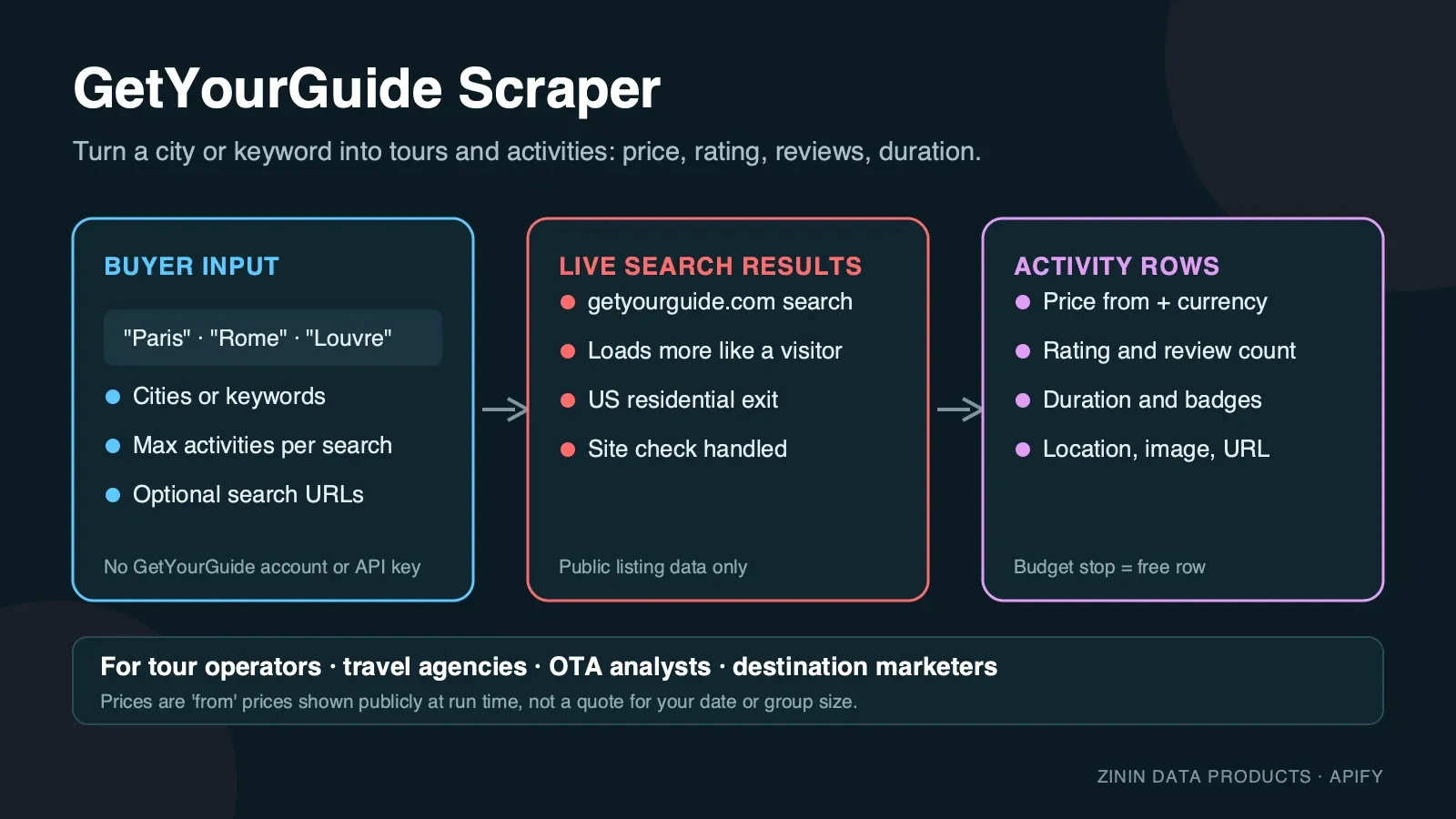
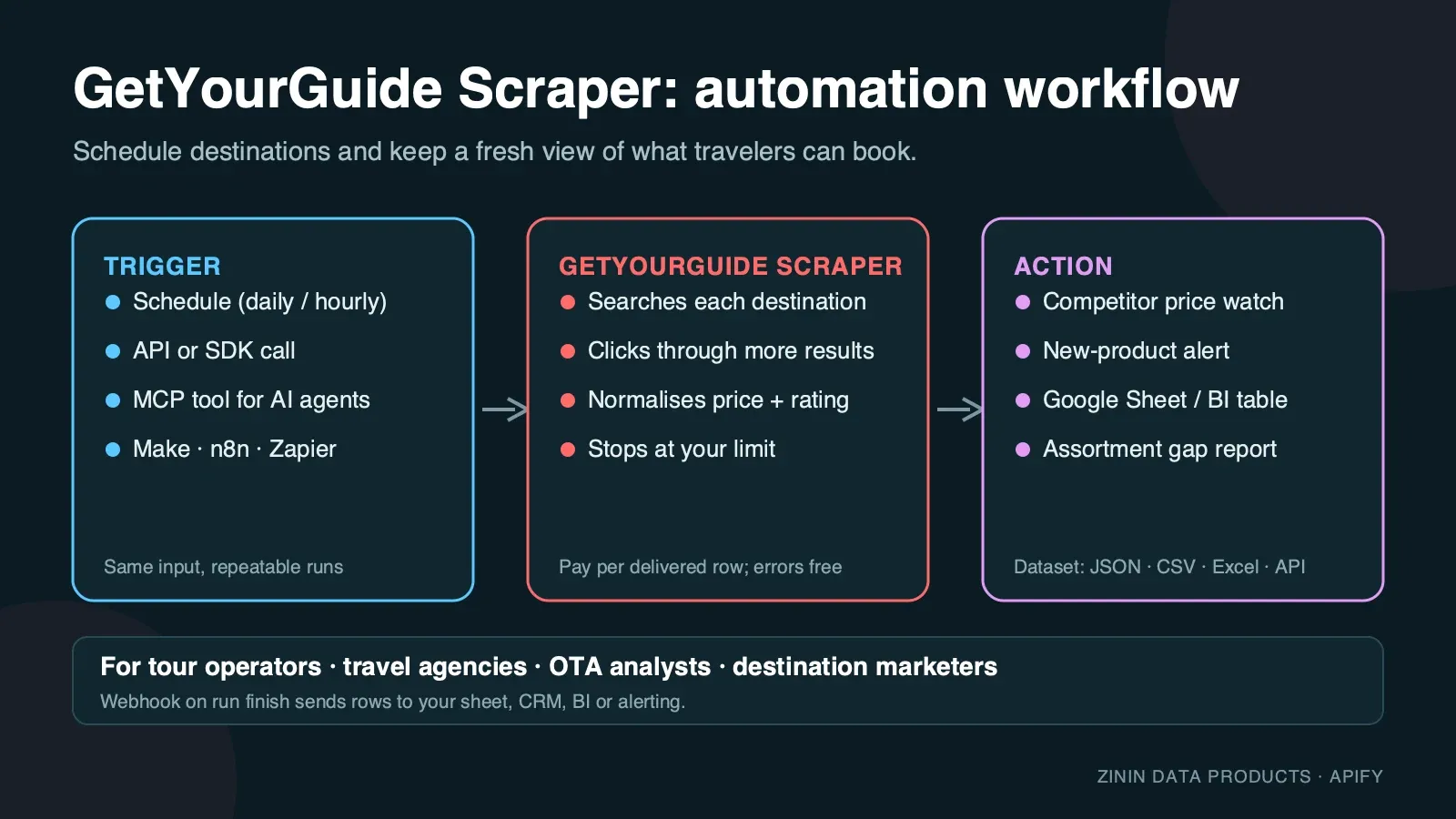
GetYourGuide is one of the largest marketplaces for tours, activities, tickets and experiences worldwide — hundreds of thousands of listings across tens of thousands of cities, each with its own dynamic price, rating and ranking. This Actor opens the public search page exactly as a traveller sees it, in a real anti-detect browser behind residential proxies (GetYourGuide blocks plain HTTP and TLS-only automation, including through residential IPs — a real browser is the only thing that gets through), reads the same server-rendered data the page itself uses to draw the cards, and turns every card into one structured row. You pick a city or keyword, set how many results you need, and get a dataset you can download as JSON, CSV or Excel, pull through the Apify API, or send to Google Sheets, Make, n8n, Zapier or an AI agent over MCP.
It is built for recurring travel-product work: run it daily or weekly on your city list and you know who changed a price, which tour is trending ("Booked N times yesterday"), which listings are about to sell out, and how your own catalogue's price and rating compare to what a traveller actually sees on page one.
What you get
One row per tour or activity card on the GetYourGuide search results page:
- Identity —
tourId(GetYourGuide's numeric tour ID, stable across runs) andtitleexactly as shown. - Price —
priceas a number (the "from" price for the cheapest available option, e.g. the smallest group size or shortest slot),currency(ISO code, matches the run's residential exit —USDby default) andpriceLabel, the rounded display string GetYourGuide itself shows (e.g."$282"). - Social proof —
rating(0–5, rounded to two decimals) andreviewCount. - Format —
duration(free text as GetYourGuide writes it, e.g."2 hours","1h 30m","3 days") andcategory(GetYourGuide's internal type, e.g.guidedTour,privateTour,entryTicket,dayTrip,cruise,workshopOrClass,cityCard). - Ranking badges —
badges, a comma-joined list of every ribbon shown on the card:Top pick,Top rated,Booked N times yesterday,Likely to sell out,New activity,Certified by GetYourGuide,Originals by GetYourGuide.nullwhen the card carries no ribbon. - Location —
location, the destination GetYourGuide resolved your search to (e.g."Paris"), taken from the page's own location metadata, not guessed from your query text.nullwhen GetYourGuide did not resolve a specific place (see Evidence and boundaries). - Media and link —
image(a CDN thumbnail URL) andurl, the direct listing page. - Context —
query(your search term),page(1-based results page the card came from) andscrapedAttimestamp.
Every row is a real activity that GetYourGuide showed for your search. Searches that hit a temporary block after retrying are reported as free rows with an error field, so you always know what happened and never pay for an explanation.
Who uses it
- OTAs, metasearch and comparison sites that need live GetYourGuide prices and ratings next to Viator, Tiqets or their own inventory, without a GetYourGuide partner integration.
- Tour operators and DMCs checking how their own listing ranks and prices against competitors for the same city, and which badges the competition is winning (Top pick, Likely to sell out).
- Revenue and pricing teams at activity suppliers watching price-from movement on their category (e.g. "Rome cooking classes") to time their own price changes.
- Destination marketers and DMOs sizing what a traveller actually sees when they search a city: how many listings, price spread, which categories dominate page one.
- Content and affiliate publishers building "best things to do in {city}" pages from fresh prices, ratings and direct booking links.
- AI travel agents that need a grounded, current answer to "what tours are available in {city} and what do they cost" and can call the Actor as an MCP tool.
How to run
- Click Try for free (or Start) on this page. You need a free Apify account; no GetYourGuide account, no API key.
- In Destinations or keywords, enter one or more searches, one per line — a city (
Paris), a landmark (Colosseum tour) or an activity type (cooking class Rome). - Set Max tours per search. GetYourGuide shows about 24 cards per page; ask for more and the Actor clicks "Show more" in the live page to pull further pages, the same way a visitor scrolling down would.
- Click Start. Use the three-result JSON above for the first run; completion time varies with source responses and retries.
- Open the Output tab: the Tours & activities view shows image, title, price, rating, duration and badges; the Errors and empty searches view shows any free explanation rows. Download as JSON, CSV, Excel or HTML, or call the dataset through the API.
To run it on a schedule, open Schedules, pick the Actor (or a saved task with your city list) and choose daily or weekly. To connect it to other tools, see Integration recipes.
Pricing
This Actor uses pay per event pricing. You pay only for tours actually delivered to your dataset, plus a small start fee:
| Event | Price | When it is charged |
|---|---|---|
| Actor start | $0.02 per GB of memory | Once per run. The default memory means a fixed number of start events. |
| Tour or activity found | $0.003 per row | For every tour/activity row delivered to the dataset. |
Example: with the default 2 GB memory, a run that delivers 100 activities costs 2 × $0.02 + 100 × $0.003 = $0.34; 1,000 activities cost $3.04. The same price applies on every Apify plan.
What you do not pay for:
- Rows with an
errorfield — searches with no results, pages GetYourGuide did not return after retries, and the note written when your spending limit is reached — are free. - Proxy traffic, browser time and retries are included in the row price. You never see a separate proxy bill.
Spending limit. Apify lets you set Max total charge for any run. The Actor checks the remaining budget before every row and stops cleanly when the next row would exceed it, then writes a free row saying so. The archived partial-output sample illustrates the row shape. Its $0.02 cap is not a current runnable budget at 2 GB, where the start fee alone is $0.04.
Free plan. Apify's free plan includes monthly platform credit that covers small test runs of this Actor. The prefilled example is sized so that it completes well inside that credit.
Input contract
| Field | Type | Default | What it does |
|---|---|---|---|
searchQueries | array of strings | — (prefill ["Paris"]) | Destinations or keywords to search. One run can hold up to 50 searches; duplicates are removed. Required — at least one entry. |
maxItemsPerQuery | integer 1–300 | 25 (prefill 20) | Tours to return per search. The first page load returns about 24; for more, the Actor clicks "Show more" in the live page to reach further pages. Every tour row is charged the same. |
An empty searchQueries fails immediately with a clear message and costs nothing beyond the start event.
Minimal input (the prefill):
Multi-city monitoring input:
Deep category research (walks several "Show more" pages):
Output examples
All examples below are copied from real runs of this Actor on the Apify platform (September 2026). Nothing is invented or edited except line wrapping for readability.
Happy output
Input {"searchQueries": ["Paris"], "maxItemsPerQuery": 10} — run finished in 8–30 seconds (residential proxy latency varies run to run), 10 tours delivered, 0 errors. First three rows:
A larger real run — {"searchQueries": ["Rome"], "maxItemsPerQuery": 130} — clicked "Show more" five times, walked six pages and delivered all 130 tours in 83 seconds for $0.020 of platform compute.
Partial output (spending limit reached)
Archived output shape, not a current-price example. The quoted $0.02 cap below does not match the current tariff. At the default 2 GB, the start fee alone is $0.04. Use the current Pricing section when choosing a runnable spending limit.
Input {"searchQueries": ["Barcelona"], "maxItemsPerQuery": 30} started with Max total charge set to $0.02 on 2 GB memory. The Actor delivered 5 tours, saw that the next one would exceed the limit, stopped before charging and wrote this free row:
The five delivered rows were complete tours like the ones above — the first was tour 412239, "Barcelona: Sagrada Familia, Park Güell & Gothic Quarter Tour", $60.77, 4.7★ from 1,157 reviews, badge Top pick.
Guarded failure (not observed in testing, documented from the code)
Every search a GetYourGuide session refuses after three fresh residential-proxy attempts gets a free error row instead of a paid one, and if every search in the run was refused, the run still ends as Succeeded with the status message "The site blocked all N search(es)… No result was billed, only the run start." — check that message or the error field to retry automatically:
Honestly: none of the roughly ten cloud runs made while building this Actor failed (one was stopped by hand before it finished), including one that hit GetYourGuide's Cloudflare challenge ("Just a moment...", HTTP 403) on the very first attempt and recovered automatically on the built-in retry with a fresh proxy session — no failed run was captured to copy a real row from. The message format above is the literal string the Actor's shared retry code produces (lib/browser.js), shown so you know exactly what to expect if GetYourGuide ever refuses all three attempts for a search.
Field dictionary
| Field | Type | Meaning | Notes |
|---|---|---|---|
tourId | integer | GetYourGuide's numeric tour ID | Stable across runs; use it as the primary key when comparing runs. null only on error rows. |
title | string | Tour/activity title exactly as GetYourGuide wrote it | Not translated or edited. |
price | number | "From" price for the cheapest bookable option | Excludes any personal discounts, loyalty pricing or currency conversion beyond what the page itself applied. |
currency | string | ISO currency code | Matches the residential exit country's default display currency (USD for the default US proxy). |
priceLabel | string | GetYourGuide's own rounded display string | E.g. "$282". Use price for calculations, priceLabel for display. |
rating | number | Average rating, 0–5 | Rounded to two decimals. null if the tour has no rating yet. |
reviewCount | integer | Number of reviews | |
duration | string | Free-text duration as shown on the card | null when the card does not display one (common for multi-day passes and tickets). |
category | string | GetYourGuide's internal activity type | E.g. guidedTour, privateTour, entryTicket, dayTrip, cruise, workshopOrClass, cityCard, adventure. |
badges | string | Comma-joined ribbon labels shown on the card | Top pick, Top rated, Booked N times yesterday, Likely to sell out, New activity, Certified by GetYourGuide, Originals by GetYourGuide. null when the card shows none. |
location | string | Destination GetYourGuide resolved the search to | Taken from the page's own location metadata (e.g. "Paris"). null when GetYourGuide did not resolve a specific place for the search text — see Evidence and boundaries. |
image | string | First card thumbnail (CDN URL) | Images are not downloaded by the Actor; the URL is GetYourGuide's own CDN. |
url | string | Direct listing page | Absolute URL on getyourguide.com. |
query | string | The search text that produced the row | |
page | integer | 1-based results page the card came from | Page 1 is the initial load; page 2+ came from clicking "Show more". |
scrapedAt | string | ISO timestamp when the row was written | UTC. |
error | string | Present only on free explanation rows | Never present on paid tour rows. |
Badge and category glossary
badges and category carry GetYourGuide's own vocabulary. Both are useful as filters once exported — here is what each value actually signals:
| Badge | What it means on GetYourGuide | Why it matters to you |
|---|---|---|
Top pick | GetYourGuide's own algorithmic pick for the search, usually a mix of conversion rate, rating and margin | The listing GetYourGuide is actively steering traffic toward — your main benchmark if you sell a similar experience |
Top rated | Among the highest rating/reviewCount combinations for the search | Social-proof leader; hard to out-rank on reviews alone, easier to out-rank on price or format |
Booked N times yesterday | Real recent transaction volume, refreshed daily | The closest thing to a live demand signal in the dataset; track N over consecutive days to see momentum, not just a snapshot |
Likely to sell out | GetYourGuide's own inventory/availability signal for the dates it checked | Time-sensitive; if it is a competitor, expect a price rise or sell-out soon; if it is yours, consider raising price before it does sell out |
New activity | Recently onboarded to GetYourGuide | New entrants to watch; also useful to confirm your own new listing is being surfaced |
Certified by GetYourGuide | Passed GetYourGuide's own quality/safety review programme | A trust signal buyers respond to; worth pursuing for your own listings if you do not have it yet |
Originals by GetYourGuide | Part of GetYourGuide's own curated "Originals" product line, not a third-party supplier | Direct competition from the platform itself, not just other suppliers |
category value | What it is |
|---|---|
guidedTour | Escorted group tour with a live guide |
privateTour | Private/exclusive tour, typically a smaller group or just the buyer's party |
entryTicket | Skip-the-line or standard admission ticket to an attraction |
dayTrip | Full- or multi-day excursion, usually outside the searched city |
cruise | Boat/river/harbour cruise |
workshopOrClass | Cooking class, craft workshop or similar hands-on activity |
cityCard | Multi-attraction pass or city card bundling several entries |
adventure | Outdoor/adrenaline activity (buggy, zipline, watersports and similar) |
GetYourGuide adds categories over time; the Actor passes through whatever value the card carries rather than mapping it to a fixed list, so you may see values not in this table for newer or niche activity types.
Evidence and boundaries
What this Actor observes and what it does not:
- Source. Only the public GetYourGuide search results page at
getyourguide.com/s/, the same page any visitor sees without logging in. It does not open the booking flow, checkout or account areas. - Price is the "from" price at run time. GetYourGuide changes prices with demand, season, currency and promotions. The row is what the search card said when the Actor loaded it, for the cheapest bookable option shown — not a specific date, group size or the checkout total.
- "Show more" pagination, not a URL parameter. GetYourGuide's
?page=Nquery parameter does not change the search results — it silently re-serves page 1. Pages beyond the first only exist behind the in-page "Show more" button, which the Actor clicks the same way a visitor scrolling down would, capturing the fresh batch it loads. This is a real, tested constraint of the site, not a shortcut the Actor takes. - Unmatched searches fall back to recommendations, they do not return zero. If your search text does not resolve to a real place or a recognised category, GetYourGuide does not show an empty page — it falls back to a "500+ results" page of globally popular tours (Disneyland Paris, NYC's 9/11 Memorial, Marrakech buggy tours and similar, regardless of what you searched).
locationcomes backnullin this case because no specific place was resolved, but you will still get real, bookable rows — they just are not narrowed to your search text. Use a recognisable city or landmark name to get results scoped to that place. - Ranking and currency depend on the connection. The Actor always uses a US residential connection by default, so prices are in USD and ranking reflects what a US-based visitor sees. GetYourGuide personalises ranking; two runs minutes apart can order page one slightly differently, and the same search from a different country would show different prices and currency.
- Ratings and review counts are the card's own numbers. They are GetYourGuide's aggregate figures at run time, not independently verified.
- No guarantee of completeness. Broad city searches can have hundreds of matching tours; the Actor returns up to
maxItemsPerQueryof them in GetYourGuide's own ranked order, not every listing that exists.
How the Actor reaches the page: GetYourGuide, like most large marketplaces, protects its pages against automated traffic — plain HTTP requests and TLS-impersonating clients are blocked even through residential proxies. The Actor opens each search page in a real, privacy-hardened browser (Camoufox) through residential proxies matching the target market, waits until GetYourGuide's own page data is present, and reads it. Images, fonts and video are never downloaded, which keeps the run fast and the traffic small. If a page is not usable, it retries with a fresh proxy session up to three times and then reports the search as a free error row instead of guessing.
Decision routing
| What you see in the data | What it usually means | What to do next |
|---|---|---|
badges contains Likely to sell out | Limited capacity for that date range | Time-sensitive; good candidate for urgency messaging if it is your own listing |
badges contains Booked N times yesterday with a high N | Trending demand right now | Compare N week over week to spot a break-out listing early |
Your listing's rating/reviewCount trails competitors at the same price | Weaker social proof at a comparable price point | Prioritise review generation over further discounting |
A competitor's price drops sharply between runs | Promotion or repricing | Decide whether to match, hold, or differentiate on badges/duration instead |
Many rows share category: entryTicket on page one | Category is commoditised around tickets | Differentiate with privateTour/workshopOrClass formats, which show higher average prices in most cities |
location comes back null | Search text did not resolve to a place (see fallback note above) | Reformulate the search with a recognisable city or landmark name |
| Free error row about attempts | GetYourGuide refused three fresh sessions | Re-run later; it is not charged |
Commercial playbooks
1. Daily competitor price watch. Save a task with your 10–30 city or category searches and maxItemsPerQuery: 40. Schedule it daily. Key rows on tourId, track price and badges over time, and alert when a competitor's price drops or a Likely to sell out badge appears on their top listing.
2. Own-listing rank check. Search the city you operate in, page through enough results with a higher maxItemsPerQuery, and find your own tourId by title. Note its page/position and which badges the listings above it carry — that tells you what to fix first (reviews, price, or duration/format).
3. Category sizing before entering a destination. Run one broad city search with maxItemsPerQuery: 150. Count listings per category, look at the price distribution and how many carry Top pick/Top rated. This tells you in minutes whether a category is crowded or under-served.
4. Content and affiliate pages. Pull the top-rated tours (sort by rating/reviewCount after export) for a city, filter to reviewCount ≥ 100, and use the fresh price, rating and booking link in a "best things to do in {city}" page. Refresh weekly.
5. Multi-city portfolio monitoring for DMCs. One run, one row per city in searchQueries, maxItemsPerQuery sized to your competitive set. Compare price bands and badge frequency across your whole footprint in a single dataset instead of city-by-city manual checks.
6. Format gap analysis. Group a city's rows by category and look at the average price and reviewCount per category. A category with few listings but high average reviewCount (strong demand, thin supply) is usually a better format to launch next than one already crowded with Top pick/Top rated competitors.
7. Launch-week monitoring for your own new listing. Search your city daily for the first two weeks after a new listing goes live. Watch for New activity to appear (confirms GetYourGuide has indexed it), track its page/position moving up, and note when Booked N times yesterday first appears — that is the point demand becomes visible to other buyers of this data too.
Integration recipes
Apify API (any language). Start a run and get items in one call:
Python client.
JavaScript client.
Google Sheets. Use Apify's Google Sheets integration on a saved task: every finished run appends rows to your sheet. Filter out rows where error is not empty.
Make, n8n and Zapier. Use the Apify app: trigger "Watch Actor runs" (or "Watch task runs"), then "Get dataset items", then your action — a Slack alert when a competitor's price drops, a row in Airtable, a record in your CRM.
Webhooks. Add a webhook for ACTOR.RUN.SUCCEEDED pointing at your endpoint; it receives the run object with defaultDatasetId, and you fetch items from there.
AI agents (MCP). The Actor is available as a tool through the Apify MCP server (https://mcp.apify.com). An agent can call it with a city and use the returned rows to answer "what tours are available in {city} and what do they cost right now". Keep maxItemsPerQuery small for interactive use.
Comparing runs over time
Most buyers use this Actor to see change, not a single snapshot. A reliable setup looks like this:
- Fix the input. Save a task with the exact searches and
maxItemsPerQuery. Changing either changes which tours are in scope and makes day-to-day comparison noisy. - Key on
tourId. GetYourGuide keeps it stable for the life of a listing. Titles rarely change; ranking (page) moves often. - Store
scrapedAtwith every row. Two rows with the sametourIdand a differentpriceare a price change between those two timestamps. - Separate "dropped off page one" from "delisted". If a
tourIddisappears from your result window, it may have simply ranked lower rather than been removed. For important listings, request more pages (maxItemsPerQuery) so they stay in scope. - Watch
badges, not onlyprice.Likely to sell outandBooked N times yesterdayare GetYourGuide's own demand signals and often move before price does.
A simple daily sheet: one tab per day of rows, a pivot of price per tourId, and a conditional format that flags a change of more than 10%. That is enough to catch most competitor moves within a day.
Operating guide
- Memory. 2 GB is confirmed sufficient in testing; more memory does not make pages load faster and increases the start fee.
- Run size. One page load ≈ 24 tours and a few seconds; each further page (one "Show more" click) adds roughly 10–15 seconds. A run with 10 searches × 40 tours typically finishes in a few minutes.
- Scheduling. Daily is enough for most competitive-price work; hourly makes sense only around major promotions or launches.
- Stable keys. Compare runs on
tourId, not ontitle(rarely, but not never, edited) and not onpage(ranking moves). - Many searches. Put up to 50 searches into one run rather than starting 50 runs — you pay one start fee instead of fifty.
- Timeouts. The default run timeout is 30 minutes. For very large jobs (many cities × high
maxItemsPerQuery), raise the timeout or split searches across runs. - Retries. A search that failed with an attempts error is safe to run again; nothing was charged for it.
Troubleshooting
The run finished but I got fewer tours than maxItemsPerQuery. GetYourGuide had fewer matching tours, or the "Show more" button stopped appearing (end of that search's results).
location is null and the tours look unrelated to my search. Your search text did not resolve to a specific place — GetYourGuide fell back to globally popular recommendations instead of an empty page. Use a recognisable city or landmark name (see Evidence and boundaries).
I see an error about attempts. GetYourGuide did not serve a usable page to three separate sessions (its Cloudflare challenge can appear briefly). This is rare and temporary; start the run again. The failed search was not charged.
The run stopped early with a spending-limit row. Your Max total charge was reached. Raise it in the run options or lower maxItemsPerQuery.
Prices look different from what I see in my own browser. Your browser may be in a different country, logged in, or showing a currency other than USD. The Actor always uses a US residential connection by default and reads prices as a logged-out US visitor sees them.
FAQ
Do I need a GetYourGuide account or API key? No. The Actor reads public search pages; there is nothing to register.
Is this GetYourGuide's official API? No. It is an independent tool that reads the public website. GetYourGuide's own Partner/Affiliate APIs require a commercial agreement and have their own field set; this Actor needs neither and returns what the public website shows, including badges.
Can I get full tour descriptions, all photos, itineraries or available time slots? Not in this Actor. It reads search results, which is what price and rank monitoring needs at scale. The url field takes you to the full listing page.
How fresh is the data? It is read at run time. Schedule the Actor as often as you need fresh prices.
Can I search by exact GPS coordinates or a bounding box? No — searches are the same text or city name you would type into GetYourGuide's own search box.
What happens if GetYourGuide changes its page? Rows would stop appearing and searches would return free error rows rather than wrong data. The Actor is monitored and updated.
Why is duration sometimes null? Multi-day passes, city cards and some ticket types do not show a single duration on the card; GetYourGuide itself leaves it blank there.
Can I filter by price range, language or start time inside the Actor? Not yet — the input is intentionally kept to search text and a result cap so a first run is a one-line input. GetYourGuide's on-site filters (price, language, duration, start time, rating) are visible in the page but not exposed as Actor input fields in this version; open an Issue if your workflow needs one exposed.
Does reviewCount include reviews from all of GetYourGuide's languages? Yes — rating and reviewCount are the aggregate figures GetYourGuide shows on the card, combining reviews across languages, not just English-language ones.
Two runs of the same search returned tours in a different order. Is something broken? No — GetYourGuide personalises and experiments with ranking continuously; page-one order moving slightly between runs minutes apart is normal and matches what happens if you refresh the site yourself.
Can this Actor book a tour? No. It only reads the public search results; it never adds to cart, enters payment details or interacts with the booking flow.
Sources and rights
- Data comes from publicly accessible GetYourGuide search result pages. The Actor does not log in, does not bypass any paywall and does not collect personal data about travellers.
- Tour titles, prices, ratings and images belong to GetYourGuide GmbH and the respective activity suppliers. Use the data in line with GetYourGuide's terms and the laws that apply to you, especially for republication. For large-scale commercial reuse, consider GetYourGuide's official Partner/Affiliate programme.
- This Actor is not affiliated with, endorsed by or sponsored by GetYourGuide GmbH. "GetYourGuide" is a trademark of its owner and is used here only to describe the data source.
- Report a bug or ask for a feature in the Issues tab of this Actor. Custom fields or other destinations can be built on request.
More travel scrapers from the same author
| Actor | What it gives you |
|---|---|
| Tripadvisor Scraper | Attractions, restaurants and hotels with ratings and ranks |
| Expedia Hotel Scraper | Hotel prices per night and guest ratings |
| Viator Tours Scraper | Tours with from-prices, ratings and durations |
| Airbnb Listings & Prices Scraper | Airbnb listings with nightly prices |


