

Facebook URL to ID - Page, Profile, Group & Post IDs
Pricing
from $2.60 / 1,000 id looked ups
Facebook URL to ID - Page, Profile, Group & Post IDs
Convert Facebook URLs, usernames and @handles to numeric IDs in bulk: Pages, profiles, groups, pfbid posts, videos, reels, photos, events, hashtags and share links. Classic Page ID, owner IDs, type and name. $2.60 per 1,000 IDs, no start fee, no login.
Pricing
from $2.60 / 1,000 id looked ups
Rating
0.0
(0)
Developer

Top Api
Maintained by CommunityActor stats
0
Bookmarked
2
Total users
1
Monthly active users
a day ago
Last modified
Categories
Share
What does Facebook URL to ID do?
Facebook URL to ID turns any public Facebook link into the numeric ID behind it. Paste Page, profile, group, post, video, reel, photo, album, event, hashtag or share URLs, vanity names, @handles or bare numeric IDs, and get one row per input: the numeric ID, the object type, the classic Page ID, the owner's ID and name, and the canonical URL. Built for ad and audience teams, CRM and lead-list owners, social listening pipelines and developers who feed Facebook IDs into other tools.
Also known as: Facebook ID finder · Facebook Page ID lookup · find Facebook ID · Facebook UID finder · pfbid to post ID.
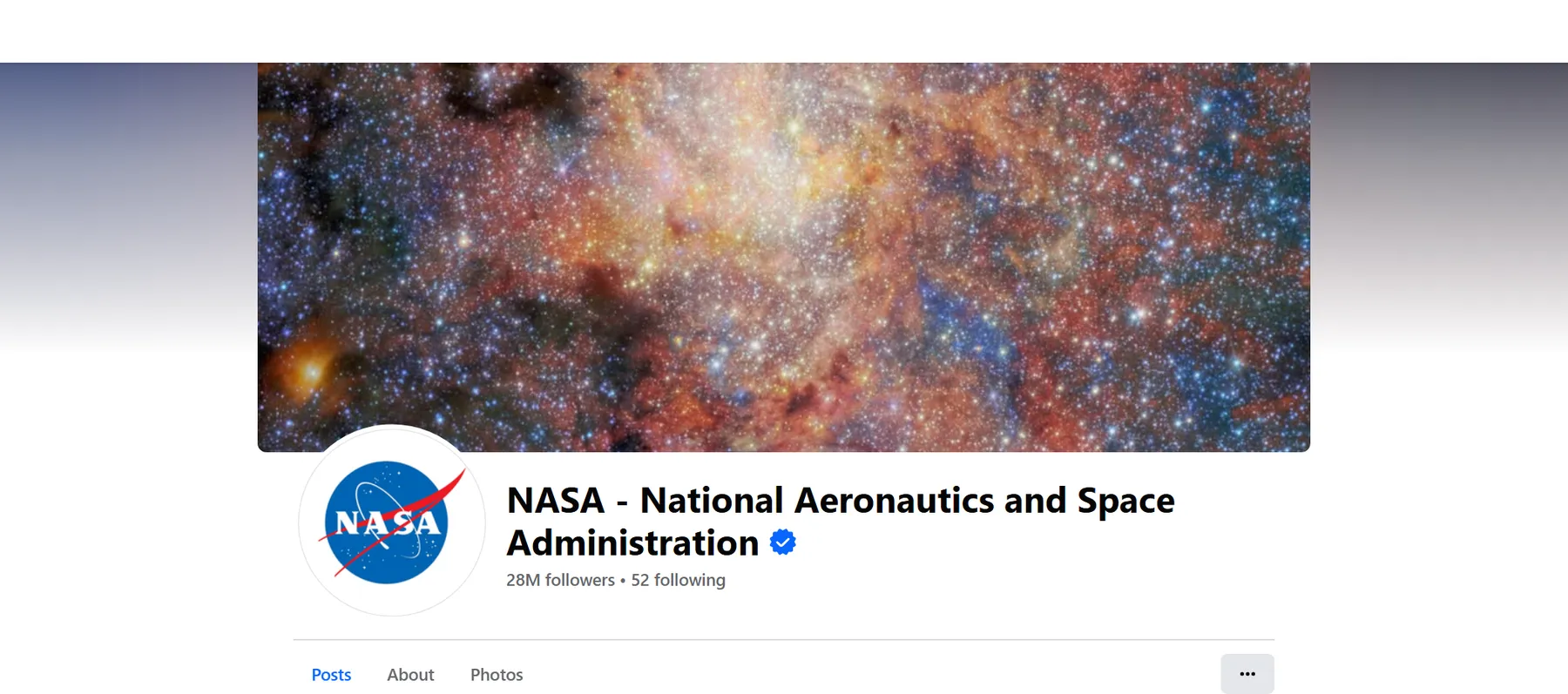
- Every kind of Facebook link: Pages, profiles,
profile.php?id=,/people/links, groups, group posts,pfbidposts,permalink.php, videos,watch?v=, reels, photos, albums, events, hashtags,/share/links andfb.watchshort links. www, m., web. and fb.com hosts all work. - Both Page IDs: the profile ID Facebook routes on today and the classic Page ID the Ad Library and Business Manager ask for, plus the verified badge, followers and category.
- Owners included: the ID, name and username of whoever posted a post, video, reel or photo.
- Reverse lookup: paste a bare numeric ID and Facebook URL to ID tells you what it is (a Page, a post, a photo, a reel) and who owns it.
- No login, cookies or Facebook API key: it asks Facebook the same questions the signed-out website asks.
- Pay only for IDs delivered: no start fee; inputs that are not found, private or invalid get a free row that says why.
- Schedules and monitoring: re-check a saved list and get only what changed (renamed username, deleted Page, new owner).
- Works with AI agents: call it through the Apify API or the MCP server.
What data can you get from Facebook?
| 🔢 Numeric ID (`facebookId`) | 🏷️ Object type (`type`) | 🏢 Classic Page ID (`pageId`) |
| 👤 Profile ID (`profileId`) | 👥 Group ID (`groupId`) | 📝 Post ID + story ID (`postId`, `storyId`) |
| 🎬 Video / reel ID (`videoId`) | 🖼️ Photo + album ID (`photoId`, `albumId`) | 📅 Event / hashtag ID (`eventId`, `hashtagId`) |
| 🙋 Owner ID, name, username | 🔤 Username (vanity) | 📛 Name |
| ✅ Verified badge (`isVerified`) | 📄 Page or person (`isPage`) | 🗂️ Category |
| 📈 Followers, talking about, were here | 🖼️ Profile picture + cover photo | 📢 Active ads in the Ad Library (add-on) |
| 🔗 Canonical URL + link by ID (`idUrl`) | ↪️ Where a share link or old username led (`resolvedUrl`) | 🧾 Status + reason for every input |
On a test run of 32 inputs of every kind (run CQpO2Le5qk2I8y6CT), 29 resolved in 5.8 seconds: every row had its numeric ID and type, every Page and profile its classic Page ID, verified badge, category and follower count, and every post, video, reel and photo its owner ID and owner name.
How to scrape Facebook IDs with Facebook URL to ID
- Create a free Apify account. It includes $5 of monthly credit and needs no card.
- Open Facebook URL to ID and click Try for free.
- Paste your links into Facebook URLs (or a link to a text/CSV file of them), and names, @handles or numeric IDs into Vanity names, @handles or numeric ids.
- Click Start. Rows appear in the dataset as each batch resolves.
- Open the Storage tab and Export as JSON, CSV or Excel, or let a schedule run it for you.
⬇️ Input
| Parameter | Type | Description |
|---|---|---|
| 🔍 What to resolve | ||
fbUrls | List | Facebook URLs, one per line, or a remote text/CSV file of them. The same field name as Apify's own Facebook URL to ID, so saved API calls keep working. startUrls and urls are accepted too. |
ids | List | Vanity names (cocacola), @handles (@Meta) or numeric IDs (100044561550831). |
| 🎯 What to look up | ||
fetchDetails | Boolean | Names, usernames, classic Page ID, Page or person, verified badge, followers, owners. Default true. Off: IDs printed in the URL are read without a request (the cheaper rate). |
resolveFromUrlOnly | Boolean | Never contact Facebook; only IDs printed in the URL. Default false. |
includeCategory | Boolean | Also read the Page category. Default true. |
| ✂️ Refine results | ||
types | Select (multi) | Keep only these types: Pages, personal profiles, groups, group posts, posts, videos, reels, photos, albums, events, hashtags. |
verifiedOnly | Boolean | Pages and profiles with the verified badge only. |
minFollowers | Integer | Pages and profiles with at least this many followers. |
dedupeById | Boolean | One row per Facebook object when several inputs lead to the same one. |
| ➕ Extra data | ||
checkAdsLibrary | Boolean | Pages: whether the Page runs ads now and how many, from the Meta Ad Library. Charged as ad-library-check ($0.001) per Page row that gets a count. |
| 🔁 Monitoring | ||
monitorMode | Boolean | Only inputs that are new or changed since the last run. Pair it with a daily schedule. |
monitorStoreName | String | One name per list you watch. Default facebook-url-to-id-monitor. |
| 📦 Output | ||
maxItems | Integer | Stop after this many delivered IDs. 0 = every input. |
includeFailedRows | Boolean | Write a free row for inputs without an ID (status + reason). Default true. |
compact | Boolean | Nine core fields only, sized for AI agents and MCP. |
| ⚙️ Advanced | ||
proxyConfiguration | Proxy | Default: Apify's own connection first, the Apify proxy if Facebook refuses it, then RESIDENTIAL with a per-run cap. |
maxConcurrency | Integer | Page reads in parallel (1-20, default 8). Lookups always go 15 URLs per Facebook request. |
Input JSON
Paste whole URLs, names or IDs, in any mix
Tracking parameters (?ref=, mibextid, rdid, __cft__) are removed and mobile hosts are moved to www, so the same Page pasted three ways is looked up once. Do: https://m.facebook.com/natgeo?ref=bookmarks, natgeo or @natgeo · Don't: a Google or Instagram link (written as an invalid row, free).
Turn details off when your URLs already carry the ID
profile.php?id=4, /groups/359370103235663/, /reel/2166091230582141/ or /photo/?fbid=… already contain their ID. With Fetch details off they are read without asking Facebook and charged at the cheaper id-from-url rate. Vanity names, pfbid posts and share links always need a lookup.
Use pageId for the Ad Library, facebookId for everything else
Since Facebook's new Pages layout every Page has two IDs. facebookId (= profileId) is the one profile.php?id= opens and most tools key on. pageId is the classic Page ID that the Ad Library, Business Manager and older integrations ask for. You get both, and adLibraryUrl links straight to the Page's ads.
⬆️ Output
Every input becomes one dataset item. Here is the table view of run CQpO2Le5qk2I8y6CT:
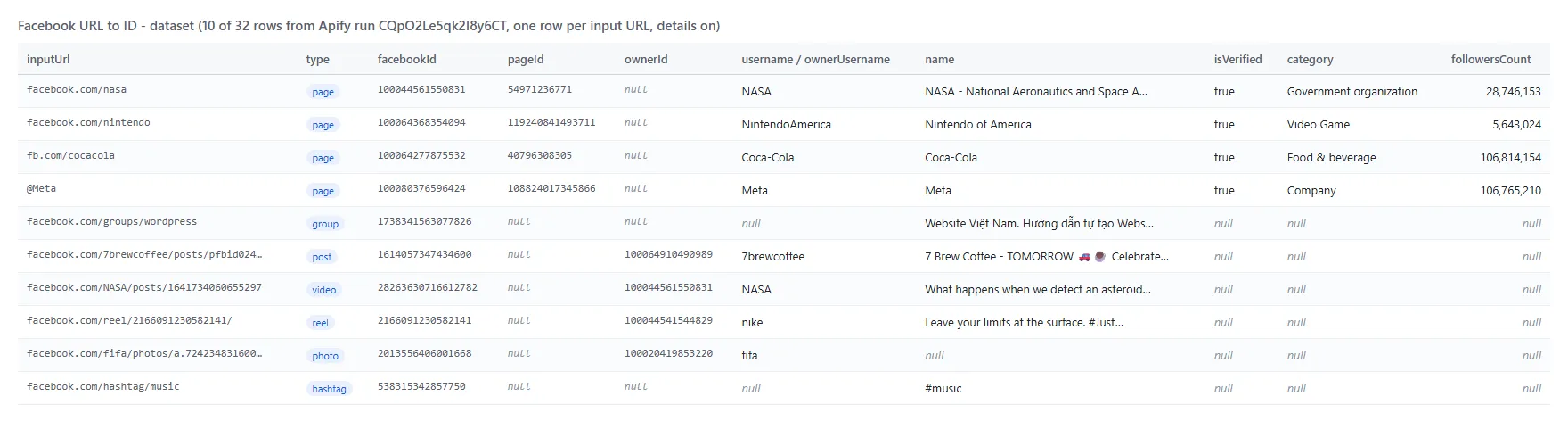
A Page row as JSON (from the same run; the intro, picture and cover URLs are left out for length):
A post row: "type": "post", "facebookId": "1614057347434600", "postId": "1614057347434600", "ownerId": "100064910490989", "ownerName": "7 Brew Coffee", "ownerUsername": "7brewcoffee". A missing handle: "status": "notFound", "error": "Facebook: \"This content isn't available right now\" (removed, private or never existed)".
Fields
| Field | What it is | Fill on test runs |
|---|---|---|
facebookId, type, status | The object's numeric ID, its type, ok / notFound / invalid / needsLookup / unreachable | 100% of ok rows (3 runs) |
pageId | Classic Page ID (Pages and professional profiles) | 100% (10 of 10 accounts, 32-input run); 89% of 79 accounts on the 100-input run |
isVerified | Verified badge | same as pageId |
followersCount, talkingAboutCount | From the public Page | 100% (both runs) |
isPage, category, coverPhotoUrl | From the full profile page | 100% on the 32-input run; 3% on the 100-input run (see Limits) |
username | Vanity name (null when the account has none) | 80-97% |
description, imageUrl | Intro and profile picture | 100% |
ownerId, ownerName | Owner of posts, videos, reels, photos, albums | 100% (14 of 14) |
ownerUsername | Owner's vanity name | 86% (owners without a vanity are null) |
groupId | Groups and group posts | 100% of group rows |
postId, storyId | Posts (pfbid resolved) | 100% / 80% |
canonicalUrl, idUrl, adLibraryUrl | Links | 100% of Pages; idUrl 97% of all rows (hashtags have none) |
hasActiveAds, activeAdsCount | Ad Library add-on | 10 of 10 Pages (run ZxDbzfOeEzh428iWz) |
monitorStatus, changedFields, previous | Monitor mode only | on new / changed rows |
How can I use Facebook ID data?
- 📢 Ad and audience teams: turn a list of competitor Page links into classic Page IDs for the Ad Library and Business Manager, and see who runs ads right now.
- 🗂️ CRM and lead-list owners: store the numeric ID next to each Facebook link so a renamed Page still matches.
- 🔁 Data teams: dedupe
/nintendo,m.facebook.com/NintendoAmericaandprofile.php?id=100064368354094into one ID. - 🔎 Social listening and research: feed post, group and video IDs into other Facebook scrapers and APIs; expand share links to the real post and author.
- 🤖 AI agents: ask "what is the Facebook ID of …" through MCP and get a compact row back.
- 📈 Brand monitoring: schedule a list and get a row only when a Page is renamed, deleted or changes owner.
How much does it cost to scrape Facebook IDs?
Facebook URL to ID is pay-per-result, with no start fee:
- $2.60 per 1,000 IDs looked up (
id-lookup): any row Facebook was asked about (a username, pfbid post, share link, group name, numeric ID) or any row with details. - $0.45 per 1,000 IDs read from the URL (
id-from-url): Fetch details off and the ID already printed in the link. - $1.00 per 1,000 Ad Library checks (
ad-library-check), only when you turn it on and a count comes back.
Not found, private, invalid and filtered inputs are free.
| IDs looked up | Cost |
|---|---|
| 10 | $0.026 |
| 100 | $0.26 |
| 1,000 | $2.60 |
| 10,000 | $26.00 |
There is nothing else to pay: Apify platform usage is included in these prices. Measured: 100 inputs in 8.4 seconds and 981 inputs in 7 minutes on the default 256 MB.
Integrations, API, scheduling & MCP
- Schedules: run Facebook URL to ID daily or weekly from the Schedules tab. With Only new or changed rows on, an unchanged list delivers nothing and costs nothing in events.
- Webhooks: fire a URL when a run finishes and push the IDs to your CRM, Slack or a sheet.
- No-code: Make, Zapier, n8n, Google Sheets, Airtable and Slack via Apify integrations.
- API: call it from Node.js or Python with
apify-client. Code is on the API tab; see the Apify API reference. - MCP / AI agents: connect Claude, Cursor or any MCP client through the MCP tab.
More Facebook scrapers
| 📰 Facebook Posts Scraper: a Page's posts with reactions and comments | 🔍 Facebook Post Details Scraper: one row per post URL, views and shares | 💬 Facebook Comments Scraper: comments and replies of a post |
| ⭐ Facebook Reviews Scraper: a Page's recommendations | 📅 Facebook Events Scraper: events by search, city or Page | 🛒 Facebook Marketplace Scraper: listings and price drops |
| 🔎 Facebook Search Posts Scraper: posts by keyword, date and place | 🧭 All TopApi actors | |
Limits & empty runs
- Lookups: Facebook answers up to 15 URLs per lookup request; a list of any size is split into batches automatically.
- Full Page profiles per run: Facebook shows its full profile page to one signed-out IP only a limited number of times (we measured 7-25). After that, Facebook URL to ID switches to Facebook's Page Plugin and the mobile page for the remaining Pages: classic Page ID, verified badge, followers, intro and picture stay filled, while
isPage,categoryandcoverPhotoUrlare null andtypereadspage_or_profile. - Not available: group member counts and privacy (Facebook shows a group's About card to signed-out visitors from datacenter IPs only as its login page), and Page like counts (Facebook now prints followers instead).
- Empty or short dataset: every input still gets a row unless you turn Write rows for failed inputs off.
notFoundmeans Facebook says the object was removed, is private or never existed;invalidmeans the line is not a Facebook object link;unreachablemeans Facebook did not answer after retries. None of these is charged, and the run log andRUN_SUMMARYgive the count of each.
FAQ
How many IDs can Facebook URL to ID resolve in one run?
As many as you paste. A 981-input list took 7 minutes and delivered 692 IDs; the other 289 rows were handles that do not exist (283) or lines that are not Facebook objects (6), written free. Set Maximum ids to cap a run.
Can I run Facebook URL to ID on a schedule?
Yes. Save your input as a task, open Schedules, and turn on Only new or changed rows. A run over 99 saved inputs that found no change took 3.6 seconds and delivered nothing.
Can I integrate Facebook URL to ID with other apps?
Yes: Make, Zapier, n8n, Google Sheets, Slack and more via Apify integrations, or webhooks when a run finishes.
Can I use Facebook URL to ID with the Apify API?
Yes. Use apify-client for Node.js or Python. The input field fbUrls takes the same [{ "url": "…" }] list as Apify's own Facebook URL to ID.
Can I use Facebook URL to ID through an MCP server?
Yes. Open the MCP tab, connect Claude Desktop, Cursor or another MCP client, and ask for the Facebook ID of a link. Turn on Compact output for nine-field rows.
Do I need a Facebook account, cookies or an API key?
No. Facebook URL to ID reads only what Facebook shows a signed-out visitor; you pass links, names or IDs and nothing else.
Why did my run return notFound rows?
The handle does not exist, the Page or post was removed, or the owner limited it to signed-in viewers. Facebook answers all three with the same "This content isn't available right now" page, so the row says exactly that. Check the link in a private browser window.
What is the difference between facebookId and pageId?
facebookId is the profile ID Facebook routes on today (profile.php?id=). pageId is the classic Page ID used by the Ad Library and Business Manager. Pages have both; personal profiles without a Page have pageId null.
How is Facebook URL to ID different from other Facebook ID finders?
It asks Facebook's own route resolver about 15 URLs per request instead of loading a full Facebook page per URL, so 100 inputs took 8.4 seconds. It also types a bare numeric ID, follows share and fb.watch links, returns both Page IDs and the owner of every post, video, reel and photo, and tells you what changed between runs.
Is it legal to scrape Facebook IDs?
Facebook URL to ID reads only public information and does not log in. Public data can still include personal data, protected by laws such as the GDPR, so make sure you have a legitimate purpose. Meta and Facebook are trademarks of Meta Platforms, Inc.; this actor is not affiliated with or endorsed by Meta.
Your feedback
Found a link Facebook URL to ID does not resolve, or missing a field? Open an issue on the Issues tab.


