
Yandex Maps Scraper
Pricing
from $1.40 / 1,000 results
Yandex Maps Scraper
[💰$2 / 1K] ⚡ Fast Yandex Maps scraper. No login, no API key. Get places by keyword or by search, category and place URL: name, address, phones, website, social links, rating, opening hours, features, photos, nearby metro and reviews in one row. Rating and open-now filters.
Pricing
from $1.40 / 1,000 results
Rating
0.0
(0)
Developer

Aboo Script
Maintained by CommunityActor stats
0
Bookmarked
2
Total users
1
Monthly active users
3 days ago
Last modified
Categories
Security
Limited permissionsShare
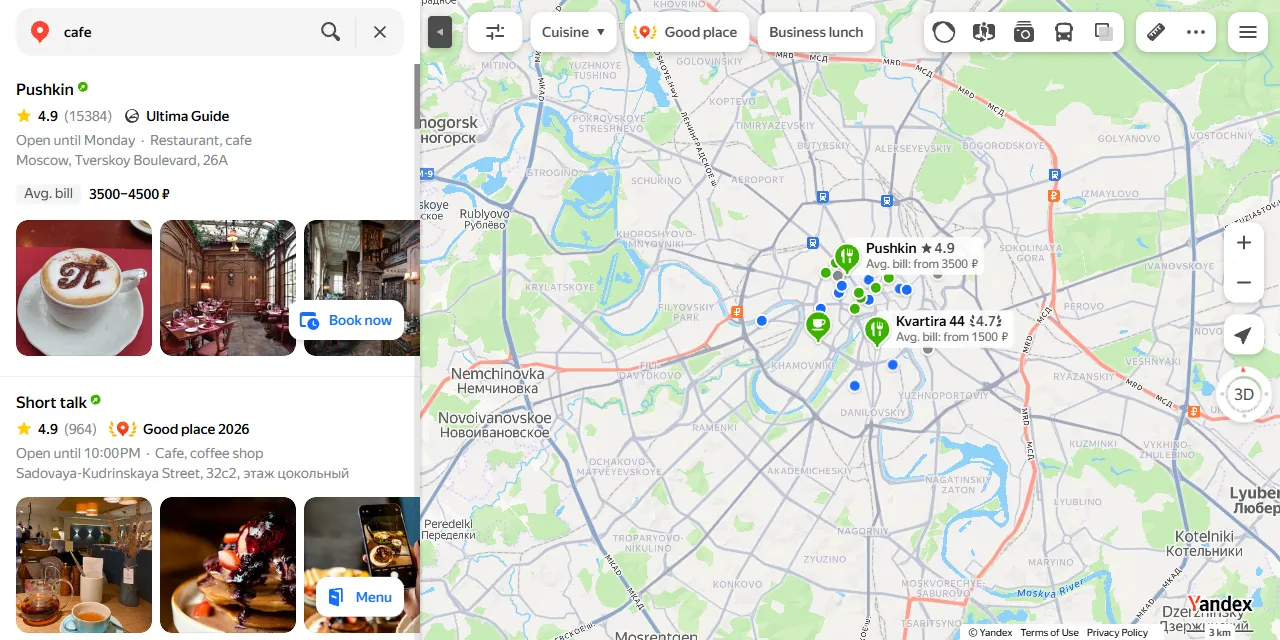
Yandex Maps Scraper extracts places and businesses from Yandex Maps into clean, structured data you can download as JSON, CSV, Excel, or HTML. Paste a Yandex Maps search URL or type what you are looking for, and get the name, address, phone numbers, website, rating, opening hours, features, photos, and reviews of every place. No account or login required.
Introduction
Yandex Maps is the leading map and local business directory in Russia and many CIS countries, with millions of cafes, shops, clinics, hotels, and service businesses, each with contacts, opening hours, ratings, and customer reviews.
This Yandex Maps scraper collects the same public information you see in your browser and turns it into a ready-to-use dataset. You can run it once, schedule it to run daily, or connect it to your own tools as a Yandex Maps API alternative.
What data can you extract from Yandex Maps?
- 🏷️ Place name, short name, and categories
- 📍 Full address, street, house number, city, postal code, country, and coordinates
- 📞 Phone numbers, websites, and social media links
- ⭐ Rating, number of ratings, and number of reviews
- 🕒 Opening hours for every day of the week and whether the place is open now
- 🧾 Place features, such as average bill, delivery, takeout, Wi-Fi, payment methods, and parking
- 🖼️ Photos, total photo count, and logo
- 🚇 Nearby metro stations and public transport stops with distances
- 💬 What customers mention most (food, staff, atmosphere, and more) with positive, neutral, and negative counts
- 🗨️ Reviews with author, rating, text, language, date, likes, photos, and the owner's reply
- 🔗 Direct URL of every place on Yandex Maps
Use Cases
- 🤝 Lead generation: build lists of local businesses with phone numbers, websites, and social links for sales outreach.
- 📈 Market research: see how many businesses of a type exist in a city, how they are rated, and what they offer.
- 🕵️ Competitor monitoring: follow the ratings, reviews, and opening hours of competing places.
- ⭐ Reputation analysis: collect reviews and customer sentiment by topic for your own or your clients' businesses.
- 🗂️ Database building: create your own directory of places with addresses and coordinates for maps or apps.
- 🤖 AI and automation: feed clean, structured data into spreadsheets, dashboards, or AI workflows.
How to scrape Yandex Maps step by step
- Paste one or more Yandex Maps URLs into Start URLs, or type what you are looking for into Search queries (for example "coffee in Berlin").
- Set Maximum number of places to how many places you want per URL or per query.
- Optionally set Maximum reviews per place to include reviews.
- Click Start and wait for the run to finish.
- Download your data in JSON, CSV, Excel, or HTML from the Output tab.
Input
- Start URLs: Yandex Maps URLs to scrape. Supported pages: search results (such as
https://yandex.com/maps/213/moscow/search/cafe/), category pages, and single place pages (https://yandex.com/maps/org/...). Any Yandex domain works, for example yandex.com, yandex.ru, or yandex.com.tr. Filters you apply on the website (rating, open now, cuisine, price, and more) are kept in the results. - Search queries: what to search for, one per line. Include the city or area in the query, for example "dentist Moscow" or "coffee in Berlin". Each query is scraped separately.
- Maximum number of places: how many places to collect for each start URL or search query. Use 0 for no limit.
- Maximum reviews per place: how many reviews to include for each place, most relevant first. 0 skips reviews.
- Minimum rating: only places rated at least this high (applies to search queries).
- Open now: only places that are open at the time of the run (applies to search queries).
- Open 24 hours: only places open around the clock (applies to search queries).
You can use start URLs, search queries, or both in the same run.
Input Examples
Scrape a Yandex Maps search page:
Search by keywords with the default filters and no reviews:
Output
Each place is saved as one item in the dataset. Here is an example of a single item (lists shortened):
You can download the dataset in JSON, CSV, Excel, XML, or HTML, or access it through the Apify API.
Notes
- Yandex Maps shows up to about 300 places per search. For more results, split a broad search into smaller ones (by district, category, or city).
- Text such as categories, features, and opening hours follows the language of the Yandex domain you use; search queries run on yandex.com in English.
- A place that appears in several of your searches is saved only once per run.
- Places without ratings return
ratingasnull. Phone numbers, websites, photos, and features are empty when the business has not added them. - Only Yandex Maps search, category, and place URLs are supported. Other URLs are skipped.
Why use the Yandex Maps Scraper?
- ✅ No login needed: works with public data only, so there is no account to manage.
- 🎯 Keeps your filters: paste any Yandex Maps search URL from your browser and get exactly what you see there.
- 💬 Reviews included: get reviews and customer sentiment in the same item as the place details.
- 🧹 Clean data: numbers are real numbers, dates use one standard format, and opening hours are split by day.
- 💸 Pay for what you need: set a limit per URL or query and keep every run small and cheap.
- 🔄 Ready for automation: schedule runs, export to Google Sheets, or connect to Make, Zapier, and n8n.
FAQ
How many places can I scrape?
Set any number in Maximum number of places, or 0 for no limit. The actor keeps going until it reaches your limit or runs out of results. See Notes for the limit Yandex Maps sets per search.
Do I need a Yandex account?
No. The actor only collects publicly available data. You do not need to log in or provide any account details.
Can I scrape data on a schedule?
Yes. Use Apify Schedules to run the actor every hour, day, or week, and get fresh data automatically.
Can I request a new feature or filter?
Yes. Right now the actor supports start URLs, search queries, and the rating, open now, and open 24 hours filters. If you need other inputs, such as review sorting or more filters, get in touch and they can be added.
Can I get a custom or private version?
Yes. The actor can be customized for your workflow, delivered as a private version, or a new scraper can be built for a different website. Use the contact details below.
Need to scrape other map platforms?
- Google Maps Photos Scraper: every photo and video of a Google Maps place.
- Google Maps Business Posts Scraper: Google Business Profile updates, offers, and events.
- Google Maps Contributor Scraper: reviews and photos of a Google Maps Local Guide.
Need help or want a custom solution?
- 📧 Email: aboo.script@gmail.com
- 🧩 More scrapers: Apify profile
Image Credit
Image credit: Yandex Maps


