
Audio Extractor — Video to MP3, WAV, FLAC (Speech Ready)
Pricing
from $2.10 / 1,000 audio minute extracteds
Audio Extractor — Video to MP3, WAV, FLAC (Speech Ready)
Extract audio from videos in bulk as MP3, M4A, Opus, WAV or FLAC. One-click speech-to-text format (WAV 16 kHz mono) for Whisper and speech APIs, loudness normalization, metadata removed. Pay per minute.
Pricing
from $2.10 / 1,000 audio minute extracteds
Rating
0.0
(0)
Developer

Leandro Zanatta
Maintained by CommunityActor stats
0
Bookmarked
1
Total users
1
Monthly active users
14 days ago
Last modified
Categories
Share
Audio Extractor — Video to MP3, WAV, FLAC (Speech-to-Text Ready)
Pull the audio track out of videos in bulk and save it as MP3, M4A (AAC), Opus, WAV or FLAC. One switch gives you the format speech recognition engines like Whisper work best with (WAV, mono, 16 kHz), and optional loudness normalization fixes recordings that are too quiet or too loud. Metadata is removed from every file.
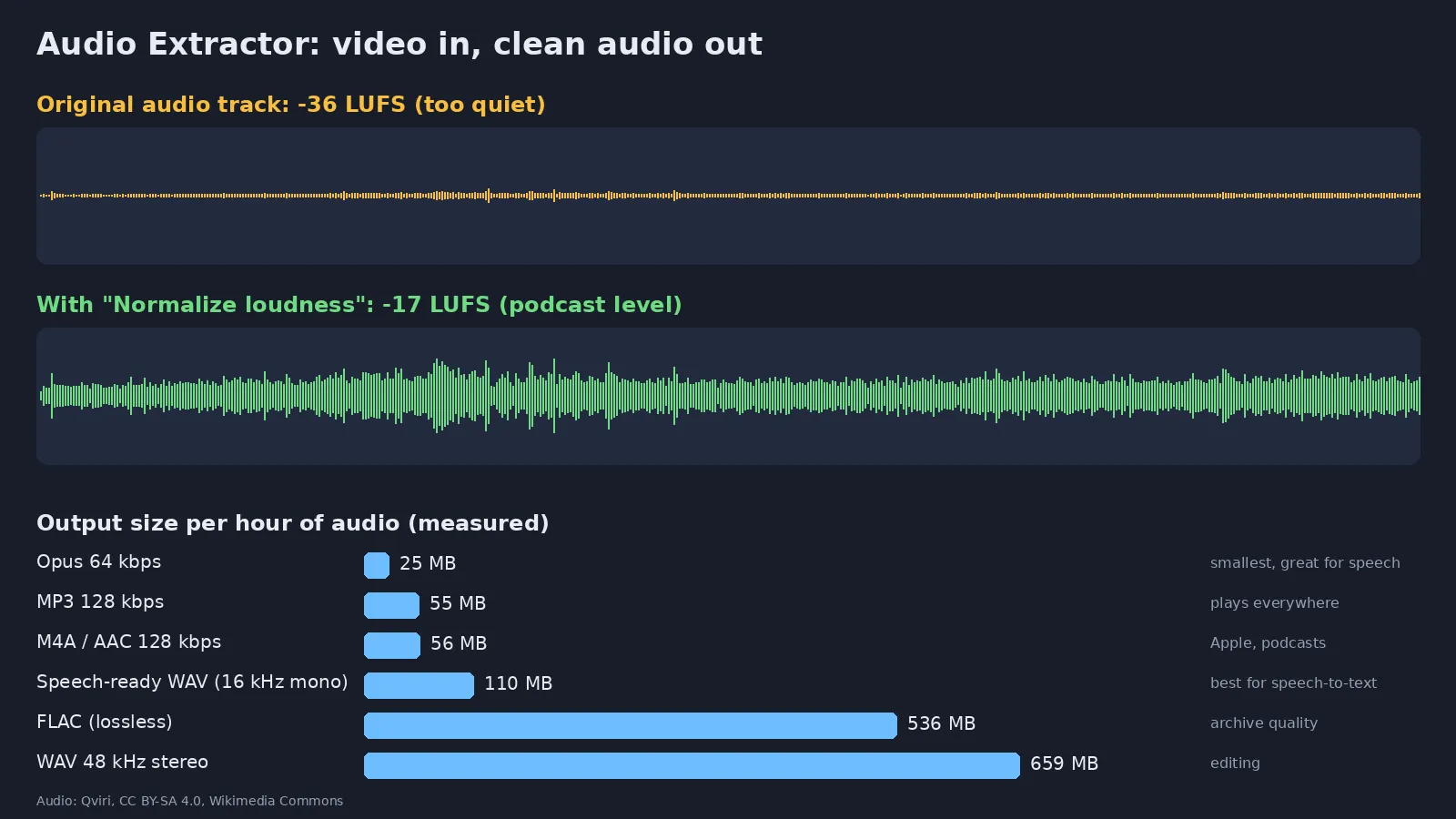
Real output of this Actor: a quiet street recording raised from -36 to -17 LUFS, and measured file sizes per format. Audio: Qviri, CC BY-SA 4.0, Wikimedia Commons.
Why use it
- 🗣️ Better transcripts, lower cost: speech-to-text APIs charge by upload size or duration and work best with 16 kHz mono audio. Sending a 1 GB video when 110 MB of WAV (or 25 MB of Opus) carries the same speech wastes bandwidth and time.
- 🔊 Even volume: loudness normalization to the podcast standard (-16 LUFS) makes quiet phone recordings and loud webinars sound the same.
- 🎧 Every common format: MP3 for compatibility, M4A for Apple and podcasts, Opus for the smallest files, FLAC/WAV for lossless archives and editing.
- 📦 Bulk and automated: hundreds of files per run, from URLs, Google Drive or Dropbox links, on a schedule or from a webhook.
- 🔒 Metadata removed: no device, software or location tags in the output.
- 🧩 No FFmpeg setup: send URLs, get audio links back.
Who uses it
| Sector | Typical use |
|---|---|
| AI & speech-to-text pipelines | Prepare audio for Whisper, Deepgram, AssemblyAI, Google or Azure Speech |
| Podcasters & content creators | Turn video episodes, lives and interviews into podcast audio |
| Education & e-learning | Audio versions of lectures and courses for listening on the go |
| Companies & legal | Archive the audio of meetings, hearings, depositions and calls |
| Media monitoring & research | Extract speech from news, social and broadcast videos for analysis |
| Call centers & QA | Normalize recorded video calls before transcription and scoring |
| Data teams | Build audio datasets (speech, sound events) from video collections |
Formats
Measured on real output (size per hour of audio):
| Format | Setting | Size / hour | Best for |
|---|---|---|---|
| Opus | 64 kbps | ~25 MB | Smallest files, excellent for speech |
| MP3 (default) | 128 kbps | ~55 MB | Plays on any device |
| M4A (AAC) | 128 kbps | ~56 MB | Apple devices, podcast platforms |
| Speech-ready WAV | 16 kHz, mono | ~110 MB | Speech-to-text engines (Whisper & co.) |
| FLAC | lossless | ~540 MB | Archive without quality loss |
| WAV | original rate | ~660 MB (48 kHz stereo) | Audio editing software |
Lossy formats use the Bitrate you choose (32–320 kbps).
Input
| Field | Type | Default | Description |
|---|---|---|---|
Media URLs (mediaUrls) | array | — | Links to videos or audio files. Public Google Drive and Dropbox share links are converted automatically. Up to 4 GB per file. |
Speech-to-text ready (speechReady) | boolean | false | Overrides format, rate and channels with WAV, 16 kHz, mono |
Format (format) | string | mp3 | mp3, m4a, opus, wav or flac |
Bitrate (kbps) (bitrateKbps) | integer | 128 | For MP3, M4A and Opus (32–320) |
Sample rate (sampleRate) | string | original | original, 16000, 22050, 44100 or 48000 |
Channels (channels) | string | original | original, mono or stereo |
Normalize loudness (normalizeLoudness) | boolean | false | EBU R128 normalization to -16 LUFS |
Max minutes per file (maxDurationMinutes) | integer | 180 | Only the first N minutes are extracted and billed |
Example:
Supported inputs: MP4, MOV, WebM, MKV, AVI, FLV, MPEG-TS, and audio files such as M4A, OGG, WAV, FLAC and MP3. The first audio track of each file is used.
Output
One dataset row per file. The audio file is stored in the run's key-value store and linked in audioUrl.
| Field | Meaning |
|---|---|
audioUrl | Download link of the audio file |
format, durationSeconds, sizeMB | What you got |
sourceAudioCodec | Audio codec of the input (aac, opus, mp3, pcm…) |
truncated | true when only the first Max minutes per file were extracted |
billedMinutes | Started minutes billed for this file |
error | Present only when a file failed. Files without an audio track return a clear error and are not billed |
Pricing
Pay per started minute of audio extracted, plus a tiny per-run start fee. No subscription. Failed files are free. Apify plan discounts apply automatically (see the Pricing tab).
| Example | Minutes billed |
|---|---|
| 30-second clip | 1 |
| 1-hour webinar | 60 |
| 100 short videos of 2 minutes | 200 |
Use Max minutes per file or the run's maximum cost setting to cap spending; the Actor stops cleanly when the limit is reached.
Use it from code or an AI agent
Python: extract, then transcribe
JavaScript
HTTP
No-code and agents: use the Apify modules in Make, Zapier or n8n, trigger runs from webhooks or schedules, or let an AI agent call it through the Apify MCP server.
FAQ
Which format should I pick for transcription? Turn on Speech-to-text ready (WAV, 16 kHz, mono). If your transcription service limits upload size, use Opus 32–64 kbps mono instead: about 4–6× smaller with practically the same accuracy for speech.
Does normalization change the content? No. It only adjusts the volume so the whole file sits around -16 LUFS without clipping peaks.
Can it extract from YouTube or social media links? It needs a direct link to the file (or a public Google Drive / Dropbox link). Page URLs of streaming sites are not supported.
What about videos with several audio tracks? The first audio track is extracted.
How long can files be? Up to 4 GB per file; up to Max minutes per file (default 180) are extracted.
Is my data kept? Files are processed inside your run and stored only in your own Apify storage, under your account's data-retention settings.
Related Actors
- Audio & Video to Text (Whisper) — transcripts, SRT and VTT subtitles
- Video Optimizer — reduce FPS, resize and compress videos
- Video Frame Extractor for AI — turn videos into clean image datasets
- Image & Video Anonymizer — blur faces and license plates (GDPR / LGPD)
Support
Need another format or setting? Open an issue in the Issues tab.
Need a different tool? Request it
Missing a feature, an input or output format, or a whole different tool for your workflow? Open an issue in the Issues tab and describe what you need:
- what goes in (files, URLs, data) and what should come out,
- roughly how much you process (per day or month),
- one example, if you can share it.
Requests with a real use case get built, either as a new option in this Actor or as a new Actor in this collection, and you get notified in the issue when it's live. Every request is read.


![YouTube Audio Extractor [Only $6/1K💰] | MP3/M4A/FLAC avatar](https://images.apifyusercontent.com/xNXyAfi8Xw94O7ECuEsFKoX9hG41PWpE9XhHbWlbf4Y/rs:fill:76:76/cb:1/aHR0cHM6Ly9hcGlmeS1pbWFnZS11cGxvYWRzLXByb2QuczMudXMtZWFzdC0xLmFtYXpvbmF3cy5jb20vZHRSN3FuVGJRck5pU0NtajctYWN0b3ItUk5pT2ZQaVRVRHI4WlJyWTctbUJ4SmZBZHY3cS15b3V0dWJlLWxvZ28teW91dHViZS1pY29uLXRyYW5zcGFyZW50LWZyZWUtcG5nLnBuZw.webp)


