
Audio & Video to Text — Speech to Text API + SRT (Whisper)
Pricing
from $4.20 / 1,000 audio minute (fast)s
Audio & Video to Text — Speech to Text API + SRT (Whisper)
Transcribe audio & video to text in bulk with OpenAI Whisper AI. Paste file links, Google Drive/Dropbox or podcast RSS feeds → transcripts with timestamps + SRT/VTT subtitles. 99 languages, auto-detect, translate to English. From $0.006/min, no API key.
Pricing
from $4.20 / 1,000 audio minute (fast)s
Rating
0.0
(0)
Developer

Leandro Zanatta
Maintained by CommunityActor stats
0
Bookmarked
2
Total users
1
Monthly active users
14 days ago
Last modified
Categories
Share
Audio & Video to Text — Speech to Text API with SRT Subtitles (Whisper)
Turn any audio or video file into text with OpenAI Whisper, in bulk, without an API key or a GPU. Paste links to MP3, MP4, WAV, M4A and other media files, share links from Google Drive or Dropbox, or whole podcast RSS feeds. You get clean transcripts with timestamps and ready-to-use SRT and VTT subtitles.
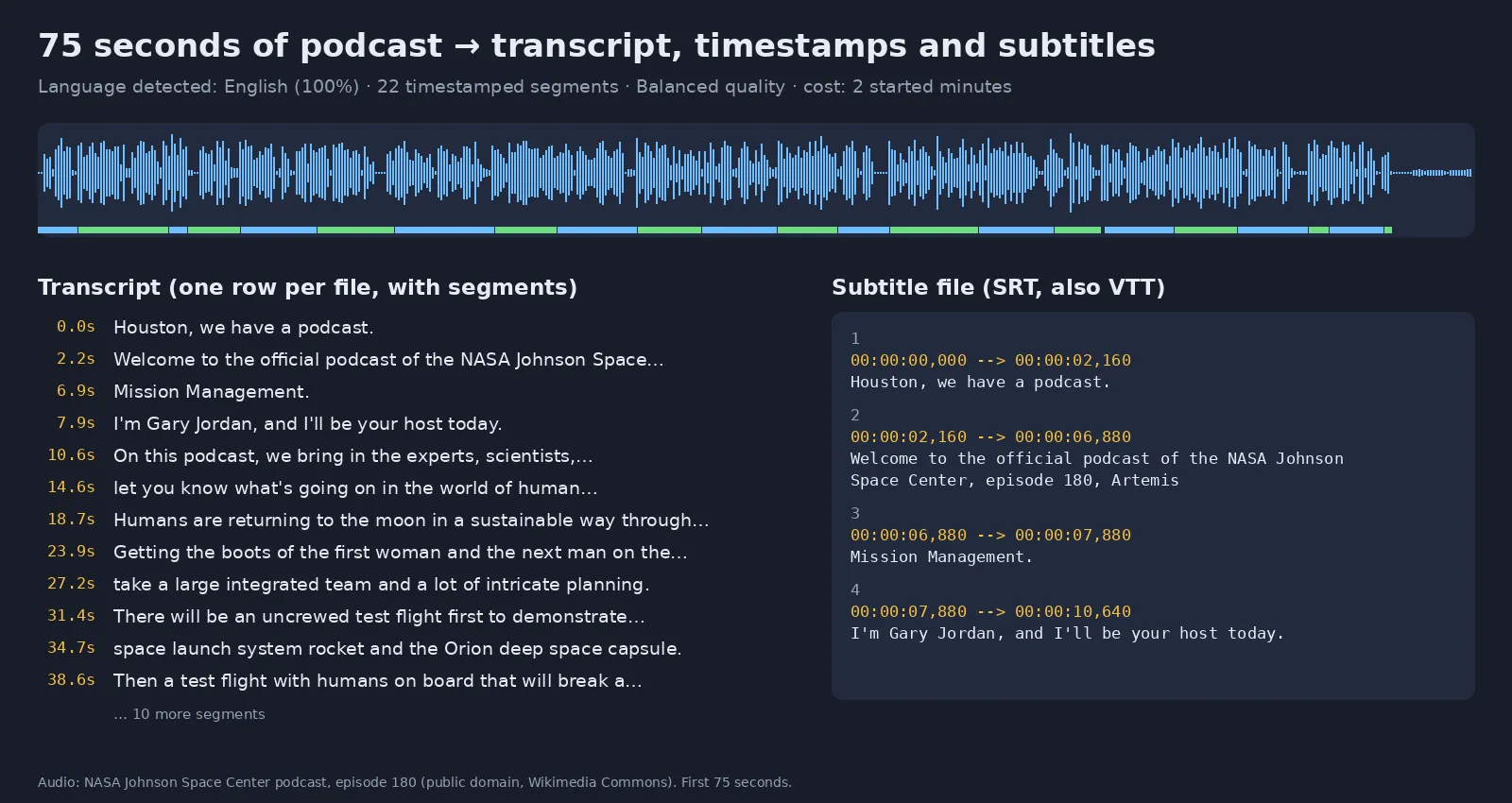
Real output of this Actor (Balanced quality) on the first 75 seconds of a NASA Johnson Space Center podcast (public domain).
- 🌍 99 languages, with automatic language detection
- 🇬🇧 Translate to English from any supported language
- ⏱️ Segment and word-level timestamps
- 🎬 SRT / VTT subtitle files for every transcript
- 📡 Podcast transcription straight from RSS feeds
- 📦 Bulk transcription: hundreds of files in one run
- 💸 From $0.006 per minute, and you only pay for audio that was transcribed successfully
What does this speech-to-text Actor do?
It downloads each media file, runs Whisper speech recognition on it and saves the result to a dataset: full transcript text, detected language, duration, timestamped segments and links to SRT/VTT subtitle files. Export as JSON, CSV, Excel or HTML, or fetch it through the API.
Typical uses:
- Podcast transcripts: show notes, blog posts, SEO articles and searchable archives
- Video subtitles and captions for courses, webinars, YouTube uploads and social clips
- Meeting, interview and lecture transcription
- AI and LLM pipelines: feed spoken content into RAG, summarisation, chatbots and AI agents
- Content repurposing: turn audio and video into text, quotes and social posts
Who uses it
| Sector | Typical use |
|---|---|
| Podcasters & media | Show notes, blog posts, searchable archives and quotes from every episode |
| Video creators & agencies | SRT/VTT captions for YouTube, courses, ads and social clips, in the original language or translated to English |
| Education & e-learning | Lecture and webinar transcripts, accessible captions for LMS platforms |
| Companies & HR | Meeting, interview and training transcripts for documentation and search |
| Legal, compliance & research | Transcribe hearings, depositions, field interviews and focus groups |
| Market & media monitoring | Turn news, radio and podcast audio into text for analysis and alerts |
| AI & LLM developers | Feed spoken content into RAG, summarisation, chatbots and AI agents |
How to transcribe audio or video to text
- Paste one or more file URLs into Audio / video URLs, or podcast feeds into Podcast RSS feeds.
- Choose a Quality (see below). Leave Language empty to auto-detect it.
- Click Start. When the run finishes, open the Output tab to see the transcripts and download the subtitles.
Quality levels and pricing
You pay per started minute of transcribed audio. Failed files are free.
| Quality | Whisper model | Price per minute | 1-hour podcast | Best for |
|---|---|---|---|---|
| Fast | base | $0.006 | $0.36 | Clear speech, large volumes |
| Balanced (default) | small | $0.015 | $0.90 | Podcasts, interviews, meetings |
| Accurate | large-v3-turbo | $0.07 | $4.20 | Accents, noisy audio, names and jargon, non-English |
Paid Apify plans get automatic discounts of 10% (Starter), 20% (Scale) and 30% (Business) on these prices; see the Pricing tab.
There is also a small start fee per run ($0.00125 per GB of memory, about $0.005 with the default 4 GB). Set Max duration per file or a maximum cost per run to stay within budget: the Actor stops transcribing when the limit is reached.
Supported inputs
- Audio: MP3, M4A, AAC, WAV, FLAC, OGG, OPUS, WMA
- Video: MP4, MOV, WEBM, MKV, AVI (the audio track is transcribed)
- Links: any direct, publicly downloadable URL, plus public Google Drive and Dropbox share links
- Podcasts: any standard podcast RSS feed; the newest N episodes are transcribed
Input example
Output example
words is only included when Word-level timestamps is on.
Use it as a transcription API
Call the Actor from your code with the Apify API or client libraries:
It also works with Make, Zapier, n8n, webhooks and scheduled runs, and as a tool for AI agents (Claude, ChatGPT, Cursor…) through the Apify MCP server.
FAQ
Which languages are supported? All 99 Whisper languages, including English, Spanish, Portuguese, French, German, Italian, Hindi, Japanese, Chinese, Arabic and Russian. The language is detected automatically, or you can set it.
Do I need an OpenAI API key? No. Whisper runs inside the Actor, and you only pay the per-minute price.
Can it transcribe YouTube, TikTok or Instagram links? No. It needs a direct link to a media file (or a podcast RSS feed). Only process content you have the right to use.
How long can a file be? Up to 4 GB per file. Use Max duration per file to transcribe only the first N minutes.
How accurate is it? Accurate mode (large-v3-turbo) is close to the best open speech recognition models available. Fast and Balanced trade some accuracy for a lower price and are usually enough for clear speech.
How fast is it? Fast mode handles about 4 minutes of audio per minute of runtime at the default 4 GB of memory. For Accurate mode on long files, give the run 8–16 GB of memory (more CPU cores).
Is speaker diarization included? Not yet. If you need speaker labels, open an issue.
Tips
- Set Language when you know it: detection is skipped and short clips come out more accurate.
- Use Translate to English to get English subtitles for foreign-language video.
- Found a bug or need a feature? Open an issue in the Issues tab.
Related Actors
- Audio Extractor — pull the audio out of videos (MP3, WAV, FLAC) before transcribing to save upload time
- Video Optimizer — reduce FPS, resize and compress videos
- Video Frame Extractor for AI — turn videos into clean image datasets
- Image & Video Anonymizer — blur faces and license plates (GDPR / LGPD)
Need a different tool? Request it
Missing a feature, an input or output format, or a whole different tool for your workflow? Open an issue in the Issues tab and describe what you need:
- what goes in (files, URLs, data) and what should come out,
- roughly how much you process (per day or month),
- one example, if you can share it.
Requests with a real use case get built, either as a new option in this Actor or as a new Actor in this collection, and you get notified in the issue when it's live. Every request is read.


