
Video Frame Extractor for AI — No Blur, No Duplicates
Pricing
from $0.70 / 1,000 frame extracteds
Video Frame Extractor for AI — No Blur, No Duplicates
Turn videos into clean image datasets for AI: frames every N seconds, keyframes or one per scene. Skips blurry and near-duplicate frames automatically. Timestamps + sharpness manifest, JPEG/PNG/WebP, ZIP. Pay per frame kept.
Pricing
from $0.70 / 1,000 frame extracteds
Rating
0.0
(0)
Developer

Leandro Zanatta
Maintained by CommunityActor stats
0
Bookmarked
3
Total users
2
Monthly active users
14 days ago
Last modified
Categories
Share
Video Frame Extractor for AI — Clean Image Datasets (No Blur, No Duplicates)
Turn videos into clean image datasets for annotation, model training and computer vision pipelines. Extract frames every N seconds, only keyframes or one per scene, and the Actor automatically skips blurry frames and near-duplicates (moments where nothing moved), so you don't pay to store, label or train on the same picture hundreds of times.
Every frame comes with its timestamp, size and a sharpness score, ready for Label Studio, CVAT, Roboflow, a vector database or your own training code.
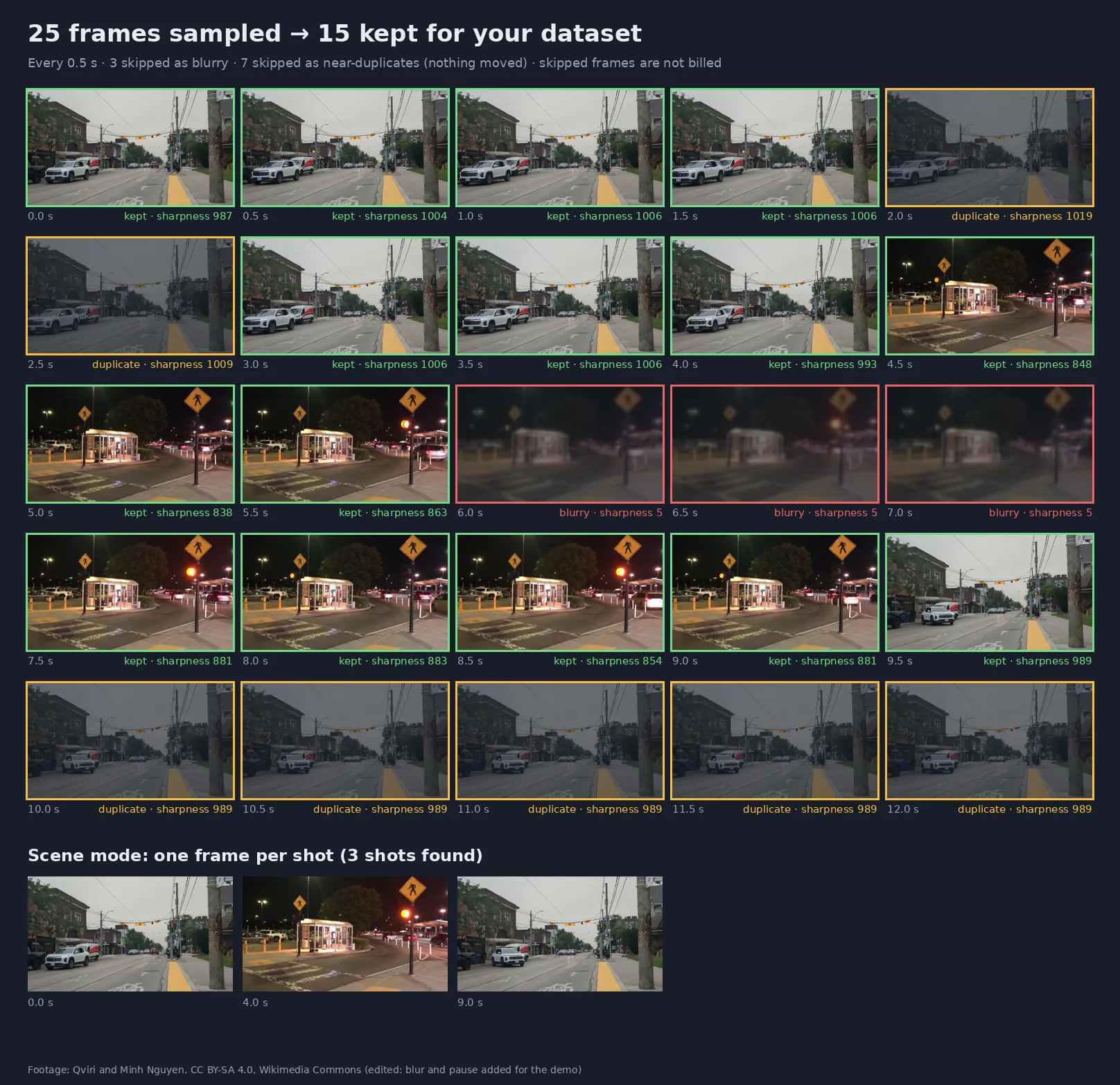
Real output of this Actor on a 12-second test clip with a motion-blurred stretch and a frozen ending. Footage: Qviri and Minh Nguyen, CC BY-SA 4.0, Wikimedia Commons.
Why use it
- 🧹 Cleaner datasets, less labeling: plain "one frame per second" exports are full of blurry and identical images. Annotators waste time on them and models overfit to them. This Actor filters both out before you ever see them.
- 💸 You only pay for useful frames: skipped frames are free, so cleaning the dataset also lowers the bill.
- 🎯 Keeps the motion that matters: the duplicate filter measures how much of the picture changed, so a car crossing a static street scene is kept while the empty street is not.
- 🎞️ Three sampling strategies: fixed interval, keyframes (fastest) or scene change (one image per shot).
- 🧾 Training-ready manifest: one row per frame with image link, timestamp, width, height and sharpness. Export as JSON, CSV or Excel.
- 🧩 No FFmpeg or OpenCV setup: send video URLs, get image links and an optional ZIP.
Who uses it
| Sector | Typical use |
|---|---|
| AI / ML teams | Build object-detection, segmentation and classification datasets from raw video |
| Data labeling companies | Pre-filter frames before sending them to annotators (Label Studio, CVAT, Roboflow) |
| Security & smart cities | Sample CCTV and traffic footage for detector training and evaluation |
| Autonomous driving, drones, robotics | Dashcam and drone flights into image sets for perception models |
| Retail & manufacturing | Shelf, conveyor and inspection footage into images for quality-control models |
| Media & research | Thumbnails, shot lists and visual indexes of long videos; frames for multimodal LLMs and vector search |
| Sports & fitness | Key moments from training videos for pose estimation and analysis |
How it works
- Each video is downloaded and decoded inside the run.
- Candidate frames are picked by the sampling mode.
- Each candidate gets a sharpness score (variance of the Laplacian). Frames below the blur threshold are skipped.
- Each remaining frame is compared with the last kept one; if less than Minimum change (%) of the picture changed, it is skipped as a near-duplicate.
- Kept frames are optionally resized, encoded as JPEG / PNG / WebP and stored; one dataset row is written per frame.
Sampling modes
| Mode | What you get | Best for |
|---|---|---|
Every N seconds (interval) | One candidate every N seconds (0.04 to any value; e.g. 0.5, 1, 10) | Datasets with even time coverage |
Keyframes only (keyframes) | Only the encoder's keyframes (I-frames), usually every 2–10 s | Fast previews of long videos |
Scene change (scene) | One frame each time the shot changes | Edited videos, ads, movies, shot lists |
Input
| Field | Type | Default | Description |
|---|---|---|---|
Video URLs (videoUrls) | array | — | Direct links to videos. Public Google Drive and Dropbox share links are converted automatically. Up to 4 GB per file. |
Sampling mode (mode) | string | interval | interval, keyframes or scene |
Every N seconds (everySeconds) | string | 1 | Time between candidates in interval mode |
Scene change sensitivity (sceneThreshold) | string | 0.35 | 0.2 = more frames, 0.5 = only big cuts |
Skip blurry frames (skipBlurry) | boolean | true | Drop motion-blurred or out-of-focus frames |
Blur threshold (blurThreshold) | integer | 40 | Minimum sharpness to keep a frame. Every frame's score is in the output so you can tune it |
Skip near-duplicate frames (skipDuplicates) | boolean | true | Drop frames where almost nothing changed |
Minimum change (%) (minChangePercent) | string | 0.5 | Share of the picture that must change since the last kept frame |
Max side (px) (maxSide) | integer | original | Downscale so the longest side is at most this (e.g. 640 for YOLO-style models) |
Image format (outputFormat) | string | jpeg | jpeg, png or webp |
Quality (quality) | integer | 90 | JPEG / WebP quality (50–100) |
Create ZIP (createZip) | boolean | false | Also store one ZIP with all frames of each video |
Max frames per video (maxFramesPerVideo) | integer | 200 | Hard limit for cost control |
Max minutes per video (maxDurationMinutes) | integer | 60 | Only the first N minutes are scanned and billed |
Example:
Supported inputs: MP4, MOV, WebM, MKV, AVI and other common containers; H.264, H.265/HEVC, VP8, VP9, AV1 and more.
Output
One dataset row per kept frame:
| Field | Meaning |
|---|---|
imageUrl | Download link of the frame image |
timestampSeconds | Position of the frame in the video |
width, height | Size of the stored image (after Max side) |
sharpness | Higher = sharper. Clearly blurred frames score below ~40, typical sharp frames several hundred |
videoIndex, frameIndex | Which video and which kept frame |
error | Present only when a video failed (failed videos are free) |
A per-video summary is saved in the run's key-value store as SUMMARY-video001:
Pricing
Pay per frame kept, plus a small fee per started minute of video scanned, plus a tiny per-run start fee. No subscription. Skipped frames and failed videos are free. Apify plan discounts apply automatically (see the Pricing tab).
| Example | Frames kept | Minutes scanned |
|---|---|---|
| 12-second clip, every 0.5 s (image above) | 15 | 1 |
| 10-minute video, every 2 s, mostly static camera | ~100–300 | 10 |
| 1-hour video, scene mode | one per shot | 60 |
Use Max frames per video, Max minutes per video or the run's maximum cost setting to cap spending; the Actor stops cleanly when the limit is reached.
Use it from code or an AI agent
Python: download a clean dataset
JavaScript
HTTP
No-code and agents: use the Apify modules in Make, Zapier or n8n, trigger runs from webhooks or schedules, or let an AI agent call it through the Apify MCP server (for example to give a multimodal LLM a few representative frames of a video).
FAQ
How do I get more or fewer frames? Lower Every N seconds for more frames. Raise Minimum change (%) (e.g. 2–5) to keep only clearly different images, or set it to 0 to disable the duplicate check while keeping the blur filter.
Too many frames marked blurry (or not enough)? Check the sharpness values in the output and set Blur threshold just below the sharp frames you want to keep. Dark, low-detail scenes naturally score lower.
Does it upscale? No. Max side only downsizes.
Can I get every single frame? Set Every N seconds to the frame interval (e.g. 0.04 for 25 fps) and turn off both filters. Mind Max frames per video.
Are faces or license plates blurred? No. If you need anonymized frames, run the related anonymizer Actor on the output images.
Is my data kept? Videos are processed inside your run; frames are stored only in your own Apify storage, under your account's data-retention settings.
Related Actors
- Video Optimizer — reduce FPS, resize and compress videos
- Image & Video Anonymizer — blur faces and license plates (GDPR / LGPD)
- Audio Extractor — video to MP3, WAV or FLAC
- Audio & Video to Text (Whisper) — transcripts and subtitles
Support
Need another sampling strategy or export format (COCO, YOLO folders)? Open an issue in the Issues tab.
Need a different tool? Request it
Missing a feature, an input or output format, or a whole different tool for your workflow? Open an issue in the Issues tab and describe what you need:
- what goes in (files, URLs, data) and what should come out,
- roughly how much you process (per day or month),
- one example, if you can share it.
Requests with a real use case get built, either as a new option in this Actor or as a new Actor in this collection, and you get notified in the issue when it's live. Every request is read.


