

Image & Video Anonymizer — Blur Faces & License Plates (GDPR)
Pricing
from $3.50 / 1,000 image anonymizeds
Image & Video Anonymizer — Blur Faces & License Plates (GDPR)
Blur, pixelate or redact faces and license plates in photos and videos for GDPR/LGPD privacy compliance. Bulk URLs in, anonymized files out. Removes EXIF/GPS metadata. Own models; files never sent to third parties.
Pricing
from $3.50 / 1,000 image anonymizeds
Rating
0.0
(0)
Developer

Leandro Zanatta
Maintained by CommunityActor stats
0
Bookmarked
2
Total users
1
Monthly active users
14 days ago
Last modified
Categories
Share
Image & Video Anonymizer — Blur Faces & License Plates (GDPR / LGPD)
Automatically blur, pixelate or redact faces and license plates in photos and videos, in bulk, for GDPR / LGPD privacy compliance. Paste image or video links and get back anonymized files, ready to publish, share or use for AI training. EXIF, GPS and device metadata is always removed.
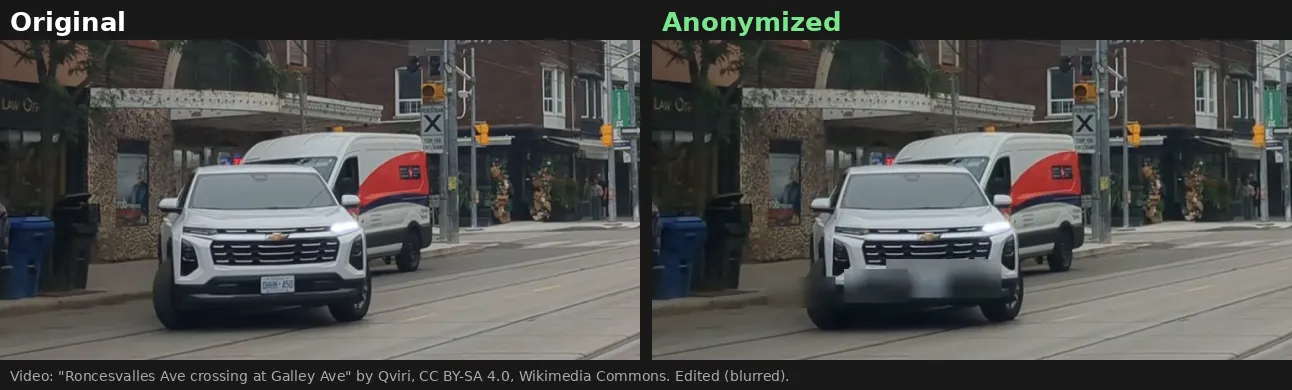
▶️ Watch the animated video demo
Demo footage: "Roncesvalles Ave crossing at Galley Ave, PXO Type A lights flashing, July 2026" by Qviri, CC BY-SA 4.0, via Wikimedia Commons. Edited: anonymized with this Actor; the demo image and GIF are shared under the same license.
- 🙂 Face blurring: detects frontal and slightly turned faces, including small faces in crowds
- 🚗 License plate blurring: tuned on real Brazilian (Mercosur) road-camera footage, including night/infrared images
- 🎨 Blur, pixelate or black box, with adjustable padding
- 🧹 Strips EXIF/GPS metadata from every output image
- 🔒 Privacy by design: plates are only located, never read or stored, and images are processed inside the Actor and never sent to third-party AI services
- 🎥 Video: every frame anonymized, output as H.264 MP4 that plays everywhere, original audio kept (or removed)
- 📦 Bulk: thousands of images or hours of video per run, with Google Drive and Dropbox links supported
- 💸 Pay per image or per video minute, and failed files are free
Who is this for?
- Real estate and property listings: street photos with neighbours, passers-by and parked cars
- Drone, dashcam, bodycam and CCTV footage: inspections, mapping, fleet, insurance and security video shared with third parties
- AI and computer-vision teams: anonymize datasets before training or sharing them (GDPR/LGPD data minimisation)
- Media, events and research: publish crowd photos without identifiable bystanders
- Marketplaces and classifieds: hide plates on vehicle listings automatically
How to anonymize images
- Paste image URLs into Image URLs (JPEG, PNG, WebP, BMP, TIFF).
- Choose what to hide (faces, license plates, or both) and how (blur, pixelate or solid box).
- Click Start. The Output tab shows the anonymized images with counts of faces and plates hidden.
How video works
Faces and plates are detected several times per second, and boxes are carried between detections so moving people and cars stay covered.
| Video mode | Detections per second | Price per started minute | Best for |
|---|---|---|---|
| Standard (default) | 5 | $0.25 | Street, real estate, drone and CCTV footage |
| Thorough | 10 | $0.45 | Fast motion, dashcams, night footage |
Use Max minutes per video to cap cost on long files. The output keeps the source resolution and frame rate.
Pricing
Pay only for what was processed. No subscription; failed files are free.
| What | Price | Example |
|---|---|---|
| Image anonymized | $0.005 per image | 1,000 listing photos = $5 |
| Video, Standard mode | $0.25 per started minute | 10-minute drone flight = $2.50 |
| Video, Thorough mode | $0.45 per started minute | 10-minute dashcam clip = $4.50 |
Paid Apify plans get automatic discounts (see the Pricing tab). Use Max minutes per video or the run's maximum cost setting to stay within budget.
Input example
Output example
Turn off Include detection boxes if you only need the images.
Use it from your code or AI agent
It also works with Make, Zapier, n8n, webhooks and schedules, and as a tool for AI agents through the Apify MCP server.
FAQ
Is the blur reversible? No. Regions are heavily downsampled before blurring, so the original pixels cannot be recovered. For maximum safety, use solid.
Does it read license plate numbers? No. It only finds where plates are. Nothing is read, logged or stored.
Which plates are supported? The plate model was fine-tuned on Brazilian Mercosur and older Brazilian plates from road cameras. It also detects many other rectangular plates, but accuracy on other countries' formats has not been measured yet, so review critical images.
Will it catch every face? It catches most visible faces, including small ones with Detect small / distant faces on. Faces in strong profile, heavily occluded or very blurry may be missed. Review images where a miss would be critical.
Which video formats are supported? MP4, MOV, WebM, MKV, AVI and most other common formats, up to 4 GB per file. The output is always an H.264 MP4.
Can something be missed in video? Plates heavily blurred by fast motion can slip through in single frames, even in Thorough mode. For critical footage, review a sample.
Where are my images processed? Inside the Actor on the Apify platform. Images are not sent to any external AI API.
Related Actors
- Video Optimizer — reduce FPS, resize and compress videos (e.g. before or after anonymizing CCTV footage)
- Video Frame Extractor for AI — turn videos into clean image datasets, then anonymize them here
- Audio Extractor — video to MP3, WAV or FLAC
- Audio & Video to Text (Whisper) — transcripts and subtitles
Support
Missed a face or plate, or need another plate format? Open an issue in the Issues tab with an example and it will be looked at.
Need a different tool? Request it
Missing a feature, an input or output format, or a whole different tool for your workflow? Open an issue in the Issues tab and describe what you need:
- what goes in (files, URLs, data) and what should come out,
- roughly how much you process (per day or month),
- one example, if you can share it.
Requests with a real use case get built, either as a new option in this Actor or as a new Actor in this collection, and you get notified in the issue when it's live. Every request is read.


