

Video Optimizer — Reduce FPS, Resize & Compress (CCTV, AI)
Pricing
from $21.00 / 1,000 video minute optimizeds
Video Optimizer — Reduce FPS, Resize & Compress (CCTV, AI)
Shrink videos in bulk: lower FPS (30 to 5), downscale to 720p, compress to H.264 MP4 or fit under 16/25 MB. Presets for CCTV storage, AI inference, WhatsApp and e-mail. Removes GPS/device metadata. Pay per minute.
Pricing
from $21.00 / 1,000 video minute optimizeds
Rating
0.0
(0)
Developer

Leandro Zanatta
Maintained by CommunityActor stats
0
Bookmarked
2
Total users
1
Monthly active users
14 days ago
Last modified
Categories
Share
Video Optimizer — Reduce FPS, Resize & Compress Videos
Shrink videos in bulk with one API call: lower the frame rate (for example 30 → 5 fps), downscale to 720p, compress to H.264 MP4, or fit a target size such as 16 MB. Ready-made presets for CCTV / security camera storage, AI and computer vision inference, web, WhatsApp and e-mail. Container metadata (device model, creation time, GPS location) is removed by default.
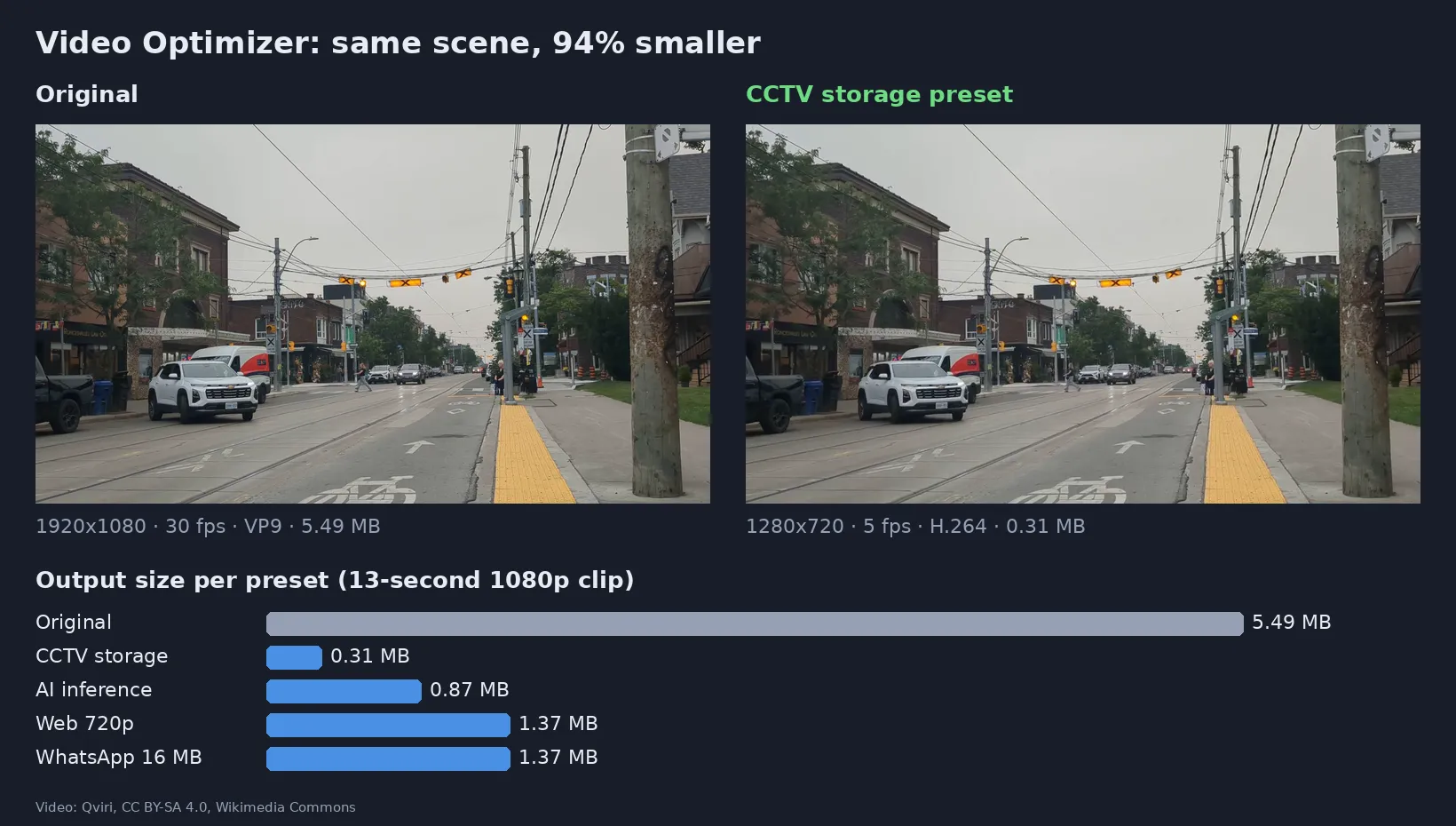
Real output of this Actor on a 13-second 1080p street clip (video: Qviri, CC BY-SA 4.0, Wikimedia Commons).
Why use it
- 💾 Cut storage costs: security footage rarely needs 30 fps and 1080p. The CCTV preset typically removes 90–95% of the size while keeping people, vehicles and events clearly visible.
- 🤖 Faster, cheaper AI pipelines: object detectors, OCR and video analytics usually process 1–5 frames per second. Sending them a 5 fps, 640p file cuts upload, decoding and GPU time.
- 📤 Files that actually send: fit any clip under the 16 MB WhatsApp limit or the 25 MB e-mail attachment limit, automatically.
- 🔒 Privacy by default: removes metadata such as the recording device, creation date and GPS coordinates before you share or archive a file.
- 🧩 No servers, no FFmpeg setup: send URLs, get MP4 links back. Works from Python, JavaScript, Make, Zapier, n8n, webhooks and AI agents (MCP).
Who uses it
| Sector | Typical use |
|---|---|
| Security & CCTV integrators | Archive weeks of camera exports in a fraction of the space; send clips to clients and insurers |
| AI / computer vision teams | Pre-process video before detection, tracking, OCR or labeling |
| Logistics, fleets, dashcams | Shrink driver and yard footage for upload over mobile networks |
| Real estate, construction, drones | Lighter inspection and site-progress videos for reports and portals |
| Education & e-learning | 720p versions of lectures for LMS platforms with upload limits |
| Support & customer service | Make customer-sent videos small enough for ticket systems and e-mail |
| Marketing & social media | Batch-convert raw footage (MOV, WebM, HEVC) into web-friendly MP4 |
Presets
Measured on the 13-second, 1920×1080, 30 fps, 5.49 MB clip shown above:
| Preset | What it does | Result | Best for |
|---|---|---|---|
| CCTV storage (default) | 5 fps, max 720p, CRF 30, no audio | 0.31 MB (−94%) | Archiving security-camera footage |
| AI inference | 5 fps, max 640p, CRF 23, no audio | 0.87 MB (−84%) | Detection, tracking, OCR, video analytics |
| Web 720p | Max 720p, CRF 23, original fps and audio | 1.37 MB (−75%) | Websites, LMS, internal portals |
| Fit in 16 MB (WhatsApp) | Max 720p, guaranteed under 16 MB | 1.37 MB (−75%) | WhatsApp, Telegram, chat apps |
| Fit in 25 MB (e-mail) | Max 720p, guaranteed under 25 MB | 1.37 MB (−75%) | E-mail attachments |
| Custom | Only what you set | — | Anything else |
How the size presets work: the video is first encoded at good quality with a bitrate cap. If it already fits, you get that file (a small video is never inflated to fill the limit). If it doesn't, the Actor runs a two-pass encode that lands just under the limit. If the video is simply too long for the limit, the run says so clearly instead of returning an unwatchable file; raise the size or set Max minutes per video.
Any field you fill in overrides the preset, so CCTV storage + Target FPS 10 gives 10 fps with the rest of the preset.
Input
| Field | Type | Description |
|---|---|---|
Video URLs (videoUrls) | array | Direct links to videos. Public Google Drive and Dropbox share links are converted automatically. Up to 4 GB per file. |
Preset (preset) | string | cctv-storage, ai-inference, web-720p, whatsapp-16mb, email-25mb or custom |
Target FPS (targetFps) | integer | New frame rate. Never increases the original. |
Max height (maxHeight) | integer | Downscale anything taller, keeping the aspect ratio. Never upscales. |
Quality (CRF) (crf) | integer | 18 = near lossless, 23 = good, 28–32 = small files |
Target file size (MB) (targetSizeMB) | integer | Keep each output under this size |
Remove audio (removeAudio) | boolean | Drop the audio track |
Remove metadata (stripMetadata) | boolean | Remove device, creation time and GPS (default: on) |
Max minutes per video (maxDurationMinutes) | integer | Only the first N minutes are processed and billed (default 120) |
Example:
Supported inputs: MP4, MOV, WebM, MKV, AVI, FLV, MPEG-TS and others; codecs H.264, H.265/HEVC, VP8, VP9, AV1, MPEG-4. Output is always H.264 MP4 with fast-start, which plays in every browser, phone and video player.
Output
One dataset row per video. The optimized file is stored in the run's key-value store and linked in outputUrl.
| Field | Meaning |
|---|---|
outputUrl | Download link of the optimized MP4 |
input / output | Duration, size, resolution, fps and codecs before and after |
sizeReductionPercent | How much smaller the output is |
truncated | true when only the first Max minutes per video were processed |
billedMinutes | Started minutes billed for this video |
error | Present only when a video failed (failed videos are free) |
Export the table as JSON, CSV or Excel, or read it through the API.
Pricing
Pay per started minute of video processed, plus a tiny per-run start fee. No subscription. Failed videos are free. Apify plan discounts apply automatically (see the Pricing tab).
| Example | Minutes billed |
|---|---|
| 13-second clip | 1 |
| 10 clips of 30 seconds | 10 |
| 1 hour of CCTV footage | 60 |
Use Max minutes per video or the run's maximum cost setting to cap spending; the Actor stops cleanly when the limit is reached.
Use it from code or an AI agent
Python
JavaScript
HTTP (one request, waits for the result)
No-code and agents: use the Apify modules in Make, Zapier or n8n, trigger runs from webhooks or schedules (e.g. every night on new camera exports), or let an AI agent call it through the Apify MCP server.
FAQ
Will the video look worse? Lower fps and resolution are visible by design: the CCTV and AI presets trade smoothness for size, while people, vehicles and events stay clear. "Web 720p" keeps the original motion and good quality. For near-original quality use Custom with CRF 18–20.
Can it make a video bigger or upscale it? No. Resolution and fps are only ever reduced, and the size presets never inflate a file that already fits.
How long can videos be? Files up to 4 GB. Long recordings are processed in full unless you set Max minutes per video (default 120).
How fast is it? Roughly real-time or faster for 1080p input with the default 4 GB memory. More memory gives more CPU and faster runs.
Does it remove GPS and device information? Yes, container metadata is removed by default (stripMetadata). It does not blur faces or license plates; for that, see the related Actor below.
Is my video kept? Files are processed inside your run and stored only in your own Apify storage, which follows your account's data-retention settings. Nothing is shared with third parties.
Private files? Use direct download links (for example S3 / GCS pre-signed URLs) or public share links from Google Drive or Dropbox.
Related Actors
- Image & Video Anonymizer — blur faces and license plates in photos and videos (GDPR / LGPD)
- Video Frame Extractor for AI — turn videos into clean image datasets
- Audio Extractor — video to MP3, WAV or FLAC, speech-to-text ready
- Audio & Video to Text (Whisper) — transcripts and subtitles
Support
Found a bug or need a preset for your workflow? Open an issue in the Issues tab and it will be answered there.
Need a different tool? Request it
Missing a feature, an input or output format, or a whole different tool for your workflow? Open an issue in the Issues tab and describe what you need:
- what goes in (files, URLs, data) and what should come out,
- roughly how much you process (per day or month),
- one example, if you can share it.
Requests with a real use case get built, either as a new option in this Actor or as a new Actor in this collection, and you get notified in the issue when it's live. Every request is read.


