

Image Quality Checker — Detect Blurry, Dark & Duplicate Photos
Pricing
from $0.70 / 1,000 image checkeds
Image Quality Checker — Detect Blurry, Dark & Duplicate Photos
Score photos 0-100 and flag blurry, motion-blurred, too dark, overexposed, noisy, low-contrast, low-resolution and duplicate images in bulk. For listings, uploads, KYC and AI datasets. Fast CPU checks, pay per image.
Pricing
from $0.70 / 1,000 image checkeds
Rating
0.0
(0)
Developer

Leandro Zanatta
Maintained by CommunityActor stats
0
Bookmarked
2
Total users
1
Monthly active users
15 days ago
Last modified
Categories
Share
Image Quality Checker — Blurry, Dark & Duplicate Photo Detection
Check photos in bulk before they go live or into a dataset. Every image gets a 0–100 quality score, a clear pass / flagged verdict and the reasons: blurry, motion blur, too dark, overexposed, low contrast, noisy, low resolution or duplicate of another image in the batch. Fast CPU measurements, no AI service calls, pay per image.
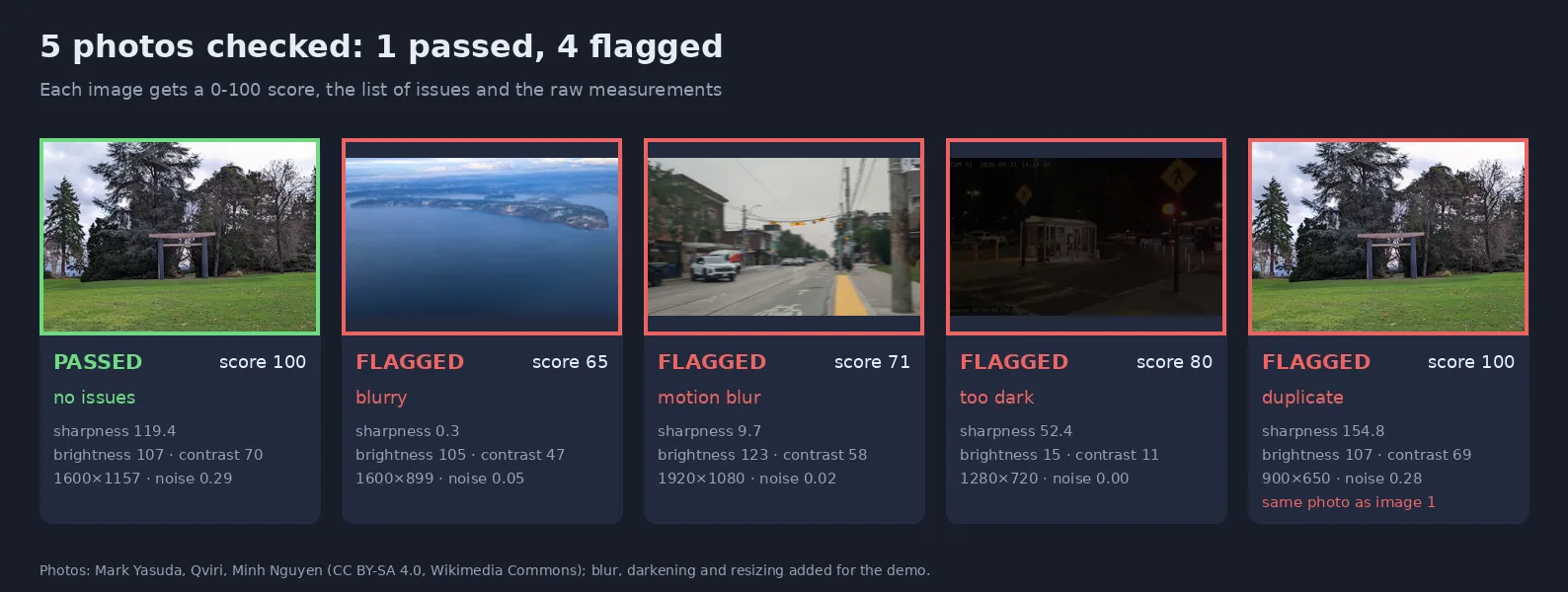
Real output of this Actor on its sample set (photos CC BY-SA 4.0, Wikimedia Commons, with blur and darkening added).
Why use it
- 🚫 Stop bad photos at the door: blurry listing photos, dark selfies and tiny thumbnails cost conversions, re-shoots and support tickets.
- 🧹 Cleaner AI datasets: drop blurred, dark and duplicate images before labeling or training.
- 🎯 Tells you why: each issue is named, with the measurement behind it, so you can show users a precise message ("photo is too dark").
- 🔁 Finds duplicates: resized or re-compressed copies of the same photo in a batch are flagged.
- ⚙️ Your rules: strict, standard or lenient presets, or set each threshold yourself; choose which issues should not fail an image.
- ⚡ Fast and cheap: about 0.2 s of CPU per 10-megapixel photo; nothing is sent to external AI services.
Who uses it
| Sector | Typical use |
|---|---|
| Marketplaces & classifieds | Reject or warn on blurry, dark or tiny listing photos before publishing |
| Real estate & hospitality | Audit property and room photos across thousands of listings |
| E-commerce | Check product photos from suppliers before they reach the catalog |
| KYC & onboarding | Ask users to retake a document photo or selfie that is too dark or blurry |
| AI & data teams | Filter training images and remove duplicates |
| Insurance & inspections | Make sure field photos are usable before closing a claim or report |
| Media & DAM | Sort archives by quality and find duplicate files |
Checks
| Issue | How it is measured | Standard threshold |
|---|---|---|
| blurry | Laplacian variance on the most detailed parts of the picture, divided by contrast (a soft background or a dark photo is not mistaken for blur) | sharpness < 20 |
| motion blur | Same, plus a direction check: camera shake removes detail in one direction only | sharpness < 20 and direction balance < 0.08 |
| too dark | Average brightness, share of pure-black pixels | brightness < 40 or > 15% clipped |
| overexposed | Average brightness, share of pure-white pixels | brightness > 215 or > 15% clipped |
| low contrast | Standard deviation of brightness | < 25 |
| noisy | Noise measured in the smoothest areas (sky, walls), where texture can't be confused with noise | > 1.0 |
| low resolution | Short side in pixels | < 480 px |
| duplicate | Perceptual hash compared with earlier images in the run | distance ≤ 6 |
Tested on four real photos, each degraded eight ways (Gaussian blur, horizontal and vertical motion blur, darkening, overexposure, noise, low resolution, low contrast): 35 of 36 cases flagged correctly, and every original passed. The one miss was a vertical shake on a wide landscape, labeled blurry instead of motion blur (still flagged). Typical sharp photos score 30–200 in sharpness, blurry ones under 10.
Input
| Field | Type | Default | Description |
|---|---|---|---|
Image URLs (imageUrls) | array | — | Photos to check (JPEG, PNG, WebP, BMP, TIFF), up to 100 MB. Google Drive and Dropbox links work |
Strictness (preset) | string | standard | standard, strict (print, product, documents) or lenient (user content, thumbnails) |
Issues that do not fail an image (ignoreIssues) | array | — | Still reported, but passed stays true |
Flag duplicates (findDuplicates) | boolean | true | Compare each image with the earlier ones in the run |
Duplicate tolerance (duplicateDistance) | integer | 6 | 0 = identical only, 6 = resized/re-saved copies, 12 = similar shots |
| Threshold overrides | string | preset | minSharpness, minBrightness, maxBrightness, maxClippedPercent, minContrast, maxNoise, minShortSide |
| Preset | Sharpness | Brightness | Clipped | Contrast | Noise | Short side |
|---|---|---|---|---|---|---|
| lenient | ≥ 10 | 25–230 | ≤ 25% | ≥ 15 | ≤ 2.0 | ≥ 240 px |
| standard | ≥ 20 | 40–215 | ≤ 15% | ≥ 25 | ≤ 1.0 | ≥ 480 px |
| strict | ≥ 30 | 60–200 | ≤ 8% | ≥ 35 | ≤ 0.7 | ≥ 1000 px |
Output
passed is true when the image has no issue (except those in ignoreIssues). qualityScore (0–100) is useful to sort or rank images. A run summary (passed, failed, duplicates) is saved as SUMMARY. Failed downloads return an error field and are free.
Pricing
Pay per image checked, plus a tiny per-run start fee. No subscription. Apify plan discounts apply automatically (see the Pricing tab).
| Example | Images billed |
|---|---|
| One listing with 12 photos | 12 |
| 5,000 product images | 5,000 |
| 100,000 dataset images | 100,000 |
Use it from code or an AI agent
Python: keep only the good photos
JavaScript: show the user why a photo was rejected
HTTP
No-code and agents: check new uploads with Make, Zapier or n8n, chain it after a scraper with an integration, or let an AI agent judge photos through the Apify MCP server.
FAQ
My product photos on white background are flagged as overexposed. White backgrounds have many pure-white pixels. Raise maxClippedPercent (e.g. 60) or add overexposed to ignoreIssues.
Night photos are flagged as too dark. That is the intended signal; use the lenient preset or lower minBrightness for night content.
Does it judge composition or aesthetics? No. It measures technical quality (focus, exposure, noise, size, duplicates), which is objective and explainable.
Are duplicates checked against previous runs? Only within one run. Each row includes its phash, so you can compare across runs in your own database (Hamming distance).
Is my data kept? Images are processed inside the run and not stored; only the measurements are saved in your dataset.
Related Actors
- EXIF & GPS Cleaner — read and remove hidden photo metadata, losslessly
- Image & Video Anonymizer — blur faces and license plates
- Video Frame Extractor for AI — sharp, de-duplicated frames from videos
- Face Compare — face verification and embeddings
Support
A photo judged wrongly? Open an issue in the Issues tab with the image link and the result.
Need a different tool? Request it
Missing a feature, an input or output format, or a whole different tool for your workflow? Open an issue in the Issues tab and describe what you need:
- what goes in (files, URLs, data) and what should come out,
- roughly how much you process (per day or month),
- one example, if you can share it.
Requests with a real use case get built, either as a new option in this Actor or as a new Actor in this collection, and you get notified in the issue when it's live. Every request is read.


