

Face Compare — Face Verification & Embeddings API (No GPU)
Pricing
from $1.05 / 1,000 image analyzeds
Face Compare — Face Verification & Embeddings API (No GPU)
Check if photos show the same person: compare faces with a reference photo or embedding, get similarity scores, match/no-match and 128-d face embeddings. 99.0% on LFW. Your images only, no web search. Pay per image.
Pricing
from $1.05 / 1,000 image analyzeds
Rating
0.0
(0)
Developer

Leandro Zanatta
Maintained by CommunityActor stats
0
Bookmarked
3
Total users
2
Monthly active users
14 days ago
Last modified
Categories
Share
Face Compare — Face Verification & Face Embeddings API
Check whether two or more photos show the same person. Give the Actor a reference photo (or a stored face embedding) and a list of images: every face found is compared with the reference and you get a similarity score, a match / no match decision, the face position, and optionally the 128-number face embedding to store and reuse. No GPU, no external AI service: detection and recognition run inside the Actor with open models.
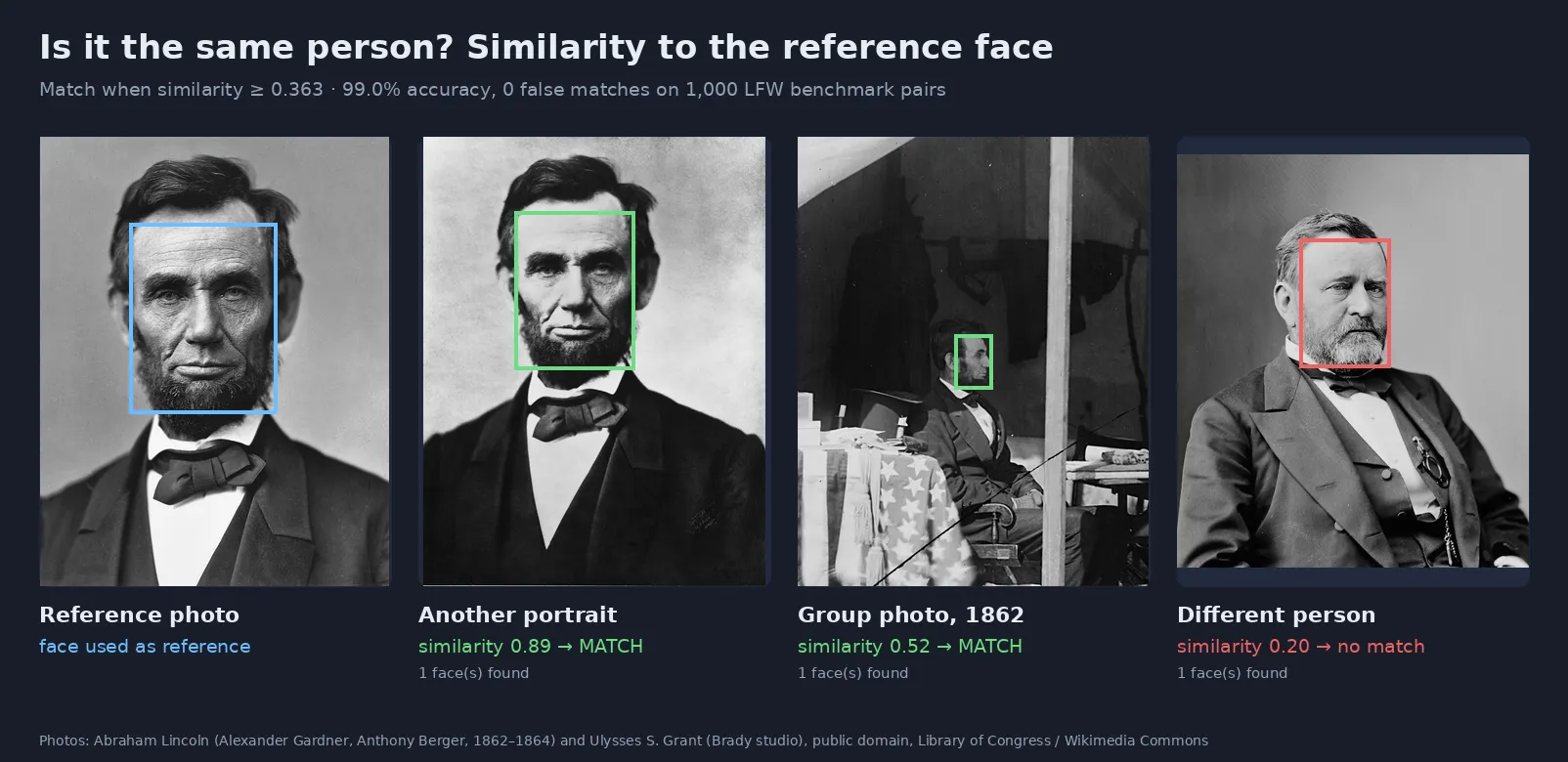
Real output of this Actor. Public-domain photos from the Library of Congress via Wikimedia Commons.
What it does
- 🧑🤝🧑 1:1 and 1:N verification: compare a reference face with every face in your images
- 🎯 Measured accuracy: 99.0% on the standard LFW benchmark (1,000 test pairs), with 0 false matches at the default threshold
- 🔢 Face embeddings: 128-number vectors you can store and compare later, without keeping the photos
- 🖼️ Several faces per image: boxes, detection score and similarity for each face; group photos work
- 🧬 Robust references: give 2–5 photos of the same person and they are averaged into one reference
- ⚡ Fast and cheap: about 15 ms of compute per image on CPU; you pay per image analysed
- 🔒 Your images only: compares the images you send. It does not search the internet or any database of people
Who uses it
| Sector | Typical use |
|---|---|
| Onboarding & KYC flows | Check that the selfie matches the ID document photo (with the user's consent) |
| Events & access control | Match attendee selfies with registration photos at check-in |
| HR & workforce apps | Confirm the employee clocking in is the registered employee |
| Marketplaces & communities | Detect duplicate or fake profiles that reuse the same face across accounts |
| Photo services & archives | Find all photos of a person in a client's own event, school or family album |
| Developers & data teams | Generate face embeddings for de-duplication, clustering and search in your own vector database |
How it works
- Detection: faces are found with YuNet (MIT license), including 5 facial landmarks.
- Alignment: each face is aligned using the eyes, nose and mouth corners.
- Embedding: SFace (Apache 2.0 license, OpenCV Model Zoo) turns each face into a 128-number vector.
- Comparison: the cosine similarity between the reference and each face is computed. At or above the threshold, it is a match.
Accuracy
Measured with this Actor's code on the 1,000 test pairs of the LFW benchmark (500 same-person and 500 different-person pairs):
| Threshold | Accuracy | False matches | Missed matches |
|---|---|---|---|
| 0.30 | 98.3% | 2.0% | 1.4% |
| 0.33 | 99.0% | 0.2% | 1.8% |
| 0.363 (default) | 99.0% | 0.0% | 2.0% |
| 0.40 | 98.8% | 0.0% | 2.4% |
| 0.45 | 98.3% | 0.0% | 3.4% |
Real-world accuracy depends on the photos: frontal, sharp, well-lit faces of at least ~80 px work best. Strong profiles, sunglasses, masks, very small or blurry faces reduce similarity. For decisions that matter, keep a human review step for borderline scores.
Input
| Field | Type | Default | Description |
|---|---|---|---|
Reference photo(s) (referenceImageUrls) | array | — | 1–5 photos of the person. The largest face of each is used and they are averaged |
Reference embedding (referenceEmbedding) | array | — | A 128-number embedding returned earlier by this Actor |
Images to check (imageUrls) | array | — | Images to analyse (JPEG, PNG, WebP, BMP, TIFF; up to 50 MB). Google Drive and Dropbox links work |
Match threshold (threshold) | string | 0.363 | Similarity needed to call it a match |
Return embeddings (returnEmbeddings) | boolean | false | Include each face's embedding (always on without a reference) |
Return facial landmarks (includeLandmarks) | boolean | false | Eyes, nose tip and mouth corners per face |
Minimum face size (minFaceSize) | integer | 40 | Ignore faces smaller than this (px) |
Max faces per image (maxFacesPerImage) | integer | 20 | Keep only the largest N faces |
Three ways to use it:
The last one (no reference) only extracts embeddings, for your own storage, clustering or de-duplication.
Output
One dataset row per image:
| Field | Meaning |
|---|---|
isMatch | true if any face in the image matches the reference |
bestSimilarity, bestFaceIndex | Highest similarity in the image and which face it was |
faces[].similarity | Cosine similarity to the reference, from -1 to 1 (on LFW, 90% of same-person pairs scored 0.48–0.83 and 95% of different-person pairs scored below 0.25) |
faces[].box | Face position in pixels |
faces[].embedding | 128 numbers, L2-normalised |
error | Present only when an image failed (failed images are free) |
The reference actually used (averaged embedding and which face was taken from each reference photo) is saved in the run's key-value store as REFERENCE, so you can reuse it as referenceEmbedding in later runs.
Pricing
Pay per image analysed (reference photos included), plus a tiny per-run start fee. No subscription. Failed images are free. Apify plan discounts apply automatically (see the Pricing tab).
| Example | Images billed |
|---|---|
| Selfie vs ID photo | 2 |
| 1 reference vs 500 event photos | 501 |
| Embeddings for 10,000 profile photos | 10,000 |
Use the run's maximum cost setting to cap spending; the Actor stops cleanly when the limit is reached.
Use it from code or an AI agent
Python: verify a selfie against an ID photo
JavaScript
HTTP (one request, waits for the result)
No-code and agents: use the Apify modules in Make, Zapier or n8n, trigger runs from webhooks, or call it from an AI agent through the Apify MCP server.
Responsible use
Face images and face embeddings are biometric data, a special category of personal data under the GDPR (art. 9), Brazil's LGPD (art. 11) and similar laws. When you use this Actor:
- Process only images you are allowed to process, with a valid legal basis, usually the explicit consent of the people involved.
- Use it to verify a person who takes part in your process (onboarding, check-in, de-duplication), not to identify strangers or monitor people.
- Keep embeddings only as long as needed; delete runs and datasets you no longer need (Apify's data-retention settings apply).
- Combine scores with human review where a wrong decision could harm someone.
This Actor has no web search, no face database and no identity lookup: it only compares the faces you send to each other.
FAQ
What similarity counts as the same person? The default threshold 0.363 is the one recommended for this model and gave 0 false matches on LFW. Raise it (0.40–0.45) when false matches are costly, lower it (0.30–0.33) when missing a match is costlier.
Can I compare embeddings myself? Yes. Embeddings are L2-normalised, so the dot product equals the cosine similarity. Use the same threshold.
Are embeddings compatible with other face models? No. Only compare embeddings produced by this Actor.
Is it a liveness / anti-spoofing check? No. It compares faces in images; it cannot tell a live person from a photo of a photo.
Does it detect age, gender or emotion? No, and it is not intended to.
Which models and licenses? YuNet face detector (MIT) and SFace face recognizer (Apache 2.0), both from the OpenCV Model Zoo. No third-party API is called.
Related Actors
- Image & Video Anonymizer — blur faces and license plates (GDPR / LGPD)
- Video Frame Extractor for AI — turn videos into clean image datasets
- Video Optimizer — reduce FPS, resize and compress videos
- Audio & Video to Text (Whisper) — transcripts and subtitles
Support
Questions or a use case that needs another option? Open an issue in the Issues tab.
Need a different tool? Request it
Missing a feature, an input or output format, or a whole different tool for your workflow? Open an issue in the Issues tab and describe what you need:
- what goes in (files, URLs, data) and what should come out,
- roughly how much you process (per day or month),
- one example, if you can share it.
Requests with a real use case get built, either as a new option in this Actor or as a new Actor in this collection, and you get notified in the issue when it's live. Every request is read.


