

EXIF & GPS Cleaner — Read and Remove Photo Metadata (Lossless)
Pricing
from $0.70 / 1,000 image processeds
EXIF & GPS Cleaner — Read and Remove Photo Metadata (Lossless)
See what your photos reveal (GPS location, phone model, serial number, author, date) and get clean copies with all hidden metadata removed, without recompressing: pixels stay identical. JPEG, PNG, WebP. Bulk API.
Pricing
from $0.70 / 1,000 image processeds
Rating
0.0
(0)
Developer

Leandro Zanatta
Maintained by CommunityActor stats
0
Bookmarked
2
Total users
1
Monthly active users
14 days ago
Last modified
Categories
Share
See what your photos reveal before you publish them, and remove it. For every image this Actor reports the hidden metadata (GPS location with a map link, phone or camera model, lens, serial numbers, author, date and time, editing software) with a clear list of privacy risks, and returns a clean copy with all of it removed, without recompressing: the pixels stay exactly the same. Works in bulk on JPEG, PNG and WebP.
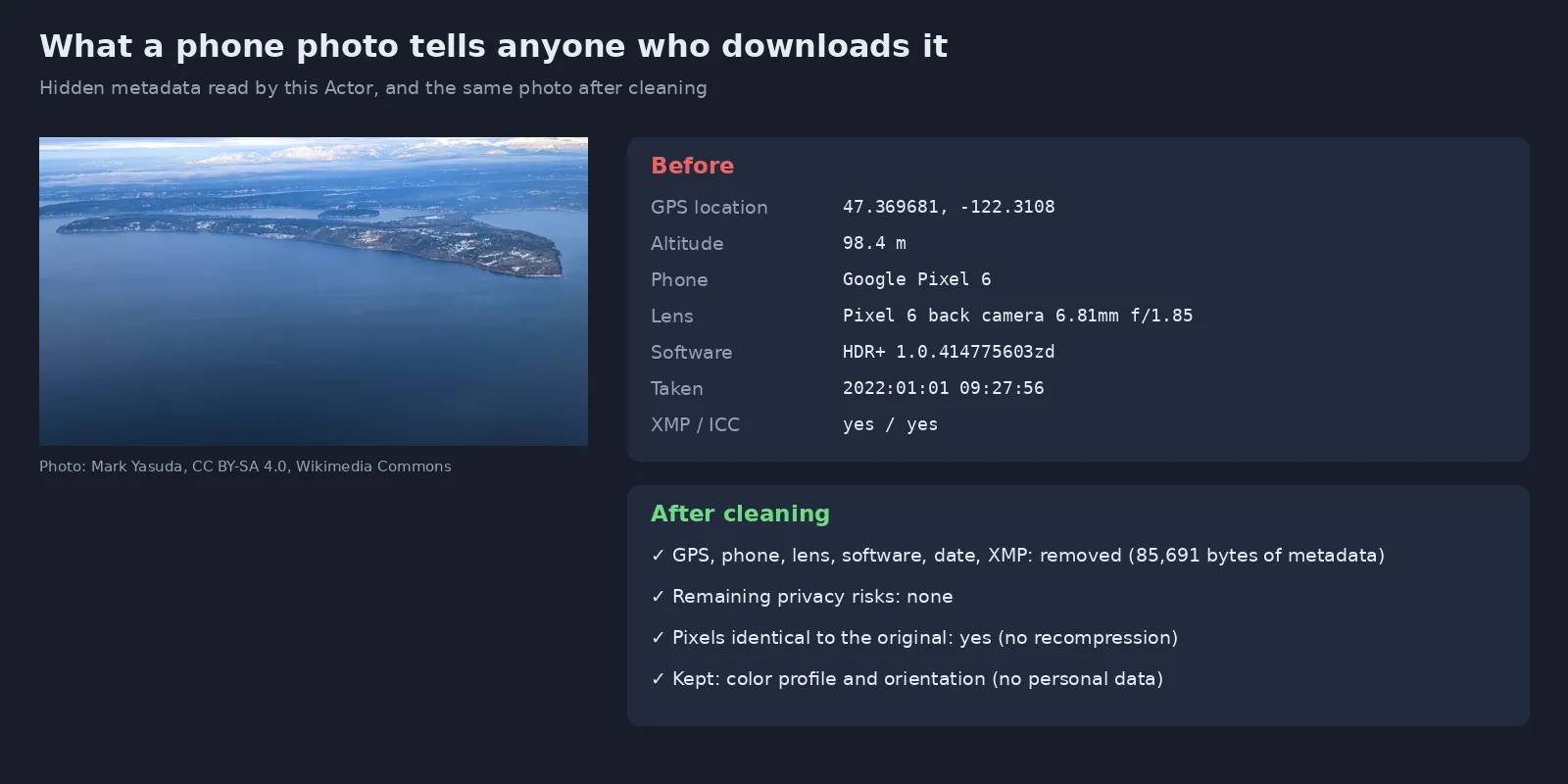
Real output of this Actor on a Pixel 6 photo (photo: Mark Yasuda, CC BY-SA 4.0, Wikimedia Commons).
Why use it
- 📍 Phones write your location into photos: anyone who downloads the original file can see where it was taken, often your home or workplace. This Actor finds and removes it.
- 🖼️ Truly lossless: metadata blocks are cut out of the file; the image data is copied byte for byte. Each run can verify that the decoded pixels are identical. No quality loss, no size growth.
- 🕵️ Removes what other tools miss: EXIF (including the embedded thumbnail), XMP, IPTC, comments, data appended after the image such as motion-photo videos, and extra embedded images.
- 🧭 Photos stay upright and true to color: only the orientation tag and the color profile are kept by default (both contain no personal data).
- 📊 Audit before you clean: report-only mode tells you which images in a set leak GPS, serial numbers or author names.
- 🔒 Runs inside the Actor: images are not sent to any third-party service.
Who uses it
| Sector | Typical use |
|---|---|
| Marketplaces & classifieds | Strip seller locations from listing photos before they go live |
| Real estate | Publish property photos without the agent's or owner's device data |
| Journalism & NGOs | Protect sources and staff when publishing field photos |
| Companies under LGPD / GDPR | Remove personal data from images on websites, reports and shared drives |
| Apps & platforms with user uploads | Clean every uploaded photo through the API before storing it |
| Investigations & OSINT | Read dates, devices and locations from photos you are allowed to analyse |
| Photographers & agencies | Audit and remove serial numbers and GPS before delivering files |
What it reports
| Field | Meaning |
|---|---|
privacyRisks | Plain list: GPS location, device serial number, author or owner name, date and time taken, camera / phone model, tagged people / face regions |
gps | Latitude, longitude, altitude and a Google Maps link |
camera | Make, model, lens and software |
dateTaken | Original date and time |
serialNumbers | Body / lens serial numbers, when present |
authorInfo | Artist, copyright, owner, XMP creator, IPTC by-line, XMP city / location |
hasExif, hasXmp, hasIptc, hasIccProfile | Which metadata blocks the file contains |
allTags | Every EXIF, GPS and IPTC tag (optional) |
Input
| Field | Type | Default | Description |
|---|---|---|---|
Image URLs (imageUrls) | array | — | Photos to process (JPEG, PNG, WebP; reading also works for TIFF and others). Up to 100 MB each. Google Drive and Dropbox links work |
What to do (mode) | string | report-and-clean | report-and-clean, report or clean |
Keep orientation (keepOrientation) | boolean | true | Keep only the rotation tag so photos are not shown sideways |
Keep color profile (keepColorProfile) | boolean | true | Keep the ICC profile so colors look the same |
Verify pixels are identical (verifyPixels) | boolean | true | Decode both files and confirm the image did not change |
Include all tags (includeAllTags) | boolean | false | Add every raw EXIF, GPS and IPTC tag |
Output
Clean copies are stored in the run's key-value store and linked in cleanImageUrl. Failed images return an error field and are free.
Pricing
Pay per image processed (report and clean copy included), plus a tiny per-run start fee. No subscription. Apify plan discounts apply automatically (see the Pricing tab).
| Example | Images billed |
|---|---|
| 1 photo | 1 |
| 500 marketplace listing photos | 500 |
| 10,000 user uploads per month | 10,000 |
Use it from code or an AI agent
Python: audit a folder of public URLs, then use the clean copies
JavaScript
HTTP
No-code and agents: clean every new upload with Make, Zapier or n8n, trigger runs from webhooks, or let an AI agent check photos through the Apify MCP server.
FAQ
Does cleaning reduce quality? No. The image data is copied unchanged; only metadata blocks are removed. With Verify pixels on, every row confirms it with pixelsIdentical.
Why is the clean file smaller? Phones store a lot besides the picture: a preview thumbnail, XMP, sometimes an HDR gain map or a short motion-photo video. All of it is removed.
Will my photos appear rotated? No, the orientation tag is kept by default. Turn Keep orientation off only if you rotate images yourself.
Which formats? Cleaning: JPEG, PNG and WebP. Reading: also TIFF and most formats Pillow opens. HEIC/HEIF is not supported yet; convert to JPEG first.
Does it remove faces or license plates? No, that is visual content. Use the anonymizer below for that, and this Actor for the hidden data.
Is it legal to read other people's photo metadata? Reading metadata of images you are allowed to process is common practice (e.g. moderation, journalism, investigations). Respect privacy laws when you use the locations you find.
Related Actors
- Image & Video Anonymizer — blur faces and license plates in the same photos
- PII Masker — mask CPF, e-mails, phones and names in texts and datasets
- Face Compare — face verification and embeddings
- Video Optimizer — removes metadata from videos while compressing
Support
A file that was not fully cleaned? Open an issue in the Issues tab with a sample (without personal data).
Need a different tool? Request it
Missing a feature, an input or output format, or a whole different tool for your workflow? Open an issue in the Issues tab and describe what you need:
- what goes in (files, URLs, data) and what should come out,
- roughly how much you process (per day or month),
- one example, if you can share it.
Requests with a real use case get built, either as a new option in this Actor or as a new Actor in this collection, and you get notified in the issue when it's live. Every request is read.


