

FINRA BrokerCheck Scraper [$1.50/1K 💰] | Advisors
Pricing
from $1.40 / 1,000 results
FINRA BrokerCheck Scraper [$1.50/1K 💰] | Advisors
Scrape FINRA BrokerCheck individuals by name, firm or CRD number. Get disclosures, registrations, current employments, branches and profile URLs. $1.50 per 1,000 records.
Pricing
from $1.40 / 1,000 results
Rating
0.0
(0)
Developer

Ahmed Jasarevic
Maintained by CommunityActor stats
0
Bookmarked
2
Total users
1
Monthly active users
6 days ago
Last modified
Categories
Features
Share
FINRA BrokerCheck Scraper – Advisor & Firm Records
Collect public FINRA BrokerCheck records for brokers and investment advisers. Search by name, firm or CRD number and get registration scopes, disclosure flags, employment counts, current firm affiliations, branch locations and profile links. $1.50 per 1,000 records.
Broker And Advisor Data For Compliance Teams
FINRA BrokerCheck is the public directory of registered securities professionals and firms in the United States. This Actor turns those records into structured data for compliance teams, recruiting firms, background-check providers, wealth-management platforms, journalists and AI dataset builders.
- Advisor due diligence — review registration scope, disclosures and employment history.
- Recruiting intelligence — map advisers by firm, branch and experience.
- Compliance monitoring — track disclosure flags and registration counts.
- Directory enrichment — add CRD profiles to CRM and research tools.
- AI datasets — build structured financial-professional corpora.
How It Works
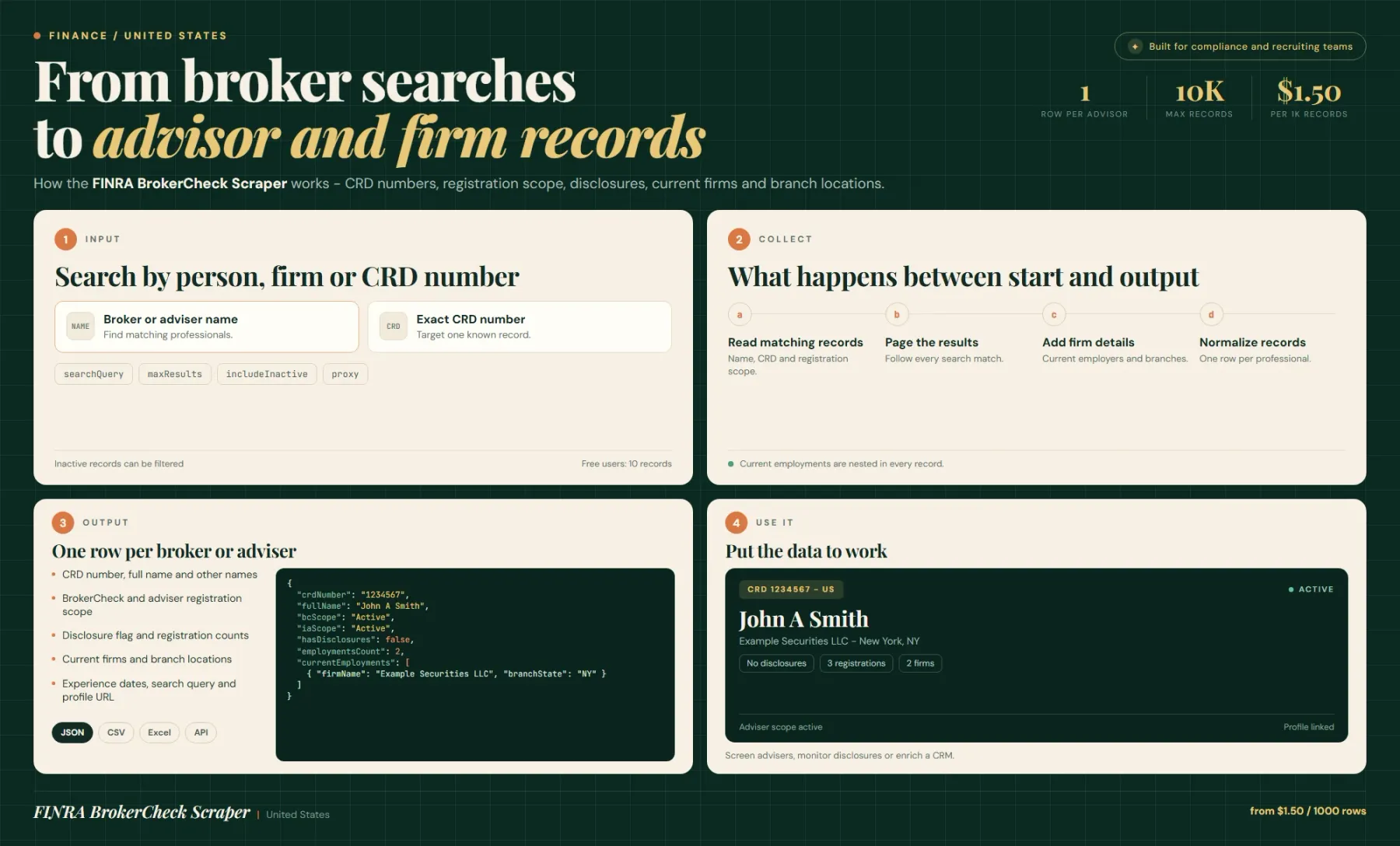
Enter a name, firm or CRD number, set the maximum number of records and choose whether inactive individuals should be included. The Actor searches public BrokerCheck records and writes one row per matching professional.
- Search by person name, firm name or CRD number.
- Filter inactive and expanded-scope records.
- Save current employments with branch details.
- Get disclosure flags, registration counts and profile URLs.
- Free users get a 10-record preview.
What You Can Search
- Person names — full or partial names such as
john smith. - Firm names — search for professionals associated with a firm.
- CRD numbers — target a specific broker or adviser record.
- Inactive records — include or exclude inactive scopes with
includeInactive.
Results may include multiple people with the same name. Use CRD numbers when you need exact matching.
Record Fields
Each row includes the CRD number, first, middle and last name, suffix, other names and full name. Registration fields include BrokerCheck scope, investment-adviser scope, disclosure flag, approved FINRA registration count and employment count.
Employment fields include current firm IDs, firm names, branch city, state and ZIP, investment-adviser-only status, and firm BD and IA SEC numbers. Every row also stores the search query and public BrokerCheck profile URL.
Input – Configure A BrokerCheck Run
| Field | Type | Default | Notes |
|---|---|---|---|
searchQuery | string | john smith | Name, firm or CRD number; required |
maxResults | integer | 100 | Maximum records saved, up to 10,000 |
includeInactive | boolean | true | Include inactive and expanded-scope individuals |
proxy | object | Off | Optional connection settings |
Output – Advisor Fields
- Identity —
crdNumber,firstName,middleName,lastName,nameSuffix,otherNames,fullName - Registration —
bcScope,iaScope,hasDisclosures,approvedFinraRegistrationCount,employmentsCount - Experience —
industryDays,industryCalDate - Current firms —
currentEmploymentswithfirmId,firmName,branchCity,branchState,branchZip,iaOnly,firmBdSecNumber,firmBdFullSecNumber,firmIaSecNumber,firmIaFullSecNumber - Provenance —
searchQuery,sourceUrl
Example Input – Search Advisers By Name
Example Output – One BrokerCheck Record
Export Records And Schedule Updates
Download JSON, CSV, Excel or HTML from Apify Console, or send results to Google Sheets, Airtable, BigQuery, Make, Zapier, n8n or a webhook. Schedule weekly runs to monitor new registrations and disclosure changes.
Related Actors
- SEC Scraper — add public company filings
- Skip Trace People Finder — add people-search enrichment
- Court Scraper — add public court records
- ProPublica Nonprofit Scraper — add nonprofit financial data
FAQ
What is BrokerCheck?
BrokerCheck is FINRA's public directory of registered brokers, investment adviser representatives and firms.
Can I search by CRD number?
Yes. Enter the CRD number in searchQuery to target a specific record.
What does includeInactive do?
When true, records with inactive BrokerCheck or investment-adviser scope are kept. Set it to false to keep active records only.
Why do some records share a name?
BrokerCheck can return several professionals with the same or similar names. Use CRD numbers, firm names or branch details to disambiguate.
Are disclosures included?
hasDisclosures flags whether the record has disclosures. This Actor returns the flag and public profile link, not the full disclosure narrative.
How many records can one run return?
maxResults defaults to 100 and supports up to 10,000. Free users get a 10-record preview.
How much does it cost?
FREE and BRONZE users pay $0.0015 per record ($1.50 per 1,000). SILVER pays $0.00145 and GOLD+ pays $0.0014 ($1.40 per 1,000), plus a small Actor Start event.
For AI Agents & LLM Apps
Returns one row per broker or adviser with registration scope, disclosure flag, employment counts, current firms and profile URL.
Minimal working input:
Output fields: crdNumber, firstName, middleName, lastName, nameSuffix, otherNames, fullName, bcScope, iaScope, hasDisclosures, approvedFinraRegistrationCount, employmentsCount, industryDays, industryCalDate, currentEmployments, searchQuery, sourceUrl.
Behaviors an agent should know:
searchQueryis required; an empty query stops the run.middleName,nameSuffix,industryDaysandindustryCalDatecan benull.currentEmploymentscan be an empty array.includeInactive: falseremoves inactive and expanded-scope records.- Free users get a 10-record preview.
Billing: $0.0015 per record on FREE/BRONZE ($1.50 per 1,000), $0.00145 on SILVER and $0.0014 on GOLD+ ($1.40 per 1,000), plus a small Actor Start event.
Legal & Compliance Disclaimer
This Actor is an independent tool. It is not affiliated with, endorsed by or sponsored by FINRA or BrokerCheck.
It collects publicly available registration information. Records can change without notice and should be verified against the official source before use in hiring, lending, tenant screening or other decisions governed by the Fair Credit Reporting Act or local law. Users are responsible for complying with FINRA terms and applicable regulations.
SEO Keywords
finra scraper, brokercheck scraper, finra brokercheck, broker data, financial advisor data, finra records, crd number lookup, advisor disclosures, securities professional data, broker employment history, finra registration data, financial compliance data, advisor directory, brokercheck api, finra data export, wealth management data, regulatory data, financial professional dataset


