

Airbnb Listings Scraper | Prices, Ratings, Map Coordinates
Pricing
from $2.10 / 1,000 listings
Airbnb Listings Scraper | Prices, Ratings, Map Coordinates
Scrape Airbnb search results for any city or region: listing name, type, nightly and total price for your dates, rating, reviews, bedrooms, beds, baths, coordinates, badges and photos. Goes past Airbnb's 270-result limit by splitting the search into price ranges. No host personal data.
Pricing
from $2.10 / 1,000 listings
Rating
0.0
(0)
Developer

Akatra
Maintained by CommunityActor stats
0
Bookmarked
2
Total users
1
Monthly active users
22 days ago
Last modified
Categories
Share
Airbnb Listings Scraper: prices, ratings and coordinates for any location
Collect Airbnb listings for any city, neighbourhood or region. For each listing you get the name and type, the nightly and total price for your dates, any discount, rating and review count, bedrooms, beds and baths, map coordinates, badges such as Superhost and Guest favorite, and photos.
Airbnb shows about 270 listings per search. Ask for more and the scraper splits the search into price ranges and merges the results, so you can cover a whole market.
Pay per result · No login, no API key · Public data only · Tested daily · LLM-ready JSON for AI agents (MCP)
🛠️ What does Airbnb Listings Scraper do?
- 🗺️ Whole markets, not just one results page. Airbnb shows about 270 listings per search; the scraper splits the search into price ranges and merges the results.
- 💵 Nightly and total price for your dates, including discounts.
- 📍 Map coordinates, rating and review count, bedrooms, beds and baths, badges and photos for every listing.
- 🛡️ Built to get through blocking. Requests go out with a real browser fingerprint through rotating proxies, and a blocked request is retried from a fresh IP. A result that could not be completed is never charged.
What people use it for
- Short-term rental market research. Compare prices, ratings and supply across neighbourhoods and cities.
- Pricing your own listing. See what similar places charge for your dates.
- Investment analysis. Map listings and prices before buying a property.
- Travel products and dashboards. Feed fresh listing data into your own app, sheet or BI tool.
- Tracking prices over time. Run it on a schedule for the same dates and watch the market move.
📊 What data can you extract?
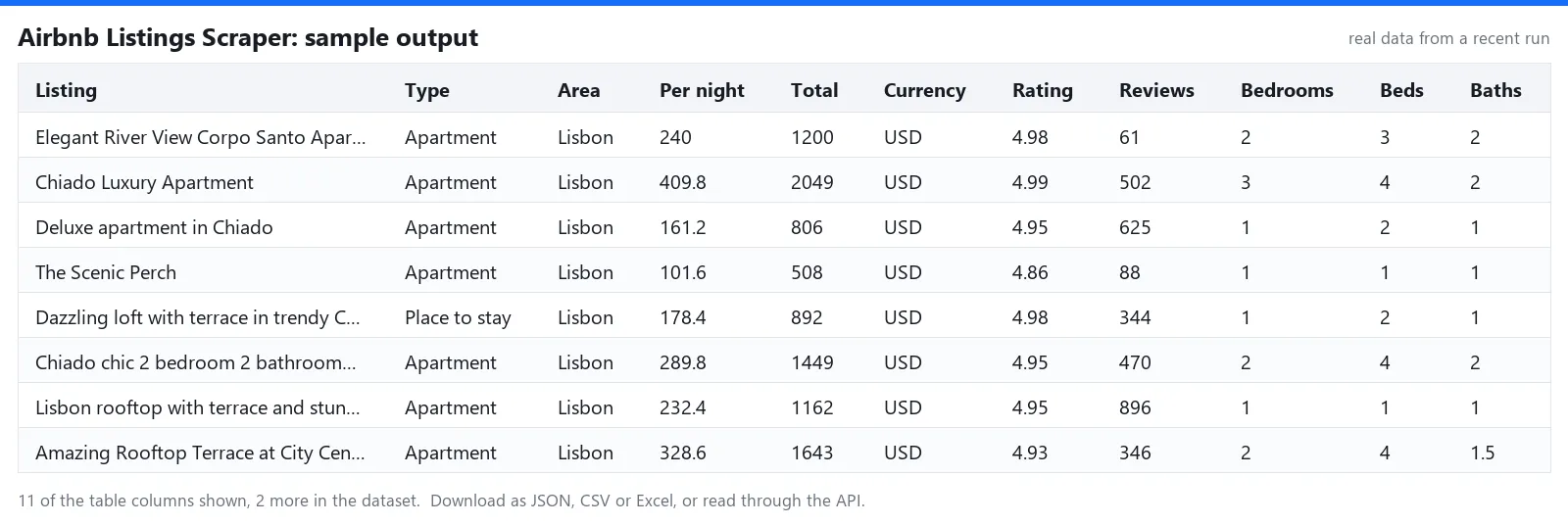
Every result is one JSON object (one row in CSV or Excel) with these fields:
| Field | Meaning |
|---|---|
listingId, url | Airbnb's ID for the listing and a link to it with your dates |
name, title | The listing's name and Airbnb's short title ("Apartment in Santa Maria Maior") |
latitude, longitude | Map position as Airbnb shows it in search results (approximate) |
bedrooms, beds, baths | Room counts. A studio has 0 bedrooms |
rating, reviewCount, isNew | Average guest rating and number of reviews. New listings have no rating yet |
badges | Airbnb's badges, such as "Superhost" and "Guest favorite" |
priceTotal, priceOriginal, nights, pricePerNight, priceText, currency | Price for the stay as shown in search, the price before discount when there is one, and the price per night |
checkIn, checkOut | The dates the price is for: your dates, or the sample dates Airbnb chose when you gave none |
propertyType, area | Filled when Airbnb's title has the form "Apartment in Alfama"; hotels and branded places use their own name as title |
images | Up to 10 photo links |
searchLocation, resolvedLocation | The location you entered and the place Airbnb matched it to |
🚀 How to use Airbnb Listings Scraper
- Create a free Apify account and open this Actor.
- Add one or more locations, written the way you would type them into Airbnb's search box:
Lisbon, Portugal,Brooklyn, NY. - Set check-in and check-out to get the exact price for your stay. Leave them empty for a general scan.
- Set guests and, if you like, the type of place, minimum bedrooms and a price range.
- Choose the currency and how many listings you want per location.
- Run it and download the results as JSON, CSV or Excel, or connect them through the API.
📥 Input example (JSON)
📤 Sample output (JSON)
🤖 Use it with AI agents, MCP and the API
The output is clean JSON with stable field names, ready for LLM pipelines, RAG and agent tools without extra parsing.
- AI agents and MCP (Claude, ChatGPT, Cursor and others). Add the Apify MCP server with this Actor as a tool:
https://mcp.apify.com?tools=akatra/airbnb-listings-scraper. The agent can then run it and read the results by itself. - API. Start a run and get the results in a single call:
- No-code tools and SDKs. Works with Make, n8n, Zapier and LangChain through Apify's integrations, and with the Apify clients for Python and JavaScript. Schedule it and send the results to a webhook, Google Sheets or your own database.
💰 Pricing: pay per result
You pay per listing, nothing for empty runs beyond a tiny start fee. See the price on the Pricing tab. There is no subscription or rental fee. New to Apify? The free plan includes $5 of platform credit every month, enough for about 1,600 listings with this Actor, and no credit card is needed.
🚦 Run status and error messages
Every run ends with a plain status message, so automated workflows (API, Make, n8n, AI agents) can tell what happened without reading the log:
| Situation | What you get |
|---|---|
| Finished normally | Saved N listings. |
| Nothing matched | The run succeeds with No listings saved. Check the location name, or widen the dates and filters. You pay only the start fee. |
| Airbnb does not recognize a location | Airbnb did not recognize N location(s): … Nothing is charged for that location. |
| A price range holds more listings than Airbnb shows | N price range(s) hold more listings than Airbnb shows; narrow the area or the price range to reach the rest. |
| Missing or unsupported input | The run fails at once and the log names the field to fix. Nothing is scraped. |
| The site kept blocking some pages | Some pages stayed blocked, so the results are incomplete; run again to get the rest. |
| Your maximum charge is reached | Stops cleanly with Stopped at your maximum charge limit. Everything saved so far stays in the dataset. |
ℹ️ Good to know
- Prices are the ones shown in Airbnb's search results. With dates they are the total for your stay. Without dates Airbnb picks sample dates for each listing;
checkIn,checkOutandnightsthen tell you which dates the price is for. - A location Airbnb does not recognize returns nothing and costs nothing; the run log tells you which one. If a name with accents is not recognized, the scraper also tries it without accents ("Kadıköy" as "Kadikoy").
- One search shows about 270 listings. Above that the scraper uses the prices it has seen to split the search into price ranges, and splits a range again when it is still full. If a range still holds more listings than Airbnb shows, the run log and status message say so; narrow the area or the price range to reach the rest.
- A listing is delivered once per run, even when it appears for several of your locations. If you set a maximum charge for a run, the scraper stops as soon as that limit is reached.
- The scraper reads search results only. It does not collect host names, host profiles or guest reviews.
📝 Changelog
- 2026-10-02 Searches without dates now say which sample dates and how many nights the price belongs to. README restructured: data table, API and MCP examples, run status messages.
- 2026-10-02 Full price ranges are split again and the part that cannot be reached is reported, after an independent audit.
- 2026-10-02 First release: listings with prices, ratings and coordinates; price-range splitting beyond 270 listings.
⚖️ Legal and privacy
This scraper is an independent tool and is not affiliated with, endorsed by, or sponsored by Airbnb. "Airbnb" is a trademark of its owner and is used here only to show which website the tool works with. It reads only pages that are public without logging in. Use the data in line with the laws that apply to you and the source site's terms.
The source site's name and logo are trademarks of their owner and appear here only to identify the website this tool works with. The Actor reads only pages that are public without logging in. How you store and use the data is your responsibility: follow the laws that apply to you, such as GDPR and CCPA.
🔗 More scrapers from Akatra
- Indeed Jobs Scraper: 💼 job ads from Indeed in 30 countries, with yearly salary and only-new mode.
- Google News Scraper: 📰 news by keyword or topic in 50 editions, with the real article URLs.
- Google Trends Scraper: 📈 interest over time, by region, and rising related queries.
- Google Ads Transparency Scraper: 🔎 every ad a company runs on Google, with regions and dates.
- YouTube Transcript Scraper: 🎬 video transcripts as clean text and timestamped lines.
💬 Support
Found a bug or need a field that is missing? Open an issue on the Issues tab and we usually reply within a day.


