

FMCSA Carrier Monitor: Authority, Insurance & Revocations
Pricing
from $2.00 / 1,000 carrier records
FMCSA Carrier Monitor: Authority, Insurance & Revocations
FMCSA carrier monitoring for your DOT/MC list: daily alerts when operating authority is revoked or pending, insurance is cancelled or below the BIPD minimum, or name/address change. Plus a new trucking authorities feed and bulk DOT number / MC number lookup.
Pricing
from $2.00 / 1,000 carrier records
Rating
0.0
(0)
Developer

Alpine Data Labs
Maintained by CommunityActor stats
0
Bookmarked
2
Total users
1
Monthly active users
3 days ago
Last modified
Categories
Share
FMCSA Carrier Monitoring: Authority, Insurance & Revocation Alerts
FMCSA Carrier Monitor watches your list of trucking carriers and brokers by USDOT number or MC number. It alerts you when something important changes: operating authority revoked, inactive or pending, insurance cancelled or below the BIPD minimum, a new revocation or suspension order, or a legal name or address change. It also has a new trucking authorities feed (newly granted MC numbers) and a bulk DOT number lookup that returns the full carrier record.
All data comes from the official FMCSA open data on data.transportation.gov (Licensing & Insurance, Motus registration system and Company Census). There are no logins, no API keys and no scraping of SAFER pages. It is built for freight brokers, 3PLs, shippers, factoring companies and insurers who need ongoing carrier vetting after onboarding, not just a one-time check.
How to use it (no code)
- Fill in the form: under What do you want to do? pick Monitor my carriers, One-time lookup or New authorities feed. Paste USDOT numbers (and/or MC numbers) into the form, one per line; a pasted Excel column works. The form already has 5 working example carriers.
- Click Start. The first monitor run delivers the full record for every carrier (charged once as a carrier record) and saves a baseline with each carrier's current authority, insurance and revocation status, plus risk flags such as "BIPD insurance below required minimum".
- Download: open the Output tab and click Export for Excel, CSV or JSON.
- Optional: schedule it daily. Click Save as a new task, then Schedule. Every later run lists only the carriers that changed, with the old and new value.
You never need to write JSON or code: every option is a field, dropdown or checkbox in the form.
First run vs. later runs (important)
With Only list changes switched on (the default), only the first run returns all matching carriers. Later runs return only what changed:
- Monitor: the first run lists every carrier in your list and saves it as the baseline. Later runs list only carriers with an alert (plus carriers newly added to the list).
- New authorities feed: the first run lists all matching carriers. Later runs list only carriers that were not delivered before.
The actor remembers what it has already seen in a named key-value store in your Apify account, called fmcsa-carrier-monitor-state. One record is kept per mode and Watchlist name. That store is not deleted after a run, so this works across scheduled runs. An empty later run is normal and means "nothing new".
To get everything again: switch off Only list changes (monitor: show all), or enter a new Watchlist name (this starts a new baseline and counts its carriers as new carrier records again). You can also delete the store in Storage → Key-value stores to start from scratch.
Sample output (real data, checked 2026-10-23)
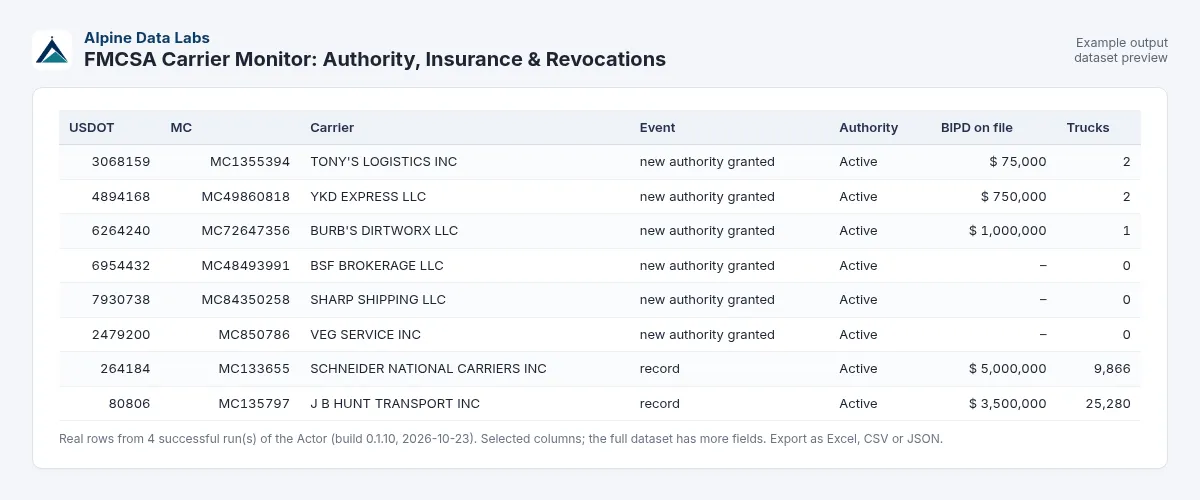
| dotNumber | mcNumber | legalName | commonAuthority | brokerAuthority | bipdOnFile | bipdRequired | insurerName | powerUnits | riskFlags |
|---|---|---|---|---|---|---|---|---|---|
| 264184 | MC133655 | SCHNEIDER NATIONAL CARRIERS INC | Active | Active | 5,000,000 | 750,000 | Old Republic Insurance Company | 9,866 | – |
| 80806 | MC135797 | J B HUNT TRANSPORT INC | Active | Active | 3,500,000 | 750,000 | Ace American Insurance Company | 25,280 | – |
| 90849 | MC107478 | OLD DOMINION FREIGHT LINE INC | Active | Active | 1,000,000 | 1,000,000 | Fidelity & Deposit Co. of Maryland | 10,313 | – |
| 2226453 | MC384859 | C H ROBINSON COMPANY INC | Inactive | Active | 0 | 750,000 | Southwest Marine and General Insurance | 0 | – (broker: bond on file) |
A change alert from a monitor run looks like this: changeType: authority_change, changedFields: ["commonAuthority"], previousValue: "commonAuthority: Active", newValue: "commonAuthority: Inactive".
The output has three views: Carriers & alerts, Change alerts and Full details. You can export every view to Excel, CSV or JSON. A RUN_SUMMARY record shows what was charged.
Excel tip: carrier names come from public filings. If you open exports in Excel, use the XLSX export rather than CSV, so that a name starting with =, +, - or @ cannot be read as a formula.
Schedule tip
Save your input as a Task and add a daily Schedule, for example at 07:00 your time. FMCSA publishes the open-data files daily. To get alerts by email or Slack, add an Apify integration ("Run succeeded", then send the dataset) or connect the task to Zapier or Make. If you keep several lists, give each one its own Watchlist name so they keep separate baselines.
Alert types (what triggers a change alert)
changeType | Triggered when | changedFields |
|---|---|---|
authority_change | Common, contract, broker or freight-forwarder authority or the USDOT status changes (e.g. Active → Inactive or Revoked), or a new authority application becomes pending | commonAuthority, brokerAuthority, usdotStatus, authorityPending, ... |
revocation | A new revocation or suspension order appears, or a revocation becomes pending | lastRevocation, revocationPending |
insurance_cancel | A policy cancellation date is filed, a newer cancellation shows up in the insurance history, or BIPD on file drops to 0 | policyCancelDate, lastInsuranceCancelDate, bipdOnFile |
bipd_below_minimum | BIPD liability on file falls below the required minimum while the carrier holds motor-carrier authority | bipdOnFile |
name_address_change | Legal name, DBA name or physical address changes (case and punctuation ignored) | legalName, dbaName, physicalAddress |
If several things change at once, one row lists them all, for example changeType: "authority_change, revocation". Other values you may see: baseline (first check of a carrier in this watchlist), unchanged (with "Show all"), record (lookup), new_authority_granted / new_authority_application / new_new_usdot (feed) and not_found (free).
Key output fields
dotNumber,mcNumber: USDOT number and docket (MC/MX/FF) number.authorityStatus,commonAuthority,contractAuthority,brokerAuthority: operating authority status per type, as on FMCSA Licensing & Insurance.bipdOnFile,bipdRequired,bipdBelowMinimum: liability insurance on file vs. the required minimum.cargoOnFileand bond filings for brokers are included too.insurerName,policyEffective,policyCancelDate,insuranceCancelPending: the current insurance filing and any pending cancellation.revocationsTotal,revocationPending: revocation and suspension history.powerUnits,drivers,physicalCity,physicalState,mcs150Date,addDate,safetyRating: census data.riskFlags: plain-English warnings, e.g. "operating authority not active", "BIPD insurance below required minimum", "insurance cancellation effective 2026-11-15".saferUrl: link to the carrier's official SAFER snapshot.dataSources: which FMCSA datasets were used.
Use cases
- Freight brokers and 3PLs: ongoing carrier monitoring after onboarding. You hear about authority revoked, insurance lapse or pending cancellation before you tender a load.
- Shippers: vet the carriers in your routing guide every day.
- Factoring companies: watch the client carriers you fund for revocations and insurance cancellations.
- Insurers, agents and ELD/fuel-card vendors: a new trucking authorities feed of newly granted motor carriers and brokers, filtered by state and fleet size.
- Compliance and data teams: bulk DOT number lookup and MC number lookup to clean up carrier master data.
Input fields in plain words
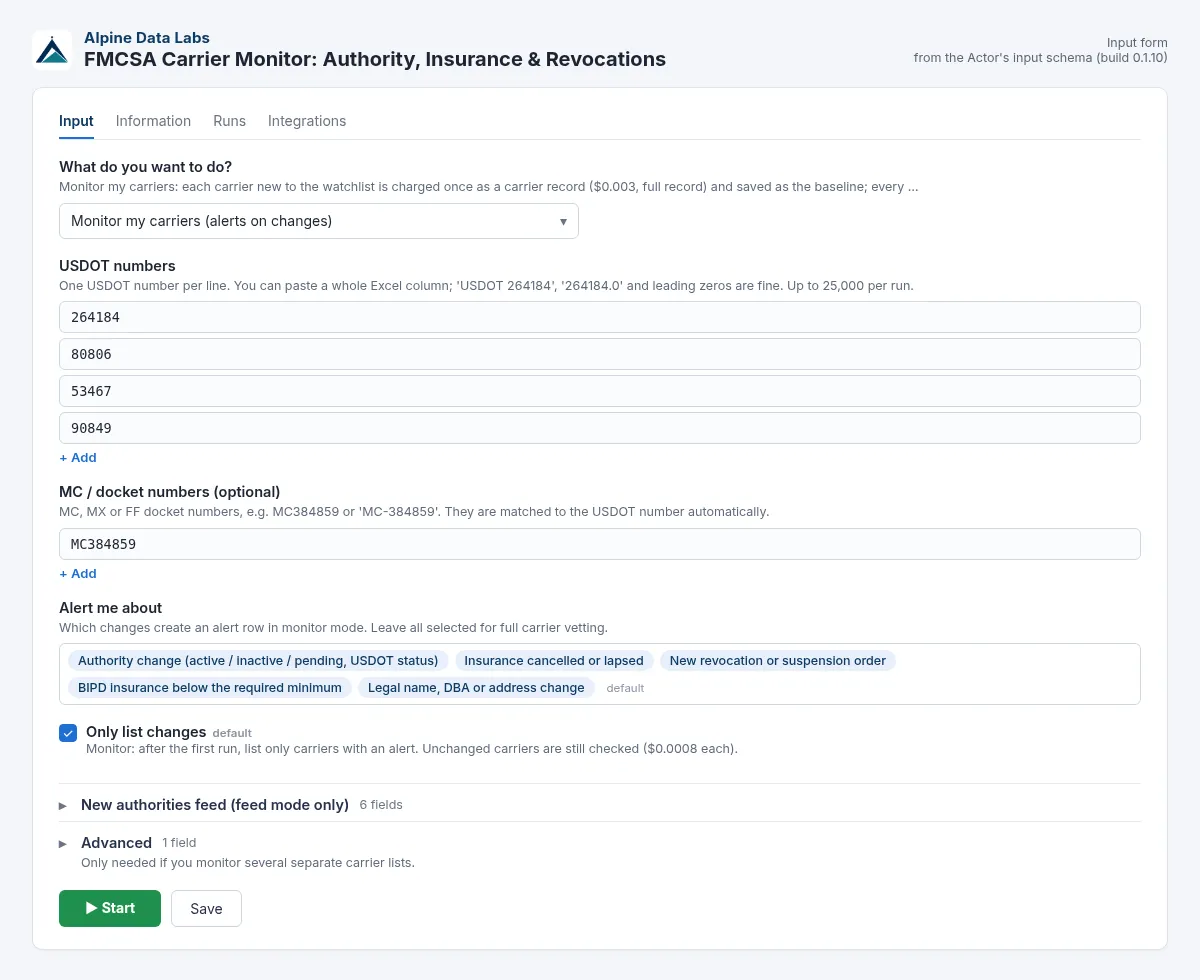
| Form field | What it does | Default |
|---|---|---|
| What do you want to do? | Monitor my carriers (alerts on changes), One-time lookup (full record) or New authorities feed (no list needed) | Monitor |
| USDOT numbers | One per line. "USDOT 264184", "264184.0" and leading zeros are fine. Up to 25,000. | example carriers |
| MC / docket numbers | MC / MX / FF numbers, e.g. MC384859 or MC-384859 | – |
| Alert me about | Tick the changes you care about: authority, insurance cancelled, revocation, BIPD below minimum, name/address | all |
| Only list changes | Monitor: list only alerts after the first run. Feed: skip carriers already delivered. | on |
| Feed: what to list | Authority granted, authority application, or new USDOT registration | Authority granted |
| Feed: type of authority | Any, motor carrier, broker or freight forwarder | Any |
| Feed: look back (days) | 1–365 | 7 |
| Feed: states | Physical address state, codes or names: TX, CA, Texas, Washington DC. An unknown state (for example a typo like "Texs") stops the run with a message and nothing is charged. All new entries in the look-back period are checked against your states, so small states are not missed. Small states such as DC, RI or VT simply have few new entries (DC: about 1 newly granted authority per month), so use 30 days or more there. | all |
| Feed: minimum trucks | Minimum power units | 0 |
| Feed: max carriers per run | Cost limit for the feed | 200 |
| Advanced: Watchlist name | Keeps separate baselines for separate lists | – |
Pricing
Pay per event, and only for carriers that were found:
| Event | Price | Per 1,000 | When |
|---|---|---|---|
carrier-record | $0.003 | $3.00 | One full carrier record. Lookup and feed rows, and in monitor mode once per carrier that is new to the watchlist (first run, newly added carriers, or a new watchlist name). |
carrier-checked | $0.0008 | $0.80 | Each later monitor check of a carrier that is already in the watchlist, whether the row is listed or hidden by "Only list changes". "Show all" rows for known carriers are $0.0008 too. |
change-alert | $0.009 | $9.00 | Added for each carrier with an alert (authority, insurance, revocation, BIPD, name/address), on top of its carrier-checked: one alerted carrier = two events (one alert per carrier, however many fields changed). |
How monitor billing works: a carrier you add to a watchlist is charged once as a carrier record ($0.003) and you get its full record. After that, every check costs $0.0008, plus $0.009 for each alert. A new watchlist name starts new baselines, so its carriers count as carrier records again.
Worked example: a broker monitors 200 carriers. The first run costs 200 × $0.003 = $0.60. Each daily run after that costs 200 × $0.0008 = $0.16 plus $0.009 per alert, so a day with 2 alerts costs $0.178. If you add 10 new carriers later, that run costs 10 × $0.003 + 200 × $0.0008 = $0.19.
The example input (5 carriers, monitor mode) costs 5 × $0.003 = $0.015 on the first run and $0.004 on later runs, plus $0.009 per alert.
Plan discounts: on the Apify Scale plan all three prices are 10 % lower, on Business (and higher) 20 % lower. The prices above apply to the Free and Starter plans.
| Apify plan | carrier-record | carrier-checked | change-alert |
|---|---|---|---|
| Free, Starter | $0.003 | $0.0008 | $0.009 |
| Scale (−10 %) | $0.0027 | $0.00072 | $0.0081 |
| Business and higher (−20 %) | $0.0024 | $0.00064 | $0.0072 |
Always free: invalid inputs, USDOT/MC numbers that are not found (listed with a reason), feed carriers removed by your filters, carriers already delivered in earlier feed runs, and runs where the FMCSA API is down. Duplicates in your list are merged. You can cap the cost with the maximum charge per run in the run options.
FAQ
How do I look up a DOT number or MC number? Choose One-time lookup, paste USDOT or MC numbers and run. You get authority, insurance, revocation and census data for every carrier, plus a link to its SAFER snapshot.
How do I monitor carriers for insurance cancellation or authority revoked? Use Monitor my carriers with a daily Schedule. The first run is the baseline. After that you get a row only when authority, insurance, revocations, BIPD coverage or name/address change.
How much does carrier monitoring cost? Each carrier new to your watchlist is charged once as a carrier record ($0.003, full record included). Every later check costs $0.0008, plus $0.009 per alert. For example, 200 carriers cost $0.60 on the first run, then $0.16 per daily run plus $0.009 per alert. Scale plans pay 10 % less, Business plans 20 % less. Invalid and not-found numbers are free.
Where can I get a list of new trucking authorities / new MC numbers? Choose New authorities feed, set Feed: what to list to Authority granted, pick Feed: look back (days) and optional states. With Only list changes switched on, a daily run returns only carriers you have not seen before.
What does "BIPD below minimum" mean? The bodily injury and property damage liability on file with FMCSA is below the required amount ($750,000 for general freight, more for hazmat and passengers). It is only flagged when the carrier holds active or pending motor-carrier authority. Brokers file a bond or trust fund instead.
Is this an FMCSA carrier search by name? No. Search by USDOT or MC number. You can look up the number on SAFER first.
Does it include safety scores (CSA / SMS) or inspections? Not yet. It includes the official safety rating (Satisfactory, Conditional, Unsatisfactory) from the census, but not CSA BASIC scores.
How often is the FMCSA data updated? FMCSA updates most open-data files daily. Some files, such as the census, can lag a few days behind. Run the monitor once a day; more often rarely finds more.
Can I monitor by MC number only? Yes. Paste them into MC / docket numbers and leave USDOT numbers empty. The actor resolves each MC to its USDOT number. If you give both the DOT and the MC of one carrier, it is checked and charged once.
What happens to numbers that are not found?
They are listed as not_found rows with a reason, for example "USDOT number not found in FMCSA data" or "not a USDOT or MC number". They are free.
Why does my state return only a few carriers? The state filter checks every new entry in your look-back period, not just a sample. Small states really do have few new authorities: in the 30 days to 23 Oct 2026 FMCSA granted about 6,300 authorities nationwide, of which about 750 were in TX, 23 in RI, 6 in VT and 1 in DC. Choose 30 to 90 days back for small states. A run with states can take a little longer (about 20–60 seconds) because more entries are checked. Checked entries are free; you pay only for delivered rows.
Can I get freight broker leads? Yes. Choose New authorities feed and set Feed: type of authority to Broker to get newly granted freight broker authorities with MC number, state and bond filing.
Limits and data notes
- This is not a SAFER/CSA safety score. It shows the official authority, insurance, revocation and census records.
- Motus migration: FMCSA is moving registration to the new Motus system (since Dec 2025), so files run in parallel and names and fields change. For every group, the actor reads the Motus dataset first and falls back to the legacy Licensing & Insurance dataset. Every row names the datasets it used in
dataSources. Missing fields are left empty instead of failing the run. - Many carriers are sole proprietors, so
legalNamecan be a person's name. That is public regulatory record. The actor returns no phone numbers, emails or company officer names. - Some FMCSA files are updated daily, others with a lag of a few days. Brand-new filings can show up in the insurance file before the carrier file. The actor uses the larger of the two values for BIPD on file.
- Monitor mode runs up to 25,000 carriers. Feed mode returns up to 10,000 carriers per run.
Legal
The data is US federal government open data (public domain) from data.transportation.gov. This actor is not affiliated with, endorsed by or connected to FMCSA or USDOT. Always confirm critical decisions, such as tendering a load, on the official FMCSA SAFER / Licensing & Insurance sites.
Related tools from Alpine Data Labs
- EU Tenders (TED): Tender Alerts & Excel Export: daily alerts for public tenders in Europe, including transport and logistics contracts.
- Career Page Job Scraper: see which logistics companies and brokers are hiring drivers, dispatchers or carrier sales reps.
- Zefix Swiss Company Register: vet Swiss business partners with official company register data.
- All tools from Alpine Data Labs: no-code data tools for public data, business research and monitoring.
Support
Found a bug or need a field? Open an issue in the Issues tab. We usually answer within one business day. Built by Alpine Data Labs.
For developers / API & integrations
Everything in the form is also available through the API, so the Actor fits into your own workflows, websites and scripts. The input field names, their formats and the output fields are stable: inputs that worked before keep working.
Minimal JSON input (all other fields use the form defaults):
Full example input:
Feed example:
cURL (runs the Actor and returns the dataset rows as JSON):
JavaScript (npm install apify-client):
Python (pip install apify-client):
Example output row:
Keep the same stateKey on every monitor run so each run compares with the previous one. A RUN_SUMMARY record in the run's key-value store shows what was charged. Output field names (dotNumber, mcNumber, changeType, changedFields, …) do not change between versions.
Input field names (API) and accepted alternatives:
| Form field | API field | Also accepted |
|---|---|---|
| What do you want to do? | mode (monitor / lookup / feed) | watchlist, new_authorities, one_time_lookup and the form wording, e.g. "Monitor my carriers" |
| USDOT numbers | dotNumbers | dots, dot, usdot, usdotNumbers, carriers; numbers or strings, one string with commas/new lines works |
| MC / docket numbers | mcNumbers | mc, mcs, dockets, docketNumbers |
| Alert me about | alertOn (authority_change, insurance_cancel, revocation, bipd_below_minimum, name_address_change) | alerts |
| Only list changes | onlyChanges | only_changes; "yes"/"no" |
| Feed: what to list | feedEvent (authority_granted / authority_application / new_usdot) | "Authority granted", granted, application |
| Feed: type of authority | authorityType (any / motor_carrier / broker / freight_forwarder) | "Motor carrier", carrier, brokers, forwarder |
| Feed: look back (days) | daysBack | days |
| Feed: states | states | state; codes or names |
| Feed: minimum trucks | minPowerUnits | – |
| Feed: max carriers per run | maxResults | maxItems |
| Watchlist name | stateKey | – |
Integrations:
- Schedules: save your input as a Task and add a Schedule (Apify Console → Schedules). Every scheduled run uses the same input.
- Webhooks: under Integrations → Webhooks, call your URL on "Run succeeded" and fetch the rows from
https://api.apify.com/v2/datasets/<datasetId>/items?format=json(orformat=xlsx/csv). - Make, Zapier, n8n: use the Apify app/node, "Run Actor" or "Run task", then "Get dataset items". Google Sheets, Slack and email integrations are available in the Integrations tab without any code.
- Apify MCP: AI agents can call this Actor through the Apify MCP server (mcp.apify.com) as the tool
alpine-data/fmcsa-carrier-monitor.
Do not put your API token into public code or web pages. Keep it on your server or in the integration's credentials.


