

YouTube Transcript Scraper: Channels, Captions & Subtitles
Pricing
from $2.40 / 1,000 transcripts
YouTube Transcript Scraper: Channels, Captions & Subtitles
Get the transcript of any YouTube video, Short, channel, playlist or search results as text, timestamped segments, SRT, VTT or Markdown, in any available language, with title, channel, duration and views. Videos without captions can be transcribed with AI (Whisper). Pay per transcript.
Pricing
from $2.40 / 1,000 transcripts
Rating
0.0
(0)
Developer

Fernando Guiraud
Maintained by CommunityActor stats
0
Bookmarked
4
Total users
3
Monthly active users
4 days ago
Last modified
Categories
Share
What does YouTube Transcript Scraper do?
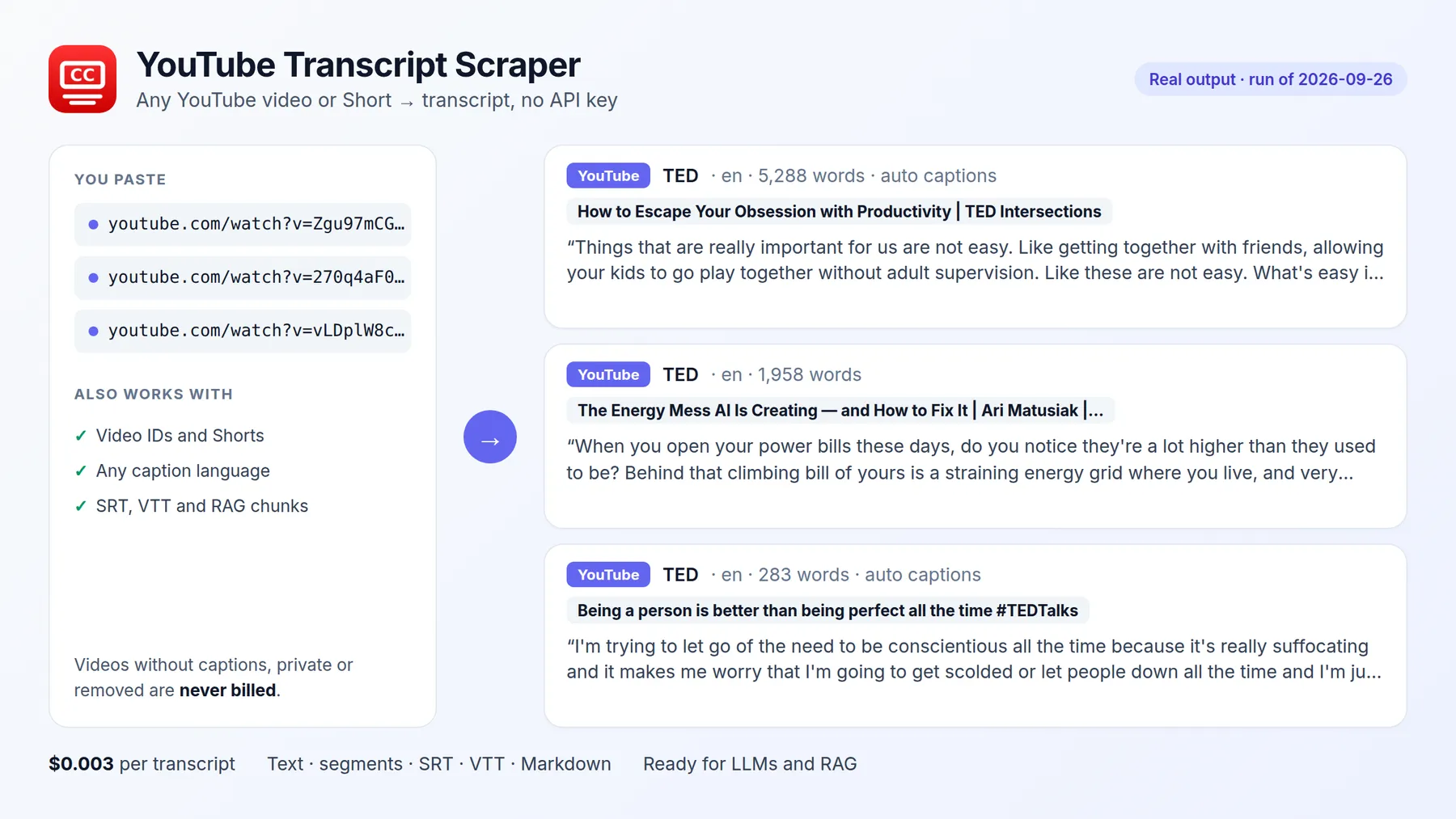
YouTube Transcript Scraper gets the transcript of any YouTube video or Short as plain text, timestamped segments, SRT or VTT subtitles, Markdown with timestamps, or RAG-ready chunks, in any language the video has captions for. It returns human captions when they exist and YouTube's auto-generated captions otherwise, plus the video's title, channel, duration, views, keywords and description.
Paste a list of video links or IDs, whole channels and playlists (@handle), or a YouTube search ("python tutorial", with date, length and sort filters), and get clean transcripts in seconds, with no YouTube API key. Videos without captions, private or removed videos are never billed, and with aiFallback on, videos without any captions are transcribed with AI (open-source Whisper) instead of coming back empty.
It runs on the Apify platform, so you also get an API, scheduling, integrations (Google Sheets, Make, Zapier, n8n, Slack) and access for AI agents through the Apify MCP server.
Independent tool, not affiliated with or endorsed by the platforms it reads. YouTube is a trademark of Google LLC; they are named only to describe the public data this Actor collects. It only accesses publicly available content.
Why use it?
- 🤖 AI and RAG pipelines: feed video content to ChatGPT, Claude or your vector database, already split into chunks with timestamps.
- ✍️ Content repurposing: turn videos into blog posts, newsletters, social posts and show notes.
- 🔍 Research and analysis: analyse what competitors, creators or experts say across hundreds of videos.
- 🎓 Study and accessibility: searchable text of lectures and tutorials.
- 🎬 Subtitles: download SRT or VTT files ready for video editors.
- 📺 Whole channels on a schedule: give
@handlewith Only new videos and every run returns only what the channel uploaded since the last one. - 🔎 Search YouTube by keyword: transcripts of the top videos for any topic, in YouTube's order, or a daily alert with the new videos about it.
How to get the transcript of a YouTube video
- Click Try for free.
- Paste YouTube links (one per line):
youtube.com/watch?v=...,youtu.be/..., Shorts and live links all work. For a whole channel or playlist, use Channels or playlists (@TED,youtube.com/@TED, a playlist link). - Optionally set the preferred languages (
en,es,de...) and the output formats. - Click Start.
- Download the transcripts as JSON, CSV or Excel, or copy them from the Transcripts view.
Input
| Field | Description | Default |
|---|---|---|
videos | Video links or IDs | videos, channels or searchQueries |
channels | Channels (@handle, /channel/UC..., /c/name) or playlist links; their newest videos are processed | — |
maxVideosPerChannel | Newest videos taken from each channel or playlist (up to 2,000) | 10 |
searchQueries | YouTube searches (python tutorial); the results' transcripts are returned in YouTube's order | — |
maxVideosPerSearch | Results taken from each search (up to 500) | 10 |
sortBy | Search order: relevance, date, views, rating | relevance |
uploadDate | Search period: any, hour, today, week, month, year | any |
videoDuration | Search length: any, short (< 4 min), medium (4-20 min), long (> 20 min) | any |
onlyNewVideos | Skip videos of these channels, playlists and searches that earlier runs already processed | false |
languages | Preferred caption languages, in order (es also matches es-419) | the video's own |
fallbackToOtherLanguage | Return another language when the preferred one does not exist | true |
preferManualCaptions | Human captions before auto-generated ones | true |
outputs | text, segments, srt, vtt, markdown, chunks | text, segments |
includeMetadata | Channel ID, duration, views, keywords, description | true |
aiFallback | Transcribe videos that have no captions with AI (Whisper), $0.010 per minute | false |
maxAiMinutesPerVideo | Longer videos without captions are not transcribed with AI (not billed) | 60 |
A whole channel, every week, paying only for new uploads (listing the channel is free):
Output
One record per video. You can download the dataset in various formats such as JSON, HTML, CSV, or Excel.
Data fields
| Field | Description |
|---|---|
text | The transcript as paragraphs |
segments | Lines with start and end in seconds |
srt, vtt | Subtitle files |
markdown | Paragraphs with [HH:MM:SS] timestamps, ready for LLMs and notes |
chunks | ~1,000-character pieces with start/end time and a token estimate, for RAG |
language, isAutoGenerated | Language of the transcript and whether it was generated automatically |
transcriptSource | captions (YouTube captions) or ai-whisper (transcribed with AI, see aiMinutesBilled) |
availableLanguages | Every caption track of the video |
title, channel, durationSeconds, viewCount, keywords, description | Video details |
foundIn | The channel or playlist the video was listed from |
searchQuery, searchRank | The search the video was found with, and its position in the results (1 = first) |
status | ok (billed), no-captions, unavailable or error (not billed) |
How much does it cost to scrape YouTube transcripts?
| Event | Price |
|---|---|
| Run start (per GB of memory, default 256 MB) | $0.001 |
| Transcript (one video, all formats, with video details) | $0.003 |
AI transcription minute (only with aiFallback, videos without captions) | $0.010 |
1,000 transcripts cost $3, residential proxies included. With aiFallback, a video without captions is billed per started minute of audio instead of the transcript price: a 2-minute video costs $0.02, a 10-minute one $0.10. Runs with aiFallback on use 2 GB of memory (run start $0.002). Videos without captions, private or removed videos and failures are never billed. Set Max cost per run and the Actor stops cleanly at that limit.
Videos without captions: AI transcription
Some videos have no captions at all: many Shorts, very new uploads, and videos in languages YouTube does not caption automatically. Turn on aiFallback and the Actor downloads only the audio of those videos and transcribes it with open-source Whisper (99 languages). Videos with captions keep using them and keep their normal price.
- Results say where the text comes from:
transcriptSourceiscaptionsorai-whisper, andaiMinutesBilledshows the minutes billed. - Quality: very good in widely spoken languages (English, Spanish, Portuguese, French, German, Italian...), weaker in languages with little training data (for example Swahili or Yoruba). If you know the language, put it first in
languages: the AI then skips language detection, which is unreliable on short clips. - Videos longer than
maxAiMinutesPerVideo(60 by default), music without speech and failed downloads are not billed. - Off by default, so nobody pays for AI by surprise.
Use it with AI agents (MCP)
Add https://mcp.apify.com?tools=fguiraud/youtube-transcript-scraper to Claude, Cursor or any MCP client and ask:
- "Summarize this video and list the key takeaways: https://youtu.be/arj7oStGLkU"
- "Get the transcripts of these 10 videos and tell me what each creator recommends."
- "Write a blog post based on this YouTube tutorial."
Smallest useful input for an agent: {"videos": ["https://youtu.be/arj7oStGLkU"], "outputs": ["text"]}.
Agent-friendly input: common field names such as url, urls, startUrls, query or keywords are accepted, and an empty input runs a small sample from the input form (with a note in the results) instead of failing.
Search YouTube by keyword
Transcripts of the top YouTube results for a search (searching is free; you pay per transcript):
Real result (2026-10-08, text shortened):
A daily alert with the new videos about a topic: "searchQueries": ["nvidia earnings"], "sortBy": "date", "uploadDate": "today", "onlyNewVideos": true, and a schedule.
Tips
- For AI summaries of long videos, choose
markdownorchunks: timestamps let the model cite the exact moment. - Choose only the outputs you need: smaller results are faster to download.
languages: ["es", "en"]returns Spanish when it exists and English otherwise.- Channels: videos come newest first, Shorts and past live streams included. With
onlyNewVideos, a video that had no captions yet is not retried in later runs. - Searches: only regular videos are returned (no channels, playlists or ads). Results follow YouTube's order for an English US visitor, so they can differ slightly from what you see signed in.
- Long runs are safe: if the platform restarts the run, finished videos are skipped and never charged twice.
FAQ and limitations
- Videos without captions: some videos have neither human nor automatic captions (many Shorts, music without lyrics, very new uploads, some live streams). They come back with
status: "no-captions"and are not billed, unless you turn onaiFallbackto transcribe them with AI. - Age-restricted, private and members-only videos cannot be read without signing in; they come back as
unavailableand are not billed. - Translation into languages the video has no captions for is not included.
- Is it legal? The Actor reads the captions YouTube shows publicly on each video. Respect the rights of the video creators when you reuse their content.
- Found a problem or need a feature? Open an issue on the Issues tab. Replies within 48 hours.
- Did it save you time? A short review on the Reviews tab helps other people find this Actor.
Related tools
- A whole channel? YouTube Channel Transcripts. Videos about a topic? YouTube Search Transcripts. Same engine and price, with a form focused on that job.
- TikTok, Instagram Reels, X or Facebook videos? Video to Text Transcriber takes the link (or a whole TikTok account) and returns the transcript with views and likes.
- Audio & Video to Text Transcription (Whisper): transcribe your own audio and video files (MP3, MP4, WAV, Google Drive or Dropbox links) with Whisper.
- Podcast Transcript Scraper: transcripts of any podcast by name, Apple Podcasts link or RSS feed.


