
Facebook Reviews Scraper
Pricing
from $1.40 / 1,000 reviews
Facebook Reviews Scraper
Extract data from hundreds of Facebook reviews from one or multiple Facebook pages. Get review text, timestamp, review URL, likes and comments count and basic reviewer info. Download the data in JSON, CSV, Excel and use it in apps, spreadsheets, and reports.
Pricing
from $1.40 / 1,000 reviews
Rating
4.7
(11)
Developer
Apify
Maintained by ApifyActor stats
83
Bookmarked
3.2K
Total users
412
Monthly active users
3.8 days
Issues response
a day ago
Last modified
Categories
Share
What is Facebook Reviews Scraper?
It's a simple but powerful data extraction tool that allows you to scrape Facebook reviews from any public Facebook page. To extract Facebook reviews, just insert page URLs and click "Save & Start" button. With this review scraper API, you can go beyond the limitations of the Facebook API:
🗂 Scrape reviews from multiple Facebook pages at once
⭐ Extract key review data: text, ratings, timestamps, likes, comments, and reviewer info
👎 See whether a reviewer recommends a page or not
⚡ Get hundreds of reviews for free in minutes
🔓 No login required — no Facebook account needed
💾 Export Facebook reviews data in JSON, CSV, Excel, or HTML
🔗 Export via SDKs (Python & Node.js), use API Endpoints, webhooks, or integrate with apps & AI workflows
🔍 Explore 20+ other Facebook scraping tools
What Facebook reviews data can I extract?
With this Facebook review API, you will be able to extract reviews from any public Facebook page and get the following data:
| 📝 Review text | 🔗 Review URL |
| 👍 Likes count | 💬 Comments count |
| 🧑 Reviewer name and profile URL | 🖼 Reviewer profile picture |
| ⏱ Timestamp | 📷 Review photos/images |
| 👎 Recommended or not recommended | 🏷 Review tags |
| 📄 Page name and Facebook URL | 🆔 Review ID and Facebook ID |
How do I use Facebook Reviews Scraper?
Facebook Reviews Scraper was designed to be easy to start with even if you've never extracted data from the web before. Here's how you can scrape Facebook reviews with this tool:
- Create a free Apify account using your email.
- Open Facebook Reviews Scraper.
- Add one or more Facebook page URLs to scrape reviews from.
- Click "Start" and wait for the data to be extracted.
- Download your data in JSON, XML, CSV, Excel, or HTML.
Watch our video case study to see how a company used Facebook Reviews Scraper to extract and analyze review data.
How much will scraping Facebook reviews cost you?
Scraping Facebook reviews costs $2.50 for every 1,000 reviews, or $0.0025 per review. If you're on Apify Free plan, you will be able to scrape up to 2,000 reviews before needing to upgrade.
For more frequent or extensive Facebook reviews scraping, consider upgrading to the $29/month Starter plan, which can get you up to 11,600 Facebook reviews per month. For scalable scraping of FB page reviews, check out $199/month Scale or $999/month Business plan.
⬇️ Input
The input for Facebook Reviews Scraper should be Facebook page review URLs such as https://www.facebook.com/pagename/reviews. You can insert the page URLs one by one, paste a prepared list, or set the input via API.
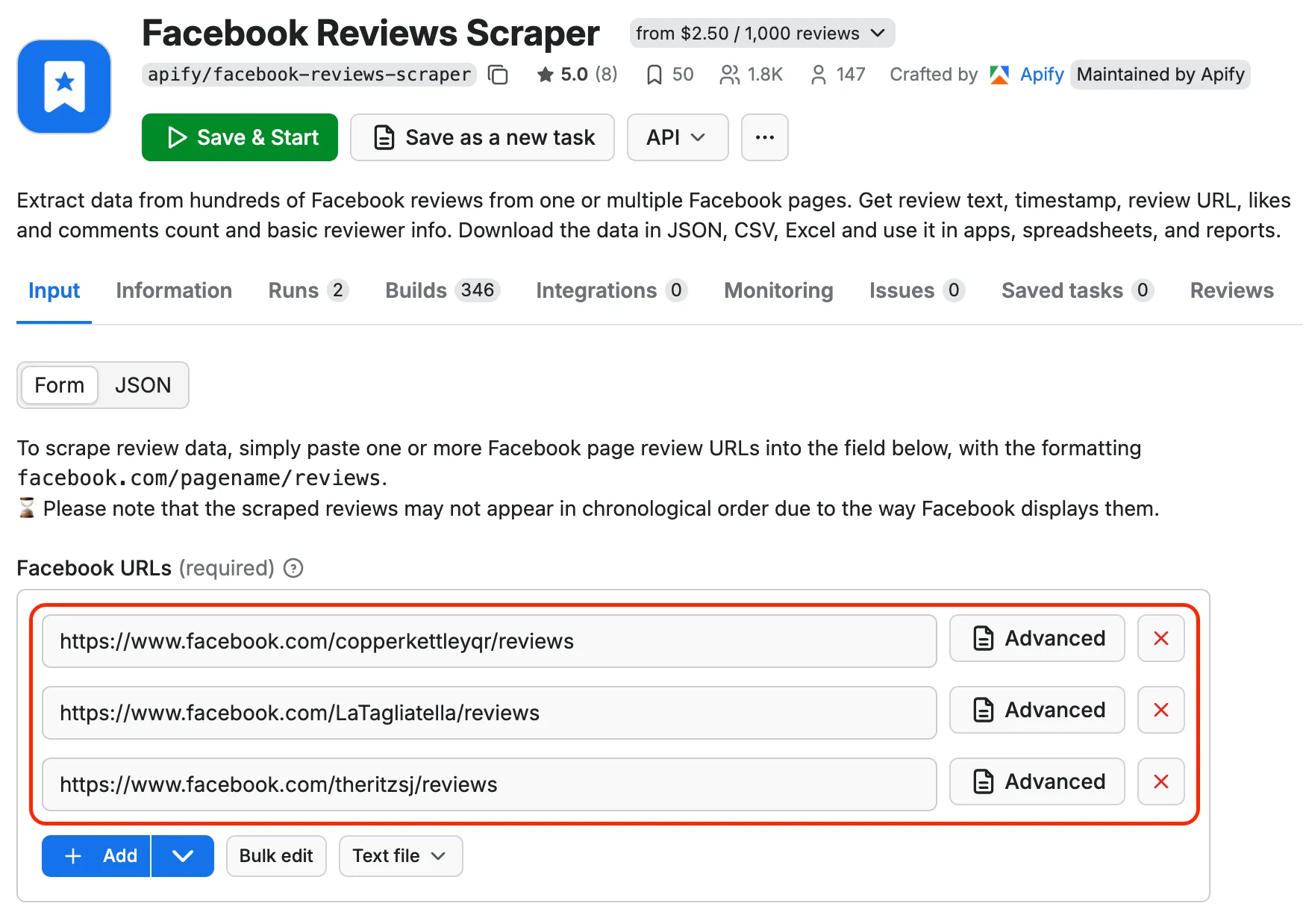
Click on the input tab for a full explanation of an input example in JSON.
⬆️ Output
The results will be wrapped into a dataset which you can find in the Output tab.
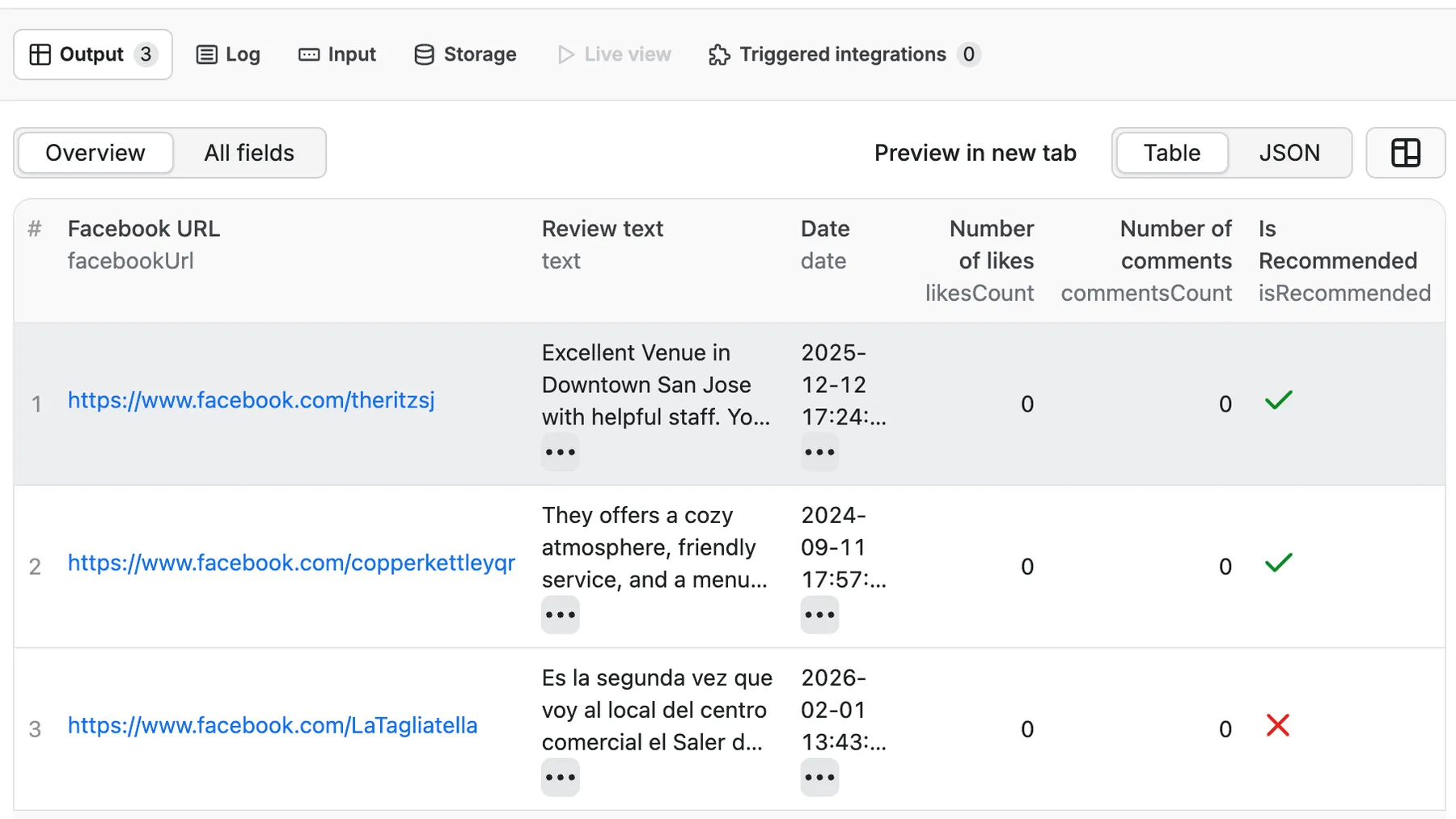
Be aware that the results are not sorted chronologically. However, you can easily sort them yourself in the final dataset.
📘 Extracted Facebook reviews sample
You can choose in which format to download your Facebook data: JSON, JSONL, Excel spreadsheet, HTML table, CSV, or XML. Here's what a typical review output looks like:
What is the best Facebook scraper?
You can use any of the dedicated scrapers below if you want to scrape specific Facebook data. Each of them is built particularly for the relevant Facebook scraping case be it groups, reviews, comments or ads. Feel free to browse them:
❓ FAQ
Can I scrape reviews from other websites?
Yes! If you need to extract reviews from other platforms, check out these popular review scrapers in the Apify Store:
- Google Maps Reviews Scraper — extract reviews from Google Maps and Google Business
- Tripadvisor Reviews Scraper — scrape reviews from Tripadvisor listings
- Booking.com Reviews Scraper — extract hotel and accommodation reviews from Booking.com
- Amazon Reviews Scraper — scrape product reviews from Amazon
Can I export Facebook Reviews data using API?
Yes, you can access the extracted Facebook reviews data through the Apify API. You'll need an Apify account and your API token (available under Integrations settings in Console). Apify API is organized around RESTful HTTP endpoints that enable you to manage, schedule, and run Apify actors. The API also lets you access any datasets, monitor actor performance, fetch results, create and update versions, and more. To access the API using Node.js, use the apify-client NPM package. To access the API using Python, use the apify-client PyPI package.
Click on the API tab for code examples or check out the Apify API reference docs for full detail.
Can I use Facebook Reviews Scraper through an MCP server?
With Apify API, you can use Facebook Reviews Scraper within your AI workflows. You can connect to the MCP server using clients like ClaudeDesktop and LibreChat or build your own. Here's how you can set up Facebook Reviews Scraper via Model Context Protocol (MCP) server:
- Start a Server-Sent Events (SSE) session to receive a
sessionId. - Send API messages using that
sessionIdto trigger the scraper. - The message starts the Facebook Reviews Scraper with the provided input.
- The response should be:
Accepted.
This makes Facebook Reviews Scraper compatible with MCP server implementations and allows you to use it as a review scraper API within your AI agent workflows.
Do I need proxies to scrape Facebook reviews?
You need proxies in general but you don't need to do anything extra to apply them if you run the scraper on the Apify platform. For successful Facebook reviews scraping, we run residential proxies in the background which are included in Apify's monthly Starter plan ($29).
Can I integrate data from Facebook Reviews Scraper with other apps?
Yes. Facebook Reviews Scraper can be connected with almost any cloud service or web app thanks to integrations on the Apify platform. You can integrate with Make, Zapier, ChatGPT, Slack, Airbyte, GitHub, Google Sheets, Asana, Google Drive, Keboola, MCP Servers, and more.
Is it legal to scrape Facebook Reviews data?
Our Facebook scrapers are ethical and do not extract any private user data. They only extract what the user has chosen to share publicly. However, you should be aware that your results could contain personal data. You should not scrape personal data unless you have a legitimate reason to do so.
If you're unsure whether your reason is legitimate, consult your lawyers. You can also read our blog post on the legality of web scraping and ethical scraping.
Facebook Reviews Scraper is not working?
We're always working on improving the performance of our Actors. So if you've got any technical feedback for Facebook Reviews Scraper or simply found a bug, please create an issue on the Actor's Issues tab.


![Facebook Marketplace [$1.5💰] Get newest items ASAP avatar](https://images.apifyusercontent.com/nKMo9NFaL_X5HFMFiKNHuGA-Ci2vE_qSh-zwYSCpsFo/rs:fill:76:76/cb:1/aHR0cHM6Ly9hcGlmeS1pbWFnZS11cGxvYWRzLXByb2QuczMudXMtZWFzdC0xLmFtYXpvbmF3cy5jb20vbmduOHZSRVNUa3NleVdFNnAtYWN0b3ItZWF5Y2pFdUNNS0hCRHVMOXotUnhiWUF0SjBsdy1mYWNlYm9vay5wbmc.webp)