

Loopnet Agents Email
Pricing
from $19.90 / 1,000 results
Loopnet Agents Email
LoopNet agent email extractor that fetches broker contacts and listing details from LoopNet listing IDs, returning a clean flat dataset with names, emails, phones, and titles in one row per listing.
Pricing
from $19.90 / 1,000 results
Rating
0.0
(0)
Developer

B2B Lead Generation
Maintained by CommunityActor stats
0
Bookmarked
12
Total users
0
Monthly active users
3 months ago
Last modified
Categories
Share
LoopNet Agents Email: Extract B2B Broker Contacts and Property Details from LoopNet
LoopNet Agents Email pulls B2B broker contacts from LoopNet commercial real estate listings using listing IDs.
Pass in one ID or a few thousand. You get broker names, emails, phone numbers, job titles, brokerage companies, and property address info. A listing with multiple agents produces multiple rows, one per broker, with the property address repeated on each. Two agents on one listing means two rows of full contact data. Three agents means three rows. That's it.
No LoopNet account or API key needed.
Output preview
Table view — one row per broker, listing header repeated across all brokers for that property:
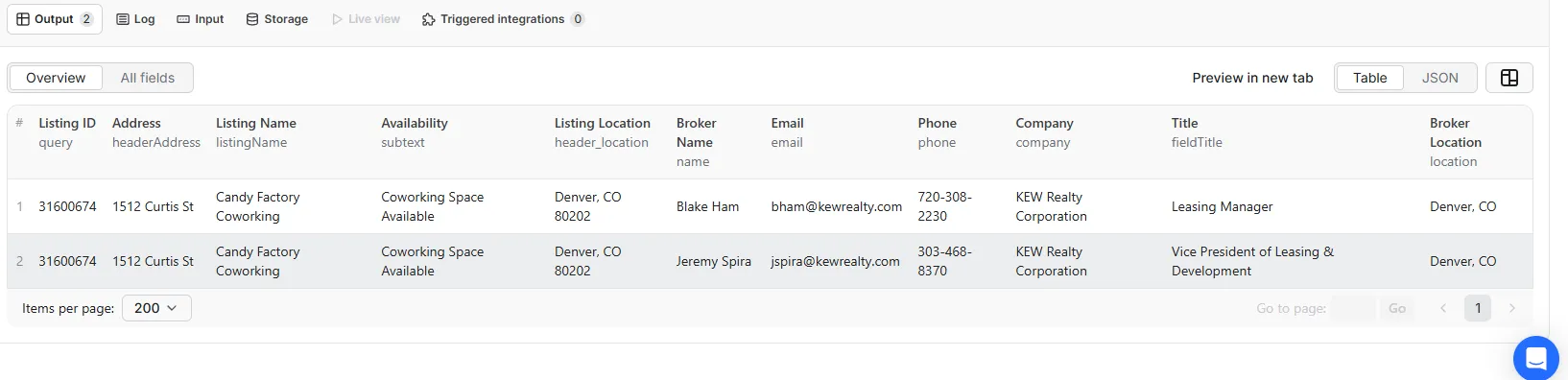
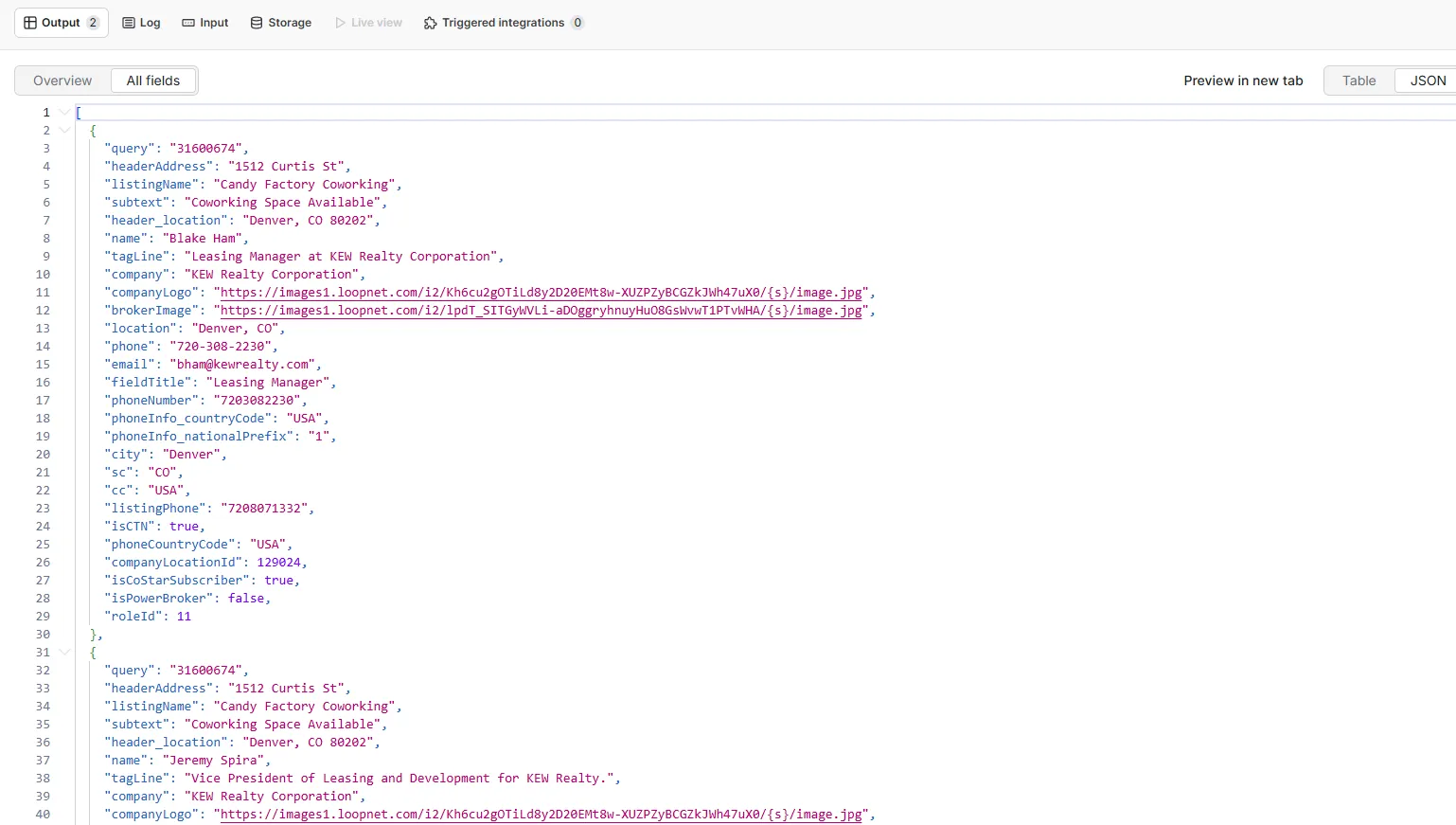
JSON view — all fields flat, no nested objects:
Use cases
- B2B lead generation: build targeted LoopNet broker email lists for cold outreach campaigns without manual searching
- CRM enrichment: append verified commercial real estate agent contacts to existing records using listing IDs as the join key
- CRE market research: pull listing headers and full broker contact info for hundreds of properties in one run
- Market mapping: collect broker and brokerage data across listings to identify the most active commercial agents in any city or submarket
- Broker contact database: build a structured CRE contact database from LoopNet listing IDs collected from search results or other sources
- Competitor analysis: see which agents and brokerages dominate specific property types, markets, or zip codes
- Outreach automation: feed broker emails into Make, Zapier, or n8n to trigger personalized email sequences as soon as data lands
- Investment prospecting: find listing agents on newly posted or off-market commercial properties for acquisition outreach
Input
| Parameter | Type | Default | Description |
|---|---|---|---|
listing_ids | array of strings | (required) | One or more LoopNet listing IDs to fetch broker and property data for. |
maxItems | integer | 100 | Maximum number of listings to process per run. Up to 10,000. |
timeoutSecs | integer | 30000 | Overall actor run timeout in seconds. Increase for very large batches. |
requestTimeoutSecs | integer | 30 | Per-request timeout in seconds. |
proxyConfiguration | object | Datacenter (Anywhere) | Proxy type and location. Supports Datacenter, Residential, Special, and custom proxies. Optional. |
Example input
What data does this actor extract?
One flat row per broker. Listing header fields repeat on every broker row. A property with two agents gives two rows; three agents gives three rows.
Sample output (two brokers on one listing)
Output field reference
| Field | Type | Description |
|---|---|---|
query | string | LoopNet listing ID. Repeats on every broker row for this listing. |
headerAddress | string | Street address of the commercial property. |
listingName | string | Property or listing name. |
subtext | string | Availability note from the listing header (e.g. "Office Space Available"). |
header_location | string | City, state, and ZIP of the property. |
name | string | Broker full name. |
tagLine | string | Broker professional tagline or bio line. |
company | string | Brokerage company name. |
companyLogo | string | URL of the brokerage company logo image. |
brokerImage | string | URL of the broker profile photo. |
location | string | Broker city and state. |
phone | string | Broker direct phone number (formatted). |
email | string | Broker B2B email address. |
fieldTitle | string | Broker job title (e.g. "Leasing Manager", "VP of Investments"). |
phoneNumber | string | Phone number digits only, from phoneInfo. |
phoneInfo_countryCode | string | Phone country code from phoneInfo (e.g. USA). |
phoneInfo_nationalPrefix | string | National dialing prefix (e.g. 1 for US). |
city | string | Broker city. |
sc | string | Broker state code (e.g. CO, TX, CA). |
cc | string | Broker country code (e.g. USA). |
listingPhone | string | Listing contact phone digits. |
isCTN | boolean | Whether click-to-call is enabled for this broker. |
phoneCountryCode | string | Top-level phone country code. |
companyLocationId | integer | Internal brokerage location ID. |
isCoStarSubscriber | boolean | Whether the broker is a CoStar subscriber. |
isPowerBroker | boolean | Whether the broker holds LoopNet PowerBroker status. |
roleId | integer | Broker role ID. |
error | string | Populated when a listing could not be fetched. Empty on success. |
Tips for getting the most out of this actor
Build your listing ID list first. This actor takes listing IDs as input — it does not search LoopNet for you. Collect listing IDs from LoopNet search URLs, your own CRM, or a separate LoopNet search actor, then feed them here in bulk.
Use proxies for large batches. For runs over 500 listings, enable Datacenter proxies in the proxy configuration. Switch to Residential proxies if you see a high rate of failed rows.
Check the error field. Any row with a non-empty error field means that listing ID failed. Export those IDs, investigate, and re-run them in a separate smaller batch.
Connect to Google Sheets or a CRM. Use the Apify Google Sheets integration or a webhook to push broker emails directly into your outreach tool the moment a run finishes. No manual CSV exports needed.
Filter by isPowerBroker or isCoStarSubscriber. These boolean fields let you prioritize the most active or established brokers in your downstream outreach workflow.
FAQ
Can I pass a single listing ID?
Yes. Add one ID to the listing_ids array. The actor works for one or ten thousand.
How many rows will I get per listing? One row per broker on that listing. A property listed by two agents gives two rows, each with the same property address and listing name repeated.
What happens if a listing has no broker details?
The actor writes error: "Data unavailable" for that listing ID. The property header fields stay empty and the row is easy to filter out.
How many listings can I process per run? Up to 10,000 per run. For very large datasets, split IDs across multiple runs and use the Apify scheduler to chain them.
Do I need a LoopNet account? No. No login, no API key, no credentials of any kind.
Should I use a proxy? For batches over a few hundred, yes. Datacenter proxies are fast and cheap. Residential proxies are slower but more reliable if you see lots of failures.
Can I export the results to CSV or Google Sheets? Yes. From the Apify dataset view, export directly to CSV, JSON, Excel, or connect to Google Sheets via the Apify integration.
Integrations
Connect LoopNet Agents Email with your existing tools using Apify integrations. Works with Make, Zapier, Slack, Airbyte, GitHub, Google Sheets, Google Drive, HubSpot, and more. Use webhooks to push broker contact data into your CRM or outreach platform the moment a run finishes, with no manual steps in between.


![LoopNet US + UK + Realla [$1.5💰] Commercial Property Scraper avatar](https://images.apifyusercontent.com/OWa9kJL7gqsCWnKo6lZR80k_riG91PzwIe70jgZCt_s/rs:fill:76:76/cb:1/aHR0cHM6Ly9hcGlmeS1pbWFnZS11cGxvYWRzLXByb2QuczMudXMtZWFzdC0xLmFtYXpvbmF3cy5jb20vbmduOHZSRVNUa3NleVdFNnAtYWN0b3ItMFpDUU9OeEIzQmR5T3pyYkQtSmVPT0FKRE5idS1sb29wbmV0LmpwZw.webp)


