AI Visibility Tracker: 7 AI Assistants
Pricing
from $40.00 / 1,000 brand query checks
AI Visibility Tracker: 7 AI Assistants
See how AI assistants answer when buyers ask about your category. Calls the official APIs of ChatGPT, Perplexity, Gemini, Claude and Grok, plus Google AI Overviews and AI Mode. Reports whether your brand is named, how early, whether your site is cited, and which rivals appear alongside you.
Pricing
from $40.00 / 1,000 brand query checks
Rating
0.0
(0)
Developer
Babel42
Maintained by CommunityActor stats
0
Bookmarked
2
Total users
1
Monthly active users
2 days ago
Last modified
Categories
Share
Find out how AI assistants answer when your buyers ask about your category, and whether your brand is in the answer.
When someone asks ChatGPT "what are the best project management tools for a small agency", one of two things happens. Your brand is named, or it is not. This Actor asks that kind of question on seven AI assistants and tells you whether you were named, how early in the answer, whether your own site was used as a source, and which competitors came up alongside you. Switch on sentiment and it rates how favourably too.
No API keys. Nothing to sign up for. Set a brand name and press start.
Use it as an MCP tool inside any AI agent. No setup, no install:
https://mcp.apify.com?tools=babel42/ai-visibility-tracker
Works with Claude, ChatGPT agents, Cursor, LangChain, Make, Zapier, n8n and the REST API.
Which AI assistants it checks
Seven, in a single run. Pick any combination.
| AI assistant | Live web search | Returns citations |
|---|---|---|
| ChatGPT | Yes | Yes |
| Perplexity | Yes | Yes |
| Google Gemini | Yes, Google Search grounding | Yes |
| Claude | Yes | Yes |
| Google AI Overviews | Yes | Yes |
| Google AI Mode | Yes | Yes |
| Grok | Answers from training knowledge | No |
Every result records whether the assistant searched the web for that answer or answered from what it already knew. Both are worth measuring, and the difference matters when you read the numbers.
ChatGPT, Perplexity, Gemini, Claude and Grok are each called through their own official API, so what you see is what the assistant actually returned. Google publishes no API for AI Overviews or AI Mode, so those two run through DataForSEO, a licensed SERP data provider.
Key features
- Seven AI assistants in one run, not three or four.
- No API keys to bring and no separate AI bills.
- Answers come from the assistants' own official APIs, with the two Google surfaces served by a licensed SERP data provider.
- Builds your questions from real Google search volume, seeded by the keywords your domain already ranks for.
- Tells "your brand was not mentioned" apart from "this assistant could not be reached".
- Records whether each answer came from a live web search or from memory.
- Tracks competitor mentions in the same answer, so you get share of voice per question.
- Follows citations to the exact URL and domain.
- Optional sentiment rating on every mention, off by default.
- Free dry run shows the exact questions and cost before you spend anything.
- Set a maximum spend and the run stops there.
- Works as an MCP tool in any AI agent through one URL, with nothing to install.
- Country and city targeting for local intent.
Where the questions come from
Most trackers make you write the questions, or pick from a fixed template menu. This one starts from measured demand.
Give it your domain and it looks up the keywords that domain already ranks for in Google's top 30 results, along with the real monthly search volume behind each one. The highest volume terms become the seeds for the questions put to the AI assistants. Every result carries the seed_keyword it grew from, so you can trace any number back to a real search term and the demand behind it.
That means you are measuring visibility on the questions that carry actual search volume in your category, not on questions someone guessed at.
You can still write your own questions. Put them in customQueries and they are used exactly as given.
What you get for every check
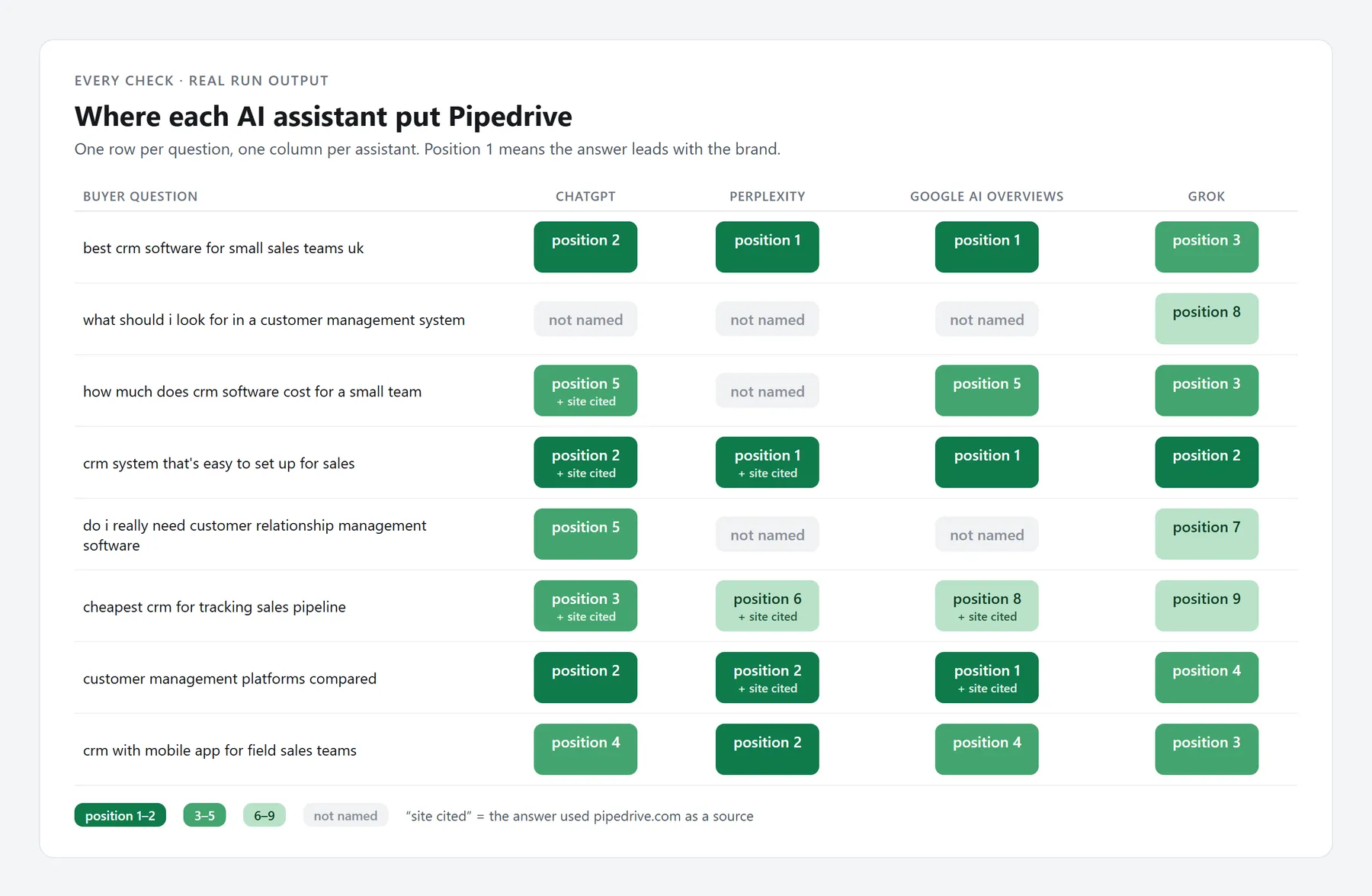
One row per brand, question and AI assistant.
| Metric | What it tells you |
|---|---|
brand_mentioned | Whether your brand appears in the answer at all |
brand_mention_count | How many times it appears |
mention_position_score | How early it appears, 1 is first and most prominent |
mention_context | The sentence around the mention, so you can read it in context |
sentiment | Positive, neutral or negative on that mention |
is_cited_as_source | Whether your own domain was used as a source |
cited_url | The exact page of yours that was cited |
cited_urls | Every source the assistant cited for that answer |
cited_domains | Which domains the assistant trusts in your category |
total_sources_cited | How many sources the answer rested on |
competitor_mentions | Which rivals were named in the same answer |
competitor_mention_count | How many times, in total |
brand_share_of_voice | Your mentions as a share of you plus your competitors |
searched | Whether the assistant searched the web for this answer |
ai_response_summary | The answer itself, so you can see what was actually said |
query_category | Which kind of buying question this was |
model_used | Exactly which model answered |
ok | Whether the check completed |
What you get for the whole run
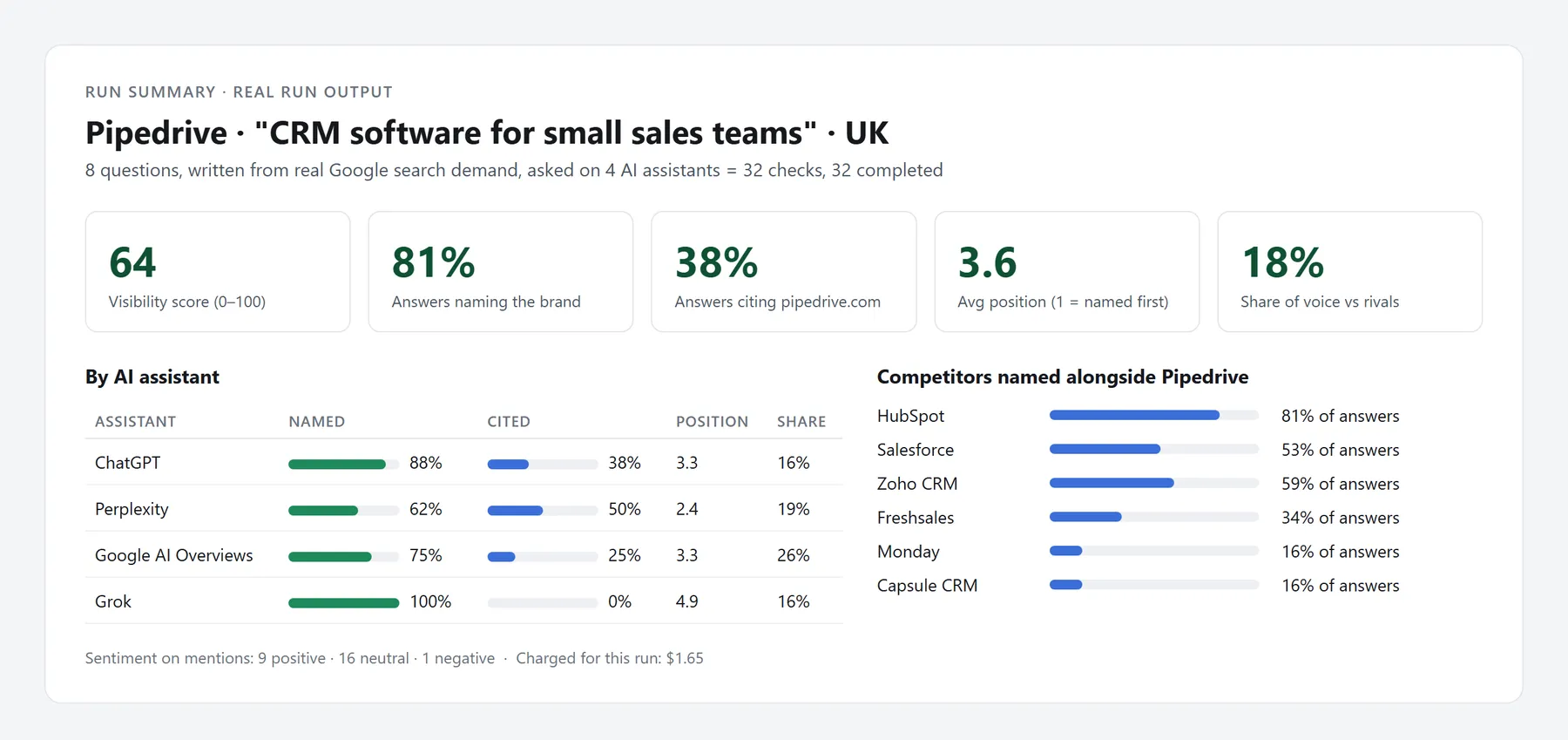
A summary is written to the key value store under RUN_SUMMARY on every run. Set includeSummaryItem if you also want it appended to the results dataset.
| Metric | What it tells you |
|---|---|
visibility_score | One number for how visible the brand is across everything checked |
mention_rate | Share of questions where the brand was named |
citation_rate | Share of answers that cited your domain |
avg_position_score | How early you appear on average |
share_of_voice | You against your competitors across the whole run |
sentiment_breakdown | Positive, neutral and negative counts |
by_assistant | The same figures broken down per AI assistant |
top_competitors | Who comes up most often alongside you |
top_cited_domains | Which sites AI assistants cite most in your category |
Every rate is calculated over the checks that completed, so one assistant having a bad day never quietly drags a number down.
How to use it
Step 1: the smallest useful input
{"brand": "Ahrefs","brandDomain": "ahrefs.com","category": "SEO tools"}
That is enough. The Actor writes the questions, picks sensible AI assistants and runs.
Step 2: see the plan before you spend
Set demoMode to true. The run builds the exact question set and assistant list, reports them, and charges nothing. No AI provider is called. Use it to check a configuration before a large run.
Step 3: a real run
{"brand": "Ahrefs","brandDomain": "ahrefs.com","category": "SEO tools","competitors": ["Semrush", "Moz", "Ubersuggest"],"assistants": ["chatgpt", "perplexity", "gemini", "ai_overviews"],"maxQueries": 10,"market": "GB","includeSentiment": true,"maxBudgetUsd": 2.00}
Step 4: schedule it
Run it weekly with the Apify scheduler and set monitorId to the same value each time. Every row carries that value, so a week of runs lines up into a trend without any extra work.
How much does it cost
Pay per event. One check is one brand, on one question, on one AI assistant. Ten questions across four assistants is forty checks.
| Event | Price |
|---|---|
| Brand query check | $0.04 |
| Claude query checked | $0.21 |
| Question set written for you | $0.08 per run, only when you ask for it |
| Sentiment classified | $0.005 per check, optional |
| Competitors discovered | $0.005 per check, optional |
Claude is billed as its own event because it costs considerably more to run per check. It is not in the default selection, so you only pay for it when you choose it.
A typical weekly run of 10 questions across 4 assistants is about $1.60. Sentiment and competitor discovery are charged per check, so switching both on adds about $0.40 to that run. Set a maximum spend and the run will not start if the total would exceed it.
Output example
{"platform": "perplexity","query": "best SEO tools for a small agency","query_category": "best_tools","brand": "Ahrefs","brand_mentioned": true,"brand_mention_count": 3,"mention_position_score": 2,"mention_context": "Ahrefs remains the strongest choice for backlink analysis...","sentiment": "positive","is_cited_as_source": true,"cited_url": "https://ahrefs.com/blog/seo-tools/","total_sources_cited": 8,"competitor_mentions": ["Semrush", "Moz"],"brand_share_of_voice": 0.6,"searched": true,"model_used": "sonar","ok": true}
Use it inside an AI agent
Point your agent at this URL and it can run brand checks inside a conversation:
https://mcp.apify.com?tools=babel42/ai-visibility-tracker
Then ask it directly:
"Check how Ahrefs appears in ChatGPT and Perplexity when people ask about SEO tools for small agencies."
Set mode to quick for agent use. It returns shorter answer excerpts, which keeps the response small enough to sit comfortably in a conversation.
API
REST
curl -X POST "https://api.apify.com/v2/acts/babel42~ai-visibility-tracker/runs" \-H "Authorization: Bearer YOUR_APIFY_TOKEN" \-H "Content-Type: application/json" \-d '{"brand": "Ahrefs","brandDomain": "ahrefs.com","category": "SEO tools","assistants": ["chatgpt", "perplexity", "ai_overviews"]}'
Python
from apify_client import ApifyClientclient = ApifyClient("YOUR_APIFY_TOKEN")run = client.actor("babel42/ai-visibility-tracker").call(run_input={"brand": "Ahrefs","brandDomain": "ahrefs.com","category": "SEO tools","competitors": ["Semrush", "Moz"],"assistants": ["chatgpt", "perplexity", "gemini"],})for item in client.dataset(run["defaultDatasetId"]).iterate_items():print(item["platform"], item["brand_mentioned"], item["mention_position_score"])summary = client.key_value_store(run["defaultKeyValueStoreId"]).get_record("RUN_SUMMARY")print(summary["value"]["visibility_score"])
Works with the Apify scheduler, the MCP server, Make, Zapier, n8n, Google Sheets, Slack, Airtable and any webhook.
Frequently asked questions
Do I need my own API keys?
No. Access to all seven AI assistants is included in the per check price. There is nothing to sign up for and no second bill.
How often should I run it?
Weekly suits most brands. Run it after publishing a major piece of content, launching a feature or running a campaign, and compare against the week before.
Can I track a competitor instead of my own brand?
Yes. Put their name in brand and their domain in brandDomain. You get exactly the same report on them.
What does the position score mean?
It runs from 1 to 10. A 1 or 2 means the assistant leads with your brand. A 6 to 9 means you are mentioned late, after other options. It is the difference between being the recommendation and being an afterthought.
Can I write my own questions?
Yes. Put them in customQueries and they are used exactly as written. Leave it empty and the Actor builds them from the keywords your domain already ranks for in Google, weighted by real monthly search volume.
Can I limit what a run costs?
Yes. Set maxBudgetUsd and the run stops when it reaches your ceiling.
Is this affiliated with OpenAI, Anthropic, Google or xAI?
No. This Actor uses their public APIs under their normal terms. It is not endorsed by or affiliated with any of them. Product names are used only to identify which assistant was measured.
Support
Maintained by Babel42. Open an issue on the Actor's Issues tab and we will pick it up.