

🔥 LinkedIn Jobs Scraper
Pricing
from $1.00 / 1,000 job results
🔥 LinkedIn Jobs Scraper
ℹ️ Designed for both personal and professional use, simply enter your desired job title and location to receive a tailored list of job opportunities. Try it today!
Pricing
from $1.00 / 1,000 job results
Rating
4.5
(74)
Developer

Bebity
Maintained by CommunityActor stats
754
Bookmarked
46K
Total users
5.4K
Monthly active users
8.7 days
Issues response
23 days ago
Last modified
Categories
Share
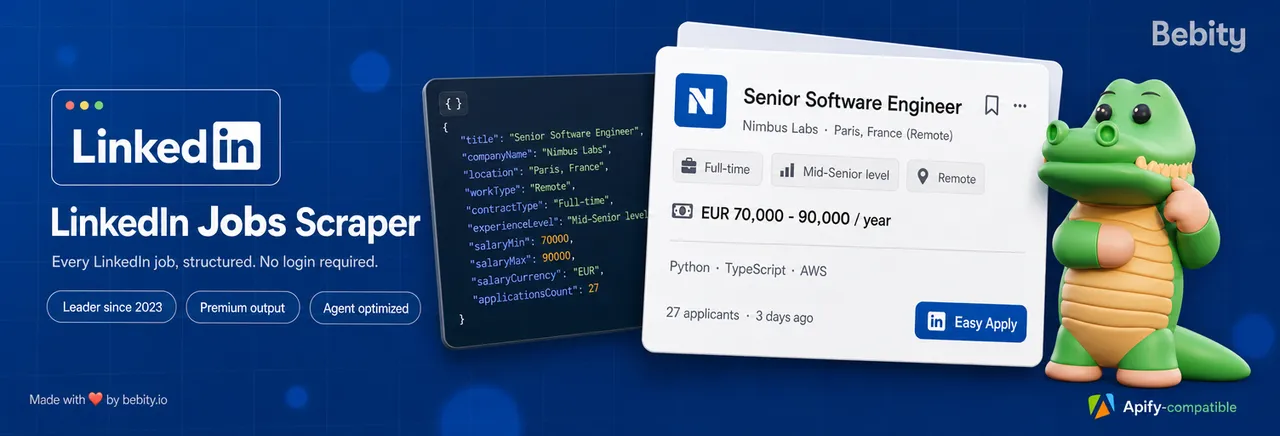
LinkedIn Jobs Scraper extracts job postings from LinkedIn Jobs into clean, structured JSON, CSV or Excel — no LinkedIn account, no cookies, no login required. Paste a LinkedIn job search URL or fill in a few filters (job title, location, remote, salary, experience level), and get 42 data fields per job: full description, company profile, recruiter details, salary breakdown, applicant count and the direct apply URL.
Running on Apify since February 2023, this is the original LinkedIn jobs scraper on the Store — 3.9 million+ runs, 35,000+ users, and a 99%+ success rate. It has never been deprecated, never flagged under maintenance.
🆕 September 2026 — major update. Fully rebuilt for LinkedIn's 2026 search filters, and now moving to pay-per-event pricing. No more $29.99/month subscription: you pay only for the jobs you actually get. See What's new.
| 🗓️ On the Store since | February 2023 — the longest-running LinkedIn jobs scraper on Apify |
| ▶️ Total runs | 3,900,000+ |
| 👥 Users | 35,000+ |
| ✅ Success rate | 99%+ |
| 📊 Data fields per job | 42 — the most of any LinkedIn jobs scraper on Apify |
| 🔑 Login required | No — no LinkedIn account, no cookies |
What is LinkedIn Jobs Scraper?
LinkedIn Jobs Scraper is a LinkedIn Jobs API alternative: an unofficial, no-code LinkedIn job scraper that turns any LinkedIn job search into a structured dataset. LinkedIn has no public jobs API, so this Actor acts as a stand-in — it reads the same public job listings you see in your browser and returns them as machine-readable data you can query, filter, schedule and pipe into any tool.
Use it to scrape LinkedIn jobs for:
- 🎯 Job hunting — track every new posting matching your title, location and work type, hours after it goes live.
- 📈 Labor market research — extract salaries, seniority, contract types and applicant counts to benchmark a market or a role.
- 🏢 Recruitment & competitive intelligence — monitor who your competitors are hiring, in which cities, at what pay.
- 🤝 Lead generation — a company that is hiring is a company that is spending. Extract hiring signals plus the recruiter behind each posting.
- 🤖 AI agents & LLM pipelines — feed clean job data straight into an agent, RAG index or automation. See AI agents.
🆕 What's new in the 2026 rebuild
LinkedIn overhauled its job search in 2026 and broke a lot of scrapers. This one was rebuilt from the ground up around the new endpoints and filters.
- ✅ All 2026 LinkedIn filters supported, server-side and exact — work type (on-site / remote / hybrid), job type, experience level, industry, date posted, Easy Apply, under-10-applicants, company. Work type, job type, experience level and industry each accept several values at once (e.g. Remote or Hybrid), matched in one search. A Remote search returns genuinely remote roles, not a filtered-looking guess.
- 🏭 Industry filter by name — pick industries from a list (Software Development, Financial Services, Hospitals and Health Care, …), no codes to look up.
- 🏢 Search by company, three ways — company name, numeric id, or LinkedIn company page URL. Paste a company URL into Start URLs to scrape every job at that company.
- 🏢 Company profile with every job — headcount, followers, industry, description, tagline, headquarters, company type, founding year and the company's website. Read once per company and reused across its jobs.
- 📊 Search totals — each run reports how many jobs LinkedIn says match your search (
SEARCH_TOTALS), independent of how many you scrape. - 🔗 Paste LinkedIn URLs directly — copy any
linkedin.com/jobs/search/?...URL from your browser and every filter in it is honoured. Singlelinkedin.com/jobs/view/{id}URLs work too. - 🔎 Multi-title × multi-location search — search several job titles across several locations in one run, with each result tagged by the title and location that produced it.
- 💸 Salary parsing — the raw salary string plus a structured breakdown:
salaryMin,salaryMax,salaryCurrency,salaryPeriod. - 🧭 Full provenance — every job carries a
scrapingInfoobject (page, index, input URL, title, location) so you can always trace a row back to the exact search that produced it. - 🔁 Resumable runs — a migrated or restarted run picks up where it stopped. No duplicate rows, no double billing.
- ⚡ Rebuilt performance layer — in-memory request queues, shared rate-limit backoff and smart proxy rotation. Fewer retries, faster runs, lower cost per job.
- 💳 Pay-per-event pricing — pay for the jobs you receive, not for a monthly seat.
🤖 Built for AI agents: Claude Code, ChatGPT, Codex, MCP
Most scrapers were designed for humans clicking a Run button. This one is designed to be called by an agent.
If you are building with Claude, Claude Code, ChatGPT, OpenAI Codex, Cursor, LangChain, LlamaIndex, CrewAI, n8n or Make, this Actor is directly callable as a tool — no glue code, no HTML parsing, no browser automation on your side.
How do I use LinkedIn Jobs Scraper with an AI agent?
- 🔌 MCP (Model Context Protocol) — Apify exposes every Actor through its MCP server at
https://mcp.apify.com. Add it to Claude Code, Claude Desktop, Cursor or any MCP client and your agent can search LinkedIn jobs as a native tool, with the input schema auto-discovered. - 🧰 Agent frameworks — official Apify integrations for LangChain, LlamaIndex, CrewAI and the OpenAI Agents SDK let you drop this Actor in as a tool in a few lines.
- 📡 One REST call —
POST https://api.apify.com/v2/acts/bebity~linkedin-jobs-scraper/run-sync-get-dataset-itemsreturns the finished dataset as JSON in a single synchronous request. Perfect for a function-calling loop. - 🧩 Predictable, typed output — a stable, documented schema with 42 fields and no surprise shape changes. Descriptions come in both plain text (
description, token-efficient for LLM context) and HTML (descriptionHtml, when you need the formatting). - 🔍 Traceable results —
scrapingInfotells the agent which query produced which row, so multi-step research stays grounded and citable. - 🔄 No auth to manage — no LinkedIn cookies to refresh, no session to babysit, no 2FA to solve. An unattended agent will not silently start returning login walls.
Why it matters: an agent that has to scrape LinkedIn itself burns context on HTML, breaks on every layout change, and gets blocked. Calling one Actor that returns typed JSON is faster, cheaper and far more reliable.
What data can you extract from LinkedIn jobs?
42 fields per job — the most complete LinkedIn job dataset on Apify. Results arrive in three clean views:
💼 Jobs
| Field | Description |
|---|---|
title | Job title |
description / descriptionHtml | Full job description, plain text and HTML |
location | Job location |
jobFunction | LinkedIn "Job function" (e.g. Engineering and Information Technology) |
salary | Raw salary string as shown on LinkedIn |
salaryMin / salaryMax / salaryCurrency / salaryPeriod | Structured salary breakdown |
contractType | Full-time, Part-time, Contract, Temporary, Internship, Volunteer |
experienceLevel | Internship → Director |
workType | On-site, Remote or Hybrid |
applicationsCount | How many people have applied |
postedTime / publishedAt | When the job was posted |
benefits | Listed benefits |
applyType / applyUrl | Easy Apply vs external, plus the direct apply link |
jobUrl / id | Canonical LinkedIn job URL and job ID |
scrapingInfo | Provenance: page, index, input URL, searched title, searched location |
⭐ jobState | Whether the posting is still LISTED or CLOSED |
⭐ postedAtTimestamp | Exact posting time as an epoch (ms) — precise timestamp behind publishedAt |
⭐ repostedJob | Whether the posting is a repost |
⭐ verified | Whether the posting carries LinkedIn's "verified hiring" badge |
⭐ locationParsed | Structured location object — city, region, country (ISO), formatted |
🏢 Company
| Field | Description |
|---|---|
companyName / companyUrl / companyId | Company identity and LinkedIn page |
companyLogo | Logo image URL |
sector | Industry sector |
🏢 companyEmployeeCount | Exact headcount |
🏢 companySize | Headcount bracket as LinkedIn displays it |
🏢 companyFollowerCount | LinkedIn followers |
🏢 companyIndustries | Full industry list |
🏢 companyDescription | Company "About" text |
🏢 companyTagline | The company's tagline |
🏢 companyHeadquarters | Structured HQ: street, city, region, postal code, ISO country |
🏢 companyHeadquartersText | HQ as displayed, e.g. "Paris, Ile de France" |
🏢 companyType | e.g. Privately Held, Public Company, Nonprofit |
🏢 companyFoundedYear | Year the company was founded |
🏢 companyWebsite | Company's external website URL |
🧑💼 Recruiter
| Field | Description |
|---|---|
posterFullName / posterProfileUrl | Who posted the job, and their LinkedIn profile |
⭐ posterHeadline | Their headline |
⭐ posterPhoto | Their profile photo |
⭐ salarySource | Whether the pay range is employer-provided or a LinkedIn estimate |
🏢 = Company profile (companyProfile), on by default — one lookup per company, reused across its jobs. ⭐ = Hiring contact & job signals (enrichCompany) — a paid add-on covering the recruiter's posterHeadline + posterPhoto, salarySource and the job's own signals (jobState, postedAtTimestamp, repostedJob, verified, locationParsed): one lookup, one charge, billed only for the jobs it enriches.
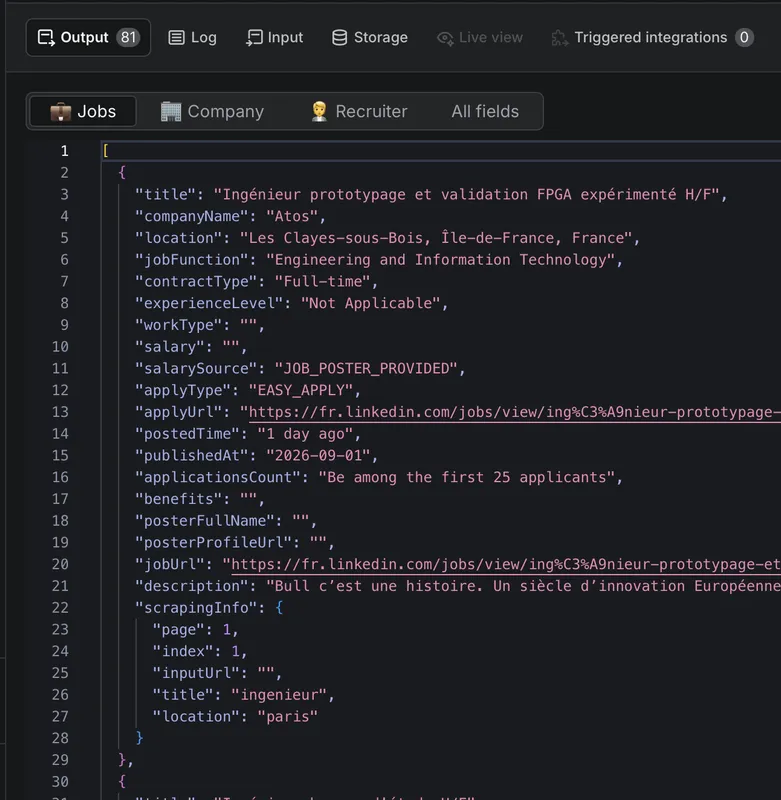
A real run: the three output views — 💼 Jobs, 🏢 Company and 🧑💼 Recruiter — and the scrapingInfo block that maps every row back to the search that produced it.
How many jobs match a search? When LinkedIn exposes it, each run also writes a
SEARCH_TOTALSrecord to its key-value store — the total number of matching positions for each search, regardless of how manyrowsyou actually scraped.
How to scrape LinkedIn jobs — step by step
There are two ways to run a search. Pick whichever is easier.
Option 1 — Paste LinkedIn URLs
- Open LinkedIn Jobs and search however you like, using LinkedIn's own filters.
- Copy the URL from your browser — e.g.
https://www.linkedin.com/jobs/search/?keywords=developer&location=Paris&f_WT=2. - Paste it into LinkedIn URLs (
startUrls). Add as many as you want, and mix three kinds of URL:- a search URL —
https://www.linkedin.com/jobs/search/?keywords=developer&location=Paris&f_WT=2; - a single job URL —
https://www.linkedin.com/jobs/view/4459772101; - a company page URL —
https://www.linkedin.com/company/openai/→ scrapes every open job at that company.
- a search URL —
- Set Max results per URL (
maxRowsPerUrl) to cap each one — 0 (the default) = all available, until the last page — then click Start.
Every filter in the URL is applied, so you get exactly what you saw on LinkedIn. When you provide URLs, the structured filters below are ignored — each URL defines its own search.
Company URL — two ways. Paste a company page URL into Start URLs to get all of that company's jobs. Or, to filter a normal keyword/location search down to one or more companies, put their URLs in the Company URLs (
companyUrls) field instead (Option 2).
Option 2 — Fill in the filters
| Field | What it does |
|---|---|
🔎 Job titles / keywords (titles) | What to search for (e.g. Web developer). Add several — each is searched separately and every result is tagged with the term it came from. |
📍 Job locations (locations) | Where to search (e.g. Paris, Germany). Every title is searched in every location, and each result is tagged with the location it came from. |
⚡ Easy Apply only (easyApply) | Only jobs with LinkedIn Easy Apply. |
🎯 Under 10 applicants (under10Applicants) | Only less-competitive roles. |
🗓️ Published at (publishedAt) | Past 24 hours, past week or past month. |
🏢 Company name / id / URLs (companyName / companyId / companyUrls) | Restrict the search to specific companies. companyUrls takes LinkedIn company page URLs (e.g. https://www.linkedin.com/company/openai/) — often easier than the numeric id — and filters your search to them. |
🏠 Workplace type (workTypes) | On-site / Remote / Hybrid — pick one or more to match any of them. |
📄 Employment type (contractTypes) | Full-time, Part-time, Contract, Temporary, Internship, Volunteer — pick one or more. |
📈 Experience level (experienceLevels) | Internship → Director — pick one or more. |
🏭 Industry (industry) | Filter by company industry — pick one or more from the list (e.g. Software Development, Financial Services, Hospitals and Health Care). Pick several to match any of them. |
🔢 Results per search (rows) | How many results per search (up to 1000). 0 (the default) = all available — every search runs to its last page. Each title × location counts as one search. |
🏢 Company profile (companyProfile) | On by default. Adds each company's headcount, followers, industry, description, tagline, structured HQ, type, founding year and website. One lookup per company, reused across its jobs. Turn it off for the fastest possible run. |
⭐ Hiring contact & job signals (enrichCompany) | Adds the fields the listing card does not carry: the hiring contact's headline & photo (name & profile link come with every result), the salary source, and the job's workplace type, status, exact posting timestamp, repost flag, verified badge and structured location. One lookup → one charge. Billed separately. |
No field is required. Fill in only what you care about — a title alone, a location alone, or just a filter. The old single-value
title,location,workType,contractTypeandexperienceLevelinputs still work if your saved task uses them, but they are no longer shown in the form — use the list fields (titles,locations,workTypes,contractTypes,experienceLevels) instead.
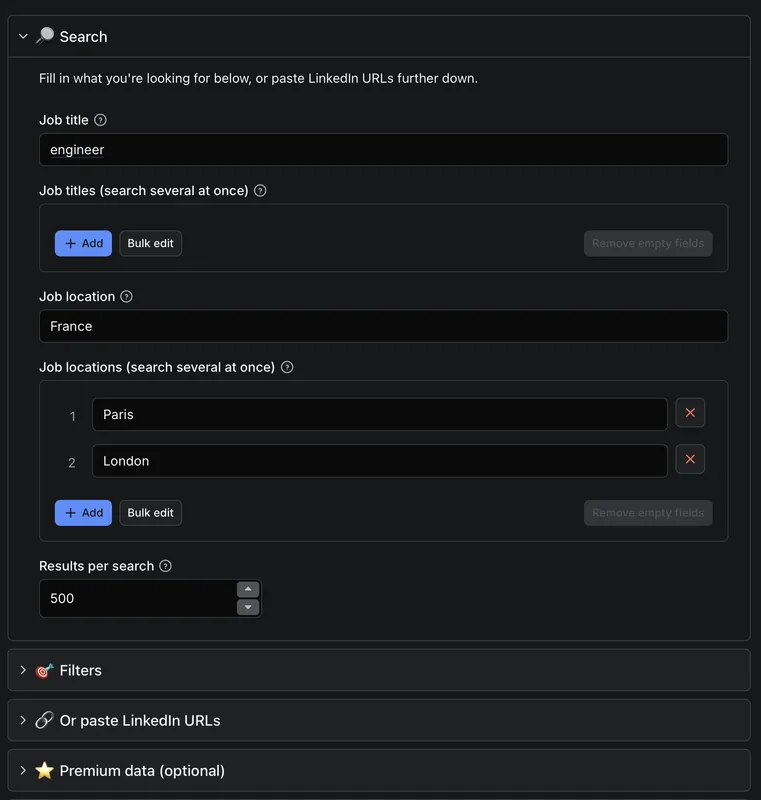
Fill in one job title and location, add several of each to search them all in one run, or open 🔗 Or paste LinkedIn URLs to work straight from a LinkedIn search URL.
How much does it cost to scrape LinkedIn jobs?
This Actor uses pay-per-event pricing: you pay for the results you receive, not a monthly subscription. There is no seat fee, no minimum commitment, and you are not billed separately for Apify platform usage.
- Base rate — charged per job returned. A run that returns 500 jobs costs 500 × the base rate, whatever filters you used to get there.
- 🏢 The company profile comes with the results —
companyProfileis part of the base rate, nothing is billed on top. - ⭐ One paid add-on — Hiring contact & job signals (
enrichCompany) is billed on top of the base rate, only for the jobs it actually enriches. Leave it off and you never pay for it. - Resumed runs are not double-billed — a migrated or restarted run skips jobs it already delivered.
- Hard caps — set a max item or max cost limit on the run and the Actor stops scraping the moment the budget is reached, so it never spends compute on results you will not be charged for.
New Apify accounts get $5 in free credits every month, which is enough to try the Actor and pull thousands of jobs before paying anything.
Is there a free LinkedIn jobs scraper?
You can run this Actor on Apify's free plan using your monthly free credits — enough for a real evaluation, not just a demo. Beyond that you only pay per job, so a small job-hunting run costs cents rather than a $29.99 monthly subscription.
Input and output example
Input
Output (one item, trimmed)
You can download the dataset in JSON, CSV, Excel, HTML or XML, or pull it straight from the Apify API.
Integrations, API and scheduling
Because it runs on the Apify platform, this LinkedIn jobs scraper comes with far more than the scraper itself:
- ⏰ Scheduling — run it every hour or every morning and catch new postings while they are still fresh.
- 🔗 Integrations — push results to Google Sheets, Airtable, Slack, Zapier, Make, n8n, Webhooks, Amazon S3 or Google Drive without writing code.
- 📡 Full REST API — start runs, poll status and fetch datasets programmatically. Official clients for JavaScript and Python.
- 🌐 Proxy rotation — residential proxies handled for you, so large runs keep working.
- 📊 Monitoring — run history, logs, success rates and alerts when something breaks.
Other LinkedIn scrapers by Bebity
| Actor | What it does |
|---|---|
| 🔥 Best & Cheapest LinkedIn Profiles Scraper | Extract LinkedIn profile data, pay per result |
| 🔥 Best & Cheapest LinkedIn Companies Scraper | Extract LinkedIn company pages, pay per result |
| 🔥 Booking Scraper | Scrape hotels and stays from Booking.com |
Pair this Actor with the profiles or companies scraper to go from a job posting → the hiring company → the people behind it.
FAQ
Do I need a LinkedIn account to scrape LinkedIn jobs?
No. This Actor reads publicly visible job listings and requires no LinkedIn login, no cookies and no session token. That is what makes it safe to run unattended, on a schedule, or from an AI agent — there is no account to get restricted and no credentials to rotate.
Is it legal to scrape LinkedIn jobs?
Our scrapers are ethical and do not extract private user data. They only collect what is already published publicly — job postings that employers deliberately made visible to everyone. We therefore believe this scraper, used for ethical purposes, is safe. However, your results may still contain personal data (for example the name of the recruiter who posted a job). Personal data is protected by the GDPR in the European Union and by similar regulations elsewhere. You should not scrape or store personal data without a legitimate reason. If you are unsure whether your reason is legitimate, consult your lawyers.
How is this different from other LinkedIn jobs scrapers on Apify?
| This Actor | Typical alternative | |
|---|---|---|
| On the Store since | February 2023 | 2024–2025 |
| Total runs | 3.9M+ | Fewer |
| Data fields per job | 42 | 19–31 |
| Structured salary breakdown | ✅ min / max / currency / period | Raw string only |
| Recruiter enrichment | ✅ name, headline, photo, profile | Partial |
| Company enrichment | ✅ size, followers, industries, description | Partial |
Result provenance (scrapingInfo) | ✅ | ❌ |
| Multi-title × multi-location in one run | ✅ | ❌ |
| LinkedIn login required | ❌ Never | Sometimes |
| Resumable, no double-billing | ✅ | Varies |
Is LinkedIn Jobs Scraper reliable?
It has been on Apify Store since February 2023 with a 99%+ success rate across 3.9 million runs, and has never been deprecated or flagged under maintenance — Apify tests every Store Actor daily and removes the ones that break. It is actively maintained: the 2026 rebuild shipped days after LinkedIn changed its search filters.
How many jobs can I scrape at once?
By default rows is 0, which means all available — every search runs to its last page. Set a number to cap it instead (up to 1,000 per search). Each job title × location pair counts as its own search, so 5 titles across 4 locations is 20 searches. Bound the whole run with the max items or max cost limit you set on the run, and use maxRowsPerUrl the same way when you paste startUrls.
Can I get the salary for every job?
Only when LinkedIn shows one. Salary disclosure depends on the employer and on local pay-transparency law. When a range is present, you get both the raw string and the parsed salaryMin / salaryMax / salaryCurrency / salaryPeriod. With ⭐ premium data on, salarySource tells you whether the employer provided it or LinkedIn estimated it.
Why did my run report fewer searches than the titles I entered?
Titles and locations are de-duplicated (case-insensitively) before the title × location cross-product, so Engineer and engineer count once. The run tells you what it collapsed and how many unique searches it will actually run. Pasted startUrls that are not a LinkedIn job search or job posting are skipped with a notice rather than failing the run.
Something is not working — where do I get help?
Open a ticket in the Issues tab on this Actor's page. Bug reports, feature requests and questions all land there and are answered. If you need a custom version of this scraper for a specific workflow, mention it in an issue.


![🚀 Indeed jobs scraper [PPR] avatar](https://images.apifyusercontent.com/PEDOk9MmTf1yHtczA1A4wQEoGyAKCe5Aft1HzkhwROk/rs:fill:76:76/cb:1/aHR0cHM6Ly9hcGlmeS1pbWFnZS11cGxvYWRzLXByb2QuczMudXMtZWFzdC0xLmFtYXpvbmF3cy5jb20vTVhMcG5nbVZwRThXVEVTUXIvQjFrZ3BRS1p5dzJvVEpJUmctTG9nby1IZXJvLVN0YXRpYy1lemdpZi5jb20td2VicC10by1qcGctY29udmVydGVyLmpwZw.webp)


