

PDF to Text and Markdown Extractor with Reading Order
Pricing
$2.80 / 1,000 pdf documents
PDF to Text and Markdown Extractor with Reading Order
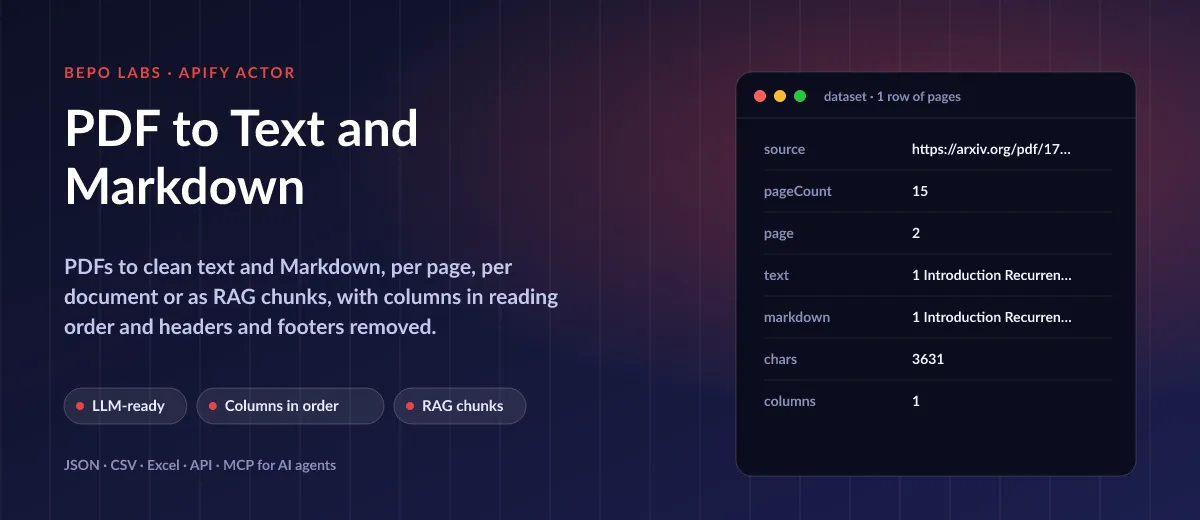
Get headings, lists and body text from a stack of PDFs. Running headers, footers and numbers are stripped; chunks of a size you set carry their section path. Costs 2.8 USD per 1,000 PDF documents.
Pricing
$2.80 / 1,000 pdf documents
Rating
0.0
(0)
Developer

BEPO Labs
Maintained by CommunityActor stats
0
Bookmarked
2
Total users
1
Monthly active users
2 hours ago
Last modified
Categories
Features
Share
📄 What is PDF to Text and Markdown?
Bulk-extract text from each PDF document, by URL, and convert it into structured Markdown as JSON, with two- and three-column layouts read in sequence. Scanned image-only pages are flagged with needsOcr, so you know which ones need OCR.
- RAG and AI agents: feed papers, manuals and reports to your vector store as clean, headed chunks
- Search: index the text of every PDF on your site or in your archive
- Research: pull the text of academic papers per page for reading, quoting or analysis
- Data extraction: get the raw text of invoices, filings or contracts before parsing them
✨ Why use this Actor?
- ✅ New: word count and links: every row gives its
wordCountand the weburlscited in it, for RAG sizing and link checks - ✅ Clean for LLMs: headers, footers and page numbers removed, so they do not repeat in every chunk
- ✅ Reading order: side-by-side text blocks are read in sequence;
columnsreports how many were found - ✅ Three output shapes:
split: page, document or chunk (withchunkSize) - ✅ Links or uploads: public PDF URLs or files in a key-value store
- ✅ Scans flagged:
needsOcrmarks pages without a text layer instead of returning empty text silently - ✅ Fair price: 0.0028 USD per PDF with 20 pages included
📦 What data can you get with PDF to Text and Markdown?
| 📝 Plain text | Ⓜ️ Markdown | 🔢 Page number and page count |
| 🔗 Source URL or key | 🏷️ PDF title | 🔠 Characters |
| 🗞️ Columns detected | 🔎 Needs OCR flag |
🚀 How to use PDF to Text and Markdown
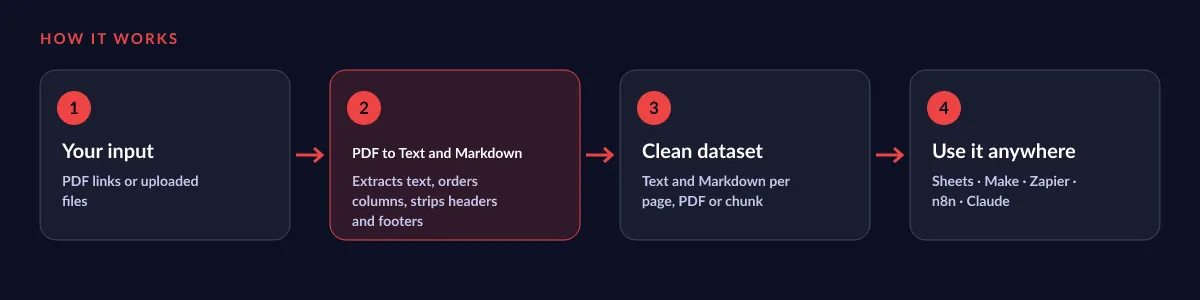
PDF to Text and Markdown works in a few clicks, no coding needed:
- Create a free Apify account (the free plan includes 5 USD of monthly credit).
- Open PDF to Text and Markdown and click Try for free.
- Paste one or more PDF links (or keys of uploaded files) and choose page, document or chunk output.
- Click Start and wait for the run to finish (most runs take seconds).
- Download your data as JSON, CSV, Excel, XML or HTML, or send it straight to Google Sheets, Make, Zapier or your AI agent.
⬇️ Input
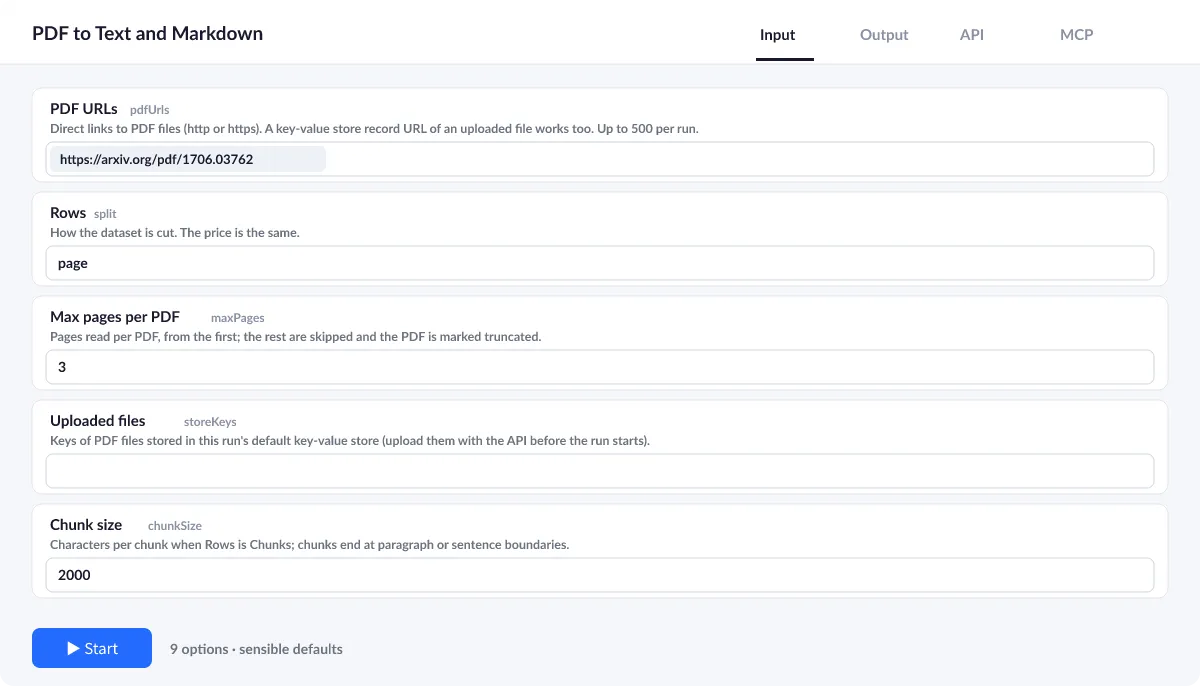
Give pdfUrls or storeKeys; the defaults return one row per page with headers and footers removed.
Split
Choose page (default), document or chunk; chunks hold about chunkSize characters with the heading path above.
Limits
maxPages and maxSizeMb default to 300 and 50 and protect you from huge files; a cut PDF is named in the run summary under truncated.
| Field | Type | What it does | Default |
|---|---|---|---|
PDF URLs (pdfUrls) | array | Direct links to PDF files (http or https). | ["https://arxiv.org/pdf/1706.03762"] |
Uploaded files (storeKeys) | array | Keys of PDF files stored in this run's default key-value store (upload them with the API before the run starts). | |
Rows (split) | string | How the dataset is cut. | "page" |
Chunk size (chunkSize) | integer | Characters per chunk when Rows is Chunks; chunks end at paragraph or sentence boundaries. | 2000 |
Max pages per PDF (maxPages) | integer | Pages read per PDF, from the first; the rest are skipped and the PDF is marked truncated. | 300 |
Max file size (MB) (maxSizeMb) | integer | Larger files are refused before they are downloaded. | 50 |
Remove running headers and footers (removeHeadersFooters) | boolean | Drop lines repeated at the top or bottom of at least half the pages (page numbers, report titles). | true |
Include plain text (includeText) | boolean | Off: Markdown only, smaller rows. | true |
Retries (maxRetries) | integer | Retries per download on network errors, 429 and 5xx, with exponential backoff. | 3 |
Input example
⬆️ Output
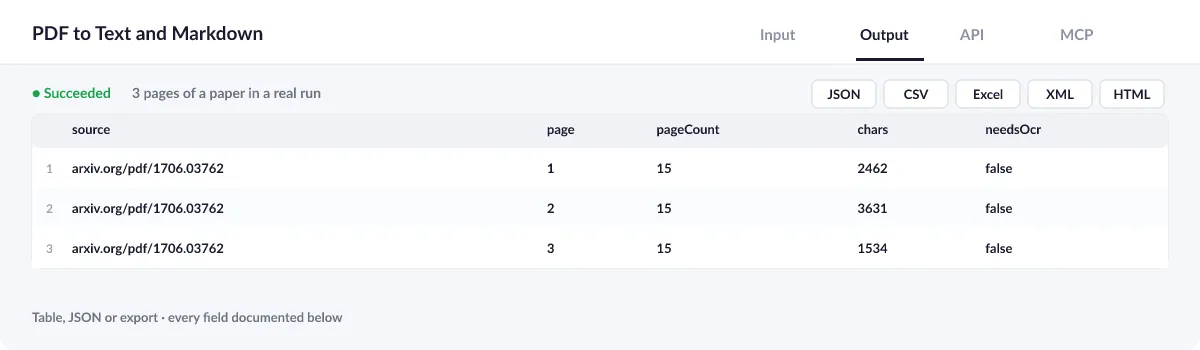
Each page, PDF or chunk becomes a row with text and Markdown. The run summary (OUTPUT) counts PDFs, failures and scans that need OCR.
Output example
One row of the dataset (page 2 of arXiv 1706.03762, a real run of 2026-10-16, text shortened):
View the results as a table or JSON in the Output tab and download them as JSON, CSV, Excel, XML, HTML or RSS, all fields or only those you pick.
💰 How much does PDF to Text and Markdown cost?
PDF to Text and Markdown is priced per event: 2.8 USD per 1,000 PDFs (0.0028 USD each), with no monthly rental. Each one counts once with 20 pages included, plus 0.0002 USD for every extra sheet; failures cost nothing.
| You get | You pay |
|---|---|
| 100 PDFs | 0.28 USD |
| 1,000 PDFs | 2.8 USD |
| 10,000 PDFs | 28 USD |
| 100,000 PDFs | 280 USD |
💡 Apify's free plan gives you 5 USD of credit every month, enough for about 1,785 PDFs at no cost. Set a spending limit per run and the Actor stops there.
⚖️ PDF to Text and Markdown vs. the alternatives
| PDF to Text and Markdown | Basic PDF text extractors | Copy and paste | |
|---|---|---|---|
| Headers and footers removed | ✅ | rarely | ❌ |
| Columns in reading order | ✅ | varies | ❌ |
| Markdown and RAG chunks | ✅ | rarely | ❌ |
| Scanned pages flagged | ✅ | ❌ | – |
🔌 Integrations, API and MCP
Connect PDF to Text and Markdown to your AI agent (MCP)
Give Claude, ChatGPT, Cursor or any MCP client direct access to PDF to Text and Markdown through the Apify MCP server. Add this URL to its settings:
For Claude Desktop, add it under mcpServers in claude_desktop_config.json:
Then ask: "Read this PDF report and give me its text as Markdown chunks of 2,000 characters for my knowledge base."
Run it from your code
Python (pip install apify-client):
JavaScript (npm install apify-client):
No-code integrations
Send results to Google Sheets, Slack, Airtable, HubSpot, Make, Zapier, n8n and more from the Integrations tab, start runs on a schedule, or trigger your own endpoint with a webhook when a run finishes. The Apify API gives you full control over runs and datasets.
❓ FAQ
Does it do OCR?
No. It reads the PDF's text layer; pages without one are marked needsOcr: true so you can send them to an OCR tool.
How large can a PDF be?
Up to maxSizeMb (50 MB) and maxPages (300) unless you raise them.
Can I upload my own files?
Yes: put them in a key-value store and list their keys in storeKeys.
Is it legal to use PDF to Text and Markdown?
The Actor reads only the PDFs you give it. Make sure you may process them; copyright and confidentiality of the documents stay your responsibility.
What if something is missing or does not work?
Open an issue on the Issues tab; we read each one and reply. Feature requests are welcome too.
💬 Your feedback
Tell us what PDF to Text and Markdown should add on the Issues tab or leave a review; your notes decide what we work on next.
🔗 Related Actors
| Actor | What it does |
|---|---|
| 🔤 Image OCR | Extract text from images in 29 languages: plain text, clean Markdown and every word with its pixel box and confidence. |
| 🎓 OpenAlex Research Papers | Research papers in bulk from OpenAlex: search, DOI or citing works to clean rows with citations, abstracts and free PDF links. |
| 📝 Website to Markdown | Any web page or docs site to clean Markdown for LLMs, RAG and AI agents, with headings, links and ready-made chunks. |
| 🧪 Clinical Trials Data | ClinicalTrials.gov studies by condition, drug, sponsor or NCT id, with sites, eligibility and posted results. |
| 🎙️ Audio and Video Transcriber | Whisper transcripts of audio and video files: full text, timed segments, SRT and WebVTT. No API key. |
| 💊 openFDA Data | FDA adverse events, recalls, drug labels and 510(k) clearances for any drug or device, as clean rows. |
| 📰 RSS Feed Reader | Any RSS, Atom or JSON feed, or just a website URL, to one clean list of articles, with full text on request. |
| 🏛️ SEC EDGAR Filings | Tickers or CIK numbers to SEC filings: 10-K, 10-Q, 8-K, Form 4 and any other form, with document links. |


