

SEO, GEO & AEO Audit: AI Search Readiness Checker
Pricing
from $4.00 / 1,000 page auditeds
SEO, GEO & AEO Audit: AI Search Readiness Checker
SEO, GEO and AEO audit plus an llms.txt checker for AI search readiness. Check public HTML, robots.txt for GPTBot and other AI crawlers, llms.txt and the sitemap. Get 0–100 scores and prioritized fixes for ChatGPT and Perplexity visibility. Fast HTTP crawl, no browser and no proxy.
Pricing
from $4.00 / 1,000 page auditeds
Rating
0.0
(0)
Developer

Web Audit Lab
Maintained by CommunityActor stats
0
Bookmarked
2
Total users
1
Monthly active users
7 days ago
Last modified
Categories
Features
Share
What this Actor does
The SEO, GEO & AEO Audit: AI Search Readiness Checker is a website audit for AI search readiness. It checks whether public pages are clear to AI crawlers and answer engines, not only to classic Google results. In one run you get an SEO check, a GEO/AEO audit and an llms.txt checker, so you can see how a site may appear for ChatGPT and Perplexity visibility.
It fetches public HTML over HTTP (no browser, no proxy), stays on the same hostname, and respects robots.txt. For each site it also reads robots.txt rules for AI crawlers such as GPTBot and ClaudeBot, plus llms.txt, llms-full.txt and the sitemap. Every audited HTML page and each site summary gets transparent 0–100 scores for SEO, GEO and AEO, with a prioritized fix list. Failed or non-HTML URLs are not charged as page audits. Each audited page and each site summary is one dataset item, without the full HTML.
The Actor uses Crawlee CheerioCrawler (HTTP + Cheerio). It does not open a browser, does not need a proxy for typical public documentation and marketing sites, and it does not call an LLM. You can run it in Apify Console, via the Apify API, on a schedule, or from an integration such as Make or Zapier.
Who it is for
- SEO and content teams who want a GEO/AEO audit next to classic on-page checks
- Developers and site owners preparing documentation or marketing sites for AI search readiness
- Analysts who need an llms.txt checker and a robots.txt review for ChatGPT and Perplexity visibility
- AI agents that need a structured website audit through the Apify MCP server
Features
- Website audit of public HTML: title, meta description, canonical, H1, word count, language, Open Graph, FAQ and HowTo signals, JSON-LD
- GEO/AEO audit scores (0–100) with a written reason for each rule, plus a prioritized fix list (high, medium, low)
- llms.txt checker (and llms-full.txt) against the llms.txt draft (HTTP 200, not HTML, Markdown H1 required), sitemap sample, and AI-crawler access from robots.txt
- AI crawler robots.txt audit for a fixed list of well-known bots (including GPTBot, OAI-SearchBot, ChatGPT-User, ClaudeBot, PerplexityBot, Google-Extended, Applebot-Extended, CCBot and Bytespider), plus any other AI-like user agents found in the file
- Sitemap discovery from robots.txt,
/sitemap.xmland/sitemap_index.xml - Same-hostname crawl with a maximum number of HTML pages per site; the Actor respects robots.txt for its own user agent
- Fast Cheerio crawl at 512 MB by default; large pages are truncated before scoring
- No personal data collection: email and phone patterns in stored text fields are redacted;
mailto:andtel:links are not followed
How to use
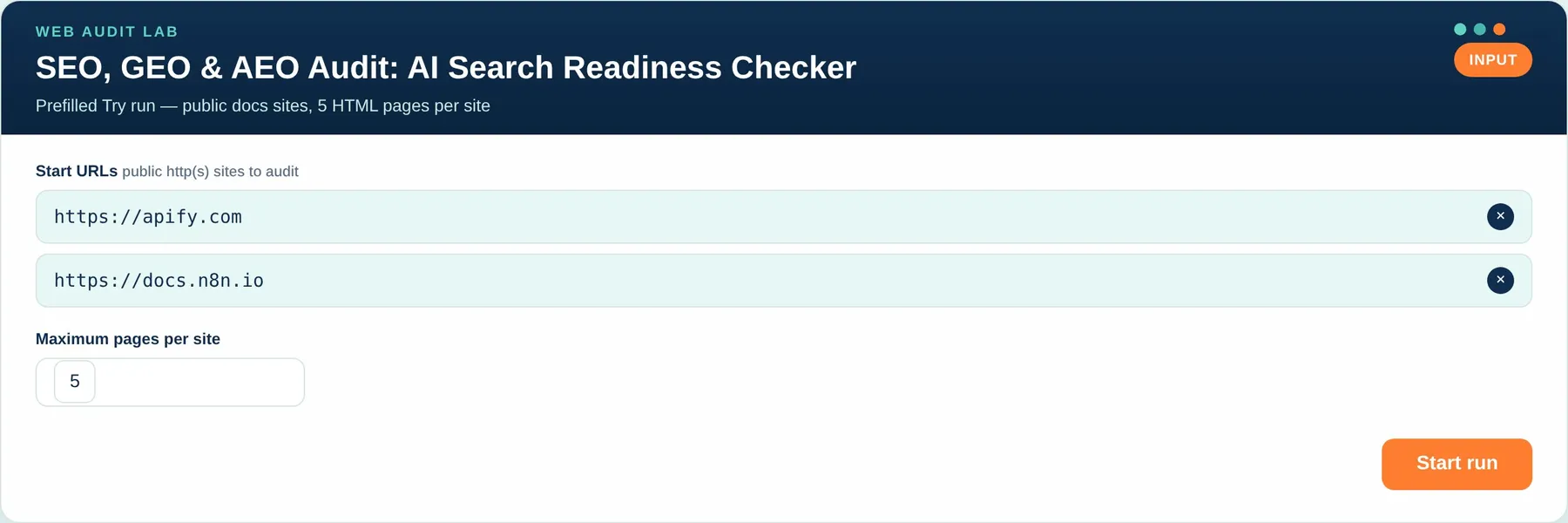
- Open the Actor in Apify Console and keep the prefilled start URLs, or replace them with your own
http(s)URLs. - Set Maximum pages per site (default 5). This cap applies to HTML pages only, not to robots.txt, llms.txt or sitemap fetches. Start small, then raise the cap if you need a larger audit.
- Leave memory at 512 MB unless you have a reason to raise it. Platform test runs of this Actor stayed well below that.
- Click Start and wait for the run to finish.
- Open the dataset. Use the Page audits view for individual URLs and the Site summaries view for per-site scores and file checks. A combined
REPORTrecord is also stored in the default key-value store.
You can do the same with the Apify API or the Apify client in JavaScript or Python. Schedule runs and attach webhooks if you want a recurring audit.
Screenshots
Input — a prefilled Try run, styled in the Web Audit Lab palette:
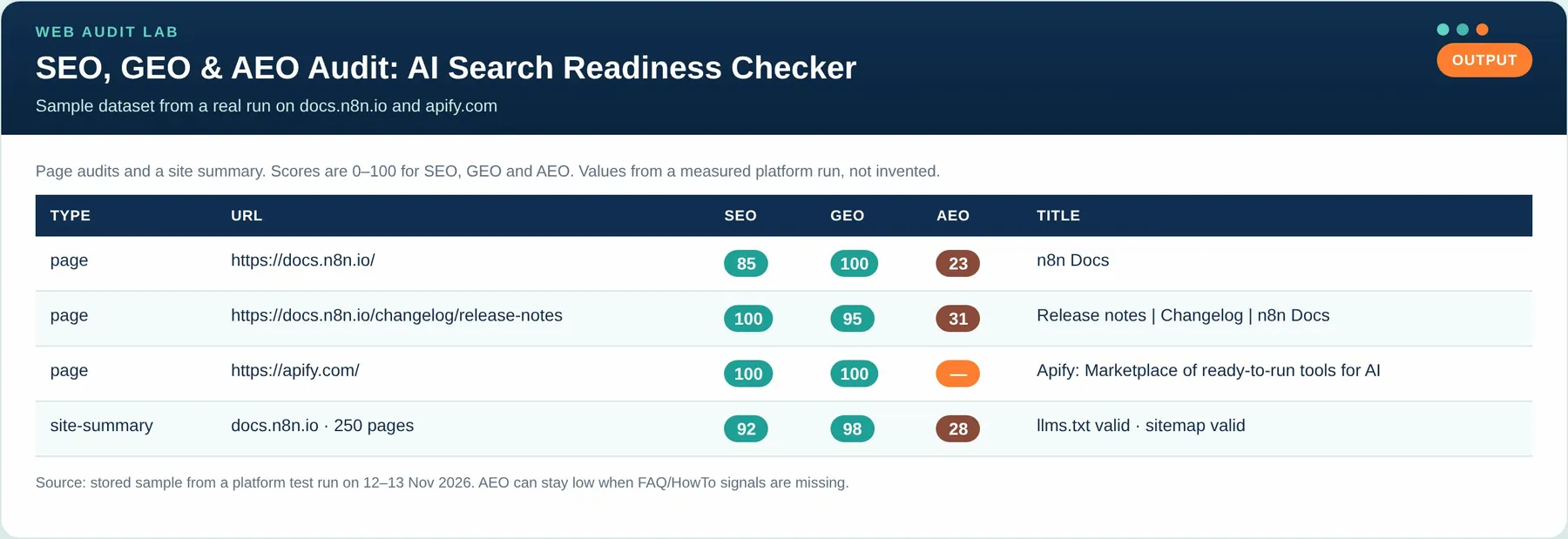
Output — sample dataset from a real platform run:
Input
| Field | Type | Default | Description |
|---|---|---|---|
startUrls | array of URLs | prefilled examples | Public http(s) URLs. Each unique hostname (www-insensitive) is treated as a site. |
maxPagesPerSite | integer | 5 | Maximum HTML pages to audit per site (1–500). Site files such as robots.txt and llms.txt are not counted here. |
Example input:
Output examples
The dataset contains two item types: page and site-summary. The values below come from private test runs on 12 November 2026, not from invented data. Compact JSON samples of later control-run items are in store-draft/v2/sample-output-v2.json, with a short table in store-draft/v2/sample-table.md. A public example task with this 5-page docs.n8n.io input, and a finished run, is at https://apify.com/blithe_gambol_x3a/website-ai-search-readiness-auditor/examples/example-docs-n8n-5-pages .
https://apify.com/ (page): SEO 100, GEO 100, AEO 33. Title "Apify: Marketplace of ready-to-run tools for AI" (47 characters), one H1, 1,183 static words, language en, canonical present, URL found in the sitemap sample, JSON-LD types including Organization, WebSite and SoftwareApplication, no FAQ or HowTo schema.
https://example.com/ (page): SEO 22, GEO 20, AEO 0. Title "Example Domain" (14 characters), no H1, no meta description, no canonical, 26 static words. The current example.com HTML (as fetched in that test) no longer includes the classic H1.
Site summaries from the same runs:
| Site | Pages | SEO | GEO | AEO | llms.txt | llms-full.txt | Sitemap |
|---|---|---|---|---|---|---|---|
| apify.com | 5 | 94 | 85 | 36 | valid | missing | valid (201,649 URLs) |
| docs.n8n.io | 5 | 92 | 100 | 23 | valid | valid | valid (1,326 URLs) |
| example.com | 1 | 22 | 30 | 0 | missing | missing | missing (robots.txt was HTTP 404) |
On apify.com, the listed AI crawlers were restricted through the User-agent: * group (some Disallow rules, but / was not fully blocked). On docs.n8n.io, all 20 listed AI crawlers were allowed.
A later control run on docs.n8n.io (run 6c8bfw4XHTerSKMF8, 250 pages) produced these real items:
| Type | URL or site | SEO | GEO | AEO | Notes |
|---|---|---|---|---|---|
| page | https://docs.n8n.io/ | 85 | 100 | 23 | 157 words |
| page | https://docs.n8n.io/changelog/release-notes | 100 | 95 | 31 | 12,219 words, analysis truncated |
| site-summary | docs.n8n.io (250 pages) | 92 | 98 | 28 | llms.txt valid; llms-full.txt valid; sitemap valid |
Each item also includes a scores object with rule-by-rule points and a fixes or priorityFixes list.
How the scores work
All scores are deterministic checklists from 0 to 100. The same rules are stored on every item under scores.
- SEO: title, meta description, canonical, H1, word count, language, Open Graph
- GEO: readable without JavaScript, llms.txt, sitemap membership, canonical, language (site GEO also includes AI-crawler access)
- AEO: FAQ and HowTo signals, JSON-LD, question-like H1, answer length
Page SEO (100)
| Rule | Max | How points are awarded |
|---|---|---|
| Title | 20 | 20 if length is 30–65; 12 if present but outside that range; 0 if missing |
| Meta description | 20 | 20 if length is 70–160; 12 if present but outside that range; 0 if missing |
| Canonical | 15 | 15 if present and matches the page; 8 if present but mismatched; 0 if missing |
| H1 | 15 | 15 if exactly one non-empty H1; 8 if several; 0 if none |
| Word count | 15 | 15 if ≥ 300 static words; 8 if ≥ 100; 4 if ≥ 30; 0 otherwise |
| Language | 10 | 10 if html[lang] or og:locale is set |
| Open Graph | 5 | 5 if at least two of og:title, og:description, og:image; 3 if one |
Page GEO (100)
| Rule | Max | How points are awarded |
|---|---|---|
| Readable without JavaScript | 40 | 40 if ≥ 100 static words; 20 if ≥ 30; 5 if any text; 0 if none |
| llms.txt | 15 | 15 if the site has a valid /llms.txt; 5 if the file exists but is invalid |
| Sitemap | 15 | 15 if this URL is in the sitemap sample; 10 if a sitemap exists but the URL was not in the sample; 8 if the URL is known to be absent; 0 if no sitemap |
| Canonical | 15 | 15 if a canonical URL is present |
| Language | 15 | 15 if the language is declared |
Page AEO (100)
| Rule | Max | How points are awarded |
|---|---|---|
| FAQ | 30 | 30 for FAQ JSON-LD; 15 for FAQ-like HTML signals only |
| HowTo | 20 | 20 for HowTo JSON-LD; 8 for HowTo-like HTML signals only |
| JSON-LD | 20 | 20 for Article/WebPage/FAQ/HowTo/Product types; 10 for any other JSON-LD |
| Question-like H1 | 15 | 15 if the H1 looks like a question or how-to; 8 if there is a non-question H1 |
| Answer length | 15 | 15 if ≥ 150 static words; 7 if ≥ 50 |
Site SEO and site AEO are the averages of the audited pages. Site GEO is 50% of average page GEO, plus AI-crawler access in robots.txt (20), valid llms.txt (15), valid llms-full.txt (5), valid robots.txt (5) and a usable sitemap (5).
These scores are a transparent checklist. They are not a search-engine ranking and not an official GEO or AEO standard.
Pricing
This Actor uses pay-per-event pricing. You pay for the work that finished, not for a vague compute bundle:
| Event | When it is charged | Price |
|---|---|---|
| Page audited (primary) | Each HTML page that is successfully fetched and audited | $4.00 per 1,000 pages ($0.004 each) |
| Site summary | Once per website, after the site files and page scores are summarized | $0.01 per site |
| Actor start | Automatically when the run starts (once at 512 MB or 1 GB) | $0.00005 (Apify default; the first 5 seconds of compute are covered) |
Failed pages are not charged. A 10-page audit of one site costs $0.04 + $0.01 + $0.00005 = $0.05005 at these event prices.
Set a maximum cost per run in the Console or API if you want a hard spending cap. Platform usage for paid-plan users is taken into account in the creator payout formula; it is not billed to you on top of these events.
Privacy and robots.txt
Public pages only. The Actor respects robots.txt, does not use a proxy, and redacts email and phone patterns in titles and similar text fields. It does not collect personal data as a goal.
- Only public HTTP(S) pages and site files are fetched.
- The crawl respects robots.txt for the Actor's own user agent and stays on the same hostname (www is treated as the same host).
- The Actor does not collect email addresses, phone numbers or other contact details. Known email and phone patterns in titles or descriptions are redacted before storage.
mailto:andtel:links are not followed. - No request bodies, cookies or login forms are used. There is no proxy by default.
Use with AI agents (MCP)
AI agents can discover and run this Actor through the Apify MCP server at https://mcp.apify.com.
A typical flow:
search-actors— find the Actor (name:website-ai-search-readiness-auditor).fetch-actor-details— read the input schema, README and pricing.call-actor— passstartUrlsandmaxPagesPerSite. Put memory, timeout andmaxTotalChargeUsdincallOptions, not in the Actor input. The default wait is 30 seconds (45 at most); pollget-actor-runif the run is still going.get-dataset-items— readpageandsite-summaryitems from the run dataset.
The Actor runs with limited permissions, which is the permission level the MCP server is designed to call. Spend limits should be set with maxTotalChargeUsd so an agent cannot overspend.
Limitations
- JavaScript-only pages look thin (that is also the “readable without JavaScript” check). Cheerio does not execute JavaScript.
- Non-HTML links (.md, .txt, .pdf, images and similar, plus well-known files such as
llms.txtandrobots.txt) are skipped and not counted as failures.llms.txtis still checked separately as a site file. If a URL looks like HTML but the response is nottext/htmlorapplication/xhtml+xml, that response is skipped the same way. - Very large HTML is truncated before scoring (download cap 1 MB, body text cap 80,000 characters). Word-count rules already top out at a few hundred words, so scores stay valid. The page item sets
analysisTruncatedtotruewhen a cap was hit. Full HTML and body text are not stored in the dataset or in memory after the page is scored. - Default memory is 512 MB. Concurrency starts at 1 and may autoscale up to 2 at 512 MB (up to 3 at 1024 MB), and the crawler treats memory as overloaded earlier so it can scale down before the container limit.
- Subdomains (for example
docs.example.comvsexample.com) are different sites unless you add them tostartUrls. - Sitemap URL membership may be
nullwhen only a sample of a large sitemap was parsed (up to five child sitemaps and 50 URLs kept for matching). - robots.txt wildcard support is the common
*and trailing$subset, not a full Google or Bing parser. "Restricted" means some Disallow rules exist, not that the whole site is blocked. - There is no proxy. Sites that block datacenter or cloud IP addresses may fail. Check the run log and any
failedrequest messages. - The Console status message may show only the last site's crawler line (for example "Total 1 requests" when the last host was a one-page site). Trust the dataset item count and the Site summaries view.
- If a start URL is invalid or not
http(s), it is skipped. The run fails only when no valid start URL remains.
Troubleshooting
- Non-HTML URLs are skipped. Links to
.md,.txt,.pdf, images and similar files, plus well-known files such asllms.txtandrobots.txt, are not added to the crawl queue and are not counted as failed pages.llms.txtis still checked separately as a site file. If a URL looks like HTML but the response is nottext/htmlorapplication/xhtml+xml, that response is skipped the same way. - The page limit is per site.
maxPagesPerSitecaps audited HTML pages per hostname. robots.txt, llms.txt and sitemap fetches do not count toward the cap. Start with a small number (for example 5), then raise it. Subdomains are separate sites unless you add them tostartUrls. - Timeouts. If a run stops before the crawl finishes, raise the run timeout in Console or the API (
timeoutSecs) and keep the page cap modest. Default memory of 512 MB is enough for typical documentation sites; very large HTML is truncated (1 MB download, 80,000 characters of text) and marked withanalysisTruncated. - Blocked sites. The Actor uses no proxy. Sites that block datacenter or cloud IP addresses may fail. Check the run log and any
failedrequest messages. robots.txt may also disallow the Actor's user agent; those URLs are skipped, not forced. - Costs. You pay $0.004 per successfully audited HTML page (
page-audited) plus $0.01 persite-summaryand $0.00005 for Actor start. Failed or skipped non-HTML URLs are not charged as page audits. SetmaxTotalChargeUsdon the run if you want a hard spending cap. A 5-page audit of one site is $0.02 + $0.01 + $0.00005 = $0.03005 at these event prices, before any platform-usage calculation for paid-plan users.
FAQ
Is this a browser audit or a Lighthouse report?
No. It is a fast HTTP audit of public HTML and site files, focused on SEO, GEO and AEO signals that AI crawlers can see without executing JavaScript.
Does a high score mean ChatGPT or Perplexity will cite the page?
No. Scores only show whether common AI search readiness checks passed. They do not predict citations or rankings.
Can I audit more than one site in a run?
Yes. Add each site to startUrls. The page cap applies per hostname.
Where can I report issues?
Open an issue on the Actor's issues tab in Apify Console, or contact the developer from the Actor page.
Related Actors
Other tools from the same developer that fit the same workflows:
- On-Page SEO Audit & SEO Checker: Meta, Schema — Classic on-page SEO audit and SEO checker with a 0–100 score for titles, meta, headings and JSON-LD.
- Lighthouse PageSpeed Audit: Core Web Vitals — Lab Lighthouse PageSpeed audit in real Chrome for Core Web Vitals and category scores. Does not call the PageSpeed Insights API.
- Tech Stack Detector: Website Technology Lookup — BuiltWith and Wappalyzer alternative: detect CMS, JavaScript frameworks, analytics and CDN from public HTML.
- Website Change Monitor & Changelog Checker — Website change monitor and changelog checker with a short line diff.
- Greenhouse Scraper: Lever & Ashby Job Scraper — Greenhouse scraper and job scraper for official Lever and Ashby board APIs.
Changelog
- 2026-11-15 — Discoverability and visual update: sharper Store titles, README input and output screenshots, and clearer example inputs where needed.
- 2026-11-14 — First public release on Apify Store with pay-per-event pricing.
Development
The project is a standard Apify Actor (Node.js 22+, TypeScript, Crawlee CheerioCrawler). Local commands:
Default platform configuration uses 512 MB and no proxy.


