
App Store & Google Play Reviews Scraper: Only New Reviews
Pricing
from $0.10 / 1,000 reviews
App Store & Google Play Reviews Scraper: Only New Reviews
App Store reviews and Google Play reviews scraper in one run, no login: ratings, text, dates, developer replies, countries. Only-new monitoring, star and date filters, app search. $0.10 per 1,000 reviews. Export data, run via API, schedule and monitor runs, or integrate with other tools.
Pricing
from $0.10 / 1,000 reviews
Rating
0.0
(0)
Developer

Mohamed Bahaa
Maintained by CommunityActor stats
0
Bookmarked
2
Total users
1
Monthly active users
3 days ago
Last modified
Categories
Share
What does App Store & Google Play Reviews Scraper do?
App Store reviews scraper, Google Play reviews scraper and app reviews API in one run. One schema for both stores, only new reviews on scheduled runs, and App Store history past Apple's 500-review cap.
| What you can extract | Features & integrations |
|---|---|
| ⭐ Star rating: 1 to 5 stars per review | Both stores, one run: App Store and Google Play together |
| 📝 Review title & text: the full review | Search by app name: or paste app URLs and IDs |
| 📅 Date & country: when and where it was posted | Filters: countries, language, star range, date from |
| 💬 Developer reply: the reply text when there is one | Only new reviews: per app, store and country |
| 👤 Reviewer name: as shown in the store | Scheduling: run it hourly, daily or weekly with Apify schedules |
| 📱 App version & thumbs-up: Google Play reviews | Export anywhere: JSON, CSV, Excel, XML or HTML from the dataset |
| 🏪 Store & app name: App Store or Google Play in one schema | API & SDKs: Apify REST API plus JavaScript and Python clients |
| 🔗 Review URL: link back to the review | AI agents (MCP): call it from Claude or other agents via Apify's MCP server |
Try it free in 1 click: open this ready-made example and press Start. Apify's free plan includes $5 of usage every month, no credit card needed. The Input example below returned 40 records and costs about $0.004 at list price.
Google Play reviews scraper and App Store reviews scraper in one run and one normalized schema. Paste app URLs or IDs from either store (or search by app name), pick countries, and get star rating, title, review text, date, country and the developer's reply as clean JSON, CSV or Excel. No login, no browser, no API key. Only public reviews. Pay per review.
- App Store reviews scraper + Google Play reviews scraper in one run. Both stores land in the same dataset with the same fields;
storetells them apart. Compare your iOS and Android reviews (or a competitor's) side by side. - Only new reviews since the last run (app review monitoring). Turn on
onlyNewReviewsand the Actor remembers what it already returned, per app, store and country, in a named key-value store in your account. Test: run 1 saved 100 Duolingo reviews (50 per store); a run a minute later returned only the 2 reviews that had appeared since and skipped the 100 it had already returned. - App Store reviews past the 500-review cap. It pages Apple's web reviews feed instead of the RSS feed that stops at 500; one test run pulled 3,140 App Store reviews for a single app and country.
- An App Store and Google Play reviews API alternative. Apple's App Store Connect API and the Google Play Developer API return reviews only for your own apps and need a developer account. This Actor reads the public reviews of any app, yours or a competitor's, with no developer account and no login.
- Search apps by name. Type
"spotify"or"habit tracker"; the top match on each store is scraped. No URL hunting. - Filter reviews by stars and date. Star rating range (e.g. only 1–2★ complaints), "reviews since" date (
2026-01-01or7 days), newest-first or most-relevant sort. - Multi-country App Store reviews. App Store reviews are per storefront: scrape
us,gb,de,jp… in one run, each row tagged with its country. - Developer replies included with their date, on both stores. Google Play reviews also include the app version (when the store shows one) and the thumbs-up count.
- No duplicate rows. The same app pasted twice (URL and ID) is scraped once, and Google Play, which shows the same reviews in every country, isn't repeated per country.
- Respects your spending limit and stops cleanly when it is reached. If Apple rate-limits a long run, it slows down and waits instead of giving up.
- Lightweight: plain HTTP, 256 MB memory, fast and cheap to run.
What data can App Store & Google Play Reviews Scraper extract?
| Field | What it is | |
|---|---|---|
| 🏪 | store | appStore or googlePlay |
| 🆔 | appId | App Store numeric ID or Google Play package name |
| 📱 | appName | App name |
| 🔑 | reviewId | The store's review ID |
| 👤 | userName | Reviewer name as shown in the store |
| 🖼️ | userImage | Reviewer avatar URL (Google Play) |
| ⭐ | rating | Star rating, 1 to 5 |
| 🏷️ | title | Review title (App Store) |
| 📝 | text | Review text |
| 📅 | date | Review date (ISO 8601) |
| ✏️ | isEdited | Whether the review was edited (App Store) |
| 🔢 | appVersion | App version the review was written on (Google Play, when shown) |
| 👍 | thumbsUp | Helpful votes (Google Play) |
| 💬 | developerReply | The developer's reply, if any |
| 🗓️ | developerReplyDate | When the developer replied |
| 🌍 | country | Storefront country |
| 🗣️ | language | Review language (Google Play) |
| 🔗 | reviewUrl | Link to the review (Google Play) or the app's reviews page (App Store) |
| 🌐 | appUrl | App page URL |
| 🔍 | searchTerm | The search term that found the app (when you used search) |
| ⏱️ | scrapedAt | When the row was scraped |
Store differences (good to know)
| Field | App Store | Google Play |
|---|---|---|
title | ✅ | — (Google Play reviews have no title) |
appVersion | — (not exposed publicly by Apple) | ✅ |
thumbsUp | — | ✅ |
userImage | — | ✅ |
isEdited | ✅ | — |
developerReply + date | ✅ | ✅ |
| Per-country reviews | ✅ separate per storefront | mostly global; filtered by language |
reviewUrl on Google Play links to the single review; on the App Store it links to the app's reviews page (Apple has no public per-review link).
How to use App Store & Google Play Reviews Scraper in 5 steps
- Create a free Apify account.
- Open App Store & Google Play Reviews Scraper.
- Add your input: App Store or Google Play app URLs or IDs (you can mix both stores), or app names under Search apps by name; then pick countries, a star-rating range and how many reviews per app you want.
- Click Start.
- Download the reviews as JSON, CSV or Excel, or get them through the API. To watch an app, turn on Only new reviews since the last run and schedule it daily.
Input
| Field | What it does |
|---|---|
apps | App Store URLs (https://apps.apple.com/us/app/whatsapp-messenger/id310633997) or IDs (id310633997, 310633997); Google Play URLs (https://play.google.com/store/apps/details?id=com.whatsapp) or package names (com.whatsapp). Mix both. |
searchTerms | App names or keywords, e.g. ["spotify"]. Searched in the first country (App Store via Apple's iTunes Search API, Google Play via its search page). |
searchResultsPerTerm | Top results to scrape per term, per store (1–10). Default 1. |
searchStore | both (default), appStore or googlePlay. |
countries | Two-letter codes, e.g. ["us","gb"]. Empty = the country in the App Store URL, else us. |
language | Google Play review language (en, de, es…). Default en. |
sort | newest (default) or mostRelevant. |
maxReviewsPerApp | Per app, per country. Default 100. 0 = no limit (your spending limit still applies). |
minRating / maxRating | Star range, 1–5. Set both to 1 for 1-star reviews only. |
dateFrom | Only reviews on/after a date: 2026-01-01, or relative 7 days, 2 weeks, 3 months. |
onlyNewReviews | true = return only reviews not returned by an earlier run (per app and country). Forces newest-first sort. |
stateStoreName | Name of the key-value store that remembers seen reviews. Default app-reviews-state; use one name per monitoring task. |
dedupeReviews | Default true: scrape Google Play once instead of once per country (same reviews everywhere for a language). |
Example input
This exact input was run on Oct 19 2026 (Spotify on both stores, 20 reviews per store). Paste it into the Input tab (switch to JSON view) and click Start:
More tested inputs
Every example below was test-run and works as is.
1. Find 1-2 star complaints about an app on both stores
2. Compare iOS vs Android reviews, by app name (no URLs needed)
The top App Store and Google Play match for each term is scraped; every row carries searchTerm and appName so you can check what was matched.
3. Monitor new reviews daily across several countries (only new ones)
Schedule this daily. The first run saves up to 500 newest reviews per app and country; every later run returns only reviews it hasn't returned before and stops paging as soon as it reaches them. App Store reviews are collected per country; Google Play is collected once (it shows the same reviews in every country for a language).
Output
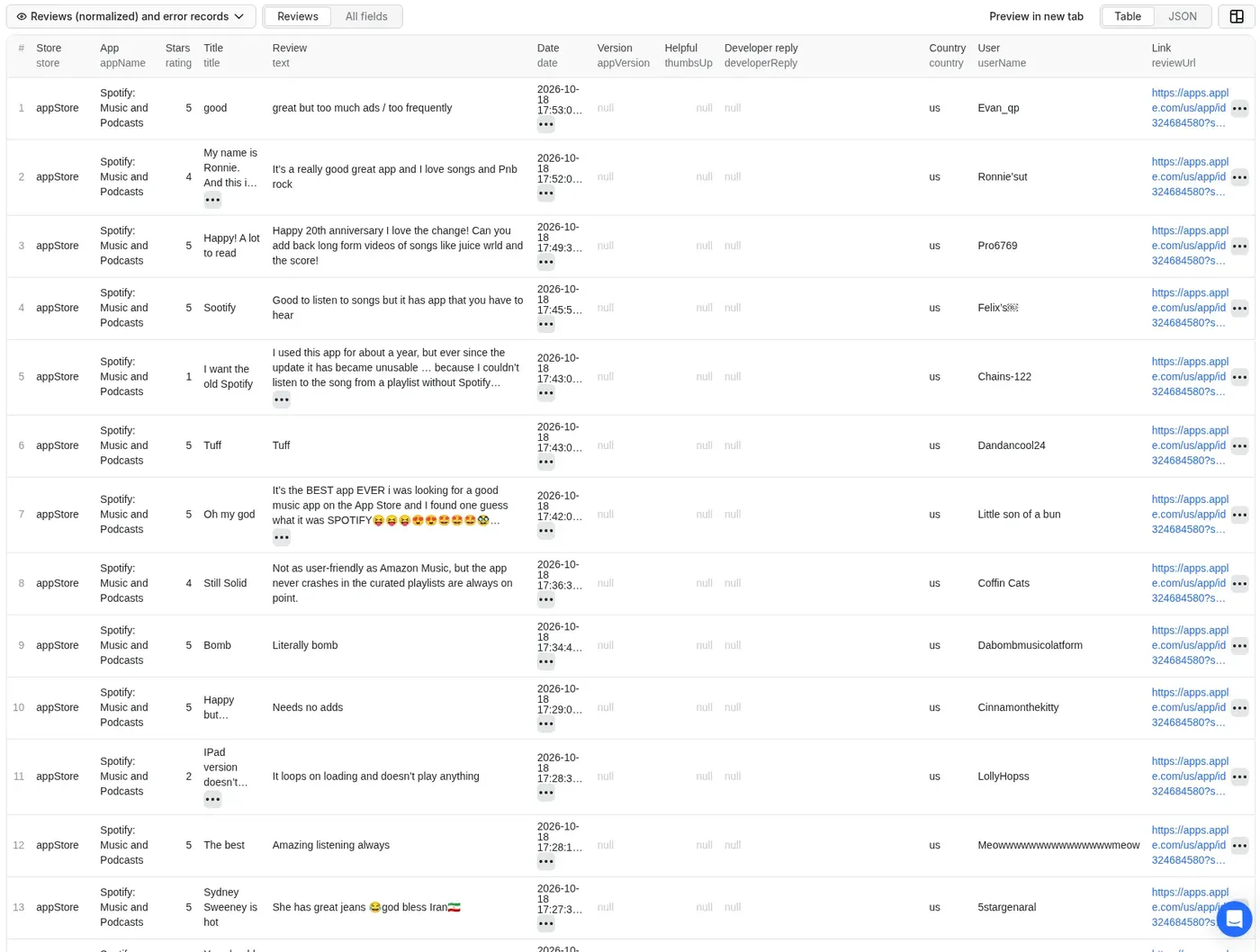
One row per review, with the same fields for both stores. Real records from the example input above (one per store, Oct 19 2026):
You can download the dataset as JSON, CSV, Excel, XML or HTML. A RUN_SUMMARY record in the run's key-value store gives counts per app, which apps each search term matched, and how many duplicate / already-seen reviews were skipped.
How can I use the data?
- App review monitoring and alerts: schedule it daily with
onlyNewReviews: trueand send new reviews to Slack or email. - Competitor analysis and feature-request mining across iOS and Android.
- Sentiment analysis, topic modeling, and LLM / AI agent pipelines.
- ASO (App Store Optimization) research and release QA ("what broke in version X?").
- Customer support: find unanswered 1★ reviews (
developerReplyisnull).
Ready-made example tasks: Find negative Spotify reviews on App Store and Google Play and Monitor new app reviews since the last run.
More Actors from the same developer
| Actor | What it does |
|---|---|
| Telegram Channel Scraper | Public Telegram channel posts with a keyword monitor and only-new mode |
| Substack Scraper | Substack newsletters to clean Markdown, plus podcast transcripts |
| Greenhouse & Workday Jobs Scraper | Jobs from 8 career-site platforms with visa sponsorship and clearance flags |
| Website to Markdown Crawler | Any website to Markdown for RAG, with incremental sync and llms.txt |
| Government Bids & RFP Scraper | Open bids and RFPs from 500+ US city and county portals on OpenGov |
| State Bids Scraper | Open bids from COMMBUYS, BidBuy, NJSTART, OregonBuys and NevadaEPro |
| PERM Green Card Sponsors | Companies that sponsor green cards, from official DOL PERM data |
Error items
An input that can't be scraped becomes one error row in the dataset instead of a silent gap:
error | When |
|---|---|
UNSUPPORTED_URL | The input is not an App Store or Google Play app URL or ID |
APP_NOT_FOUND | The app doesn't exist, or isn't available in the requested App Store storefront(s) |
NO_SEARCH_RESULTS | A search term matched no apps (input is search: <term>) |
FETCH_FAILED | The store kept refusing after retries, or an unexpected error; the message says how many reviews were saved before the failure |
store, appId and country are included when the app is known (not on UNSUPPORTED_URL or NO_SEARCH_RESULTS rows). Error rows count as one item each. Not reported as rows: invalid country codes (anything that isn't two letters is dropped), an invalid dateFrom (ignored, with a warning in the log), and duplicate inputs for the same app (scraped once, noted in the log). When your spending limit is reached the run stops cleanly and says so in the log.
FAQ
How much does it cost? Pay per event: about $0.10 per 1,000 reviews ($0.0001 per review saved; error rows count as one item) plus a tiny start fee ($0.00005 per run at the default 256 MB memory). No platform usage is passed on to you on top. Set a maximum cost per run in Apify and the Actor stops exactly there. See the Pricing tab.
How many reviews can I get? Thousands per app and country. In our tests one run returned 5,500 Google Play reviews and about 3,000–3,900 App Store reviews for Spotify (US). Set maxReviewsPerApp to 0 for everything (watch your spending limit). Apple rate-limits very long App Store runs: the scraper then slows down and waits up to a few minutes; if Apple keeps refusing, it keeps every review already saved and adds a FETCH_FAILED row saying how many it got. For ongoing tracking, onlyNewReviews avoids re-downloading history.
Why do I get Google Play reviews for only one country? Google Play shows the identical review list in every country for a given language (we checked us/gb/in/ng and sa/eg: 150 of 150 the same). So by default each Google Play app is scraped once, in your first country. Use language to get reviews in another language, or set dedupeReviews to false to repeat them per country.
How does "only new reviews" work? After each app and country, the scraper stores the newest review date plus the IDs of the last 48 hours of reviews in a named key-value store (stateStoreName) in your Apify account. The next run reads newest-first, skips IDs it has already returned, and stops once it is 24 hours older than the previous newest review (the overlap catches late-published reviews). Delete that store, or use a new name, to start over. If a run hits your spending limit, its memory for that app isn't updated, so the next run picks up the rest.
What if search finds the wrong app? Search takes the store's own top result. Check appName and searchTerm in the output, raise searchResultsPerTerm, or paste the exact URL instead.
Can I connect it to Make, Zapier, Google Sheets or Slack? Yes. Use Apify's integrations for Make, Zapier, n8n, Google Sheets and Slack, or a webhook that fires when a run finishes. Combine it with an Apify Schedule for daily review alerts.
Can I use it through the API? Yes. Use the Apify REST API or the official clients. Node.js (npm install apify-client):
Python (pip install apify-client):
Can AI agents use it (MCP)? Yes. Connect Claude, Cursor or another MCP client to the Apify MCP server (https://mcp.apify.com) and add chimey_forearm/app-reviews-scraper as a tool. Input and output are simple JSON.
Is it legal to scrape App Store and Google Play reviews? It collects only publicly visible reviews, without logging in. Our Actors are ethical and do not extract any private user data, such as email addresses, gender, or location. They only extract what the user has chosen to share publicly. However, your results could contain personal data, which is protected by the GDPR in the European Union and by other regulations around the world. You should not scrape personal data unless you have a legitimate reason to do so. If you're unsure whether your reason is legitimate, consult your lawyers. Reviewer names (userName) and avatars (userImage) are personal data under the GDPR, so drop them if you don't need them.
Found a bug or need a field? Open an issue in the Issues tab and I'll usually reply within a day.
If it saved you time, a quick review on the Store helps a solo developer keep improving it. Bugs or ideas? Open an Issue.


