
Substack Scraper: Posts to Markdown + Podcast Transcripts
Pricing
from $0.30 / 1,000 results
Substack Scraper: Posts to Markdown + Podcast Transcripts
Substack scraper and Substack newsletter scraper: export posts to clean Markdown for RAG and LLMs, with podcast transcripts, comments, likes, paywall flag and only-new mode. No login. Export data, run via API, schedule and monitor runs, or integrate with other tools.
Pricing
from $0.30 / 1,000 results
Rating
0.0
(0)
Developer

Mohamed Bahaa
Maintained by CommunityActor stats
0
Bookmarked
2
Total users
1
Monthly active users
3 days ago
Last modified
Categories
Share
What does Substack Scraper do?
Substack scraper, Substack posts scraper and Substack newsletter scraper. Exports posts as clean Markdown, adds podcast transcripts as text, and returns only new posts on scheduled runs.
| What you can extract | Features & integrations |
|---|---|
| 📰 Post details: title, subtitle, authors, publish date, tags | Publications or single posts: whole newsletters or post URLs |
| 📝 Full Markdown body: clean Markdown plus word count | Date filters: published after / before |
| 🎙️ Podcast transcripts: timestamped speaker turns for free episodes | Only new posts: per-publication state for scheduled runs |
| ❤️ Engagement: likes and comment count | LLM-ready output: Markdown for RAG and vector databases |
| 💬 Comments: comment text, optional | Scheduling: run it hourly, daily or weekly with Apify schedules |
| 🔒 Paywall status: audience flag, previews for paid posts | Export anywhere: JSON, CSV, Excel, XML or HTML from the dataset |
| 🖼️ Cover image: image URL for each post | API & SDKs: Apify REST API plus JavaScript and Python clients |
| 🧬 Content hash: spot posts whose text changed | AI agents (MCP): call it from Claude or other agents via Apify's MCP server |
Try it free in 1 click: open this ready-made example and press Start. Apify's free plan includes $5 of usage every month, no credit card needed. The Input example below returned 4 records and costs about $0.001 at list price.
- Substack scraper and Substack newsletter scraper: give it a publication (
astralcodexten,astralcodexten.substack.com, a custom domain likewww.astralcodexten.com) or single post links, and get every post as a dataset record. - Substack to Markdown: the full post body as clean Markdown for RAG, LLMs, vector databases and AI agents. Headings, links, lists, quotes, code blocks and images are kept; subscribe buttons, share widgets and other Substack clutter are removed.
- Substack podcast transcripts: for free podcast and video episodes it returns Substack's own auto-transcript as timestamped speaker turns (
[mm:ss] SPEAKER_01: …). - Only new posts since the last run: turn on
onlyNewPostsand each scheduled run returns just the posts you haven't received (state per publication in your own key-value store). Test: run 1 saved 1 post, run 2 returned 0. - Post metadata: title, subtitle, authors, publish date, tags, likes, comment count, restacks, cover image, word count and paywall status.
- Substack comments scraper (optional): comment text, author, date, likes and nested replies.
contentHashon every post, so you can re-embed only posts whose text changed.- Paywall-aware: paid posts are flagged, and you can get their free public preview (
bodyType: "preview") or metadata only. Full text of paid posts is never scraped. - No login, no cookies, no browser: reads Substack's public JSON, so it's fast and cheap (runs in 256 MB).
- Date filters, max posts per publication and a metadata-only mode for quick newsletter archive exports.
- Substack API alternative: Substack's official Developer API returns public creator profile data (name, subscriber count, profile links), not post text. This Actor gives you the posts themselves as Markdown and JSON.
What data can Substack Scraper extract?
📰 title / subtitle: post headline | ✍️ author / authors: name, handle, id | 📅 publishedAt / updatedAt: dates |
🔗 url / slug: post link | 🏠 publication / publicationHost: newsletter name and host | 🆔 postId / publicationId: Substack IDs |
📝 markdown: full body as Markdown | 🔢 wordCount / markdownWordCount: length | 🧱 bodyType: full, preview or none |
🔒 audience / isPaywalled: free or paid | 👀 bodyIsPreview: only the free part of a paid post | 🏷️ audienceRaw: Substack's own audience value |
❤️ likes: reaction count | 💬 comments: comment count | 🔁 restacks: restack count |
🖼️ coverImage: image URL | 🗒️ description: post summary | 🏷️ tags / section: post tags and section |
🎙️ podcastUrl / podcastDuration: audio link, seconds | 📜 transcript / transcriptStatus: speaker turns (optional) | 🗨️ commentList / commentsError: comments (optional) |
🧬 contentHash: SHA-256 of title, subtitle and Markdown | 🌐 language: post language | 🧾 postType: newsletter, podcast and others |
🧩 html: raw body HTML (optional) | ⏱️ scrapedAt: when it was saved | 🚦 type: post or error |
How to use Substack Scraper in 5 steps
- Create a free Apify account.
- Open Substack Scraper and go to the Input tab.
- Add one or more newsletters (a name like
astralcodexten, asubstack.comURL or a custom domain), set Max posts per publication and, if you want, a published-after or published-before date. - Click Start.
- Download the results as JSON, CSV or Excel, or read the
markdownfield straight into your pipeline through the API.
Ready-made example: Export a Substack newsletter to Markdown. More: Build a RAG knowledge base from AI Substack newsletters and Scrape Substack posts with reader comments.
Input
| Field | Description |
|---|---|
publications | Substack subdomains (pragmaticengineer), Substack URLs, or custom domains (newsletter.pragmaticengineer.com). Post links (…/p/slug) here are treated as single posts |
postUrls | Optional single posts, e.g. https://www.astralcodexten.com/p/some-post |
maxPostsPerPublication | Newest posts first (default 50) |
publishedAfter / publishedBefore | Optional dates, YYYY-MM-DD (before is inclusive) |
includeBody | Convert each post body to Markdown (default true). Turn off for a fast metadata-only list |
includePaywalledPreview | Include the free preview of paid posts (default true) |
includeHtml | Also save the raw body HTML (default false) |
onlyNewPosts | Return only posts not saved by an earlier run (default false) |
stateKey | Name for the "already saved" list, one per pipeline (default default) |
includeComments | Add public comments as commentList (default false) |
maxCommentsPerPost | Comments kept per post, replies included (default 50) |
includeTranscripts | Add transcripts of free podcast/video posts (default false) |
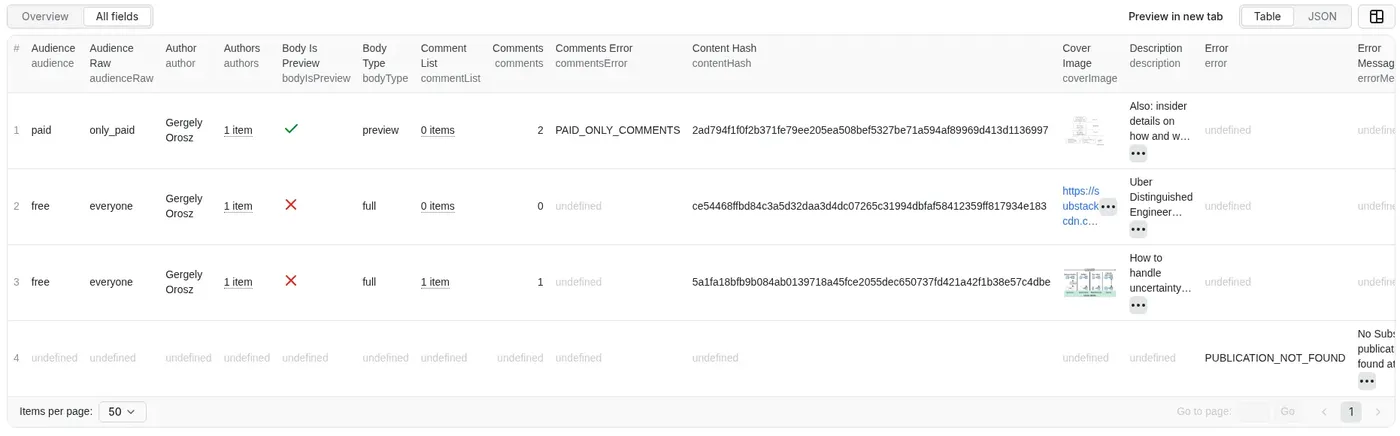
This input was run on Oct 19 2026 (256 MB). It returned 3 posts and 1 error record for the made-up newsletter:
More tested inputs
Paste any of these into the Input tab (switch to JSON view) and click Start.
Export a newsletter archive to Markdown
Daily feed of new posts for a RAG index. Schedule this daily. The first run saves the newest posts as a baseline; every later run returns only posts published since the previous run.
Podcast transcripts and reader comments
Output
Every record has a type: post or error. A real post record from the run above (long text shortened):
Every post has bodyType: "full" (the complete post), "preview" (only the free part of a paid post, with "bodyIsPreview": true) or "none" (no body saved). Paid-only posts come back with "audience": "paid" and "isPaywalled": true. wordCount is Substack's count for the full post; markdownWordCount counts the Markdown you received.
Podcast transcripts
With includeTranscripts: true, free podcast and video posts get a transcript and a transcriptStatus (ok, none when Substack has no transcript, paywalled, not_audio, unavailable / empty when the transcript file couldn't be read, or Substack's own transcription status when it isn't marked transcribed). Speaker labels are Substack's (SPEAKER_01, SPEAKER_02), not names. Real fields from a test run (dwarkesh.com, Oct 18 2026; text shortened):
Comments
With includeComments: true each post gets a commentList (best first), each comment with id, author, handle, userId, isPostAuthor, date, editedAt, body, likes, restacks, isPinned and nested replies. Substack only shows comments on paid-only posts to subscribers, so those come back empty with commentsError: "PAID_ONLY_COMMENTS".
Only new posts
With onlyNewPosts: true the Actor remembers which posts it already saved, per publication, in a named key-value store called substack-to-markdown-state on your account (key state-<stateKey>). The first run is the baseline and returns the newest posts up to your max. Later runs page the archive only until they reach the last post they saw. If more new posts appeared than your max, the rest are returned on the next run, so nothing is skipped. Use a different stateKey for each separate pipeline; delete the key to start over.
How can I use the data?
- Build a RAG knowledge base or vector index from newsletters you follow. Chunk on Markdown headings (
##,###) and storeurl,title,authorandpublishedAtas chunk metadata so answers can cite the source. - Feed LLMs and AI agents (via Apify's MCP server) with up-to-date expert writing.
- Keep only
bodyType: "full"records if you only want complete articles, so a truncated paid post is never retrieved as if it were the whole thing. - Schedule daily with
onlyNewPosts: trueto add only new posts to your index, and comparecontentHashto re-embed only posts whose text changed. - Turn on
includeTranscriptsto make podcast episodes searchable, not just their show notes. - Newsletter archive export / backup to Markdown, Notion, Obsidian or a CMS.
- Content and competitor research: which topics get the most likes, comments and restacks.
More Actors from the same developer
| Actor | What it does |
|---|---|
| Telegram Channel Scraper | Public Telegram channel posts with a keyword monitor and only-new mode |
| Greenhouse & Workday Jobs Scraper | Jobs from 8 career-site platforms with visa sponsorship and clearance flags |
| App Store & Google Play Reviews Scraper | Reviews from both stores in one run, only new reviews on schedules |
| Website to Markdown Crawler | Any website to Markdown for RAG, with incremental sync and llms.txt |
| Government Bids & RFP Scraper | Open bids and RFPs from 500+ US city and county portals on OpenGov |
| State Bids Scraper | Open bids from COMMBUYS, BidBuy, NJSTART, OregonBuys and NevadaEPro |
| PERM Green Card Sponsors | Companies that sponsor green cards, from official DOL PERM data |
Error items
Bad inputs don't fail the run. The Actor saves an error record instead and keeps going. A real one from the run above:
Every error record has type: "error", input (what you entered), error (a code) and errorMessage. Records for a publication or post that was reached also carry publicationHost and url.
error | When |
|---|---|
INVALID_INPUT | The publication isn't a valid Substack subdomain, domain or URL |
PUBLICATION_NOT_FOUND | The address returned 404 |
NOT_A_SUBSTACK | The site didn't return Substack archive data |
FETCH_FAILED | The publication or post request failed (an HTTP error, or still failing after retries) |
INVALID_POST_URL | A post URL isn't in the form https://<publication>/p/<slug> |
POST_NOT_FOUND | The post URL returned 404 |
What does not create an error record:
- If a publication's archive stops loading after the first page, the Actor keeps the posts it already saved and only writes a warning to the run log.
- If the body of a post from a publication's archive can't be loaded, the post is still saved, with
bodyType: "none"and nomarkdown; the reason is only in the run log. - If comments can't be loaded, the post gets a
commentsErrorfield. If a transcript can't be loaded,transcriptStatussays so (for exampleunavailable). - Duplicate inputs are skipped. With no publications and no post URLs at all, the run fails with a message saying what to add.
FAQ
How much does Substack Scraper cost?
It uses pay per event: $0.30 per 1,000 results ($0.0003 per post or error record saved), plus an Actor start fee of $0.00005 per GB of memory per run. No subscription and no extra platform-usage charges. The run stops on its own when it reaches your spending limit. Comments and transcripts are saved inside the post record, so they add no extra result fees (runs just take longer). See the Pricing tab.
Can I integrate it with other apps?
Yes. Use Apify integrations to send results to Make, Zapier, Google Sheets, Slack and others, or trigger your own webhooks when a run finishes. You can also run it on an Apify schedule (hourly, daily or weekly).
Can I use it through the API?
Yes, through the Apify API or the apify-client package. Node.js:
Python:
See the API tab for more.
Can I use it with AI agents (MCP)?
Yes. Through Apify's MCP server you can call Substack Scraper from Claude and other MCP-compatible AI agents and get posts back as Markdown.
What are the limits?
- Full text of paid posts needs a subscription and is not scraped; you get the free preview at most.
- Substack's post data comes from its public but unofficial JSON endpoints, which could change. The Actor retries on errors and rate limits and paces its requests politely.
- Comments on paid-only posts are visible to subscribers only, so they are not included. Transcripts of paid episodes are not included.
- Substack rate-limits heavy use. The Actor slows down automatically when that happens, so big runs (especially with comments or transcripts) can take a few minutes.
Is it legal to scrape Substack?
This Actor reads only publicly available content. Post bodies are the authors' copyrighted work, and comments include commenters' names and handles, which are personal data under GDPR and similar laws. Only collect what you have a legitimate reason to use, respect Substack's terms and the laws that apply to you, and check with a lawyer if you're unsure.
I found a bug or need a field. Where do I report it?
Open an issue in the Issues tab and I'll usually reply within a day.
If it saved you time, a quick review on the Store helps a solo developer keep improving it. Bugs or ideas? Open an Issue.


