
Government Bids Scraper: RFPs from 500+ City Portals
Pricing
from $2.00 / 1,000 bids
Government Bids Scraper: RFPs from 500+ City Portals
Government bids scraper and RFP scraper for 500+ US city, county, school and utility portals on OpenGov Procurement. Open bids, RFQs, deadlines, buyer contacts, only-new bid alerts. No login. Export data, run via API, schedule and monitor runs, or integrate with other tools.
Pricing
from $2.00 / 1,000 bids
Rating
0.0
(0)
Developer

Mohamed Bahaa
Maintained by CommunityActor stats
0
Bookmarked
2
Total users
1
Monthly active users
3 days ago
Last modified
Categories
Share
What does Government Bids & RFP Scraper do?
Government bids scraper and RFP scraper for 500+ US city, county and school procurement portals. Scan a whole state at once, get buyer contacts and deadlines, and receive only new bid opportunities on scheduled runs.
| What you can extract | Features & integrations |
|---|---|
| 📄 Bid basics: title, solicitation type, reference number, status | Whole-state scan: type a state and every OpenGov agency is checked |
| 🏛️ Agency & department: who is buying, with city and state | Filters: keywords, solicitation type, due within, posted within |
| ⏰ Deadlines: due date, Q&A deadline, pre-bid meeting | Only new bids: plus new-addendum alerts |
| 👤 Buyer contact: name, email and phone as the agency publishes them | Scheduling: run it hourly, daily or weekly with Apify schedules |
| 🏷️ Category codes: UNSPSC and NIGP | Export anywhere: JSON, CSV, Excel, XML or HTML from the dataset |
| 📎 Addenda & attachments: addenda and attachment names | API & SDKs: Apify REST API plus JavaScript and Python clients |
| 📋 Timeline & evaluation criteria: when listed on the bid | Webhooks & integrations: Zapier, Make, Slack, Google Drive and more |
| 🔒 Sealed-bid flag: shown per bid | AI agents (MCP): call it from Claude or other agents via Apify's MCP server |
Free sample: 53 open Massachusetts government bids (+ a few CT/NY) for HVAC, roofing, janitorial, IT and landscaping, pulled with this Actor and the companion State Bids Scraper. Run it yourself for your own states and get new bids on a schedule.
Try it free in 1 click: open this ready-made example and press Start. Apify's free plan includes $5 of usage every month, no credit card needed. The Input example below returned 4 records and costs about $0.008 at list price.
Government bids scraper for OpenGov Procurement, the e-procurement portal used by 500+ US cities, counties, school districts, transit agencies, airports and utilities (Pittsburgh, Tampa, Orange County CA, Ocean County NJ, Las Cruces and hundreds more). It pulls open bids, RFPs, RFQs and invitations to bid with deadline, solicitation type, reference number, department, buyer contact, pre-bid meeting, questions deadline, UNSPSC/NIGP category codes, addenda and attachment names, in one clean table. No login, no browser, no proxies.
- Government bids scraper and RFP scraper for OpenGov Procurement portals: open bids, RFPs, RFQs and invitations to bid from 500+ US city, county, school district, transit, airport and utility agencies.
- Scan a whole state: type
FL,CAor any 2-letter code and every active OpenGov agency there is checked, or pick agencies by portal code, URL or name. - Bid search filters: keywords, excluded words, solicitation type, bid status, posted within and due within N days.
- Buyer contacts and deadlines: buyer name, title, work email and phone as the agency publishes them, due date, Q&A deadline and pre-bid meeting.
- Bid alerts: with only new bids on a schedule you get just what is new since the last run, plus new-addendum alerts.
- No login, no browser, no proxies: it reads the same public pages anyone can open.
- An alternative to a paid bid-subscription service for these portals: the notices are public, so you can monitor them yourself and pay per bid delivered.
What makes it different
- Scan a whole state in one run. Type
FLorCAand every active OpenGov agency there is checked (93 in Florida, 127 in California in our tests), using OpenGov's own agency directory, so there is no list of portal slugs to maintain. The other OpenGov scraper on the Store takes portal slugs only, and a regional one covers 11 Dallas-Fort Worth portals. - Bid alert feed: only new bids, plus new-addendum alerts. With
onlyNewon, each run returns only bids you have not received yet. If an agency posts an addendum to a bid you already have, it comes back once withchangeType: "new_addendum", so you never miss a change to specs or deadlines. - The details bidders need, at list price. Buyer name, title, work email and phone (as published by the agency), pre-bid meeting, Q&A deadline, sealed-bid flag, category codes, addenda, attachment names, timeline and evaluation criteria. $2.00 per 1,000 bids, details included. Comparable bid scrapers on the Store charge $3 to $20 per 1,000.
Fields you get
| Field | What it is | |
|---|---|---|
| 📄 | title, referenceNumber | Bid title and the agency's solicitation number |
| 🏷️ | solicitationType, procurementClassification | Agency label (e.g. "Invitation for Bid", "Request for Proposal") and OpenGov's class |
| 🚦 | status, comingSoon | open, pending, evaluation, awardPending or closed |
| 🏛️ | agency, agencyCode, agencyCity, agencyState, department | Who is buying |
| ⏰ | postedAt, dueAt, daysUntilDue, timezone | Release date and response deadline (ISO 8601, UTC) and the agency's time zone |
| 📝 | summary, background | Scope text, HTML stripped |
| 🔗 | url, agencyPortalUrl | Link to the bid and the agency portal on OpenGov |
| 👤 | procurementContact, contact | Buyer / project contact as the agency published it: name, title, work email, phone, address. null when the agency hides it |
| 🤝 | preProposalMeeting, questionsDeadline, questionsEnabled | Pre-bid meeting (date, type such as "Non-Mandatory", location) and Q&A cut-off |
| 🔒 | sealedBid, isEmergency | Flags from the solicitation |
| 🗂️ | categories | UNSPSC or NIGP category codes and titles chosen by the agency |
| 📢 | addendaCount, addenda | Number and list of addenda and notices with release dates |
| 📎 | attachments | Attachment titles and file types (download them from the bid page) |
| 📅 | timeline | Key dates such as bid opening, contract period |
| 📊 | evaluationCriteria | Scoring criteria with max score and weight for RFPs, when published |
| 🕒 | lastUpdatedAt, scrapedAt | When the agency last updated the bid and when it was read |
| 🆕 | changeType | new or new_addendum in only-new mode, otherwise null |
| 🧾 | type | bid, agency (directory mode) or error |
Fields from contact to lastUpdatedAt need Include bid details (on by default). In directory mode (List agencies only) each agency record has agencyCode, agency, agencyCity, agencyState, website, timezone, bidsInSelectedStatuses, note and agencyPortalUrl.
How to use Government Bids & RFP Scraper in 5 steps
- Create a free Apify account.
- Open Government Bids & RFP Scraper and click Try for free.
- Add your input: agency portal codes or URLs (the part after
procurement.opengov.com/portal/) or US states to scan every OpenGov agency there, then narrow it with keywords, solicitation type, posted within or due within days. For an alert feed, turn on Only new bids. - Click Start. To get new bids automatically, add a daily run on the Schedules tab.
- Download the results as JSON, CSV or Excel from the dataset, or fetch them through the Apify API.
Not sure which agencies are on OpenGov? Turn on List agencies only with a state: you get each agency's portal code and how many open bids it has right now (Texas: 44 agencies in our test).
Input
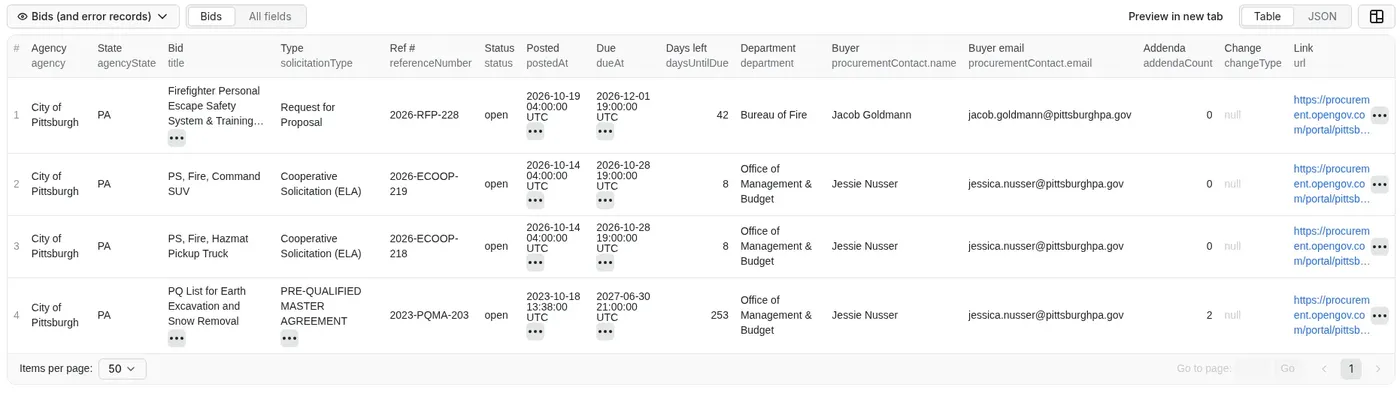
Copy-paste input from a real run (City of Pittsburgh, Oct 19 2026, 4 matching bids):
Single bids work too: https://procurement.opengov.com/portal/pittsburghpa/projects/285142 returns just that bid with full details.
Public example tasks you can open and run:
- Software and IT bids in Florida
- Daily alert for new California construction bids
- Bids due in the next 14 days, with buyer contacts
Output
A real record from the run above (buyer contact shortened, categories and evaluationCriteria cut to 2 items):
How can I use the data?
- Win more public contracts: contractors, IT firms and consultants find bids in their trade and states before the deadline.
- Daily bid alert feed: schedule only-new runs and send new bids to Slack, email or Google Sheets.
- Sales prospecting: reach the buyer contact each agency published on the bid, within the rules that apply to you.
- Market research: use
statuses: ["all"]to see what an agency buys, how often and with which solicitation types. - Bid-matching and procurement tools: feed clean JSON into your own app, CRM or AI agent.
Example use cases
1. Find software and IT bids from every OpenGov agency in Florida
Example task: Software and IT bids in Florida
Tested Oct 18 2026: 93 Florida agencies and 323 open bids scanned in under 5 seconds, 3 matches:
| Agency | Bid | Type | Due |
|---|---|---|---|
| City of Clermont | Cloud Based Location Intelligence Foot Traffic Data Platform | Request for Proposal | 2026-11-12 |
| Putnam County School District | K-12 Master Scheduling Software, Implementation, and Support Services | Request for Proposal | 2026-10-30 |
| Jacksonville Transportation Authority | Public Engagement Web Based Software Platform | Solicitation (Attach a Document) | 2026-10-22 |
2. Daily alert: new construction bids in California
Example task: Daily alert for new California construction bids
Schedule it daily. Tested Oct 18 2026: 127 California agencies, 378 open bids scanned, 7 new matches on the first run (first 4 shown). The next run returns only bids posted since.
| Agency | Bid | Posted | Due | changeType |
|---|---|---|---|---|
| Alameda Municipal Power | Request for Information (RFI) for On-Call Civil Service Construction IFB | 2026-10-16 | 2026-10-30 | new |
| City of Napa | Paving for Water Facilities and Leak Repairs 2026-1 | 2026-10-13 | 2026-11-12 | new |
| County of Alameda, CA | ON CALL AS NEEDED ROOF MAINTENANCE, INSPECTION, DIAGNOSTIC, TROUBLESHOOTING AND | 2026-10-13 | 2026-11-17 | new |
| City of Pasadena | Construction Management for Holly Street Bridge Seismic Retrofit & Rehabilitatio | 2026-10-08 | 2026-10-29 | new |
3. Bids due in the next 14 days at chosen agencies, with buyer contacts
Example task: Bids due in the next 14 days, with buyer contacts
Tested Oct 18 2026: 29 bids due within 14 days (first 5 shown), each with the buyer's contact.
| Agency | Bid | Ref # | Due | Buyer title |
|---|---|---|---|---|
| City of Pittsburgh | PS, Fire, Hazmat Pickup Truck | 2026-ECOOP-218 | 2026-10-28 | Senior Sourcing Specialist |
| City of Pittsburgh | PS, Fire, Command SUV | 2026-ECOOP-219 | 2026-10-28 | Senior Sourcing Specialist |
| City of Pittsburgh | City Channel Pittsburgh End-of-Life Replacements | 2026-IFB-200 | 2026-10-26 | Sourcing Specialist |
| City of Pittsburgh | Traffic Calming | 2026-IFB-186 | 2026-10-21 | Sourcing Specialist |
| City of Pittsburgh | Recycling Engagement and Analytics Application | 2026-RFP-168 | 2026-10-20 | Sustainable Procurement Specialist |
Tips
- Keywords match the start of words, so
rooffinds "roofing" anditdoes not match "permit". Turn on Match keywords in the title only for stricter results. statuses: ["all"]includes past and awarded bids, useful for researching what an agency buys and how often.- The only-new memory is kept per input automatically. Use Only-new memory name to share it across tasks or start fresh.
Limitations
- Covers agencies that publish on OpenGov Procurement only (not Bonfire, BidNet, PlanetBids, DemandStar or SAM.gov).
- Attachment files themselves are not downloaded; you get their names and the bid link.
- Only public bids are returned. Invitation-only and private projects are not visible.
- Buyer contacts are what the agency published on the bid; some agencies hide them.
More Actors from the same developer
| Actor | What it does |
|---|---|
| Telegram Channel Scraper | Public Telegram channel posts with a keyword monitor and only-new mode |
| Substack Scraper | Substack newsletters to clean Markdown, plus podcast transcripts |
| Greenhouse & Workday Jobs Scraper | Jobs from 8 career-site platforms with visa sponsorship and clearance flags |
| App Store & Google Play Reviews Scraper | Reviews from both stores in one run, only new reviews on schedules |
| Website to Markdown Crawler | Any website to Markdown for RAG, with incremental sync and llms.txt |
| State Bids Scraper | Open bids from COMMBUYS, BidBuy, NJSTART, OregonBuys and NevadaEPro |
| PERM Green Card Sponsors | Companies that sponsor green cards, from official DOL PERM data |
Error items
Bad inputs never fail the whole run. Each input that cannot be scraped gives one record with type: "error" and these fields: input (what you entered), error (a code below), errorMessage (a plain-English reason), scrapedAt, plus agencyCode for agency errors and suggestions for AGENCY_NOT_FOUND.
error | When |
|---|---|
AGENCY_NOT_FOUND | No OpenGov portal with that code. suggestions lists close matches, e.g. pitsburghpa → "Did you mean: pittsburghpa (City of Pittsburgh, PA)?" |
INVALID_INPUT | Not a portal code/URL, or a state that is not a 2-letter code |
NO_AGENCIES_IN_STATE / NO_AGENCIES_MATCH | No active OpenGov agency in that state, or none whose name contains your words |
BID_NOT_FOUND | A single-bid URL that is not found or not public |
FETCH_FAILED | Network or OpenGov error after 3 attempts (bids list, agency directory or single bid). Usually temporary; run again |
If a bid is listed but its details cannot be loaded, the bid record is still delivered with a detailError field instead of the detail fields. Error records are charged like a bid. Agencies with no matching bids are not charged and produce no record; counts are in the RUN_SUMMARY record of the run's key-value store.
Two inputs end the run right away with a clear status message and an empty dataset instead (the run still shows Succeeded and only the start fee applies): no agencies, states or agency names at all, and a statuses list with no valid status.
FAQ
How much does it cost? Pay per event, $2.00 per 1,000 bids. See the Pricing tab.
Pay per result: $0.002 per bid (or per agency record in directory mode, or per error record), plus $0.00005 per run. Details are included at no extra cost. Platform usage is not passed on to you.
- Florida software scan above (93 agencies, 3 bids): about $0.006
- Pittsburgh + Ocean County, 29 bids with details: about $0.06
- A daily California construction alert that finds about 5 new bids a day: about $0.30 a month
Set Maximum cost per run in the run options to cap spend; the Actor stops cleanly at the limit.
Does it work with Make, Zapier, Google Sheets or Slack? Yes. Use Apify integrations for Make, Zapier, Google Sheets, Slack and Google Drive, or a webhook that fires when a run finishes.
Can I run it through the API? Yes. With the apify-client for Node.js:
Or Python:
Can AI agents use it (MCP)? Yes. Add it to the Apify MCP server and call it from Claude or other MCP clients.
Do I need an OpenGov account? No. The Actor reads the same public information anyone sees on an agency's portal without logging in.
How fresh is the data? Live. Each run reads the agency portals at run time.
Can I submit bids with it? No. It finds and tracks opportunities; you respond on the agency's portal.
Is it legal? It reads public bid notices only. Buyer contacts are the work contacts as published by the agency on the bid. If you store or use personal data such as names and emails, GDPR and similar laws may apply to you. More below.
Found a bug or need a field? Open an issue on the Issues tab. Requests from users are prioritized.
Is it legal to scrape OpenGov Procurement?
The Actor only reads public solicitation notices that government agencies publish to attract vendors, without logging in, at a gentle request rate, and links every record back to the agency's official page. It does not download documents or access vendor accounts. Contact details are the work contacts agencies publish on their bids; handle them according to the laws that apply to you (for example CAN-SPAM for outreach). Check OpenGov's terms and your own legal requirements for how you reuse the data. This Actor is independent and not affiliated with OpenGov or any agency.
If it saved you time, a quick review on the Store helps a solo developer keep improving it. Bugs or ideas? Open an Issue.


