

Green Card Sponsors: PERM Data by Job, City & Salary
Pricing
from $1.50 / 1,000 perm case or employers
Green Card Sponsors: PERM Data by Job, City & Salary
Find green card sponsors and visa sponsorship companies in official DOL PERM data (FY2020-2026), no login. Filter by job title, city and salary; approval rates. Export data, run via API, schedule and monitor runs, or integrate with other tools.
Pricing
from $1.50 / 1,000 perm case or employers
Rating
0.0
(0)
Developer

Mohamed Bahaa
Maintained by CommunityActor stats
0
Bookmarked
2
Total users
1
Monthly active users
3 days ago
Last modified
Categories
Share
PERM Data Scraper: Green Card Sponsors & Salaries (DOL)
PERM data for job seekers: find visa sponsor and green card sponsor companies by job title, city and salary. Official DOL PERM filings FY2020-2026 in one schema, per-employer approval rates, and only-new mode for quarterly updates. (PERM green-card filings, not H-1B.)
| What you can extract | Features & integrations |
|---|---|
| 🏢 Employer: name, city, state and NAICS industry | Official DOL data: PERM filings FY2020 to FY2026 |
| 💼 Job title & SOC: the role and its occupation code | Search filters: employer, title, SOC, state, city, wage, status |
| 📍 Worksite: city, county, state and postal code | Two output modes: one row per case or per employer |
| 💰 Yearly wage: offered wage converted to a yearly number | Only new cases: for quarterly updates |
| ✅ Case status & decision date: certified, denied or withdrawn | Scheduling: run it hourly, daily or weekly with Apify schedules |
| ⚖️ Law firm: the attorney firm on the case | Export anywhere: JSON, CSV, Excel, XML or HTML from the dataset |
| 📊 Employer summary: approval rate, median wage, top titles and worksites | API & SDKs: Apify REST API plus JavaScript and Python clients |
| 📇 Employer contact: the employer's point of contact, optional | AI agents (MCP): call it from Claude or other agents via Apify's MCP server |
Try it free in 1 click: open this ready-made example and press Start. Apify's free plan includes $5 of usage every month, no credit card needed. The Input example below returned 10 records and costs about $0.015 at list price.
What does PERM Data Scraper do?
Find companies that sponsor green cards, straight from official US Department of Labor PERM data. Search every PERM labor certification case by employer, job title, occupation (SOC), state, city, wage and status, or get one summary row per employer with approval rate, median salary, top job titles and worksites.
PERM labor certification is the first step of most employer-sponsored green cards (EB-2 / EB-3). Every quarter the DOL Office of Foreign Labor Certification (OFLC) publishes each decided case as a large Excel file. This Actor reads those public files for you (no login, no API key), filters them to your search and returns clean rows.
- Green card sponsors by job title and city: find which companies filed PERM cases for your role, e.g. software engineer in New York or data scientist in California.
- Visa sponsorship companies list: one row per employer with total cases, certified, denied and withdrawn counts and an approval rate.
- PERM salaries: offered wages converted to a yearly number, plus median, min and max yearly wage per employer.
- Filter by SOC occupation, NAICS industry, law firm, decision date and case status (certified, certified-expired, denied, withdrawn).
- Every DOL PERM file from FY2020 to FY2026 in one schema, including both FY2024 files (old ETA-9089 form and the new 2023+ form). Pick
latest, one year, a range like2022-2026, orall. - Only-new mode for quarterly updates: remembers the cases you already got and skips an unchanged DOL file without downloading it. In our test the third run of the same search finished in 1.6 seconds with 0 items charged.
- The alternative to doing it by hand: no need to download the 150+ MB DOL Excel file yourself (the FY2026 Q3 file is 156 MB with 112,550 cases) and filter it in a spreadsheet. In our test, a search of the newest file took about 25 seconds.
- PERM only, not H-1B: this Actor covers PERM (green card) labor certifications. It does not include H-1B LCA data.
What makes it different
- Yearly-normalized wages. Hourly, weekly and monthly wages are converted to yearly (hour × 2080, week × 52, month × 12) so you can filter by
minYearlyWageand compare. On old-form files (FY2020 to FY2024) you also get the prevailing wage and how far the offer is above it (offeredVsPrevailingPct). - Employer summary built for job seekers.
outputMode: "employers"gives one row per sponsor for your role and city: total cases, certified / denied / withdrawn, approval rate, median, min and max yearly wage, top job titles, top worksites, top law firms. - $1.50 per 1,000 records with no real start fee ($0.00005 per run). Other PERM Actors charge $6 to $20 per 1,000 records, or add a start fee of up to $0.10 to every run.
What data can PERM Data Scraper extract?
Every record has a type: case, employer or error.
Case mode (outputMode: "cases"), one row per PERM case:
🔢 caseNumber DOL case number | ✅ status / caseStatus / isCertified | 📅 fiscalYear / decisionDate / receivedDate |
🏢 employerName / employerTradeName | 🏙️ employerCity / employerState / employerPostalCode | 🧾 employerFein / naicsCode |
👥 employerEmployees / employerYearCommenced | 💼 jobTitle / occupationType | 🏷️ socCode / socTitle |
📍 worksiteCity / worksiteState / worksitePostalCode | 🗺️ worksiteCounty / worksiteArea / multipleWorksites | 💵 wageFrom / wageTo / wageUnit (as published) |
💰 offeredYearlyWageFrom / offeredYearlyWageTo | 📈 prevailingWage / prevailingWageUnit / prevailingWageYearly / prevailingWageLevel (old form) | ➕ offeredVsPrevailingPct (old form) |
🔗 prevailingWageCaseNumber | 🎓 minimumEducation / requiredExperienceMonths (old form) | 🌍 countryOfCitizenship / classOfAdmission (old form) |
🧑💼 workerAlreadyEmployedByEmployer | ⚖️ lawFirm | 📄 form / sourceFile / sourceUrl |
📇 employerContact {name, title, email, phone} (with includeContacts) | 🧑⚖️ attorney {name, type, firm, email, phone} (with includeContacts) | 🕒 scrapedAt |
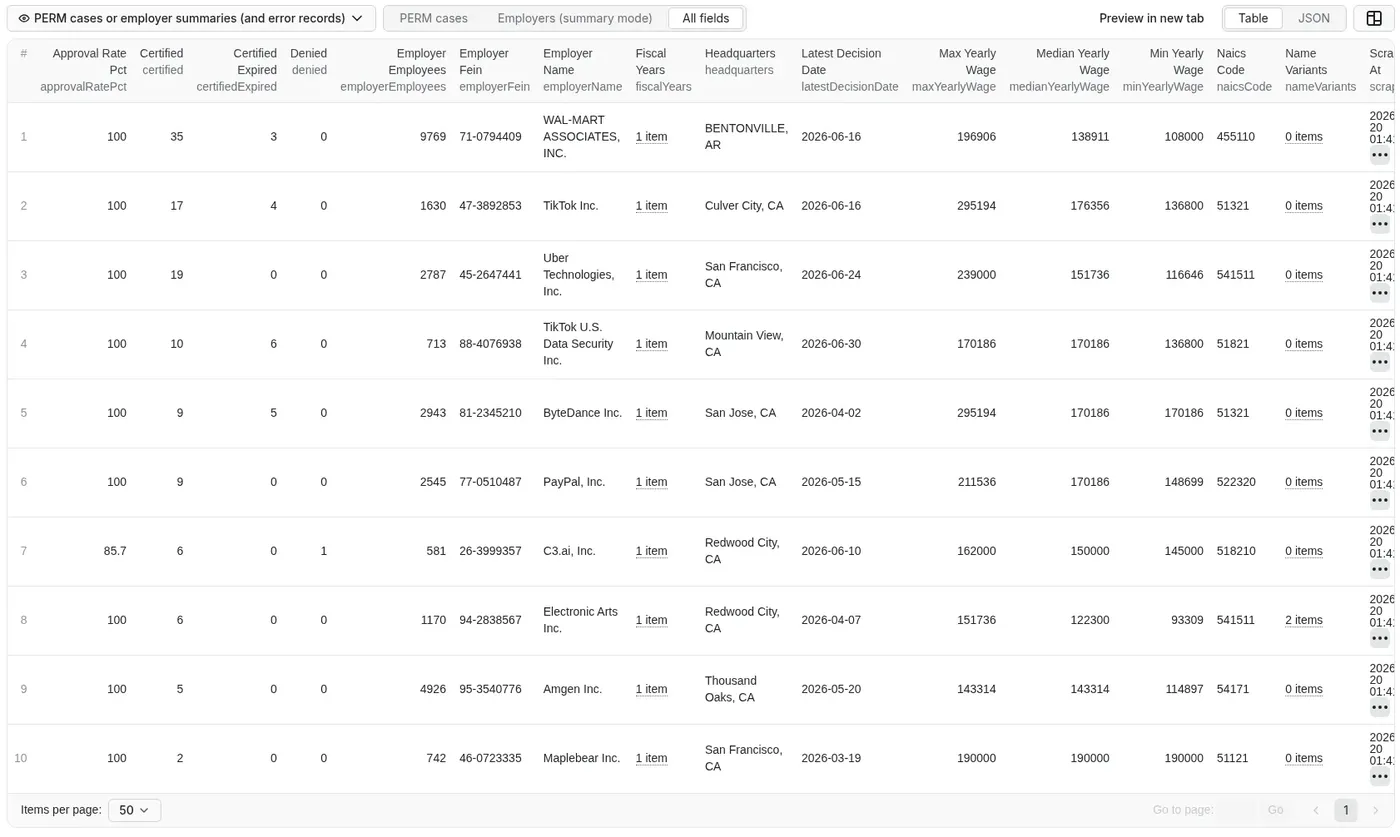
Employer-summary mode (outputMode: "employers"), one row per sponsoring employer:
🏢 employerName / nameVariants | 🧾 employerFein / naicsCode | 🏙️ headquarters |
👥 employerEmployees | 🔢 totalCases | ✅ certified / certifiedExpired |
❌ denied / withdrawn | 📊 approvalRatePct | 💰 medianYearlyWage / minYearlyWage / maxYearlyWage |
💼 topJobTitles | 🏷️ topSocOccupations | 📍 topWorksites / worksiteStates |
⚖️ topLawFirms | 📅 fiscalYears / latestDecisionDate | 🕒 scrapedAt |
Fields marked "old form" come only from the pre-2023 ETA-9089 files (FY2020 to FY2024) and are null on 2023+ form files.
How to use PERM Data Scraper in 5 steps
- Create a free Apify account.
- Open PERM Data Scraper and go to the Input tab.
- Add your input: fiscal years (
latestis the newest DOL file), output mode (one row per case or per employer) and filters such as job title, worksite state and city, minimum yearly wage or case status. - Click Start. For alerts, switch on Only new cases since my last run and add a schedule.
- Download the results as JSON, CSV or Excel, or fetch them with the API.
Input
This exact input was run on the Apify cloud on Oct 19 2026 (1024 MB): data scientist green card sponsors in California with at least 3 PERM cases in the newest DOL file.
Result: the FY2026 Q3 file (112,550 cases) was scanned in 22 seconds, 326 cases matched, 23 employers had 3 or more, and the run stopped at the 10-row maxResults cap.
| Field | Description |
|---|---|
fiscalYears | latest, a year (2025), a range (2022-2026) or all (FY2020 to today) |
outputMode | cases (default) or employers |
employerNames | Employer contains any of these words (matched at the start of a word) |
jobTitleKeywords | Job title contains any of these |
socCodes | SOC code prefix, e.g. 15-1252 (Software Developers), 15- (all computer and math jobs) |
worksiteStates / worksiteCities | 2-letter code or full state name; city contains |
statuses | certified (includes certified-expired), certified_only, certified_expired, denied, withdrawn, all. Leave empty in employer mode for a real approval rate |
minYearlyWage / maxYearlyWage | Offered wage, converted to yearly |
decisionDateFrom / decisionDateTo | A date like 2026-01-01 or a period like 90 days |
naicsCodes | Employer industry code prefix, e.g. 5415, 6221 |
countriesOfCitizenship | Old-form files only (FY2020 to FY2024) |
lawFirmNames | Law firm contains |
includeContacts | Adds the employer contact and attorney details exactly as DOL publishes them. Off by default |
onlyNew / stateKey | Return only cases not delivered before for the same search (cases mode) |
minCasesPerEmployer | Employer mode: minimum matching cases |
maxResults | Stop after this many records (0 = no limit; default 1,000) |
More tested inputs (public example Tasks)
Each of these was test-run on the Apify cloud; open one and click Start:
- Amazon and Microsoft software engineer green card sponsors in Washington, $150K+: 20 certified cases (the
maxResultscap), cost about $0.03. - Companies sponsoring green cards for software engineers in New York: 28 employers with 5 or more software engineer PERM cases in FY2026.
- Only new PERM cases for software developers in New York: the first run saves a baseline, later runs return only cases not yet delivered, and a rerun with no new DOL file finished in 1.6 s with 0 items.
Output
A trimmed real employer row from the run above:
Other employers in the same run: TikTok Inc. (20 cases, median $176,356), Uber Technologies, Inc. (19, $151,736), PayPal, Inc. (9, $170,186), C3.ai, Inc. (7, 85.7% approval, $150,000), Maplebear Inc. (5, $190,000).
A trimmed real case row (Amazon/Microsoft example Task, Oct 18 2026):
Note that one company can file under several legal entities (for example TikTok Inc. and TikTok U.S. Data Security Inc. in the run above), so the employer summary lists each one separately.
You can download the dataset as JSON, CSV, Excel, XML or HTML. A RUN_SUMMARY record in the key-value store lists the files read, rows scanned, cases matched, employers matched, files skipped as unchanged, errors, and whether the run stopped at your limit.
How can I use the data?
- Job seekers on a visa: build a shortlist of companies that sponsored green cards for your exact role and city, and see what they paid.
- Salary research: compare offered yearly wages for a job title across employers and states.
- Approval-rate checks: see how many cases an employer had certified, denied or withdrawn before you apply.
- Quarterly sponsor alerts: schedule only-new mode and get just the cases DOL added since your last run.
- Recruiters and immigration law firms: find employers that sponsor in a given SOC occupation or NAICS industry, and which law firms file for them.
- Journalists and researchers: analyze PERM filings by year, state, occupation or country of citizenship (old-form years).
More Actors from the same developer
| Actor | What it does |
|---|---|
| Telegram Channel Scraper | Public Telegram channel posts with a keyword monitor and only-new mode |
| Substack Scraper | Substack newsletters to clean Markdown, plus podcast transcripts |
| Greenhouse & Workday Jobs Scraper | Jobs from 8 career-site platforms with visa sponsorship and clearance flags |
| App Store & Google Play Reviews Scraper | Reviews from both stores in one run, only new reviews on schedules |
| Website to Markdown Crawler | Any website to Markdown for RAG, with incremental sync and llms.txt |
| Government Bids & RFP Scraper | Open bids and RFPs from 500+ US city and county portals on OpenGov |
| State Bids Scraper | Open bids from COMMBUYS, BidBuy, NJSTART, OregonBuys and NevadaEPro |
Error items
The Actor pushes an error record to the dataset (and it counts as one record for billing) in these cases:
error | When |
|---|---|
INVALID_INPUT | A bad decisionDateFrom / decisionDateTo, an unknown statuses value, an unknown worksite state, or minYearlyWage higher than maxYearlyWage. The run then ends right away with this record and a clear status message (the run still shows Succeeded). |
UNSUPPORTED_FISCAL_YEAR | A fiscal year that is not available (FY2019 and earlier use a different file layout). Other valid years still run; if none is valid, the run ends right away with these records and a clear status message (still Succeeded). |
SOURCE_NOT_FOUND | dol.gov returned 404 for a PERM file. Has an extra fiscalYear field. Other fiscal years in the run are unaffected. |
SOURCE_UNAVAILABLE | Any other failure reading a PERM file from dol.gov. Has an extra fiscalYear field. Other fiscal years in the run are unaffected. |
A search with no matches pushes no error record: the run succeeds with 0 items and logs a warning. The RUN_SUMMARY record counts errors and lists filesFailed.
Limitations
- DOL updates quarterly, with a lag. New files usually appear a few weeks after each quarter ends. The newest file at the time of writing is FY2026 Q3 (decisions to June 30, 2026). This is not real-time data.
- The 2023+ form has fewer fields. Files on the new ETA-9089 form (FY2024 new form, FY2025, FY2026) do not include prevailing wage, education, experience or the worker's country of citizenship, so those fields are
nullthere. - Registered nurses are nearly absent. Nurses (SOC 29-1141) and physical therapists are Schedule A occupations, which skip PERM, so very few nurse cases appear.
- A certified case is not a green card. PERM is one step; USCIS still decides the I-140 and I-485. Past sponsorship does not mean a company will sponsor you.
- Large files take time. Pre-2023 files take about 45 to 55 seconds each to read; a search across
allyears takes several minutes. - Not legal advice. For your own case, talk to an immigration attorney.
FAQ
How much does it cost?
The Actor uses pay per event: $1.50 per 1,000 records ($0.0015 per case, employer row or error record) plus $0.00005 per run start. No subscription. See the Pricing tab.
| Search | Records | Approx. cost |
|---|---|---|
| Amazon/Microsoft example (20 cases) | 20 | $0.03 |
| New York employer summary | 28 | $0.04 |
| 1,000 cases | 1,000 | $1.50 |
| Only-new rerun with no new DOL file | 0 | $0.00005 |
Set a maximum cost per run in the run options and the Actor stops cleanly when it is reached (tested: a $0.01 cap stopped at 6 records).
Can I connect it to Make, Zapier, Google Sheets or Slack?
Yes. Use Apify's integrations for Make, Zapier, Google Sheets, Slack and others, or a webhook that fires when a run finishes. You can also schedule runs (daily, weekly) with Apify schedules.
Can I use it through the API?
Yes. Node.js with apify-client:
Python with apify-client:
Can AI agents use it (MCP)?
Yes. Through the Apify MCP server, Claude and other MCP-compatible AI agents can run this Actor and read its results.
Is it legal to use this data?
The data is public US government data, published by the US Department of Labor's Office of Foreign Labor Certification (OFLC) in its PERM disclosure files. The Actor reads only those public files. With includeContacts on, it adds the employer's point of contact and the attorney or agent exactly as DOL publishes them. Those are personal data: if you are in the EU or handle data of EU residents, GDPR may apply. Use contact details lawfully and respect privacy and anti-spam laws. This is not legal advice.
I found a bug or need a field. What do I do?
Open an issue on the Actor's Issues tab and include the run ID. Feature requests are welcome.
If it saved you time, a quick review on the Store helps a solo developer keep improving it. Bugs or ideas? Open an Issue.


