

Unsplash Scraper: Photos, Views, Downloads & Photographers
Pricing
from $0.69 / 1,000 photos
Unsplash Scraper: Photos, Views, Downloads & Photographers
Unsplash photos past the 4,000-result limit of one search, each with views, downloads and 30 days of daily statistics. Plus EXIF camera data, location, tags, topics and photographer profiles with their totals. Search by keyword, photographer, collection, topic, photo ID or link. No login.
Pricing
from $0.69 / 1,000 photos
Rating
0.0
(0)
Developer

ClearPath
Maintained by CommunityActor stats
0
Bookmarked
1
Total users
1
Monthly active users
2 days ago
Last modified
Categories
Features
Share
From Clearpath, creators of Adobe Stock Scraper, Reddit Search Scraper and Reddit Post Comments Scraper. 265,000+ combined lifetime runs across these content-research scrapers.
Every photo an Unsplash search holds
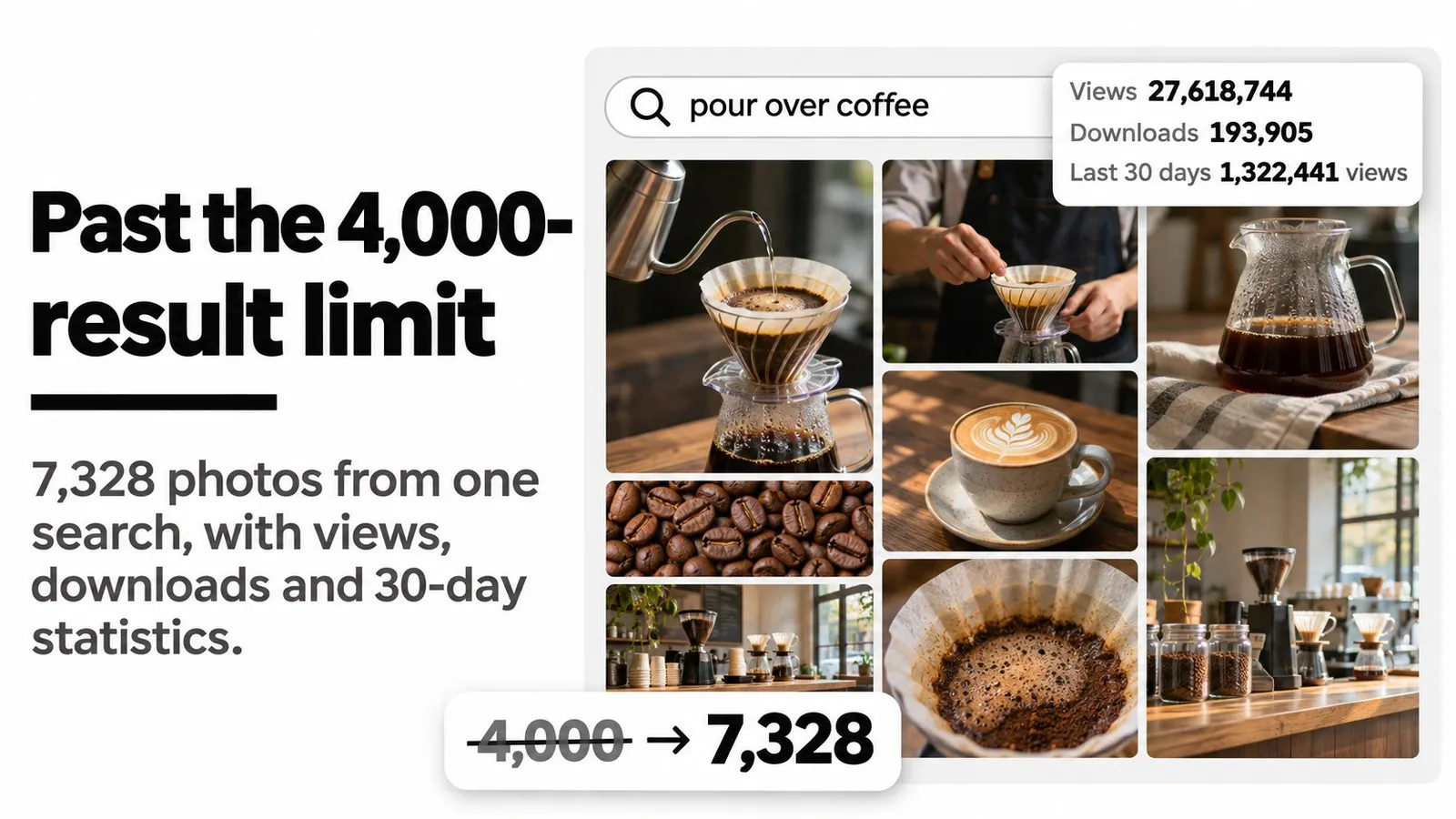
Past the 4,000-result limit. Unsplash shows at most 4,000 results for one search. This actor keeps going: a recorded run saved 7,328 unique photos for the single search pour over coffee, each one once, numbered in order. The most viewed photo in that run, with 58.5 million views, came after the first 4,000.
Views and downloads, day by day. Every free photo comes with its total views and downloads, plus its views and downloads for each of the last 30 days. Every photographer comes with total views and downloads, their own daily series for the last 30 days, interests, Unsplash+ status and badge when Unsplash awarded one. Use it to see which photos, subjects and photographers actually get used.
Every way to pick photos, every detail. Search terms with color, orientation, license and sort filters, a photographer's portfolio, a collection, a topic, photo IDs or any pasted unsplash.com link. Each photo carries camera settings (EXIF), location, tags, topics, five image sizes and full attribution.

Quick input
Try 100 coffee photos with their views, downloads and 30-day statistics:
Export a photographer's most viewed photos:
Open actor input to enter your own search terms, photographers, collections or topics. Photo details, statistics and photographer profiles are on by default and included in the photo price. Set maxItems to 0 to collect everything an input holds, including past 4,000 results for a search, and set a spending limit. The 100-photo trial does not reproduce the 7,328-photo run.
 Clearpath · Stock Media
Copy to your AI assistant
What can you scrape from Unsplash?
| Input | What you get |
|---|---|
Search terms (queries) | Every photo matching each term, in Unsplash's order, continuing past the 4,000 results one search shows. |
Photographers (usernames) | A photographer's whole portfolio, by username or profile link, ordered by Portfolio order: newest, oldest, popular, most viewed or most downloaded. |
Collections (collectionIds) | Every photo in a collection, by ID or collection link. |
Topics (topics) | A topic's photos, such as wallpapers, nature or 3d-renders, ordered newest, oldest or popular. |
Photo IDs (photoIds) | Specific photos by ID, slug or photo link. |
Unsplash links (startUrls) | Paste any unsplash.com search (filters in the link are kept), photo, photographer, collection or topic page. |
Each search term, photographer, collection, topic and link is its own input, and maxItems applies to each, defaulting to 100. All photo IDs together count as one input. Use 0 to save everything an input holds. Photographers, collections and topics run to their end; search terms and search links continue past 4,000 results.
Search filters (optional, each narrows search terms): photos or illustrations, most relevant or newest first, license (all, free only or Unsplash+ only), orientation (landscape, portrait, square), color (black and white, black, white, yellow, orange, red, purple, magenta, green, teal, blue) and content safety (standard or strict). A pasted search link keeps the filters set in the link.
Sponsored photos. Unsplash places an advertiser's photo in search results about every seventh place. These ignore your filters and sort order, so they are left out unless you turn on includeSponsored.
Free landscape photos in green tones:
Every photo of a collection, plus the newest wallpapers:
A faster export with only image links, sizes, likes and attribution:
With the three switches off, views, downloads, tags, topics, camera, location and the daily series are null, and the photographer's badge, interests and statistics are left out. The price per photo is the same either way.
Unsplash views and downloads for photos and photographers
With the default settings every free photo carries:
viewsanddownloads: totals since uploadviewsLast30DaysanddownloadsLast30Days: totals for the last 30 daysdailyViewsanddailyDownloads: one entry per day for the last 30 days, each with its date
Every photographer carries totalViews, totalDownloads, viewsLast30Days, downloadsLast30Days, averageDailyViews, averageDailyDownloads and their own dailyViews and dailyDownloads, plus badge when Unsplash awarded one (for example "1 billion+ views"), interests, topTags, portfolio counts and Unsplash+ status. A photographer's profile is fetched once per run, however many of their photos are saved.
Unsplash does not publish view and download counts for Unsplash+ photos. Those rows carry null instead of a misleading zero, with statisticsPublished set to false. A real Unsplash+ row (excerpt):
Follow statistics over time. Each run returns the 30 days before it. Schedule the same input monthly for a continuous daily history, or weekly to watch new uploads, and compare runs by photo id.
What data do you get from Unsplash?
- Photo: ID, slug, page link, title, description, alt text, upload, update and featured dates, width, height, orientation, aspect ratio, dominant color, blur hash, likes
- Statistics: total views and downloads, 30-day totals, daily views and downloads for the last 30 days
- Details: tags, topics with submission status, camera make, model, exposure, aperture, focal length and ISO, location with city, country and coordinates, slugs in 9 languages
- License: Unsplash+ and free flags, license name, public domain flag, sponsored flag with the sponsor's name and links
- Image links: raw, full, regular, small and thumb sizes, download link and the link Unsplash counts a download with
- Photographer: name, username, bio, location, website, Instagram and X (Twitter) usernames, profile images, for-hire flag, badge, interests, top tags, portfolio counts, total and 30-day views and downloads with daily series
- Search context: which input returned the photo, its link, and its position within that input
A real photo row from a chemex search (the four daily series shortened to 3 of 30 days, topTags to 8 of 30):
Fields Unsplash leaves empty for a photo stay null, for example the location or camera of many photos. A sponsored photo, saved only with includeSponsored on, carries the sponsor (excerpt):
Every run also writes a SEARCHES record to its key-value store, one entry per input, with Unsplash's own count of matching photos (totalResults), how many were saved and whether the input ran to its end. Unsplash's count is an estimate and can be lower than what a run saves:
CSV and Excel exports flatten nested fields into columns such as photographer/name; the default export keeps them nested.
Integrations and scheduling
Run the Unsplash scraper on a schedule in Apify Console: monthly to keep a continuous history of photo and photographer statistics, weekly to collect new uploads for a search or topic. Each completed run can trigger a webhook for n8n, Make or Zapier workflows; see Apify integrations.
Pricing
You pay per photo saved: $0.99 per 1,000 photos on the Free plan. Bronze pays $0.89, Silver $0.79, Gold and above $0.69 per 1,000. Photo details, 30-day statistics and photographer profiles are included in that price.
| Charge | When | Price |
|---|---|---|
| Photo | Each photo saved | $0.99 per 1,000 on Free, $0.89 Bronze, $0.79 Silver, $0.69 Gold and above |
| Actor start | Once per run | $0.001 |
| Dataset result | Each row saved | $0.01 per 1,000 |
A 100-photo test costs about $0.10 on the Free plan. Inputs that find nothing add no photo charges. The Free plan has no extra limits.
FAQ
Do I need an Unsplash account or login? No. Enter a search term and run it. No Unsplash account, login, developer registration or key is involved.
How do I see the views and downloads of an Unsplash photo?
Search for it, paste its link into startUrls or put its ID in photoIds. Every free photo carries total views and downloads and its daily views and downloads for the last 30 days.
How do I get statistics for an Unsplash photographer?
Put the username or profile link in usernames and set maxItems to 0 for the whole portfolio. Each row carries the photographer's total views and downloads and their daily series; portfolioOrder set to views or downloads lists the best performers first.
Can I get more than 4,000 results for one search?
Yes, for search terms and pasted search links. Unsplash shows at most 4,000 results for one search; with maxItems above that (or 0), the actor keeps collecting and saves each photo once. The first results follow Unsplash's order and the rest follow after them. A recorded pour over coffee run saved 7,328 unique photos.
Why does SEARCHES show fewer photos available than were saved?
totalResults is Unsplash's own count, which is an estimate. A chemex search reported 1,456 photos and the run saved 1,608 unique ones.
Does it include Unsplash+ photos?
Yes. Every row has isPlus and license. Set license to free or plus to keep only one kind. Unsplash publishes no views or downloads for Unsplash+ photos, so those fields are null.
Can I use the filters from the Unsplash website?
Yes. Set them on unsplash.com and paste the search link into startUrls. The actor follows that search with its filters.
Can I download the image files in bulk? Rows carry links to five image sizes and the download link, ready for any download tool. The actor does not store the image files. Use of each photo is governed by its license on Unsplash.
What happens with a photo ID or username that does not exist? The run finishes normally, saves everything else and names the IDs or usernames it could not find.
How fresh is the data? Every run reads Unsplash live. Daily statistics cover the 30 days before the run.
Support
Questions, missing fields or a search that did not work as expected: open an issue in the Issues tab or email max@mapa.slmail.me. Unsplash is a trademark of Unsplash Inc. This actor is independent and is not affiliated with or endorsed by Unsplash.


