

Google Hotels Scraper - Prices & Offers, No Login
Pricing
from $1.82 / 1,000 hotels
Google Hotels Scraper - Prices & Offers, No Login
Get Google Hotels prices by city or hotel: nightly and total price, every booking site's offer with link, rating, reviews, stars, amenities, address, phone and coordinates. Dates, guests, filters, date sweep. No login.
Pricing
from $1.82 / 1,000 hotels
Rating
0.0
(0)
Developer

Cliqto Media
Maintained by CommunityActor stats
0
Bookmarked
2
Total users
1
Monthly active users
8 days ago
Last modified
Categories
Features
Share
Google Hotels Scraper reads Google Hotels for a city, area, hotel name or hotel link and returns one row per hotel for your dates: nightly and total price, the price at every booking site with its link, rating, reviews, stars, amenities, address, phone and coordinates.
Type a place, pick check-in and check-out dates and click Start. The prefilled run (Bangkok, 10 hotels) takes about 10 seconds and needs no login, cookies or API key.
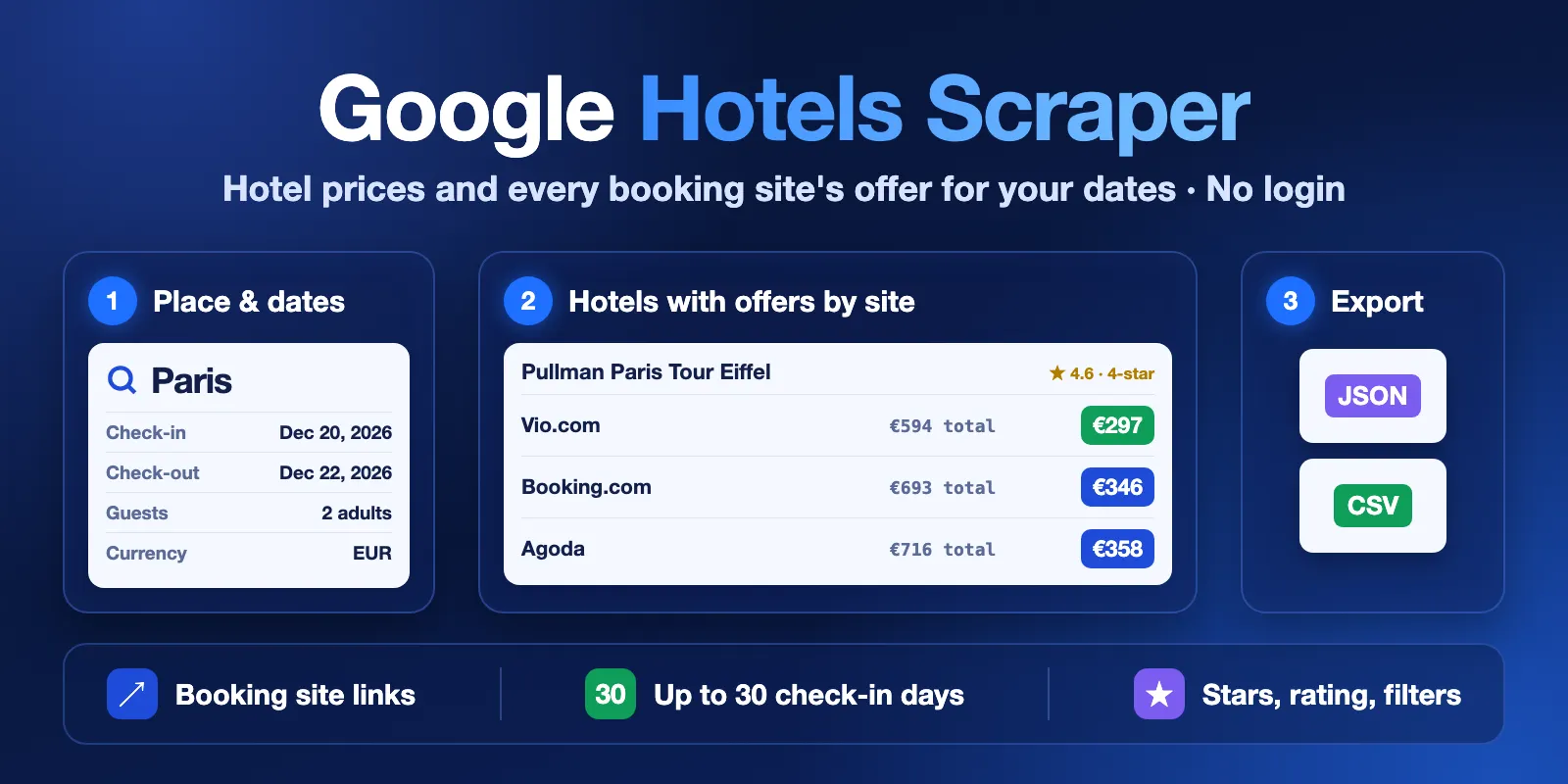
Table of contents
- What it does
- How it works
- Quick start
- Use cases
- Input
- Output
- Pricing
- Limits
- API, export and integrations
- Troubleshooting
- FAQ
- Related Actors
- Support
What it does
The Actor searches the public Google Hotels pages, the same ones you see in a browser without signing in. For each hotel it saves one Dataset row with the price for your dates and guests, and, by default, the offers of every booking site Google lists for that hotel: Booking.com, Agoda, Expedia, the hotel's own website and others, each with its nightly and total price, a link and free cancellation when Google shows it.
You can search many places at once, give hotel links directly, compare up to 30 check-in days in one run, and use Google's own filters: sort order, star class, guest rating, free cancellation, price range and amenities.
Good fit
- Compare hotel prices in a city for your dates, with the cheapest booking site for each hotel.
- Track the price of your own or competitor hotels at every booking site over time.
- Find the cheapest check-in day for a trip or an event.
- Build a hotel list for a city with rating, stars, address, phone, website and coordinates.
How it works
- You give places (
queries) or Google Hotels links (hotelUrls), dates and guests. - The Actor runs the Google Hotels search for each place and date, page by page, with your filters, and opens each hotel's prices page for the booking-site offers.
- Each hotel becomes one row in the Dataset. The key-value store record
RUN_SUMMARYtells you the run status, how many hotels each search found and what stopped the run, if anything stopped it.
Quick start
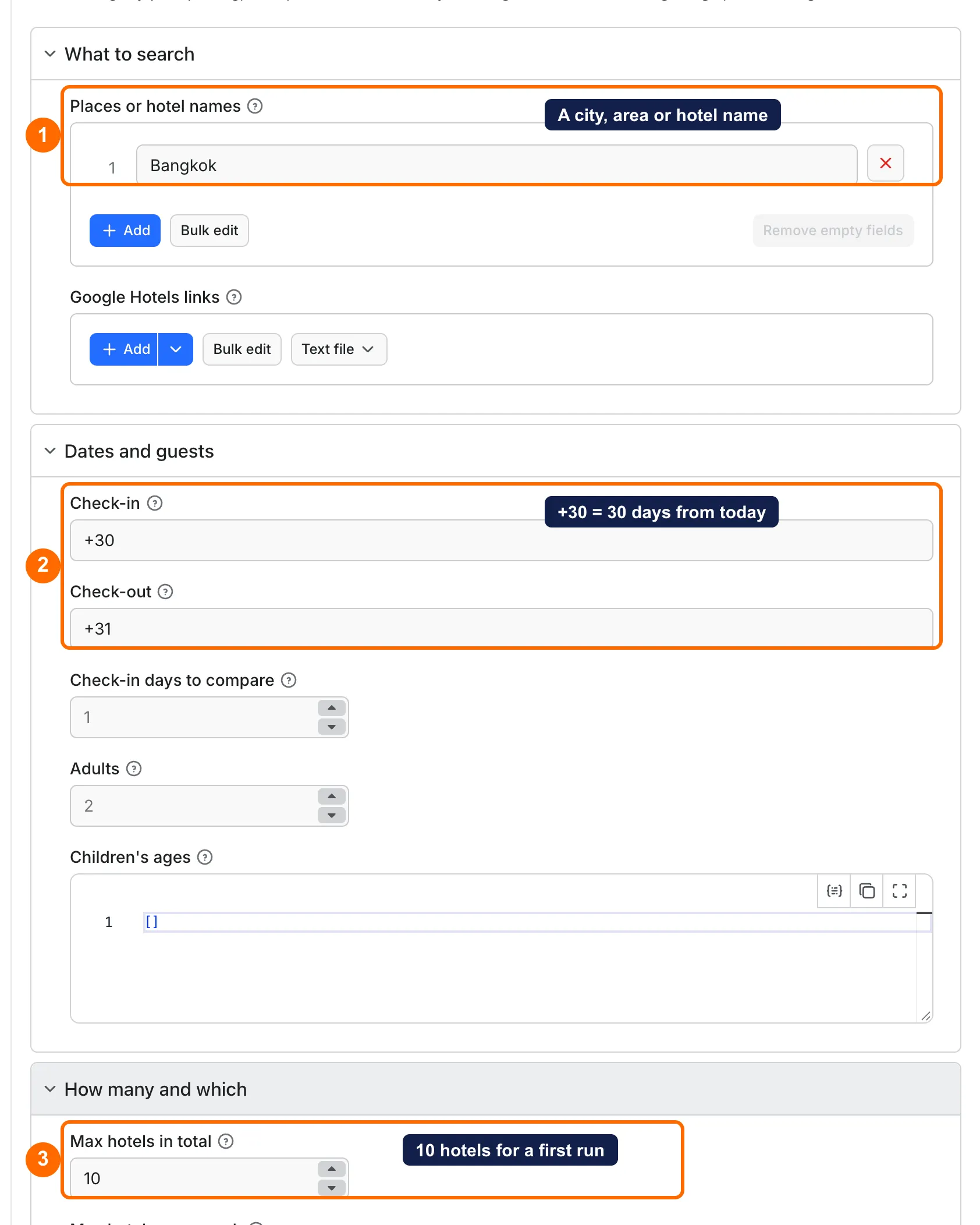
-
Open the Input tab.
queriesis prefilled withBangkok(box 1 in the picture). -
Keep the prefilled dates
checkIn+30andcheckOut+31(30 and 31 days from today), or type your own dates asYYYY-MM-DD(box 2). -
Keep
maxItemsat the prefilled10hotels, or raise it (box 3). -
Click Start.
-
Open the Hotels view of the Dataset and check
name,pricePerNight,lowestPriceProviderandoffersCount.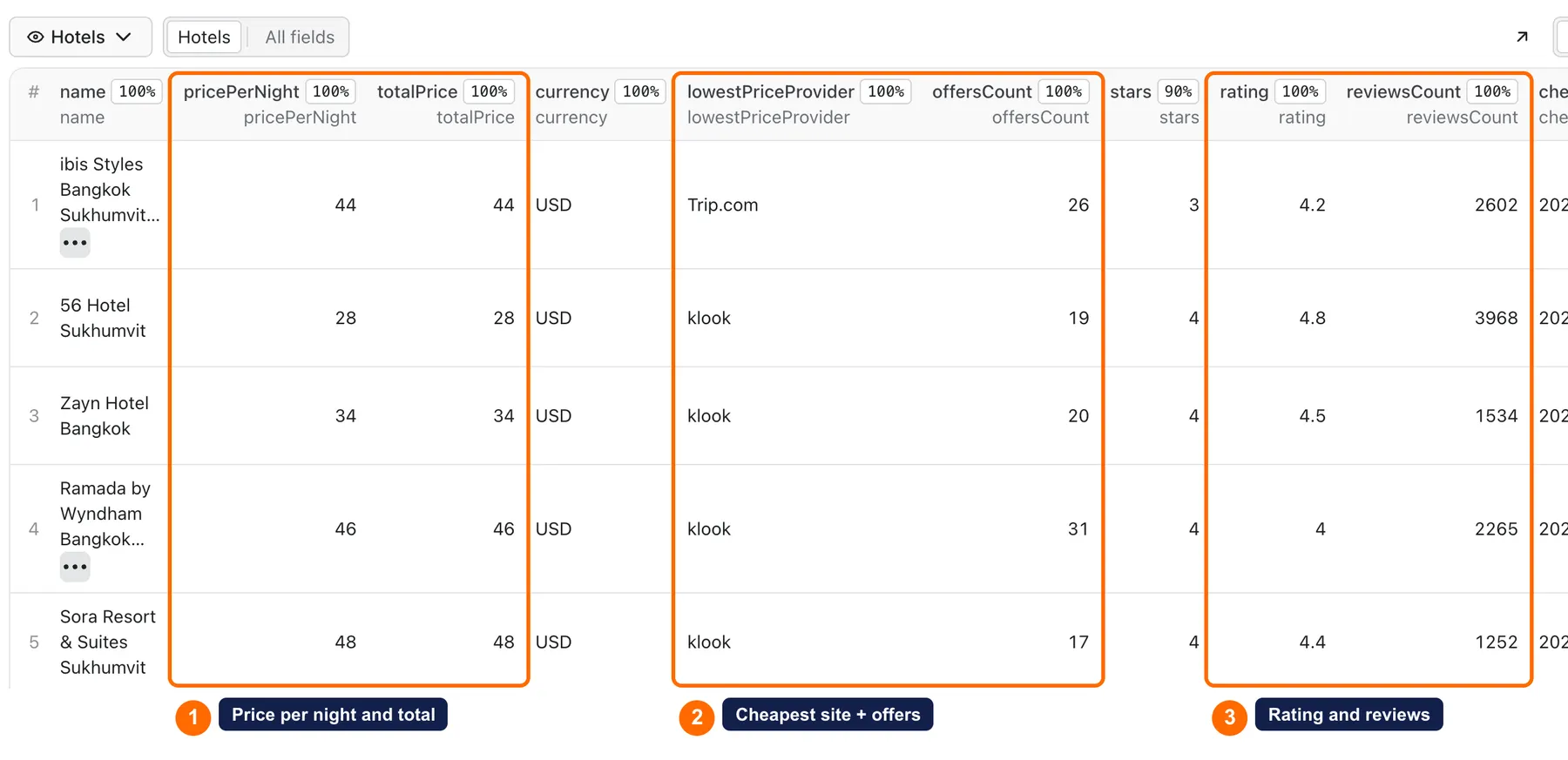
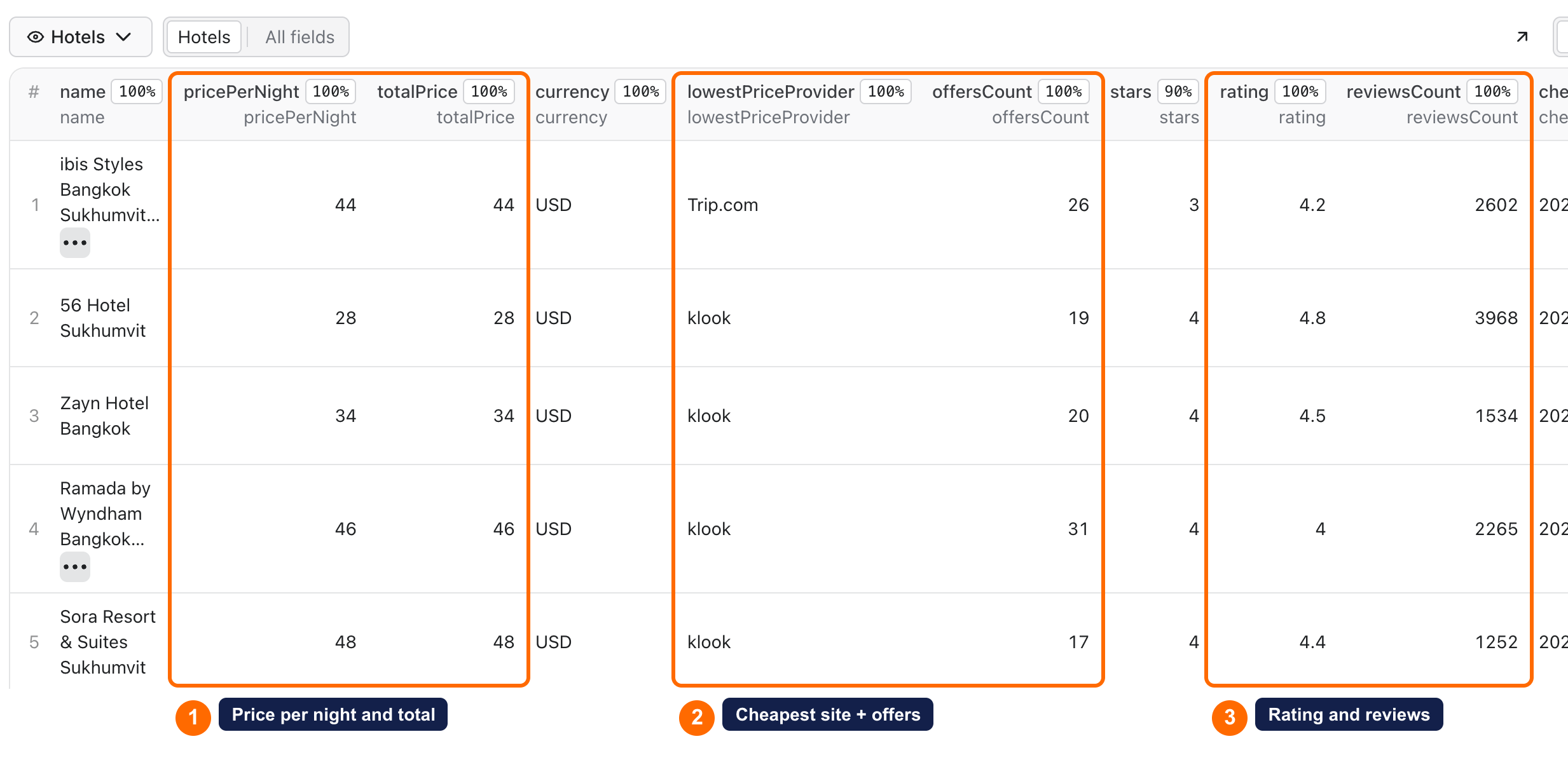
Expected result: 10 hotel rows in about 10 seconds, in Google's order. Most have a nightly price and 10–30 booking-site offers; a hotel Google shows without a price for the dates has pricePerNight: null.
Use cases
| Buyer job | Input path | Output entity | Key fields | Next integration |
|---|---|---|---|---|
| Compare hotel prices in a city | queries, checkIn, checkOut, adults | hotel row | name, pricePerNight, totalPrice, lowestPriceProvider, rating | Export to CSV or a sheet |
| Rate parity: one hotel at every booking site | hotelUrls | hotel row with offers | offers[].provider, offers[].pricePerNight, offers[].isOfficial | Schedule daily, compare runs |
| Cheapest check-in day | sweepDays | one row per hotel and date | checkIn, pricePerNight, hotelId | Sort by pricePerNight |
| Hotel list with contacts | queries, filters | hotel row | address, phone, website, lat, lng | CRM or map |
| Feed an AI agent with live hotel prices | MCP, small maxItems | hotel row | name, pricePerNight, currency, googleHotelsUrl | Agent answer |
Input
Input fields
| Field | Plain name | Type | Required | Default / prefill | Allowed values | Effect | Example | Recommendation |
|---|---|---|---|---|---|---|---|---|
queries | Places or hotel names | array of strings | one of queries or hotelUrls | prefill ["Bangkok"] | up to 50 | One Google Hotels search per place and date | ["Paris", "Hilton Tokyo"] | A city, district or hotel name, as you would type it on Google |
hotelUrls | Google Hotels links | array of strings | one of queries or hotelUrls | empty | up to 100 links with /travel/hotels/entity/… | One row for each hotel and date, with all offers | a link copied from a hotel page | Use for rate tracking of known hotels |
checkIn | Check-in | string | no | prefill +30, empty = 30 days from today | YYYY-MM-DD or +N days from today; today up to 330 days ahead | Arrival date | 2026-12-20 | |
checkOut | Check-out | string | no | prefill +31, empty = one night after checkIn | after checkIn, at most 30 nights | Departure date | 2026-12-22 | |
sweepDays | Check-in days to compare | integer | no | 1 | 1–30 | Also searches the next N−1 check-in days with the same number of nights | 7 | Each day is a separate search and separate rows |
adults | Adults | integer | no | 2 | 1–10 | Guests; prices depend on it | 2 | |
childrenAges | Children's ages | array of integers | no | empty | up to 6 children, ages 0–17 | Child guests; prices depend on it | [7] | |
maxItems | Max hotels in total | integer | no | 20 (prefill 10) | 1–1,400 | Stops the run after this many hotel rows | 100 | Start small; see Limits for time |
maxItemsPerSearch | Max hotels per search | integer | no | no limit | 1–500 | Limits rows for each place and date | 50 | Use with many places or sweepDays |
sortBy | Sort by | string | no | relevance | relevance, lowest_price, highest_rating, most_reviewed | Google's sort order | lowest_price | |
hotelClass | Hotel class (stars) | array | no | any | 2, 3, 4, 5 | Google's star filter | ["4", "5"] | |
minRating | Guest rating | string | no | any | any, 3.5, 4.0, 4.5 | Google's rating filter | 4.0 | |
freeCancellation | Free cancellation only | boolean | no | false | Google's free cancellation filter | true | ||
minPrice, maxPrice | Price per night | integer | no | empty | 0 or more, in currency | Keeps hotels whose nightly price is in the range | 50, 150 | Hotels without a price are dropped when a range is set |
amenities | Must have amenities | array | no | empty | free_wifi, pool, parking, breakfast, spa, pet_friendly, … (22 values in the form) | Keeps hotels that list all of them | ["pool", "free_wifi"] | |
includeOffers | Read offers of every booking site | boolean | no | true | Opens each hotel's prices page: offers, address, phone, website | false | Turn off for a faster list without offers | |
maxOffersPerHotel | Max offers per hotel | integer | no | 0 (all) | 0–100 | Cuts the offers list, cheapest first is not guaranteed | 5 | |
currency | Currency | string | no | USD | 3-letter code Google supports | Currency of all prices | EUR | |
country | Country (Google region) | string | no | us | 2-letter code | Google's region; offers can differ by country | gb | |
language | Language | string | no | en | language code | Language of names and descriptions | de | |
deliveryConnector, deliveryTarget | Send results to | string | no | empty | your MCP connector, Notion page link or Slack channel ID | Posts a short run summary | See below |
The run checks the input before it sends any request. A wrong input (a date in the past, check-out before check-in, only links that are not Google Hotels links) ends the run with INVALID_INPUT and a message that names the field and shows a good value. One bad link among good ones does not stop the run: it gets a free row with status: invalid_input (or not_found for a hotel ID Google does not know) and the other inputs run. The same place typed twice (Tokyo and tokyo) is searched once. Field names from other hotel scrapers (query, location, startUrls, maxResults, checkInDate, checkOutDate) are accepted, and RUN_SUMMARY.ignoredInputFields lists fields the Actor does not use.
Interacting settings
| When | Input A | Input B | Effective behavior | Example | Cost/result effect |
|---|---|---|---|---|---|
| Many places or days | maxItems | maxItemsPerSearch | maxItems caps the whole run; maxItemsPerSearch caps each place and date | 3 places, maxItemsPerSearch: 20, maxItems: 100 → up to 60 rows | You pay per row saved |
| Date range | checkIn/checkOut | sweepDays | Check-in moves one day at a time, the stay length stays the same | +30/+32, sweepDays: 7 → 7 searches of 2 nights | One search page or more per day |
| Price range | minPrice/maxPrice | pricePerNight | Filter runs on the nightly price from the search list, after Google's own filters | maxPrice: 100 | Dropped hotels are not charged; search pages are |
| Offers off | includeOffers: false | offers, address, phone | These fields stay null, offersStatus is not_requested | Faster run, same price per row | |
| Run option "Max items" | Apify run options | maxItems | The smaller of the two wins |
Input examples
Hotels in one city (the prefill)
Expected behavior: one Google Hotels search for 2 adults, USD, then the prices page of each hotel.
Expected output: 10 hotel rows with name, pricePerNight, lowestPriceProvider, offers and rating.
Limit or cost note: 1 search page and 10 hotel events (see Pricing).
One hotel at every booking site, for a week of check-in days
Expected behavior: the hotel's prices page for each of 7 check-in days.
Expected output: 7 rows of the same hotelId, one per checkIn, each with its offers.
Output
Each hotel and date is one row in the default Dataset. The Hotels view shows the main columns as a table.
Output example
This is one row from a real run (Paris, 2026-12-20 → 2026-12-22, 2 adults, EUR). It is trimmed: 2 of 29 offers, 6 amenities, one image and shorter links are shown.
null means Google did not show the value. It never means zero. pricePerNight comes from the search list and the offers come from the hotel's prices page a moment later, so the two can differ a little, as in this example.
Output fields
| Field | Meaning | Type | Can be empty? | Example / enum | Source / notes |
|---|---|---|---|---|---|
status | Row type | string | no | ok, invalid_input, not_found | ok for a hotel. The other two are free rows about one bad input; their hotel fields are null |
error | Why the input was rejected | string | yes, null on hotel rows | Has an example of a good value | |
hotelId | Google Hotels ID of the hotel | string | no on hotel rows | ChgIxfW9… | Use it to join runs |
name | Hotel name | string | no on hotel rows | Pullman Paris Tour Eiffel | |
propertyType | Hotel or vacation rental | string | yes | hotel, vacation_rental | |
stars, hotelClass | Star class as a number and as Google writes it | integer, string | yes | 4, 4-star tourist hotel | |
rating, reviewsCount | Guest rating out of 5 and number of reviews | number, integer | yes | 4.6, 17790 | |
pricePerNight | Lowest nightly price Google shows in the search list | number | yes, when Google shows no price for the dates | 281 | In currency, for all guests |
totalPrice | Total for the whole stay, from the cheapest offer | number | yes | 594 | |
currency | Currency of all prices | string | no | EUR | |
lowestPriceProvider | Booking site of the cheapest offer | string | yes | Vio.com | |
hasFreeCancellation | Google marks a free cancellation offer | boolean | yes | true | |
offersCount | Number of booking-site offers | integer | yes | 29 | null when offers were not read |
offersStatus | Whether offers were read | string | no | ok, not_requested, skipped_residential, error | See Output entities |
offers[] | One item per booking site: provider, pricePerNight, totalPrice, url, isOfficial, freeCancellationUntil | array | null when offers were not read | see example | isOfficial is the hotel's own site |
amenities | Amenities Google lists | array | can be [] | ["Free Wi-Fi", "Pool"] | |
address, phone, website | Contact details from the hotel page | string | yes | Only with includeOffers: true | |
lat, lng | Coordinates | number | yes | 48.85 | |
placeId, cid | Google Maps IDs | string | yes | ||
countryCode | Country of the hotel | string | yes | FR | |
checkInTime, checkOutTime | Hotel's check-in and check-out time | string | yes | 4:00 PM | |
description | Short description from Google | string | yes | ||
imageUrl, images | Main photo and more photos | string, array | yes | Google image links | |
googleHotelsUrl, googleMapsUrl | Links to this hotel on Google | string | yes (null on invalid_input rows) | ||
searchQuery, searchRank | The place you searched and the hotel's position in Google's list | string, integer | yes, for hotelUrls rows | Paris, 1 | |
checkIn, checkOut, nights, adults, childrenAges | Search settings of this row | no | 2026-12-20 | ||
fetchedAt | When the row was read (UTC) | string | no | ISO time |
Output entities and surfaces
| Situation | Dataset/API/KVS/live view | Result shape | User action |
|---|---|---|---|
| Normal item | Dataset, Hotels view | one row per hotel and date with offersStatus: ok | Use pricePerNight, offers |
| Domain-empty result | Dataset empty; RUN_SUMMARY.status NO_RESULTS | no rows; the search has no_hotels in RUN_SUMMARY.searches | Check the place, dates and filters |
| Partial result | Dataset rows; RUN_SUMMARY.status PARTIAL with stopReason | rows saved before the stop stay | Read stopReason and unprocessedInputs |
| One bad input among good ones | free Dataset row with status: invalid_input or not_found, also in RUN_SUMMARY.skippedInputs or searches; RUN_SUMMARY.counts.freeRows counts these rows, counts.hotelRows counts hotels only | error says what is wrong and quotes the bad link; the other inputs run | Fix that link, or filter rows by status: ok |
| Hotel prices page failed | Dataset row with offersStatus: error | offers, address, phone are null; search fields are kept | Run that hotel again with hotelUrls |
| Technical failure or retry | RUN_SUMMARY.status ERROR, run status message | no rows or rows saved before the error | See Troubleshooting |
RUN_SUMMARY also lists each search (searches) with its status (hotels_found, no_hotels, not_found, error, not_processed) and the hotels it gave, and warnings in plain English.
Send results to Slack or Notion
Pick your connector in the optional deliveryConnector field. After the run saves its data, the Actor posts a short summary (up to 25 rows and a link to the full dataset) there. Put a Notion page link or a Slack channel ID in deliveryTarget: in Notion every run is added on top of that one page, so your workspace does not fill up with new pages. Without a page link, Notion delivery is skipped and the log says so. A delivery error never fails the run and costs nothing extra. Connect a service once in Apify Console → MCP connectors.
Use case → fields
| Buyer job | Input path | Output entity | Key fields | Next integration |
|---|---|---|---|---|
| City price list | queries | hotel row | name, pricePerNight, lowestPriceProvider | CSV, sheet |
| Rate parity | hotelUrls | offers[] | provider, pricePerNight, isOfficial | Daily schedule |
| Cheapest day | sweepDays | hotel row per date | checkIn, pricePerNight | Sort |
Pricing
Pricing unit
You pay for each hotel row saved to the Dataset, with its booking-site offers included, plus a small fee per Google page.
| Event | When | Free plan | Bronze | Silver | Gold and higher |
|---|---|---|---|---|---|
hotel | One hotel row saved to the Dataset, with its price and offers when Google shows them for the dates | $0.0026 ($2.60 / 1,000) | $0.00234 | $0.00208 | $0.00182 |
google-page | One Google Hotels search page or hotel-link page that Google returned, also a page with no matching hotels. Prices pages opened for search results are not charged | $0.0002 | $0.00018 | $0.00016 | $0.00014 |
apify-actor-start | Once per run, per GB of run memory (default 512 MB = one event) | $0.0005 | $0.0005 | $0.0005 | $0.0005 |
Proxy and platform usage are included in the price. A hotel that Google lists without a price for your dates (pricePerNight: null) is still a hotel row and costs one hotel event; set minPrice or maxPrice to keep only priced hotels. A hotel whose prices page failed (offersStatus: error) still has its search data and costs the same hotel event. A search with no hotels costs only its pages (one page, or a few more when a price filter rejects every hotel). A wrong input that fails the check costs only the start fee. A hotel ID that Google does not know costs one google-page (Google returned a page for it); its not_found row is free.
The Actor never asks for more events than fit in the maximum charge you set for the run: it stops with PARTIAL and CHARGE_LIMIT and keeps the rows already saved.
Cost examples
| Scenario | Input scope | Expected item/event count | Base charge | Optional charge | Stop/cap behavior |
|---|---|---|---|---|---|
| Prefill | Bangkok, 10 hotels | 10 hotel, 1 google-page | $0.0262 + $0.0005 start | none | Stops at maxItems |
| One city, 100 hotels | 1 place, maxItems: 100 | 100 hotel, about 7 google-page | about $0.2614 + $0.0005 start | none | Stops at maxItems |
| One hotel link | hotelUrls with 1 link | 1 hotel, 1 google-page | $0.0028 + $0.0005 start | none | |
| Filter with no matches | 1 place, strict class/rating filters | 0 hotel, 1 google-page | $0.0002 + $0.0005 start | none | NO_RESULTS |
| Price filter with no matches | 1 place, minPrice/maxPrice nobody meets, maxItems: 10 | 0 hotel, up to 5 google-page | up to $0.001 + $0.0005 start | none | NO_RESULTS; the price filter checks a few more pages before it stops |
Prices are Free plan prices.
Limits
- Speed: with offers a hotel takes about 1.2–1.8 seconds. In our tests at the default 512 MB, 10 hotels took under 10 seconds and 100 hotels about 130–175 seconds, so the default 300-second timeout fits about 100 hotels. For more, raise the timeout in the run options (1,400 hotels took about 29 minutes at 512 MB). Rows saved before the time limit stay (
PARTIAL,DEADLINE). - Up to 1,400 hotel rows per run (
maxItems), 50 places, 100 hotel links and 300 place × date searches. Google stops listing at about 500 hotels per search. The largest run we tested saved 1,400 hotels from 14 cities in about 29 minutes, with offers for all of them. - One run sends at most 1,500 requests to Google (search pages plus hotel prices pages), enough for 1,400 hotels with offers. Split bigger jobs into several runs.
- Dates: check-in from today up to 330 days ahead, at most 30 nights.
- No booking, no room types and no prices behind a login. The Actor returns what Google Hotels shows for the region in
countryat the time infetchedAt; booking sites can show other prices. - Google shows a different set and order of hotels from one search to the next, so two runs of the same input can list different hotels.
- If Google answers only through residential proxy, hotel prices pages are skipped for search results (
offersStatus: skipped_residential) to keep the run cheap. Search pages that bring no hotels and hotel links cost more there than they earn, so the run stops after about two such pages (stopReason: REQUEST_CAP) and keeps what it saved.
API, export and integrations
- API: start the Actor with the Apify API and read rows from the default Dataset (
view=hotelsfor the table columns), and the run status from theRUN_SUMMARYrecord of the key-value store. - Export: download the Dataset as JSON, CSV, Excel, XML or HTML from the run page.
offersis a nested list; use JSON or the API to keep it whole. - Scheduling: create an Apify schedule with the same input to collect prices every day. Use relative dates (
+30) so each run searches 30 days ahead. Join runs byhotelIdandcheckIn. - Webhooks / no-code: use Apify webhooks or the Make, Zapier and n8n integrations to send new rows to a sheet or database when a run succeeds.
Use with AI agents (MCP)
- MCP server URL with only this Actor:
https://mcp.apify.com?tools=cliqtomedia/google-hotels-scraper. - Smallest useful input:
- Key output fields:
name(hotel),pricePerNightandtotalPricewithcurrency(for all guests),lowestPriceProvider(cheapest booking site),rating,googleHotelsUrl(link to show the user). - 10 hotels take about 10 seconds and cost about $0.027 on the Free plan. Keep
maxItemssmall in agent calls; dates must be today or later and at most 30 nights apart.
Troubleshooting
The run has no rows (NO_RESULTS)
Symptom: the run succeeded but the Dataset is empty.
Likely reason: Google Hotels shows no hotels for this place, dates and filters.
Check: open the search on google.com/travel/hotels with the same dates and filters; read RUN_SUMMARY.searches.
Action: use a broader place or fewer filters (minRating, hotelClass, amenities, price range).
Some rows have offersStatus: error
Symptom: offers and address are null for a few hotels.
Likely reason: the hotel's prices page did not load after retries.
Action: run those hotels again with their googleHotelsUrl in hotelUrls.
Rows have offersStatus: skipped_residential
Symptom: no offers for search results; a warning in RUN_SUMMARY.
Likely reason: Google refused the cheaper routes, so the run used residential proxy, where prices pages are skipped.
Action: run again later.
The run stopped with DEADLINE
Symptom: status PARTIAL, fewer hotels than maxItems, the message says the time limit was reached.
Action: raise the run timeout in the run options, set includeOffers: false, or split places across runs. Saved rows stay.
The run stopped with CHARGE_LIMIT
Symptom: status PARTIAL, fewer hotels than asked.
Action: raise the maximum charge of the run or lower maxItems.
The run failed at once with INVALID_INPUT
Read the run status message. It names the field to fix, for example a check-in date in the past or a link that is not a Google Hotels hotel link. When every hotel link points to a hotel ID Google does not know, the run fails the same way after Google answers; each such link costs one google-page.
FAQ
Do I need a Google account, login or API key?
No. The Actor reads public Google Hotels pages without login or cookies, and it picks its own connection route; there is no proxy setting to choose.
Is the price the same as on Booking.com or the hotel website?
It is the price Google Hotels shows for that site, for the region in country and the time in fetchedAt. The site itself can show another price, for example with a member discount or taxes added for your country. Prices change often.
Why do I get different hotels than in my browser or in my last run?
Google changes the set and order of hotels from search to search, also by region and language. Hotels that appear in both runs have the same values within normal price changes.
Is there an official Google Hotels API?
Google has no public API for hotel prices. This Actor gives you the same data as JSON through the Apify API.
How do I get the link of one hotel?
Open the hotel on google.com/travel/hotels and copy the address from the browser, or take googleHotelsUrl from a row of an earlier run.
Related Actors
- Booking.com Scraper — hotels, room prices and reviews straight from Booking.com.
- Agoda Hotels & Prices Scraper — rates and rooms on Agoda, strong in Asia.
- Expedia & Hotels.com Hotels Scraper — hotel prices on Expedia and Hotels.com.
- Airbnb Scraper — vacation rentals with prices and calendar for the same dates.
- Google Flights Scraper — flight prices for the same trip.
Support
For a bug, question or feature request, open the Actor's Issues tab on Apify. Include the run ID, the place or hotel link, the dates and the status message. Never send API tokens or other private data.
⭐ Found it useful? Rate this Actor. Something wrong? Report a problem — we fix reported problems.


