

iFood Scraper: Restaurants, Menus & Delivery Fees by Address
Pricing
from $1.82 / 1,000 restaurant saveds
iFood Scraper: Restaurants, Menus & Delivery Fees by Address
Scrape iFood Brazil restaurants near any address to compare competitors, plan delivery coverage and study menu prices: rating, reviews, delivery fee and time, price range, address, CNPJ, hours and full menus. No login.
Pricing
from $1.82 / 1,000 restaurant saveds
Rating
0.0
(0)
Developer

Cliqto Media
Maintained by CommunityActor stats
0
Bookmarked
2
Total users
1
Monthly active users
3 days ago
Last modified
Categories
Features
Share
iFood Scraper finds the restaurants that iFood Brazil shows for any delivery address and saves each one as a row: rating, reviews, delivery fee, delivery time, price range, full address, CNPJ, opening hours and, if you want, the full menu with prices. No login, no cookies and no iFood account are needed.
Use it to compare competitors in a district, see who delivers to an address and at what fee, or study menu prices. The form example (20 restaurants near Av. Paulista) takes under 30 seconds and costs about $0.07.
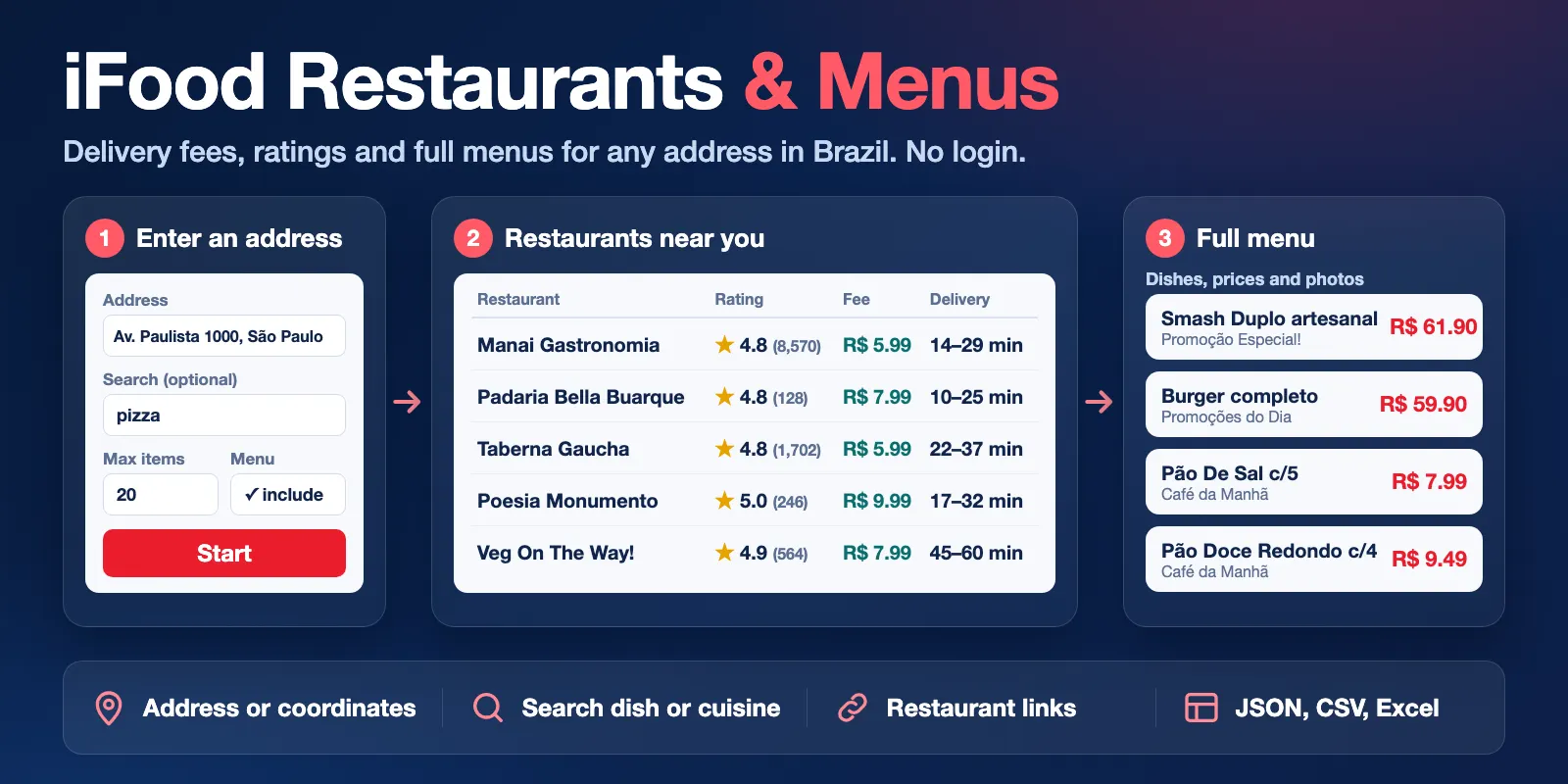
Table of contents
- What it does
- How it works
- Quick start
- Use cases
- Input
- Output
- Pricing
- Limits
- API, export and integrations
- Troubleshooting
- FAQ
- Related Actors
- Support
What it does
iFood is the largest food delivery app in Brazil. What a buyer sees in the app depends on the delivery address: which restaurants deliver there, the fee and the time. This Actor takes addresses or coordinates, optional search words (for example pizza or sushi) and optional restaurant links, and returns one row per restaurant.
Each row has the name, main category, rating, number of reviews, delivery fee in BRL, delivery time range, distance, open or closed, price range and minimum order. By default it also reads the restaurant page for the full address, CNPJ, restaurant description, opening hours and all categories. Turn on Include full menu to add every dish with its menu section, description, price, old price and photo.
The Actor never logs in, never places orders and never collects data about iFood customers. It reads only what iFood shows to any visitor without an account.
Good fit
- See which restaurants deliver to one or more addresses, with the fee and time for each.
- Compare competitors in a district: rating, reviews, delivery fee, price range and minimum order.
- Study menu prices: every dish and price of the pizzerias or sushi places near an address.
- Build a list of restaurants in a city with address, CNPJ and opening hours for your own research.
How it works
- You enter delivery addresses in Brazil or latitude,longitude points. The Actor finds each place on the map and removes duplicates. You can add search words and iFood restaurant links.
- For each place (and each search word) it reads the restaurant list that iFood shows for that address, page by page. The Max restaurants limit is shared fairly between places.
- For each restaurant it reads the restaurant page (address, CNPJ, hours) and, if asked, the full menu.
- It saves one Dataset row per restaurant. A restaurant that appears for two places or two search words is saved once. Links that are not iFood restaurants or no longer exist also get a row with
statusinvalid_inputornot_found; these rows are free. - At the end it writes a run summary (
RUN_SUMMARY) with counts per place and, if you want, posts a short summary to Slack or Notion.
iFood often refuses requests from data centers. The Actor switches to Brazilian proxies by itself and keeps the rows it already saved.
Quick start
-
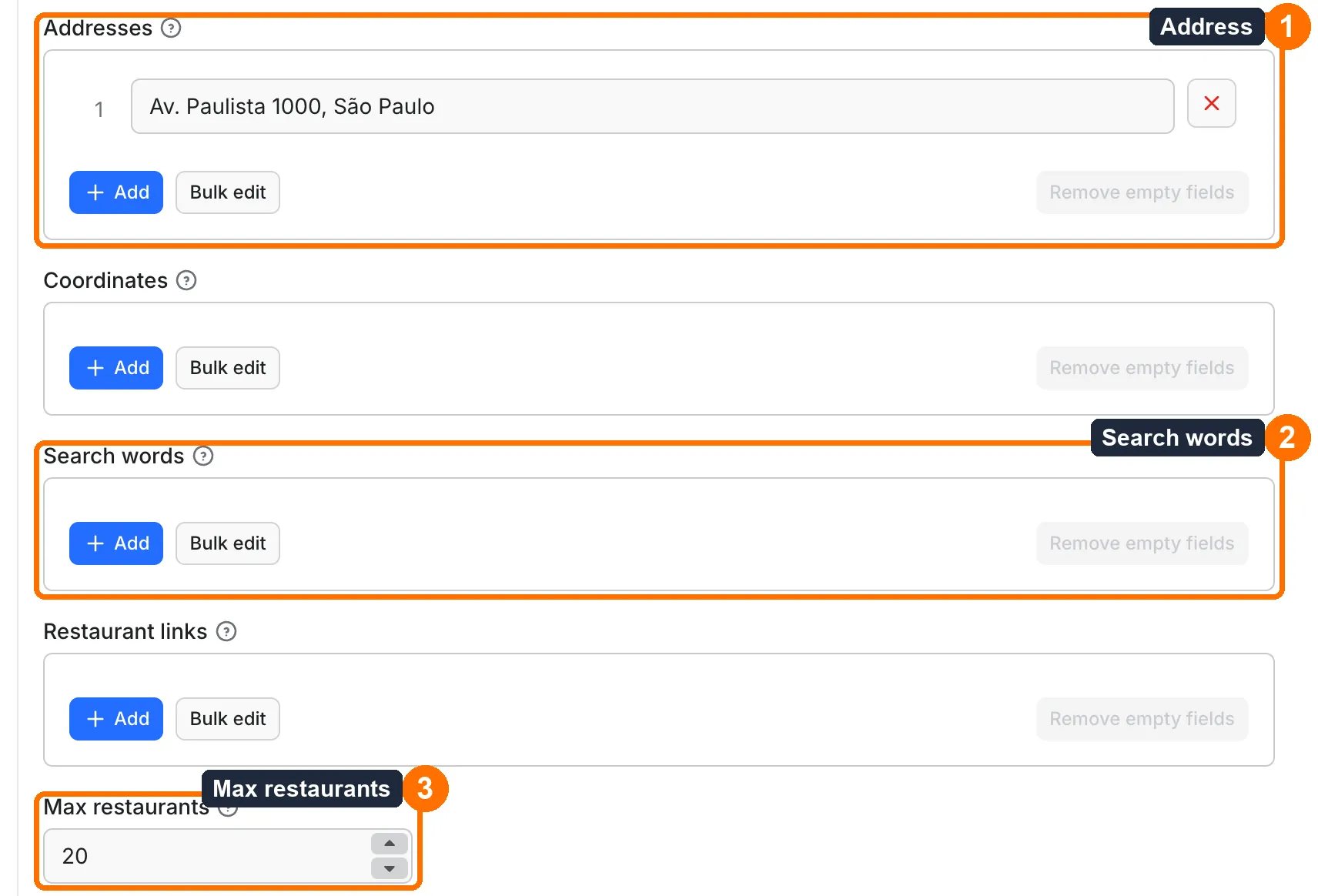
Open the Input tab. Addresses already has
Av. Paulista 1000, São Paulo(box 1). Keep it or put your own address. -
Search words is empty (box 2): you get all kinds of restaurants. Add
pizzaorsushito narrow the list. -
Max restaurants is 20 in the form (box 3). Leave it empty for the default of 100, or set up to 5000.
-
Click Start.
-
Open the Output tab. The Restaurants view shows name, category, rating, reviews, delivery fee, delivery time, price range and city (box 5).
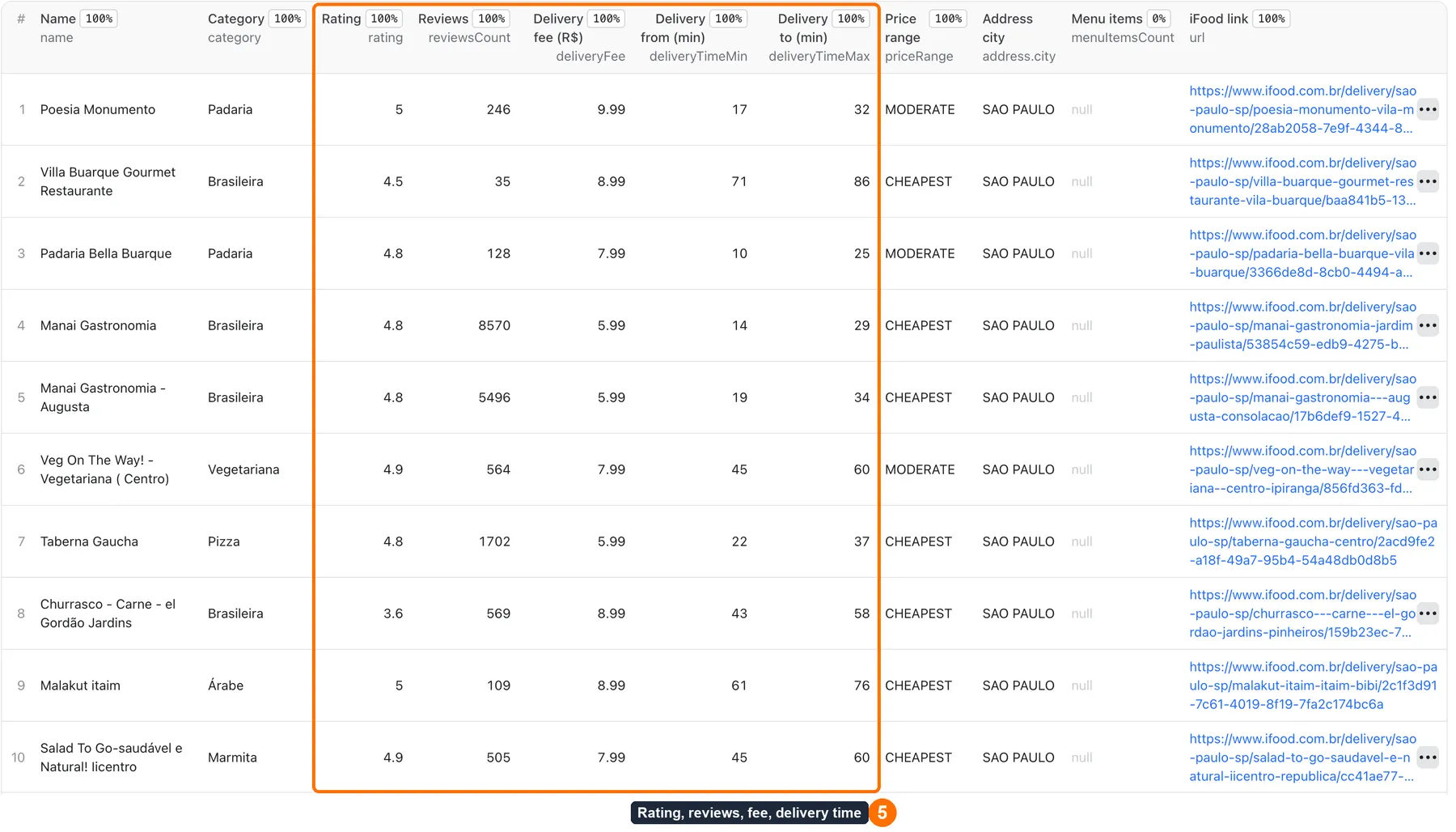
Expected result: 20 restaurant rows in under 30 seconds.
Use cases
| Buyer job | Input path | Output entity | Key fields | Next integration |
|---|---|---|---|---|
| Compare competitors near an address | addresses + searchQueries | Restaurant | rating, reviewsCount, deliveryFee, deliveryTimeMin, priceRange | Export to Excel or Google Sheets |
| Plan delivery coverage | several addresses or coordinates | Restaurant | deliveryFee, deliveryTimeMax, distanceKm, searchPoint | Dataset API, map tool |
| Study menu prices | addresses + searchQueries + includeMenu | Restaurant with menu | menuItems[].name, menuItems[].price, menuItems[].category | Export to CSV |
| Restaurant list for research | addresses | Restaurant | name, address, cnpj, description, openingHours | CRM import, schedule |
| Watch known restaurants | restaurantUrls | Restaurant | rating, reviewsCount, isOpen, menuItems | Schedule + Slack summary |
Input
Input fields
| Field | Plain name | Type | Required | Default / prefill | Allowed values | Effect | Example | Recommendation |
|---|---|---|---|---|---|---|---|---|
addresses | Addresses | list of strings | one of addresses, coordinates or restaurantUrls | prefill: Av. Paulista 1000, São Paulo | addresses in Brazil, up to 20 | Finds the restaurants iFood shows for each address | Rua Visconde de Pirajá 300, Rio de Janeiro | Street, number and city work best |
coordinates | Coordinates | list of strings | as above | empty | latitude,longitude, up to 20 | Same as an address, but at an exact point | -23.5647,-46.6527 | Use when an address is not found |
searchQueries | Search words | list of strings | no | empty | up to 20 words or phrases | Searches iFood near each place | pizza, açaí | Leave empty for a mix of all kinds |
restaurantUrls | Restaurant links | list of strings | as above | empty | iFood restaurant links or IDs, up to 250 | Reads these restaurants directly | https://www.ifood.com.br/delivery/sao-paulo-sp/pizza-hut---paraiso-jardim-paulista/f1b60ced-d490-499f-976b-6d3d717d927e | Use to watch the same restaurants every day |
maxItems | Max restaurants | integer | no | default 100, prefill 20 | 1–5000 | Most restaurant rows in the run, across all places | 500 | Over 1000, give the run more time |
includeMenu | Include full menu | boolean | no | false | true, false | Adds every dish with price and photo | true | Costs more and takes about 6–14 s per restaurant |
includeDetails | Include address, CNPJ and hours | boolean | no | true | true, false | Reads the restaurant page for full address, CNPJ, description and hours | false | Turn off for faster lists without these fields |
proxyConfiguration | Proxy | object | no | empty | Apify Proxy or your own proxies | Your own first route to iFood | Leave empty: the Actor picks Brazilian proxies itself | |
deliveryConnector | Send results to | MCP connector | no | empty | Slack, Notion or another MCP connector | Posts a short summary after the run | your Slack connector | Optional |
deliveryTarget | Notion page or channel | string | no | empty | Notion page link or Slack channel ID | Where the summary goes | C0123456789 | Needed for Notion |
Empty input stops at once with a clear message and examples. An address that cannot be found in Brazil is named in the run summary; if no place is found and there are no links, the run fails with PLACE_NOT_FOUND. Input fields from other iFood scrapers (citySlug, searchTerm, maxResults, includeMenuItems) are accepted and mapped.
Interacting settings
| When | Input A | Input B | Effective behavior | Example | Cost/result effect |
|---|---|---|---|---|---|
| Several places | addresses / coordinates | maxItems | The limit is split fairly; rows a place cannot fill go to the next places | 3 addresses, maxItems 30 | About 10 rows per address |
| Search words | searchQueries | places | Near each place the words are searched in order until that place's share is full; duplicates are saved once | 2 words × 2 addresses | One row per restaurant |
| Menu | includeMenu = true | maxItems | Reads the menu of every saved restaurant | maxItems 30 | 30 × $0.0173 instead of 30 × $0.0026; 2–7 minutes |
| Fast lists | includeDetails = false | places | No restaurant page: no address, CNPJ, description or hours | maxItems 1000 | Same price, faster |
| Links and places together | restaurantUrls | addresses | Links first, then the places, until maxItems | 5 links + 1 address, maxItems 20 | 5 link rows + 15 rows near the address |
| Search words without a place | searchQueries | only restaurantUrls | Search words are ignored (they need a place); the run summary says so | Only link rows |
Input examples
Restaurants near one address (form example)
Expected behavior: finds the address, reads the iFood list for it and the page of each restaurant.
Expected output: 20 restaurants with rating, deliveryFee, deliveryTimeMin, address, cnpj.
Limit or cost note: about $0.072 (start + 20 restaurants), under 30 seconds.
Pizzerias with full menus in two cities
Expected behavior: searches pizza near both addresses, about 15 restaurants each, and reads every menu.
Expected output: 30 restaurants with menuItems (dish, section, price, photo).
Limit or cost note: about $0.54, 2–7 minutes (iFood answers menus at varying speed).
Known restaurants by link
Expected behavior: reads this restaurant and its menu.
Expected output: one restaurant with menuItems; no delivery fee or time (they depend on an address).
Limit or cost note: about $0.037, under a minute.
Output
Output fields
| Field | Meaning | Type | Can be empty? | Example / enum | Source / notes |
|---|---|---|---|---|---|
restaurantId | iFood restaurant ID | string | on invalid_input rows | 28ab2058-7e9f-4344-8fbb-20893a3c6f26 | Same ID as in the iFood link |
name | Restaurant name | string | on not-found rows | Poesia Monumento | |
url | Restaurant link on iFood | string | no | https://www.ifood.com.br/delivery/… | |
category, categories | Main category and all categories | string, array | yes | Padaria; ["Pizza", "Lanches"] | In Portuguese, as iFood shows them |
rating | Average rating, 1–5 | number | yes | 4.8 | New restaurants may have none |
reviewsCount | Number of ratings | integer | yes | 246 | |
deliveryFee | Delivery fee to the place, BRL | number | for link rows | 9.99 | 0 means free delivery |
deliveryTimeMin, deliveryTimeMax | Delivery time range, minutes | integer | for link rows | 17, 32 | |
distanceKm | Distance from the place, km | number | for link rows | 4.16 | |
isOpen | Open at run time | boolean | for link rows | true | |
priceRange | Price level | string | yes | CHEAPEST, CHEAP, MODERATE, EXPENSIVE, MOST_EXPENSIVE | iFood's own scale |
minimumOrderValue | Minimum order, BRL | number | yes | 30 | |
address | Restaurant address | object | null when includeDetails is off | street, number, district, city, state, zipCode, latitude, longitude | From the restaurant page |
cnpj | Company tax ID | string | yes | 20937420000106 | As the restaurant gave it to iFood |
description | The restaurant's own text about itself | string | yes | Pão fresco, todo dia | Usually Portuguese, as on iFood |
openingHours | Hours per weekday | array | yes | {"dayOfWeek": "MONDAY", "start": "06:30", "end": "21:25"} | |
chain | Chain name | string | yes | Galetus | null for single restaurants |
logoUrl | Logo image | string | yes | https://static-images.ifood.com.br/… | |
features | iFood service flags | array | yes | ["DELIVERY", "TRACKING"] | |
menuItems | Menu dishes | array | null without menu | id, category, name, description, price, originalPrice, minPrice, imageUrl, available | originalPrice is set for discounts |
menuItemsCount | Number of dishes | integer | null without menu | 102 | |
menuStatus | Menu result | string | no | complete, empty, unavailable, not_requested | unavailable: menu could not be read, row still saved |
searchQuery, searchPoint | Search word and place that found the row | string, object | for link rows | pizza; {"lat": -23.56, "lon": -46.65, "label": "Av. Paulista 1000, São Paulo"} | |
status | Row result | string | no | complete, partial, not_found, invalid_input | partial: some part (details or menu) failed |
errors | What went wrong for this row | array | [] on complete rows | ["menu: …"] | |
source, fetchedAt | Source and read time (UTC) | string | no | ifood.com.br, ISO 8601 |
Output entities and surfaces
| Situation | Dataset/API/KVS/live view | Result shape | User action |
|---|---|---|---|
| Normal run | Dataset, Restaurants and Address & company views | One row per restaurant, status complete; run SUCCEEDED | Export or use deliveryFee, rating, url |
| iFood shows nothing for the place and search | Dataset empty, RUN_SUMMARY | Run SUCCEEDED, RUN_SUMMARY.status empty with a hint | Try another address or other search words |
| Run stopped early | Dataset, RUN_SUMMARY | Rows saved so far; RUN_SUMMARY.status partial, stopReason CHARGE_LIMIT, DEADLINE or CANCELLED; run SUCCEEDED | Raise the maximum cost or the timeout |
| Some menus not read | Dataset, RUN_SUMMARY | Rows saved with menuStatus unavailable, charged without menu; RUN_SUMMARY.status partial with the reason; run SUCCEEDED | Run those links again later |
| Bad or removed links | Dataset | Free rows with status invalid_input or not_found and a message in errors | Check the link |
| Technical failure | RUN_SUMMARY, status message | Run FAILED, stopReason PLACE_NOT_FOUND, INVALID_INPUT, SOURCE_BLOCKED or SOURCE_CHANGED, with a plain message | Fix the input, or try again later |
RUN_SUMMARY in the Key-value store has the run status (complete, partial, empty, error), stopReason, counts per place and search word, and proxy statistics.
Output example
This example is trimmed: some fields, six weekdays and most categories are left out. The restaurant fields are from the form example run; the menuItems part is one dish from a menu run of another bakery (with includeMenu off, menuItems is null and menuStatus is not_requested). null means iFood did not show the value. Fees, times, ratings and open status change during the day.
Send results to Slack or Notion
Pick your connector in the optional deliveryConnector field. After the run saves its data, the Actor posts a short summary (up to 25 restaurants with rating and city, and a link to the full dataset) there. Put a Notion page link or a Slack channel ID in deliveryTarget: in Notion every run is added on top of that one page, so your workspace does not fill up with new pages. Without a page link, Notion delivery is skipped and the run summary says why. A delivery error never fails the run and costs nothing extra. Connect a service once in Apify Console → MCP connectors.
Use case → fields
| Buyer job | Input path | Output entity | Key fields | Next integration |
|---|---|---|---|---|
| Compare competitors | addresses + searchQueries | Restaurant | rating, reviewsCount, deliveryFee, priceRange | Excel, Google Sheets |
| Delivery coverage | addresses / coordinates | Restaurant | deliveryFee, deliveryTimeMax, distanceKm | Dataset API |
| Menu prices | includeMenu | Restaurant with menu | menuItems[].price, menuItems[].originalPrice | CSV |
Pricing
Pricing unit
You pay per event. Apify platform usage (compute, proxy) is included: the developer pays it.
| Event | What it is | FREE | BRONZE | SILVER | GOLD and higher |
|---|---|---|---|---|---|
restaurant | Restaurant: one saved restaurant row without menu | $0.0026 | $0.00234 | $0.00208 | $0.00182 |
restaurant-with-menu | Restaurant with menu: one saved restaurant row with its full menu | $0.0173 | $0.01557 | $0.01384 | $0.01211 |
apify-actor-start | One run start, per GB of memory | $0.02 | $0.02 | $0.02 | $0.02 |
$2.60 per 1000 restaurants on the FREE tier, $1.82 on GOLD. With full menus: $17.30 per 1000 on FREE, $12.11 on GOLD.
The start fee scales with run memory (per GB). This Actor runs with 256 MB by default and allows up to 1 GB, so the start is one event, $0.02.
Runs with no results pay only the start fee: an address where iFood shows nothing, search words that match nothing and links that are all not found or not iFood links cost $0.02. not_found and invalid_input rows are always free. A restaurant whose menu could not be read is charged as a restaurant without menu, never more. A partial run pays only for the rows it saved. The maximum cost per run setting is respected: the run stops with CHARGE_LIMIT, its status stays SUCCEEDED and its rows are kept. The smallest allowed limit is $0.04.
Cost examples
Amounts are for the FREE tier at the current prices. Row counts and times are from real runs of this Actor.
| Scenario | Input scope | Expected item/event count | Base charge | Optional charge | Stop/cap behavior |
|---|---|---|---|---|---|
| Quick test (form) | 1 address, maxItems 20 | 20 restaurants | $0.072 | None | Stops at maxItems, under 30 s |
| Typical | 1 address + 1 search word, maxItems 100 | 100 restaurants | $0.28 | None | Stops at maxItems |
| Large | 1 address, maxItems 1000 | 1000 restaurants | $2.62 | None | 3–4 minutes, fits the default timeout |
| With menus | 2 addresses, includeMenu, maxItems 30 | 30 restaurants with menu | $0.539 | Menu events | 2–7 minutes |
| One link with menu | 1 restaurant link, includeMenu | 1 restaurant with menu | $0.0373 | Menu event | Under a minute |
| No matches | Address where iFood shows nothing for the search | 0 restaurants | $0.02 | None | Ends when the list ends |
| Removed links | Links that are not found | 0 restaurants, free not_found rows | $0.02 | None | Ends after the links |
| Cost cap | Maximum cost $0.10 | 30 restaurants | $0.10 or less | None | Stops with CHARGE_LIMIT |
Limits
- Brazil only. Addresses and coordinates outside Brazil are not found.
- Up to 20 addresses, 20 coordinates, 20 search words and 250 links per run, and up to 5000 restaurants. The most we saved in one run is 4110 restaurants from 5 points in São Paulo; then iFood had no more. For more, add more addresses.
- Speed without menu is about 5 restaurants per second, so 1000 restaurants fit the default timeout of 600 s. For 2000 or more, set a longer timeout (Run options → Timeout).
- Menus are slower: 30 restaurants with menu take 2–7 minutes. For more than about 40 restaurants with menu, set a longer timeout.
- If iFood refuses menus again and again (2 refusals before any menu arrives, or 5 in a row later), the Actor stops asking for menus, saves the rest without menu at the lower price and marks the run
partial. - Links alone give no delivery fee, delivery time, distance or open status: these depend on an address. Search by address for them.
- iFood shows each address only the restaurants that deliver there. When many restaurants are closed (late at night), the list can be shorter.
- Data is what ifood.com.br shows at run time. Text is in Portuguese and is not translated. We do not promise that every field is filled for every restaurant.
API, export and integrations
- API: start a run with the Apify API (
POST /v2/acts/cliqtomedia~ifood-scraper/runs) and the same JSON as the input form. Read rows from the run's default Dataset. - Export: download the Dataset as JSON, CSV, Excel, XML or HTML from the Output tab or the API. The Restaurants view is a flat table; menus are in the JSON export.
- Scheduling: save your addresses as a task and add an Apify schedule to follow fees and ratings every day.
- Webhooks / no-code: use Apify webhooks or the Make, Zapier and n8n integrations to send new rows on. The next system usually reads
restaurantId,deliveryFee,ratingandurl. - Slack or Notion: set
deliveryConnectoranddeliveryTargetfor a short summary after each run.
Use with AI agents (MCP)
-
MCP server URL with only this Actor:
https://mcp.apify.com?tools=cliqtomedia/ifood-scraper. -
Smallest useful input:
{ "addresses": ["Av. Paulista 1000, São Paulo"], "maxItems": 20 } -
Key output fields:
name,rating(1–5),reviewsCount,deliveryFee(BRL to the given address),deliveryTimeMin/deliveryTimeMax(minutes),priceRange,address.city,url. WithincludeMenu,menuItemslists dishes withprice. Rows that are not restaurants havestatusnot_foundorinvalid_input. -
The form example takes under 30 seconds and costs about $0.07. 30 restaurants with menus take 2–7 minutes and cost about $0.54.
-
Limits: Brazil only, up to 5000 restaurants per run; fee and time need an address.
Troubleshooting
The run failed with PLACE_NOT_FOUND
Symptom: the run is FAILED and the status message names the places that were not found.
Likely reason: the address is outside Brazil, too short, or has a typo; or the coordinates are not in Brazil.
Check: RUN_SUMMARY.points shows each place and whether it was found.
Action: write street, number and city, for example Av. Paulista 1000, São Paulo, or use coordinates like -23.5647,-46.6527.
The run is SUCCEEDED but has 0 restaurants
Symptom: the Dataset is empty and RUN_SUMMARY.status is empty.
Likely reason: iFood shows no restaurants for this address and search words now, for example late at night or for a rare dish.
Check: open ifood.com.br with the same address and search in a browser.
Action: try another address, other search words or another time of day. The run cost only the start fee.
The run stopped with DEADLINE
Symptom: fewer rows than maxItems, status SUCCEEDED, RUN_SUMMARY.stopReason DEADLINE.
Likely reason: the run timeout is too short for the number of restaurants, often with menus.
Check: about 5 restaurants per second without menu, 30 with menu in 2–7 minutes.
Action: set a longer timeout in Run options, or a smaller maxItems.
The run stopped with CHARGE_LIMIT
Symptom: fewer rows than maxItems, status SUCCEEDED, stopReason CHARGE_LIMIT.
Likely reason: the maximum cost per run was reached.
Check: the run's charged events in the run details.
Action: raise the maximum cost per run, or lower maxItems.
Rows have menuStatus unavailable
Symptom: includeMenu is on, but some rows have menuItems null and status partial.
Likely reason: iFood refused the menu request for that restaurant several times.
Check: the errors field of the row.
Action: run those restaurant links again later. These rows are charged as restaurants without menu. If iFood refuses menus again and again, the Actor stops asking for menus for the rest of the run; the run is partial and its message says so.
The run failed with SOURCE_BLOCKED
Symptom: the run is FAILED, the status message says iFood refused every request.
Likely reason: iFood is blocking proxy traffic for a while.
Check: RUN_SUMMARY.http shows refused requests per proxy route.
Action: try again in a few minutes. Rows saved before the stop are kept.
FAQ
Do I need an iFood account, cookies or proxies?
No. The Actor reads what iFood shows without a login and picks Brazilian proxies itself; proxy cost is included in the price.
Why do two addresses give different fees for the same restaurant?
The delivery fee and time depend on the distance from the restaurant to the address. Each row has the place that found it in searchPoint. A restaurant is saved once per run, for the first place that found it.
Can I get only restaurants of one kind?
Yes. Put words like pizza, sushi or hambúrguer in Search words. The Actor saves what the iFood search shows for these words near your address.
Why did I pay for a run with 0 restaurants?
Every run pays the start fee of $0.02. Not-found and invalid links are free, and nothing else is charged when no restaurant is saved.
Does it return customer reviews or phone numbers?
No. It returns the rating and the number of ratings, not review texts, and no phone numbers or personal data.
How fresh is the data?
Each row is what ifood.com.br showed at fetchedAt. Fees, times and open status change during the day, so schedule runs at the hours you care about.
Related Actors
- Yelp Scraper — restaurants, reviews and menus from Yelp for the same research outside Brazil
- OpenTable Reviews & Restaurants Scraper, No Login — restaurant reviews and ratings to add to delivery menus
- Tripadvisor Scraper — restaurant ratings and reviews from Tripadvisor
- Mercado Libre Scraper — product prices in Brazil and Latin America
Support
For a bug, question or feature request, open the Issues tab of this Actor on Apify. Include the run ID, the input you used (or one example address) and the stopReason or the row errors. Never send tokens, cookies, private data or billing data.
⭐ Found it useful? Rate this Actor. Something wrong? Report a problem — we fix reported problems.


