
npm Package Monitor: Versions, License & Downloads
Pricing
from $0.56 / 1,000 package records
npm Package Monitor: Versions, License & Downloads
Check up to 100 npm packages per run: latest dist-tag and highest stable semver, release dates, license, repository, maintainers count, deprecation, weekly downloads, and new releases since a date or since the last run.
Pricing
from $0.56 / 1,000 package records
Rating
0.0
(0)
Developer

Cliqto Media
Maintained by CommunityActor stats
0
Bookmarked
2
Total users
1
Monthly active users
4 days ago
Last modified
Categories
Security
Limited permissionsShare
Check up to 100 npm packages in one run and get one row per package: the latest dist-tag, the highest stable semver version, release dates, declared license, repository, maintainers count, deprecation and weekly downloads. The data comes from the public npm registry and the npm downloads API, with no login or API key.
Use it to watch your dependencies for new releases (since a date or since your last run) or to build a package metadata table. A run with the five prefilled packages takes a few seconds and costs about $0.0055.
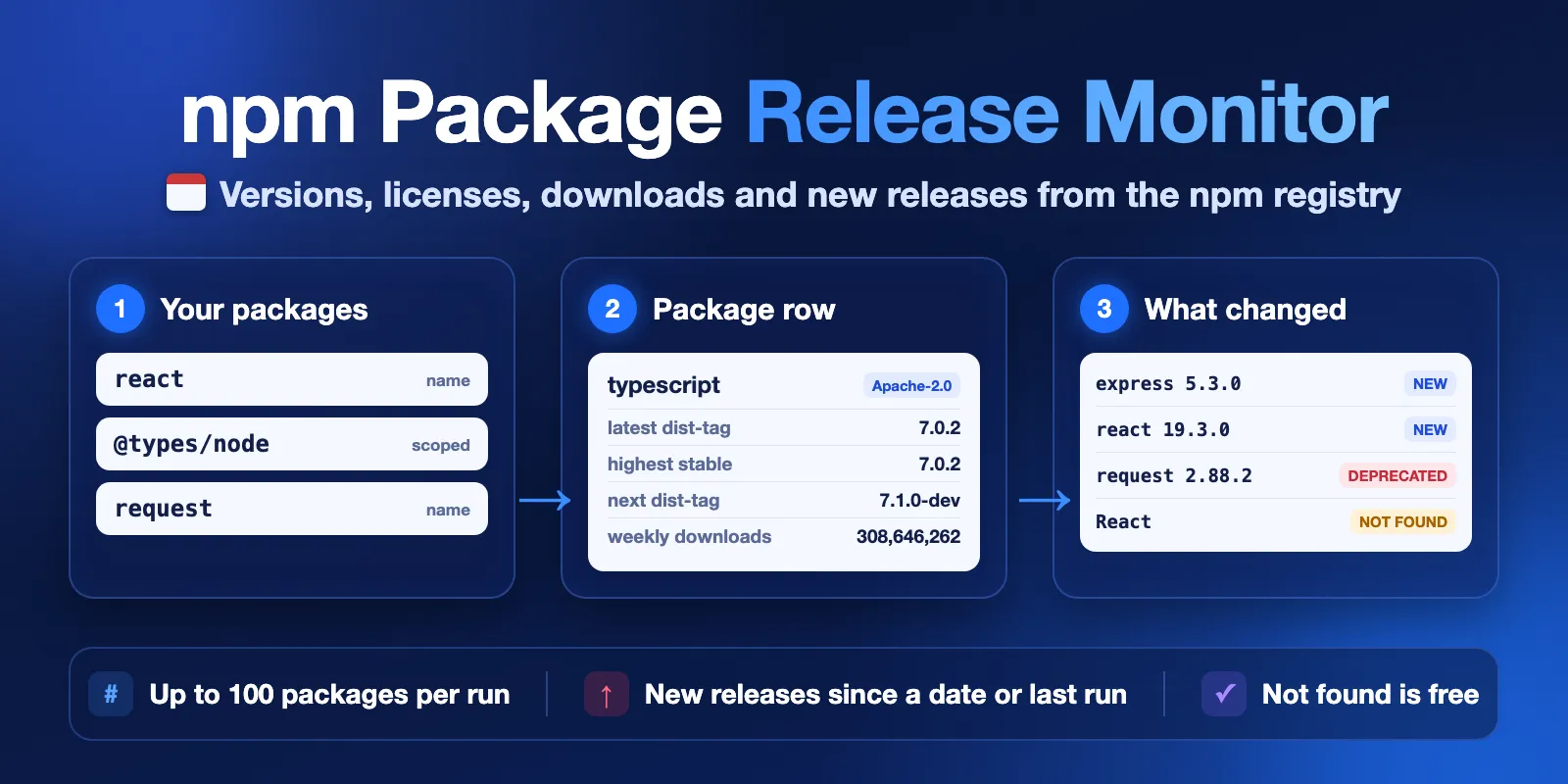
Table of contents
- What it does
- What data you get
- Quick start
- Input
- Input examples
- Output example
- Output fields
- Pricing
- Use cases
- Monitoring and scheduling
- API, export and integrations
- Limits and partial results
- Troubleshooting
- FAQ
- Related Actors
- Support
What it does
You give a list of npm package names. For each name, the Actor reads the package document from the npm registry and, if you want, the last-week download count from the npm downloads API. It writes one Dataset row per package.
The Actor keeps two version answers apart:
latestVersionis the version thelatestdist-tag points to. This is whatnpm install <name>installs.highestStableVersionis the highest non-prerelease version by semver order.
They are often the same, but not always. For example, a project can publish a fix for an old major line after the new major. latestIsHighestStable tells you if they match.
The Actor can also report new releases: versions published since a date (sinceDate) or since the previous run with the same monitorKey.
Good fit
- Watch your project's dependencies and see which ones had new releases since last week.
- Build a table of packages with license, repository, maintainers count and deprecation.
- Compare weekly downloads and release activity of several packages.
Not a fit / limits
- It is not a security scanner. It does not check vulnerabilities, malware or code.
latestHasProvenanceonly says that npm has a build attestation for the latest version. - It does not verify licenses.
licenseis what the package author declared. - It reads only the public npm registry. Private registries, GitHub Packages and other registries are not supported.
- It does not resolve dependency trees and does not read your
package.jsonor lock file. You list the package names.
What data you get
| Group | Fields |
|---|---|
| Versions | latestVersion, highestStableVersion, highestVersion, latestIsHighestStable, distTags, versionsCount, prereleaseVersionsCount, deprecatedVersionsCount |
| Dates | createdAt, latestPublishedAt, lastReleaseAt, lastStableReleaseAt, daysSinceLastRelease, recentReleases |
| Package facts | description, license, repositoryUrl, homepage, bugsUrl, maintainersCount, deprecated, deprecationMessage, latestHasProvenance, latestDependenciesCount, latestUnpackedSize, nodeEngine |
| Popularity | weeklyDownloads, downloadsPeriod |
| Monitoring | newReleases, newReleasesCount, baselineKind, baselineAt |
| Provenance of data | status, provider, fetchedAt, sourceUpdatedAt, error |
Maintainer names and email addresses are never output. You get only maintainersCount.
Quick start
- Open the Input tab.
- In npm packages (
packages), keep the prefilled names (react,express,lodash,@types/node,typescript) or add your own. - Keep the other settings as they are.
- Click Start.
- Open the Output tab and check the Packages view:
latestVersion,highestStableVersion,licenseandweeklyDownloads.
Expected result: one row with status complete for each package, in a few seconds.
Input
| Field | Plain name | Type | Required | Default | Allowed values | What it changes | Recommendation |
|---|---|---|---|---|---|---|---|
packages | npm packages | array of strings | yes | prefill: react, express, lodash, @types/node, typescript | 1–100 unique names | Which packages to check | Use exact names. Scoped names like @types/node work. |
includePrereleases | Include prereleases | boolean | no | false | true, false | Adds prereleases (canary, beta, rc…) to recentReleases, newReleases and daysSinceLastRelease | Keep false if you only care about stable releases. |
sinceDate | New releases since date | string | no | empty | YYYY-MM-DD (UTC) or ISO date-time, not in the future | Fills newReleases with versions published on or after this date | Use for a one-time "what changed since…" check. |
monitorKey | Monitor key | string | no | empty | 1–63 letters, digits, -, _ | Remembers what the run saw; the next run with the same key reports only newer versions | Use one key per package list, for example my-app-deps. |
onlyNewReleases | Only output packages with new releases | boolean | no | false | true, false | Writes only packages with new releases; others are checked but not written | Needs sinceDate or monitorKey. Good for scheduled monitoring. |
includeDownloads | Include weekly downloads | boolean | no | true | true, false | Adds weeklyDownloads from the npm downloads API | Turn off if you do not need popularity data. The price is the same. |
maxRecentReleases | Recent releases per package | integer | no | 10 | 0–100 | How many newest versions go into recentReleases | Use 0 for smaller rows. |
How package names are read. Each entry can be a name (react), a scoped name (@babel/core), an npmjs.com link (https://www.npmjs.com/package/@babel/core) or a name with a version (lodash@4.17.21). The version part is ignored, and the run summary shows a warning. Names are case-sensitive: JSONStream and jsonstream are different packages. Exact repeats are removed before the run. A name that npm cannot have gets a free row with status invalid, and no request is made for it. You can also send packages as one comma- or newline-separated string through the API.
Interacting settings
| When | Setting A | Setting B | What happens |
|---|---|---|---|
| Both are set | monitorKey | sinceDate | Packages already in the snapshot are compared with the previous run. New packages in the list are compared with sinceDate. |
| First run with a key | monitorKey | — | This run is the baseline: newReleases is null and baselineKind is initial. The next run reports changes. |
| Monitoring only | onlyNewReleases | sinceDate or monitorKey | Without a baseline the run stops with INVALID_INPUT. Packages without new releases are checked and charged at a lower price, but not written. |
| Prereleases | includePrereleases | sinceDate / monitorKey | With false, a new canary or beta is not a new release. |
Input examples
Check a few packages (the prefill)
Expected behavior: the Actor reads five registry documents and the download counts. Expected output: five complete rows with latestVersion, highestStableVersion, license, weeklyDownloads. Cost: $0.0055 on the Free plan.
Releases since a date
Expected output: the same rows, plus newReleases with the versions published on or after 1 October 2026, newest first. [] means no new releases.
Weekly monitoring of your dependencies
Expected behavior: the first run saves a baseline and writes all packages. Each next run writes only packages with versions published since the previous run. If nothing changed, the run ends with status NO_CHANGES and an empty Dataset.
Output example
This is a real row for express from the prefill run (trimmed: recentReleases shows 2 of 10 items).
null and 0 are different. null means unknown or not declared. 0 means the real value is zero. For example, weeklyDownloads: 0 means nobody downloaded the package last week, and weeklyDownloads: null means the count was not requested or the downloads API failed.
Output fields
| Field | Meaning | Type | Can be null? | Example |
|---|---|---|---|---|
input | The entry as you typed it | string | no | lodash@4.17.21 |
packageName | Exact npm name that was looked up | string | yes, for invalid | lodash |
status | Row result, see the table below | string | no | complete |
npmUrl | Package page on npmjs.com | string | yes, for invalid | https://www.npmjs.com/package/express |
registryUrl | Registry document the data came from | string | yes, for invalid | https://registry.npmjs.org/express |
description | Package description (up to 2000 characters) | string | yes | Fast, unopinionated… |
latestVersion | Version of the latest dist-tag | string | yes | 5.3.0 |
distTags | All dist-tags and their versions | object | yes | {"latest":"5.3.0","next":"…"} |
highestStableVersion | Highest non-prerelease version by semver | string | yes, if only prereleases exist | 5.3.0 |
highestVersion | Highest version by semver, prereleases included | string | yes | 19.3.0 |
latestIsHighestStable | true if latestVersion equals highestStableVersion | boolean | yes, if unknown | true |
versionsCount | Number of published versions | integer | yes | 290 |
prereleaseVersionsCount | How many versions are prereleases or not valid semver | integer | yes | 43 |
deprecatedVersionsCount | How many versions are deprecated | integer | yes | 173 |
createdAt | First publish time (ISO 8601, UTC) | string | yes | 2010-12-29T19:38:25.450Z |
modifiedAt | Last change of the registry document | string | yes | 2026-10-09T12:56:55.078Z |
latestPublishedAt | Publish time of latestVersion | string | yes | 2026-10-09T12:56:54.505Z |
lastReleaseAt | Newest publish time of any version | string | yes | 2026-10-09T12:56:54.505Z |
lastStableReleaseAt | Newest publish time of a stable version | string | yes | 2026-10-09T12:56:54.505Z |
daysSinceLastRelease | Whole days since the last stable release (any release with includePrereleases) | integer | yes | 3 |
license | Declared license of the latest version, usually an SPDX expression | string | yes, if not declared | MIT |
repositoryUrl | Repository as an https URL (credentials and .git removed) | string | yes | https://github.com/expressjs/express |
repositoryRaw | Repository value as declared | string | yes | git+https://github.com/expressjs/express.git |
repositoryDirectory | Folder inside a monorepo | string | yes | packages/react |
homepage | Declared homepage | string | yes | https://expressjs.com/ |
bugsUrl | Declared issue tracker | string | yes | https://github.com/expressjs/express/issues |
maintainersCount | Number of npm maintainer accounts | integer | yes | 5 |
deprecated | true if the latest version is deprecated | boolean | yes | false |
deprecationMessage | The author's deprecation message | string | yes | use String.prototype.padStart() |
latestHasProvenance | true if the latest version has an npm provenance attestation | boolean | yes | true |
latestDependenciesCount | Runtime dependencies of the latest version | integer | yes | 28 |
latestUnpackedSize | Unpacked size of the latest version, bytes | integer | yes | 76638 |
nodeEngine | engines.node range of the latest version | string | yes | >= 18 |
weeklyDownloads | Downloads in the last full week | integer | yes, if off or failed | 144987450 |
downloadsPeriod | Dates the count covers | object | yes | {"start":"2026-10-05","end":"2026-10-11"} |
recentReleases | Newest versions with dates, newest first | array | no (can be []) | [{"version":"5.3.0",…}] |
newReleases | Versions published since the baseline, newest first | array | yes, if no baseline | [] |
newReleasesCount | Number of items in newReleases | integer | yes, if no baseline | 0 |
baselineKind | What newReleases is compared with: snapshot, sinceDate, initial, none | string | no | none |
baselineAt | Baseline time | string | yes | 2026-10-01T00:00:00.000Z |
unpublishedAt | When the package was unpublished | string | yes | null |
provider | Data source | string | no | npm public registry… |
fetchedAt | When the row was fetched | string | no | 2026-10-12T14:34:04.374Z |
sourceUpdatedAt | When the registry document last changed | string | yes | 2026-10-09T12:56:55.078Z |
error | Why a row is not complete: code and message | object | yes | {"code":"NOT_FOUND","message":"…"} |
Each item in recentReleases and newReleases has version, publishedAt, isPrerelease and deprecated.
Row status
status | Meaning | Charged? |
|---|---|---|
complete | All requested data is in the row | yes |
partial | Package data is there, but weeklyDownloads is missing (see error) | yes |
not_found | npm has no package with this name (HTTP 404). This is an answer, not an error | no |
unpublished | The package existed, but all versions were removed | no |
invalid | Not a valid npm name, no request was made | no |
error | The lookup failed (see error.code) | no |
Output surfaces
| Situation | Where to look | What you see |
|---|---|---|
| Normal run | Dataset, view Packages | One row per package |
| Monitoring | Dataset, view New releases | newReleases, baselineKind, baselineAt |
| Nothing found | Dataset rows with not_found / invalid; run summary status NO_RESULTS | Check the names |
No new releases with onlyNewReleases | Empty Dataset; run summary status NO_CHANGES | Nothing to do |
| Source problem | Rows with error; run summary status PARTIAL or ERROR | Run again later |
Every run also saves RUN_SUMMARY in the default key-value store: status, counts (complete, not found, invalid, errors, skipped), downloads coverage, baseline and source notes.
Pricing
This Actor uses pay-per-event pricing. You pay only for these events:
| Event | When | Free | Bronze | Silver | Gold |
|---|---|---|---|---|---|
| Actor start | Once per run (per 1 GB of memory; default memory is 1 GB) | $0.0015 | $0.0015 | $0.0015 | $0.0015 |
| Package record | Each complete or partial row written to the Dataset | $0.0008 | $0.00075 | $0.0007 | $0.00065 |
| Unchanged package check | With onlyNewReleases: each package that was checked but had no new releases, so no row was written | $0.0002 | $0.0002 | $0.0002 | $0.0002 |
Rows with not_found, unpublished, invalid and error are free. Weekly downloads do not cost extra. A run where every name is not found or invalid costs only the Actor start.
Cost examples (Free plan prices)
| Scenario | Input | Events | Cost |
|---|---|---|---|
| Prefill | 5 packages | 1 start + 5 records | $0.0055 |
| Small list | 10 packages | 1 start + 10 records | $0.0095 |
| Full run | 100 packages | 1 start + 100 records | $0.0815 |
| 1,000 packages | 10 runs of 100 | 10 starts + 1,000 records | $0.815 |
| Monitoring, nothing new | 100 packages, onlyNewReleases | 1 start + 100 unchanged checks | $0.0215 |
| Monitoring, 3 packages changed | 100 packages, onlyNewReleases | 1 start + 3 records + 97 unchanged checks | $0.0233 |
You can set a maximum total charge for a run. When the next event would go over it, the Actor stops early, writes what it has and sets status CAPPED in the run summary. The rest of the packages are listed in skippedPackages.
Use cases
| Job | Input | Key fields | Next step |
|---|---|---|---|
| Weekly dependency release check | packages, monitorKey, onlyNewReleases | newReleases, latestVersion, deprecated | Send the Dataset to Slack or email with an Apify integration |
| "What changed since our last upgrade?" | packages, sinceDate | newReleases, latestIsHighestStable | Plan upgrades |
| Package inventory | packages | license, repositoryUrl, maintainersCount, deprecated | Export to CSV or Excel |
| Compare packages | packages | weeklyDownloads, daysSinceLastRelease, versionsCount | Sort in a spreadsheet |
Monitoring and scheduling
- Add your packages and a
monitorKey, for examplemy-app-deps. - Run once. This saves the baseline in a named key-value store
npm-package-metadata-monitorin your Apify account. - Create an Apify schedule for this input, for example every Monday.
- Turn on
onlyNewReleasesif you want only changed packages in the Dataset.
Each run compares with the newest publish time it saw for each package in the previous run with the same key. The snapshot learns only about packages the run really checked, so a stopped or failed run does not hide releases from the next one. Use a different monitorKey for each package list.
API, export and integrations
- API: start a run with the Apify API and read the Dataset items. Use
?view=overviewfor the short table or?view=releasesfor monitoring fields. - Export: download the Dataset as JSON, CSV, Excel, XML or HTML from the Output tab.
- Scheduling and webhooks: use Apify schedules to run on a timer and webhooks or integrations (Slack, email, Zapier, Make) to act when a run finishes.
Use with AI agents (MCP)
This Actor works with the Apify MCP server. MCP server URL with only this Actor:
https://mcp.apify.com?tools=cliqtomedia/npm-package-metadata-monitor
Smallest useful input:
Key output fields: latestVersion (what npm install installs), highestStableVersion (highest stable semver), newReleases (versions since the baseline), license (declared license), deprecated. A run with up to 5 packages usually finishes in under 10 seconds and costs $0.0015 plus $0.0008 per package on the Free plan. The limit is 100 packages per run.
Limits and partial results
- Up to 100 unique packages per run. For more, start several runs.
- The Actor stops its own work at about 4 minutes of a 5-minute default timeout. In tests, 100 large packages (React, TypeScript, AWS SDK and others) took 53 seconds.
- A safety limit of 120 MB applies to each registry document; a bigger document gives a row with status
errorand codeSOURCE_TOO_LARGE. The largest documents we tested (about 31 MB, packages likenextandaws-sdk) took a few seconds each. - If the npm downloads API fails, package rows are still written with
weeklyDownloads: nulland statuspartial. - If the npm registry fails or does not answer, the Actor retries a few times and then stops asking. The rest of the packages are listed as skipped, and the run summary status is
PARTIALorERROR. These rows are not charged. - Download counts are npm's own numbers and can change after the week ends.
Troubleshooting
A package shows not_found
Symptom: status is not_found.
Likely reason: the name is wrong or has a different case. npm names are case-sensitive.
Action: check the name on npmjs.com. A scoped package needs the scope: @types/node, not node.
weeklyDownloads is null
Symptom: status is partial and error.code is RATE_LIMITED or SOURCE_UNAVAILABLE.
Likely reason: the npm downloads API did not answer in time.
Action: run again later, or set includeDownloads to false if you do not need downloads.
The run status is NO_CHANGES
Likely reason: no package had new releases since sinceDate or since the previous run with this monitorKey. With onlyNewReleases on, the Dataset is empty. Without it, the Dataset still has all rows, each with newReleasesCount 0.
Action: nothing to fix. Turn onlyNewReleases off to see all rows.
newReleases is null
Likely reason: this is the first run with this monitorKey (the baseline), or you did not set sinceDate or monitorKey.
Action: run again with the same monitorKey, or add a sinceDate.
The run stops with INVALID_INPUT
Likely reason: more than 100 packages, an empty list, a future sinceDate, a bad monitorKey, or onlyNewReleases without sinceDate or monitorKey.
Action: read the status message. It names the field to fix.
FAQ
Do I need an npm account or token?
No. The Actor reads only public data from the npm registry and the npm downloads API.
Why is latestVersion lower than highestStableVersion?
The latest dist-tag is set by the package authors. Sometimes they publish a new version for an old line, or they move latest back. latestVersion is what npm install gives you; highestStableVersion is the highest stable number.
Does this Actor tell me if a package is safe?
No. It reports what the registry declares: versions, dates, license, repository, deprecation and downloads. It does not check vulnerabilities, malware or the code.
How fresh is the data?
Each row is read from the registry during the run. fetchedAt shows when, and sourceUpdatedAt shows when the registry document last changed.
Related Actors
- Software End-of-Life Checker: check if your runtime and framework versions (Node.js, Python, databases) are still supported.
Support
Open an issue in the Issues tab of this Actor for a bug, a question or a feature idea. Include the run ID, your input (package names are fine) and the error text. Never send tokens or passwords.
Data from the public npm registry under the npm Open-Source Terms. This Actor is not affiliated with or endorsed by npm, Inc. or GitHub, Inc.


