

PyPI Package Metadata: Versions, Downloads & CVEs, No Login
Pricing
from $0.15 / 1,000 package records
PyPI Package Metadata: Versions, Downloads & CVEs, No Login
Get PyPI package metadata for up to 1000 Python packages: latest version, license, Python support, dependencies, release dates, yanked releases, downloads and known vulnerabilities. No login, no API key.
Pricing
from $0.15 / 1,000 package records
Rating
0.0
(0)
Developer

Cliqto Media
Maintained by CommunityActor stats
0
Bookmarked
2
Total users
1
Monthly active users
8 days ago
Last modified
Categories
Features
Share
Add Python package names, and the Actor reads PyPI and returns one row per package: latest version, license, Python support, dependencies, release dates, downloads and known vulnerabilities.
Use it to audit a requirements.txt, compare libraries or watch for new releases; the smallest run is one package name, and it needs no login or API key.
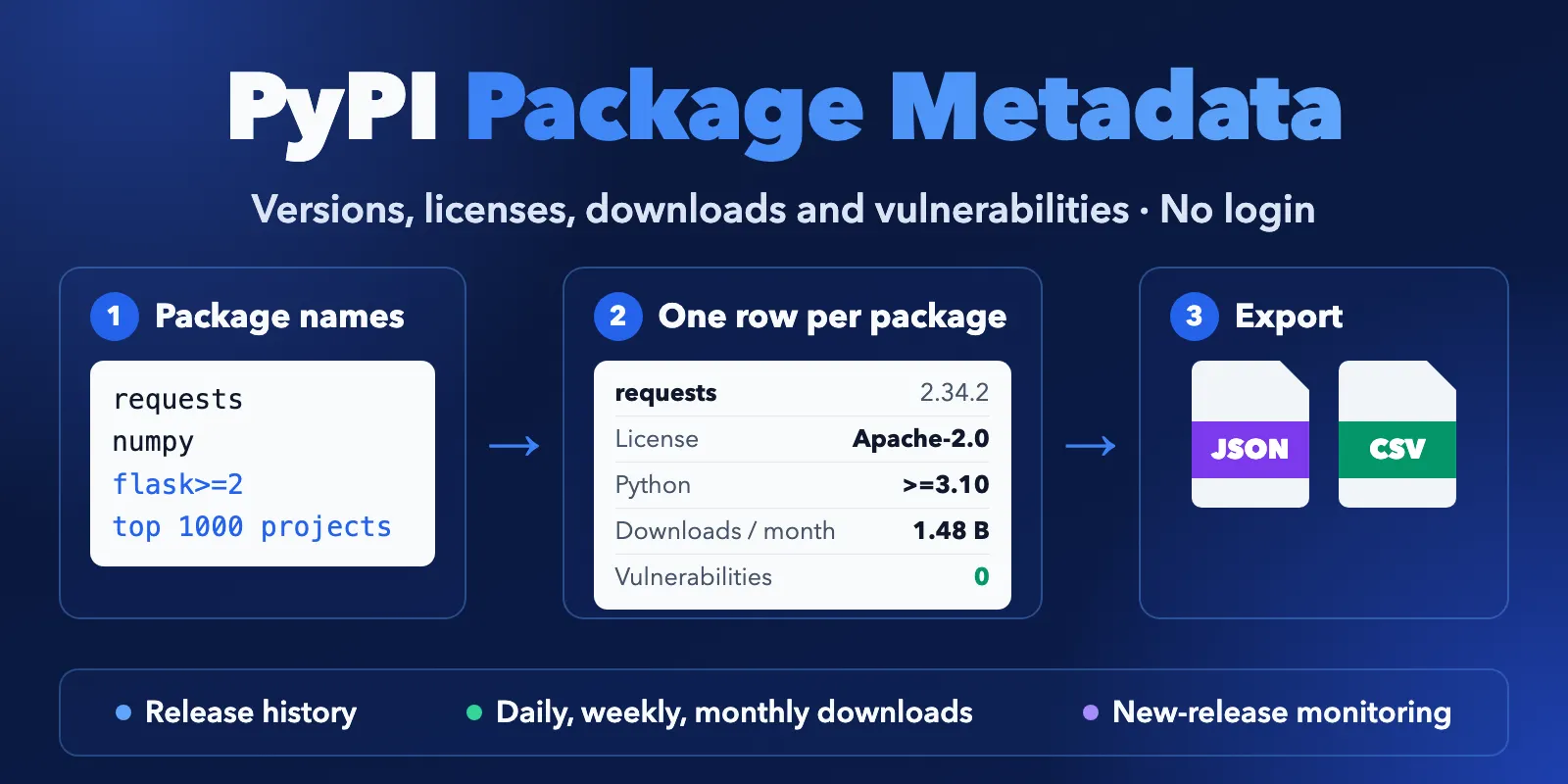
Table of contents
- What it does
- How it works
- Quick start
- Use cases
- Input
- Output
- Pricing
- Limits
- API, export and integrations
- Troubleshooting
- FAQ
- Related Actors
- Support
What it does
The Actor takes Python package names (or pypi.org links, or requirements.txt lines) and checks each one on PyPI, the public Python Package Index. For every package it saves one row with the latest version, license, supported Python versions, required dependencies, first and latest release dates, yanked status, known vulnerabilities and links to the source code and docs. It can add downloads for the last day, week and month from pypistats.org.
You can also start from a PyPI user (all their projects) or from the most-downloaded PyPI projects. A package that does not exist gets its own not_found row, so you always see which names failed.
Good fit
- Check a
requirements.txt: latest version, license and known vulnerabilities of every package. - Compare Python libraries by downloads, release activity and Python support.
- Get the release history of packages: version, upload date, yanked, wheel or source files.
- Watch packages on a schedule and get only the new releases since the last run.
How it works
- The Actor reads your package list. It cleans each line: it removes version ranges and extras, keeps a pinned version (
name==1.2.3) and removes duplicates. - For each package it asks the public PyPI JSON API. If you want downloads, it also asks pypistats.org. If you want the project status, it also asks the PyPI Simple API.
- It saves one row per package (or one row per release) in the Dataset and a short run summary in the key-value store (
RUN_SUMMARY). Every row has astatus:complete,partial,not_found,invalidorerror.
The Actor never downloads package files and never returns e-mail addresses.
Quick start
-
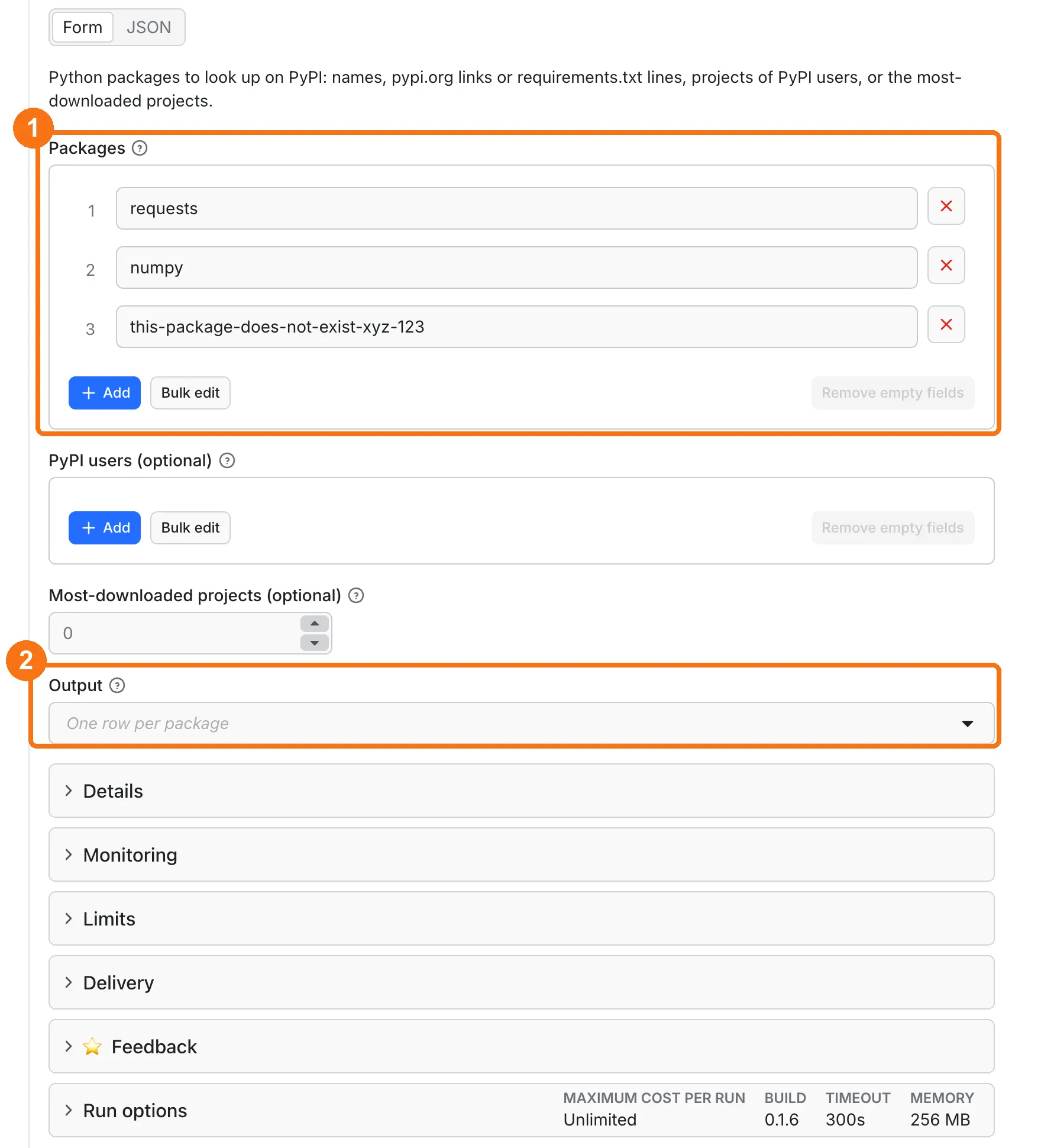
Open the Input tab. The Packages field already has
requests,numpyand one name that does not exist (box 1 in the picture). Add or change package names, one per line. -
Keep Output as One row per package (box 2). This is the default.
-
Click Start.
-
Open the Output tab. The Packages view (box 1) shows one row per package (box 2): version, license, Python support, downloads and vulnerabilities. The missing name has status
not_foundand empty values. Use Export (box 3) to save JSON, CSV or Excel.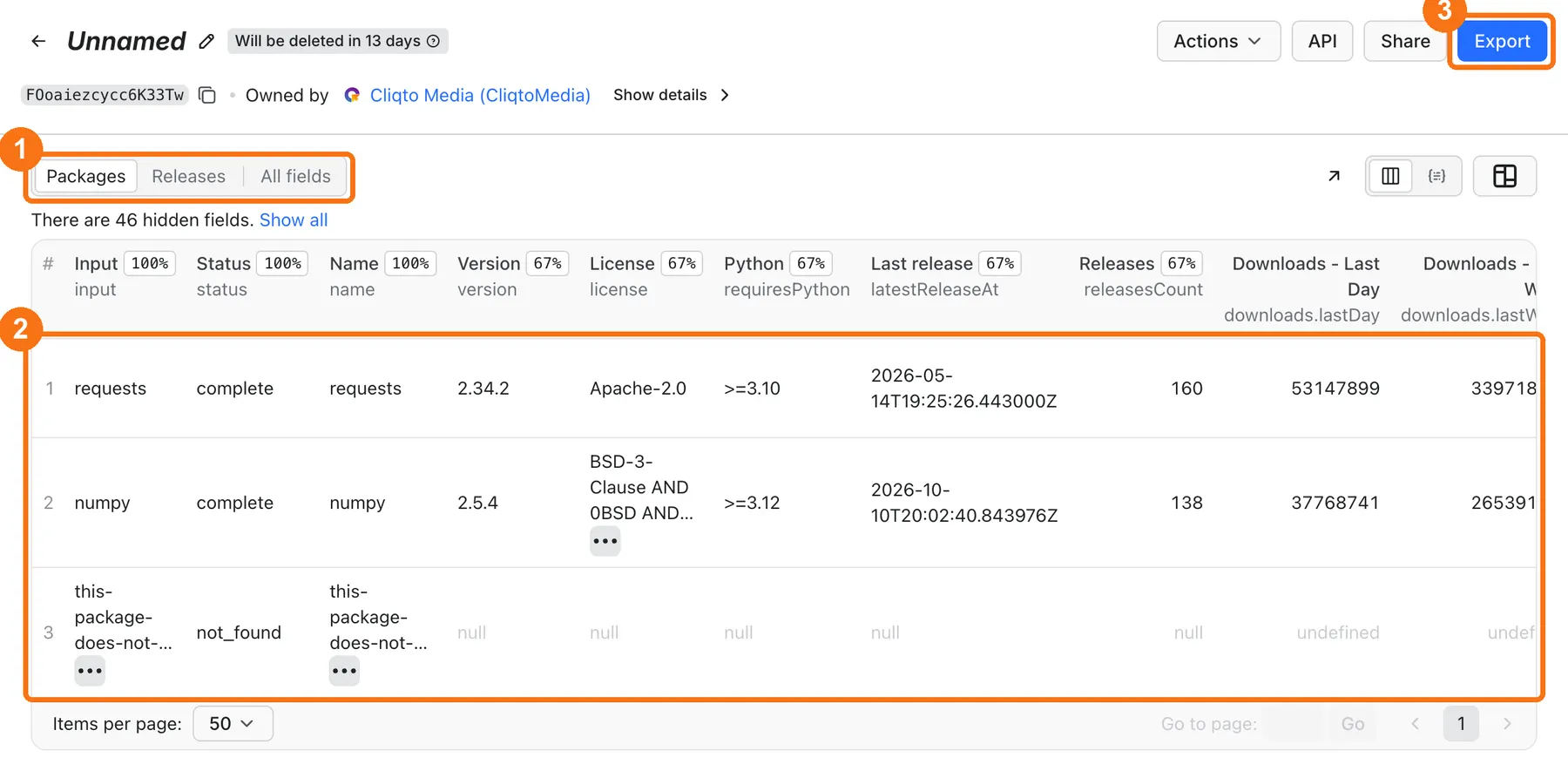
Expected result: three rows in about 5 seconds — requests and numpy with status complete, and the missing name with status not_found.
Use cases
| Buyer job | Input path | Output entity | Key fields | Next integration |
|---|---|---|---|---|
Audit a requirements.txt | packages (paste the file lines) | Package row | version, latestVersion, license, vulnerabilitiesCount, yanked | CSV export, spreadsheet |
| Compare libraries | packages, includeDownloads | Package row | downloads.lastMonth, latestReleaseAt, requiresPython, releasesCount | Dataset API |
| Release history | packages, mode = releases | Release row | version, uploadedAt, yanked, hasWheel | CSV export |
| Watch for new releases | packages, onlyNew, stateName, Apify schedule | Package or release row | newVersions, previousVersion, isNew | Slack or Notion summary, webhook |
| Check a maintainer's projects | maintainers | Package row | name, maintainerRole, version, abandonmentSignals | Dataset API |
Input
Input fields
You need at least one of packages, maintainers or topPackages. An empty input fails at once with a clear message and an example.
| Field | Plain name | Type | Required | Default / prefill | Allowed values | Effect | Example | Recommendation |
|---|---|---|---|---|---|---|---|---|
packages | Packages | list of text | one of the three | prefill: requests, numpy, a missing name | up to 1000 lines: names, pypi.org project links, requirements.txt lines | packages to check | flask>=2, Django==4.2 | name==1.2.3 checks that version; other ranges are cut to the name |
maintainers | PyPI users (optional) | list of text | one of the three | empty | up to 20 usernames or pypi.org/user/ links | adds every project the user owns or maintains | https://pypi.org/user/<username>/ | good for a full portfolio of one person or team |
topPackages | Most-downloaded projects (optional) | number | one of the three | 0 | 0–1000 | adds the N most-downloaded projects of the last 30 days | 100 | list from top-pypi-packages, updated monthly |
mode | Output | choice | no | metadata | metadata (one row per package), releases (one row per release) | row type | releases | releases for version history |
includeDownloads | Include downloads | yes/no | no | true | — | adds downloads.lastDay/lastWeek/lastMonth | false | turn off for long lists when you do not need downloads: each package waits about 1 second for pypistats |
minDownloadsLastMonth | Minimum downloads last month | number | no | 0 | 0 or more | skips packages with fewer monthly downloads | 10000 | needs includeDownloads; unknown downloads are kept |
includeVulnerabilities | Include known vulnerabilities | yes/no | no | true | — | adds vulnerabilities for the checked version | true | keep on for audits |
includeReleases | Include release list in each row | yes/no | no | false | — | adds releases (newest first) to each package row | true | use mode = releases if you want separate rows |
maxReleasesPerPackage | Releases per package | number | no | 20 | 1–1000 | how many newest releases to list | 5 | larger values make rows bigger |
includePrereleases | Include pre-releases | yes/no | no | false | — | also lists alpha, beta, rc and dev versions | true | — |
includeProjectStatus | Include project status | yes/no | no | false | — | adds projectStatus (active, archived, deprecated, quarantined) | true | one more request per package |
dependencyDepth | Dependency tree depth | number | no | 0 | 0–3 | also checks required dependencies, down to this many levels | 1 | extras are not followed; each dependency is a paid row |
onlyNew | Only new releases | yes/no | no | false | — | writes only packages or releases uploaded since the last run with the same stateName | true | for scheduled runs; the first run is the baseline |
stateName | State name | text | with onlyNew | empty | letters, digits, - | name of the saved state | my-deps | use one name per watched list |
maxResults | Max rows | number | no | 1000 | 1–10000 | stops after this many Dataset rows | 100 | the run summary says CAPPED when it stops here |
deliveryConnector | Send results to (optional) | connector | no | empty | your MCP connector | posts a short summary after the run | Slack | see Send results to Slack or Notion |
deliveryTarget | Notion page or channel (optional) | text | no | empty | Notion page link or Slack channel ID | where the summary goes | C0123456789 | Notion needs a page link |
includeDescription | Include README text | yes/no | no | false | — | adds the project description, up to 20000 characters, e-mails removed | true | makes rows much larger |
Duplicates are removed by the normalized PyPI name (Flask, flask and FLASK are one package). A line that is not a valid package name gets an invalid row; the Actor does not ask PyPI for it.
Interacting settings
| When | Input A | Input B | Effective behavior | Example | Cost/result effect |
|---|---|---|---|---|---|
| Filter by downloads | minDownloadsLastMonth | includeDownloads | the filter works only with downloads on; otherwise the input is rejected | includeDownloads: true, minDownloadsLastMonth: 1000 | a skipped package is not written and costs package-checked |
| Monitoring | onlyNew | stateName | onlyNew needs stateName; the first run writes everything as the baseline | onlyNew: true, stateName: "my-deps" | an unchanged package is not written and costs package-checked |
| Release rows | mode = releases | maxReleasesPerPackage, includePrereleases | up to N newest releases per package, pre-releases only if asked | maxReleasesPerPackage: 5 | each release row costs release-record |
| Dependencies | dependencyDepth | maxResults | dependencies are added to the list until maxResults rows | dependencyDepth: 1 | each found dependency is a paid package row |
Input examples
Check a requirements.txt
Expected behavior: the Actor checks Django and flask (latest versions) and requests version 2.25.0, and marks the last name as not_found.
Expected output: one package row each with version, license, requiresPython, vulnerabilitiesCount and downloads.
Limit or cost note: three package rows and one unresolved-entry row, plus the start fee.
Watch packages for new releases
Expected behavior: the first run saves all listed releases and the state. Later runs with the same stateName save only releases uploaded since the last run.
Expected output: release rows with version, uploadedAt, yanked and isNew.
Limit or cost note: a run with no new releases writes no rows and costs the start fee plus package-checked per package.
Output
Output fields
Package rows (recordType = package). The most useful fields:
| Field | Meaning | Type | Can be empty? | Example / enum | Source / notes |
|---|---|---|---|---|---|
input | your line, as you wrote it | text | no | flask>=2 | — |
status | result of this package | text | no | complete, partial, not_found, invalid, error | see the table below |
name | project name on PyPI | text | no | requests | PyPI |
version | checked version (latest or your pin) | text | yes | 2.34.2 | PyPI |
latestVersion | newest stable version | text | yes | 2.34.2 | PyPI |
license | license name or SPDX expression | text | yes | Apache-2.0 | PyPI license_expression, license or classifier |
requiresPython | supported Python versions | text | yes | >=3.10 | PyPI |
dependencies | required dependencies (no extras) | list | yes, empty list | ["idna", "certifi"] | PyPI requires_dist |
firstReleaseAt, latestReleaseAt | first and latest upload time | date | yes | 2026-05-14T19:25:26Z | PyPI file upload times |
releasesCount | number of versions with at least one file | number | yes | 160 | PyPI |
yanked | the checked version is yanked | yes/no | yes | false | PyPI |
vulnerabilities | known vulnerabilities of the checked version: ID, CVE aliases, summary, fixed-in versions | list | yes | [] | OSV data that PyPI returns |
downloads.lastDay, downloads.lastWeek, downloads.lastMonth | downloads | number | yes | 1478957330 | pypistats.org |
abandonmentSignals | warning signs | list | no, can be empty | no_release_2y, inactive_classifier, project_archived, project_deprecated, all_versions_yanked | computed from PyPI data |
projectStatus | PyPI project status | text | yes | active | Simple API, only with includeProjectStatus |
repositoryUrl, documentationUrl, packageUrl | links | text | yes (packageUrl no) | https://github.com/psf/requests | PyPI project links |
newVersions, previousVersion | new versions since the last run | list / text | yes | ["2.34.2"] | only with onlyNew |
warnings | why a row is partial | list | no, can be empty | — | — |
error | code and message for not_found, invalid, error | object | yes | {"code": "NOT_FOUND"} | — |
Release rows (recordType = release, with mode = releases): name, version, uploadedAt, isPrerelease, yanked, filesCount, hasWheel, hasSdist, requiresPython, isNew, packageUrl, status.
null means "not known": PyPI or pypistats did not give the value, or you did not ask for it. 0 is a real zero. For example, vulnerabilitiesCount: 0 means PyPI lists no known vulnerabilities, and downloads: null means downloads were not received.
Output entities and surfaces
| Situation | Dataset/API/KVS/live view | Result shape | User action |
|---|---|---|---|
| Normal item | Dataset, views Packages and Releases | row with status = complete | open, export or read with the API |
| Domain-empty result | Dataset + RUN_SUMMARY | not_found or invalid row with error; run status NO_RESULTS; with onlyNew, no rows and run status NO_CHANGES | check the name on pypi.org |
| Partial result | Dataset | status = partial: PyPI data is there, downloads or project status are null, reason in warnings | run again later for downloads |
| Technical failure or retry | Dataset + RUN_SUMMARY | status = error row after retries; if the time ends, run status PARTIAL with the rows already saved | run again; open an issue with the run ID if it repeats |
RUN_SUMMARY in the key-value store has the run status (COMPLETE, PARTIAL, NO_RESULTS, NO_CHANGES, CAPPED), a short message and counts: found, not found, invalid, errors, filtered and written rows.
Output example
This is the requests row from the prefill run, trimmed (some lists are shorter, and fields with null or empty values are left out). The full row has about 60 fields.
The missing name from the same run has "status": "not_found", "error": {"code": "NOT_FOUND", "message": "PyPI has no project with this name."} and null in the data fields.
Send results to Slack or Notion
Pick your connector in the optional deliveryConnector field. After the run saves its data, the Actor posts a short summary (up to 25 rows and a link to the full dataset) there. Put a Notion page link or a Slack channel ID in deliveryTarget: in Notion every run is added on top of that one page, so your workspace does not fill up with new pages. Without a page link, Notion delivery is skipped and the log says so. A delivery error never fails the run and costs nothing extra. Connect a service once in Apify Console → MCP connectors.
Use case → fields
| Buyer job | Input path | Output entity | Key fields | Next integration |
|---|---|---|---|---|
| Security and license audit | packages | Package row | vulnerabilities, license, yanked | CSV export |
| Library choice | packages | Package row | downloads.lastMonth, latestReleaseAt, abandonmentSignals | spreadsheet |
| Release tracking | mode = releases, onlyNew | Release row | version, uploadedAt, isNew | Slack summary, webhook |
Pricing
Pricing unit
This Actor uses pay per event. You pay for the rows you get, plus a small fee for each package that was checked but not written.
| Event | When it is charged | Price (no discount) |
|---|---|---|
apify-actor-start | once per run | $0.0005 |
package-record | one package row in the Dataset (complete or partial), including dependency rows | $0.00022 |
release-record | one release row in the Dataset (mode = releases) | $0.00069 |
package-checked | a package that was checked but not written: skipped by minDownloadsLastMonth, or unchanged in an onlyNew run | $0.00008 |
unresolved-entry | a not_found or invalid row | $0.00003 |
Prices with an Apify subscription are lower (Bronze, Silver and Gold discounts are shown on the Pricing tab). Rows with status = error are free.
- A run that finds nothing (only missing or invalid names) costs the start fee plus
unresolved-entryfor each name. Example: one missing name costs $0.00053. - A filter with no matches costs the start fee plus
package-checkedfor each skipped package. - A monitoring run with no new releases writes no rows and costs the start fee plus
package-checkedfor each watched package. - A
partialrow costs the same as acompleterow: it has the PyPI data, only downloads or project status are missing. - The start fee is per 1 GB of run memory. This Actor runs with 256 MB (512 MB at most), so it is charged once per run.
- Set Max cost per run in the run options to cap the charges. The Actor stops when it reaches the limit, keeps the rows it already saved, and
RUN_SUMMARYsaysCAPPED.
Cost examples
Prices without a subscription discount, downloads on.
| Scenario | Input scope | Expected item/event count | Base charge | Optional charge | Stop/cap behavior |
|---|---|---|---|---|---|
| Small | 10 packages | start 1, package rows 10 | $0.0027 | none | — |
| Normal | 100 packages | start 1, package rows 100 | $0.0225 | none | — |
| Large | 1000 packages | start 1, package rows 1000 | $0.2205 | none | needs a longer run timeout, see Limits |
| Release history | 2 packages × 5 newest releases | start 1, release rows 10 | $0.0074 | none | maxReleasesPerPackage |
| Monitoring, no changes | 100 watched packages | start 1, package-checked 100 | $0.0085 | none | no rows written |
| Only missing names | 1 name | start 1, unresolved-entry 1 | $0.00053 | none | run status NO_RESULTS |
Limits
- Run time with downloads. pypistats.org allows about one request per second, so each package with downloads takes about 1.5 seconds. Measured: 100 packages in 140 seconds, 400 packages in 603 seconds, 1000 packages in 1500 seconds. With the default 300-second run timeout, a test run of 300 packages wrote 150 rows, then stopped in time: the run status is
PARTIAL, the saved rows stay, and the message says how many packages were not checked. For more than about 150 packages with downloads, raise the run timeout (about 1.5 seconds per package) or split the list. - Up to 1000 lines in
packages. If the list is longer, the first 1000 unique packages are checked and a warning inRUN_SUMMARYsays how many were left out.maintainers(up to 20 users),topPackagesand dependencies can add more packages, up to 10000 in the queue (a warning says if more were left out).maxResults(default 1000, up to 10000) stops the run at that many rows. We tested runs up to 1000 packages. - Safety stops. A run makes at most 8000 requests; after that it stops early, keeps the saved rows and says so in
RUN_SUMMARY(REQUEST_CAP). A PyPI document larger than 64 MB is not read: that package gets anerrorrow (SOURCE_TOO_LARGE, free). The biggest PyPI projects today are about 41 MB. If 8 packages in a row fail (notnot_found), the run stops and says why, so you do not pay for a broken source. - Memory. The default 256 MB is enough for normal lists. Our hardest test (1000 packages, including the biggest PyPI projects such as ddtrace) used up to 236 MB. If a run with very large packages stops because it ran out of memory, start it again with 512 MB in the run options.
- Downloads can be missing. If pypistats.org is busy, the Actor waits and tries again. If it still gets no answer, the row is
partialanddownloadsisnull. Downloads are counts from pypistats.org, not from PyPI itself. - No keyword search. PyPI has no public search API, so you need package names, PyPI users or the top list.
- Vulnerabilities are only those that PyPI returns from the OSV database for the checked version. An empty list is not a security guarantee.
- The Actor does not download package files and does not return e-mail addresses. README text is off by default and has e-mails removed.
releasesCountcounts versions that have at least one file. Some other tools count all version names, so their number can be a little higher.
API, export and integrations
- API: start a run with the Apify API and the same JSON as the input form. Read rows from the default Dataset (
?view=overviewfor package columns,?view=releasesfor release rows) and the summary from theRUN_SUMMARYrecord. - Export: Dataset rows export to JSON, CSV, Excel, XML and HTML from the Output tab or the API.
- Scheduling: create an Apify schedule with
onlyNewand a fixedstateNameto get only new releases each day or week. - Webhooks / no-code: an Apify webhook on run success can send the Dataset link to Make, Zapier, n8n or your own endpoint. Read
status,name,versionandnewVersions. - SDK / MCP / agent: use the Apify JavaScript or Python client, or the MCP server below.
Use with AI agents (MCP)
-
MCP server URL with only this Actor:
https://mcp.apify.com?tools=cliqtomedia/pypi-package-metadata -
Smallest useful input (the prefill):
{ "packages": ["requests", "numpy", "this-package-does-not-exist-xyz-123"] } -
Key output fields:
status(complete,partial,not_found,invalid,error),version(checked version),license,vulnerabilitiesCount(0= none known,null= not checked),downloads.lastMonth(null= not received). -
Typical run: the prefill finishes in about 5 seconds and costs $0.00097 (start fee, two package rows, one not-found row). With downloads, plan about 1.5 seconds per package; the default run timeout is 300 seconds.
Troubleshooting
A package has status not_found
Symptom: the row has status = not_found and null values.
Likely reason: the name is wrong, or the pinned version (name==1.2.3) does not exist on PyPI.
Check: open packageUrl from the row on pypi.org.
Action: fix the name or the version and run again.
downloads is null and the status is partial
Symptom: PyPI fields are filled, but downloads is null and warnings says downloads were not received.
Likely reason: pypistats.org was busy and did not answer after several tries.
Check: RUN_SUMMARY shows how many packages got downloads.
Action: run again later, or turn includeDownloads off if you do not need it.
The run stopped before all packages were checked
Symptom: RUN_SUMMARY says PARTIAL (time ended) or CAPPED (row or cost limit).
Likely reason: a long list with downloads needs more than the 300-second default timeout, or maxResults or Max cost per run was reached.
Check: the message and counts in RUN_SUMMARY.
Action: raise the run timeout (about 1.5 seconds per package with downloads), raise maxResults, or split the list.
The run stopped with an error after a few failed packages
Symptom: the run ends early, and the last rows have status = error.
Likely reason: 8 packages in a row failed (PyPI did not answer or sent a broken page), or the run reached the 8000-request safety cap (REQUEST_CAP in RUN_SUMMARY).
Check: the error.code of the rows and the message in RUN_SUMMARY.
Action: run again a little later; for very big lists, split them into several runs. Rows with status = error are free.
The input is rejected
Symptom: the run fails at once with a message about the input.
Likely reason: no packages, users or top list; onlyNew without stateName; or minDownloadsLastMonth without includeDownloads.
Check: the message names the field and shows a correct example.
Action: fix that field and start again.
FAQ
Do I need a PyPI account or API key?
No. The Actor reads public PyPI and pypistats.org data. You need only an Apify account to run it.
Why do I pay for a run with no results?
Every run pays the start fee. Missing or invalid names cost $0.00003 each, and packages that were checked but not written (filter or monitoring) cost $0.00008 each. This is less than a full row. Rows with status = error are free.
How fresh is the data?
Every run reads PyPI at that moment. Downloads come from pypistats.org and are usually one day behind. The top list for topPackages is updated monthly.
Does it return every field for every package?
No. Many projects do not fill all PyPI fields. When a value is not given, the field is null or an empty list; the Actor does not guess it.
Related Actors
- npm Package Monitor — the same check for JavaScript packages: versions, license and downloads.
- Dependency Vulnerability Scanner (OSV) — check dependency versions against the OSV vulnerability database.
- Software End-of-Life Checker — check end-of-life dates of the runtimes and frameworks you use.
- GitHub Repositories & Users Search — find the source repositories behind your packages.
Support
For a bug, question or feature request, open the Actor's Issues tab on Apify. Include the run ID, the input mode and the package names that had a problem. Never send tokens, cookies or private data.
⭐ Found it useful? Rate this Actor. Something wrong? Report a problem — we fix reported problems.


