
Dependency Vulnerability Scanner (OSV)
Pricing
from $2.52 / 1,000 vulnerability founds
Dependency Vulnerability Scanner (OSV)
Check npm, PyPI, Maven, Go, Cargo and 9 more ecosystems for known vulnerabilities via OSV.dev. Paste a list, package.json, package-lock.json or requirements.txt; get one deduplicated row per CVE/GHSA with severity, CVSS and the fix for your version.
Pricing
from $2.52 / 1,000 vulnerability founds
Rating
0.0
(0)
Developer

Cliqto Media
Maintained by CommunityActor stats
0
Bookmarked
2
Total users
1
Monthly active users
4 days ago
Last modified
Categories
Security
Limited permissionsShare
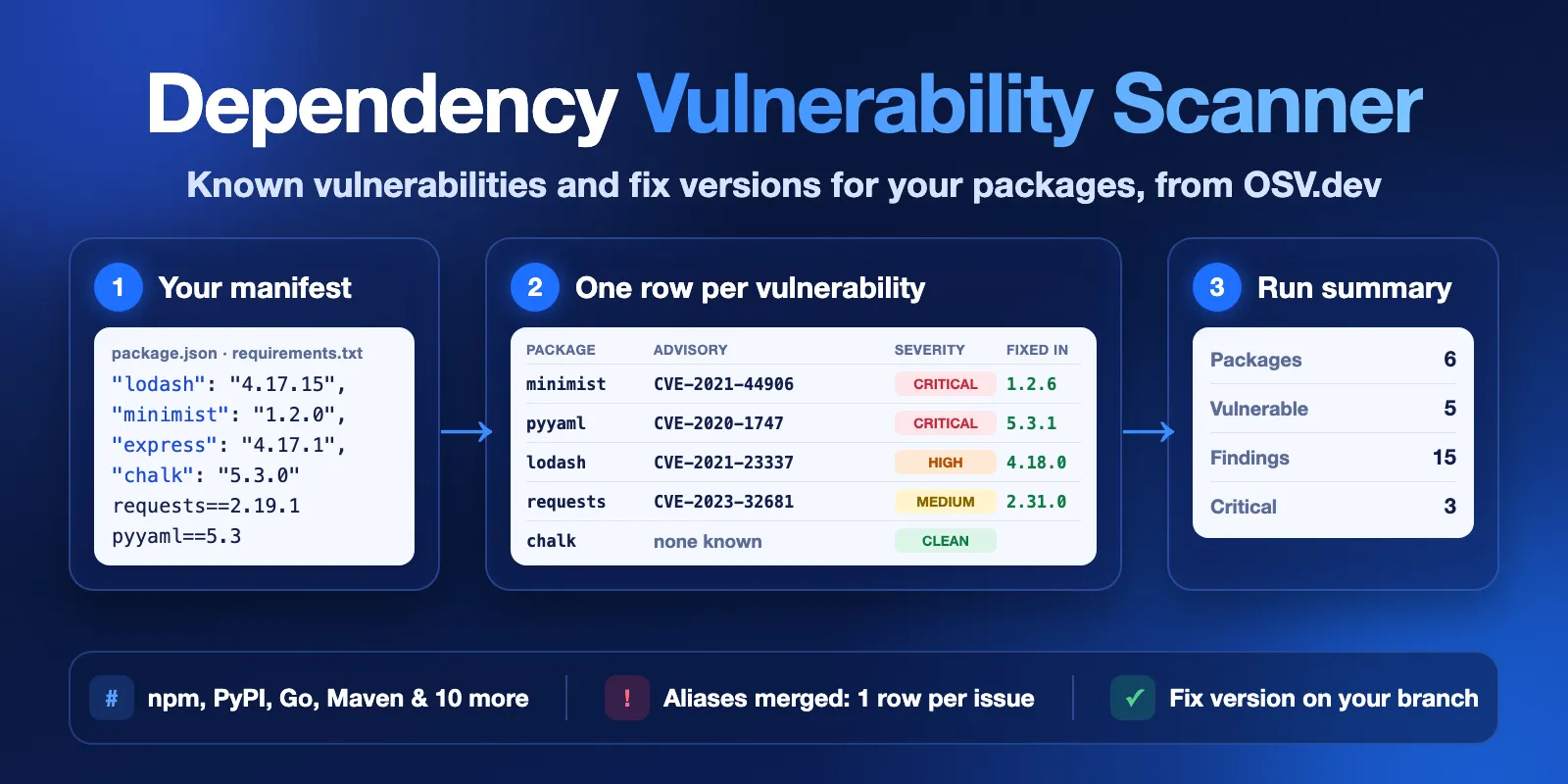
Dependency Vulnerability Scanner checks your npm, PyPI, Maven, Go, Cargo and other packages for known vulnerabilities in the free OSV.dev database. Paste a list such as npm:lodash@4.17.15, a package.json, a package-lock.json or a requirements.txt. You get one row per vulnerability with the CVE and GHSA ids, severity, CVSS score, CWE and the version that fixes it on your version branch.
It is made for developers, security reviews and CI checks. No login and no API key are needed. The form example (6 packages) finishes in a few seconds and costs $0.0572.
Contents
- What it does
- Quick start
- Use cases
- Input
- Output
- Pricing
- Limits
- API and integrations
- Troubleshooting
- FAQ
- Data source and licence
- Support
What it does
The Actor asks the public OSV API live at run time. OSV collects advisories from the GitHub Advisory Database, PyPA, RustSec, the Go vulnerability database and other sources.
For each package version the Actor:
- Reads your input. A list, a manifest or a lockfile. Duplicates are checked once. A line it cannot check (no version, a git URL, an unsupported ecosystem) gets a
skippedrow with the reason. - Finds known vulnerabilities for that exact version in OSV.
- Merges duplicates. One issue often has several ids (for example GHSA, PYSEC and CVE). They become one row, and all ids are kept in
osvIdsandaliases. - Picks the severity. The GitHub reviewed label comes first, then the highest CVSS score (v4, v3 or v2), then the ecosystem's own rating. With no score at all the row says
UNKNOWN. When aliases are merged into one row, the highest level among them counts; on a tie the GitHub label wins. - Finds the fix for your branch.
fixedInis the lowest version that fixes every merged advisory on the branch of your version. Fordjango 3.2.0it is a 3.2.x version, not an older 2.2.x fix.
Supported ecosystems: npm, PyPI, Maven, Go, crates.io, RubyGems, NuGet, Packagist, Pub, Hex, Hackage, CRAN, SwiftURL and GitHub Actions.
Good fit
- Check a project's
package-lock.jsonorrequirements.txtbefore a release. - Get a list of packages to upgrade, with the target version for each.
- Add CVE, CVSS and CWE data to an SBOM or a dependency inventory.
- Run the same check on a schedule and export the rows to a spreadsheet or a ticket system.
Not a fit
- Proof that a package is safe. An empty result means OSV has no known advisory for that exact version. It does not prove the package is safe.
- Typos and unknown packages. OSV answers the same way for an unknown name and for a clean package, so both get a
no_known_vulnerabilitiesrow. - Your code. The Actor checks package versions only. It does not scan source code, containers or OS packages (Debian, Alpine and similar are not supported).
- Version ranges. A range like
^4.17.15is checked at its lowest version. For the versions you really install, paste the lockfile.
Quick start
- Open the Input tab. The form already has six packages:
npm:lodash@4.17.15,npm:minimist@1.2.0,npm:express@4.17.1,PyPI:requests@2.19.1,PyPI:pyyaml@5.3andnpm:chalk@5.3.0. - Click Start.
- Open the Overview view in the Output tab. Check
severity,vulnerabilityIdandfixedIn. - Replace the list with your own packages, or paste a whole file into package.json, package-lock.json or requirements.txt.
Expected result: 16 rows in a few seconds. On 2026-10-13 they were 15 vulnerabilities (3 critical, 3 high, 8 medium, 1 low) in 5 packages and one no_known_vulnerabilities row for chalk 5.3.0.
Use cases
| Buyer job | Input | Key fields |
|---|---|---|
| Check a Node.js project | packageLockJson | packageName, version, severity, fixedIn, dependencyType |
| Check a Python project | requirementsTxt | severity, cveIds, fixedIn, versionSource |
| Only urgent issues | any input + minSeverity: "HIGH" | rows with HIGH or CRITICAL only |
| Enrich an SBOM or inventory | dependencies list | cveIds, ghsaIds, cvssScore, cweIds, advisoryUrl |
Input
You can combine the list and the files in one run. At least one of dependencies, packageJson, packageLockJson or requirementsTxt is needed.
| Field | Type | Default | What it does |
|---|---|---|---|
dependencies | list of strings | form example: 6 packages | One package per line: ecosystem:name@version, e.g. npm:lodash@4.17.15, PyPI:django==3.2.0, Maven:org.apache.logging.log4j:log4j-core@2.14.1, Go:github.com/gin-gonic/gin@v1.6.0. Package URLs (pkg:npm/lodash@4.17.15) work too. Through the API you can also pass objects {"ecosystem": "npm", "name": "lodash", "version": "4.17.15"}. Max 5,000 lines. |
packageJson | text | empty | The whole package.json (max 1 MB). dependencies, devDependencies, optionalDependencies and peerDependencies are read. A range is checked at its lowest version. |
packageLockJson | text | empty | The whole package-lock.json, lockfile v1, v2 or v3 (max 8 MB). Every installed package with its exact version is checked, transitive ones too. |
requirementsTxt | text | empty | The whole requirements.txt (max 1 MB). name==1.2.3 is checked exactly. >= and ~= are checked at the lower bound. |
defaultEcosystem | one of 14 ecosystems | npm | Used for list lines without a prefix, e.g. lodash@4.17.15. |
minSeverity | LOW, MEDIUM, HIGH, CRITICAL | LOW | Hide vulnerabilities below this level. GitHub's MODERATE counts as MEDIUM. |
includeUnknownSeverity | boolean | true | Keep vulnerabilities without any score (often PYSEC and Go) as UNKNOWN, whatever minSeverity is. |
includeCleanDependencies | boolean | true | Add one no_known_vulnerabilities row for each package with no advisory, so you can see what was checked. |
includeDevDependencies | boolean | true | Check dev dependencies from package.json and package-lock.json. |
maxDependencies | integer 1–2000 | 500 | The most unique packages checked in one run. The rest are counted in RUN_SUMMARY as notCheckedOverLimit, not checked and not charged. |
The same package and version from several sources is checked once and counted in duplicatesMerged. If nothing in the input can be read, the run fails with INVALID_INPUT and the status message says why.
Interacting settings
minSeverity+includeUnknownSeverity: withminSeverity: "HIGH"and the defaultincludeUnknownSeverity: true, you getHIGH,CRITICALandUNKNOWNrows. Set it tofalseto dropUNKNOWN.minSeveritynever makes a package look clean. If all its vulnerabilities are below the level, it gets onebelow_severity_filterrow with the highest hidden severity.includeCleanDependencies: falseremoves clean rows only.skipped,errorandbelow_severity_filterrows are always written.
Input examples
Check a Python project and keep only urgent issues:
Expected result: HIGH and CRITICAL rows for Django, requests and PyYAML (requests is checked at 2.19.1, versionSource: "lower_bound"). numpy has no version, so it gets a skipped row with MISSING_VERSION.
Check a lockfile without dev packages:
Output
One Dataset row per vulnerability, plus one row per clean, filtered, skipped or failed package. The Overview view shows the main fields, Details shows the advisory text and links, Inputs shows where each package came from.
Row types
resultType | Meaning |
|---|---|
vulnerable | One known vulnerability of this package version. |
below_severity_filter | OSV lists vulnerabilities for this version, but all are below minSeverity. message names the highest one. |
no_known_vulnerabilities | OSV has no advisory for this exact version. Not a guarantee of safety. |
skipped | Not checked: no version, a range or URL that cannot be resolved, an unsupported ecosystem or an include line. See errorCode and message. |
error | OSV did not answer for this package (outage or the run's time limit). Run it again later. |
Main fields
| Field | Meaning |
|---|---|
ecosystem, packageName, version | The package version that was checked. |
requestedVersionSpec, versionSource | Your original version text and how the version was chosen: exact, range_minimum, lower_bound or lockfile. |
inputSource, dependencyType | Where the package came from (dependencies, packageJson, packageLockJson, requirementsTxt) and prod, dev, optional or peer. |
vulnerabilityId | The main id: GHSA first, then PYSEC, RUSTSEC, GO and others, then CVE. |
osvIds, aliases, cveIds, ghsaIds | All ids of the same issue. Use them to match rows with other tools. |
severity, severitySource | CRITICAL, HIGH, MEDIUM, LOW or UNKNOWN, and where it came from: ghsa_database, cvss_v4, cvss_v3, cvss_v2 or ecosystem_specific. |
cvssScore, cvssVector, cvssVersion | The highest CVSS base score in the group and its vector. |
cweIds | Weakness types, e.g. CWE-1321. |
fixedIn | The lowest version that fixes every merged advisory on your version's branch. null when no fix is published for that branch. |
fixedVersions, affectedRanges | All fixed versions across branches and the affected intervals. |
summary, details, references, advisoryUrl | Advisory text (up to 4,000 characters) and links. |
published, modified | Earliest publication and latest change in the group. |
withdrawnAliases | Aliases withdrawn by their database. They are listed but do not change the severity. |
errorCode, message | Reason for skipped and error rows, explanation for clean and filtered rows. |
How severity and fixedIn are read
- The severity follows GitHub when GitHub has reviewed the advisory. So a row can say
MEDIUMwhilecvssScoreis 7.9: GitHub rated it lower than the raw CVSS score. This is the same label you see on GitHub. fixedInstays on your branch. Forminimist 1.2.0the fix is1.2.6, not0.2.4from the old 0.x branch. When merged advisories need different fixes, the highest one is used, so upgrading tofixedIncloses them all.- An advisory can have no fix yet. Then
fixedInisnull.
Output example
This example is trimmed. It comes from the form example run on 2026-10-13.
Run summary
The RUN_SUMMARY record in the Key-value store has status, a plain message, counts (checked, vulnerable, clean, skipped, failed, by severity), charged events and the data licence. status is one of:
SUCCEEDED: every package was checked;PARTIAL: OSV failed during the run; packages not checked haveerrorrows;CAPPED: the run stopped at your maximum cost or at the internal time limit, or more unique packages thanmaxDependencieswere found;ERROR: OSV could not be reached, no package was checked;INVALID_INPUT: the input is wrong or nothing in it can be checked (the run fails and the message says why);CANCELLED: you stopped the run; rows written before that are kept.
Coming from another OSV scanner
Many scanners write one row per OSV record. This Actor merges records of the same issue, so you get fewer rows with the same set of ids (osvIds + aliases). Field names differ too: look for packageName, vulnerabilityId, cveIds, fixedIn and resultType.
Pricing
Pay per event. Platform usage is included.
| Event | Price | When |
|---|---|---|
| Actor start | $0.002 | Once per run (per GB of memory; the default 256 MB counts once) |
| Vulnerability found | $0.0036 (Free plan), $0.0034 (Bronze), $0.0032 (Silver), $0.0030 (Gold and higher) | Each vulnerable row saved to the Dataset |
| Dependency checked | $0.0002 | Each unique package version that OSV answered for, clean or not |
skipped and error rows are free. Vulnerabilities hidden by minSeverity are free, but the package still counts as checked.
| Run (Free plan prices) | Example cost |
|---|---|
| Form example: 6 packages, 15 vulnerabilities | $0.0572 |
| 100 packages, none vulnerable | $0.022 |
| 100 packages, 20 vulnerabilities | $0.094 |
| 500 packages, 50 vulnerabilities | $0.282 |
Nothing can be checked (only skipped rows, run fails with INVALID_INPUT) | $0.002 |
Set a maximum cost per run in the run options to cap your spend. The Actor stops before a package whose rows do not fit and reports CAPPED.
Limits
- Up to 2,000 unique packages per run (
maxDependencies, default 500). A lockfile can be up to 8 MB;package.jsonandrequirements.txtup to 1 MB each. - A full run of 2,000 vulnerable packages took about 5.5 minutes in our test. The internal time budget is 10 minutes. Packages not reached in time get
errorrows and the run isCAPPED. Keep the run timeout at 900 seconds or more for large inputs. - Only exact versions are checked. Ranges are checked at their lowest version, and lines without a version are skipped.
- The data is only as complete as OSV. A new advisory can take time to appear, and some advisories have no score or no fix yet.
API and integrations
Start a run with the same JSON input through the Apify API (POST /v2/acts/cliqtomedia~osv-dependency-vulnerability-scanner/runs), then read the Dataset. Export to CSV, Excel or JSON from the Dataset, or connect the run to other tools with the usual Apify integrations.
To check a project regularly, save the input as a task and add an Apify schedule. The Actor keeps no state between runs, so each run reports all known vulnerabilities again.
Use with AI agents (MCP)
AI agents can call this Actor through the Apify MCP server: add https://mcp.apify.com?tools=cliqtomedia/osv-dependency-vulnerability-scanner to your MCP client (Claude, Cursor, VS Code and others). The MCP server needs your Apify account (OAuth sign-in or an Apify API token); OSV itself needs no key. The smallest useful input:
Key output fields for an agent: resultType, packageName, version, severity, vulnerabilityId, cveIds and fixedIn. A call with up to about 100 packages usually finishes in under 30 seconds. skipped rows carry an errorCode and a message that the agent can use to fix the input.
Troubleshooting
| Symptom | Check | Action |
|---|---|---|
A package you know is vulnerable shows no_known_vulnerabilities | packageName, ecosystem, version | Check the spelling and the ecosystem. OSV treats an unknown name like a clean one. Some advisories are filed under another package name (for example Rails issues under actionpack). |
skipped with MISSING_VERSION or UNRESOLVABLE_VERSION | requestedVersionSpec | Give an exact version, or paste the lockfile instead of package.json. |
skipped with UNSUPPORTED_ECOSYSTEM | ecosystem | Use one of the 14 supported ecosystems. OS packages are not supported. |
error rows or PARTIAL | RUN_SUMMARY.message | OSV did not answer. Run again later. |
CAPPED | RUN_SUMMARY.message, counts.notCheckedOverLimit | Raise maxDependencies (up to 2,000) or your maximum cost per run, or split a very large input into two runs. |
Run failed with INVALID_INPUT | the run status message | Typical causes: empty input, a file that is not valid JSON, a file over the size limit. |
FAQ
Does an empty result mean my project is safe?
No. It means OSV has no known advisory for those exact versions today. New advisories appear every day, and an unknown package name is reported the same way as a clean one.
Why do I get fewer rows than other scanners?
Records of the same issue (for example a GHSA and a PYSEC record of one Django bug) are merged into one row. All their ids are in osvIds and aliases.
Why is the severity MEDIUM when the CVSS score is high?
GitHub has reviewed the advisory and set that label. The reviewed label comes first; cvssScore still shows the raw score.
How fresh is the data?
Each run asks OSV live. Each row has modified (last change of the advisory) and fetchedAt (our read time).
Data source and licence
Data: OSV.dev, which aggregates the GitHub Advisory Database, PyPA, RustSec, Go and other databases under their own licences (mostly CC-BY 4.0). Each row links to its source in databaseSource and advisoryUrl. This Actor is independent and not affiliated with or endorsed by OSV.dev, Google or GitHub.
Support
Use the Issues tab of this Actor. Add the run ID, the input mode and the row you did not expect. Do not send API tokens or private code.


